How to Send a Polite Reminder Email That Gets Replies
Most reminder emails fail because they apologize instead of making the next step obvious. Here is the timing, structure, and wording that actually earns a reply — plus six templates you can copy today.
TL;DR
- A polite reminder email works when it removes effort, not when it adds apology. Cut "sorry to bother you" and add the one decision you need.
- Wait 3 business days for a first reminder, 5–7 for a second, then 10+ before a final one. Same thread, same subject line.
- The winning structure is five lines: context, value, ask, easy out, sign-off. Anything longer reads as pressure.
- Reply-to-address matters more than tone. A reminder that bounces or lands in spam is a deliverability problem, not a copy problem.
- Six copy-paste templates below cover invoices, proposals, interviews, event RSVPs, document requests, and cold-outreach bumps.
What Makes a Reminder Email "Polite" in the First Place?#
Politeness in email is not about softening words. It is about reducing the work you are asking someone to do.
Think of it like knocking on a neighbor's door. Saying "sorry to disturb you, whenever you get a chance, no rush at all" three times is not polite — it forces them to figure out what you actually want while you stand there. Handing them the package and saying "this arrived for you, I'll leave it here if you're busy" is polite. Clear, low-friction, easy to close.
Applied to email, politeness has four measurable components:
- Low cognitive load — the recipient understands the ask in under five seconds without scrolling or reopening attachments.
- A single decision — one question, one link, or one yes/no. Two asks in a reminder halves your reply odds.
- A face-saving exit — an explicit "if this isn't a priority right now, tell me and I'll close the loop" removes the guilt that causes silence.
- Respect for cadence — you have not emailed them four times in six days about the same thing.
Most reminder emails fail on point 1 and point 3. They open with a paragraph of apology, restate history the recipient does not need, and end with "let me know your thoughts" — which is not a decision, it is homework.
How Long Should You Wait Before Sending a Reminder?#
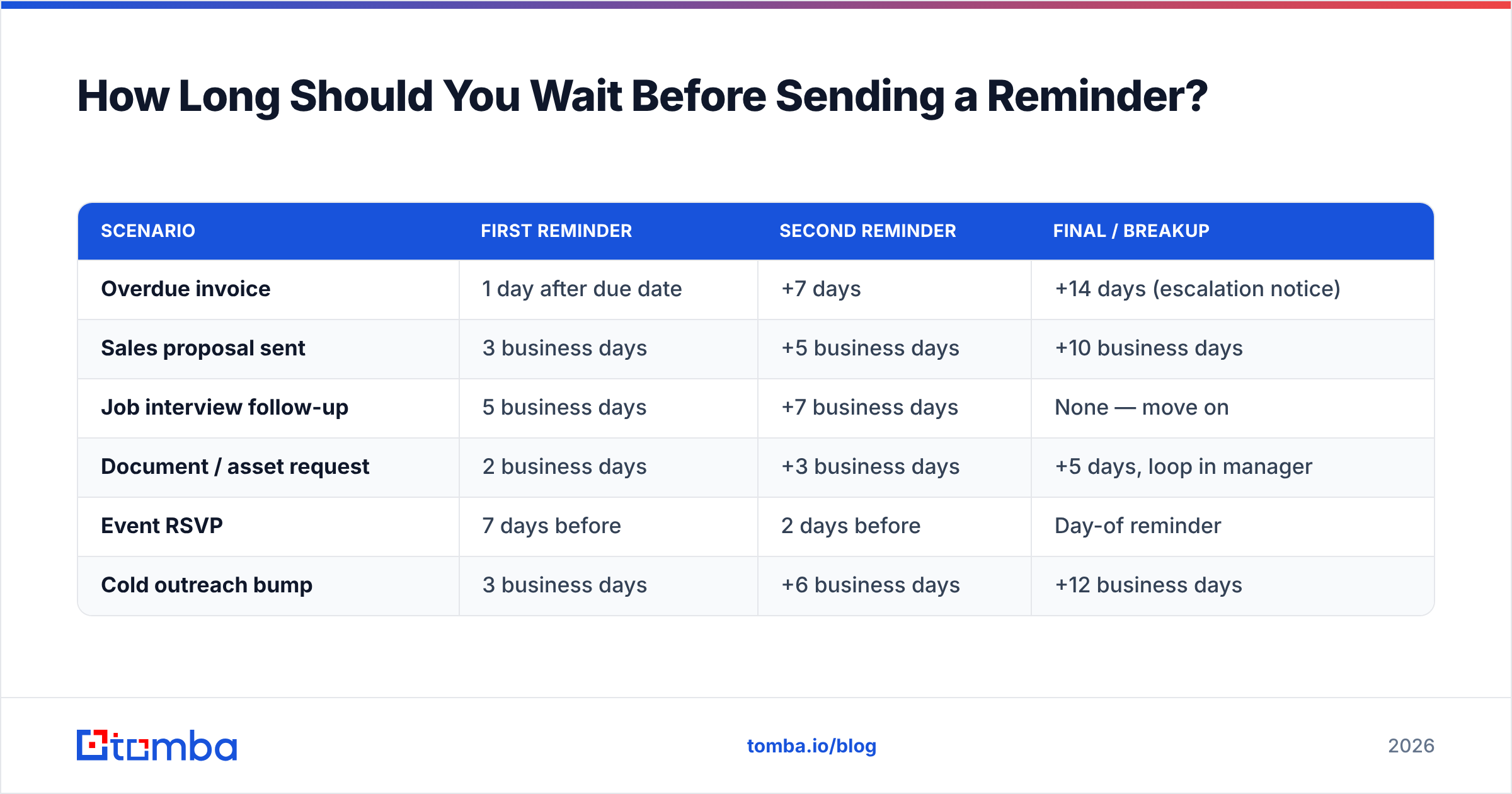
Three business days for the first reminder. That is the default that holds across almost every B2B context.
The reasoning is simple: most professionals triage their inbox within 24 hours and deliberately defer anything requiring thought. Day two is when your message drops below the fold. Day three is when it is effectively gone. Reminding before day three reads as impatient; reminding after day five means you are reintroducing context from scratch.
Timing shifts by scenario:
| Scenario | First reminder | Second reminder | Final / breakup |
|---|---|---|---|
| Overdue invoice | 1 day after due date | +7 days | +14 days (escalation notice) |
| Sales proposal sent | 3 business days | +5 business days | +10 business days |
| Job interview follow-up | 5 business days | +7 business days | None — move on |
| Document / asset request | 2 business days | +3 business days | +5 days, loop in manager |
| Event RSVP | 7 days before | 2 days before | Day-of reminder |
| Cold outreach bump | 3 business days | +6 business days | +12 business days |
Two rules override the table. First, never send a reminder on the same day as the original — it looks automated even when it is not. Second, if the recipient told you a date ("I'll get back to you after the board meeting on the 14th"), reminding before that date destroys trust. Wait until the day after, then reference their own timeline.
What Is the Structure of a Reminder Email That Actually Gets a Reply?#
Five lines. That is the whole format, and it fits on a phone screen without scrolling.
- Line 1 — Anchor. One clause tying back to the original thread. "Following up on the pricing doc I sent Tuesday." No apology, no "I hope this finds you well."
- Line 2 — Value or change. Give them a reason this email exists beyond your own deadline. A new data point, a revised number, a relevant customer story, a deadline that genuinely moved.
- Line 3 — The single ask. One decision, phrased as a closed question. "Is Thursday at 2pm still workable?" beats "let me know when you're free."
- Line 4 — The easy out. "If this has dropped down the list, just reply 'later' and I'll check back in Q2." This line alone lifts reply rates because it converts guilt into a two-word action.
- Line 5 — Sign-off. Name, one-line signature. No 400-pixel banner.
Keep the reminder inside the original thread with the original subject line. A new subject line strips the context that makes the reminder make sense, and it splits the conversation across two threads in the recipient's inbox. If you must change the subject, prefix rather than replace: "Re: Q3 pricing — quick yes/no."
Word count target: 40–90 words. Above 120 words, you are no longer reminding; you are re-pitching.
Which Phrases Should You Cut, and What Replaces Them?#
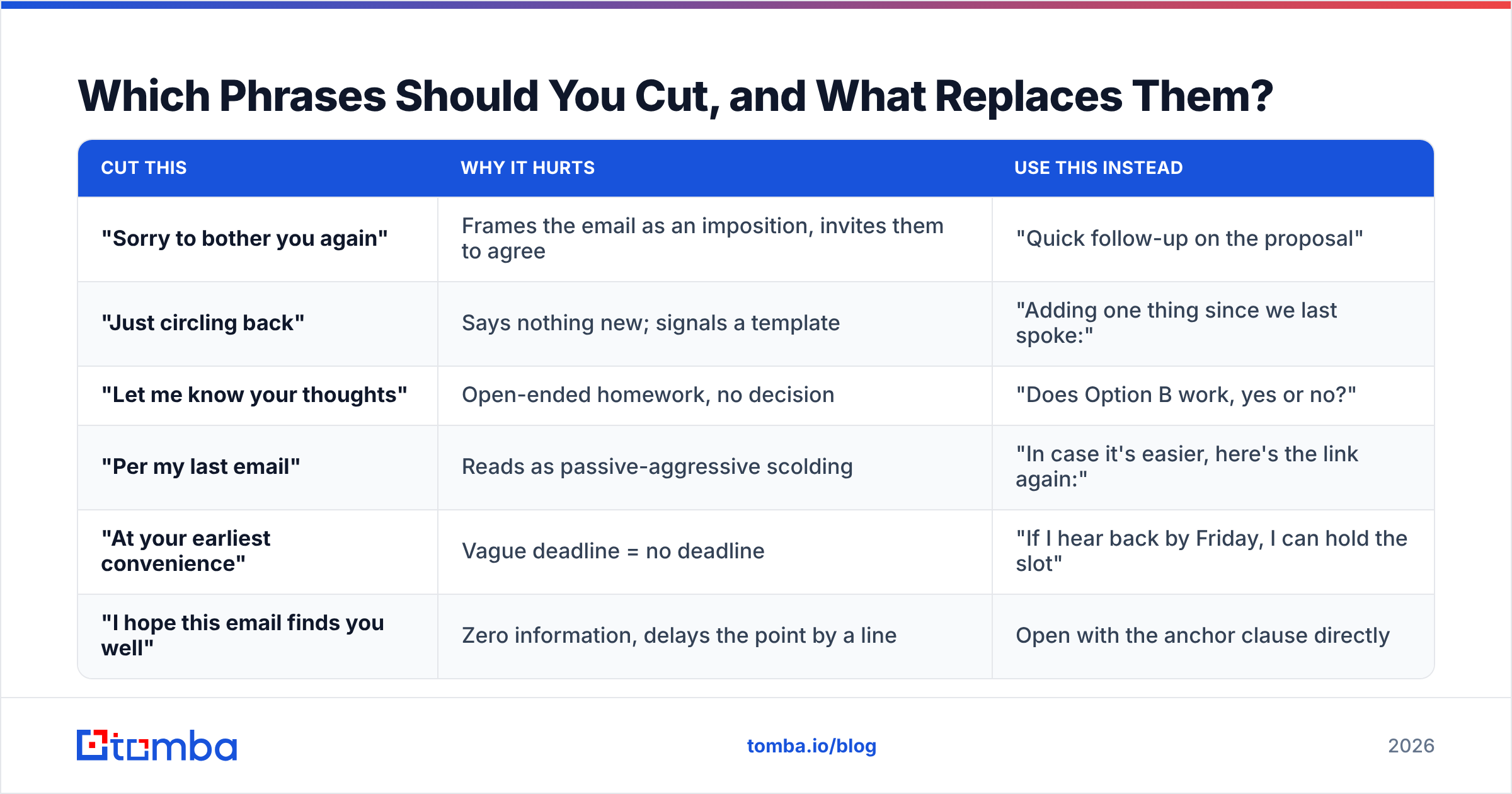
Swap apology for clarity. Every phrase in the left column below shifts effort onto the recipient.
| Cut this | Why it hurts | Use this instead |
|---|---|---|
| "Sorry to bother you again" | Frames the email as an imposition, invites them to agree | "Quick follow-up on the proposal" |
| "Just circling back" | Says nothing new; signals a template | "Adding one thing since we last spoke:" |
| "Let me know your thoughts" | Open-ended homework, no decision | "Does Option B work, yes or no?" |
| "Per my last email" | Reads as passive-aggressive scolding | "In case it's easier, here's the link again:" |
| "At your earliest convenience" | Vague deadline = no deadline | "If I hear back by Friday, I can hold the slot" |
| "I hope this email finds you well" | Zero information, delays the point by a line | Open with the anchor clause directly |
One nuance on urgency. Real deadlines work; manufactured ones burn credibility fast. "Pricing expires Friday" is fine if it does. If it does not, use a scheduling constraint instead — "my implementation calendar fills through October" — which is true, specific, and does not expire in a way anyone can audit.
What Are Six Reminder Email Templates You Can Copy?#
1. Sales proposal follow-up (day 3)
Subject: Re: Proposal — Acme × [Your Company]
Hi Dana — following up on the proposal from Tuesday.
One thing I should have included: a similar-sized team at Northwind cut their onboarding time from 6 weeks to 11 days with the same setup.
Is the scope on page 2 roughly right, or does it need trimming before you take it internally?
If this is parked for now, reply "later" and I'll circle back after your fiscal year starts.
2. Overdue invoice (day 1 past due)
Subject: Re: Invoice #2418 — due Sept 3
Hi Marcus — invoice #2418 ($4,200) came due yesterday. Attaching it again so you don't have to dig.
If it's already in your AP queue, no action needed — just confirm and I'll stop chasing.
If something's blocking approval, tell me what and I'll fix it on my end.
3. Document or asset request (day 2)
Subject: Re: Logo files for the case study
Hi Priya — still need the SVG logo pack to finish the case study draft.
Upload link (30 seconds, no login): [link]
If someone else on your team owns brand assets, point me at them and I'll take it from there.
4. Interview follow-up (day 5)
Subject: Re: Senior RevOps role — Thursday interview
Hi Elena — checking in on the Senior RevOps role after last Thursday's conversation.
The territory-mapping problem you described is close to something I rebuilt at my last company; happy to send the one-page breakdown if that's useful for the panel.
Any sense of timing on next steps? Even "still deciding" is helpful.
5. Meeting / event RSVP (7 days out)
Subject: Re: Q4 planning session — Oct 14
Hi team — the Q4 planning session is a week out and I'm locking headcount for catering Friday.
Reply "in" or "out" and I'll update the invite. No explanation needed.
6. Cold outreach bump (day 3)
Subject: Re: Cutting your list-cleaning spend
Hi Sam — one line to add to my note from Monday.
Teams your size usually pay twice for the same contact: once to find it, once to verify it. We fold both into a single credit.
Worth a 12-minute call next week, or is data quality not a priority this quarter?
Notice what every template shares: the anchor is one clause, the ask is closed, and the exit is explicit. Notice what none of them contain: an apology, a second ask, or a paragraph restating the original email.
Why Do Polite Reminders Still Get Ignored?#
Because half the time the recipient never saw the email. Tone is the wrong thing to debug first.
Three technical causes account for most "they ignored my follow-up" reports:
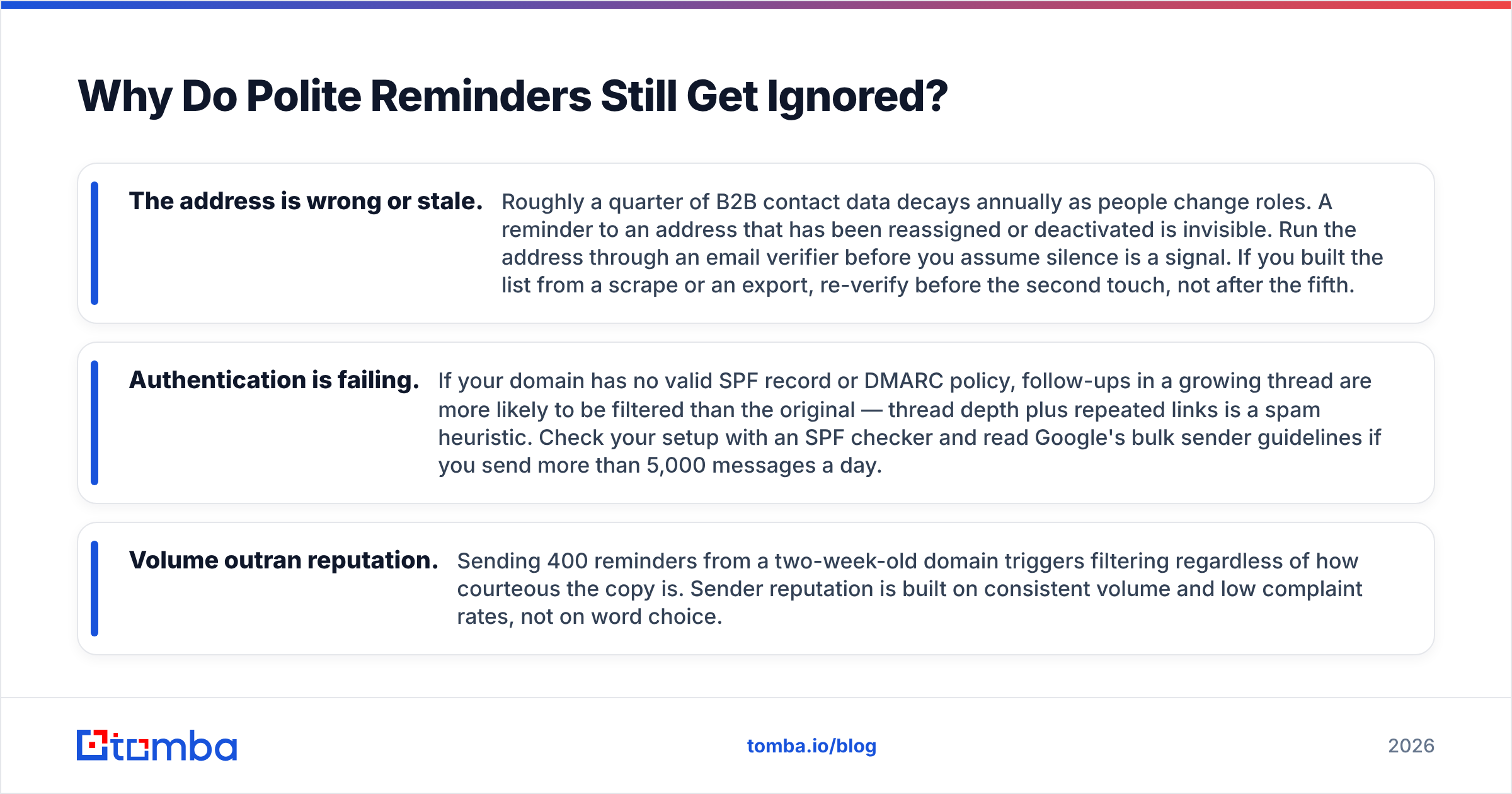
- The address is wrong or stale. Roughly a quarter of B2B contact data decays annually as people change roles. A reminder to an address that has been reassigned or deactivated is invisible. Run the address through an email verifier before you assume silence is a signal. If you built the list from a scrape or an export, re-verify before the second touch, not after the fifth.
- Authentication is failing. If your domain has no valid SPF record or DMARC policy, follow-ups in a growing thread are more likely to be filtered than the original — thread depth plus repeated links is a spam heuristic. Check your setup with an SPF checker and read Google's bulk sender guidelines if you send more than 5,000 messages a day.
- Volume outran reputation. Sending 400 reminders from a two-week-old domain triggers filtering regardless of how courteous the copy is. Sender reputation is built on consistent volume and low complaint rates, not on word choice.
There are also behavioral causes worth separating from tone. The recipient may not be the decision maker, in which case your reminder is asking someone for a yes they cannot give — reframe as "who else should be on this thread?" Or the ask may be genuinely large, in which case shrinking it works better than repeating it. "Review the 14-page doc" becomes "does the number on page 6 look sane?"
And sometimes silence is the answer. Industry benchmarks compiled by G2 and reported across sales-engagement vendors put typical cold-email reply rates in the 1–5% band. Four polite reminders will not move a genuine no. Send three, then close the loop cleanly and move the contact to a nurture list.
How Do You Scale Reminders Without Sounding Like a Robot?#
Separate the two jobs: the list and the language.
The list side is mechanical. Before a sequence starts, confirm every address resolves, deduplicate across reps so one prospect does not get reminders from three people, and enrich records with role and company size so your templates can vary by segment rather than by name-merge. Pulling verified contacts with a domain search at the top of the funnel prevents most of the mid-sequence bounce spikes that wreck a sending domain.
The language side stays manual where it counts. Use templates for the skeleton — anchor, ask, exit — and write line 2 yourself. That single line, the one that says what changed since your last email, is what separates a reminder from a bump. It is also the line no merge field can fake.
A practical operating rule: automate the first reminder, hand-write the second, and make the third a genuine close-the-loop message that requires no reply. That mix keeps volume manageable while preserving the human signal at the point where it matters most. If you are running reminders at team scale, wire the verification step into your workflow with the Tomba API so bad addresses never enter the sequence in the first place.
One last discipline: track reply rate, not open rate. Open tracking has been unreliable since Apple Mail Privacy Protection started prefetching images, and it tempts you into sending more reminders to people who "opened but didn't reply" — most of whom never opened anything. Replies are the only honest signal of whether your reminder was polite enough to answer.
Start With an Inbox That Actually Receives Your Reminder#
The best-written follow-up in the world does nothing if it lands at an address that no longer exists. Before you rewrite another template, fix the input: verify the contacts you already have, and source new ones from a system that returns a confidence score rather than a guess.
Tomba Email Finder finds professional addresses by domain, name, or company, with verification built into the same lookup. The free tier gives you 25 searches a month to test against your own list; paid plans start at $49/mo. Check the full Tomba pricing breakdown if you are comparing per-credit costs across tools. Get the address right, keep the reminder to five lines, and the reply rate takes care of itself.
Related guides#
// get started
Find, verify and enrich your first contacts today
Start on the free plan with 25 searches a month, then scale when your team is ready.
Free plan · No credit card required · GDPR & CCPA
// about the author