How to Send a Reminder Email Politely: Templates That Work
Most reminder emails fail because they apologise instead of making the next step obvious. Here are the timing rules, phrasing swaps, and templates that get replies without burning the relationship.
TL;DR
- Politeness is not softness. The most polite reminder is the one that costs the reader the least time: clear subject, one ask, one deadline, one link.
- Delete "just following up," "sorry to bother you," and "circling back." They add words without adding information, and readers pattern-match them to filler.
- Wait 3 business days after a first email, 5 after a proposal, and 24 hours before a meeting. Reminder frequency matters more than reminder wording.
- Reply in the same thread for internal or transactional nudges. Start a fresh thread with a new angle for cold prospects.
- If the reminder bounces or lands nowhere twice, the problem is usually the address, not the copy — verify before you write reminder number three.
What Actually Makes a Reminder Email Polite?#
Politeness in email is measured in reader effort, not in apologies.
A reminder that opens with "So sorry to keep bothering you!" and then buries the ask in paragraph three is less polite than a four-line email that says exactly what you need, by when, and links the thing. The first one makes the reader do work: re-read the thread, reconstruct context, guess the deadline. The second one respects their calendar.
Think of it like knocking on a colleague's office door. Standing there apologising for interrupting is the interruption. Saying "the contract needs your signature by Thursday, here's the link" and leaving is the courteous version.
Three things make a reminder read as polite:
- Context restated, not assumed. One sentence of "we spoke on March 3 about the Q2 rollout" saves the reader a search.
- A single, explicit ask. Two asks in one reminder means neither gets done.
- An easy exit. "If this is no longer a priority, tell me and I'll close the loop" removes the guilt that causes silence in the first place.
Everything else — softeners, exclamation marks, "hope you're well" — is decoration. Useful in small doses, damaging when it replaces clarity.
When Should You Send a Reminder Email?#
Timing does more work than wording. Send too early and you look anxious; send too late and the context is gone.
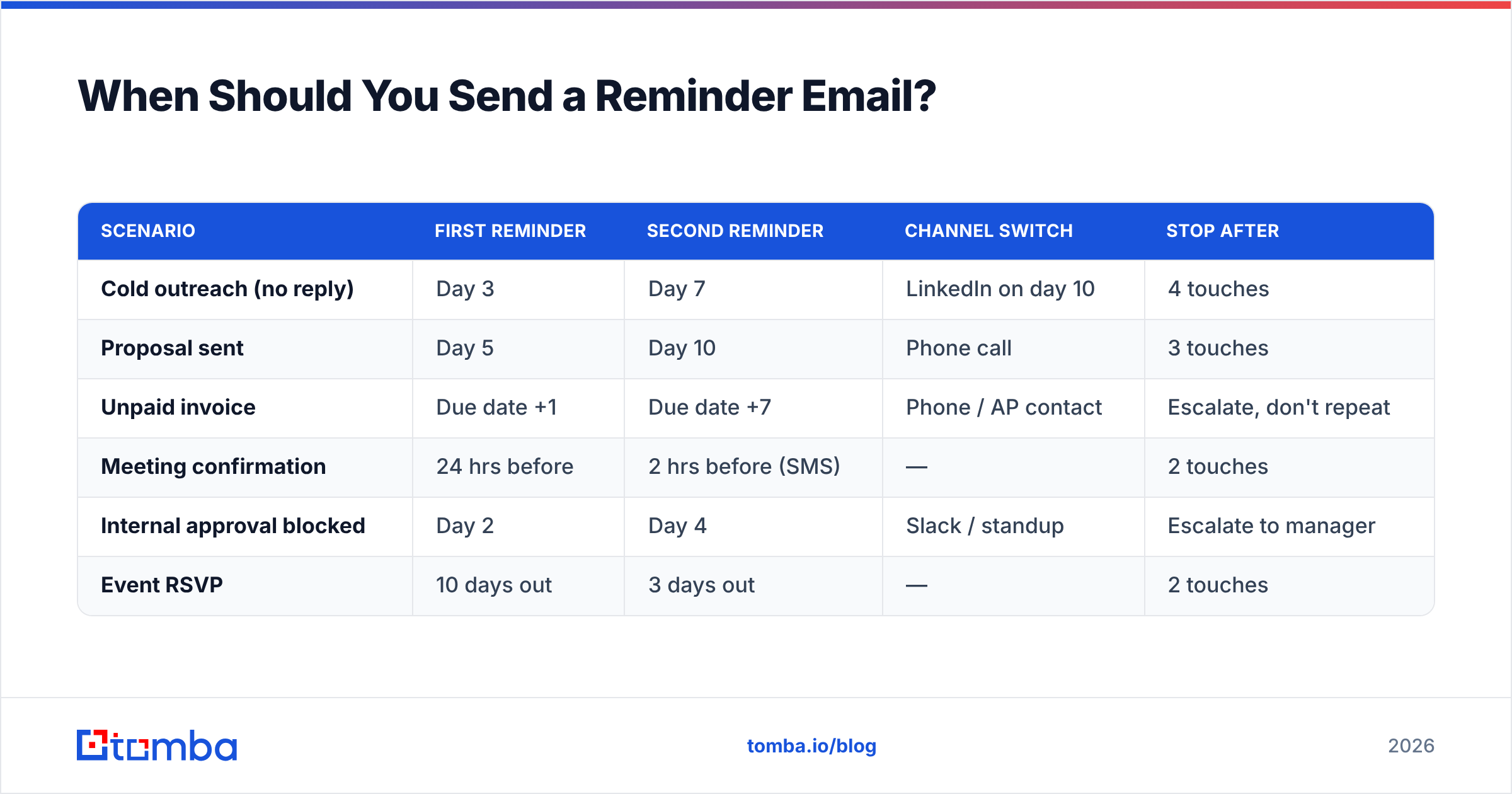
Here's a practical cadence by scenario:
| Scenario | First reminder | Second reminder | Channel switch | Stop after |
|---|---|---|---|---|
| Cold outreach (no reply) | Day 3 | Day 7 | LinkedIn on day 10 | 4 touches |
| Proposal sent | Day 5 | Day 10 | Phone call | 3 touches |
| Unpaid invoice | Due date +1 | Due date +7 | Phone / AP contact | Escalate, don't repeat |
| Meeting confirmation | 24 hrs before | 2 hrs before (SMS) | — | 2 touches |
| Internal approval blocked | Day 2 | Day 4 | Slack / standup | Escalate to manager |
| Event RSVP | 10 days out | 3 days out | — | 2 touches |
Two rules that hold across all of them:
Business days, not calendar days. A Friday-afternoon email reminded on Sunday morning reads as frantic. Count Monday to Friday.
Vary the value, not just the timing. A reminder that says nothing new is a nag. Each touch should add something: a case study, a revised timeline, a shorter version of the ask, or a genuine "should I close this out?"
Which Phrases Should You Cut From Reminder Emails?#
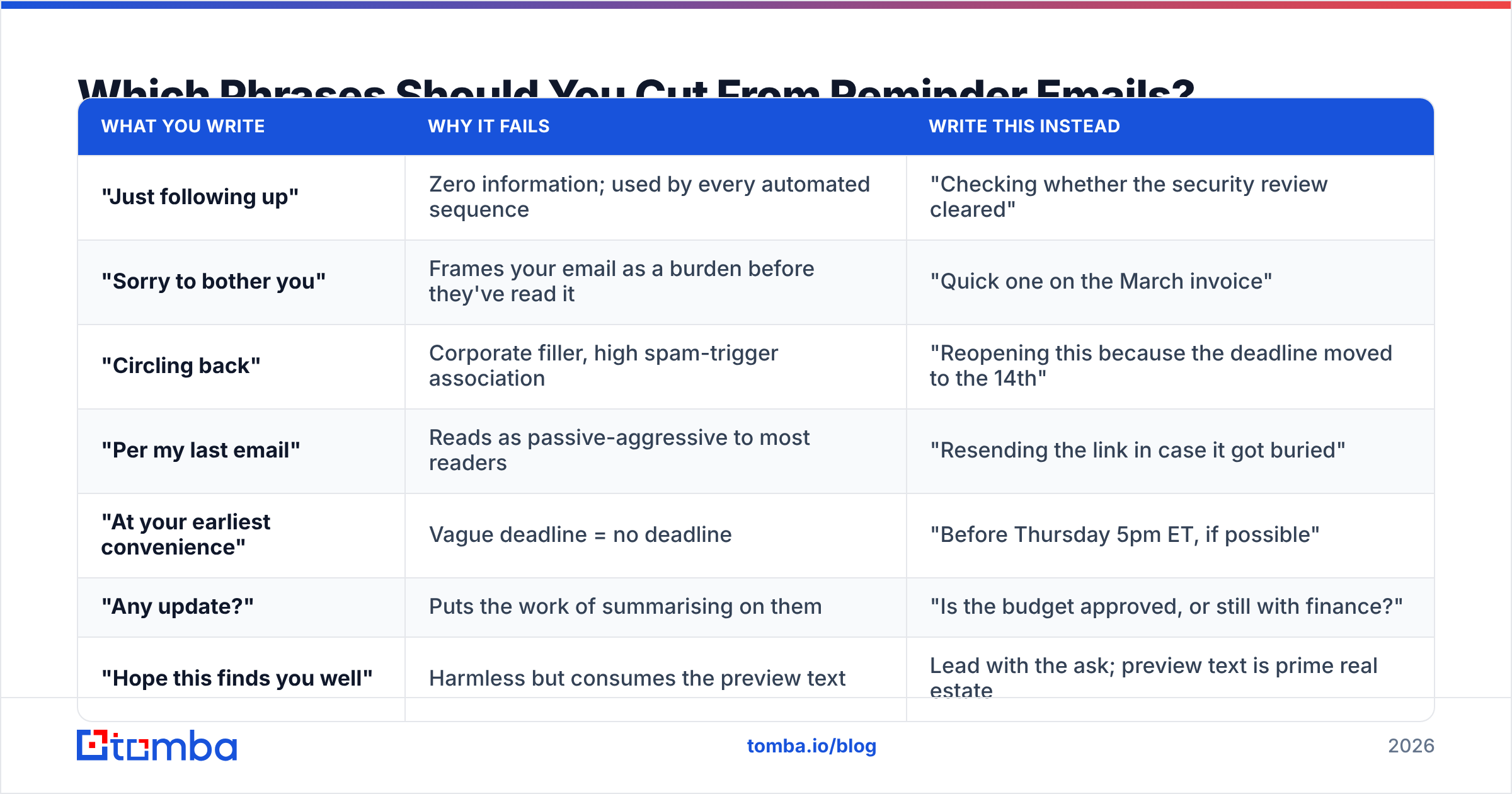
Most of the phrases people reach for to sound polite actually sound rehearsed. Here are the highest-value swaps:
| What you write | Why it fails | Write this instead |
|---|---|---|
| "Just following up" | Zero information; used by every automated sequence | "Checking whether the security review cleared" |
| "Sorry to bother you" | Frames your email as a burden before they've read it | "Quick one on the March invoice" |
| "Circling back" | Corporate filler, high spam-trigger association | "Reopening this because the deadline moved to the 14th" |
| "Per my last email" | Reads as passive-aggressive to most readers | "Resending the link in case it got buried" |
| "At your earliest convenience" | Vague deadline = no deadline | "Before Thursday 5pm ET, if possible" |
| "Any update?" | Puts the work of summarising on them | "Is the budget approved, or still with finance?" |
| "Hope this finds you well" | Harmless but consumes the preview text | Lead with the ask; preview text is prime real estate |
The pattern: replace social padding with specificity. "Is the budget approved, or still with finance?" is a yes/no question a busy person can answer from their phone in six seconds. "Any update?" requires them to write a paragraph, so they postpone it, and postponement becomes silence.
Also worth testing before you send: run the draft through a spam checker if you're sending at volume. Phrases like "urgent," "final notice," and heavy exclamation use can drag a legitimate reminder into the promotions tab, which reads to the recipient as you never emailing at all.
What Does a Polite Reminder Email Look Like? (6 Templates)#
Copy these, then strip anything that doesn't apply. Shorter is almost always better.
1. Cold outreach, no reply
Subject: Re: 40% of your ops team's time on manual QA
Hi Dana — following the note I sent Tuesday about cutting manual QA hours at Northwind.
One question, so I stop guessing: is manual QA actually a priority this quarter, or should I check back in Q3?
Either answer is useful. Thanks.
2. Proposal awaiting decision
Subject: Northwind proposal — anything blocking?
Hi Dana, the proposal went over on the 5th. No pressure on the decision itself, but I'd like to know if anything in it is unclear or if it's waiting on someone else's sign-off.
Happy to jump on 15 minutes and walk through the pricing section — that's usually where questions land.
3. Unpaid invoice
Subject: Invoice #2291 — due 14 March
Hi Ravi, invoice #2291 ($4,800) was due on 14 March and I don't see it in our received list. Payment link is here: [link]
If it's already in your AP queue, just say so and I'll stop chasing. If it needs to go to a different contact, point me at them.
4. Meeting confirmation
Subject: Tomorrow 2pm ET — still good?
Hi Dana, confirming our call tomorrow at 2pm ET. Calendar link: [link]
Agenda: onboarding timeline, integration scope, pricing. If any of that has changed on your side, tell me and I'll rework it.
5. Internal approval blocked
Subject: Blocked on your sign-off — Q2 campaign brief
Hi Sam, the Q2 brief needs your approval before design can start Monday. It's a two-page doc: [link]
If you'd rather I get sign-off from Priya instead, that works too — just let me know today so we don't lose the sprint.
6. Final touch before closing the file
Subject: Closing this out
Hi Dana, I've sent three notes about the QA project and haven't heard back, which usually means the timing is wrong.
I'm closing the thread. If it becomes relevant later, reply to this email and I'll pick it up.
That last one has an oddly high reply rate. Removing the pressure often produces the response that three polite nudges could not.
How Do You Write a Reminder Subject Line That Gets Opened?#
The subject line decides whether the reminder exists at all.
Two viable approaches:
Reply in-thread (Re: prefix intact). Best for internal requests, invoices, meetings, and anyone who has already replied to you once. The thread carries the context and the Re: signals continuity rather than a new demand.
Fresh subject, new angle. Best for cold prospects who never opened the first email. If they ignored "Quick question about your QA process," resending it in the same thread just buries the same ignored line. Change the hook: "Northwind's QA cycle — one benchmark."
Rules that apply either way:
- Keep it under 50 characters. Mobile clients truncate past that, and roughly half of B2B email is read on a phone.
- Put the deadline in the subject when one exists: "Invoice #2291 — due 14 March" outperforms "Following up on invoice."
- Never fake a reply. Adding "Re:" to a thread that never existed is a trust cost you can't recover.
- Skip urgency theatre. "URGENT" and "FINAL NOTICE" in a first reminder signal that you're running a sequence, not writing to a person.
If you're testing at volume, a subject line tester will catch length and spam-word problems before send.
Is the Reminder Failing, or Is the Address Wrong?#
This is the question almost nobody asks, and it invalidates a lot of "my reminders don't work" conclusions.
If your first email hard-bounced, was routed to a role account nobody monitors, or went to a catch-all domain that accepts everything and delivers nothing, then no amount of polite phrasing will produce a reply. You are writing better copy for an empty room.
Before you write reminder number three, check three things:
- Did the original deliver? A bounce or a soft-fail in your sending tool means stop and fix the address.
- Is it a role address?
info@,sales@, andcontact@have reply rates a fraction of named addresses. Find the individual instead. - Is the domain catch-all? Catch-all domains return "valid" for any address you test, so
firstname.lastname@might be silently discarded. A catch-all verifier distinguishes genuinely deliverable addresses from accept-everything domains.
Running your list through an email verifier before a follow-up sequence typically removes 8–15% of addresses on a list more than six months old. That directly protects your sender reputation too — repeated sends to dead addresses raise your bounce rate, and mailbox providers read a high bounce rate as a spam signal, which then hurts delivery to the good addresses on the same list.
Google's own sender guidelines put bounce management alongside authentication as a core requirement, not a nice-to-have. A reminder campaign that ignores list hygiene isn't just ineffective — it degrades every future send from the same domain.
How Many Reminders Are Too Many?#
Three to four touches for cold outreach. Two for meetings and RSVPs. For invoices, escalate rather than repeat — the fourth identical email to the same AP inbox accomplishes nothing that a phone call wouldn't do faster.
The real limit is not a number, it's whether each message earns its place. Ask before sending:
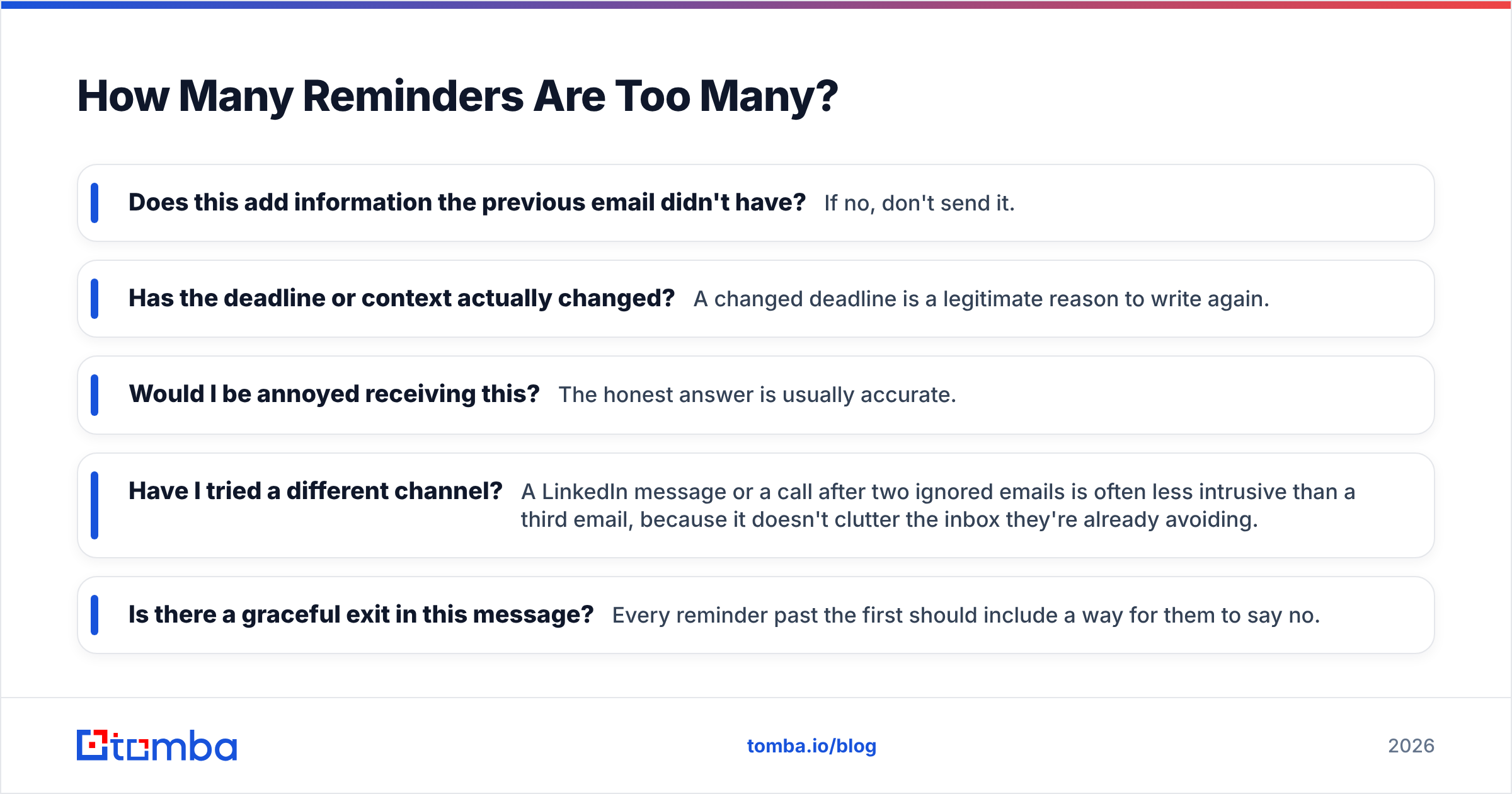
- Does this add information the previous email didn't have? If no, don't send it.
- Has the deadline or context actually changed? A changed deadline is a legitimate reason to write again.
- Would I be annoyed receiving this? The honest answer is usually accurate.
- Have I tried a different channel? A LinkedIn message or a call after two ignored emails is often less intrusive than a third email, because it doesn't clutter the inbox they're already avoiding.
- Is there a graceful exit in this message? Every reminder past the first should include a way for them to say no.
Research summarised by HubSpot consistently shows most replies to outbound sequences arrive after the first message but well before touch five — the tail is thin. Sequences that run eight or ten touches are optimising for a shrinking return while burning goodwill and domain reputation.
One structural note: separate your reminder cadence from your relationship cadence. Someone who declined this quarter is not a lost contact, they're a Q3 conversation. Move them to a nurture list rather than pushing them through touch six.
What Tools Help You Send Better Reminders?#
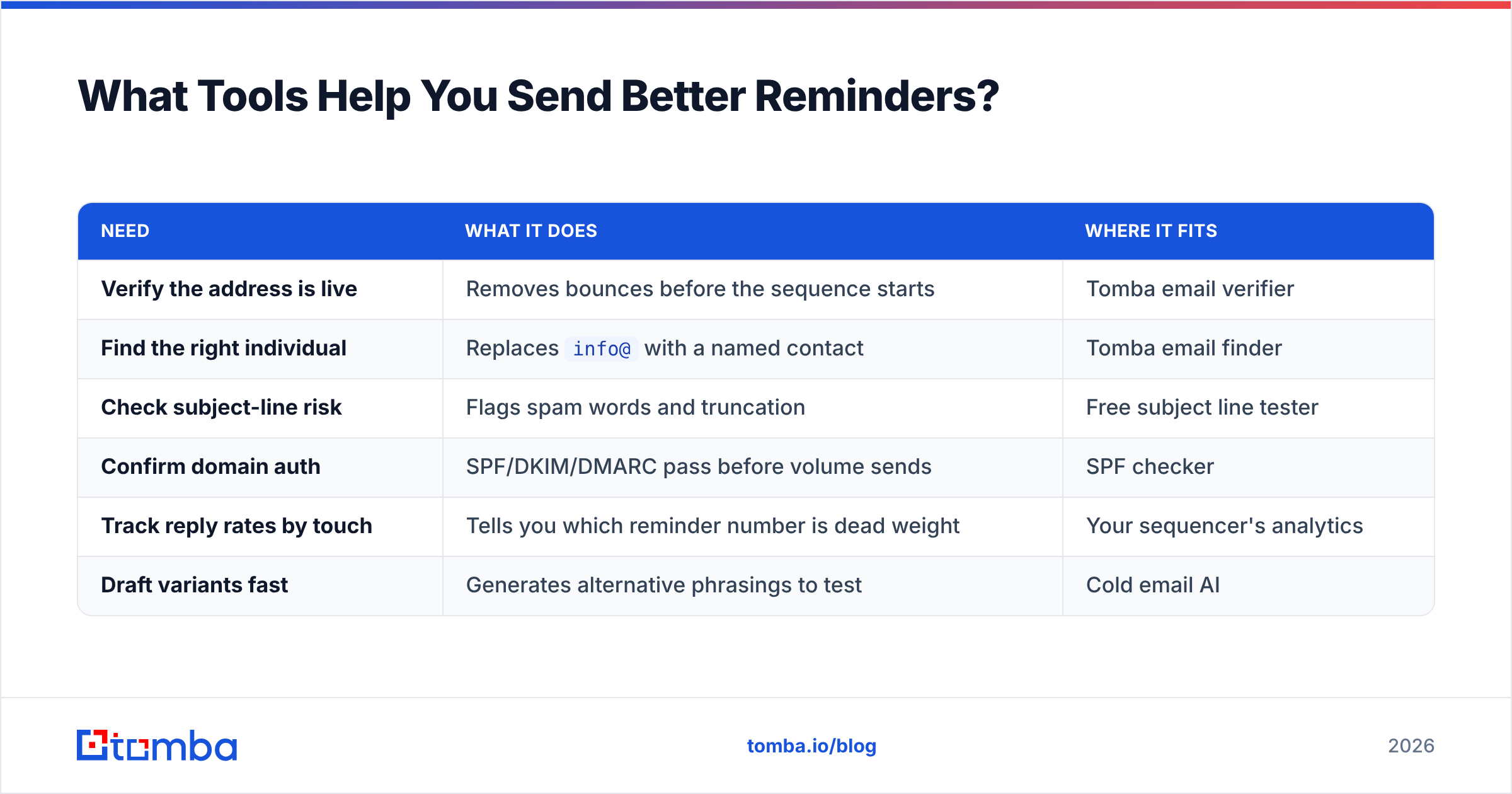
| Need | What it does | Where it fits |
|---|---|---|
| Verify the address is live | Removes bounces before the sequence starts | Tomba email verifier |
| Find the right individual | Replaces info@ with a named contact |
Tomba email finder |
| Check subject-line risk | Flags spam words and truncation | Free subject line tester |
| Confirm domain auth | SPF/DKIM/DMARC pass before volume sends | SPF checker |
| Track reply rates by touch | Tells you which reminder number is dead weight | Your sequencer's analytics |
| Draft variants fast | Generates alternative phrasings to test | Cold email AI |
Two habits separate people whose reminders get answered from people whose reminders get filtered.
The first is treating the address as part of the copy. A perfectly worded reminder to a stale contact is worse than a mediocre one to a verified individual, because the second at least reaches a human.
The second is writing every reminder as if it's the only email the person will read from you this month. That constraint forces the ask up front, kills the padding, and produces exactly the tone people describe as polite.
Start With an Address That Actually Receives Your Reminder#
Politeness is a copy problem. Getting read is a data problem. Fix the second one first.
Tomba Email Finder locates named professional addresses by domain, name, or company, so your reminders reach a person rather than an unmonitored info@ inbox — and the built-in verification means you know the address is live before touch one, let alone touch three. The free tier covers 25 searches a month, Starter runs $49/mo, and Growth is $99/mo with bulk processing. Full Tomba pricing is public, and there's no card required to test the free tier.
Write the short, specific, single-ask reminder. Send it to an address that exists. That combination outperforms clever phrasing every time.
Related guides#
// get started
Find, verify and enrich your first contacts today
Start on the free plan with 25 searches a month, then scale when your team is ready.
Free plan · No credit card required · GDPR & CCPA
// about the author