How to Send Automatic Emails: A 2026 Setup Guide
Automatic emails are easy to send and easy to get wrong. Here is the honest setup guide: which tool to pick, how to avoid the spam folder, and what actually gets replies.
TL;DR
- "Automatic emails" splits into three jobs: transactional (triggered by an app event), marketing/broadcast (one message to a list), and sequenced outbound (multi-step, personalized, sent from a real inbox). Pick the tool that matches the job — mixing them is the #1 reason automation fails.
- Before you send anything automatically, authenticate the domain: SPF, DKIM, and DMARC. Google and Yahoo have enforced this for bulk senders since February 2024, and unauthenticated automated mail gets rejected outright.
- Verify every address before it enters an automated flow. Bounce rate above 2-3% is the fastest way to burn a sending domain, and automation multiplies the damage because nobody is watching each send.
- A sane starting stack: a dedicated sending domain, a warmed inbox, verified contacts from an email finder, and a sequencer with reply detection.
- Personalization tokens are not personalization. Two dynamic variables plus one manually researched line beats twenty merge fields.
What does "send automatic emails" actually mean?#
Three very different things hide behind the same phrase, and choosing the wrong category is why most people's automation quietly stops working.
- Transactional email — a receipt, password reset, or shipping notice fired by your application when a user does something. Sent one-to-one, triggered by code, expected by the recipient. Tools: Postmark, SendGrid, Amazon SES, Resend.
- Marketing broadcast — a newsletter or campaign blasted to an opted-in list on a schedule. Sent one-to-many through a shared or dedicated IP pool. Tools: Mailchimp, Brevo, Klaviyo.
- Sequenced outbound — a 3-to-6 step cold or nurture sequence sent from a real mailbox (Google Workspace, Microsoft 365), stopping automatically when someone replies. Tools: Instantly, Smartlead, Saleshandy, Reply.io, lemlist.
- Scheduled internal automation — recurring reports, reminders, or digests sent to your own team. Often just a Zapier or Make scenario plus a Gmail action.
Everything below assumes you want #3 with occasional #2, because that is what "how to send automatic emails" almost always means when a salesperson or founder asks it. If you need #1, stop reading and use a transactional provider — running receipts through a cold-email sequencer will get your account banned.
Which tool should you use to send automatic emails?#
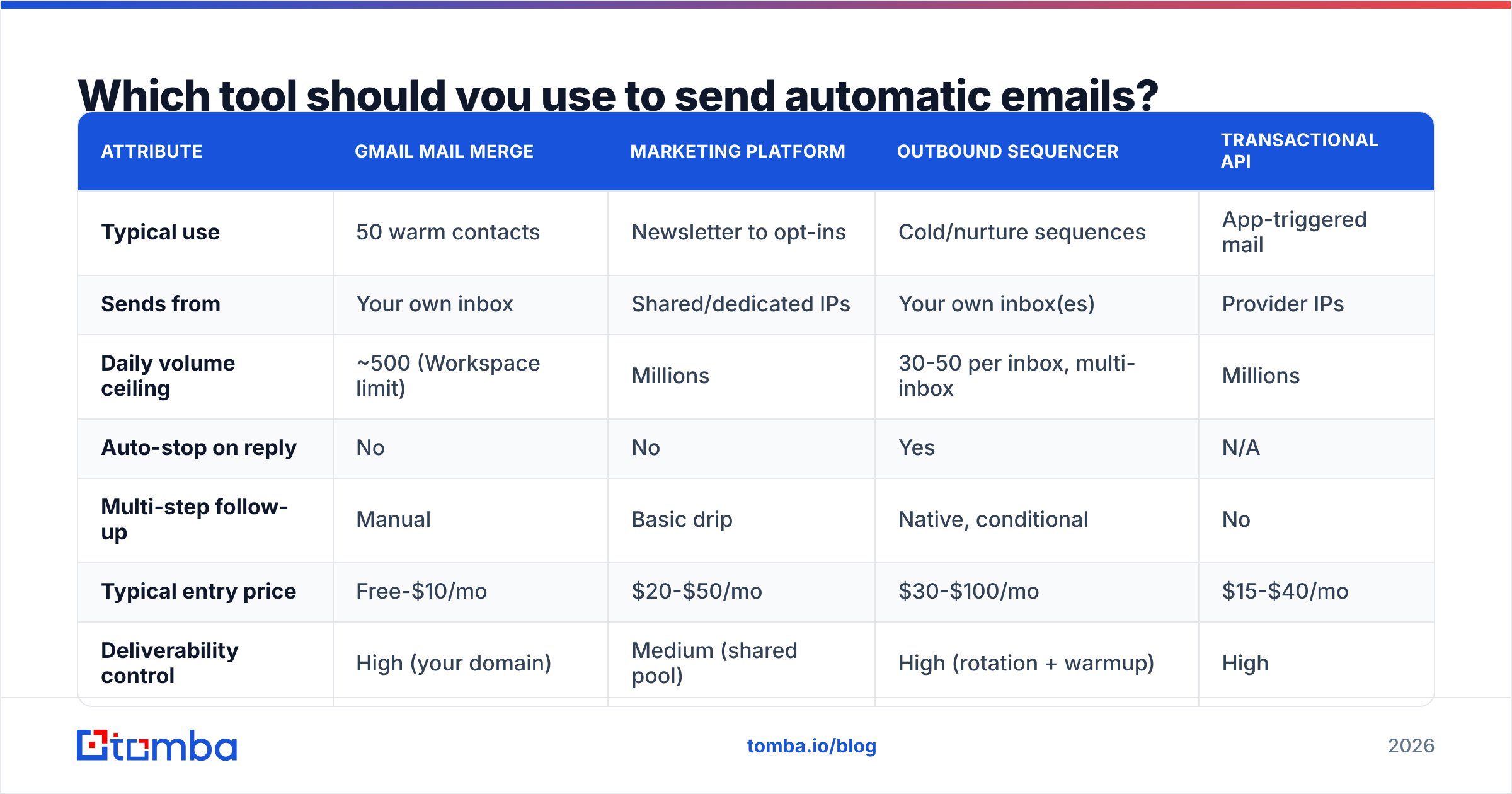
The honest answer depends on volume, list source, and whether replies matter. Here is how the main categories compare on the attributes that actually change your outcome.
| Attribute | Gmail mail merge | Marketing platform | Outbound sequencer | Transactional API |
|---|---|---|---|---|
| Typical use | 50 warm contacts | Newsletter to opt-ins | Cold/nurture sequences | App-triggered mail |
| Sends from | Your own inbox | Shared/dedicated IPs | Your own inbox(es) | Provider IPs |
| Daily volume ceiling | ~500 (Workspace limit) | Millions | 30-50 per inbox, multi-inbox | Millions |
| Auto-stop on reply | No | No | Yes | N/A |
| Multi-step follow-up | Manual | Basic drip | Native, conditional | No |
| Typical entry price | Free-$10/mo | $20-$50/mo | $30-$100/mo | $15-$40/mo |
| Deliverability control | High (your domain) | Medium (shared pool) | High (rotation + warmup) | High |
| Best for | Under 100 contacts/mo | Existing subscribers | Net-new pipeline | Product events |
A rough decision rule: under 100 sends a month to people who know you, a mail merge is fine. Above that, or when the recipient has never heard of you, you need a sequencer with warmup and reply detection. Newsletters to an opted-in list belong on a marketing platform — do not push them through a cold sequencer, because unsubscribe compliance and CAN-SPAM footers are handled properly on the marketing side.
One caveat about "unlimited" claims. Sequencers advertise unlimited sends because the real ceiling is your mailbox provider's, not theirs. Google Workspace caps external recipients at roughly 2,000/day for paid tiers but throttles far earlier for new domains, and practical safe volume per inbox for cold outreach is 30-50/day. If you want 500 sends a day, you need 10-15 inboxes, not a bigger plan.
How do you set up automatic emails step by step?#
Step 1 — Buy a separate sending domain. Never automate from your primary domain. If acme.com runs your website and billing, register getacme.com or acme-hq.com for outbound. A domain reputation hit on the throwaway costs you nothing; the same hit on your primary kills invoices and password resets.
Step 2 — Authenticate it. Publish an SPF record, enable DKIM signing at your mailbox provider, and add a DMARC record starting at p=none so you get reports before you enforce anything. Google's bulk sender requirements make all three effectively mandatory. Verify with a free SPF checker before your first send, not after your first bounce spike.
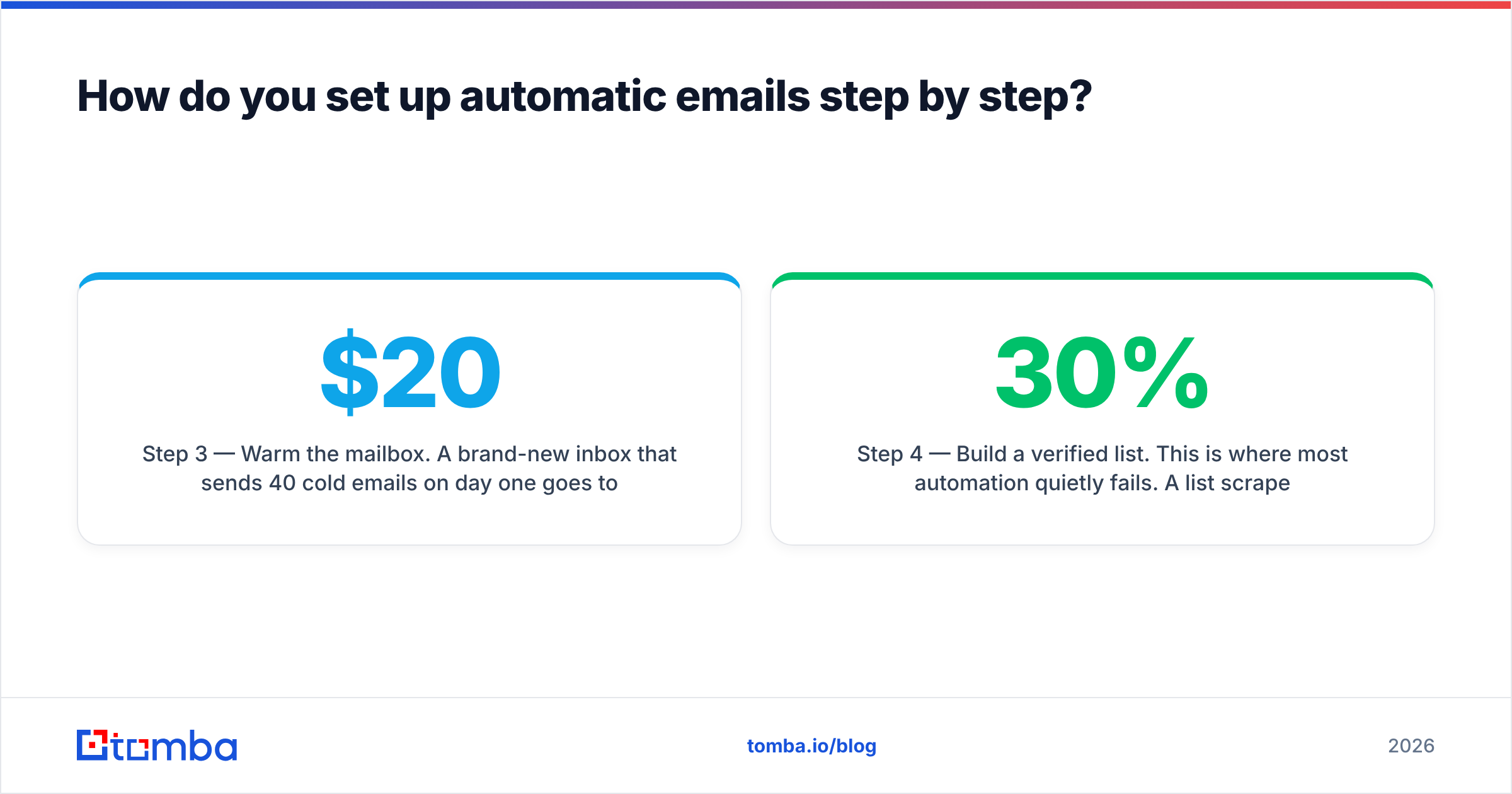
Step 3 — Warm the mailbox. A brand-new inbox that sends 40 cold emails on day one goes to spam. Ramp over 3-4 weeks: 5 sends/day in week one, doubling weekly, mixed with automated warmup traffic that generates opens and replies. Most sequencers bundle warmup now; if yours doesn't, budget $20-$30/month for a standalone tool.
Step 4 — Build a verified list. This is where most automation quietly fails. A list scraped from a website or exported from a stale CRM will carry 15-30% dead addresses. Run everything through an email verifier first, and use a catch-all verifier for domains that accept everything at the SMTP layer — catch-alls look valid to naive checkers and bounce later. If you're sourcing net-new contacts, pull them by company with domain search rather than guessing patterns.
Step 5 — Write the sequence, not the email. Three to four steps, spaced 3-4 business days apart. Step one is the pitch. Steps two and three add a new angle — a case study, a relevant trigger event, a specific question. The last step is a short breakup. Never send "just bumping this to the top of your inbox" as an entire message; it signals automation louder than anything else.
Step 6 — Set stop conditions. Reply detection, meeting-booked detection, and unsubscribe handling must all remove the contact from every active sequence, not just the current one. Test this by replying to yourself from a second account before you turn the campaign on.
Step 7 — Send at human volume and human times. Randomized delays between sends (60-180 seconds), business hours in the recipient's timezone, weekdays only. Perfectly regular sending intervals are a spam-filter fingerprint.
How do you keep automatic emails out of spam?#
Deliverability is not a setting you flip — it's the sum of authentication, list hygiene, volume ramp, and engagement. In rough order of impact:
- Authentication (SPF/DKIM/DMARC). Non-negotiable. Missing DKIM alone can send everything to spam at Gmail.
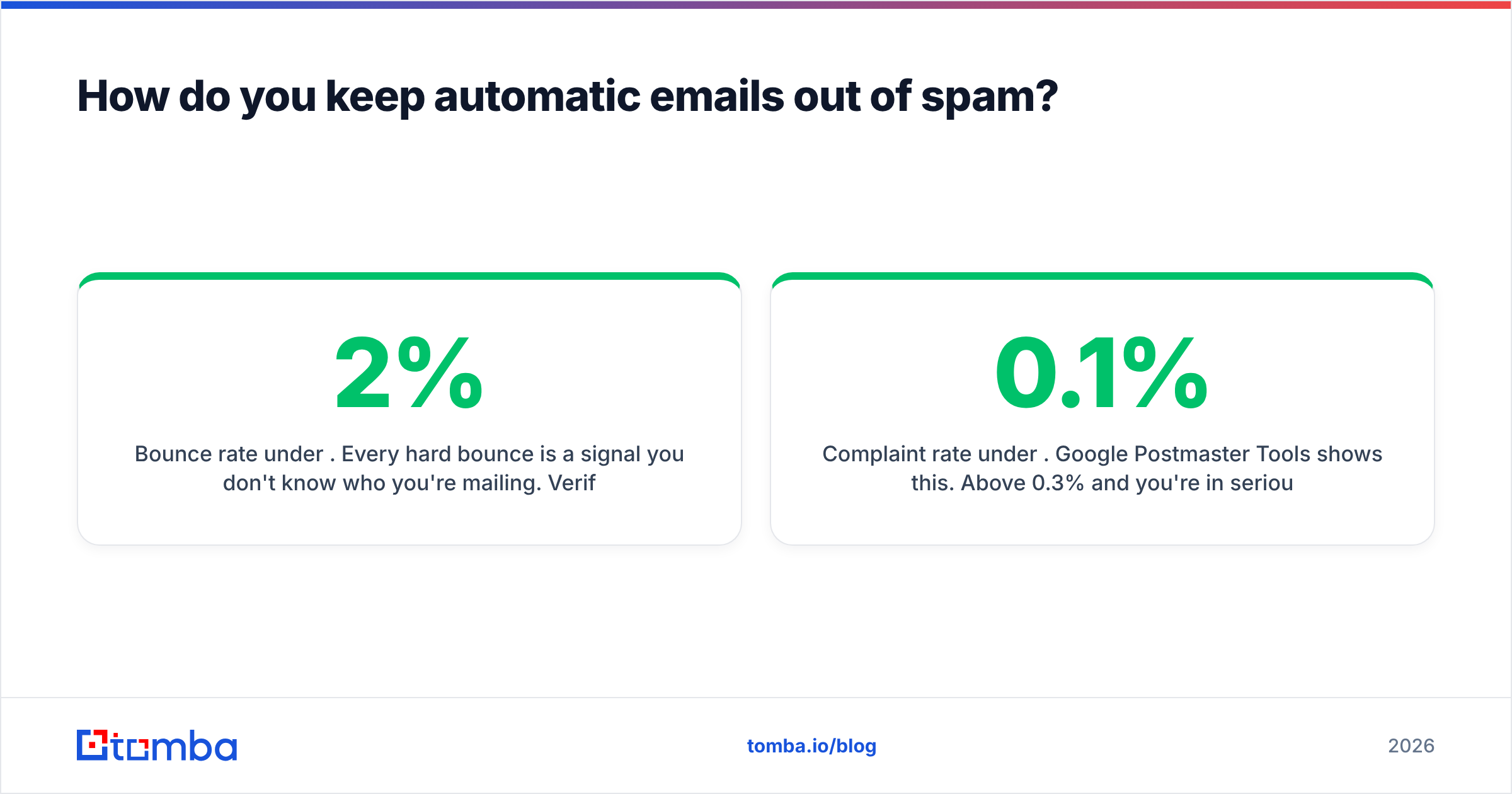
- Bounce rate under 2%. Every hard bounce is a signal you don't know who you're mailing. Verification is the only fix; there is no clever workaround.
- Complaint rate under 0.1%. Google Postmaster Tools shows this. Above 0.3% and you're in serious trouble. Relevance drives this more than any technical setting.
- Engagement signals. Replies count more than opens, and opens are increasingly unreliable after Apple Mail Privacy Protection. Optimize for replies.
- Content hygiene. No link shorteners, no tracking pixel if you can live without it, one link maximum in the first email, plain text over HTML for cold sends. Run a draft through a spam checker before launch.
- Sender reputation over time. Consistent daily volume beats bursts. Going from 0 to 400 sends in a day looks exactly like a compromised account.
Monitor with Google Postmaster Tools for Gmail traffic and Microsoft SNDS for Outlook. If domain reputation drops from High to Medium, pause, cut volume in half, and clean the list before resuming. Treat email deliverability as a weekly metric, not a one-time setup task.

What should you automate, and what should you never automate?#
Automation is a force multiplier for a good process and an accelerant for a bad one. The line falls roughly here:
- Automate: sending schedule, follow-up timing, reply detection, CRM logging, unsubscribe handling, list deduplication, bounce suppression, timezone-aware delivery, and enrichment of missing fields via data enrichment.
- Automate carefully: first-line personalization. AI-generated openers built from a LinkedIn headline are obvious. If the variable can be wrong, add a fallback and QA the first 20 rows manually.
- Never automate: the decision of who to contact, replies to real humans, and anything that touches a live deal. The moment someone responds, a person answers. An automated reply to a warm inbound is the fastest way to lose a deal you already won.
A practical QA habit: before any campaign launches, export the first 25 rendered emails to a spreadsheet and read them. Broken merge fields — "Hi {{first_name}}," or "I saw that Inc. is hiring" — show up immediately and cost you nothing to fix at that stage.
How much does email automation actually cost?#
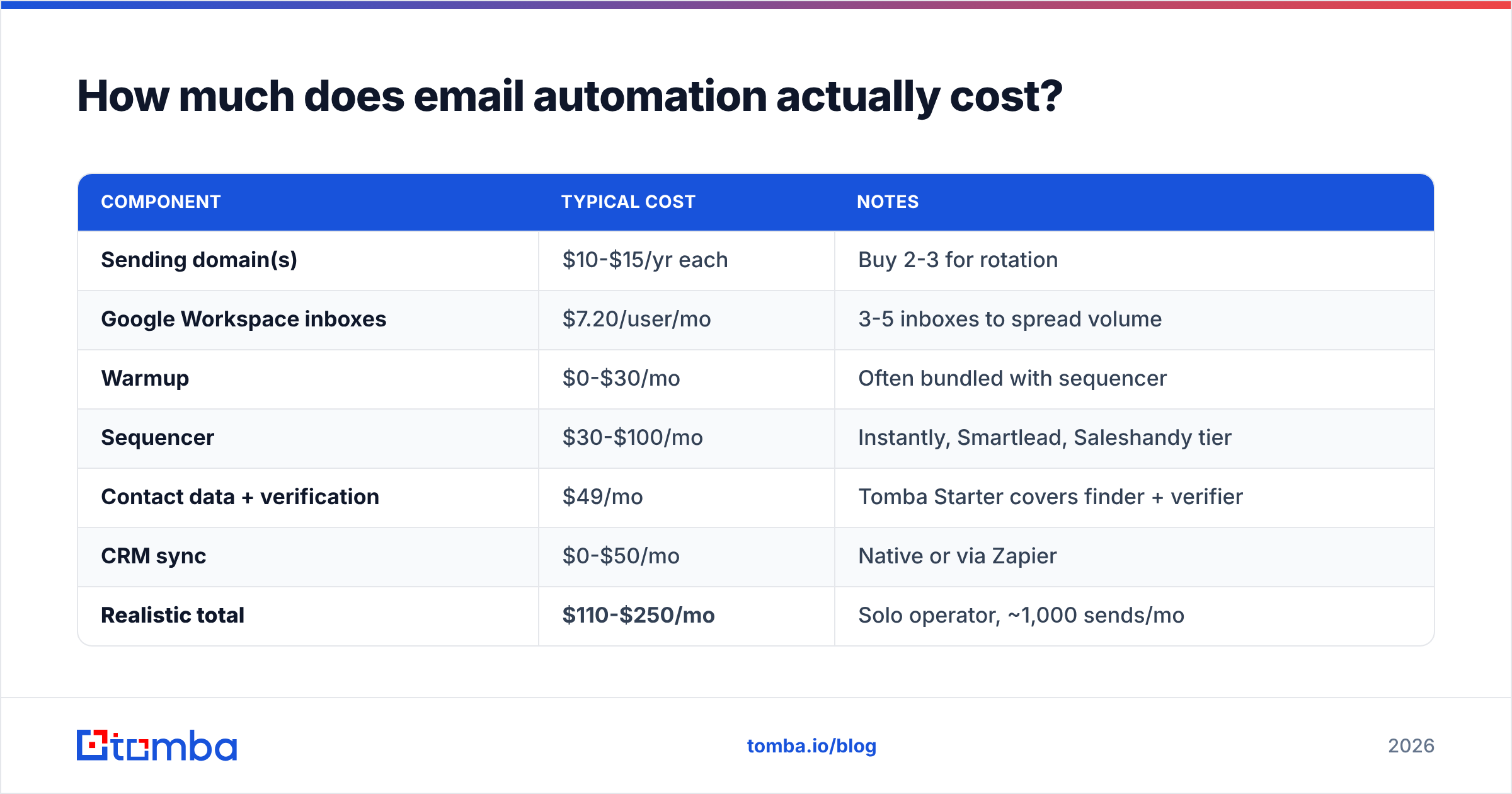
Budget for the whole stack, not just the sequencer. A realistic monthly setup for one person sending ~1,000 emails looks like this.
| Component | Typical cost | Notes |
|---|---|---|
| Sending domain(s) | $10-$15/yr each | Buy 2-3 for rotation |
| Google Workspace inboxes | $7.20/user/mo | 3-5 inboxes to spread volume |
| Warmup | $0-$30/mo | Often bundled with sequencer |
| Sequencer | $30-$100/mo | Instantly, Smartlead, Saleshandy tier |
| Contact data + verification | $49/mo | Tomba Starter covers finder + verifier |
| CRM sync | $0-$50/mo | Native or via Zapier |
| Realistic total | $110-$250/mo | Solo operator, ~1,000 sends/mo |
Where people overspend: buying an all-in-one platform at $500/month for the data, then discovering the contact accuracy is mediocre. Where people underspend: skipping verification to save $40 and losing a $12/month domain plus three weeks of reputation. Compare Tomba pricing against the per-credit cost of bundled data in your sequencer — unbundling data from sending is usually cheaper and always more accurate.
If you already have a CRM, check whether your data source pushes into it directly. A HubSpot integration or a Zapier integration removes the CSV shuffle that eats an hour a week and introduces most of the duplicate-contact problems teams complain about.
What metrics tell you if the automation is working?#
Track four numbers weekly and ignore the rest for the first 90 days:
- Bounce rate — target under 2%. Above that, your data source or verification step is broken. Fix before anything else.
- Reply rate — target 3-8% for cold outbound to a well-targeted list. Under 1% means targeting or offer, not copy.
- Positive reply rate — of replies, what share are interested or referrals? Under 20% means you're reaching the wrong role.
- Meetings booked per 1,000 sends — the only number that maps to revenue. 5-15 is healthy for mid-market B2B; below 2 means rebuild the list.
Open rate deserves a note: it is now materially inflated by privacy proxies and bot-driven link scanning at corporate security gateways. Use it directionally to compare two subject lines in an A/B test, never as a health metric. Response rate is the honest signal.
Also watch the shape of your reply curve across the sequence. If step one gets 80% of the replies and steps two through four get nothing, your follow-ups are adding no new information. If step three consistently outperforms step one, your first email is too vague — move that angle forward.
What are the most common automation mistakes?#
- Sending from the primary domain. One bad campaign and your invoices land in spam. Separate domains, always.
- Skipping verification because "the tool guarantees accuracy." Guarantees vary; run your own verification pass regardless of source. Check where the data comes from before you trust a provider's claim.
- Importing an old list. B2B data decays roughly 22-30% per year as people change jobs, per HubSpot's long-running research. A two-year-old export is half dead.
- Over-personalizing with AI. A weirdly specific opener about someone's 2019 conference talk reads as surveillance, not research.
- No suppression list. Customers, active deals, and past unsubscribes must be excluded globally, not per-campaign.
- Running the same sequence for six months. Filters adapt, and so do recipients. Refresh copy quarterly.
- Treating volume as the lever. Doubling sends on a 1% reply rate gets you twice the noise. Fix the list first.
For a deeper look at how sequencers compare on the automation side specifically, G2's sales engagement category is a reasonable neutral starting point — filter by company size, because tools that work for a 200-rep team are wildly overbuilt for three people.
Start with data you can trust#
Automation amplifies whatever you feed it. A clean, verified, well-targeted list of 300 contacts will out-earn an unverified list of 5,000 every time — fewer bounces, better reputation, higher reply rate, and no burned domain to recover from.
That's the part worth getting right first. Tomba Email Finder gives you verified professional addresses by name, domain, or company, with confidence scoring on every result so you know what's safe to send. The free tier includes 25 searches a month to test accuracy against contacts you already know, and Starter is $49/month when you're ready to feed a real sequence. Verify first, automate second — in that order, the automation actually works.
Related guides#
// get started
Find, verify and enrich your first contacts today
Start on the free plan with 25 searches a month, then scale when your team is ready.
Free plan · No credit card required · GDPR & CCPA
// about the author