How to Send the Same Email to Multiple Recipients Separately
BCC hides addresses but still lands one message in every inbox — and spam filters know it. Here are five ways to send the same email to multiple recipients separately, with the deliverability trade-offs of each.
TL;DR
- BCC does not send the same email to multiple recipients separately. It sends one message with many envelope recipients, and mailbox providers can see the fan-out.
- Mail merge (Gmail multi-send, Outlook + Word, Sheets add-ons) is the right call for 10–500 people. Each person gets a unique message and their own reply thread.
- For 500+ recipients, or anything ongoing, use a sending platform with throttling and warmup. Not your raw mailbox.
- Clean the list first. A merge to 400 addresses where 12% bounce will hurt your domain more than BCC ever would.
- Personalization is the whole point. If every message is identical, you have built a slower BCC.
You want each person to get what looks like a private, one-to-one email. Not a message where they can see 87 other names in the To field. Not a message where anyone can hit "reply all" and start a thread you cannot control.
There are five real ways to send the same email to multiple recipients separately. They are not equally good. The differences show up in deliverability, in personalization, and in what happens when someone replies.
What does it mean to send the same email to multiple recipients separately?#
It means one distinct message per person — a unique Message-ID, a single address in the To header, and its own SMTP transaction.
Think of it like handing out invitations. BCC is standing in a hallway and shouting once while 200 people listen. Everyone hears the same words, and the building manager notices the shouting. Sending separately is walking to 200 doors with 200 envelopes. Slower, but each one is addressed, and nobody knows about the other 199.
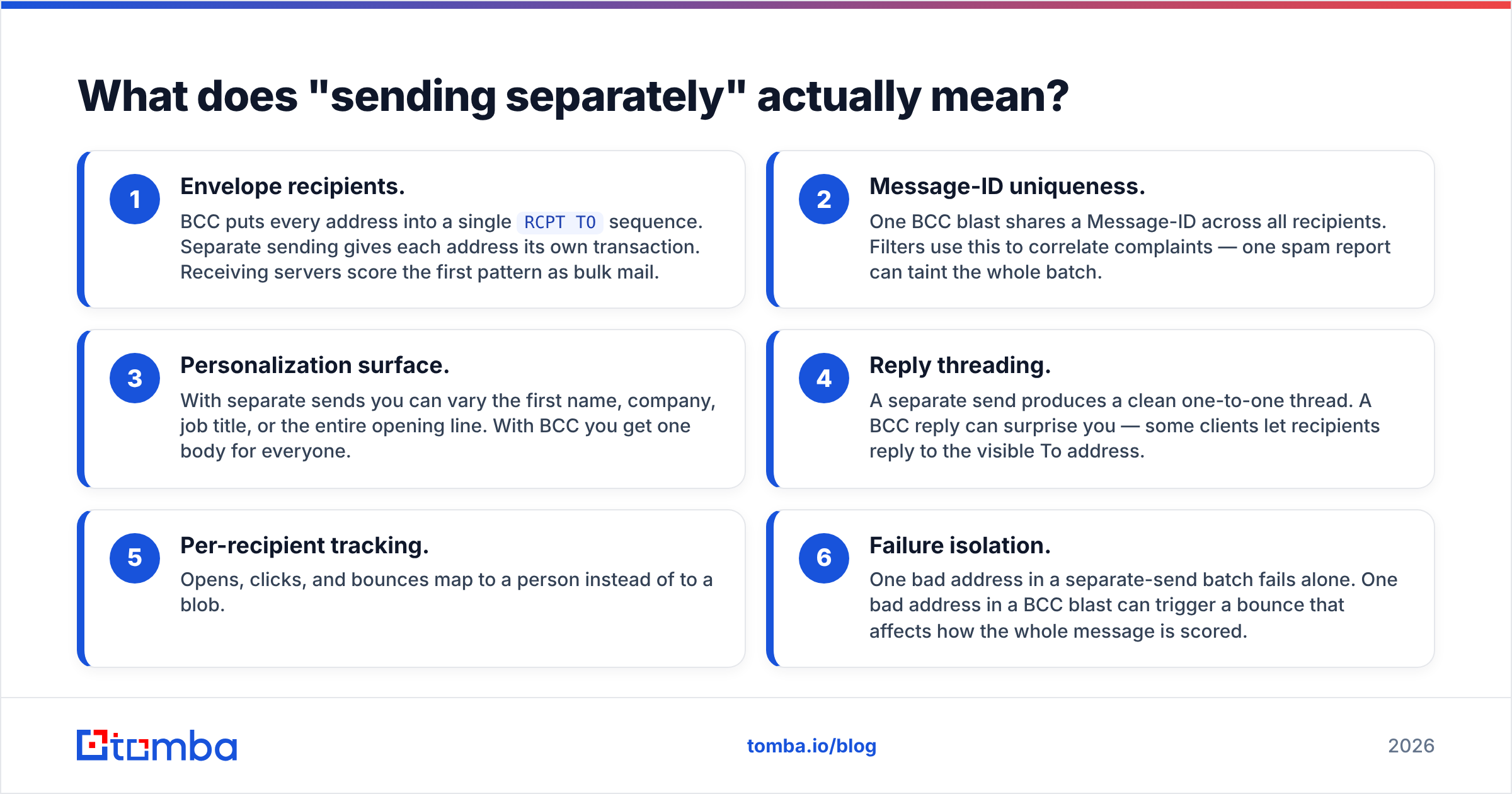
The distinction matters because mailbox providers judge messages at the envelope level, not the header level. Here is what actually changes between the two:
- Envelope recipients. BCC puts every address into a single
RCPT TOsequence. Separate sending gives each address its own transaction. Receiving servers score the first pattern as bulk mail. - Message-ID uniqueness. One BCC blast shares a Message-ID across all recipients. Filters use this to link complaints, so one spam report can taint the whole batch.
- Personalization surface. Separate sends let you vary the first name, company, job title, or the whole opening line. BCC gives you one body for everyone.
The rest of the difference shows up after the message lands:
- Reply threading. A separate send produces a clean one-to-one thread. A BCC reply can surprise you, because some clients let recipients answer the visible To address.
- Per-recipient tracking. Opens, clicks, and bounces map to a person instead of to a blob.
- Failure isolation. One bad address in a separate-send batch fails alone. In a BCC blast, that same bad address can drag down how the whole message is scored.
Why is BCC the wrong tool for this?#
Because BCC solves the privacy problem and creates a deliverability problem.
Yes, recipients cannot see each other. That is the one thing BCC does well. Everything else about it works against you:
Gmail and Outlook both apply sending limits that count BCC recipients one by one. Google's Gmail sending limits cap a standard Workspace account at 2,000 recipients per day and 500 per message. Get anywhere near that ceiling with a single BCC message and your account is likely to be locked for a while. Microsoft applies similar per-message caps on Exchange Online.
More important: the mailbox providers on the receiving end can tell. A hundred domains get the same message, with the same Message-ID, inside five minutes. The pattern is obvious. If even a handful of people mark it as spam, the filter connects the dots at once.
And BCC breaks the moment you need personalization. "Hi there" is a tell. Recipients know what a blast looks like, and reply rates show it.
There is one fair use of BCC: fewer than ten people, content that is genuinely identical, and no need to personalize. A meeting reminder or a shared document link. Beyond that, use a merge.
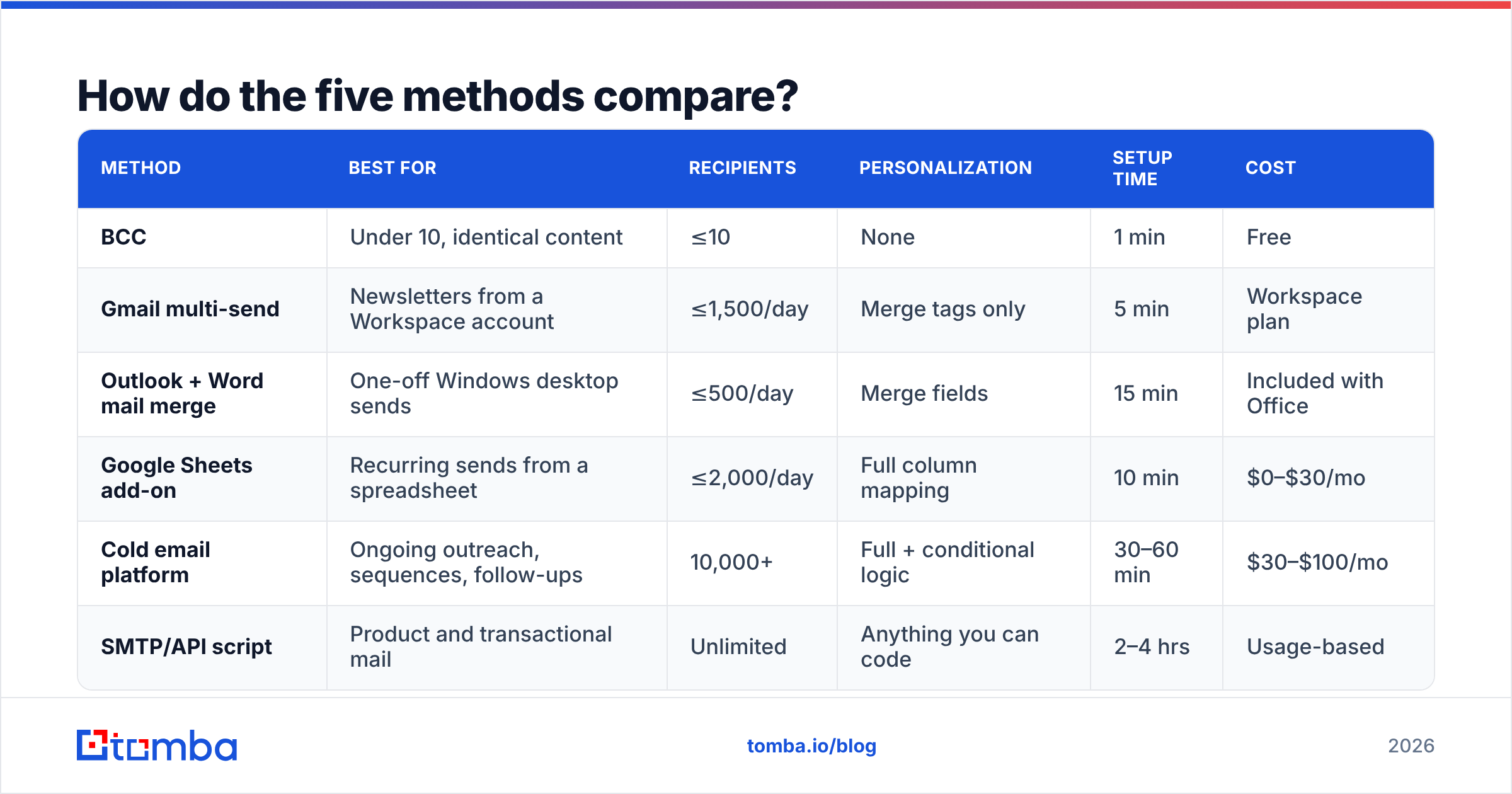
How do the five methods compare?#
| Method | Best for | Recipients | Personalization | Setup time | Cost |
|---|---|---|---|---|---|
| BCC | Under 10, identical content | ≤10 | None | 1 min | Free |
| Gmail multi-send | Newsletters from a Workspace account | ≤1,500/day | Merge tags only | 5 min | Workspace plan |
| Outlook + Word mail merge | One-off Windows desktop sends | ≤500/day | Merge fields | 15 min | Included with Office |
| Google Sheets add-on | Recurring sends from a spreadsheet | ≤2,000/day | Full column mapping | 10 min | $0–$30/mo |
| Cold email platform | Ongoing outreach, sequences, follow-ups | 10,000+ | Full + conditional logic | 30–60 min | $30–$100/mo |
| SMTP/API script | Product and transactional mail | Unlimited | Anything you can code | 2–4 hrs | Usage-based |
The right row depends on one question. Is this a one-time send or a repeating process? One-time sends belong in a merge tool. Repeating outreach belongs in a platform that handles throttling, warmup, bounces, and reply detection for you.
How do you set up a Gmail mail merge?#
Gmail Workspace has multi-send built in, and it takes about five minutes.
Open a new compose window and click the Multi-send icon (the double-arrow toggle at the right of the To field). Paste your addresses. Use merge tags — @firstname, @lastname, @fullname, @email — anywhere in the subject or body. Gmail pulls the values from your Google Contacts, or from a pasted list that includes the name next to each address.
Three constraints to know before you rely on it:
- Multi-send is available on Workspace Individual, Business Standard/Plus, Enterprise, and Education tiers. It is not on free consumer Gmail.
- It adds an unsubscribe footer automatically, and you cannot remove it. Marketing mail needs one anyway. For one-to-one sales outreach, it changes the tone.
- The daily cap is 1,500 multi-send recipients, separate from your ordinary sending limit.
For free Gmail accounts, a Google Sheets add-on is the workaround. Put your data in columns, write the template as a draft, and let the add-on merge and send. Sending still runs through your mailbox, so your normal Gmail limits apply.
How do you do it in Outlook?#
Outlook's built-in path runs through Word. It is clumsier than Gmail's, but it gives you more control over formatting.
Build the recipient list in Excel first: one row per person, one column per merge field, headers in row 1. In Word, go to Mailings → Start Mail Merge → E-mail Messages. Then pick Select Recipients → Use an Existing List and point at the spreadsheet. Insert merge fields where you want them and preview a few rows. Finish with Finish & Merge → Send E-mail Messages, choose the email column, set the subject, and pick HTML format.
The messages leave through your default Outlook account. Microsoft's Exchange Online sending limits allow 10,000 recipients per day and 500 per message on most business plans. Word sends one message per row, so the per-message cap never applies. The daily rate is what binds you.
Two known annoyances. Word mail merge cannot attach files per recipient without a VBA macro, and it does not support CC or BCC on merged messages. If you need either, skip to a dedicated tool.
What about sending platforms and APIs?#
Once you are sending the same email to multiple recipients separately more than once a month, the merge tools start costing you more in manual work than a platform costs in fees.
A sending platform adds four things a merge cannot:
- Throttling and randomization. Messages go out in a human-shaped pattern — 20 per hour with jitter, not 400 in ninety seconds.
- Automatic follow-ups. Sequence steps that stop the moment someone replies.
- Bounce and reply handling. Hard bounces are suppressed for you, instead of poisoning the next send.
- Multi-inbox rotation. Volume spreads across several addresses, so no single mailbox carries the load.
If you would rather build it, most transactional providers expose a batch API that gives each recipient an independent message. In Amazon SES this is SendBulkTemplatedEmail. In SendGrid it is the personalizations array, where each entry becomes its own message. Postmark and Mailgun have equivalents. One detail matters in every one of them: put exactly one recipient per personalization object. Several recipients in one object rebuilds the BCC problem in JSON.
Whichever route you take, set up SPF, DKIM, and DMARC on the sending domain before your first batch. Run a SPF checker against the domain and confirm the record resolves and includes your sending service. Google and Yahoo's bulk-sender rules make DMARC non-optional at any real volume.
Does list quality matter more than the sending method?#
Yes, and this is where most separate-send campaigns actually fail.
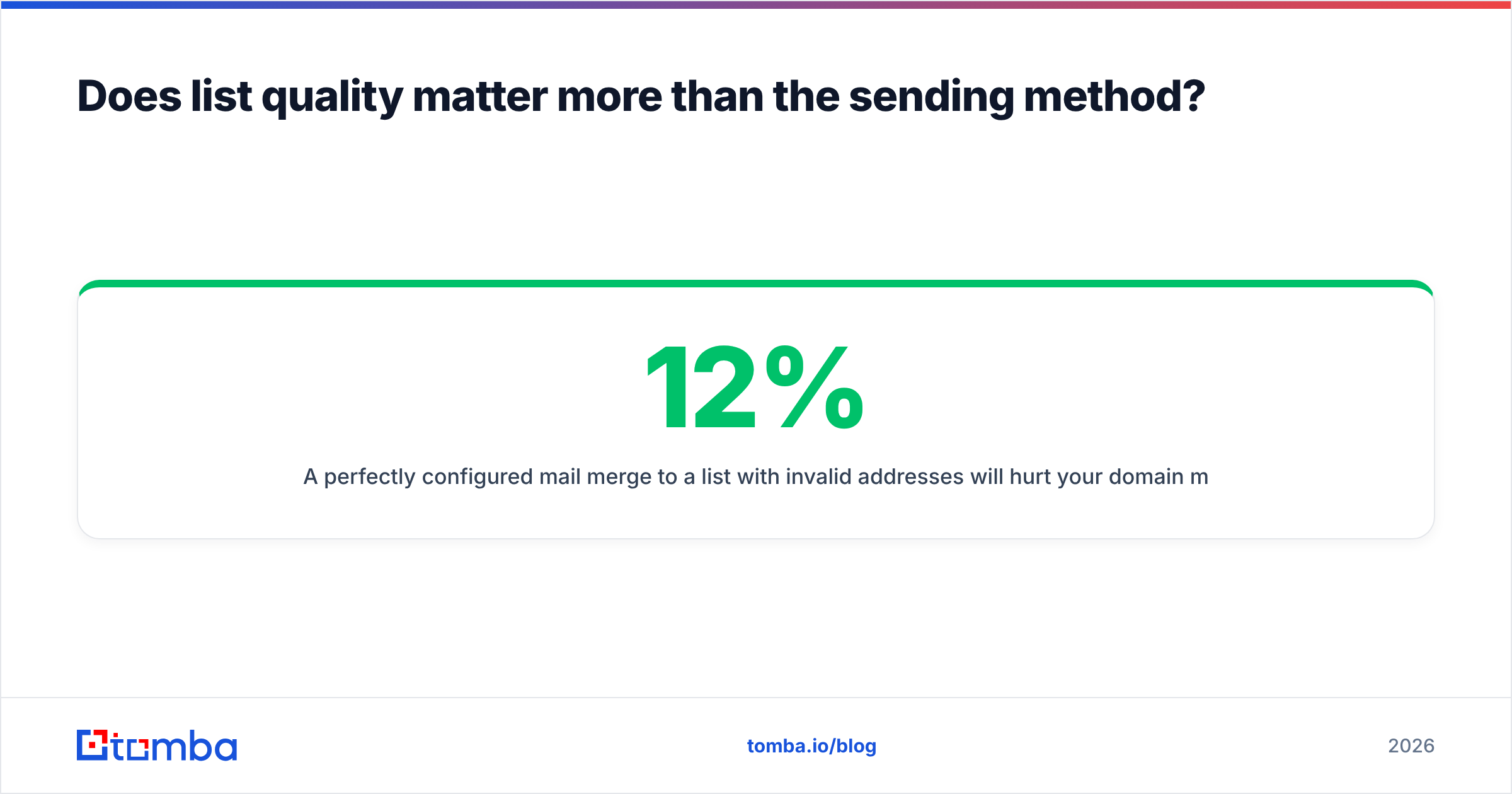
A perfect mail merge to a list with 12% invalid addresses will hurt your domain more than a sloppy BCC to 30 clean ones. Mailbox providers weight hard bounce rate heavily in sender reputation. The threshold is unforgiving. Above roughly 2% bounces, throttling starts. Above 5%, you are in real trouble.
The sequence that works:
- Deduplicate. Merge lists from two sources and the same person shows up twice under two aliases. A remove duplicates pass takes seconds.
- Verify syntax and MX. Catch typos and dead domains before any SMTP check.
- Verify the mailbox. Run the list through an email verifier to confirm each address accepts mail. Drop anything marked invalid.
- Segment catch-alls. Catch-all domains accept everything at the SMTP layer, so a standard check tells you nothing. A catch-all verifier gives you a confidence score instead of a false green light.
- Warm the sending domain. New domain, or a mailbox that has been quiet? Ramp from about 20 messages a day over three to four weeks.
If you are still building the list, find the addresses properly instead of guessing patterns. A domain search returns known addresses and the dominant format for a company in one call. That beats permutating first.last@ and hoping.
What are the rules you should not break?#
Sending separately does not exempt you from consent law. CAN-SPAM in the US requires accurate headers, a physical postal address, and a working opt-out honored within ten business days. GDPR in the EU requires a lawful basis. Legitimate interest can cover B2B outreach, but you must document it and honor objections at once. CASL in Canada is stricter still, and asks for express or implied consent before the first message.
The practical checklist:
- Real From address. No spoofing, no lookalike domains.
- Honest subject line. It must describe the message.
- Working unsubscribe. Even in one-to-one sales mail, one line offering to stop is both courteous and protective.
- Postal address in the footer for anything marketing-adjacent.
- Suppression list respected across tools. If someone opted out in your CRM, your mail merge needs to know that too.
How should you pick between these?#
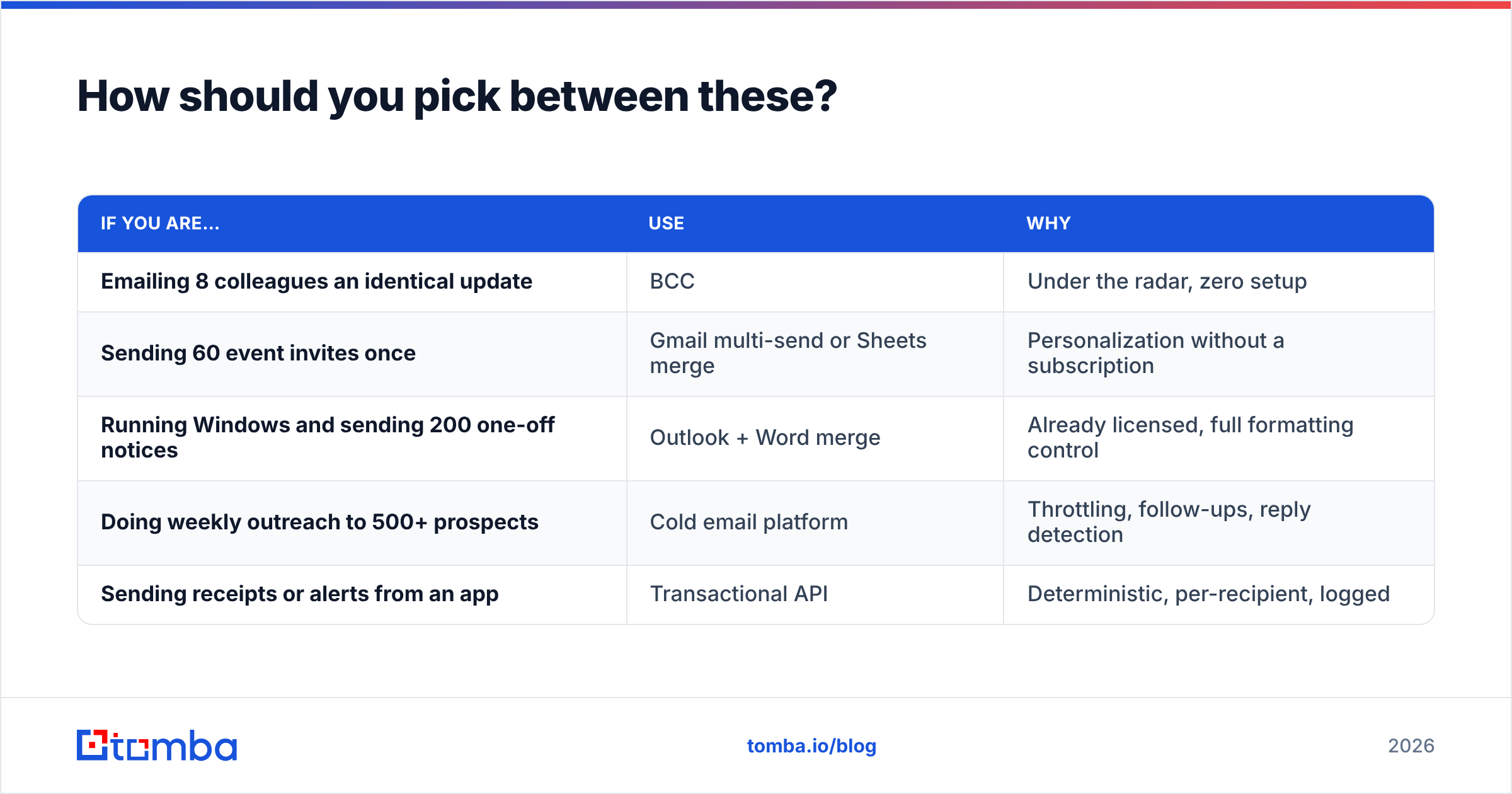
Match the method to volume and repetition, not to what you already have open.
| If you are… | Use | Why |
|---|---|---|
| Emailing 8 colleagues an identical update | BCC | Under the radar, zero setup |
| Sending 60 event invites once | Gmail multi-send or Sheets merge | Personalization without a subscription |
| Running Windows and sending 200 one-off notices | Outlook + Word merge | Already licensed, full formatting control |
| Doing weekly outreach to 500+ prospects | Cold email platform | Throttling, follow-ups, reply detection |
| Sending receipts or alerts from an app | Transactional API | Deterministic, per-recipient, logged |
One more test. If you cannot personalize beyond the first name, ask whether the email should go out at all. A merge that produces 400 identical bodies with a swapped name is a BCC with extra steps. The value comes from what you can vary: the reference to their recent funding round, their tech stack, the article they published. Everything else is mechanics.
Pull one concrete detail per person and the whole exercise starts paying for itself. Use data enrichment to attach company size, industry, and role to each row, then write merge fields that use them.
What is the fastest path from a blank list to a clean separate send?#
Build the list, verify it, merge it, throttle it.
Most people get this backwards. They write the email first, then scramble for addresses, then send to whatever they scraped. Reverse it. A verified list of 80 right-fit contacts beats an unverified 800 every time, and finding that out will not cost you your domain reputation.
Start with the addresses. Tomba's Email Finder resolves professional email addresses by name and domain and returns a confidence score for each. It runs verification in the same request, so the list you feed into your mail merge is already clean.
The free tier gives you 25 searches a month, enough to test the accuracy on names you can confirm. Paid plans start at $49/mo on Starter, with Growth at $99/mo for larger lists. Full Tomba pricing is on the site, and everything in the app is available through the Tomba API if you want list-building wired straight into your sending script.
Get the list right, and the choice between multi-send, Word merge, and a platform becomes what it should be: a five-minute decision about tooling, not a gamble with your domain.
Related guides#
// get started
Find, verify and enrich your first contacts today
Start on the free plan with 25 searches a month, then scale when your team is ready.
Free plan · No credit card required · GDPR & CCPA
// about the author