How To Start Email To Client: 12 Openers That Get Replies
Your first line decides whether a client reads or archives. Here are 12 tested opening lines, a decision table for picking one, and the greeting mistakes that quietly kill reply rates.
TL;DR
- The first 8–12 words decide everything. Most inbox previews cut off around there, so "I hope this email finds you well" burns your entire preview on nothing.
- Match the greeting to the relationship stage:
Hi [First name]for 90% of B2B,Dear [Title] [Last name]only for formal RFPs, legal, government, and some APAC/DACH contexts. - Open with them, not you. A trigger-based first line (funding, hire, product launch, their own content) beats a self-introduction on almost every reply-rate test.
- Never open cold with an apology, a compliment you can't substantiate, or "quick question" — all three are pattern-matched to spam by experienced buyers.
- Getting the name right matters more than the sentence. A wrong first name or a
info@blast kills the email before the opener has a chance.
You send a hundred emails a week and maybe twelve get answered. The gap is almost never the offer — it's the first line. Below is a practical system for how to start email to client conversations at each stage: cold, warm, existing account, and the awkward re-engagement email after four months of silence.
Why does the first line of a client email matter so much?#
Because your recipient isn't reading — they're triaging.
Think of an inbox like a hotel front desk during checkout rush. The clerk isn't listening to your full story; they're scanning for one thing: is this my problem right now? Your first line is the only sentence that gets that hearing.
Three mechanics make it decisive:
- The preview pane. Gmail, Outlook, and Apple Mail all show 30–90 characters of body text next to the subject line. That's your real subject line #2. Waste it on a pleasantry and you've shipped an email with half a headline.
- The relevance snap judgment. Buyers decide within about two seconds whether a message is addressed to them specifically or to a list. Generic openers signal "list" instantly.
- Reply momentum. An opener that references something concrete gives the recipient a natural response hook. "Congrats on the Series B" is easy to reply to. "I wanted to reach out" is not.
Anything you put before the value is rent you're paying with your reader's patience. Charge it wisely.
What greeting should you use for a client email?#
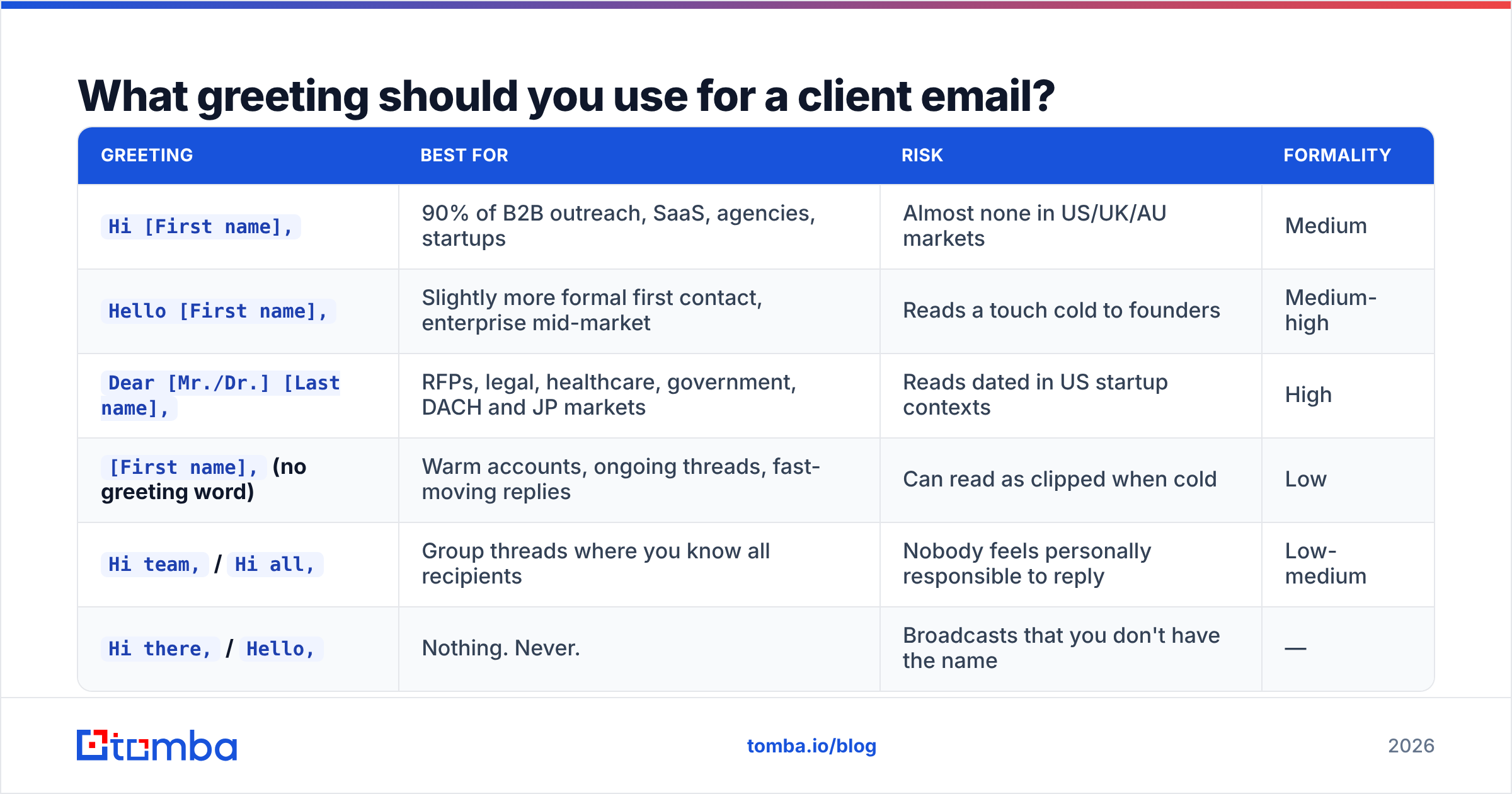
The greeting is a positioning decision, not a formality. Get it wrong in either direction — too stiff or too casual — and you've created friction before the first sentence.
| Greeting | Best for | Risk | Formality |
|---|---|---|---|
Hi [First name], |
90% of B2B outreach, SaaS, agencies, startups | Almost none in US/UK/AU markets | Medium |
Hello [First name], |
Slightly more formal first contact, enterprise mid-market | Reads a touch cold to founders | Medium-high |
Dear [Mr./Dr.] [Last name], |
RFPs, legal, healthcare, government, DACH and JP markets | Reads dated in US startup contexts | High |
[First name], (no greeting word) |
Warm accounts, ongoing threads, fast-moving replies | Can read as clipped when cold | Low |
Hi team, / Hi all, |
Group threads where you know all recipients | Nobody feels personally responsible to reply | Low-medium |
Hi there, / Hello, |
Nothing. Never. | Broadcasts that you don't have the name | — |
The last row is the one that actually costs money. "Hi there" is a confession that you couldn't be bothered to find out who you're writing to. If you don't have a verified first name, you don't have a prospect yet — you have a domain. Fix that before you write anything: run the company through a domain search to pull named contacts and their role, then confirm the address with an email verifier so your carefully crafted opener doesn't bounce into a spam trap.
One more rule: use the name they use. If their LinkedIn says "Kate" and the CRM says "Katherine," write Kate. Matching their self-presentation is a small, cheap signal that you looked.
How do you start a cold email to a new client?#
Open with a fact about them that you couldn't have known without doing work. That's the entire rule.
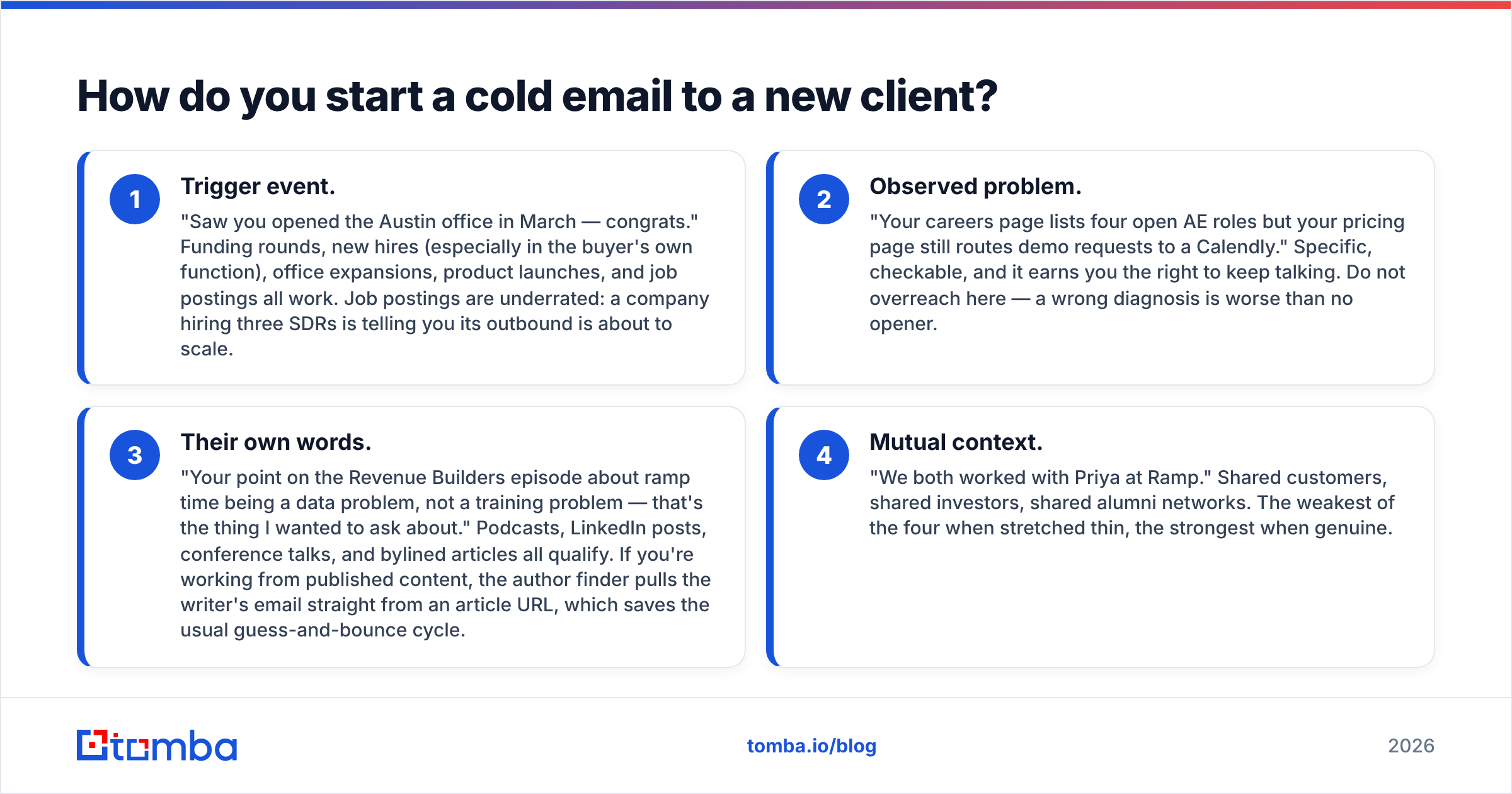
There are four opener families that reliably clear the relevance bar:
- Trigger event. "Saw you opened the Austin office in March — congrats." Funding rounds, new hires (especially in the buyer's own function), office expansions, product launches, and job postings all work. Job postings are underrated: a company hiring three SDRs is telling you its outbound is about to scale.
- Observed problem. "Your careers page lists four open AE roles but your pricing page still routes demo requests to a Calendly." Specific, checkable, and it earns you the right to keep talking. Do not overreach here — a wrong diagnosis is worse than no opener.
- Their own words. "Your point on the Revenue Builders episode about ramp time being a data problem, not a training problem — that's the thing I wanted to ask about." Podcasts, LinkedIn posts, conference talks, and bylined articles all qualify. If you're working from published content, the author finder pulls the writer's email straight from an article URL, which saves the usual guess-and-bounce cycle.
- Mutual context. "We both worked with Priya at Ramp." Shared customers, shared investors, shared alumni networks. The weakest of the four when stretched thin, the strongest when genuine.
What to cut from cold openers, without exception:
- "I hope this email finds you well." It says nothing and consumes the entire preview pane.
- "My name is X and I'm the Y at Z." They can see your signature. Your identity is not the hook.
- "I know you're busy, so I'll be brief." Then be brief. Announcing brevity is not being brief.
- "Quick question —" Overused to the point that it now reads as a template tell.
- "Just following up" as a first line. It's not a follow-up if you've never spoken.
The cold email templates library is a reasonable starting point if you want structures to adapt rather than blank-page it, but adapt them — a template sent unmodified is a template your prospect has already received from four other reps this quarter.
How should you open an email to an existing client?#
Differently. This is where most reps over-apply cold-email tactics and sound strange.
With an existing client, the relationship is the context. You don't need to earn attention — you need to respect their time and make the ask legible.
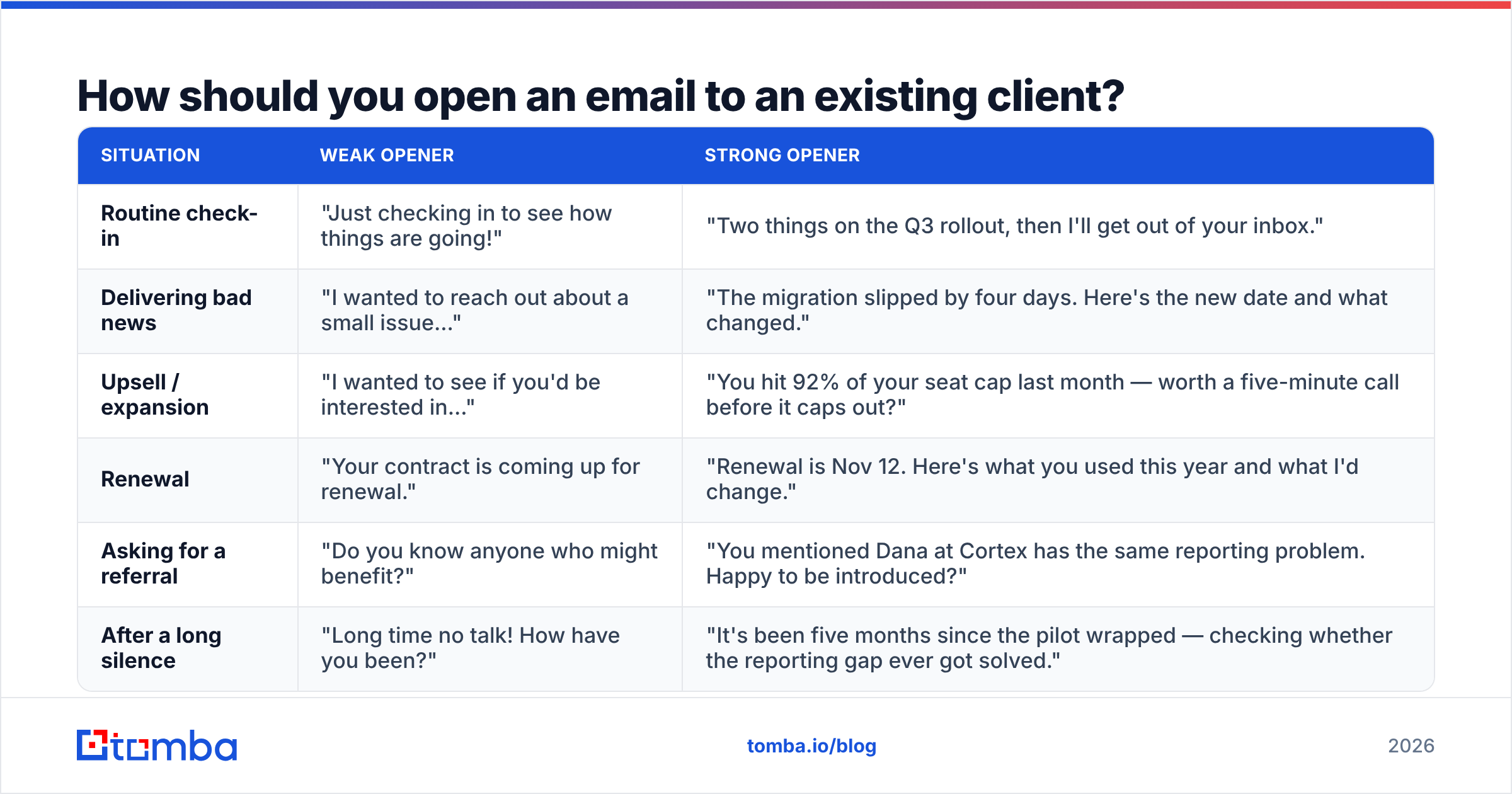
| Situation | Weak opener | Strong opener |
|---|---|---|
| Routine check-in | "Just checking in to see how things are going!" | "Two things on the Q3 rollout, then I'll get out of your inbox." |
| Delivering bad news | "I wanted to reach out about a small issue..." | "The migration slipped by four days. Here's the new date and what changed." |
| Upsell / expansion | "I wanted to see if you'd be interested in..." | "You hit 92% of your seat cap last month — worth a five-minute call before it caps out?" |
| Renewal | "Your contract is coming up for renewal." | "Renewal is Nov 12. Here's what you used this year and what I'd change." |
| Asking for a referral | "Do you know anyone who might benefit?" | "You mentioned Dana at Cortex has the same reporting problem. Happy to be introduced?" |
| After a long silence | "Long time no talk! How have you been?" | "It's been five months since the pilot wrapped — checking whether the reporting gap ever got solved." |
The pattern across the right-hand column: lead with the specific thing, not with the meta-commentary about contacting them. Every "I wanted to reach out" is a sentence spent describing the act of sending an email, which the recipient can already see happened.
For bad news specifically, front-load it. Burying a delay in paragraph three reads as evasion, and clients notice.
What about follow-ups and re-engagement emails?#
Follow-ups have their own opener grammar, and the most common mistake is starting over from scratch.
Do not reintroduce yourself in follow-up two. Reply in the same thread so the original message sits underneath. Then open with new information, not with a status report on your own persistence:
- Weak: "Just bumping this to the top of your inbox."
- Weak: "Following up on my email below."
- Strong: "One more data point since I wrote: [competitor] shipped the same integration last week."
- Strong: "Closing the loop on this — if timing's wrong, tell me and I'll check back in Q1."
That last one, the graceful exit, consistently outperforms in reply rate because it gives a low-effort out. Many replies to a breakup email are "actually, don't close it out" — which is exactly the reply you wanted.
For re-engagement after months of silence, name the gap. Pretending no time passed is uncanny. "It's been since March, so this may be irrelevant now" is honest, and honesty is disarming. Just make sure the address is still live — contact churn in B2B runs high, and a dormant list is mostly stale rows. Push it through bulk verify before you re-engage rather than after your bounce rate spikes.
Which openers actually get replies?#
Here are the twelve that hold up across cold, warm, and account contexts. Steal the structure, replace the specifics.
Cold:
- "Congrats on the [round/launch] — noticed you're hiring [role], which usually means [consequence]."
- "Your [post/episode/talk] on [topic] — the part about [detail] is why I'm writing."
- "[Mutual contact] mentioned you're rebuilding [process] this quarter."
- "Noticed [company] still routes [X] through [Y] — is that deliberate or on the list?"
Warm / inbound:
- "Thanks for downloading [asset] — the [chapter/section] on [topic] usually raises one specific question, so: [question]."
- "You looked at pricing twice this week. What's the blocker — number, timing, or approvals?"
- "[Colleague] flagged your note about [issue]. I own that at our end."
Existing client:
- "Three things, all short: [1], [2], [3]."
- "Update on [project]: [status]. No action needed from you."
- "Before your renewal on [date], here's your usage summary."
Re-engagement:
- "It's been [duration] since [event] — did [problem] ever get solved?"
- "Assuming this is dead unless I hear otherwise. No hard feelings either way."
Notice how many are questions. A question at the top of an email creates an open loop, and open loops get closed. Notice also how few contain the word "I" in the first clause. That's not an accident — HubSpot's research on sales email performance has repeatedly found that recipient-centered framing outperforms sender-centered framing on both open and reply metrics.
What ruins a good opener?#
Great first lines routinely get wasted by problems that have nothing to do with writing.
- Wrong name. The single fastest way to make personalization backfire. Nothing says "mail merge" like "Hi Jennifer" to a David.
- Broken merge tags.
Hi {{first_name}},is a career-limiting typo when it goes to 3,000 people. Always send a test to yourself with a real row. - Wrong company detail. Congratulating a company on a funding round it announced in 2023 is worse than sending no opener at all.
- Sent to a role alias.
info@,hello@, andcontact@addresses go to a shared mailbox where nobody feels ownership. A named, verified address is worth ten aliases. - Landing in spam. The best opener in the world reads at 0% in the promotions tab. Your sender reputation and authentication setup gate everything upstream of copy — check your SPF record and run a spam checker pass before volume sending.
- Mismatched subject line. If the subject promises one thing and line one delivers another, you've triggered a small bait-and-switch reflex. Keep them continuous — the opener should read like the subject's second half.
There's also a formality-calibration failure worth naming. If you're writing across borders, defaults shift: German and Japanese business email skews formal by default, and a breezy "Hey Klaus!" reads as a lack of professionalism rather than warmth. When unsure, mirror the formality of their last message to you. If there was no last message, err one notch more formal than your instinct.
How do you personalize openers at scale without sounding robotic?#
Pick one variable that's genuinely researched and keep the rest of the email static.
The common failure is trying to personalize four things per email, which either takes twelve minutes per prospect or gets outsourced to an AI that produces "I loved your recent post about business!" Neither scales.
A workable model:
- Tier 1 (top 50 accounts): fully manual opener, 5–8 minutes of research per contact. Read their last two LinkedIn posts, check headcount changes, look at the job board.
- Tier 2 (next 500): one researched variable — funding, hire, tech-stack change — merged into a fixed structure. Pull the trigger data programmatically where you can.
- Tier 3 (the long tail): segment-level personalization only. "Series A fintechs hiring their first RevOps person" is a segment; write one opener for the segment and don't pretend it's individual.
Tier 3 is legitimate as long as you don't fake specificity. A segment-accurate opener ("most fintechs at your stage are still running attribution in spreadsheets") is honest. A fake-specific one ("I loved your website!") is not, and buyers can tell.
Whichever tier, the data underneath has to be current. Contact data decays at roughly 25–30% per year in B2B — people change jobs, companies get acquired, domains migrate. Enrichment on a schedule keeps openers from referencing a job the person left in February. Tools like data enrichment and the Tomba API let you refresh title, company, and seniority fields on a cadence rather than at import time only. If you'd rather review vendors side by side first, G2's sales intelligence category is a reasonable neutral starting point.
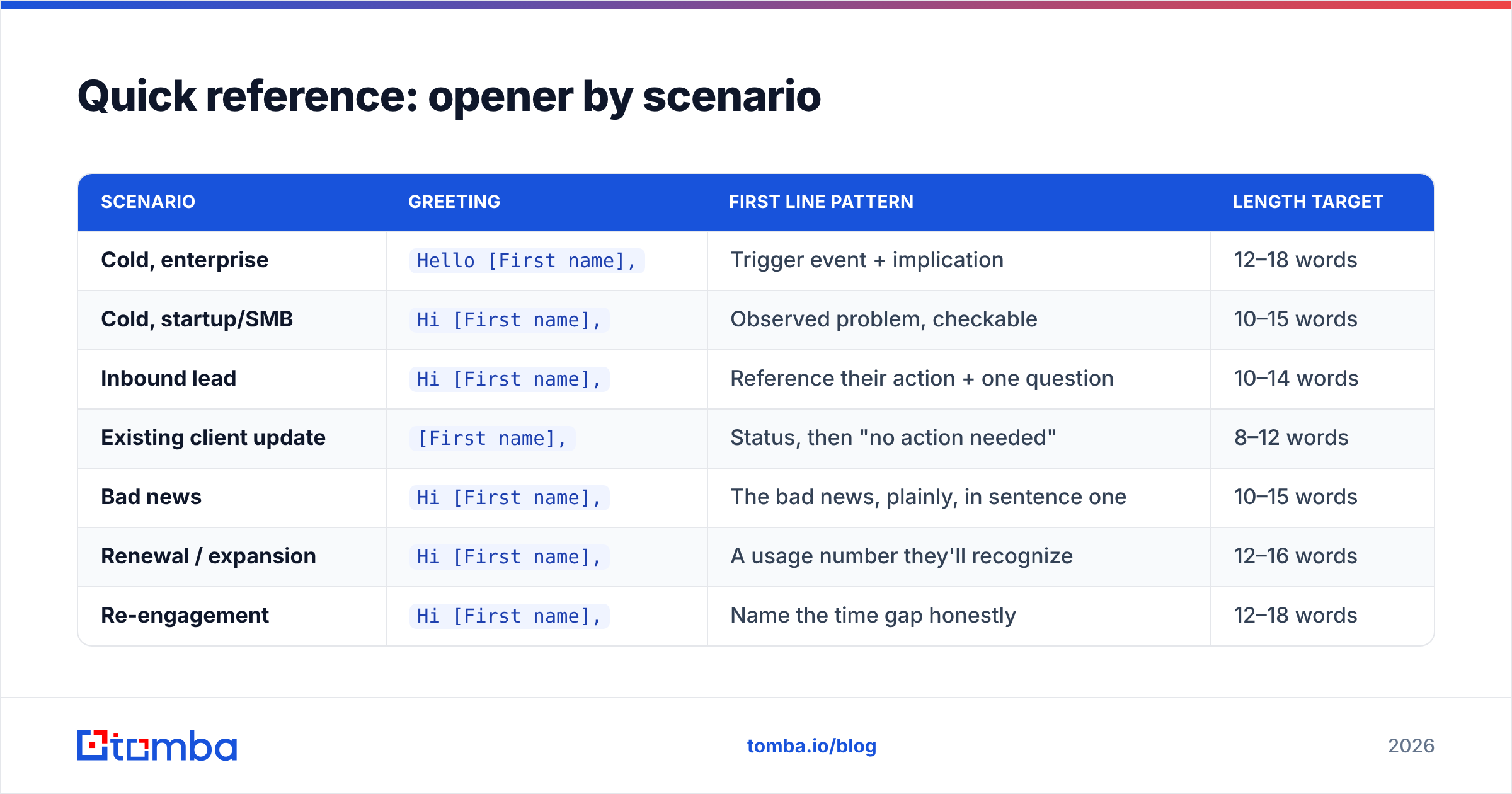
Quick reference: opener by scenario#
| Scenario | Greeting | First line pattern | Length target |
|---|---|---|---|
| Cold, enterprise | Hello [First name], |
Trigger event + implication | 12–18 words |
| Cold, startup/SMB | Hi [First name], |
Observed problem, checkable | 10–15 words |
| Inbound lead | Hi [First name], |
Reference their action + one question | 10–14 words |
| Existing client update | [First name], |
Status, then "no action needed" | 8–12 words |
| Bad news | Hi [First name], |
The bad news, plainly, in sentence one | 10–15 words |
| Renewal / expansion | Hi [First name], |
A usage number they'll recognize | 12–16 words |
| Re-engagement | Hi [First name], |
Name the time gap honestly | 12–18 words |
| Formal RFP / legal | Dear [Mr./Ms.] [Last name], |
Reference the RFP number and deadline | 15–25 words |
Print this, tape it to your monitor, and stop rewriting the same first sentence eleven times a day.
Where should you start tomorrow morning?#
Audit your last twenty sent emails. Count how many open with a sentence about you, and how many open with a sentence about them. If the ratio is worse than 1:3 in their favor, that's your entire reply-rate problem sitting in plain sight.
Then fix the layer underneath the copy. An opener addressed to the wrong person, at an unverified address, on a domain with a broken SPF record, is a well-written email nobody reads. Get the name right, get the address verified, and the writing starts to earn what it deserves.
Start with the contact, not the copy. Tomba Email Finder pulls verified, named contacts by domain or by person so your opener reaches a real human with a real first name — not a shared info@ inbox. The free tier covers 25 searches a month, and paid plans start at $49/mo on Tomba pricing if you're running outbound at volume. Find the person first; then write the line that gets the reply.
Related guides#
// get started
Find, verify and enrich your first contacts today
Start on the free plan with 25 searches a month, then scale when your team is ready.
Free plan · No credit card required · GDPR & CCPA
// about the author