How To Tell If Someone Read Your Email On Gmail (2026)
Gmail has no native read receipt for personal accounts. Here are the five methods that actually work in 2026 — from Workspace read receipts to tracking pixels — plus what each one gets wrong.
TL;DR — how to tell if someone read your email on Gmail
- Gmail has no read receipt for free/personal accounts. The feature exists only in paid Google Workspace, and only when an admin turns it on.
- You have three real options. Workspace read receipts are consent-based and accurate, but rare. Tracking pixels cover almost everyone and produce noisy data. Link-click tracking gives fewer false positives at lower volume.
- Apple Mail Privacy Protection, Gmail image proxying, and corporate scanners pre-fetch images, so a large share of "opens" are machines, not humans.
- Treat opens as a weak directional signal. Clicks and replies are the metrics that survive contact with reality.
- Before you worry about who opened, check whether the address was even valid. Bounces destroy sender reputation faster than any tracking gap.
You sent the email. Two days of silence. The question eating at you is simple: did they even see it?
This guide answers it honestly. Knowing how to tell if someone read your email on Gmail comes down to five methods. Some of them work, some are half-broken by privacy tech, and one is a legal question depending on where your recipient sits. Here is what each option actually tells you in 2026.
Does Gmail Have Built-In Read Receipts?#
Partly. It depends entirely on which Gmail you're using.
Free Gmail (@gmail.com): No read receipts. None. Google never shipped the feature to consumer accounts. There is no hidden setting that unlocks it. If a blog post tells you to enable read receipts on a personal Gmail account, it's describing something that doesn't exist.
Google Workspace (paid): Read receipts exist, but with two gates. First, a Workspace administrator has to turn them on in the Admin console under Apps → Google Workspace → Gmail → User settings. Second, the admin picks who can request them: anyone, or only people inside the organization. Most admins pick internal-only, so your outbound prospecting emails get nothing.
Even when enabled, the recipient sees a prompt asking whether to send the receipt. They can decline. Google documents the full behavior in the Gmail Help Center.
So the honest summary: native read receipts are an internal-team tool for Workspace organizations. For outbound sales, marketing, or reaching anyone at a different company, you need something else.
How To Tell If Someone Read Your Email On Gmail: The 5 Methods#
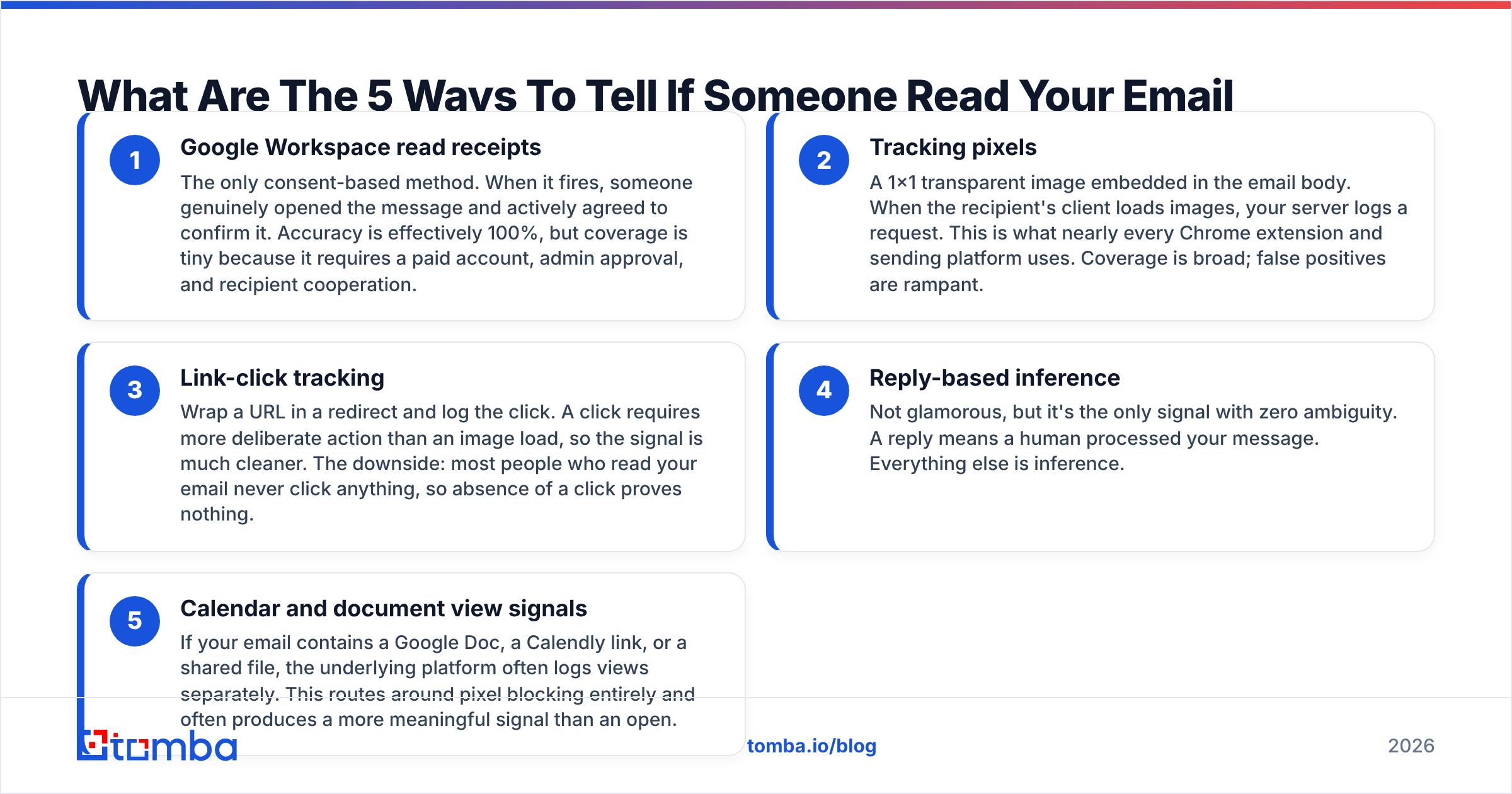
Here are the methods that exist, ranked by how much you can trust the answer.
Google Workspace read receipts — The only consent-based method. When it fires, someone genuinely opened the message and agreed to confirm it. Accuracy is near 100%. Coverage is tiny, because it needs a paid account, admin approval, and a willing recipient.
Tracking pixels — A 1×1 transparent image embedded in the email body. When the recipient's client loads images, your server logs a request. This is what nearly every Chrome extension and sending platform uses. Coverage is broad; false positives are rampant.
Link-click tracking — Wrap a URL in a redirect and log the click. A click takes more deliberate action than an image load, so the signal is much cleaner. The downside: most people who read your email never click, so a missing click proves nothing.
Reply-based inference — Not glamorous, but it's the only signal with zero ambiguity. A reply means a human processed your message. Everything else is inference.
Calendar and document view signals — Say your email contains a Google Doc, a Calendly link, or a shared file. The platform often logs those views on its own. That routes around pixel blocking, and the signal usually means more than an open.
How Do Tracking Pixels Actually Work?#
A tracking pixel is an image tag pointing at a unique URL. Something like <img src="https://tracker.example.com/o/abc123.png" width="1" height="1">. When the email client fetches that image, the server records a hit tied to abc123, which maps to a specific recipient and message.
That mechanism is the source of every problem with open tracking.
Gmail proxies images. Since 2013, Gmail routes all images through googleusercontent.com servers. Google caches each image on its own infrastructure. You lose the recipient's IP address. Repeat opens often never reach your server at all, because Gmail serves the cached copy.
Apple Mail Privacy Protection pre-fetches everything. MPP shipped in iOS 15 and is on by default. It downloads every remote image the moment a message arrives, whether or not a human opens it. Every MPP recipient registers as an open, immediately, always. Apple describes the behavior in its privacy documentation. Depending on your audience mix, this alone can inflate open rates by 20 to 40 percentage points.
Security scanners click everything. Corporate email gateways, spam filters, and link-detonation sandboxes fetch images and follow links to check for malware. Those hits look identical to a human open. They often arrive within seconds of delivery, and sometimes fire dozens of times in a row.
So when your dashboard says "opened 47 times," the honest reading is usually this: a machine touched the message 46 times, and maybe a human once.
Which Gmail Tracking Method Should You Use?#
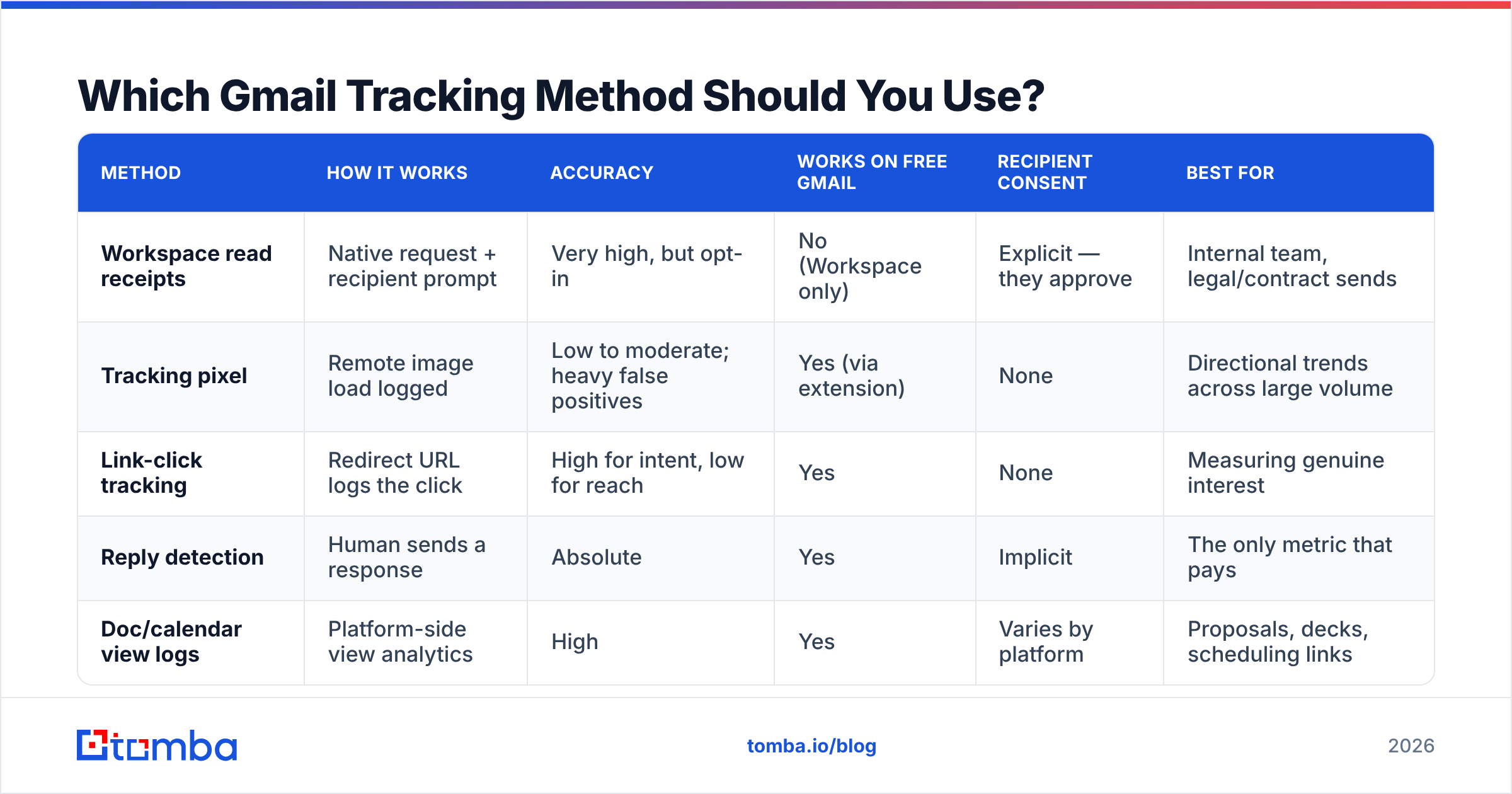
Match the method to what you actually need to know.
| Method | How it works | Accuracy | Works on free Gmail | Recipient consent | Best for |
|---|---|---|---|---|---|
| Workspace read receipts | Native request + recipient prompt | Very high, but opt-in | No (Workspace only) | Explicit — they approve | Internal team, legal/contract sends |
| Tracking pixel | Remote image load logged | Low to moderate; heavy false positives | Yes (via extension) | None | Directional trends across large volume |
| Link-click tracking | Redirect URL logs the click | High for intent, low for reach | Yes | None | Measuring genuine interest |
| Reply detection | Human sends a response | Absolute | Yes | Implicit | The only metric that pays |
| Doc/calendar view logs | Platform-side view analytics | High | Yes | Varies by platform | Proposals, decks, scheduling links |
Read that table as a hierarchy, not a menu. If you're deciding whether to follow up, a click beats an open every time. If you're proving a contract was seen, only a Workspace receipt has any weight.
What Are The Best Gmail Read-Receipt Tools In 2026?#
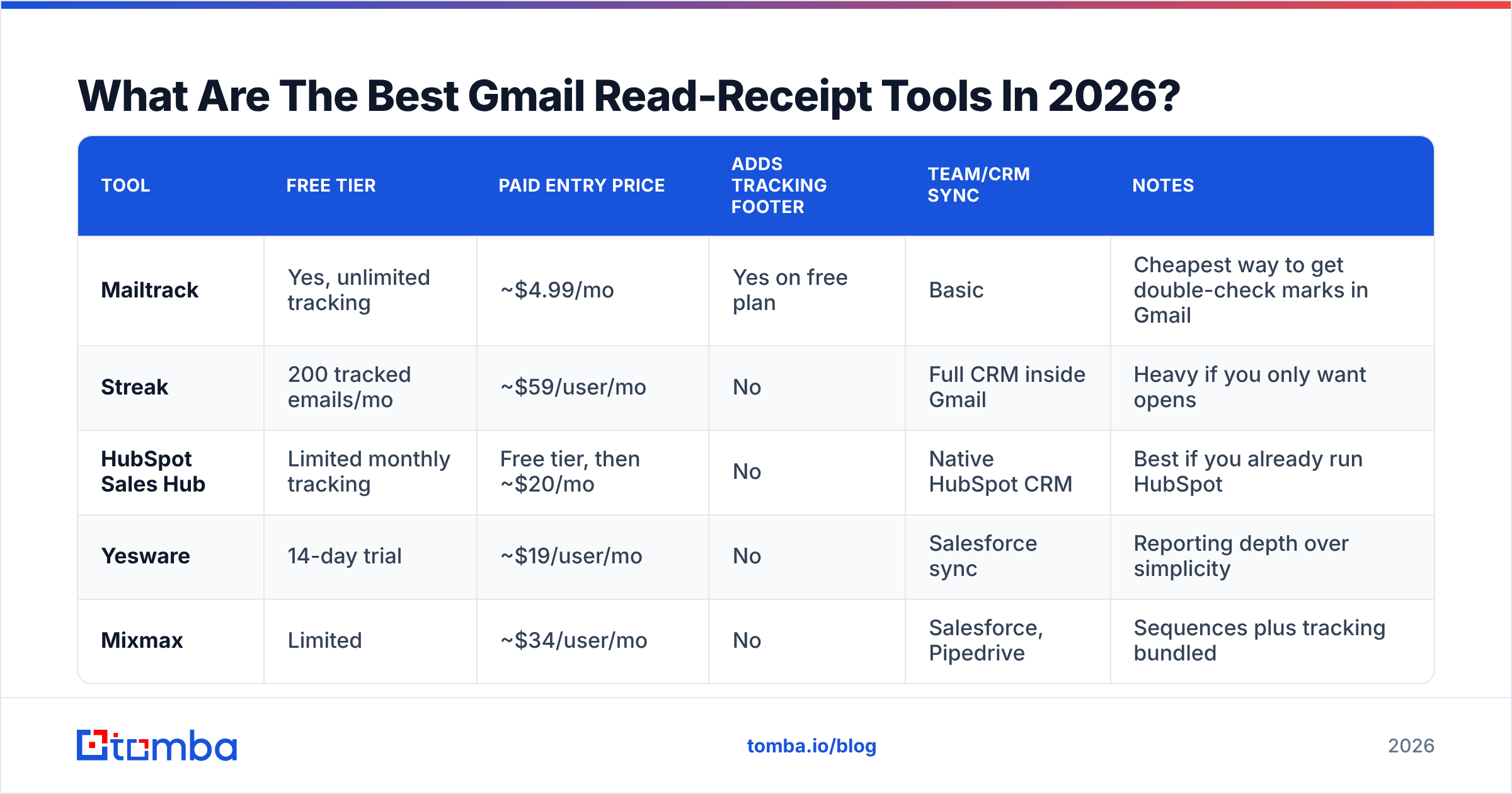
Most people reach for a Chrome extension. Here's how the common options compare on the things that matter — cost, whether they add a footer to your emails, and whether they scale past one inbox.
| Tool | Free tier | Paid entry price | Adds tracking footer | Team/CRM sync | Notes |
|---|---|---|---|---|---|
| Mailtrack | Yes, unlimited tracking | ~$4.99/mo | Yes on free plan | Basic | Cheapest way to get double-check marks in Gmail |
| Streak | 200 tracked emails/mo | ~$59/user/mo | No | Full CRM inside Gmail | Heavy if you only want opens |
| HubSpot Sales Hub | Limited monthly tracking | Free tier, then ~$20/mo | No | Native HubSpot CRM | Best if you already run HubSpot |
| Yesware | 14-day trial | ~$19/user/mo | No | Salesforce sync | Reporting depth over simplicity |
| Mixmax | Limited | ~$34/user/mo | No | Salesforce, Pipedrive | Sequences plus tracking bundled |
Two cautions before you install anything.
The free-plan footer is a credibility tax. Several free tiers append "Tracked by [tool]" to the bottom of every message. Your prospect sees it. On a cold email, that's an instant tell that you're measuring them, and it reads worse than sending nothing at all.
Extensions read your mailbox. A Gmail tracking extension usually asks for permission to read, compose, and send mail on your behalf. That's a real scope. Check the vendor's data-handling terms before you grant it, especially if your inbox holds customer data covered by a DPA. User reviews on G2 help you spot support and privacy complaints that vendor pages leave out.
Is Email Tracking Legal And Ethical?#
The short answer: legal in most contexts, regulated in some, and risky for your reputation if you handle it clumsily.
GDPR (EU/UK). Tracking pixels process personal data. For marketing email to EU recipients, you generally need a lawful basis, and consent is the safe one. Buried disclosure in a privacy policy nobody reads is a weak position. The ICO's guidance on cookies and similar technologies covers pixels explicitly.
CAN-SPAM (US). Doesn't restrict open tracking. It governs deception, sender identification, and unsubscribe handling. Tracking is fine; lying about who you are is not.
The practical ethics test. Imagine the recipient asks, "are you tracking whether I opened this?" Could you answer honestly without wincing? If yes, proceed. If the answer would embarrass you, that's your signal.
Teams cross the line through behavior, not technology. Calling someone within ninety seconds of an open — "Hey, saw you were just looking at my email!" — is unsettling. It also gets you flagged. Half the time that "open" was a spam filter, and you just announced that you watch a machine.
Why Do Open Rates Lie — And What Should You Measure Instead?#
Open rate has been degrading as a metric since 2021. MPP started it, image proxying compounded it, and aggressive security scanning finished the job. A 2026 open rate is not comparable to a 2020 one. Compare your numbers to old industry benchmarks and you will reach the wrong conclusion.
Build your reporting on signals that survive:
- Reply rate. The only metric that reflects a human decision. Everything upstream is a proxy for this.
- Click rate on a single, meaningful link. One link per email. Two links split your signal and halve the interpretability.
- Positive reply rate. Separate "interested" from "unsubscribe me." Raw reply rate hides the difference.
- Meetings booked per 100 sends. The only number your revenue team actually cares about.
- Bounce rate. Not a success metric, but the leading indicator of everything going wrong. Above 3% and your email deliverability is already sliding.
That last one deserves emphasis. Most people obsessing over read receipts have a more urgent problem: a chunk of their sends never arrive. A hard bounce produces no open, no click, and no reply. It looks exactly like being ignored, but it costs you far more. Running your list through an email verifier before a campaign removes that ambiguity.
How Do You Follow Up When You Can't Tell If They Read It?#
Design your sequence so the tracking data doesn't matter. That's the sane approach, and it's what strong outbound teams already do.
Follow up on a schedule, not on signals. Day 3, day 7, day 14. If someone opened, great. If they didn't, the follow-up still lands. Signal-triggered follow-up sounds clever. In practice it makes your cadence erratic.
Make each follow-up standalone. Never write "just bumping this in case you missed it." Add a new angle, a relevant case study, or a specific question. If they truly missed the first email, the second one should work on its own.
Change the channel by touch three. If email isn't landing after two attempts, try a call or LinkedIn. A phone finder gets you a direct dial, and LinkedIn outreach sidesteps the inbox entirely. Multi-channel sequences beat email-only, and they make the read-receipt question irrelevant.
Ask directly. "Did this land in your spam folder, or is this just not a priority right now?" is a legitimate email. It gets replies, including useful negative ones that let you close the loop and move on.
What Should You Fix Before You Worry About Read Receipts?#
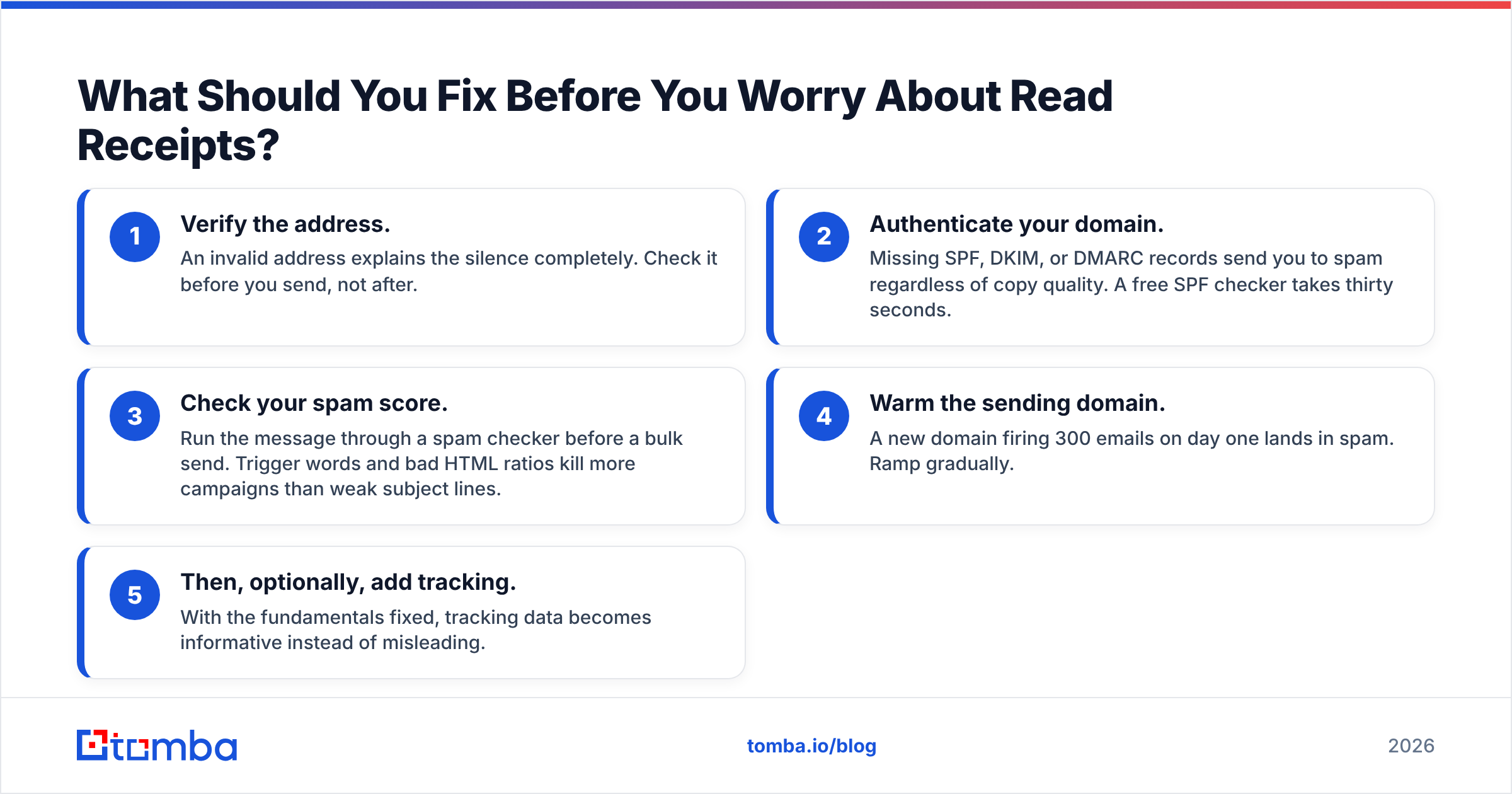
Run this checklist in order. Tracking is the last item, not the first.
- Verify the address. An invalid address explains the silence completely. Check it before you send, not after.
- Authenticate your domain. Missing SPF, DKIM, or DMARC records send you to spam no matter how good the copy is. A free SPF checker takes thirty seconds.
- Check your spam score. Run the message through a spam checker before a bulk send. Trigger words and bad HTML ratios kill more campaigns than weak subject lines.
- Warm the sending domain. A new domain firing 300 emails on day one lands in spam. Ramp gradually.
- Then, optionally, add tracking. With the fundamentals fixed, tracking data becomes informative instead of misleading.
Teams skip straight to step five constantly. They install a tracking extension, watch a wall of zeroes, and decide their copy is bad. The real problem is that a quarter of their list bounced and their DMARC record was never published.
Getting Better Data Than A Read Receipt#
Here's the reframe worth keeping. Learning how to tell if someone read your email on Gmail tells you about one message to one person. Contact quality tells you about your entire pipeline. The second one is where the leverage is.
If you send to addresses you guessed, scraped, or bought without validation, no tracking tool will save you. You'll get silence, and you won't know whether it means "not interested," "never arrived," or "that address hasn't existed since 2023."
Tomba's Email Finder resolves the addresses before you send. Find verified professional emails by name and domain, with confidence scoring, so you know what you're working with instead of guessing. The free tier gives you 25 searches a month, and paid plans start at $49/mo on the Starter tier. Full Tomba pricing is public, and the same lookups run through the Tomba API if you'd rather wire verification into your sending workflow.
Fix the address, fix the authentication, then let the follow-up sequence do its job. The read receipt was never going to tell you much anyway.
Related guides#
// get started
Find, verify and enrich your first contacts today
Start on the free plan with 25 searches a month, then scale when your team is ready.
Free plan · No credit card required · GDPR & CCPA
// about the author