How to Track an Email Address: 7 Methods That Work in 2026
Tracking an email address means three different things: proving delivery, verifying it's real, and finding who owns it. Here's how to do all three legally in 2026.
TL;DR
- "Track an email address" means three separate jobs: tracking a message you sent, tracing a message you received, and identifying who owns an address. Pick the right one before you pick a tool.
- Open-rate pixels are now unreliable for anyone on Apple Mail — Apple Mail Privacy Protection pre-loads images, so a huge share of "opens" are machines, not humans.
- Reply rate, click rate, and SMTP-level verification are the only tracking signals that still survive privacy proxies.
- To trace a received email, read the
Received:headers bottom-to-top and check SPF/DKIM/DMARC results — that's forensics, not guesswork. - To identify the human behind an address, use reverse lookup and enrichment APIs. Tomba's free tier gives you 25 searches a month to test the workflow before paying.
What does "track an email address" actually mean?#
Three different questions hide under one phrase, and each has a completely different answer.
- "Did my email arrive and get read?" — This is outbound message tracking: pixels, link redirects, reply detection, and Postmaster data. You control the sending side.
- "Where did this email really come from?" — This is header forensics on an inbound message:
Received:chains, originating IP, SPF/DKIM/DMARC authentication results. You control nothing except the raw source. - "Who owns this address?" — This is reverse lookup and enrichment: mapping
j.doe@acme.comto a name, job title, company, and LinkedIn profile. This is the one most B2B teams actually want.
There's also a fourth thing people mean and can't have: real-time geolocation of a person from their email address. That doesn't exist outside of law enforcement subpoenas. Anyone selling it is selling you IP-geolocation of a mail server, which is usually a data center in Virginia.
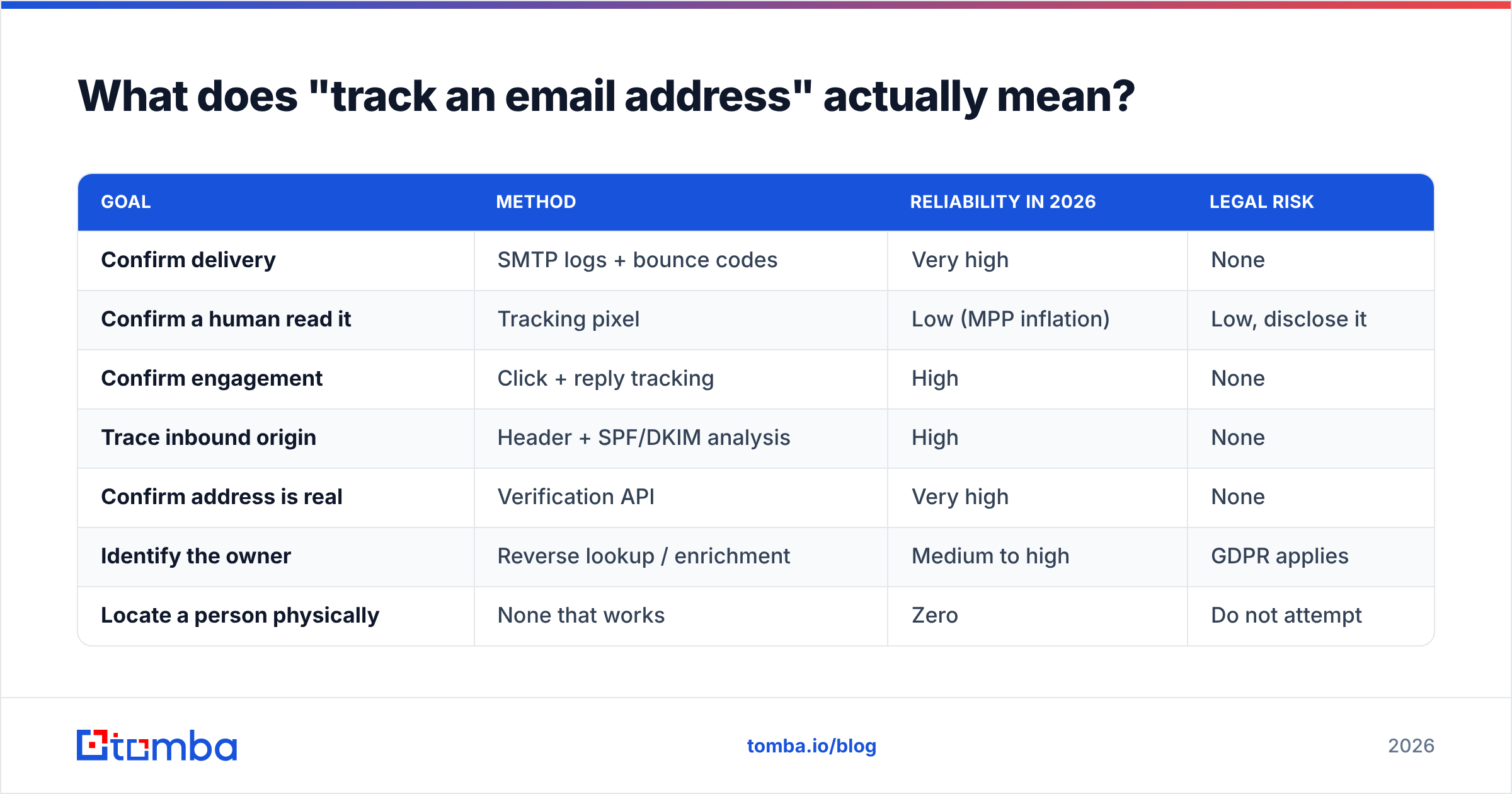
| Goal | Method | Reliability in 2026 | Legal risk |
|---|---|---|---|
| Confirm delivery | SMTP logs + bounce codes | Very high | None |
| Confirm a human read it | Tracking pixel | Low (MPP inflation) | Low, disclose it |
| Confirm engagement | Click + reply tracking | High | None |
| Trace inbound origin | Header + SPF/DKIM analysis | High | None |
| Confirm address is real | Verification API | Very high | None |
| Identify the owner | Reverse lookup / enrichment | Medium to high | GDPR applies |
| Locate a person physically | None that works | Zero | Do not attempt |

How do you track an email you sent?#
Start with what you actually control: the send, the link, and the reply.
1. Tracking pixel (weakest signal). A 1x1 transparent image hosted on your server. When the recipient's client loads images, your server logs a hit. Every major sending platform does this by default. The problem is Apple Mail Privacy Protection, which pre-fetches every image through a proxy the moment mail arrives — whether or not a human ever looks at it. Apple's own privacy documentation describes the behavior plainly. On a B2B list where 40-55% of recipients read on Apple Mail, your open rate is largely fiction.
2. Link click tracking (strong signal). Wrap outbound URLs in a redirect that logs the click before forwarding. Clicks require intentional action, so proxies inflate them far less. Downside: click-wrapping on a fresh sending domain hurts deliverability, because spam filters distrust unfamiliar redirect domains. Use your own subdomain, not a shared shortener.
3. Reply tracking (strongest signal). A reply is a human. Every sequencing tool detects it. If you only measure one thing, measure reply rate — the metric that actually correlates with pipeline. If you want a baseline to judge yourself against, look at typical response rate benchmarks for your segment before you decide your campaign is broken.
4. Postmaster and SMTP-level data. Google Postmaster Tools shows domain reputation, spam rate, and authentication pass rates for mail you send to Gmail. Microsoft SNDS does the same for Outlook. This is delivery tracking, not open tracking — and it's the layer that tells you whether your problem is copy or infrastructure. Check your SPF record first; a broken one poisons everything downstream.
[Screenshot placeholder: Google Postmaster Tools domain reputation graph showing a reputation drop after a large unverified send]
5. Bounce code parsing. Hard bounces (5xx) tell you the mailbox is gone. Soft bounces (4xx) tell you it's full or throttled. Most teams treat both the same and destroy their sender reputation by retrying dead addresses. Parse the codes and suppress permanently on 550.
Why did open tracking stop being trustworthy?#
Because the mail clients started opening your emails for the recipient.
Apple shipped Mail Privacy Protection in 2021. Since then, image pre-fetching has spread: Gmail has proxied images through its own cache since 2013, Outlook.com blocks remote content by default for unknown senders, and privacy-focused clients like Proton strip remote images entirely. Add corporate security scanners — which click every link in an inbound message to sandbox it — and your "engagement" dashboard now includes robots that click links they never read.
The practical consequences:
- Open rate is a directional trend at best. Compare it to itself over time. Never report it as a conversion metric.
- Automated "opened but didn't reply" follow-ups misfire. You're nudging people who never saw the message and skipping people who read it in a preview pane.
- Lead scoring built on opens is noise. Score on clicks, replies, and site visits instead. If you're rebuilding scoring rules, start from what a real marketing qualified lead looks like in your funnel, not from pixel fires.
- Security scanners create phantom clicks. Filter clicks that fire within a few seconds of delivery — those are almost always sandboxes.

How do you trace where a received email came from?#
Read the headers. Every email carries a full routing log, and most people never open it.
In Gmail: open the message, click the three-dot menu, choose Show original. In Outlook: File → Properties → Internet headers. In Apple Mail: View → Message → All Headers.
What to read, in order:
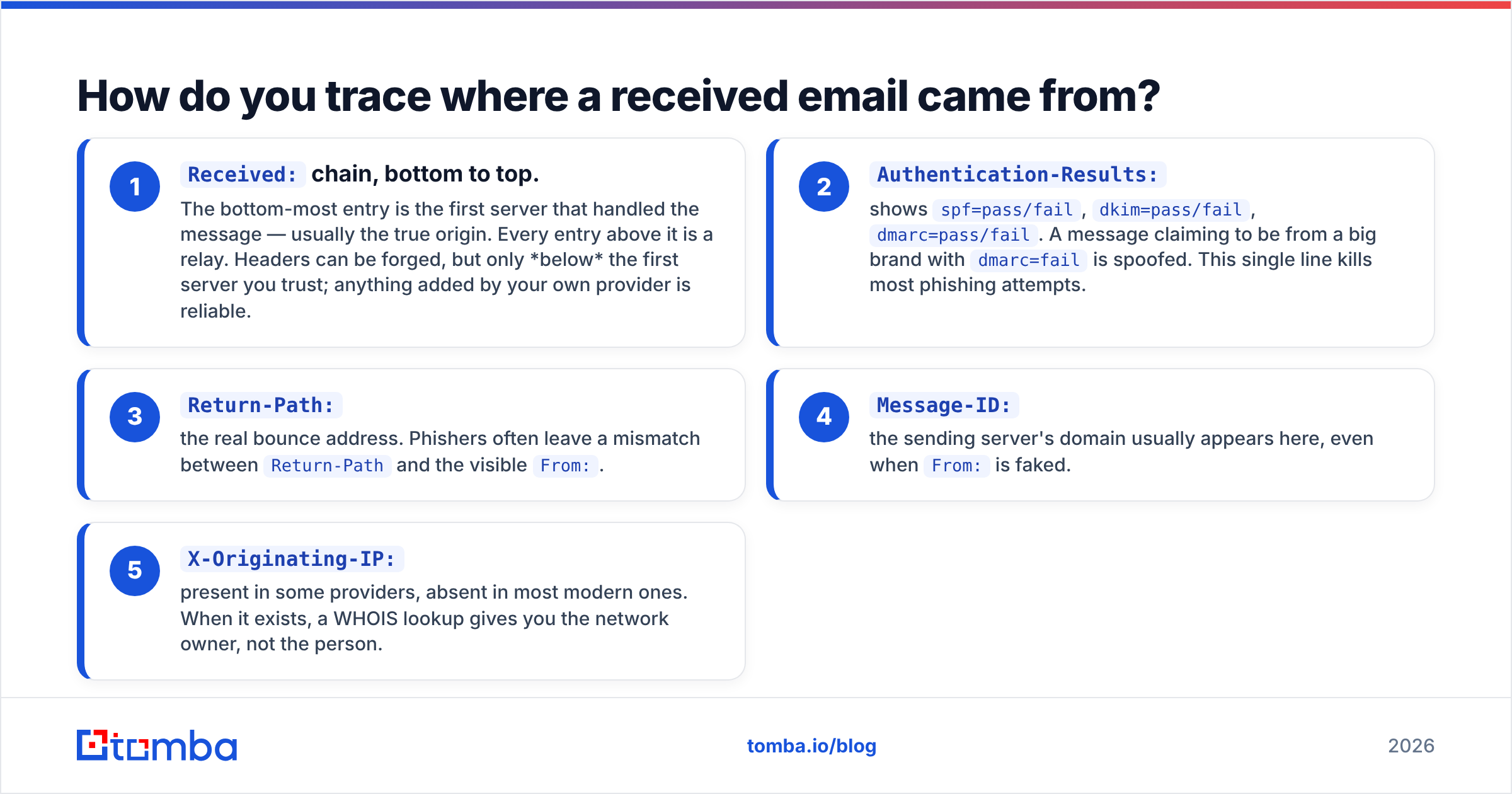
Received:chain, bottom to top. The bottom-most entry is the first server that handled the message — usually the true origin. Every entry above it is a relay. Headers can be forged, but only below the first server you trust; anything added by your own provider is reliable.Authentication-Results:— showsspf=pass/fail,dkim=pass/fail,dmarc=pass/fail. A message claiming to be from a big brand withdmarc=failis spoofed. This single line kills most phishing attempts.Return-Path:— the real bounce address. Phishers often leave a mismatch betweenReturn-Pathand the visibleFrom:.Message-ID:— the sending server's domain usually appears here, even whenFrom:is faked.X-Originating-IP:— present in some providers, absent in most modern ones. When it exists, a WHOIS lookup gives you the network owner, not the person.
Cross-check the origin IP against blocklists before you conclude anything. If the sending IP is listed, you're dealing with compromised infrastructure. A blacklist checker does this in a few seconds, and an SMTP tester confirms whether the claimed mail server actually accepts mail for that domain.
[Screenshot placeholder: Gmail "Show original" view with the Received chain and Authentication-Results line highlighted]
The honest limit: headers give you a server, a network, and a timestamp. They do not give you a person, a home address, or a live location. Anyone who tells you otherwise is describing something that requires a court order.
How do you find out who owns an email address?#
This is where tools earn their keep. Reverse lookup takes an address and returns the person: name, role, company, social profiles, sometimes a direct phone number.
Four approaches, in order of effort:
- Manual search. Paste the address into Google in quotes. Public directories, conference speaker lists, GitHub commits, and press releases surface surprisingly often. Free, slow, works maybe 20% of the time.
- Social platform search. LinkedIn no longer allows searching by email for non-connections, but some platforms still do. Diminishing returns each year.
- Reverse lookup API. Query a maintained B2B dataset and get a structured record back. A reverse email lookup turns an address into a name, title, company, and profile links in one call.
- Full enrichment. Beyond identity, you get firmographics — headcount, industry, tech stack, funding. This is what CRM records should look like before a rep ever picks up the phone. Data enrichment handles the batch version.
The reverse direction matters just as much: you have a name and a company but no address. That's what an email finder is for — pattern detection plus source verification across a company domain.
Which tool fits which tracking job?#
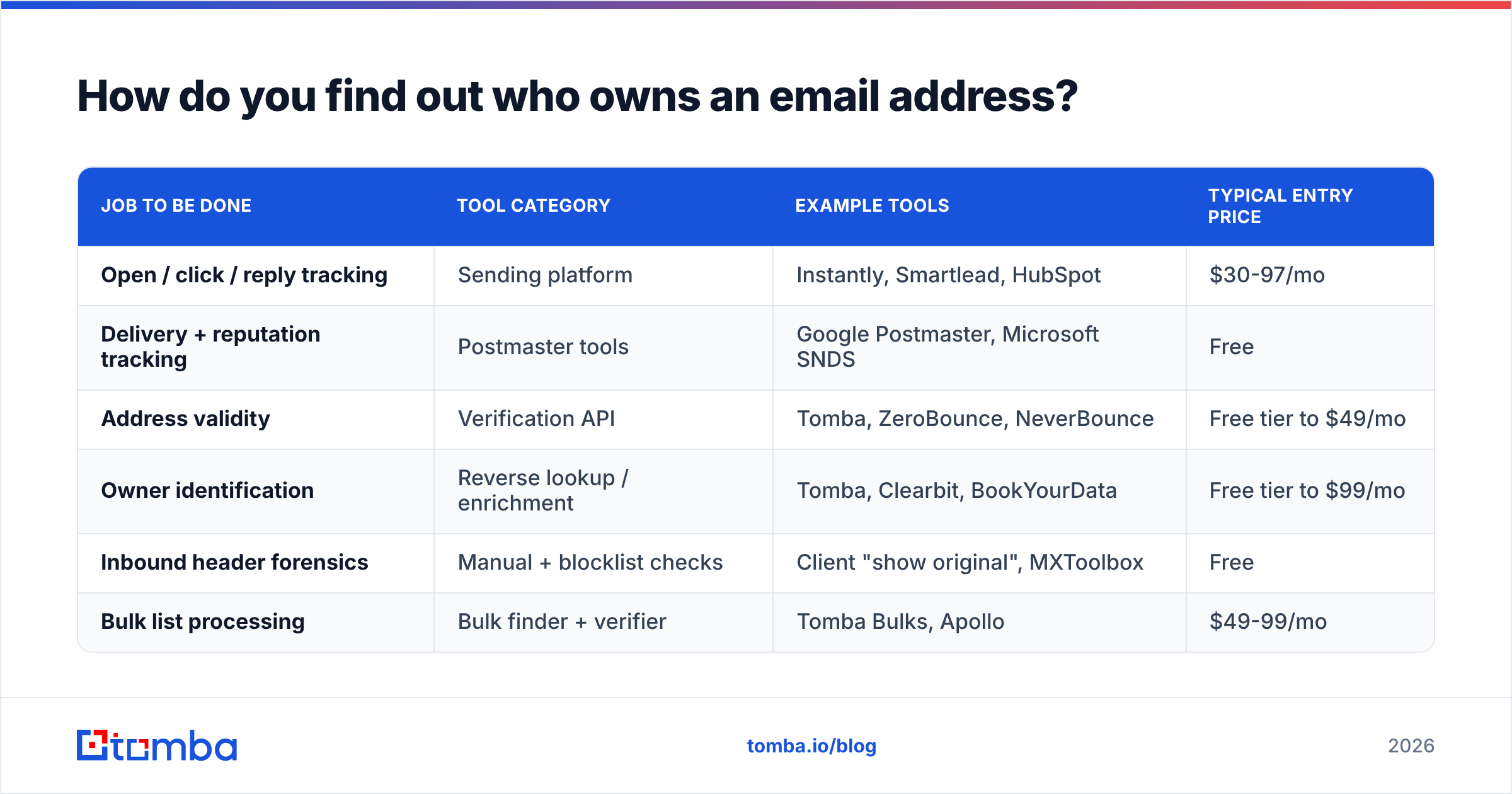
| Job to be done | Tool category | Example tools | Typical entry price |
|---|---|---|---|
| Open / click / reply tracking | Sending platform | Instantly, Smartlead, HubSpot | $30-97/mo |
| Delivery + reputation tracking | Postmaster tools | Google Postmaster, Microsoft SNDS | Free |
| Address validity | Verification API | Tomba, ZeroBounce, NeverBounce | Free tier to $49/mo |
| Owner identification | Reverse lookup / enrichment | Tomba, Clearbit, BookYourData | Free tier to $99/mo |
| Inbound header forensics | Manual + blocklist checks | Client "show original", MXToolbox | Free |
| Bulk list processing | Bulk finder + verifier | Tomba Bulks, Apollo | $49-99/mo |
Tomba's structure is worth noting because it spans three of those rows on one credit pool: Tomba pricing runs a free tier at 25 searches per month, Starter at $49/mo, Growth at $99/mo, and Pro at $249/mo, with Enterprise quoted custom. If you're doing finding, verification, and enrichment separately today, consolidating removes a reconciliation step you probably don't enjoy. BookYourData takes a different route — prepaid, pay-per-record database access — which suits teams buying a list once rather than running continuous lookups. Both are legitimate; the question is whether your volume is bursty or steady.
How do you verify an address is real before you send?#
Verification is the tracking step everyone skips and then pays for later.
The sequence a proper email verifier runs:
- Syntax check — RFC 5322 compliance. Catches typos instantly.
- Domain and MX check — does the domain exist and accept mail at all? Dead domains fail here.
- Disposable detection — flags throwaway providers.
- Role account detection —
info@,sales@,support@. Deliverable but usually worthless for outbound, and they generate complaints. - SMTP handshake — connects to the mail server and asks whether the mailbox exists, without sending anything.
- Catch-all detection — some domains accept every address regardless. These need separate handling; a catch-all verifier uses additional signals rather than returning a useless "unknown."
Run this before every campaign, not once a quarter. B2B data decays roughly 2-3% per month through job changes alone — Gartner's research on data quality has been consistent on the cost of stale records for years. A list verified in January is meaningfully wrong by June.
For volume work, bulk verify handles the whole file, and the Tomba API drops verification into your signup form so bad addresses never enter the database in the first place. That last one is the highest-leverage change most teams can make in an afternoon.
Is email tracking legal?#
Mostly yes, with real conditions that vary by jurisdiction.
GDPR (EU/UK). Tracking pixels are personal data processing. You need a lawful basis — legitimate interest works for B2B in most member states, but you must disclose tracking in your privacy policy and honor deletion requests. Several German courts have ruled that open tracking specifically requires consent. Check with counsel, not with a blog post.
CAN-SPAM (US). Doesn't restrict tracking at all. It requires accurate headers, a real physical address, and a working unsubscribe honored within 10 business days. Header forgery is the actual violation — which is why the header forensics above matter in both directions.
CASL (Canada). The strictest of the three. Requires express or implied consent before sending commercial email, with penalties that have run into seven figures.
Reverse lookup and enrichment. Legal for B2B contact data in most jurisdictions when the data is sourced from public or legitimately licensed sources and you can respond to access requests. Ask any vendor where their data comes from — Tomba documents its data sources publicly, and vendors who won't answer that question are a liability on your compliance register. G2's buyer reviews are a reasonable place to sanity-check vendor claims against actual customers.
What is never acceptable: scraping personal accounts, buying data of unknown provenance, using tracking to build behavioral profiles of individuals without disclosure, or pretending IP-geolocation is a person's location.
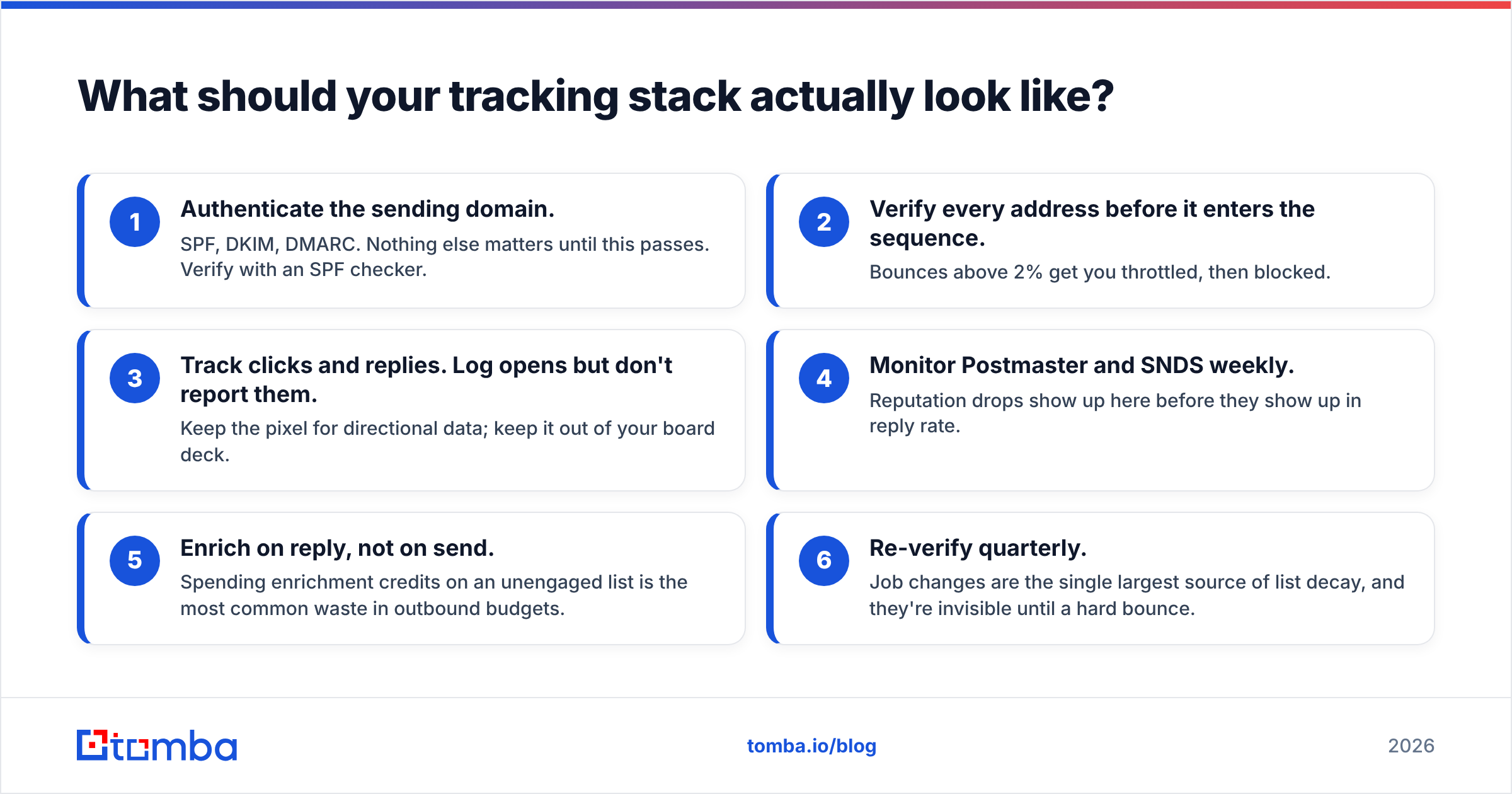
What should your tracking stack actually look like?#
Here's the practical build, in order of implementation:
- Authenticate the sending domain. SPF, DKIM, DMARC. Nothing else matters until this passes. Verify with an SPF checker.
- Verify every address before it enters the sequence. Bounces above 2% get you throttled, then blocked.
- Track clicks and replies. Log opens but don't report them. Keep the pixel for directional data; keep it out of your board deck.
- Monitor Postmaster and SNDS weekly. Reputation drops show up here before they show up in reply rate.
- Enrich on reply, not on send. Spending enrichment credits on an unengaged list is the most common waste in outbound budgets.
- Re-verify quarterly. Job changes are the single largest source of list decay, and they're invisible until a hard bounce.
The teams that get this right stop asking "who opened it" and start asking "which accounts are engaging, and do we have a verified way to reach the right person there." That's a data question, and it's answerable.
Ready to track down the people behind the addresses? Start with the Tomba Email Finder — verified professional emails by name, domain, or company, with sources shown for every result so you know exactly where the data came from. The free tier gives you 25 searches a month, no card required, and every result runs through the same verification pipeline as the paid plans. Find the address, confirm it's live, then spend your tracking effort on signals that mean something.
Related guides#
// get started
Find, verify and enrich your first contacts today
Start on the free plan with 25 searches a month, then scale when your team is ready.
Free plan · No credit card required · GDPR & CCPA
// about the author