How to Use AI for Sales Prospecting: A 2026 Playbook
AI can cut prospecting research from 20 minutes per account to under 2 — or flood your pipeline with plausible-sounding garbage. Here's the workflow that separates the two.
Learning how to use AI for sales prospecting is mostly about knowing where to stop. AI is very good at research, scoring, and first drafts. It is bad at contact data. Get that one split right and the rest is plumbing.
TL;DR
- AI is excellent at research and drafting, and unreliable at contact data. Split your stack on that line and most AI prospecting problems go away.
- The best use cases, in order: account research summaries, ICP scoring, trigger-event monitoring, and first-draft personalization.
- Never let a model invent an email address. LLMs guess
first.last@domain.comand are wrong 30-40% of the time. Send that step to a real finder plus verification. - A realistic target: 15-25 minutes of research per account drops to 2-4 minutes, with a human reviewing every send.
- Budget $150-$400 a month for a solo rep's stack — one LLM seat, one data tool, one sequencer.
What does "AI for sales prospecting" actually mean in 2026?#
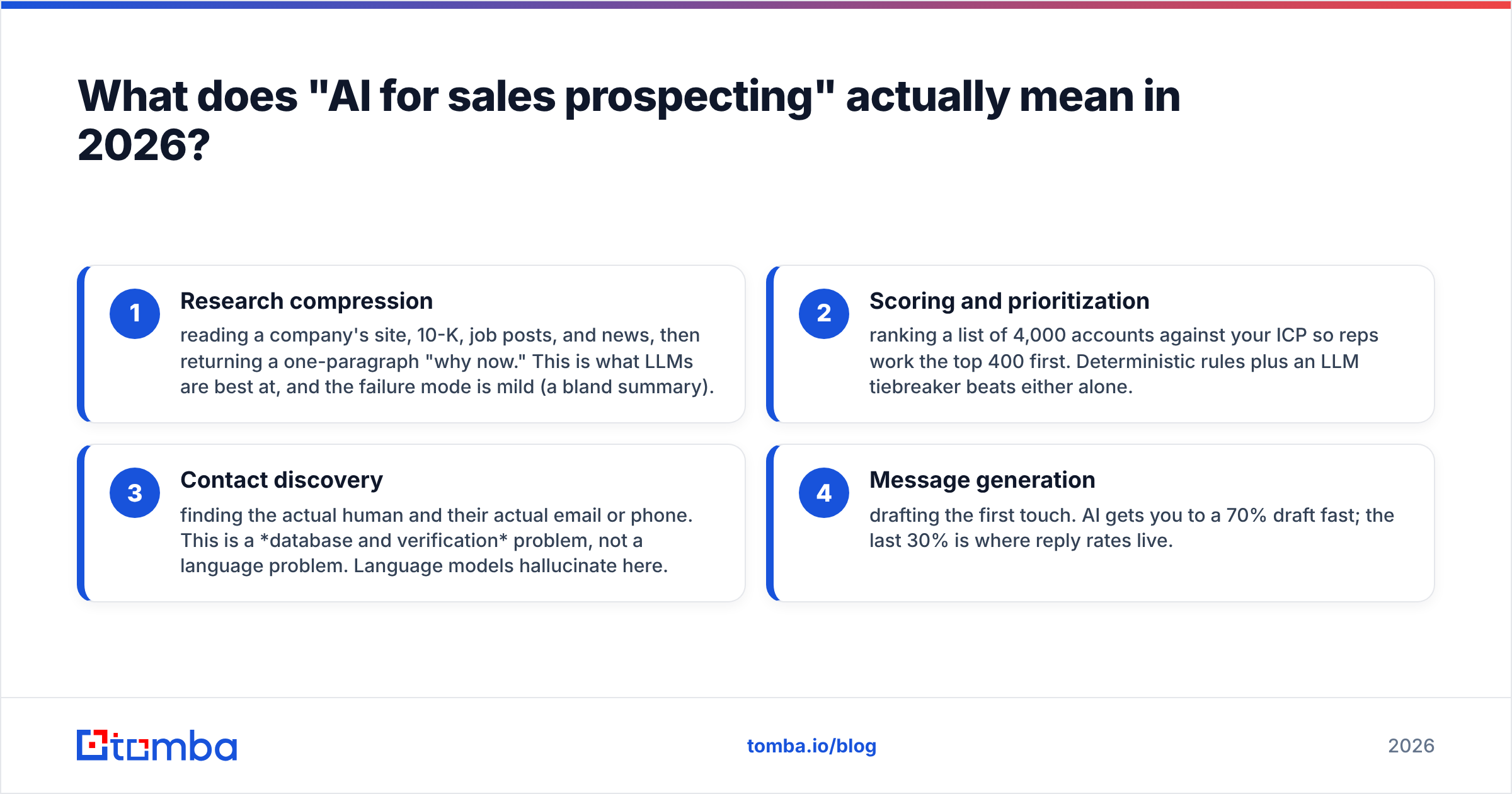
The phrase covers four different jobs. Teams that blur them together get poor results.
- Research compression — reading a company's site, 10-K, job posts, and news, then returning a one-paragraph "why now." LLMs are best at this. The worst case is a bland summary.
- Scoring and prioritization — ranking 4,000 accounts against your ICP so reps work the top 400 first. Simple rules plus an LLM tiebreaker beat either one alone.
Those two are language problems. The next two are not.
- Contact discovery — finding the actual human and their actual email or phone. This is a database and verification problem. Language models guess here, and guesses bounce.
- Message generation — drafting the first touch. AI gets you to a 70% draft fast. The last 30% is where reply rates live.
If your "AI prospecting" project is really job #3 dressed up as job #1, it will fail. A model that has never seen sarah.chen@acme.io will still produce it. It will look perfect and read with total confidence. That output is a guess, not data.

The practical rule: AI decides who and why. A verified data source decides where. Everything below is built on that split.
How to use AI for sales prospecting in seven steps#
Here is the loop. It works for a solo founder doing 20 touches a day, and for a 30-rep team doing 3,000.
- Define the ICP in machine-readable terms. Not "mid-market SaaS." Write it as filters a machine can apply: 50-500 employees, US/UK/DE, uses Segment or RudderStack, hiring a data engineer in the last 90 days, Series B or later. Vague ICPs produce vague AI output. The model will happily explain why any company fits.
- Build the account list from structured sources. Use firmographic filters, tech-stack detection, and job-post signals. AI is the filter designer here, not the data source. Ask your model to turn your ICP into query filters. Then run those filters against a real B2B database.
Those two steps set the boundaries. The next two decide who you actually contact.
- Score and rank. Run each account through a scoring prompt with a clear rubric: 0-5 on fit, 0-5 on timing. Force the model to cite the evidence it used. Drop any score without a citation. That rule is your hallucination filter.
- Find and verify contacts. For each top account, work out the right person, then find their email from a real source. Use a domain search to see who is at the company and what the email pattern looks like. Verify each address before it enters a sequence.
Step 4 is the one people rush. Slow down there. The last three steps turn research into a message.
- Generate research briefs, not messages, first. Ask for a 4-bullet brief per prospect: what they do, what changed recently, what problem you solve for that change, and one proof point. The brief works for email, LinkedIn, and calls.
- Draft from the brief. Now write the email. Feed the brief plus your best template. Cap the model at 90 words. Forbid any claim that is not in the brief.
- Human review, then send. Every message gets eyes on it. A rep can review 40-60 AI drafts an hour — far faster than writing 15 from scratch.
Steps 1-3 are where AI gives you the biggest gain. Step 4 is where it destroys value if you let it improvise.
Which AI prospecting tools should you actually use?#
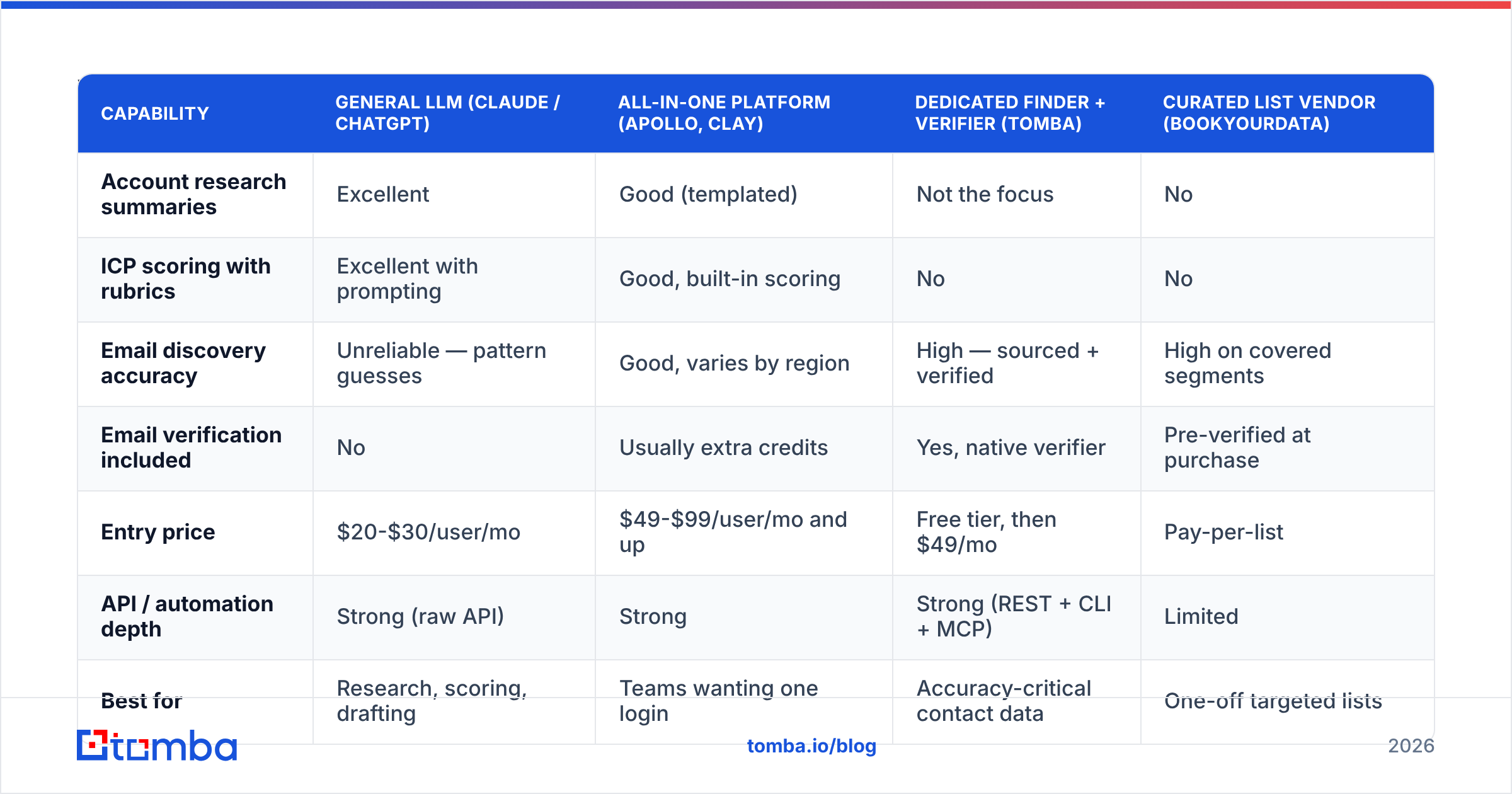
No single tool does all four jobs well. Here is how the main categories compare on what matters in a prospecting workflow.
| Capability | General LLM (Claude / ChatGPT) | All-in-one platform (Apollo, Clay) | Dedicated finder + verifier (Tomba) | Curated list vendor (BookYourData) |
|---|---|---|---|---|
| Account research summaries | Excellent | Good (templated) | Not the focus | No |
| ICP scoring with rubrics | Excellent with prompting | Good, built-in scoring | No | No |
| Email discovery accuracy | Unreliable — pattern guesses | Good, varies by region | High — sourced + verified | High on covered segments |
| Email verification included | No | Usually extra credits | Yes, native verifier | Pre-verified at purchase |
| Entry price | $20-$30/user/mo | $49-$99/user/mo and up | Free tier, then $49/mo | Pay-per-list |
| API / automation depth | Strong (raw API) | Strong | Strong (REST + CLI + MCP) | Limited |
| Best for | Research, scoring, drafting | Teams wanting one login | Accuracy-critical contact data | One-off targeted lists |
Most working stacks in 2026 look the same: one LLM for thinking, one contact-data layer for truth, one sequencer for delivery. A solo setup runs $20 (LLM) + $49 (Tomba Starter) + $60-$90 (sequencer). Call it $130-$160 a month. Team setups with a platform layer land closer to $300-$400 per seat.
BookYourData is worth a look when you need a clean, pre-verified list for one vertical and no research pipeline. It solves a narrow problem well. Tomba fits better when you want contact lookup inside an automated loop, since the email finder API and MCP server let an agent call it directly.
Why does AI hallucinate email addresses, and how do you stop it?#
Because a language model predicts the next token. It is not a lookup table. Ask it for "the email of the VP of Marketing at Acme" and it returns the most likely string, based on the shape of email addresses in its training data. Sometimes that lands. Often the real person uses s.chen@, or schen@, or a new domain after an acquisition.
The cost is not just a wasted send. Bounces above 2-3% start to damage sender reputation, and that damage is slow to repair. Google and Yahoo have made bulk-sender rules stricter, not looser. Their published sender guidelines set a hard spam-rate ceiling.
Three controls fix the problem:
- Never accept an address from a generative model. If the model does produce one, treat it as a guess. Run it through an email verifier before it counts.
- Prefer pattern plus source over inference. A finder that returns the address and the public source it came from gives you something you can check. That is the line between data and a guess.
- Handle catch-all domains on purpose. Catch-all servers accept everything, so a naive verifier calls dead addresses "valid." A catch-all verifier adds extra signals instead of shrugging.

What should you automate versus keep human?#
The split that holds up across teams:
- Automate fully: list building, firmographic enrichment, tech-stack detection, trigger monitoring (funding, hiring, leadership changes), email finding, verification, deduplication, CRM writeback.
- Automate with review: ICP scoring, research brief generation, first-draft copy, follow-up sequencing logic.
- Keep human: the final read of any first-touch message, all objection handling, anything with a named competitor or a pricing claim, and every reply.
Keeping that final read human is not sentiment. AI copy fails in one specific way: it is fluent but generic. Prospects have had two years of AI outreach and spot it in half a second. A rep skimming a draft catches "I noticed your recent growth" at once, then kills it or swaps in the thing that actually changed.
Research from HubSpot's sales trends work shows the same pattern. Teams using AI report time savings first. Quality gains show up only when a human stays in the loop on messaging.
How do you measure whether AI prospecting is working?#
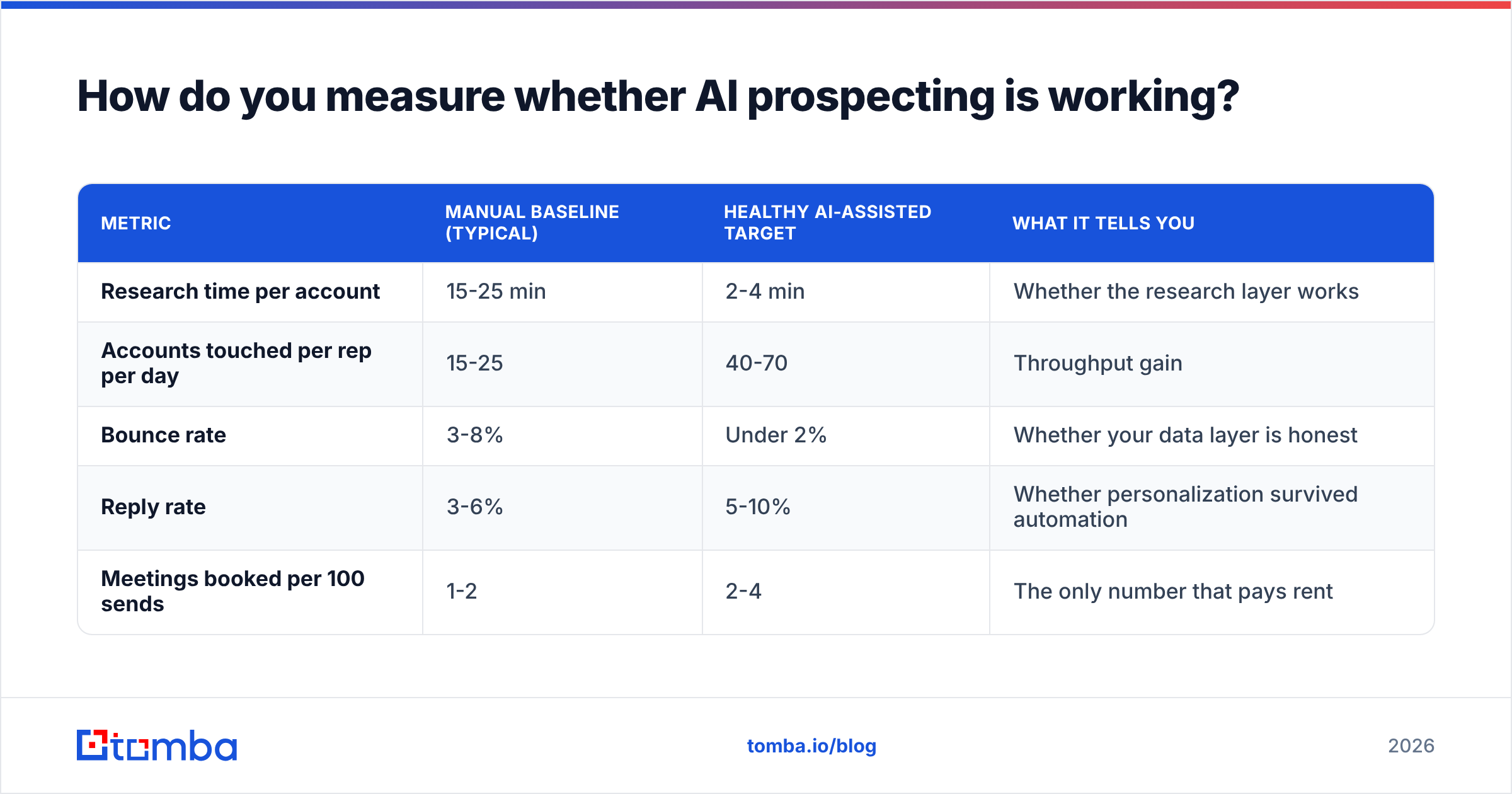
Track four numbers before and after. If two of them do not move, the stack is not paying for itself.
| Metric | Manual baseline (typical) | Healthy AI-assisted target | What it tells you |
|---|---|---|---|
| Research time per account | 15-25 min | 2-4 min | Whether the research layer works |
| Accounts touched per rep per day | 15-25 | 40-70 | Throughput gain |
| Bounce rate | 3-8% | Under 2% | Whether your data layer is honest |
| Reply rate | 3-6% | 5-10% | Whether personalization survived automation |
| Meetings booked per 100 sends | 1-2 | 2-4 | The only number that pays rent |
Watch bounce rate hardest. It is the first sign that someone let a model write addresses. If it climbs while volume climbs, stop the sequence. Re-verify the list, then find where the unverified data got in.
Track a fifth, softer number too: how many drafts your reps rewrite from scratch. Above 50% means your briefs are too thin. Fix step 5, not the copy prompt.
What are the most common AI prospecting mistakes?#
The first three are data and process errors:
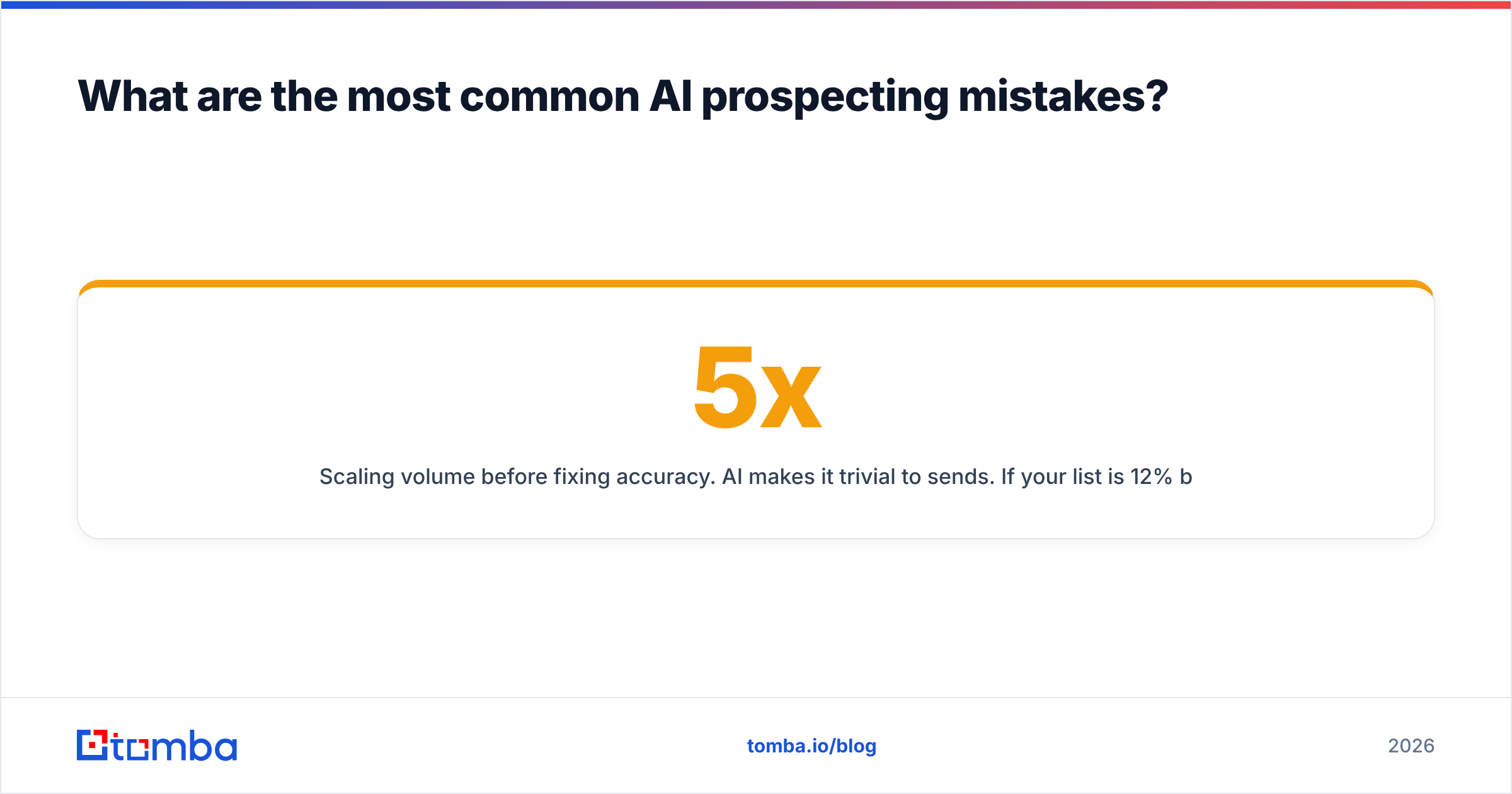
- Scaling volume before fixing accuracy. AI makes it easy to 5x sends. If your list is 12% bad, you just 5x'd your bounces and burned a domain. Fix data quality first, then scale.
- Over-personalizing on trivia. "I saw you went to Michigan" reads as surveillance, not research. Personalize on business context: a role change, a hiring pattern, a product launch.
- Using one mega-prompt. A single prompt that does research, scoring, and copywriting produces mush. Chain small prompts with clear outputs between them.
The last three are trust errors:
- Skipping the citation rule. Any AI claim about a prospect should carry a URL. No URL, no claim in the email.
- Ignoring deliverability basics. AI does not change SPF, DKIM, DMARC, warmup, or domain rotation. Check your SPF record and warm up properly before you scale. No clever prompt rescues a burned domain.
- Treating AI output as final. The model is a fast junior researcher, not a closer.
How do you connect AI to your existing stack?#
Keep the plumbing boring. A workable architecture has four layers:
- Signal layer — job boards, funding feeds, tech detection, website visitor data. This is what triggers a play.
- Data layer — contact lookup and verification. Rule-based, auditable, API-driven.
- Reasoning layer — the LLM doing scoring, briefs, and drafts. Stateless, prompt-chained, cheap to rerun.
- Execution layer — sequencer plus CRM. Where humans review and send.
Each layer should be swappable. Teams that wire an LLM straight into a sequencer end up unable to change either one. If you are building agent workflows, an MCP-compatible data source matters. It lets the agent request a verified email as a tool call instead of imagining one. Tomba MCP and the Tomba API both cover that path, as do the HubSpot and Zapier integrations.
To compare vendors, G2's sales intelligence category is a fair starting point for user reviews on regional coverage. Coverage varies far more than vendors admit, especially outside North America.
Get the data layer right first#
Knowing how to use AI for sales prospecting comes down to one rule. AI can speed up every step except knowing that an email address is real. That step stays deterministic, and it decides whether the other six matter.
Start there. Run your current list through verification and see what share comes back risky. Then wire a real finder into the workflow so the model never has to guess. The Tomba Email Finder returns sourced, verified addresses by domain, name, or company, with 25 free searches a month to test coverage on your own ICP. Point your AI at the thinking, and let a database handle the facts.
Related guides#
// get started
Find, verify and enrich your first contacts today
Start on the free plan with 25 searches a month, then scale when your team is ready.
Free plan · No credit card required · GDPR & CCPA
// about the author