How to Use an Outreach Platform: A 2026 Setup Guide
Most teams buy a sales engagement platform, import a list, and wonder why replies never come. Here is the exact setup order — domains, data, sequences, and routing — that makes an outreach platform actually work.
TL;DR
- An outreach platform is a sequencing engine, not a lead source. It sends and tracks — it does not fix bad data, bad domains, or bad offers.
- Set up in this order: sending infrastructure → verified contact data → segmented lists → sequence logic → CRM sync → reporting. Skip a step and the platform amplifies the mistake.
- Budget 3-4 weeks before your first real send: 2-3 weeks of domain warmup runs in parallel with list building.
- Cap volume at roughly 30-50 emails per mailbox per day. Volume problems get solved with more mailboxes, never with a bigger daily cap.
- Track reply rate and positive-reply rate per segment. Open rate is now close to noise thanks to privacy proxies.
What is an outreach platform, exactly?#
An outreach platform (also called a sales engagement platform) is software that schedules and executes multi-step, multi-channel touch sequences to a list of prospects, then logs every outcome back to your CRM. Think of it as a kitchen expediter: it does not cook the food or source the ingredients, it just makes sure every plate goes out at the right moment to the right table, and tells you which ones came back.
The category includes Outreach.io, Salesloft, Reply.io, Instantly, Saleshandy, Amplemarket, and a dozen others. They differ enormously in price and depth, but functionally they all do five things:
- Sequence execution — a defined series of emails, calls, LinkedIn tasks, and waits, executed per prospect on a schedule.
- Mailbox rotation — spreading sends across multiple connected inboxes so no single mailbox exceeds a safe daily volume.
- Reply detection — pulling a prospect out of a sequence the moment they respond, so nobody gets a "just following up" after saying yes.
- Activity logging — writing every touch and outcome to your CRM so pipeline attribution survives.
- Reporting — step-level and segment-level performance so you can kill what does not work.
What they explicitly do not do: find contacts, verify that those contacts exist, warm your domain from zero, or write a message anyone wants to read. Those four things determine ~80% of your result, and all four happen before the platform gets involved.
How do you set up an outreach platform without burning your domain?#
Start with infrastructure, because everything else depends on it. A sequence sent from an unauthenticated, cold domain does not underperform — it lands in spam and takes your list with it.
Step 1: Buy separate sending domains. Never run cold outreach from your primary company domain. If acme.com is where your invoices, support tickets, and marketing emails go, a spam complaint spike there is a company-wide incident. Buy getacme.com, acme-hq.com, tryacme.com — two to three lookalikes — and route all outbound through those.
Step 2: Authenticate every domain. SPF, DKIM, and DMARC are mandatory, not optional. Google and Yahoo have enforced bulk-sender authentication requirements since 2024, and enforcement has only tightened since. Check your records with an SPF checker before you connect anything, and confirm your SPF record actually includes your sending provider. Google's own bulk sender guidelines are the authoritative reference here — read them once, properly.
Step 3: Warm each mailbox for 14-21 days. Warmup tools send and reply to low-volume conversational mail between seeded inboxes, building a positive engagement history before real prospects see you. Start at 5 sends/day and ramp roughly 5 per day. Run this warmup in the background permanently, not just during onboarding — a warmup calculator will give you a realistic ramp schedule for your target volume.
Step 4: Cap per-mailbox volume. 30-50 emails per mailbox per day is the working ceiling in 2026. Two domains × three mailboxes each = six mailboxes = 180-300 sends/day. If you need 1,000/day, you need roughly 20-25 mailboxes, not a higher cap. This is the single most common mistake teams make when they first learn how to use an outreach platform: they treat the daily limit as a dial to turn up.
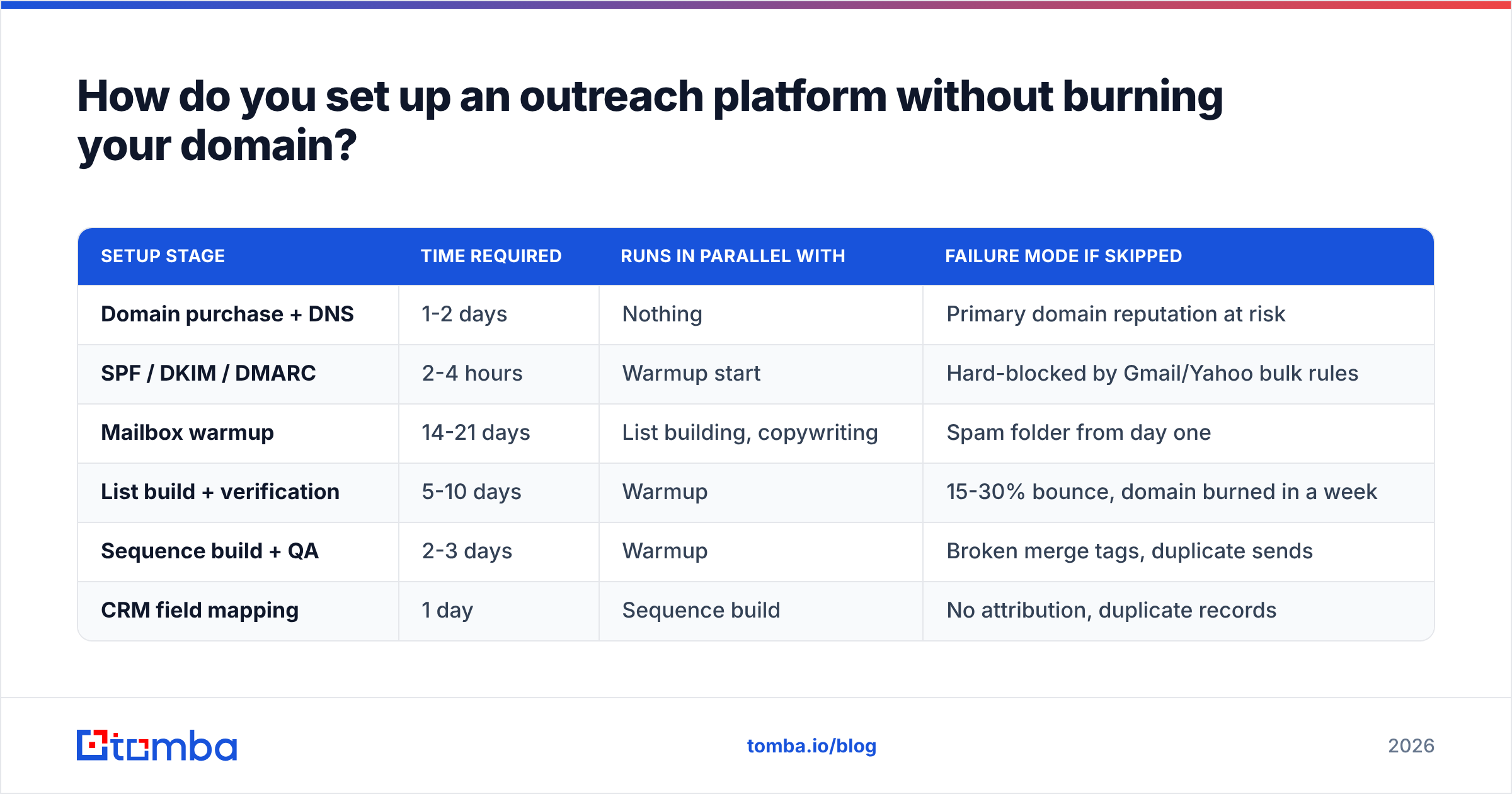
| Setup stage | Time required | Runs in parallel with | Failure mode if skipped |
|---|---|---|---|
| Domain purchase + DNS | 1-2 days | Nothing | Primary domain reputation at risk |
| SPF / DKIM / DMARC | 2-4 hours | Warmup start | Hard-blocked by Gmail/Yahoo bulk rules |
| Mailbox warmup | 14-21 days | List building, copywriting | Spam folder from day one |
| List build + verification | 5-10 days | Warmup | 15-30% bounce, domain burned in a week |
| Sequence build + QA | 2-3 days | Warmup | Broken merge tags, duplicate sends |
| CRM field mapping | 1 day | Sequence build | No attribution, duplicate records |
Where does the contact data come from?#
From outside the platform, in almost every case — and this is where most implementations quietly fail.
Some engagement platforms bundle a contact database; most do not, and the bundled ones are frequently stale. Your bounce rate is the tell. Anything above 3% starts damaging sender reputation; above 5% and mailbox providers begin treating your domain as a list-buyer.
A defensible data workflow looks like this:
- Define the account list first. Firmographics, tech stack, headcount, funding stage — whatever your ICP actually is. Account list before contact list, always.
- Find contacts per account. Use a domain search to pull every known email at a target company, then filter by role. This is faster than looking up people one at a time and gives you multi-threading options inside the same account.
- Verify before import. Run every address through an email verifier. Discard invalids, quarantine catch-alls into a separate low-volume segment rather than mixing them into your main sends.
- Enrich for personalization variables. Job title, recent role change, company news. Empty merge fields are worse than no personalization —
Hi {{first_name}}rendering literally is a well-known credibility killer. - Deduplicate against the CRM. Nothing torches a relationship faster than an SDR cold-emailing an existing customer's VP.
- Re-verify quarterly. B2B data decays roughly 25-30% per year as people change jobs.
Tools like BookYourData, Apollo, and Tomba all solve parts of this. If you want a purpose-built email finder with per-result confidence scoring and an API you can wire directly into your enrichment step, that is exactly the slot Tomba fills — see where Tomba gets data for how sourcing and scoring work.
How should you structure sequences?#
Short, segmented, and multi-channel. The single-channel 12-email blast is dead and has been for a while.
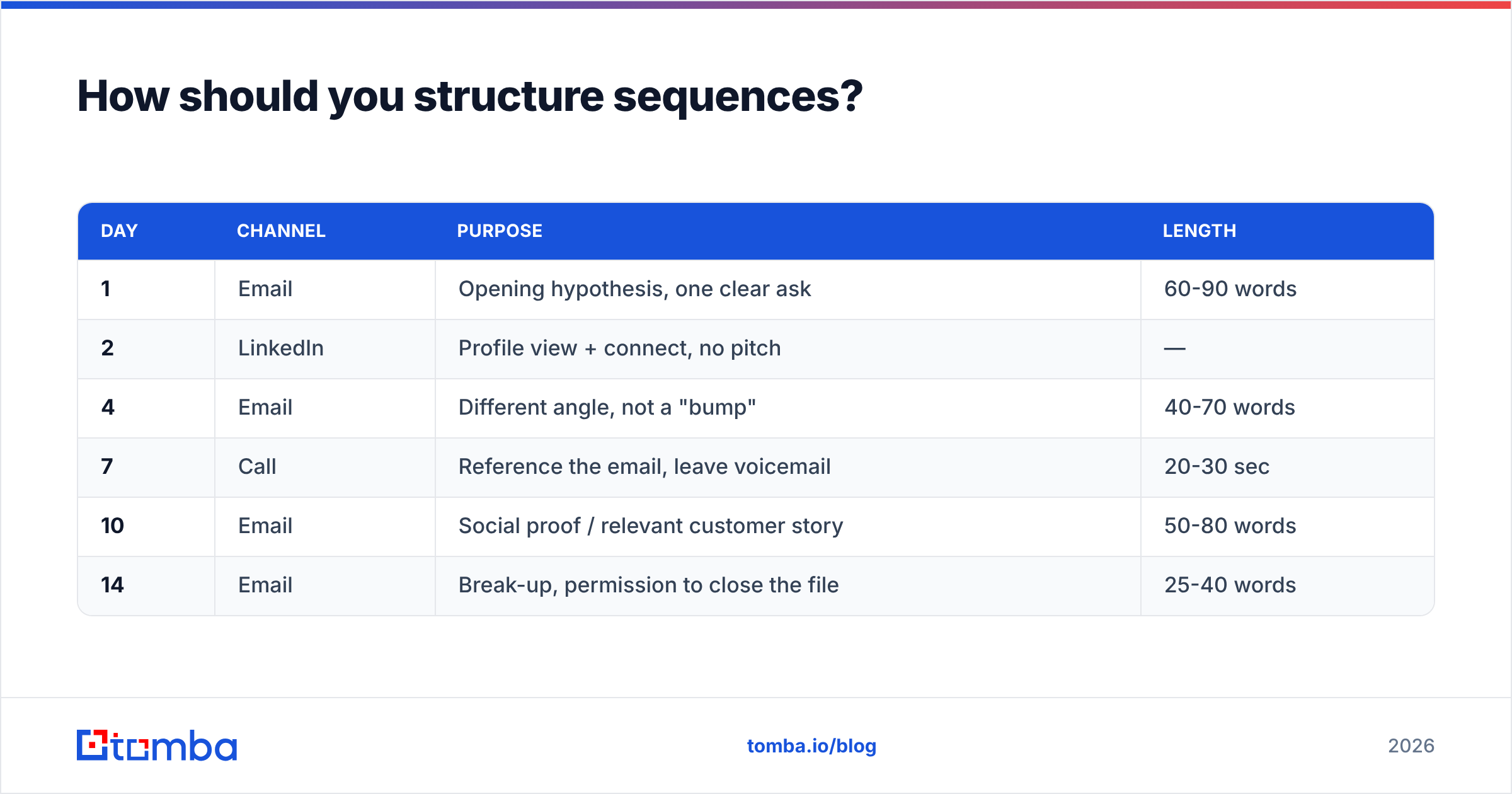
A sequence that works in 2026 looks roughly like this:
| Day | Channel | Purpose | Length |
|---|---|---|---|
| 1 | Opening hypothesis, one clear ask | 60-90 words | |
| 2 | Profile view + connect, no pitch | — | |
| 4 | Different angle, not a "bump" | 40-70 words | |
| 7 | Call | Reference the email, leave voicemail | 20-30 sec |
| 10 | Social proof / relevant customer story | 50-80 words | |
| 14 | Break-up, permission to close the file | 25-40 words |
Rules that matter more than the exact cadence:
- One idea per email. Two asks means zero replies.
- Every follow-up must add something. "Just checking in" is a tax on the recipient's attention with no return.
- Segment before you sequence. One sequence per persona per pain point. A generic sequence sent to 5,000 people will underperform six specific sequences sent to 800 each, every single time.
- Plain text only. No tracking pixels on the first touch, no images, no HTML templates. Signature links kept to one.
- QA with a live send. Push five records through to your own inbox before launching. Broken merge tags are the most common day-one failure.
Which outreach platform fits which team?#
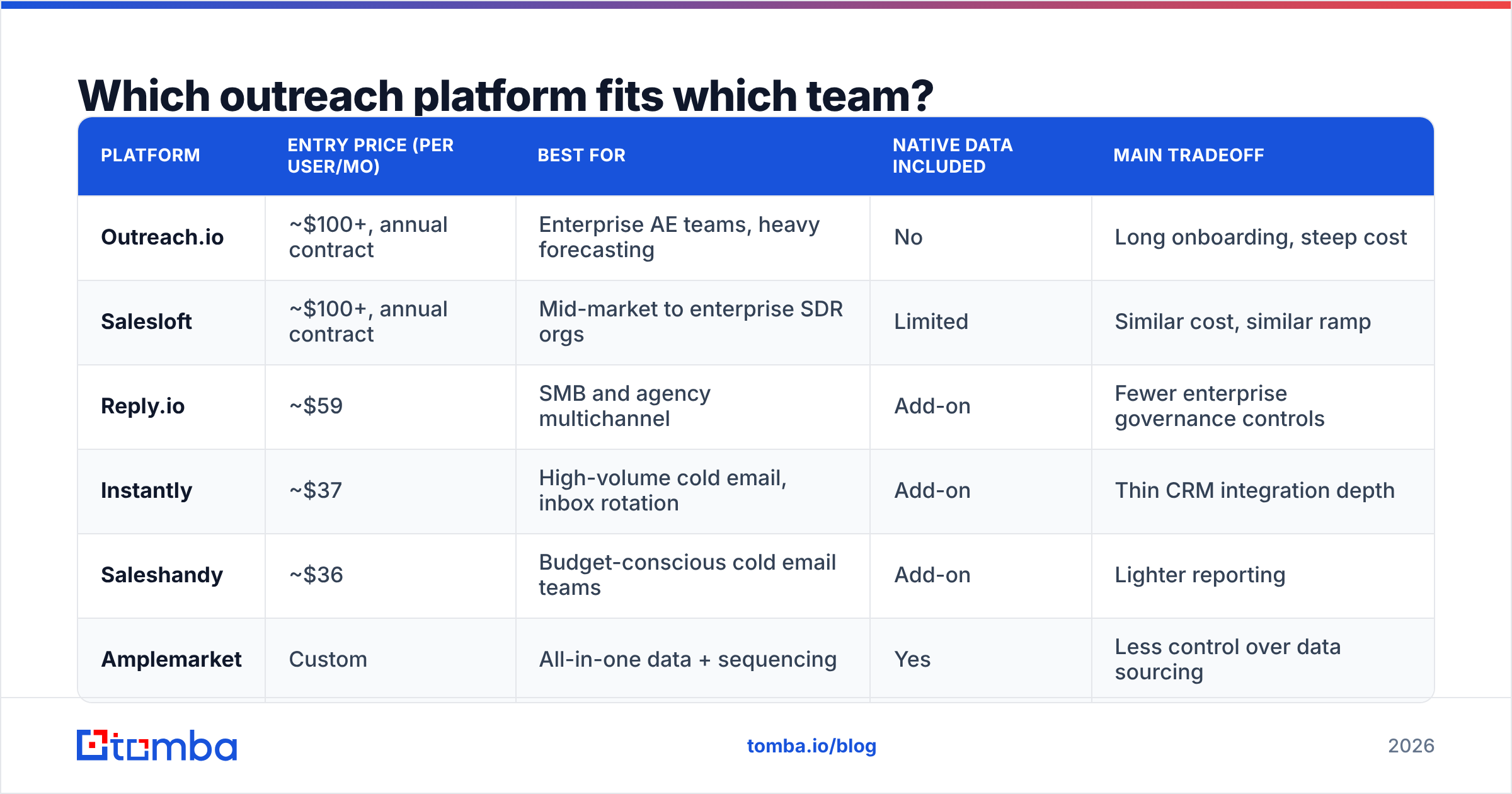
Price and depth vary by an order of magnitude. Pick for your motion, not for the feature list.
| Platform | Entry price (per user/mo) | Best for | Native data included | Main tradeoff |
|---|---|---|---|---|
| Outreach.io | ~$100+, annual contract | Enterprise AE teams, heavy forecasting | No | Long onboarding, steep cost |
| Salesloft | ~$100+, annual contract | Mid-market to enterprise SDR orgs | Limited | Similar cost, similar ramp |
| Reply.io | ~$59 | SMB and agency multichannel | Add-on | Fewer enterprise governance controls |
| Instantly | ~$37 | High-volume cold email, inbox rotation | Add-on | Thin CRM integration depth |
| Saleshandy | ~$36 | Budget-conscious cold email teams | Add-on | Lighter reporting |
| Amplemarket | Custom | All-in-one data + sequencing | Yes | Less control over data sourcing |
Check current pricing on each vendor's own site before budgeting — this category re-prices often. Peer reviews on G2 are useful for filtering on implementation pain, which is the cost nobody quotes you.
The pattern worth noticing: the platforms with the deepest sequencing and CRM governance carry the thinnest native data, and the ones with bundled data give you the least control over how it was sourced. Most mature teams end up decoupling — a sequencing platform they trust for execution, plus a dedicated data layer they trust for accuracy. If you are evaluating that split, an Outreach alternative comparison and a Salesloft alternative breakdown are reasonable places to start scoping.
How do you connect it to your CRM without creating a mess?#
Map fields once, deliberately, before the first send. Retrofitting attribution after 10,000 sends is a data-cleanup project nobody has time for.
Minimum viable mapping:
- Contact identity — email as the unique key, not name. Names collide; addresses do not.
- Sequence membership — which sequence, which step, current status. This is what lets you answer "how many opportunities came from Sequence C."
- Reply classification — positive / neutral / negative / out-of-office, written back as a picklist not free text.
- Suppression sync — unsubscribes, closed-lost accounts, and active customers must flow into the platform automatically, not be maintained by hand.
- Owner assignment — the rep who owns the account, so replies route correctly on day one.
HubSpot and Salesforce both document their sequencing objects well; HubSpot's sequences documentation is a good model for how the data should be shaped even if you use a different CRM. If you are pushing enriched contacts in programmatically, wiring the Tomba API into your enrichment step keeps the verified-address requirement enforced at the boundary rather than discovered at bounce time.
Which metrics actually tell you if it is working?#
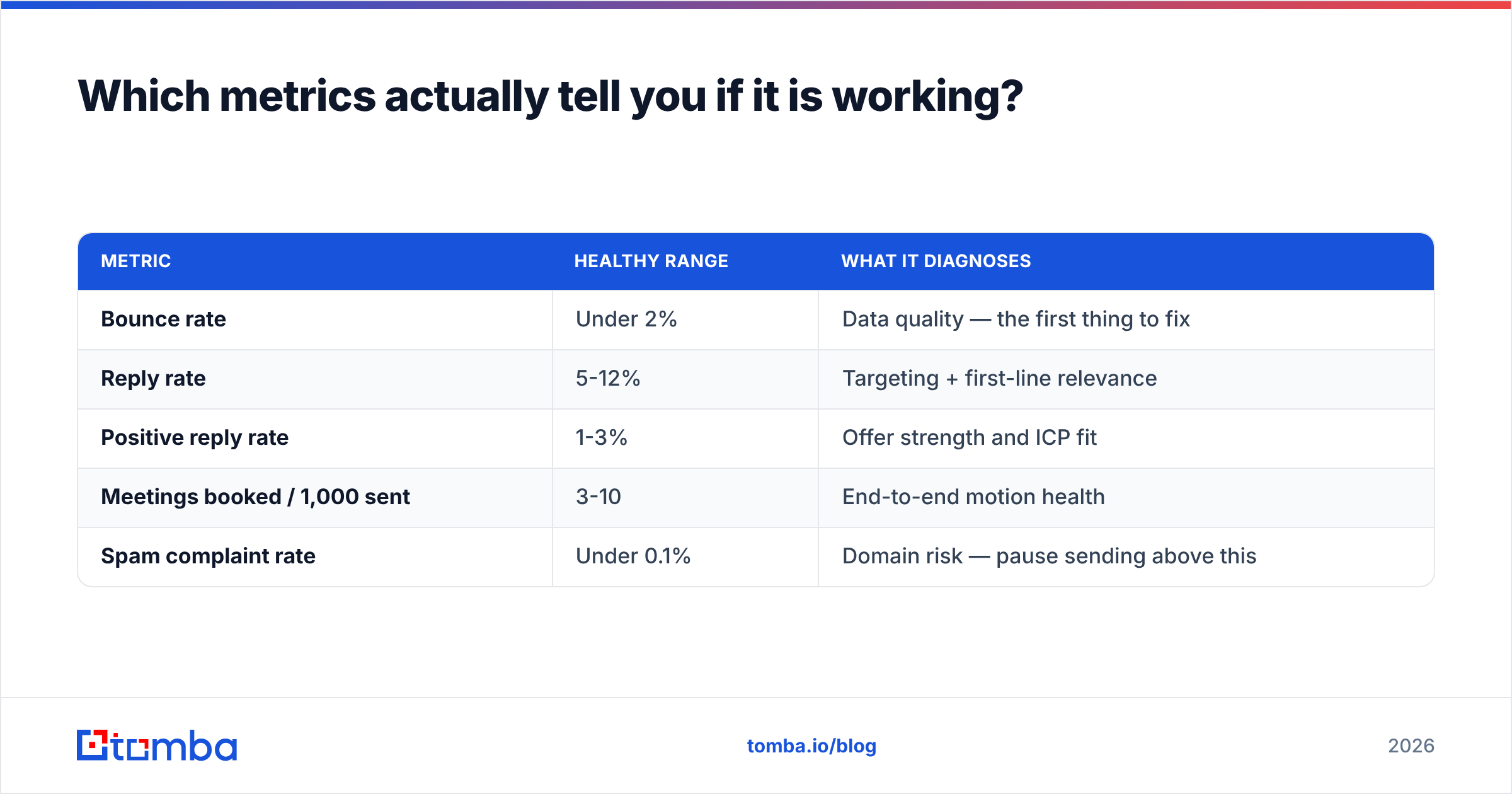
Four, and open rate is not one of them.
| Metric | Healthy range | What it diagnoses |
|---|---|---|
| Bounce rate | Under 2% | Data quality — the first thing to fix |
| Reply rate | 5-12% | Targeting + first-line relevance |
| Positive reply rate | 1-3% | Offer strength and ICP fit |
| Meetings booked / 1,000 sent | 3-10 | End-to-end motion health |
| Spam complaint rate | Under 0.1% | Domain risk — pause sending above this |
Open rate has been unreliable since Apple Mail Privacy Protection began pre-fetching images at scale, and privacy proxies have only spread since. Treat it as a directional signal at best, and never optimize a subject line on open rate alone.
Diagnose in order. High bounce means fix data before touching copy. Low reply with clean bounce means your targeting or first line is wrong. Good reply but low positive reply means you are reaching the right people with the wrong offer — the hardest problem, and no platform setting fixes it. Rising spam complaints mean stop everything and audit your list source.
Review at the segment level weekly, not the aggregate level. Aggregate numbers hide the one segment carrying your whole response rate and the three segments quietly burning your domain.
What are the most common mistakes?#
- Launching before warmup finishes. The two weeks feel wasteful. Skipping them costs you the domain.
- One sequence for everyone. Segmentation is the highest-leverage change available to most teams and it costs nothing but time.
- Importing unverified lists. A single 8% bounce campaign can undo a month of reputation building.
- Turning up daily volume instead of adding mailboxes. Providers score per-mailbox behavior; you cannot outrun that with settings.
- No suppression sync. Emailing existing customers as cold prospects is the fastest way to lose executive support for the whole program.
- Measuring on opens. It produces confident conclusions from noise.
Getting started#
Work backward from your target meetings. If you need 10 meetings a month at a 5% reply rate and a 25% reply-to-meeting conversion, you need roughly 800 well-targeted sends a month — which is six mailboxes running at a comfortable, safe pace, not a firehose. That math changes everything about how you buy and configure.
Build the data layer first, because it is the one input that determines whether every downstream step works. Start with Tomba Email Finder to source and score verified contacts by domain, company, or name, then push them into whichever sequencing platform fits your motion. The free tier gives you 25 searches a month to test accuracy against your own known contacts before committing; paid plans start at $49/mo, with full Tomba pricing if you need bulk or API volume. Verify first, sequence second — that order is the whole game.
Related guides#
// get started
Find, verify and enrich your first contacts today
Start on the free plan with 25 searches a month, then scale when your team is ready.
Free plan · No credit card required · GDPR & CCPA
// about the author