How to Validate an Email Address: 6 Methods for 2026
Regex tells you an address is shaped correctly. It tells you nothing about whether mail will land. Here are the six validation layers that actually predict deliverability, in the order you should run them.
TL;DR
- Validating an email address is not one check — it is five stacked checks: syntax, domain, MX records, mailbox (SMTP), and risk classification. Each one filters a different failure mode.
- Regex alone catches roughly the 5% of addresses that are malformed. It does nothing about the 15-25% of a stale B2B list that is simply dead.
- For a single address, a free browser checker takes about ten seconds. For a list, use a bulk API and expect $0.001-$0.008 per address depending on volume.
- Catch-all domains (roughly 15-20% of B2B domains) will never return a clean yes/no from SMTP. Treat them as a separate bucket with their own send policy, not as errors.
- Target under 2% bounce rate before you send. Above 5%, mailbox providers start throttling you, and recovery takes weeks.
What does it actually mean to validate an email address?#
Validation is a prediction, not a fact. You are asking one question: if I send mail to this address right now, will it be accepted by the receiving server and land in a real human's inbox?
Think of it like checking whether a street address is deliverable. Regex confirms the address has a house number and a street name. A domain check confirms the street exists. An MX lookup confirms someone built a mailbox on that street. An SMTP probe knocks on the door to see if anyone answers. Only the last step tells you anything useful — and plenty of houses have a doorman who says "sure, leave it here" for every name you ask about. That doorman is a catch-all server, and it is the single biggest reason validation is harder than it looks.
The reason this matters is mechanical. Gmail, Outlook, and Yahoo score your sending domain partly on how many of your messages hit nonexistent mailboxes. A high hard-bounce rate is the clearest possible signal that you bought or scraped a list. Sender reputation degrades fast and repairs slowly, which is why validation runs before the campaign, not after the first bounce report.
What are the five layers of email validation?#
Run them in this order. Each layer is cheaper than the one after it, so failing early saves money.
- Syntax check (RFC 5322). Does the string parse as a valid address? This catches typos like
john.doe@@acme.com, trailing spaces, and illegal characters. It is free, instant, and rejects about 3-6% of a raw scraped list. The formal grammar is defined in RFC 5322, and it is far more permissive than most developers assume — quoted strings and plus-addressing are both legal. - Domain and DNS check. Does
acme.comresolve at all? Parked domains, expired registrations, and misspelled TLDs (.con,.cmo) die here. One DNS query, near-zero cost. - MX record check. Does the domain publish mail exchange records? A domain can exist and still accept no mail. No MX record means a guaranteed hard bounce, and this check alone removes a surprising slice of any list older than eighteen months.
- SMTP mailbox probe. Open a connection to the MX host and issue
RCPT TOwithout sending data. A250means the mailbox exists; a550means it does not. This is the layer that actually predicts bounces, and it is also the layer that most cheap tools skip or fake. - Risk classification. Is this a role account (
info@,sales@), a disposable address (mailinator.com), a known spam trap pattern, or a catch-all domain? None of these bounce — they just hurt you in different ways. Role accounts drag down reply rates; spam traps end your sending domain.
Skip layer four and you have a syntax checker wearing a verifier's costume. Skip layer five and you will pass a list that bounces at 0.5% and still gets you blocklisted.

How do you validate a single email address by hand?#
You do not need an account for a one-off check. Three options, fastest first:
Use a free web checker. Paste the address into a free email checker and read the result. It runs syntax, MX, and SMTP in one pass and returns a status plus a confidence score. Ten seconds, no signup.
Do it manually with dig and telnet. If you want to see the raw exchange:
dig acme.com MX +short
# 10 aspmx.l.google.com.

telnet aspmx.l.google.com 25
HELO example.com
MAIL FROM: <you@example.com>
RCPT TO: <john.doe@acme.com>
A 250 2.1.5 OK means the mailbox is accepted. A 550 5.1.1 User unknown means it is not. Caveat: most residential and cloud IPs are blocked on port 25, and Microsoft 365 in particular now returns ambiguous responses to unauthenticated probes. Manual SMTP is a good way to understand the mechanism and a bad way to run production checks.
Check the pattern instead. If you are trying to confirm a guessed address rather than a supplied one, work the other direction: find the company's actual email format checker result first. If Acme uses first.last@acme.com and your address is jdoe@acme.com, you have your answer before any SMTP call.
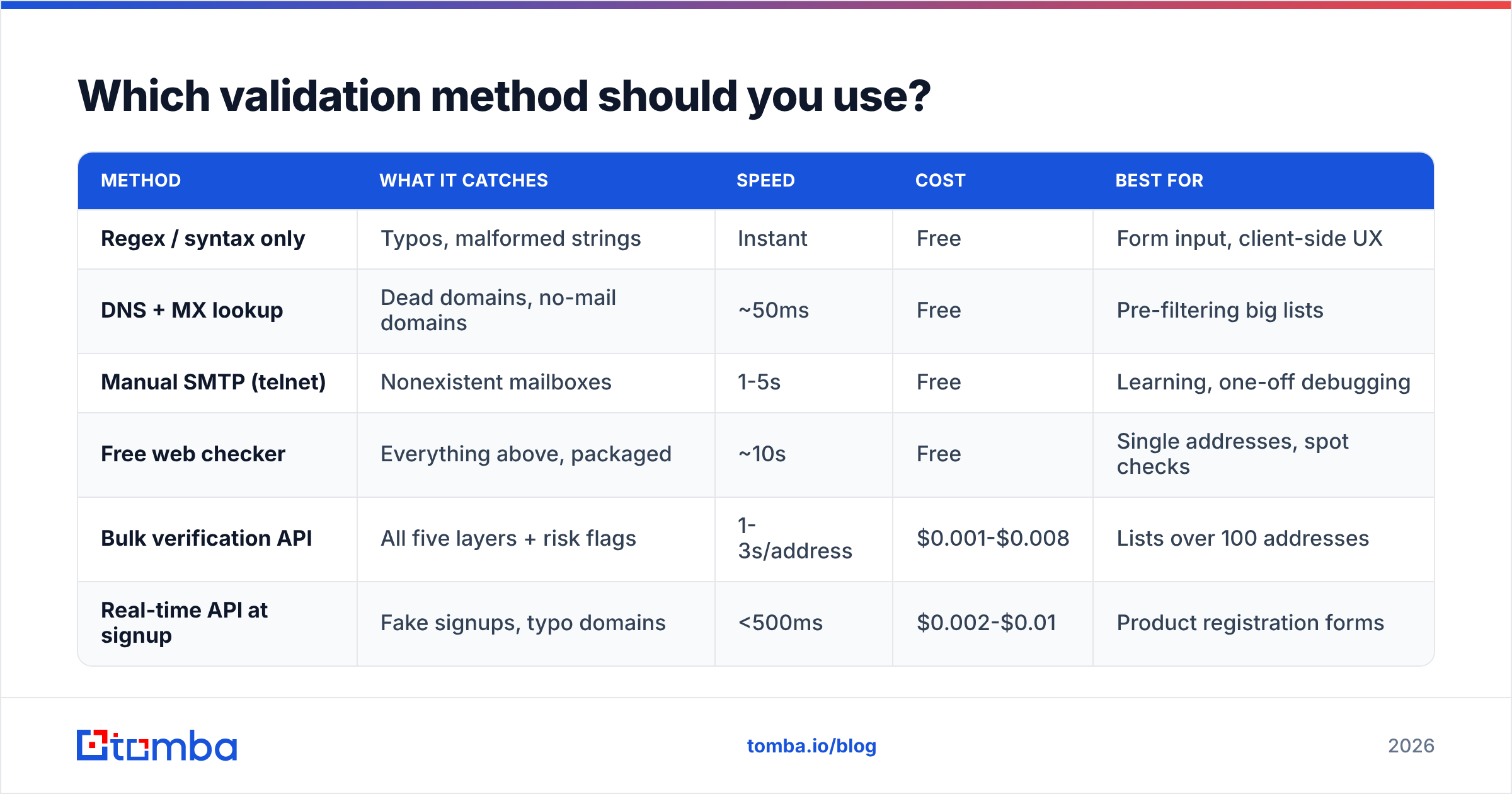
Which validation method should you use?#
| Method | What it catches | Speed | Cost | Best for |
|---|---|---|---|---|
| Regex / syntax only | Typos, malformed strings | Instant | Free | Form input, client-side UX |
| DNS + MX lookup | Dead domains, no-mail domains | ~50ms | Free | Pre-filtering big lists |
| Manual SMTP (telnet) | Nonexistent mailboxes | 1-5s | Free | Learning, one-off debugging |
| Free web checker | Everything above, packaged | ~10s | Free | Single addresses, spot checks |
| Bulk verification API | All five layers + risk flags | 1-3s/address | $0.001-$0.008 | Lists over 100 addresses |
| Real-time API at signup | Fake signups, typo domains | <500ms | $0.002-$0.01 | Product registration forms |
The practical split: use regex in your signup form for instant feedback, use a real-time API call before you write the row to your database, and use bulk verification before every campaign send. Those are three different jobs and one tool rarely does all three well.
Should you use regex to validate email addresses?#
Yes, but only as a first-pass filter, and use a short pattern rather than a clever one.
The internet is full of "RFC-compliant" regex monsters running to several thousand characters. They are technically more correct and practically worse: they reject legal addresses, they are unreadable, and on adversarial input some of them backtrack catastrophically. A pattern in the shape of ^[^\s@]+@[^\s@]+\.[^\s@]+$ covers the realistic cases and gets out of the way.
The deeper issue is that syntax and existence are unrelated. nonexistent.person@google.com passes every regex ever written and hard-bounces every time. Meanwhile "very.unusual"@strange.example.com is a legal address that most regex rejects. As the Wikipedia entry on email addresses documents, the permitted local-part grammar is genuinely strange. Match loosely, then verify for real.
One exception worth coding: a typo-domain suggester. If a user types gmial.com or yaho.com, a Levenshtein comparison against the top 50 consumer domains catches it and offers "did you mean gmail.com?" That single feature recovers more real signups than any regex refinement.
How do you validate email addresses in bulk?#
For anything past a hundred addresses, batch it.
Deduplicate first. Roughly 8-12% of a merged list is duplicates, and you pay per verification. Normalize case, strip Gmail dots and plus-tags, then remove duplicates before you spend a credit.
Split by domain. Group addresses by domain so the MX lookup runs once per domain instead of once per address. Any decent bulk service does this internally; if you built your own pipeline, it is the single biggest speedup available.
Upload and wait. A bulk verify job on 10,000 addresses typically finishes in 15-40 minutes. Rate limits at the receiving end are the bottleneck, not your uploader. Anyone promising 10,000 verified addresses in ninety seconds is returning cached or inferred results for most of them.
Segment the output, do not just delete. Valid addresses go to the campaign. Invalid goes to a suppression list you never touch again. Catch-all and unknown go to a third bucket with a lower-volume, higher-quality send — you can still mail them, just not in a 5,000-address blast from your primary domain.
Re-verify on a schedule. B2B email data decays at roughly 22-30% per year because people change jobs. A list verified in January is meaningfully worse by July. Quarterly re-verification of your active segments is the normal cadence; monthly if you are sending high volume.
If your data lives in a spreadsheet, the Google Sheets add-on runs verification in-place so you skip the export/import loop entirely.
What do verification result codes actually mean?#
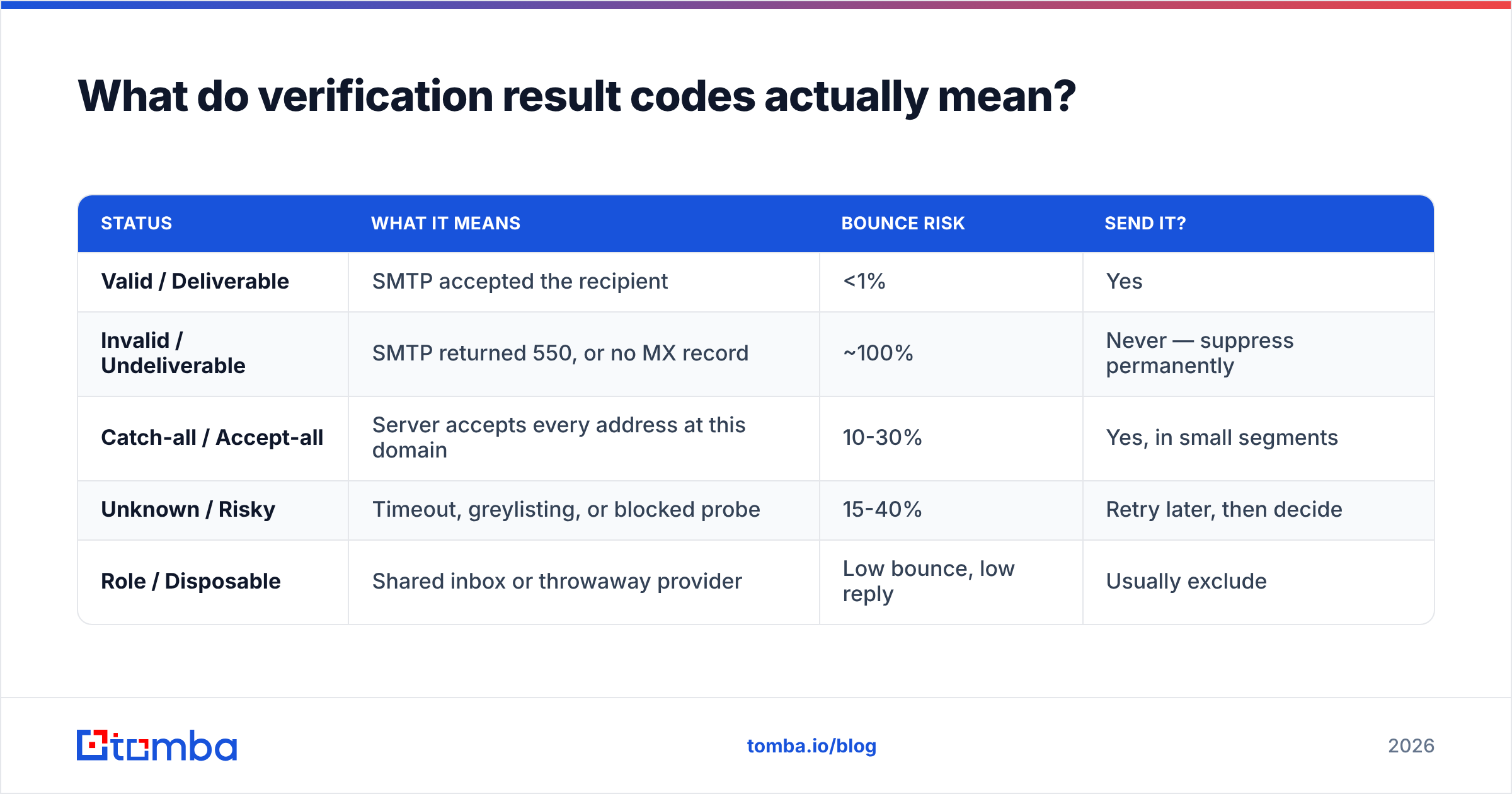
Every provider uses slightly different labels for the same five states. Here is the translation:
| Status | What it means | Bounce risk | Send it? |
|---|---|---|---|
| Valid / Deliverable | SMTP accepted the recipient | <1% | Yes |
| Invalid / Undeliverable | SMTP returned 550, or no MX record | ~100% | Never — suppress permanently |
| Catch-all / Accept-all | Server accepts every address at this domain | 10-30% | Yes, in small segments |
| Unknown / Risky | Timeout, greylisting, or blocked probe | 15-40% | Retry later, then decide |
| Role / Disposable | Shared inbox or throwaway provider | Low bounce, low reply | Usually exclude |
The status that trips people up is unknown. It is not a soft "probably fine" — it means the check genuinely could not complete, often because the receiving server greylisted the probe. Re-running unknowns 24-48 hours later resolves a good share of them into a definite answer. Providers that never return "unknown" are not more accurate; they are guessing and reporting the guess as fact.
How do you handle catch-all domains?#
Separately, and with a different playbook.
A catch-all server is configured to accept mail for any local part at the domain — ceo@, asdfgh@, everything gets a 250. Around 15-20% of B2B domains run this way, and it skews heavily toward mid-market and enterprise companies using Microsoft 365 with anti-harvesting enabled. SMTP verification cannot resolve them, because the server refuses to distinguish real from fake.
What works instead:
- Pattern confidence. If the domain's known format is
first.last@and 40 other verified contacts at that company match it, an address in that format is very likely real even on a catch-all. - Historical engagement data. Providers that have seen an address open or reply in the past can flag it as active without an SMTP answer.
- Dedicated catch-all logic. A catch-all verifier combines pattern matching, source corroboration, and engagement signals to score these addresses rather than dumping them into "unknown."
Practical policy: send to catch-all addresses, but cap them at 20-30% of any single campaign and send them from a warmed secondary domain. That way a bad batch costs you a support domain, not your primary one. And keep an eye on email deliverability metrics per segment so you can see which bucket is actually causing problems.
How accurate should you expect validation to be?#
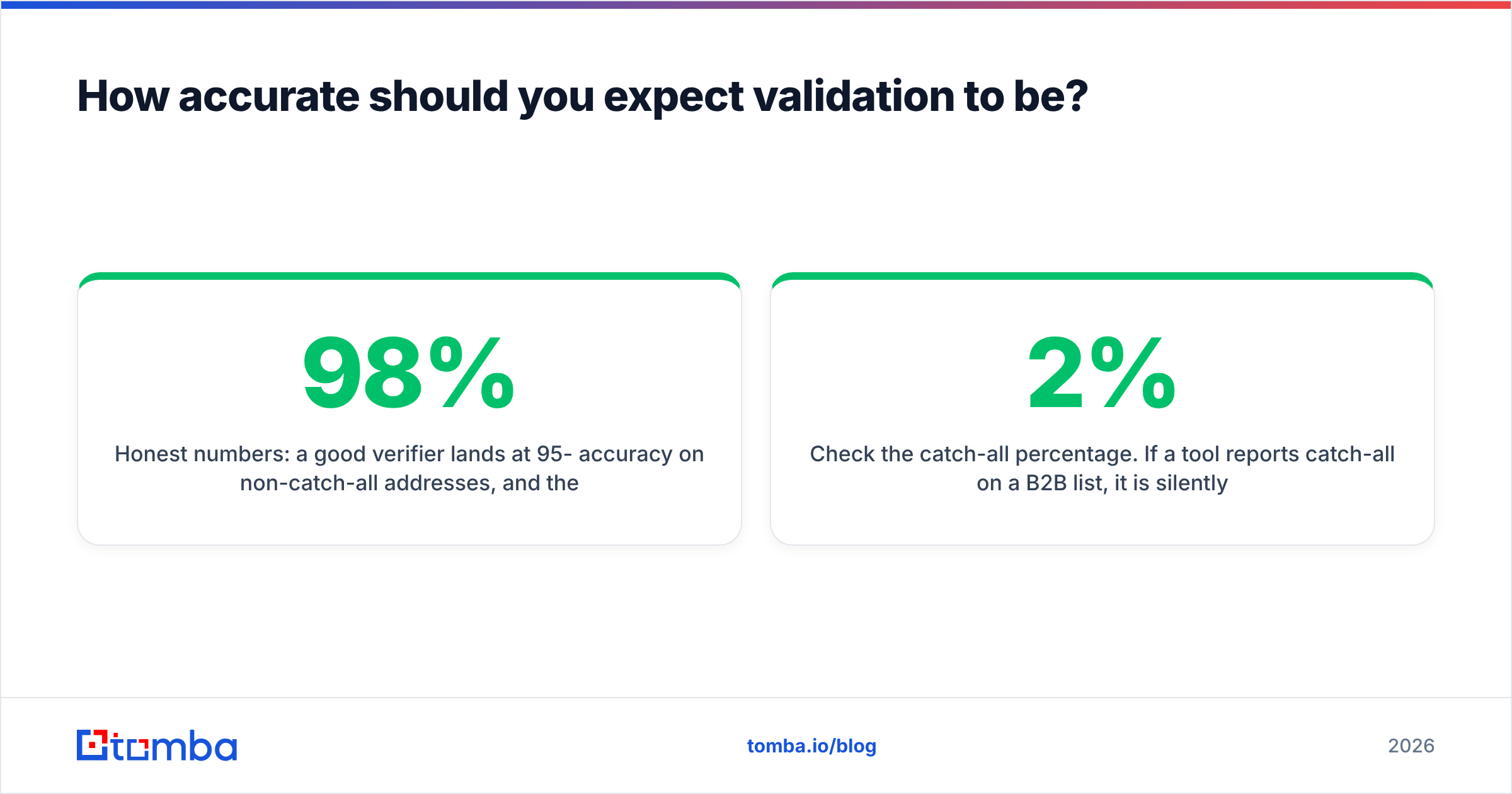
Honest numbers: a good verifier lands at 95-98% accuracy on non-catch-all addresses, and the vendor claims of "99.9%" are usually measured on a curated test set that excludes the hard cases. Where providers actually differ is in what they do with ambiguity — the weak ones mark everything uncertain as "valid" because it makes their dashboard look better and their bounce liability is yours, not theirs.
Three things to check before you trust a vendor:
- Test with known-bad addresses. Seed your test batch with 20 addresses you know are dead. If the tool passes them as valid, the SMTP layer is not real.
- Check the catch-all percentage. If a tool reports 2% catch-all on a B2B list, it is silently classifying catch-alls as valid. The real number is closer to 15-20%.
- Read the refund policy. Providers that refund credits for unknown results are the ones confident in their SMTP stack.
Buying data rather than verifying your own is a legitimate alternative for cold lists — vendors like BookYourData sell pre-verified B2B contacts with bounce guarantees, which shifts the accuracy risk to them. The tradeoff is cost per contact versus cost per credit. Comparison sites like G2's email verification category are a reasonable starting point for shortlisting, as long as you run your own seed test before committing volume.
What does email validation cost?#
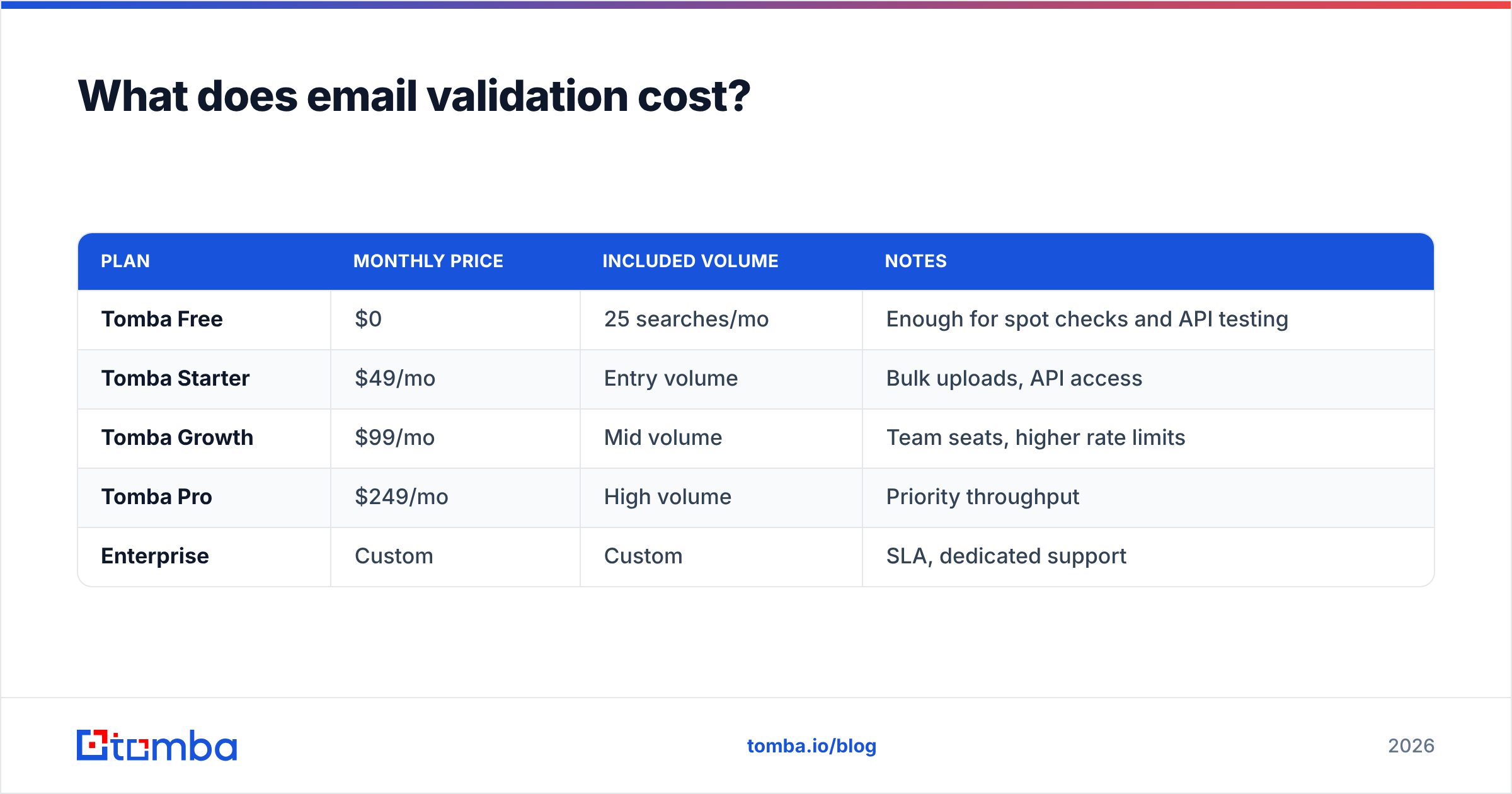
| Plan | Monthly price | Included volume | Notes |
|---|---|---|---|
| Tomba Free | $0 | 25 searches/mo | Enough for spot checks and API testing |
| Tomba Starter | $49/mo | Entry volume | Bulk uploads, API access |
| Tomba Growth | $99/mo | Mid volume | Team seats, higher rate limits |
| Tomba Pro | $249/mo | High volume | Priority throughput |
| Enterprise | Custom | Custom | SLA, dedicated support |
Full breakdown on the Tomba pricing page. The number that matters is effective cost per verified address at your actual monthly volume — not headline price. A $49 plan you outgrow in week two is more expensive than a $99 plan you use fully.
Where should you start?#
Pick the smallest loop that answers your question. One address to check? Free browser checker, ten seconds. A campaign list? Deduplicate, bulk verify, then segment into valid / catch-all / suppressed and send accordingly. A signup form? Regex client-side, API call server-side, typo-domain suggester in between.
The thing to avoid is the middle path where you run regex, feel validated, and send anyway. That is how a clean domain turns into a throttled one.
If you are validating addresses because you are building an outbound list from scratch, start one step earlier: use the Tomba Email Finder to source addresses that arrive already checked against MX, SMTP, and pattern data, then run a verify emails pass before each send. Finding and verifying in the same pipeline removes the export-import-reupload loop entirely, and the free tier gives you 25 searches a month to test whether the accuracy holds up on your own known-bad seed list before you pay anything.
Related guides#
// get started
Find, verify and enrich your first contacts today
Start on the free plan with 25 searches a month, then scale when your team is ready.
Free plan · No credit card required · GDPR & CCPA
// about the author