How to Verify an Email Address in 2026: 7 Proven Methods
Bounces kill your sender reputation before your copy ever gets read. Here are seven ways to verify an email address in 2026 — from free manual checks to SMTP-level API verification — with the accuracy trade-offs nobody spells out.
TL;DR
- Verifying an email address means confirming the mailbox exists and will accept mail — syntax checks and MX lookups alone prove almost nothing.
- The fastest free method is a single-address checker; the fastest reliable method at volume is a bulk verification API with SMTP-level probing.
- Keep hard bounces under 2%. Google and Yahoo's bulk-sender rules make 3%+ a deliverability problem, not a rounding error.
- Catch-all domains (roughly 15-20% of B2B domains) accept everything at SMTP, so they need a separate confidence-scoring step.
- Verify at capture, verify before every send, and re-verify anything older than 90 days — B2B data decays about 2-2.5% per month.
What does it actually mean to verify an email address?#
Verifying an email address means answering one question: if I send mail here, will it land in a real inbox?
Think of it like calling a phone number before driving to a meeting. The number being formatted correctly (10 digits, valid area code) tells you nothing. Hearing it ring tells you the line is live. Hearing a human answer tells you the person is still there. Email verification works the same way, in layers.
Most tools run four to six checks in sequence, and each layer filters out a different failure mode:
- Syntax validation — Does the string obey RFC 5322? Catches
john@@acme, trailing spaces, and typos in the local part. Cheap, instant, and near-useless on its own. - Domain and MX record check — Does
acme.comexist, and does it publish mail exchanger records? A domain with no MX record cannot receive mail at all. This kills dead companies and typo'd domains likegmial.com. - Disposable and role detection — Is this a burner from a service like Mailinator, or a shared role account (
info@,sales@,support@)? Neither is technically invalid, but both wreck reply rates and inflate complaint rates. - SMTP handshake — The tool opens a connection to the receiving mail server and asks whether the mailbox exists, without delivering a message. This is the layer that separates real verification from guessing.
- Catch-all detection — Does the server accept mail for
random-string-9f3x@acme.com? If yes, it accepts everything, and the SMTP answer is meaningless. - Confidence scoring — For catch-alls and ambiguous results, tools fall back to pattern data, historical engagement, and source signals to produce a score rather than a binary.
Anyone selling you "verification" that stops at step two is selling you a regex.
Why does verifying matter more in 2026 than it did in 2022?#
Because the mailbox providers stopped being polite about it.
Since February 2024, Google's bulk sender requirements have required anyone sending over 5,000 messages a day to Gmail addresses to keep spam complaints under 0.3% and authenticate with SPF, DKIM, and DMARC. Yahoo shipped near-identical rules the same quarter. Microsoft followed for Outlook.com in 2025. Bounce rate is not explicitly capped in those documents, but it feeds directly into the reputation signals that are.
The practical threshold most deliverability teams work to:
- Under 2% hard bounce — healthy, no action needed.
- 2-5% — throttle sending, audit your data source, re-verify.
- Over 5% — expect throttling or outright blocking from major providers within days.
There's a second cost that's easy to miss. If you're paying $0.30-$1.00 per contact for enriched data and 12% of it bounces, you didn't just lose deliverability — you burned 12% of your data budget and 12% of your SDR's sequencing time. Verification at $0.001-$0.008 per check is the cheapest insurance in your stack.
A third, quieter cost: bounced sends still consume your sending-tool credits, still count toward your daily volume ramp, and still occupy a slot in a sequence that a real prospect could have filled.
How do you verify a single email address for free?#
For one-off checks — a referral, a form submission, a name you found on LinkedIn — you don't need a subscription.
Method 1: Use a free single-address checker. Paste the address into a tool like Tomba's free email checker and read the status. Most free checkers run syntax, MX, and a limited SMTP probe. Takes about three seconds and requires no signup for a handful of lookups.
Method 2: Run a manual MX lookup. From a terminal, nslookup -type=mx acme.com (Windows) or dig MX acme.com (macOS/Linux) tells you whether the domain can receive mail at all. Empty result means the address is dead regardless of the local part. This costs nothing and takes ten seconds.
Method 3: Manual SMTP handshake via telnet. Connect to the MX host on port 25, issue HELO, MAIL FROM:, then RCPT TO:<target@acme.com> and read the response code. A 250 suggests the mailbox exists; 550 means it doesn't. This is the raw mechanism every verification tool automates. It's also increasingly unreliable — most residential and cloud IPs are blocked on port 25, and major providers deliberately return ambiguous codes to defeat probing. Educational, not operational.
Method 4: The gentle test send. Send a genuinely useful one-line message and watch for a bounce. This works, but you're paying for the answer with your sender reputation. Only acceptable for a handful of high-value addresses on a warmed domain — never for a list.
Method 5: Cross-reference the pattern. If you know sarah.chen@acme.com is valid, then david.park@acme.com almost certainly follows the same first.last convention. A company email pattern checker gives you the dominant format for a domain, which raises your confidence on generated addresses before you spend a verification credit.
Free methods work fine at ten addresses. At a thousand, they don't scale — and manual SMTP probing from your own IP will get that IP blacklisted fast.
How do you verify email addresses in bulk?#
Method 6: CSV upload to a bulk verifier. Export your list, upload it, wait, download the annotated file. This is the workflow most teams start with. Look for a tool that returns granular statuses — not just valid/invalid, but accept_all, disposable, role, unknown — because "invalid" and "unknown" deserve different treatment. A bulk verify job of 10,000 addresses typically completes in 15-40 minutes depending on how many catch-all domains are in the set.
Method 7: API verification at the point of capture. This is the method that actually changes your numbers. Instead of cleaning lists after the fact, you call an email verification API the moment an address enters your system — form submission, CRM import, enrichment webhook, scraped result. Bad data never lands in the database, so there's nothing to clean later.
A typical integration:
POST https://api.tomba.io/v1/email-verifier/david.park@acme.com
→ { "status": "valid", "score": 97, "mx_records": true,
    "smtp_check": true, "accept_all": false, "disposable": false }
Gate your form on status === "valid" || score > 80, and reject the rest with an inline "check that address" prompt. Front-loading verification like this typically cuts list decay work by 60-80% because the garbage never gets in.
If you'd rather not write code, the same checks are available through a HubSpot integration, Zapier, or a Google Sheets add-on that verifies a column in place.
Which email verification method should you use?#
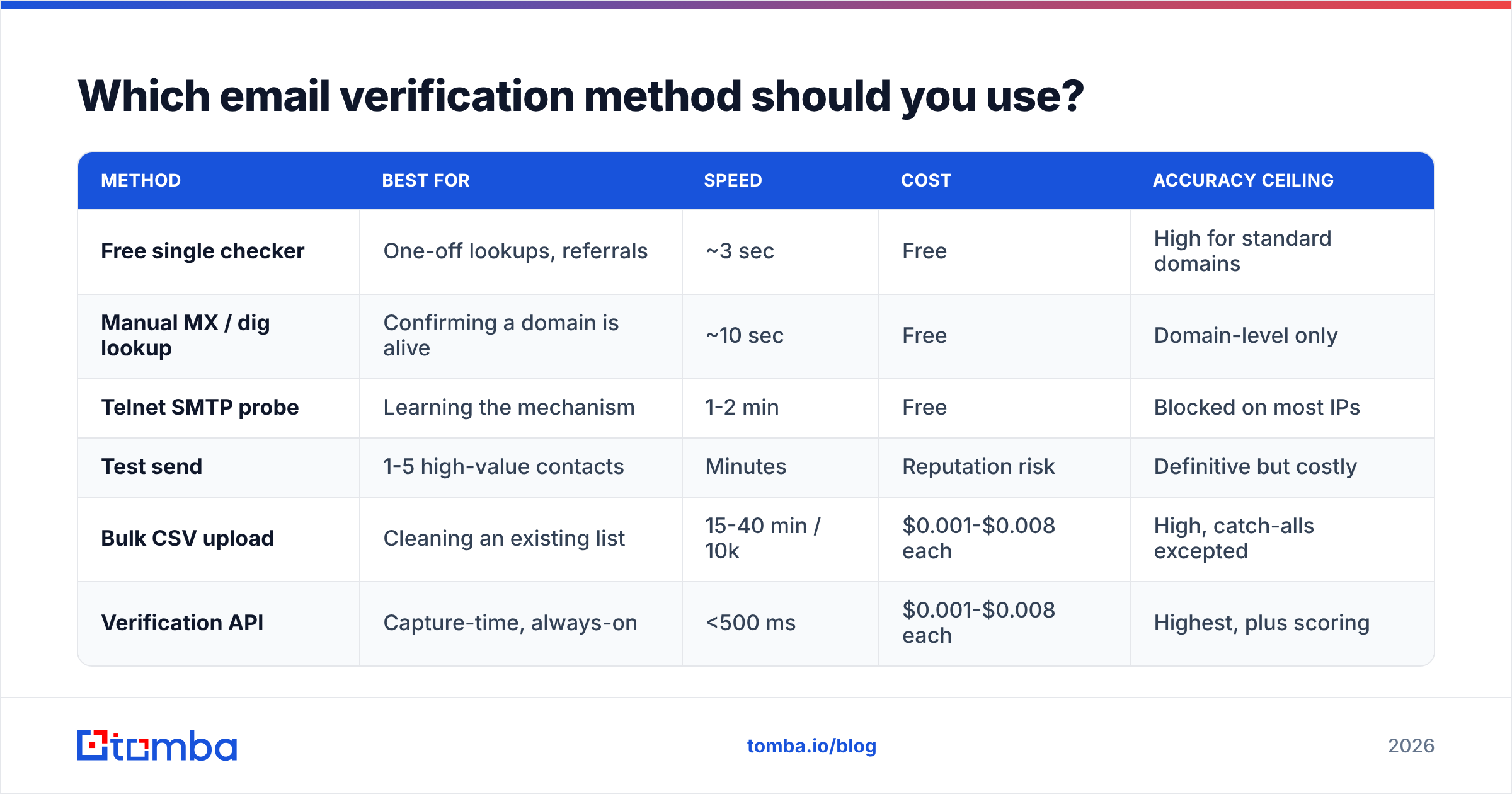
Match the method to the volume and the stakes, not to what's cheapest on paper.
| Method | Best for | Speed | Cost | Accuracy ceiling |
|---|---|---|---|---|
| Free single checker | One-off lookups, referrals | ~3 sec | Free | High for standard domains |
| Manual MX / dig lookup | Confirming a domain is alive | ~10 sec | Free | Domain-level only |
| Telnet SMTP probe | Learning the mechanism | 1-2 min | Free | Blocked on most IPs |
| Test send | 1-5 high-value contacts | Minutes | Reputation risk | Definitive but costly |
| Bulk CSV upload | Cleaning an existing list | 15-40 min / 10k | $0.001-$0.008 each | High, catch-alls excepted |
| Verification API | Capture-time, always-on | <500 ms | $0.001-$0.008 each | Highest, plus scoring |

Accuracy claims in this category deserve skepticism. Vendors quote 95-99% on their marketing pages, but those numbers are measured on curated test sets dominated by large, well-behaved domains. Your list is not that. On a realistic B2B mix — mid-market domains, SMBs on Microsoft 365, a long tail of catch-alls — expect real-world accuracy in the high 80s to low 90s from any honest provider. What separates good tools from bad ones isn't the headline number; it's what they do with the addresses they can't resolve.
The tools that tell you "unknown" honestly are more useful than the ones that guess "valid" to protect their accuracy stat.
How do verification tools compare on price and features?#
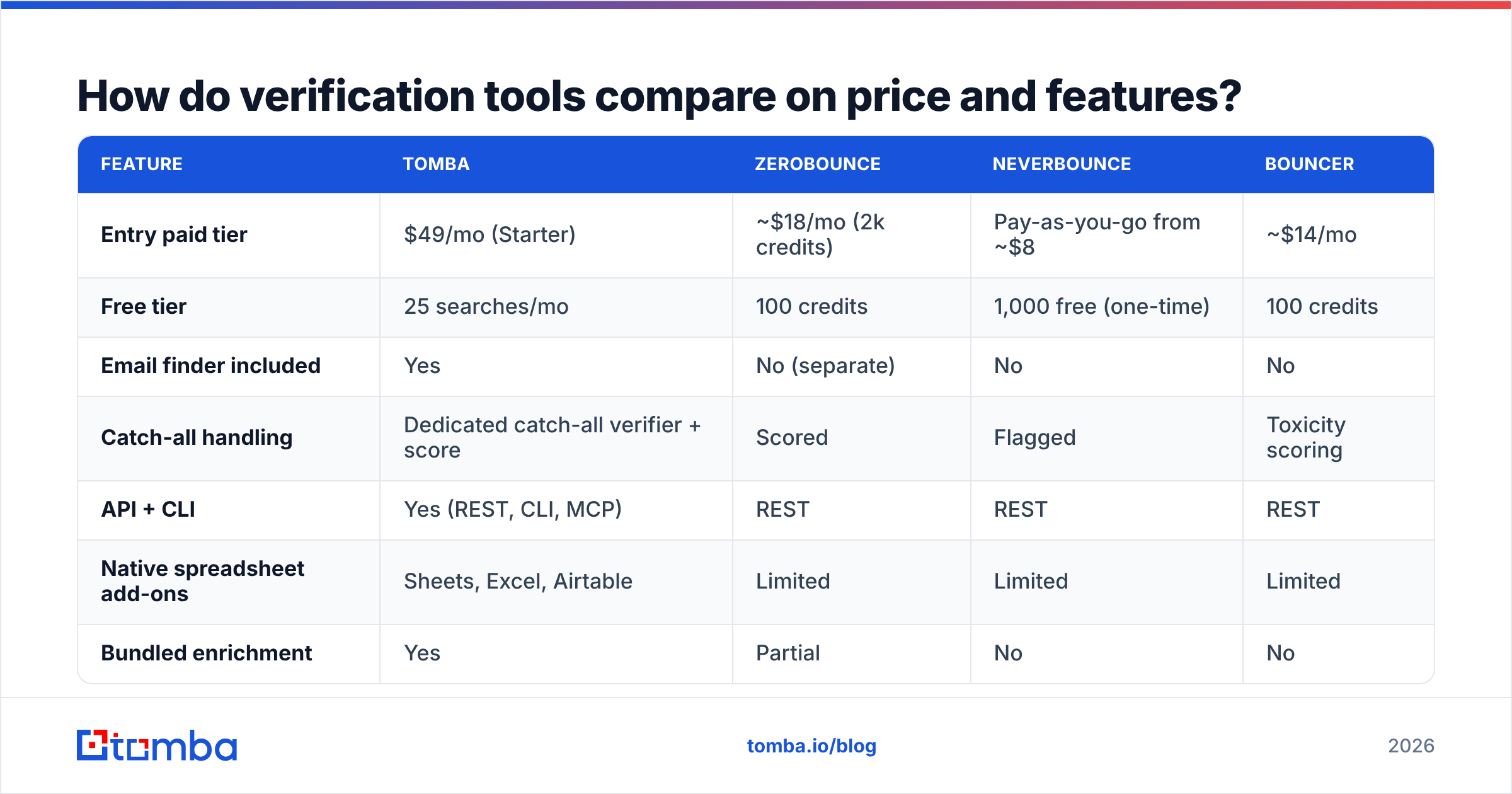
Here's how the main options stack up for a team verifying a few thousand addresses a month.
| Feature | Tomba | ZeroBounce | NeverBounce | Bouncer |
|---|---|---|---|---|
| Entry paid tier | $49/mo (Starter) | ~$18/mo (2k credits) | Pay-as-you-go from ~$8 | ~$14/mo |
| Free tier | 25 searches/mo | 100 credits | 1,000 free (one-time) | 100 credits |
| Email finder included | Yes | No (separate) | No | No |
| Catch-all handling | Dedicated catch-all verifier + score | Scored | Flagged | Toxicity scoring |
| API + CLI | Yes (REST, CLI, MCP) | REST | REST | REST |
| Native spreadsheet add-ons | Sheets, Excel, Airtable | Limited | Limited | Limited |
| Bundled enrichment | Yes | Partial | No | No |

The split is straightforward. Pure verifiers like ZeroBounce and Bouncer are cheaper per credit and perfectly good if verification is all you need — you already have the addresses and just want them cleaned. Platforms that combine finding and verifying (Tomba, and to a degree Apollo) cost more per credit but eliminate the export-import loop between two vendors. If your workflow is find address → verify address → push to CRM, running that through one email finder and one email verifier under a single API key removes a whole category of sync bugs.
If you need contact volume more than verification depth, a licensed database vendor like BookYourData is a reasonable complement — pre-verified B2B records with a bounce guarantee, which suits teams who'd rather buy a clean list than build and clean one. Different job, same end goal.
Check current Tomba pricing before you commit; credit bundles in this category change often.

What is a catch-all domain and how do you handle it?#
A catch-all (or accept-all) domain is configured to accept mail for every address at that domain, valid or not. Ask its server about zzz-not-a-real-person@acme.com and it says yes. That means the SMTP layer — the most reliable signal in the stack — returns nothing usable.
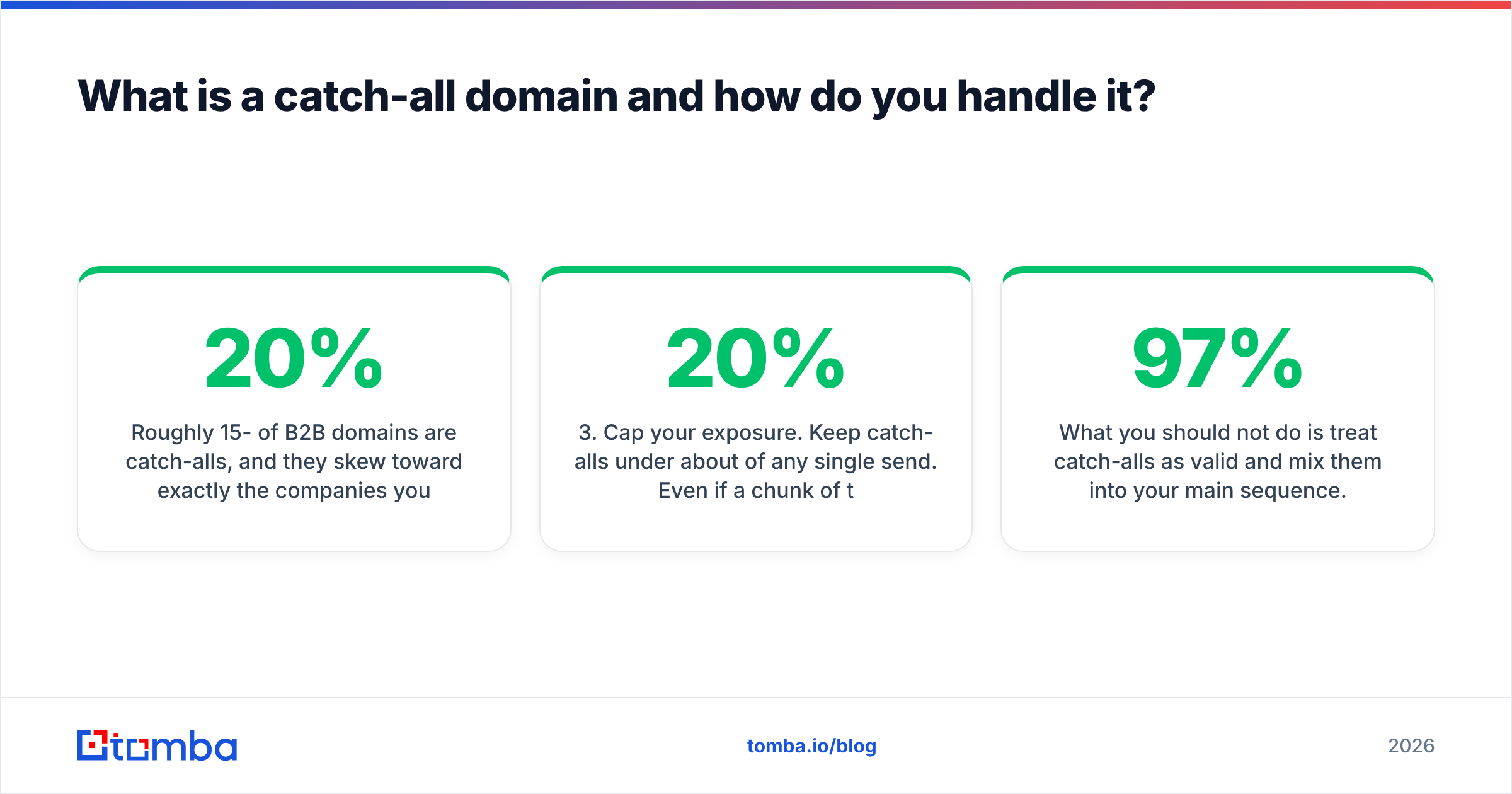
Roughly 15-20% of B2B domains are catch-alls, and they skew toward exactly the companies you want: mid-market and enterprise organizations running mail security appliances that deliberately obscure recipient validity.
Three ways to handle them, in order of preference:
- Use a dedicated catch-all scorer. A catch-all verifier falls back to non-SMTP signals — known email pattern for the domain, whether the person appears in verified sources, historical send outcomes — and returns a confidence score instead of a coin flip.
- Segment and send separately. Put catch-alls in their own sequence on a separate sending domain. If they bounce, the damage is contained and your primary domain's reputation is untouched.
- Cap your exposure. Keep catch-alls under about 20% of any single send. Even if a chunk of them are dead, the blended bounce rate stays inside safe territory.
What you should not do is treat catch-alls as valid and mix them into your main sequence. That's how a list with a "97% valid" report card produces an 11% bounce rate in production.
How often should you re-verify your list?#
Verify at three moments, and treat the schedule as non-negotiable:
- At capture. Every form fill, import, and enrichment result, via API. Zero latency to your funnel, and bad data never persists.
- Before every send. Re-run any segment you haven't verified in 30+ days. This is a cheap step that catches the bulk of decay.
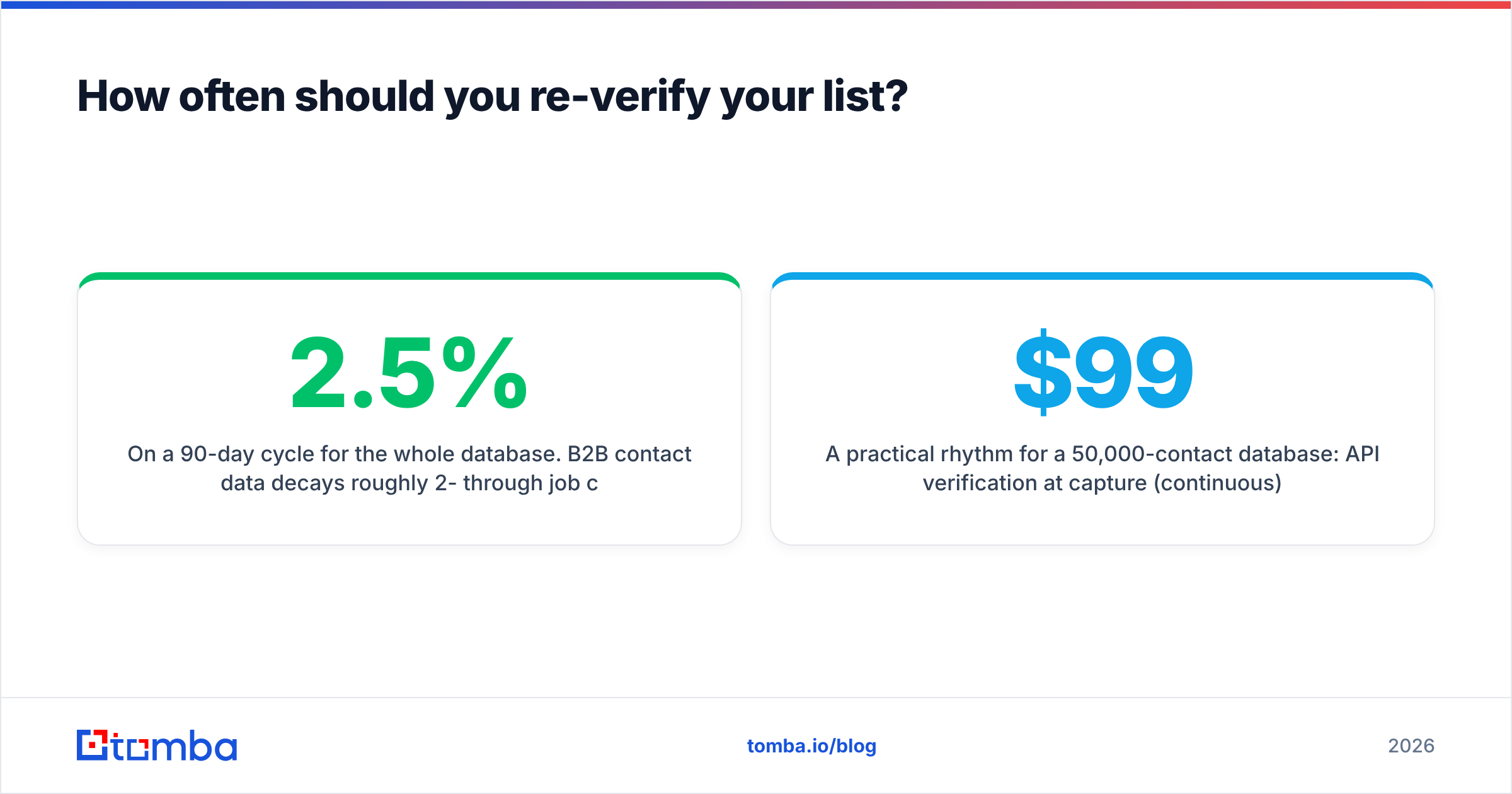
- On a 90-day cycle for the whole database. B2B contact data decays roughly 2-2.5% per month through job changes, restructures, and domain migrations — Gartner and industry research consistently put annual B2B database decay around 25-30%. That means a list you verified in January is meaningfully wrong by April and substantially wrong by October.
A practical rhythm for a 50,000-contact database: API verification at capture (continuous), a 30-day pre-send re-check on active segments only (maybe 8,000 records a month), and a full quarterly sweep. That's roughly 70,000 credits a year — well inside a Growth plan at $99/mo — for a bounce rate that stays under 2% permanently.
Pair this with basic sender hygiene. Verification protects you from bounces, but it does nothing for authentication. Confirm your SPF record is correct, keep DKIM and DMARC in place, and monitor email deliverability signals separately. Clean data plus broken auth still lands in spam.
What mistakes make verification useless?#
- Verifying once and never again. A one-time cleanup is a snapshot, not a process. Decay starts the next day.
- Treating "unknown" as "valid." Unknown means the tool couldn't get a straight answer. Segment it, don't merge it.
- Ignoring role accounts.
info@andsales@are usually deliverable and almost never valuable. They inflate your valid count and depress your reply rate simultaneously. - Buying a list and trusting the seller's verification. Verify it yourself before it touches your sending domain. Sellers verify at the moment of compilation, which may have been eighteen months ago.
- Chasing 100% valid. You'll spend disproportionate effort on the last 3%. Under 2% bounce is the operational goal, not a perfect scorecard.
- Verifying but not deduplicating. The same person at three email formats counts as three sends to one annoyed human. Run a remove duplicates pass first — it's free and it shrinks your credit bill.
For a broader view of how tools in this category are evaluated, G2's email verification grid is a reasonable third-party reference point on real user-reported accuracy.
Where should you start?#
Start with your worst list — the oldest one, the one you're afraid to send to. Run it through a bulk verifier, look at the split between valid, invalid, catch-all, and unknown, and you'll immediately know whether your problem is data quality or something further downstream.
Then move verification to the front of the pipeline so you never have to do that cleanup again.
If you're finding addresses as well as checking them, Tomba's Email Finder handles both in one place: search by domain, name, or company, and every result comes back with a verification status and confidence score attached — no export to a second vendor, no format mismatch, no credits burned on addresses you were never going to send to. The free tier gives you 25 searches a month to test it against a list you already know the answers to, which is exactly how you should evaluate any tool in this category.
Related guides#
// get started
Find, verify and enrich your first contacts today
Start on the free plan with 25 searches a month, then scale when your team is ready.
Free plan · No credit card required · GDPR & CCPA
// about the author