How to Verify Email Addresses in Bulk: 2026 Playbook
Bulk email verification is the cheapest insurance your outbound program can buy. Here is the exact workflow, the file prep, the thresholds to keep, and what each tool actually costs per 100k rows.
TL;DR
- Bulk email verification is a four-stage pipeline: deduplicate and normalize, syntax/DNS screen, SMTP-level validation, then segment by risk — not a single "clean list" button.
- Aim for a post-verification bounce rate under 2%. Anything above 3% starts damaging sender reputation at Google and Microsoft.
- Catch-all domains are the hard part. They can be 20-40% of a B2B list and no verifier returns a binary answer on them — you need a confidence score and a separate send strategy.
- Cost per 100,000 rows ranges from roughly $200 to $700 across mainstream vendors. Credit rollover and free re-verification policies matter more than the headline per-credit price.
- Verify on ingest (API) and re-verify on a 90-day cycle. A list verified six months ago is roughly 12-15% decayed.
What does bulk email verification actually do?#
Bulk email verification takes a list of addresses and tells you, for each one, whether a message sent there will land in a mailbox or hit a wall. Think of it like a postal service pre-checking every address on a mailing before the truck leaves — cheap to do at the depot, expensive to discover at the doorstep.
Under the hood, a verifier runs a sequence of checks and short-circuits as soon as it has a verdict:
- Syntax validation — RFC 5322 compliance. Catches typos like
john@@acme.comand trailing spaces from a bad CSV export. Free, instant, and rejects roughly 1-3% of a typical scraped list. - Domain and MX record check — does the domain resolve, and does it publish mail exchanger records? A domain with no MX cannot receive email at all. This kills dead companies, parked domains, and typo'd TLDs (
acme.con). - Disposable and role-account detection — flags
mailinator.comstyle throwaways andinfo@,sales@,support@role addresses. Role accounts aren't invalid, but they convert badly and complain often, so you want them in their own bucket. - SMTP handshake — the verifier opens a conversation with the receiving mail server, issues
RCPT TO, and reads the response code without ever sending a message. A250means the mailbox exists. A550means it doesn't. - Catch-all detection — if the server accepts a deliberately fake address at that domain, it accepts everything, and the SMTP check is uninformative. These get flagged as "accept-all" or "risky."
Stages one through three are cheap and local. Stage four is where latency, IP reputation, and rate limits live — and where verifiers actually differentiate from each other.

How do you verify email addresses in bulk, step by step?#
Step 1: Prepare the file#
Most "the verifier gave bad results" complaints trace back to file prep. Before you upload anything:
- Deduplicate. Duplicate rows cost you credits twice. Run them through a remove duplicates pass first. On a 100k list assembled from three sources, expect 8-15% duplicates.
- Normalize casing and whitespace.
John.Smith@Acme.comandjohn.smith@acme.comare the same mailbox but two billable rows. - Strip Gmail aliases if relevant.
name+tag@gmail.comroutes toname@gmail.com. For B2C lists this collapses meaningful volume. - Split personal from corporate. Free-provider addresses (gmail, outlook, yahoo) verify differently and have different bounce economics than corporate domains. Keep them separate from the start.
- Keep a join key. Add a row ID column so you can merge results back into your CRM without fuzzy matching on the email itself.
Export as UTF-8 CSV. Excel's default encoding mangles non-ASCII names and you'll get phantom invalids on European lists.
Step 2: Run the syntax and DNS pass first#
If your verifier bills per credit regardless of outcome, run a free local screen before you upload. A free email checker or a regex + DNS lookup script removes the obviously dead rows at zero cost. On a scraped list this typically cuts 5-10% of volume before you spend a credit.
Step 3: Upload and let SMTP validation run#
Batch throughput varies wildly. A 100k list on a mainstream bulk verify service takes anywhere from 20 minutes to six hours depending on how many of your domains are Microsoft 365 (aggressively rate-limited) versus Google Workspace (more permissive).
Do not run this during your send window. Some receiving servers correlate verification traffic with the sending IP, and hammering a domain's SMTP right before a campaign is a bad look.
Step 4: Handle catch-alls separately#
This is where most teams lose money. A catch-all domain accepts every address, so SMTP tells you nothing. Your options:
- Drop them. Safest, but on B2B lists you're discarding 20-40% of your data — often the enterprise accounts you most want.
- Score them. A catch-all verifier uses pattern inference, historical send data, and web-sourced signals to assign a probability rather than a yes/no. Addresses matching the company's dominant pattern (
first.last@) with corroborating public evidence score high. - Send them cold on a separate domain. Isolate the risk. If the bounce rate on that segment comes back at 15%, it hasn't touched your primary sending domain.
The pragmatic split: send high-confidence catch-alls (score above ~80) from a secondary domain, drop the rest.
Step 5: Segment the output and set your thresholds#
Every verifier returns roughly the same buckets under different names:
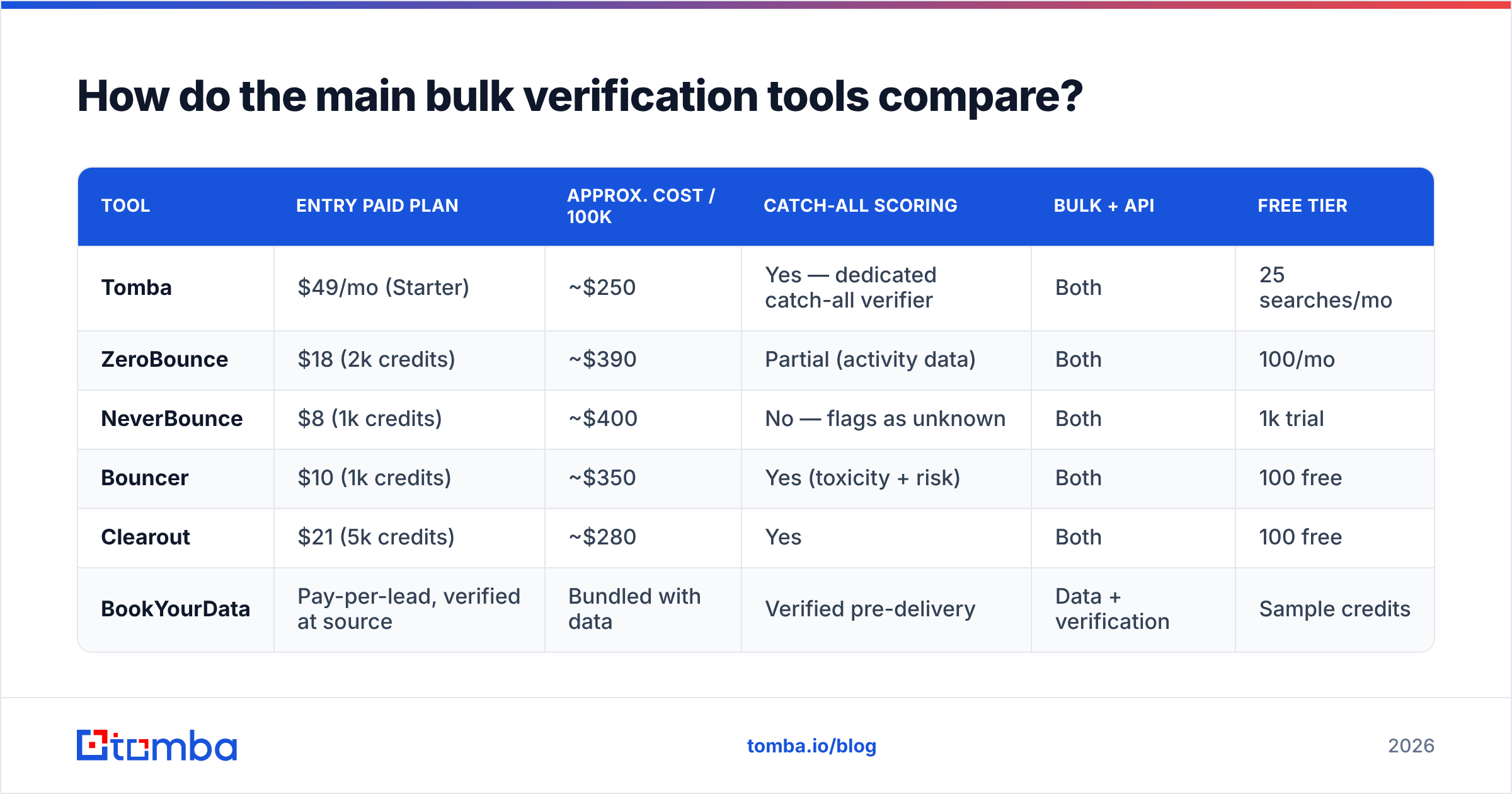
| Result bucket | Typical share of a B2B list | Send it? | Why |
|---|---|---|---|
| Valid / deliverable | 55-70% | Yes | SMTP confirmed the mailbox exists |
| Invalid / undeliverable | 8-15% | Never | Guaranteed hard bounce |
| Catch-all / accept-all | 20-40% | Conditionally | Unknowable via SMTP; needs scoring |
| Role-based | 3-6% | Separate campaign | Low conversion, high complaint rate |
| Disposable / temporary | 1-2% | Never | Throwaway, often spam-trap adjacent |
| Unknown / timeout | 1-4% | Re-run once | Server didn't respond; retry before discarding |
Set your gate at: send Valid unconditionally, send scored catch-alls above your confidence threshold, quarantine everything else. That keeps measured bounce under 2% on most B2B lists.
Why does bounce rate matter so much in 2026?#
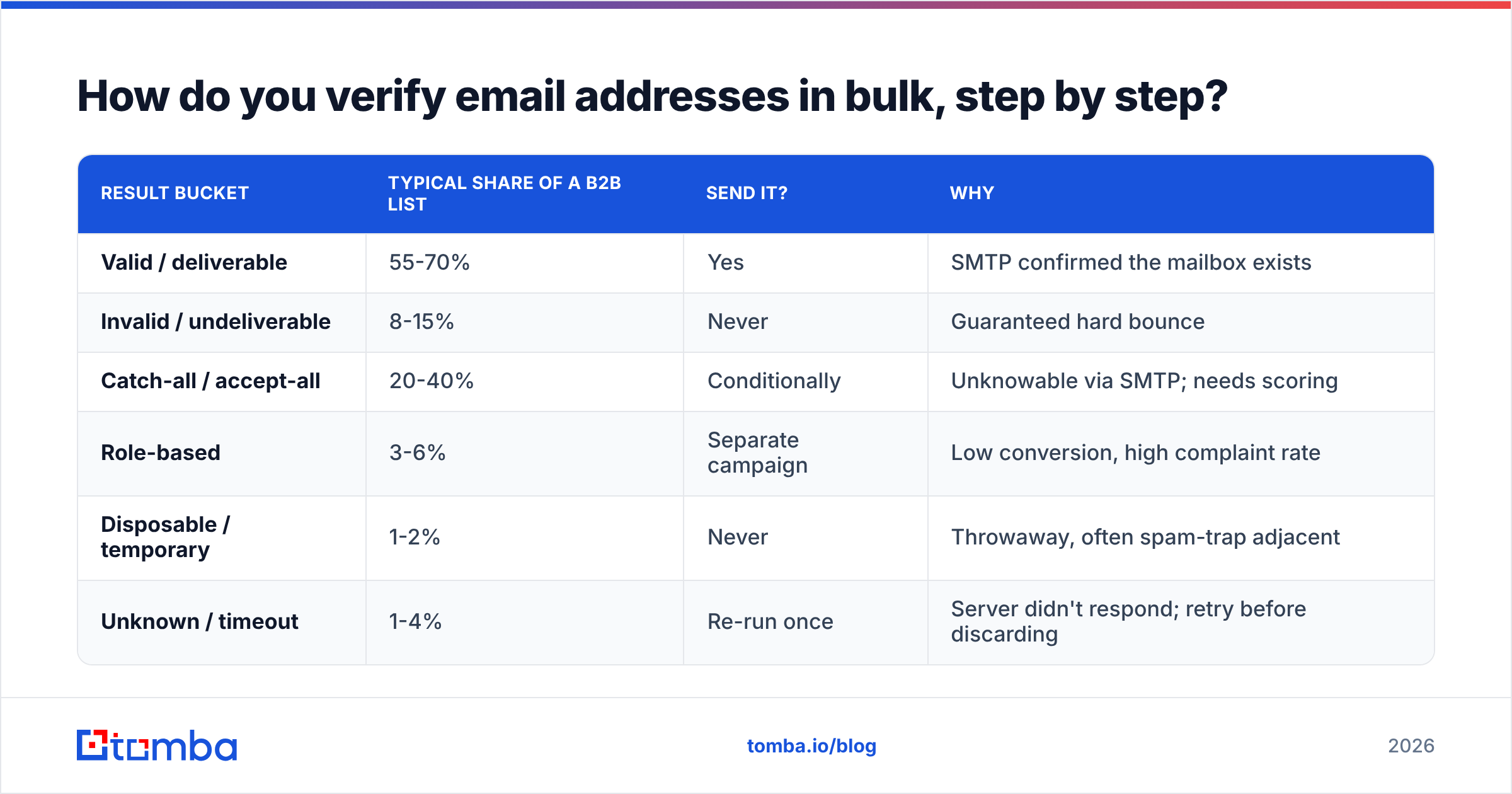
Because the mailbox providers made it a hard rule, not a guideline. Google and Yahoo's bulk sender requirements, rolled out in 2024 and tightened since, put a spam complaint ceiling at 0.3% and require authentication plus one-click unsubscribe. Microsoft followed with similar enforcement for high-volume senders in 2025.
Bounce rate isn't explicitly capped in those documents, but it's the strongest proxy for list hygiene that filtering systems have. A domain sending to 8% invalid addresses is behaving like a scraper, and gets treated like one. The practical thresholds:
- Under 2% — healthy. No reputation impact.
- 2-5% — warning zone. Inbox placement starts drifting toward Promotions and spam.
- Above 5% — active damage. ESPs like Mailchimp and Klaviyo will suspend accounts here, and your sender reputation takes weeks to recover.
The math is unforgiving. If you send 50,000 emails at a 7% bounce rate, you've generated 3,500 hard bounces in a day. That signal reaches every major filter within hours.

How do the main bulk verification tools compare?#
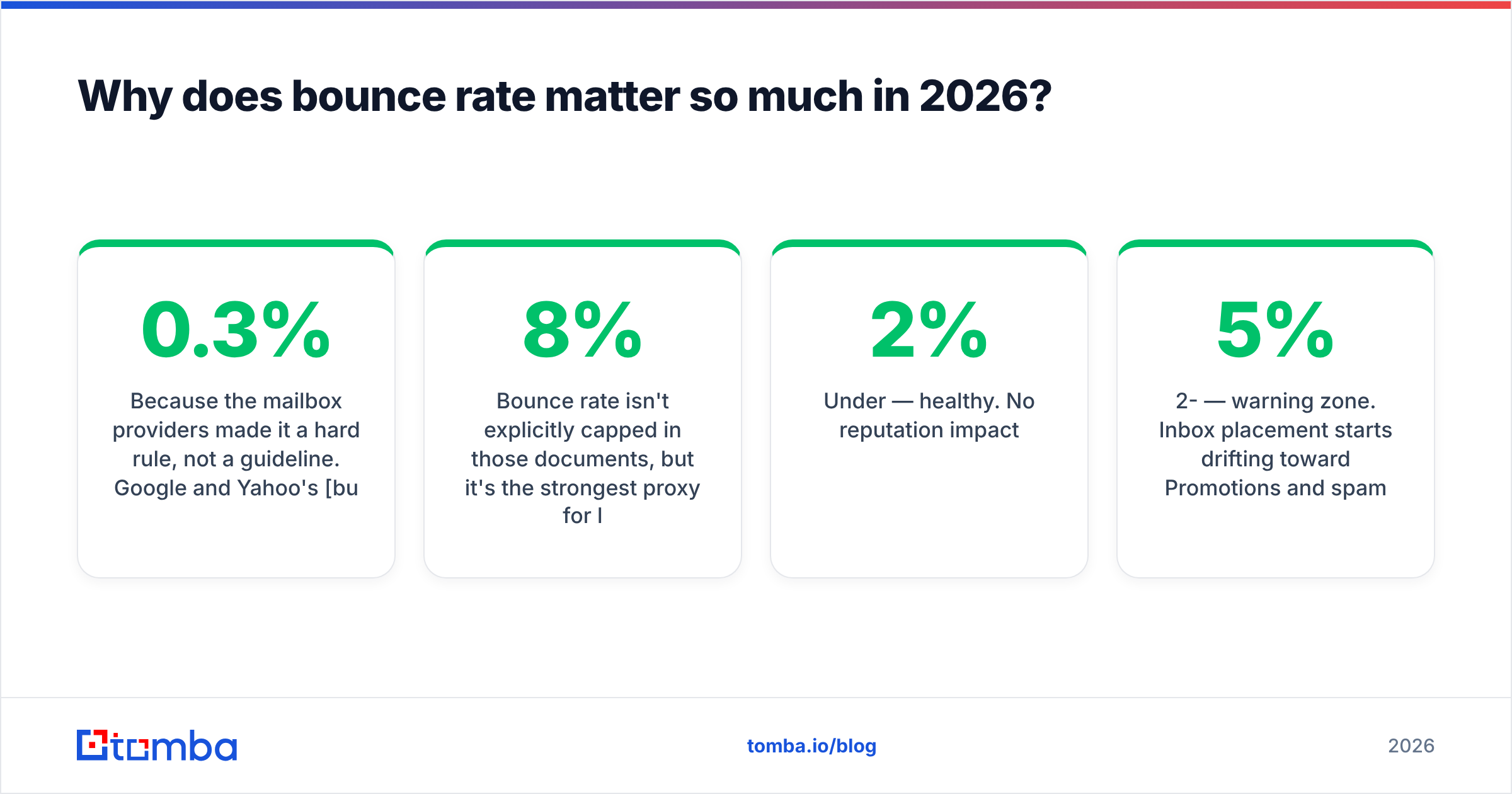
Pricing below is list price for one-time bulk credits as of early 2026. Subscription plans and volume tiers move these numbers, sometimes substantially.
| Tool | Entry paid plan | Approx. cost / 100k | Catch-all scoring | Bulk + API | Free tier |
|---|---|---|---|---|---|
| Tomba | $49/mo (Starter) | ~$250 | Yes — dedicated catch-all verifier | Both | 25 searches/mo |
| ZeroBounce | $18 (2k credits) | ~$390 | Partial (activity data) | Both | 100/mo |
| NeverBounce | $8 (1k credits) | ~$400 | No — flags as unknown | Both | 1k trial |
| Bouncer | $10 (1k credits) | ~$350 | Yes (toxicity + risk) | Both | 100 free |
| Clearout | $21 (5k credits) | ~$280 | Yes | Both | 100 free |
| BookYourData | Pay-per-lead, verified at source | Bundled with data | Verified pre-delivery | Data + verification | Sample credits |
A few things that don't show up in a price column:
- Free re-verification windows. Some vendors re-check a returned "valid" for free within 30-90 days. That's worth more than a 10% per-credit discount if you re-verify quarterly.
- Credit expiry. Pay-as-you-go credits that expire in 12 months are effectively more expensive than they look if your volume is lumpy.
- Bundled data. BookYourData and similar providers verify at the point of data delivery, so you're not paying twice — buy verified, send verified. Different model, and for teams that don't already own a list, often the cheaper path end to end.
- API rate limits. Bulk upload is fine for quarterly cleaning. Real-time form validation needs an API that handles your peak concurrency without queuing.
If you want to sanity-check pricing against your actual monthly volume, the Tomba pricing page breaks credits down per plan — Free (25 searches/mo), Starter $49/mo, Growth $99/mo, Pro $249/mo, and custom Enterprise.
When should you verify — on ingest or in batches?#
Both. They solve different problems.
Verify on ingest (API) when the address enters your system: a form submission, a scraped contact, a CRM import, an enrichment response. This is the cheapest possible moment because you're paying for one credit and preventing a bad record from ever polluting your database. Wire the email verification API into your form handler and reject invalids before they hit the CRM.
Verify in batches on a schedule, because good addresses go bad. B2B email decay runs roughly 22-30% per year — people change jobs, companies get acquired, domains consolidate. A list verified in January is materially worse by July.
A workable cadence:
- Real-time API on every new record.
- 90-day bulk re-verification for any segment you actively mail.
- Pre-campaign spot check on the specific slice you're about to send, if it's been more than 30 days.
- Immediate suppression of every hard bounce, complaint, and unsubscribe — this is non-negotiable and should be automated, not manual.
For teams pulling contacts continuously, combining the email finder with verification in one call avoids the two-step tax: you get the address and its deliverability status in a single request rather than finding first and verifying later.
What mistakes ruin bulk verification results?#
Verifying a list you should have never built. Verification confirms an address exists. It says nothing about whether that person wants your email, or whether sending to them is legal in their jurisdiction. A perfectly verified list of scraped GDPR-covered contacts is still a compliance problem.
Treating "unknown" as "valid." Unknown means the receiving server timed out or gave an ambiguous response. Some teams sweep these into the send bucket to preserve volume. They bounce at 20-30%. Re-run them once, then quarantine.
Ignoring the greylisting problem. Some servers deliberately defer first contact from unknown senders. A verifier hitting a greylisted domain gets an inconclusive result that isn't the address's fault. Good verifiers retry with backoff; cheap ones return "invalid" and you silently discard real people.
Using verification as a substitute for warmup. A clean list on a cold domain still lands in spam. Verification fixes the bounce vector. It doesn't fix authentication, domain age, sending volume ramp, or content. Check your SPF record and DMARC alignment separately — Google's sender guidelines spell out the minimum bar.
Verifying once and never again. The single most common failure. Verification is a subscription to accuracy, not a purchase.
Over-trusting a single vendor's "valid." Vendors disagree on 5-10% of addresses, mostly at the catch-all boundary. If a segment matters enough, cross-check a sample against a second provider before committing budget to it. G2's email verification category is a reasonable starting point for shortlisting a second opinion.
What does a good verification workflow look like end to end?#
Here's the sequence a well-run outbound team actually follows:
- Source contacts via enrichment, domain search, or a purchased verified dataset.
- Dedupe and normalize before any credit is spent.
- Screen with free syntax and MX checks locally.
- Bulk verify the survivors, catch-all scoring enabled.
- Segment into send / conditional / quarantine buckets by result and confidence.
- Suppress everything in quarantine at the ESP level, not just in the spreadsheet.
- Send valid addresses from your primary domain, high-confidence catch-alls from a secondary.
- Feed bounces back into suppression automatically within 24 hours.
- Re-verify on a 90-day timer.
That's it. No step is clever. The discipline is in doing all nine every time rather than five of them when someone remembers.
Ready to clean your list properly?#
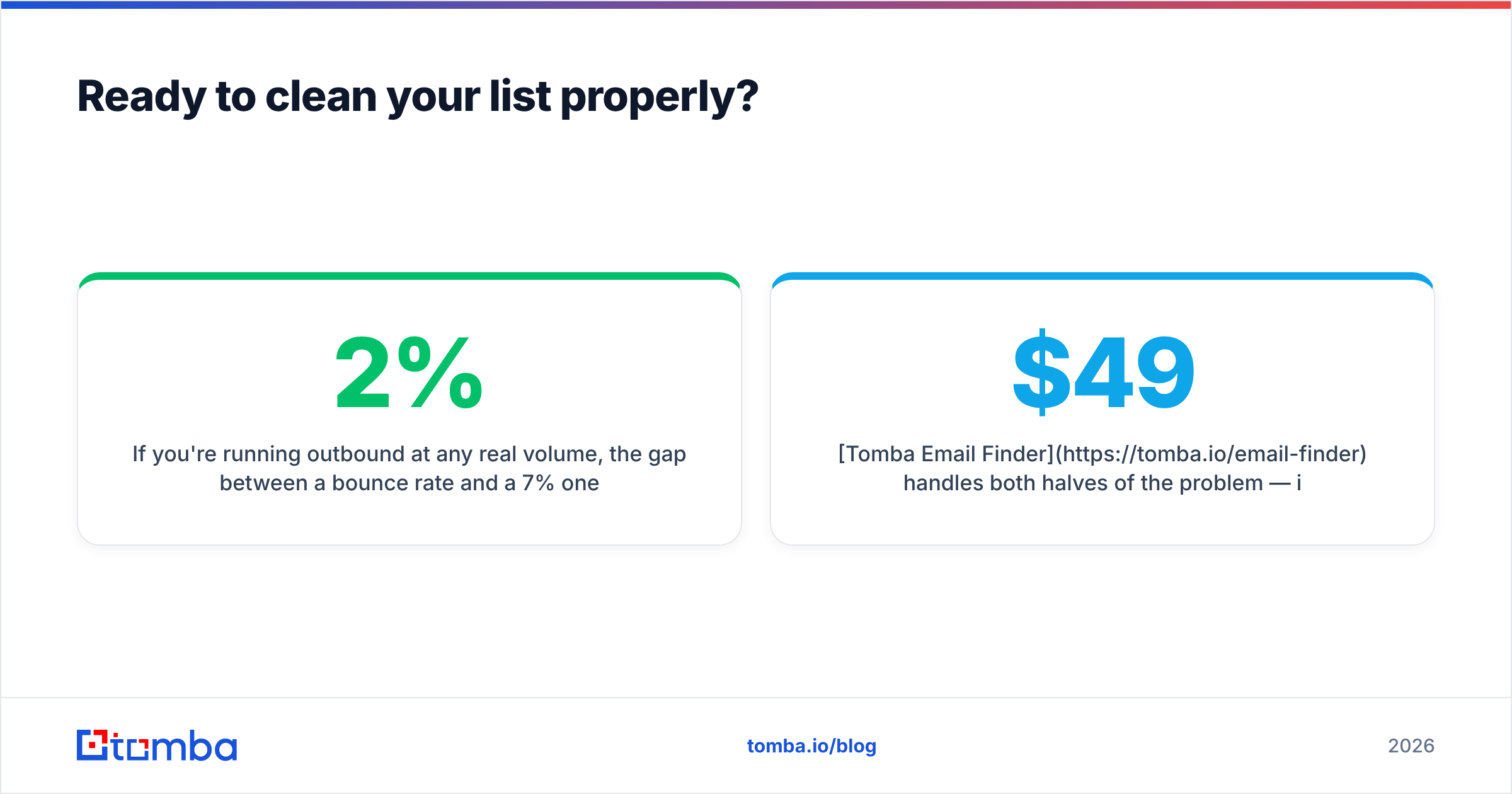
If you're running outbound at any real volume, the gap between a 2% bounce rate and a 7% one is the difference between a sending domain that works next quarter and one you have to replace. Bulk verification is the cheapest lever you have on that outcome.
Tomba Email Finder handles both halves of the problem — it finds professional addresses by domain, name, or company, and returns a deliverability verdict in the same call, so you're not paying one vendor to find and another to verify. Bulk uploads, a REST API for on-ingest validation, and dedicated catch-all scoring are all included. Start on the free tier with 25 searches a month, and move to Starter at $49/mo when the volume justifies it.
Related guides#
// get started
Find, verify and enrich your first contacts today
Start on the free plan with 25 searches a month, then scale when your team is ready.
Free plan · No credit card required · GDPR & CCPA
// about the author