How to Warm Up an Email Domain: A 2026 Step-by-Step Guide
Most cold email domains get burned in week one. Here is the exact 8-week warm-up schedule, DNS setup, and volume ramp that keeps new sending domains out of spam in 2026.
TL;DR
- A domain warm-up is a 4-8 week volume ramp, not a switch you flip. Start at 5-10 emails per mailbox per day and roughly double weekly until you hit 40-50.
- Fix DNS first. SPF, DKIM, and a DMARC record must be live and passing before the first email leaves, or the ramp is wasted effort.
- Buy the domain and park it for 2-4 weeks before sending. Google and Microsoft both weight domain age; a domain registered yesterday sending 200 emails today looks exactly like a spammer.
- List quality does more for reputation than any warm-up tool. A 3% bounce rate on a fresh domain undoes six weeks of careful ramping.
- Warm-up ends when your inbox placement is stable above 90% at target volume — not when a calendar says week eight.
What Does It Actually Mean to Warm Up an Email Domain?#
Warming up an email domain means gradually increasing send volume from a new domain so mailbox providers build a positive reputation profile for it before you send at scale.
Think of it like a credit score. A person with no credit history isn't trusted — not because they're bad, but because there's no data. A brand-new sending domain is the same: Gmail, Outlook, and Yahoo have zero history for it. The warm-up period is where you generate that history deliberately, with small volumes and high engagement, instead of letting a 5,000-email blast write your reputation file for you.
Two things get warmed at once and people conflate them:
- Domain reputation — tied to the root domain (
yourbrand-mail.com). Follows you across every IP and mailbox. - IP reputation — tied to the sending IP. On shared infrastructure like Google Workspace, you inherit a pooled IP reputation you don't control.
For most B2B teams sending through Google Workspace or Microsoft 365, domain reputation is the lever you actually own. That's what this guide focuses on.

Why Do New Domains Land in Spam So Fast?#
Because filters treat volume spikes from unknown senders as the single strongest spam signal available.
Google's Postmaster Tools documentation is blunt about it: send volume should increase gradually, and a sudden jump from a domain with no history triggers throttling or outright rejection. Microsoft's SNDS behaves similarly.
Then there are the 2024 bulk sender rules, now fully enforced by both Google and Yahoo, which added hard requirements on top of the reputation game:
- SPF and DKIM authentication (not one or the other)
- A published DMARC policy, minimum
p=none - One-click unsubscribe on bulk mail
- Spam complaint rate kept under 0.3%, ideally under 0.1%
A new domain that fails any of these doesn't get a grace period. It gets filtered. The warm-up is what buys you the engagement data to survive the scrutiny once volume climbs.
What Do You Need Before You Send the First Email?#
Set the foundation before the ramp starts. Skipping any of these means you're warming up a domain that will get rejected on technical grounds anyway.
- Buy a separate sending domain. Never cold email from your primary corporate domain. Use a close variant —
getyourbrand.com,yourbrand-hq.com— so a reputation hit never touches your billing, support, or recruiting mail. - Park it for 2-4 weeks. Point it at a real landing page with a redirect to your main site. Domain age is a scored signal; an unaged domain sending outbound is a red flag on its own.
- Publish SPF, DKIM, and DMARC. Start DMARC at
p=nonewith anruareporting address so you can watch alignment before enforcing. Verify with an SPF checker and confirm your DKIM selector resolves. - Create 2-3 mailboxes, not one. Volume splits across mailboxes. Three mailboxes at 40/day beats one mailbox at 120/day by a wide margin, and it gives you failure isolation.
- Set up a real signature and profile photo. Filters and humans both read these. Use an email signature generator if you don't have a template.
- Enroll in Google Postmaster Tools and Microsoft SNDS. These are your only direct read on domain reputation. Without them you're guessing.
Only after all six are done does the clock start.
What Does the Week-by-Week Warm-Up Schedule Look Like?#
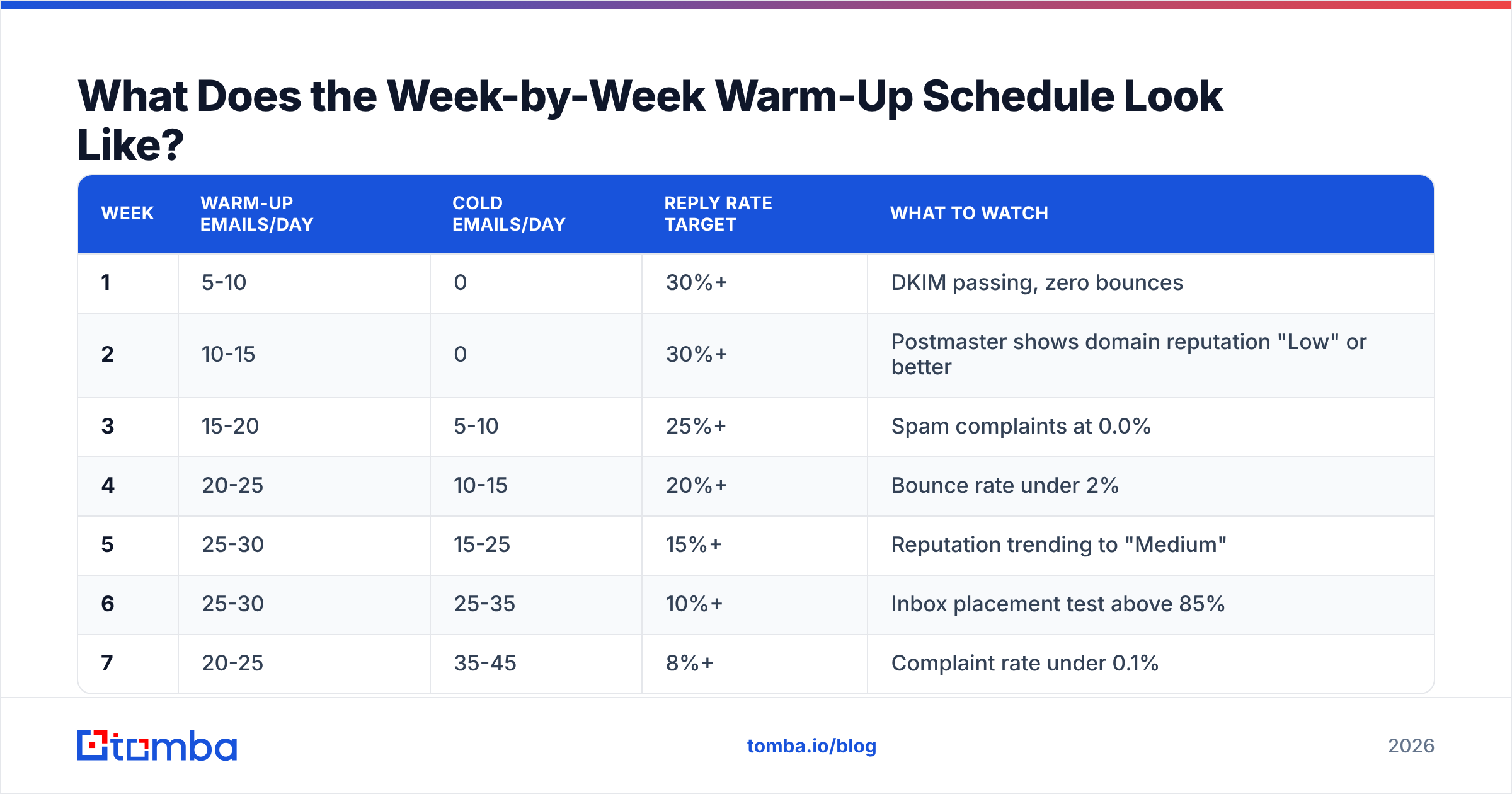
Here's the ramp that works for a standard Google Workspace or Microsoft 365 setup with three mailboxes. Volumes are per mailbox, per day, weekdays only.
| Week | Warm-up emails/day | Cold emails/day | Reply rate target | What to watch |
|---|---|---|---|---|
| 1 | 5-10 | 0 | 30%+ | DKIM passing, zero bounces |
| 2 | 10-15 | 0 | 30%+ | Postmaster shows domain reputation "Low" or better |
| 3 | 15-20 | 5-10 | 25%+ | Spam complaints at 0.0% |
| 4 | 20-25 | 10-15 | 20%+ | Bounce rate under 2% |
| 5 | 25-30 | 15-25 | 15%+ | Reputation trending to "Medium" |
| 6 | 25-30 | 25-35 | 10%+ | Inbox placement test above 85% |
| 7 | 20-25 | 35-45 | 8%+ | Complaint rate under 0.1% |
| 8+ | 15-20 (maintenance) | 40-50 | 5%+ | Stable placement above 90% |
Three rules that matter more than the exact numbers:
- Never jump more than ~40% week over week. If week 3 was 20/day, week 4 caps at roughly 28/day. Doubling from a small base is fine; doubling from 30 is not.
- Ramp down, don't stop. Warm-up traffic should taper into maintenance volume, not cut to zero the day cold sending starts.
- Weekends count against you. Sending Saturday from a B2B domain looks automated because it is. Keep the schedule Monday-Friday, business hours in the recipient's timezone.
If a metric goes the wrong way, hold volume flat for a week. Never push through a declining reputation reading.
Warm-Up Tools vs Manual Warm-Up: Which Should You Use?#
Automated warm-up networks send mail between pooled mailboxes, open it, reply to it, and drag it out of spam folders. They generate engagement fast. They also generate engagement that isn't real, and Google has been increasingly explicit that artificial engagement loops are detectable.
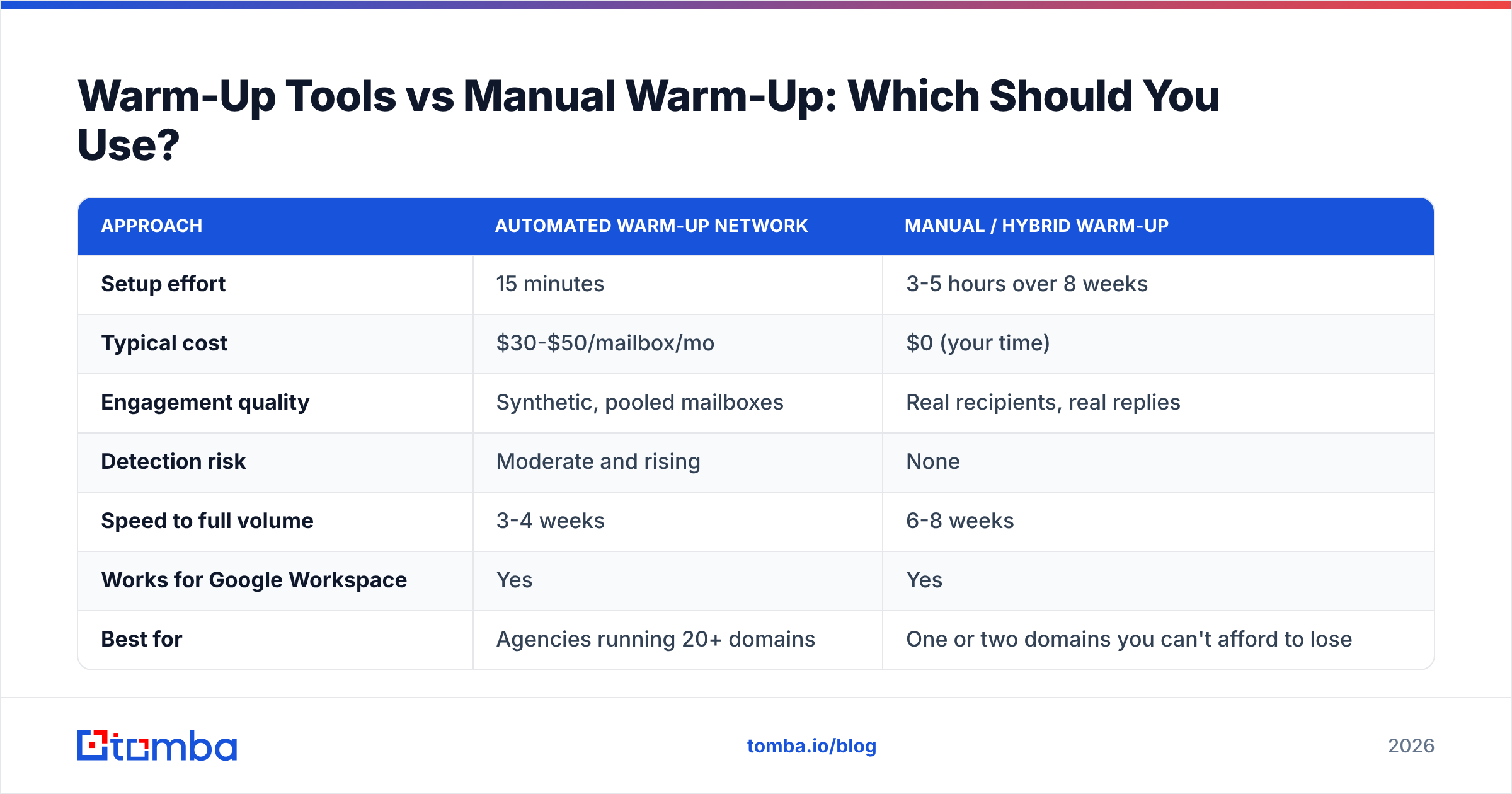
Here's the honest comparison:
| Approach | Automated warm-up network | Manual / hybrid warm-up |
|---|---|---|
| Setup effort | 15 minutes | 3-5 hours over 8 weeks |
| Typical cost | $30-$50/mailbox/mo | $0 (your time) |
| Engagement quality | Synthetic, pooled mailboxes | Real recipients, real replies |
| Detection risk | Moderate and rising | None |
| Speed to full volume | 3-4 weeks | 6-8 weeks |
| Works for Google Workspace | Yes | Yes |
| Best for | Agencies running 20+ domains | One or two domains you can't afford to lose |
The hybrid approach is what most experienced teams land on: use an automated tool for weeks 1-3 to build baseline volume, then shift to real conversations — newsletter signups, partner intros, customer support threads, your own team replying from personal accounts — from week 4 onward. Real engagement is the part filters actually reward, and no tool can fake a thread where someone replies twice.
One thing no warm-up tool fixes: a bad list. If 4% of your recipients don't exist, every mailbox provider sees a sender who doesn't know who they're mailing. Run every address through an email verifier before it enters a sequence, and route ambiguous domains through a catch-all verifier rather than guessing. Bounce control is warm-up work, even though it looks like list work.
How Do You Know the Warm-Up Is Working?#
Stop trusting your sending tool's "warmed up!" badge and read the primary sources instead.
Google Postmaster Tools gives you domain reputation on a four-step scale (Bad / Low / Medium / High), spam rate, and authentication pass rates. You want Medium or High before you run full volume. Reputation lags behavior by roughly 48-72 hours, so judge trends, not single days.
Microsoft SNDS covers Outlook, Hotmail, and Live. It's IP-based, so on shared Microsoft 365 infrastructure it tells you less — but the complaint rate data is still worth watching.
Seed list placement tests are the closest thing to ground truth. Send to a spread of real Gmail, Outlook, Yahoo, and corporate mailboxes and record where each lands. Run one at the end of weeks 2, 4, 6, and 8.
Your dashboard, in order of importance:
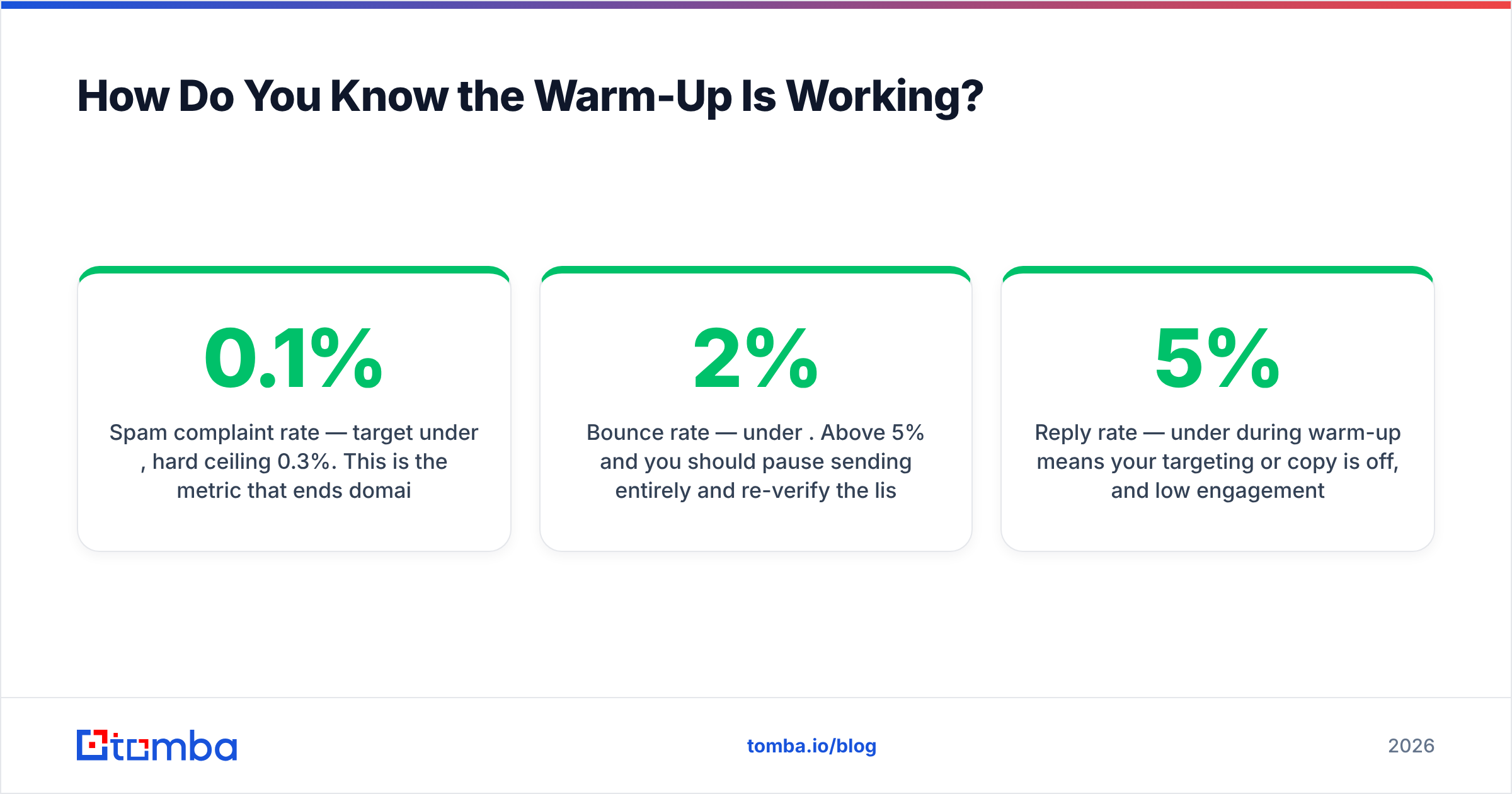
- Spam complaint rate — target under 0.1%, hard ceiling 0.3%. This is the metric that ends domains.
- Bounce rate — under 2%. Above 5% and you should pause sending entirely and re-verify the list.
- Reply rate — under 5% during warm-up means your targeting or copy is off, and low engagement suppresses reputation growth.
- Open rate — directionally useful only. Apple Mail Privacy Protection inflates it badly; don't optimize against it.
- Inbox placement — the only number that maps to revenue.

What Are the Mistakes That Kill Domains During Warm-Up?#
These are the failures that show up over and over in post-mortems.
Sending to a scraped, unverified list in week one. The single fastest way to burn a domain. A fresh domain has no reputation buffer, so a 6% bounce rate on your first send is a permanent scar rather than a bad week. Build lists with a real email finder that returns confidence scores instead of pattern-guessing addresses, then verify before sending.
Skipping DMARC because SPF and DKIM "already pass." Both Google and Yahoo require a published DMARC record for bulk senders. p=none takes five minutes to publish and costs nothing.
Using link shorteners. Bit.ly and similar are heavily abused in phishing and score badly. Use your own domain for tracked links, or none at all.
Heavy HTML in warm-up mail. Images, tracking pixels, and multi-column templates in week one look like marketing blast, not conversation. Send plain text or minimal HTML for the first four weeks.
Copy-pasting the same body across every send. Identical bodies at volume are a bulk-mail signature. Vary opening lines, subject lines, and sign-offs — and check the draft with a spam checker before it ships.
Resetting the clock every time you add a mailbox. New mailboxes on an already-warm domain inherit domain reputation, but still need their own short ramp — about two weeks, not eight.
Running warm-up and full cold volume simultaneously in week two. The table above overlaps them deliberately from week three onward. Doing it earlier means your cold volume is riding on a reputation that doesn't exist yet.
How Long Does Warming Up an Email Domain Take in 2026?#
Plan for six to eight weeks to reach 40-50 cold emails per mailbox per day with stable placement. That's up from the four to five weeks that worked in 2022, and the increase is entirely due to tighter bulk sender enforcement and better detection of synthetic engagement.
Variables that move the number:
- Domain age at first send. A domain parked for a month starts closer to week two than week zero.
- Provider. Google Workspace tends to warm faster than Microsoft 365 in practice; Microsoft's throttling on new senders is more aggressive.
- List quality. A verified list with sub-1% bounce can compress the schedule by a week or two. An unverified one extends it indefinitely.
- Reply rate. Domains that generate real conversations reach Medium reputation notably faster than domains that only send.
You cannot buy your way past this with a more expensive tool. You can only avoid restarting it — and restarts are what most teams actually pay for.
What Should You Do After Warm-Up Ends?#
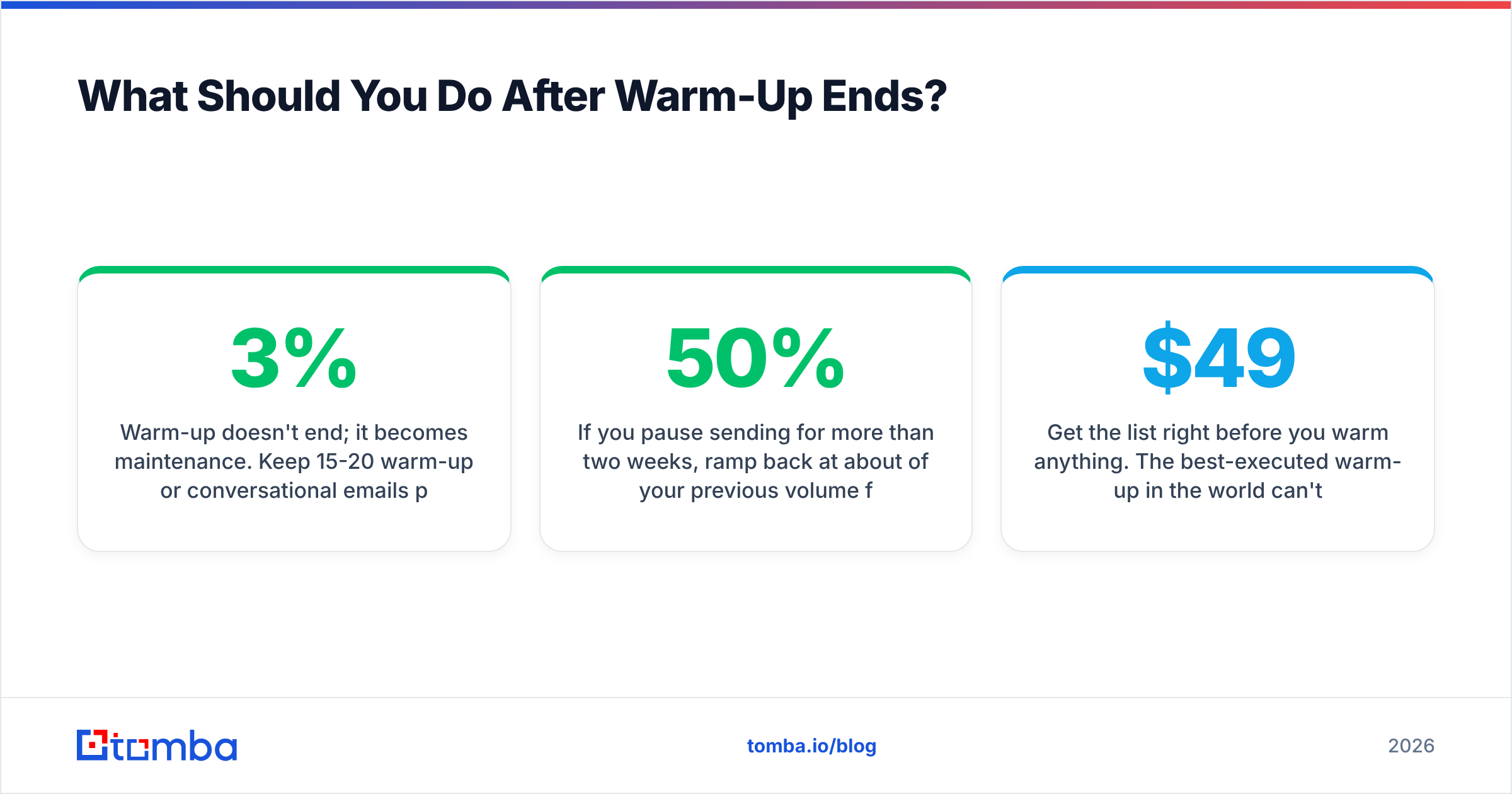
Warm-up doesn't end; it becomes maintenance. Keep 15-20 warm-up or conversational emails per mailbox per day running indefinitely, check Postmaster weekly, and re-verify any list segment older than 90 days — B2B contact data decays at roughly 2-3% per month as people change jobs.
If you pause sending for more than two weeks, ramp back at about 50% of your previous volume for a week before returning to full. Reputation decays with inactivity, and a cold restart at full volume looks identical to a compromised account.
Rotate domains before they break, not after. Most teams running high volume keep two or three sending domains in rotation with a fourth parked and aging as the next replacement. That way a reputation problem is a scheduling inconvenience, not a two-month outage.
Get the list right before you warm anything. The best-executed warm-up in the world can't survive a bounce rate driven by guessed addresses. Tomba's Email Finder returns verified professional emails with confidence scores and source attribution, so the addresses entering your sequences are real before they ever touch your new domain. Start free with 25 searches a month, or scale up on the Starter plan at $49/mo — see full Tomba pricing for bulk and API volumes.
Related guides#
// get started
Find, verify and enrich your first contacts today
Start on the free plan with 25 searches a month, then scale when your team is ready.
Free plan · No credit card required · GDPR & CCPA
// about the author