How to Warm Up SMTP Server IPs: A 30-Day Ramp Plan
A day-by-day SMTP warm-up plan with volume targets, DNS setup, and the reputation signals mailbox providers actually score. Skip the ramp and your new IP gets throttled in week one.

TL;DR
- Here's how to warm up SMTP server IPs in one line: start at 20 to 50 emails on day one, then double every two or three days. Slow growth lets mailbox providers build a reputation profile for your IP and domain instead of treating you as a spam cannon.
- DNS comes first. SPF, DKIM, DMARC, a matching PTR record, and MTA-STS all have to pass before your first production send. Warming a broken setup just builds a bad reputation faster.
- A dedicated IP needs 4 to 8 weeks to reach 100k+/day. A shared IP pool needs almost none, but you inherit your neighbors' reputation.
- List quality decides the outcome more than your schedule does. A 6% bounce rate during warm-up undoes four weeks of careful ramping in two days.
- Track each provider on its own. Gmail, Outlook, and Yahoo warm at different rates and throttle with different error codes.
What does it actually mean to warm up an SMTP server?#
The short answer to how to warm up SMTP server traffic: send a little, watch what comes back, then send more. You raise outbound volume step by step from a new IP and sending domain, so mailbox providers can watch your behavior and give you a positive reputation.
Think of it like opening a line of credit. A bank won't hand a stranger a $50,000 limit on day one. It gives you $500, watches whether you pay it back, then raises the ceiling as trust builds. Mailbox providers work the same way. A new IP has no repayment history, so Gmail and Outlook cap what they accept, watch how recipients react, and lift the limit as good signals come in.
Three separate reputations are being built at once:
- IP reputation — tied to the sending IP address. This is what most people mean by "warm-up." It resets when you change IPs.
- Domain reputation — tied to the
From:domain and the DKIM signing domain. It follows you across IPs, and it is now the dominant signal at Gmail. - Content and infrastructure reputation — link domains, tracking domains, unsubscribe handling, and consistent authentication.
Skip the ramp and you get one of three outcomes: soft-bounce throttling (421 4.7.0 Try again later), silent spam foldering, or a hard block. The third one is expensive. Reputation recovery takes far longer than the warm-up would have.

What do you configure before day one of the ramp?#
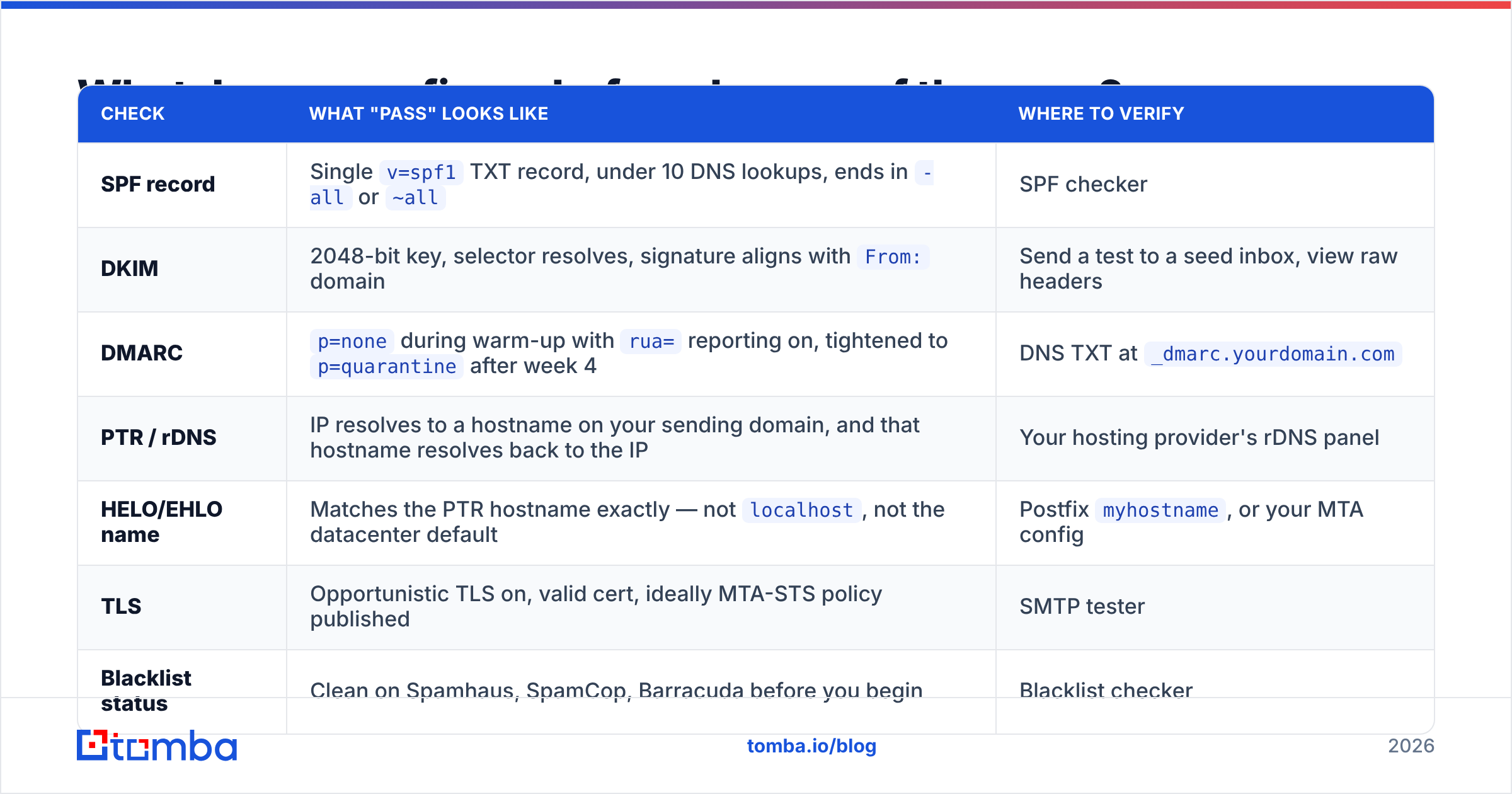
Every warm-up failure I've traced to a root cause started before the first send. Get this checklist to green, then start the schedule.
| Check | What "pass" looks like | Where to verify |
|---|---|---|
| SPF record | Single v=spf1 TXT record, under 10 DNS lookups, ends in -all or ~all |
SPF checker |
| DKIM | 2048-bit key, selector resolves, signature aligns with From: domain |
Send a test to a seed inbox, view raw headers |
| DMARC | p=none during warm-up with rua= reporting on, tightened to p=quarantine after week 4 |
DNS TXT at _dmarc.yourdomain.com |
| PTR / rDNS | IP resolves to a hostname on your sending domain, and that hostname resolves back to the IP | Your hosting provider's rDNS panel |
| HELO/EHLO name | Matches the PTR hostname exactly — not localhost, not the datacenter default |
Postfix myhostname, or your MTA config |
| TLS | Opportunistic TLS on, valid cert, ideally MTA-STS policy published | SMTP tester |
| Blacklist status | Clean on Spamhaus, SpamCop, Barracuda before you begin | Blacklist checker |
| Postmaster enrollment | Google Postmaster Tools and Microsoft SNDS both registered for the domain and IP | postmaster.google.com, sendersupport.olc.protection.outlook.com |
Two extra items matter more than people expect:
- Use a separate subdomain for cold outbound. Send prospecting mail from
mail.yourcompany.comorgo.yourcompany.com, never the root domain that carries your invoices, password resets, and support replies. If the outbound domain burns, your transactional mail survives. - Turn on one-click unsubscribe (RFC 8058). Since Google and Yahoo's 2024 bulk-sender rules,
List-UnsubscribeandList-Unsubscribe-Postheaders are effectively required above 5,000 messages a day to one provider. Add them on day one. Retrofitting mid-ramp changes your header fingerprint at the worst moment.
Google's sender guidelines spell out the authentication and spam-rate thresholds. Read them before you argue with your ESP about whose fault a block is.
How to warm up SMTP server volume: the 30-day schedule#
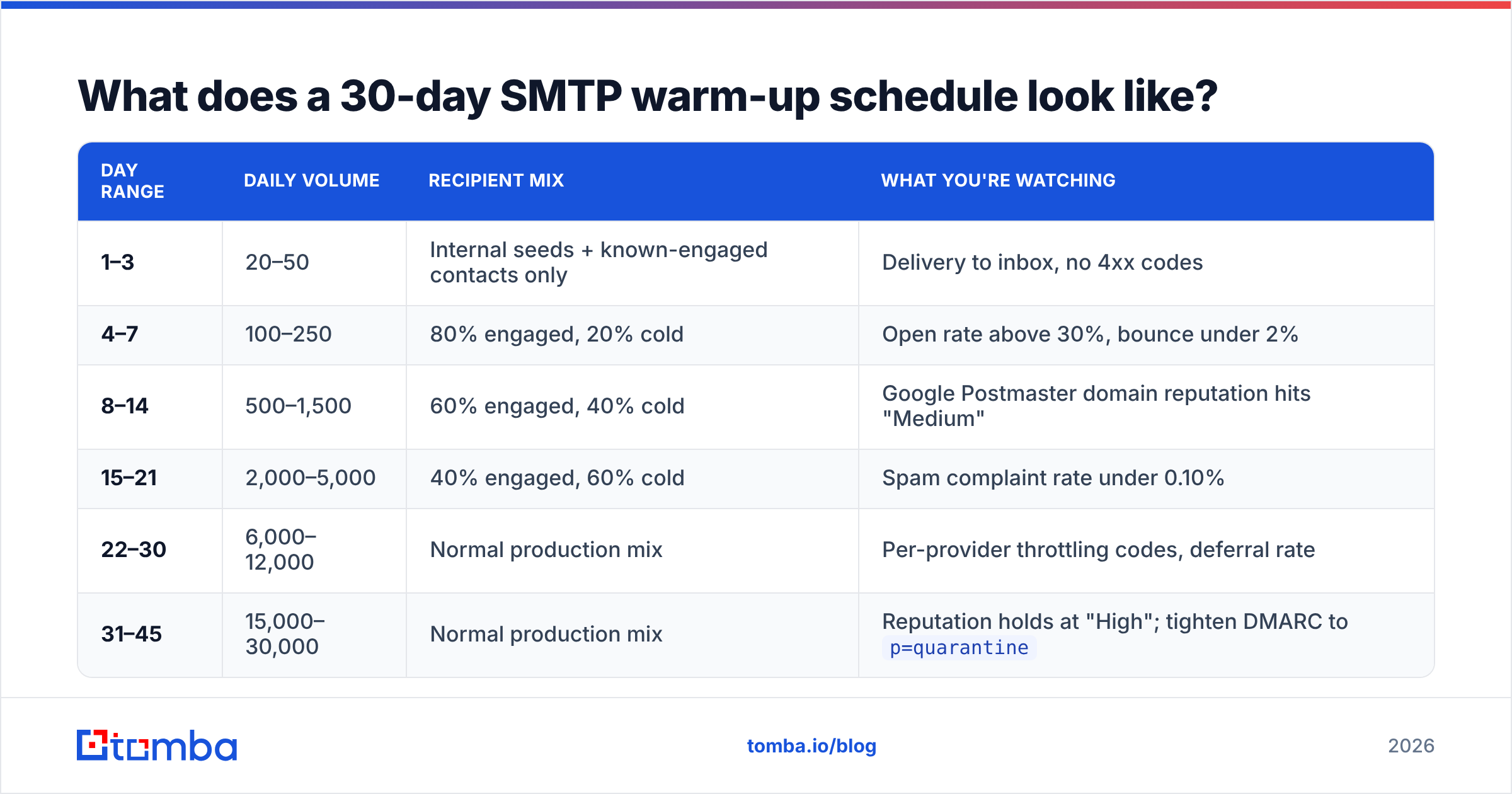
Here's the ramp I'd use for a dedicated IP aiming at roughly 20,000 emails a day by the end of week six. Volumes are per IP, per day.
| Day range | Daily volume | Recipient mix | What you're watching |
|---|---|---|---|
| 1–3 | 20–50 | Internal seeds + known-engaged contacts only | Delivery to inbox, no 4xx codes |
| 4–7 | 100–250 | 80% engaged, 20% cold | Open rate above 30%, bounce under 2% |
| 8–14 | 500–1,500 | 60% engaged, 40% cold | Google Postmaster domain reputation hits "Medium" |
| 15–21 | 2,000–5,000 | 40% engaged, 60% cold | Spam complaint rate under 0.10% |
| 22–30 | 6,000–12,000 | Normal production mix | Per-provider throttling codes, deferral rate |
| 31–45 | 15,000–30,000 | Normal production mix | Reputation holds at "High"; tighten DMARC to p=quarantine |
Rules that make the numbers work:
- Raise volume by no more than 2x per step. Hold flat for 48 hours after every increase. A jump from 1,000 to 8,000 overnight looks like a compromised account.
- Keep a steady weekday cadence. Five days on, two days near zero, repeated weekly, is a legible human pattern. Random bursts are not.
- Spread sends across the day. Drip 5,000 emails over eight hours, not eight minutes. Most MTAs let you set per-destination rate limits.
- Front-load your best contacts. The first 2,000 emails from a new IP should go to people likely to open and reply. Early engagement is the biggest lever on how fast the ceiling rises.
- Never pause for more than 5 days. IP reputation decays. A two-week gap in week three restarts your ramp.
- Roll back one step on trouble. If deferrals spike or complaints cross 0.3%, drop to the previous tier for three days.

Is dedicated IP warm-up different from shared IP or a warm-up tool?#
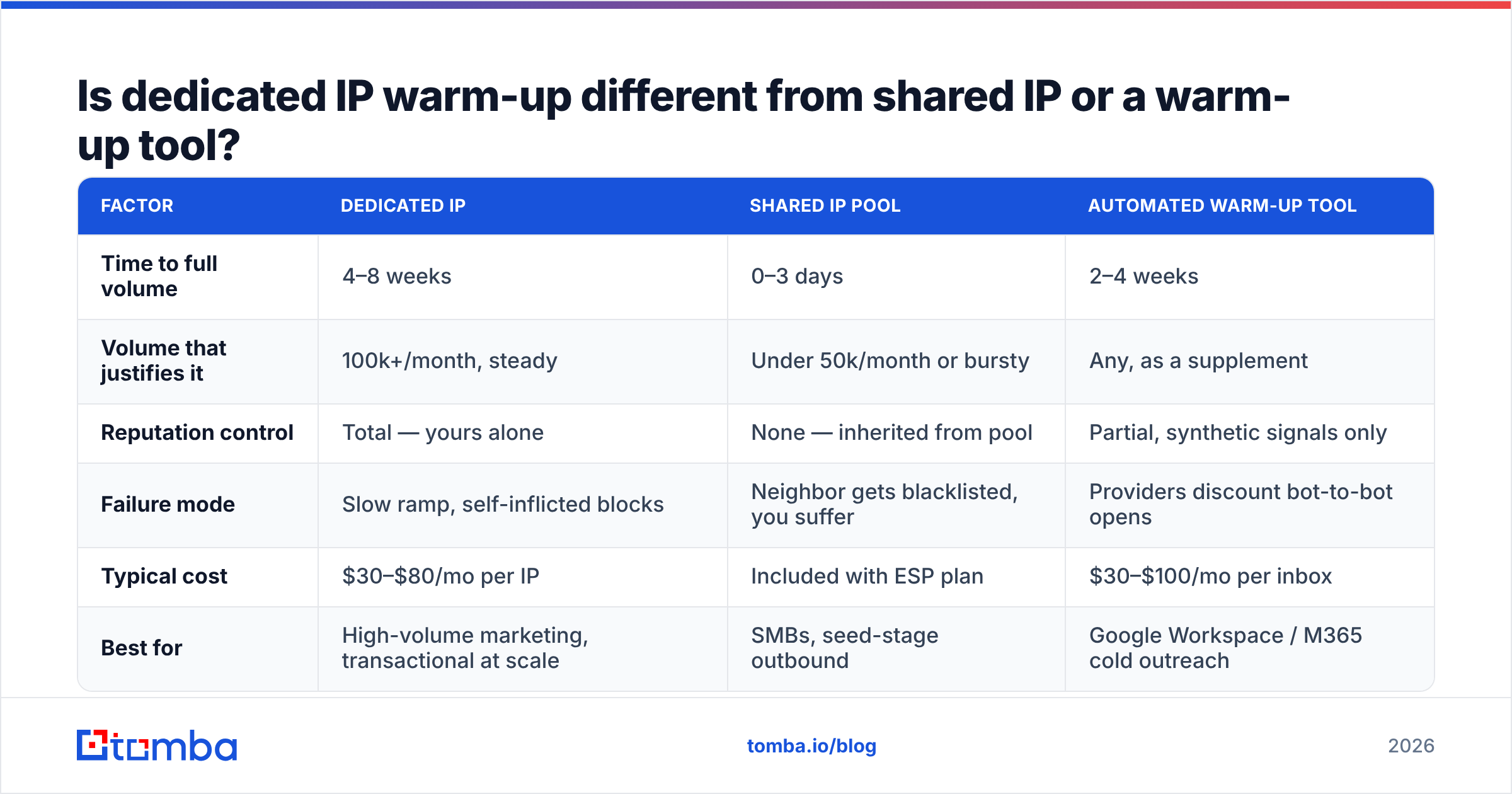
Yes, and choosing wrong wastes weeks. Here's the honest comparison.
| Factor | Dedicated IP | Shared IP pool | Automated warm-up tool |
|---|---|---|---|
| Time to full volume | 4–8 weeks | 0–3 days | 2–4 weeks |
| Volume that justifies it | 100k+/month, steady | Under 50k/month or bursty | Any, as a supplement |
| Reputation control | Total — yours alone | None — inherited from pool | Partial, synthetic signals only |
| Failure mode | Slow ramp, self-inflicted blocks | Neighbor gets blacklisted, you suffer | Providers discount bot-to-bot opens |
| Typical cost | $30–$80/mo per IP | Included with ESP plan | $30–$100/mo per inbox |
| Best for | High-volume marketing, transactional at scale | SMBs, seed-stage outbound | Google Workspace / M365 cold outreach |
Automated warm-up networks deserve a caveat. These are the tools that quietly trade mail between thousands of member inboxes and mark it as read and important. They work well for a single Google Workspace or Microsoft 365 mailbox doing cold outreach, and that's close to standard practice now. They work much less well for a self-hosted SMTP server pushing marketing volume. The synthetic pattern — 100% open, 100% reply, zero clicks, zero purchases — is easy to spot, and providers discount it. Use them as a floor, not as your whole strategy.
If you're on a shared pool with a reputable ESP, you mostly skip warm-up. Still, read the fine print on how they segment pools. Good providers separate transactional from marketing mail and quarantine bad senders fast. Bad ones dump everyone together, and you'll spend your first month debugging someone else's spam complaints. G2's email deliverability software category is a reasonable place to compare how vendors handle pool hygiene.
How do you keep bounces from killing the ramp?#
This is where most warm-ups die, and it has nothing to do with your schedule.
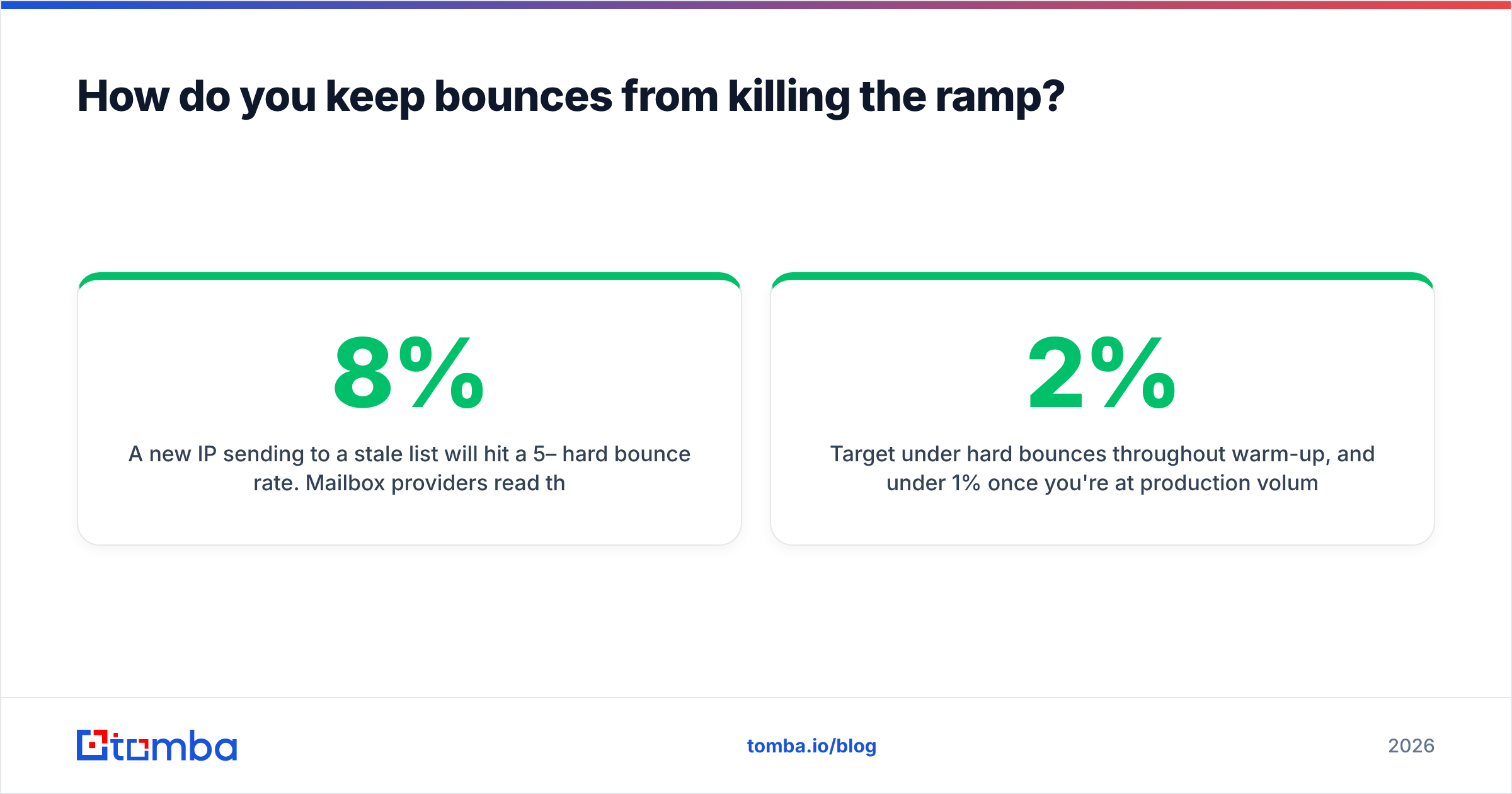
A new IP sending to a stale list will hit a 5–8% hard bounce rate. Providers read that as list-buying, and they act fast. Outlook will start returning 550 5.7.1 Unfortunately, messages from [IP] weren't sent within days. Your careful 2x ramp is irrelevant if 1 in 15 recipients doesn't exist.
Target under 2% hard bounces during warm-up, and under 1% at production volume. Getting there means:
- Verify every address before it enters the list. Run it through an email verifier and drop invalid, role-based (
info@,sales@,admin@), and disposable addresses. Role accounts skew complaint rates. - Handle catch-all domains separately. A catch-all accepts everything at SMTP time and tells you nothing. Route those through a catch-all verifier, or park them until after week four.
- Use addresses that were valid recently. A purchased list from 2023 is a liability no matter how it verifies today, because people change jobs. Pull fresh contacts with an email finder instead of mailing a stale export.
- Suppress aggressively. Every hard bounce, complaint, and unsubscribe goes on a permanent list, applied before each send.
- Deduplicate. Two copies to the same person is a complaint waiting to happen. Run a remove duplicates pass on merged lists.
One more thing people skip: seed your own addresses at Gmail, Outlook, Yahoo, and one corporate Microsoft 365 tenant. Check placement by hand every few days. Postmaster Tools lags; a seed inbox tells you today.
Which signals tell you the warm-up is working?#
Volume delivered is not the metric. These are.
Green — keep ramping:
- Google Postmaster domain reputation at Medium or High
- Spam complaint rate under 0.10% (Google's stated threshold is 0.30%, but that's the ceiling, not the target)
- Hard bounce rate under 2%
- Deferral (
4xx) rate under 5% of attempts - Open rate holding steady or rising as volume increases
Amber — hold volume flat for 72 hours:
- Complaints between 0.10% and 0.30%
- Deferrals climbing past 10%
- Open rates dropping more than 20% against the prior tier — usually the first sign of spam foldering
- Postmaster reputation slipping from High to Medium
Red — cut volume by half immediately:
- Complaints above 0.30%
- Any
550block referencing your IP - Postmaster reputation at Low or Bad
- Appearance on Spamhaus SBL, CSS, or XBL
Segment all of this by receiving domain. Gmail can be perfectly happy while Outlook throttles you at 421 4.7.500 Server busy. That code means reputation-based rate limiting, not real server load. One aggregate number hides the provider that's in trouble. Microsoft documents its throttling and mitigation path in the Outlook.com deliverability support docs, including how to ask for removal from their filtering list.
Watch engagement-weighted volume too. If you send 10,000 a day and only 400 people open, providers see 96% of your mail as ignored. Cut the list to your 3,000 most responsive contacts. Fewer, better emails raise reputation faster than pushing volume into indifference.
What breaks a warm-up after it's finished?#
Full volume isn't the end state. Reputation is a rolling window, roughly 30 days at most providers.
- Volume cliffs in either direction. Going from 20,000 a day to 200,000 for Black Friday is a new warm-up. Pre-ramp for two weeks before any seasonal spike.
- Going dark. Three weeks of silence, then full volume, reads as a hijacked IP. Keep a floor of a few hundred sends a day.
- Changing authentication mid-flight. Rotating DKIM keys, switching ESPs, or editing SPF includes changes your fingerprint. Do it in a quiet window and watch for 72 hours.
- List decay. B2B addresses go stale at 22–30% a year. A list that verified clean in January will bounce in October. Re-verify quarterly and refresh contacts with a data enrichment pass.
- Content drift. Heavy image templates, new link-shortener domains, or aggressive subject lines shift your content profile. Run new templates through a spam checker first.
Treat warm-up as an operating discipline, not a one-time project. The teams with steady email deliverability are the ones that never let volume, list hygiene, or authentication drift far from last week.
Start the ramp with addresses that actually exist#
Every plan for how to warm up SMTP server IPs assumes one thing: the addresses you send to are real, current, and belong to people who might reply. Get that wrong and no ramp curve saves you. A new IP mailing a 6%-invalid list gets throttled in week one, no matter how patiently you raised volume.
That's the part worth fixing before day one. Tomba's Email Finder pulls verified professional addresses by domain, name, or company. Confidence scoring and SMTP-level verification run in the same lookup, so your warm-up list starts clean instead of getting cleaned after the bounces land. The free tier gives you 25 searches a month to test accuracy against contacts you already know. Paid plans start at $49/mo on Tomba pricing if you need bulk volume. Build the list first, then start the clock.
Related guides#
// get started
Find, verify and enrich your first contacts today
Start on the free plan with 25 searches a month, then scale when your team is ready.
Free plan · No credit card required · GDPR & CCPA
// about the author