How to Word a Follow Up Email After No Response in 2026
Most follow-ups fail on the first line, not the offer. Here are the exact words, timing windows, and templates that pull replies out of silent threads — plus the phrases that quietly kill them.
TL;DR
- Silence is almost never rejection. It's usually bad timing, a buried thread, or a first line that gave the reader nothing to react to.
- Delete "just following up," "circling back," "bumping this," and "did you see my last email?" They add words and subtract reasons to reply.
- The highest-performing structure is: context in one clause → one new piece of value → one binary question. Under 90 words.
- Follow-up 2 and 3 do most of the work. Reply rates typically peak on the second and third touch, then decay hard after the fifth.
- Wrong email address beats wrong wording as a cause of silence. Verify before you blame your copy.
Why Do Follow-Up Emails Get Ignored?#
Your prospect isn't sitting on your email agonizing. They opened it between two meetings, decided it needed a real answer, and moved on. Then thirty more emails landed on top of it.
That's the actual failure mode: not rejection, but displacement. Which means your follow-up has one job — make replying cheaper than ignoring. Every word that doesn't serve that job is working against you.
Three things kill follow-ups before the reader gets to your ask:
- The guilt opener. "I didn't hear back from you" makes the reader's inbox neglect their problem. Nobody replies faster because you made them feel bad.
- The zero-information bump. "Just checking in" contains no new fact, no new offer, no new reason. You've asked them to re-read your first email — a chore.
- The open-ended ask. "Let me know your thoughts" requires composition. "Is this a Q3 problem or a Q1 problem?" requires one word.
There's a fourth killer that has nothing to do with copy: the email never arrived. Bounces, catch-all black holes, and stale addresses account for a meaningful share of "no response." Run your list through an email verifier before you rewrite a single sentence — otherwise you're A/B testing wording on messages nobody received.
How Should You Word a Follow Up Email After No Response?#
Use a three-part skeleton. It works because it respects the reader's memory limits and their time.
Part 1 — Anchor (one clause). Remind them what thread this is, in the fewest possible words. "On the Q4 onboarding backlog —" not "I'm reaching out to follow up on my previous email regarding..."
Part 2 — New value (one or two sentences). This is the non-negotiable part most people skip. Every follow-up must carry something the previous one didn't: a customer result, a relevant news item about their company, a shorter version of the offer, a piece of data, a resource with no strings.
Part 3 — Binary question (one line). Make the reply a single keystroke. "Worth a look, or should I close the loop?" "Is this you, or should I talk to someone on the RevOps side?"
Then stop. No signature paragraph. No "looking forward to hearing from you at your earliest convenience."
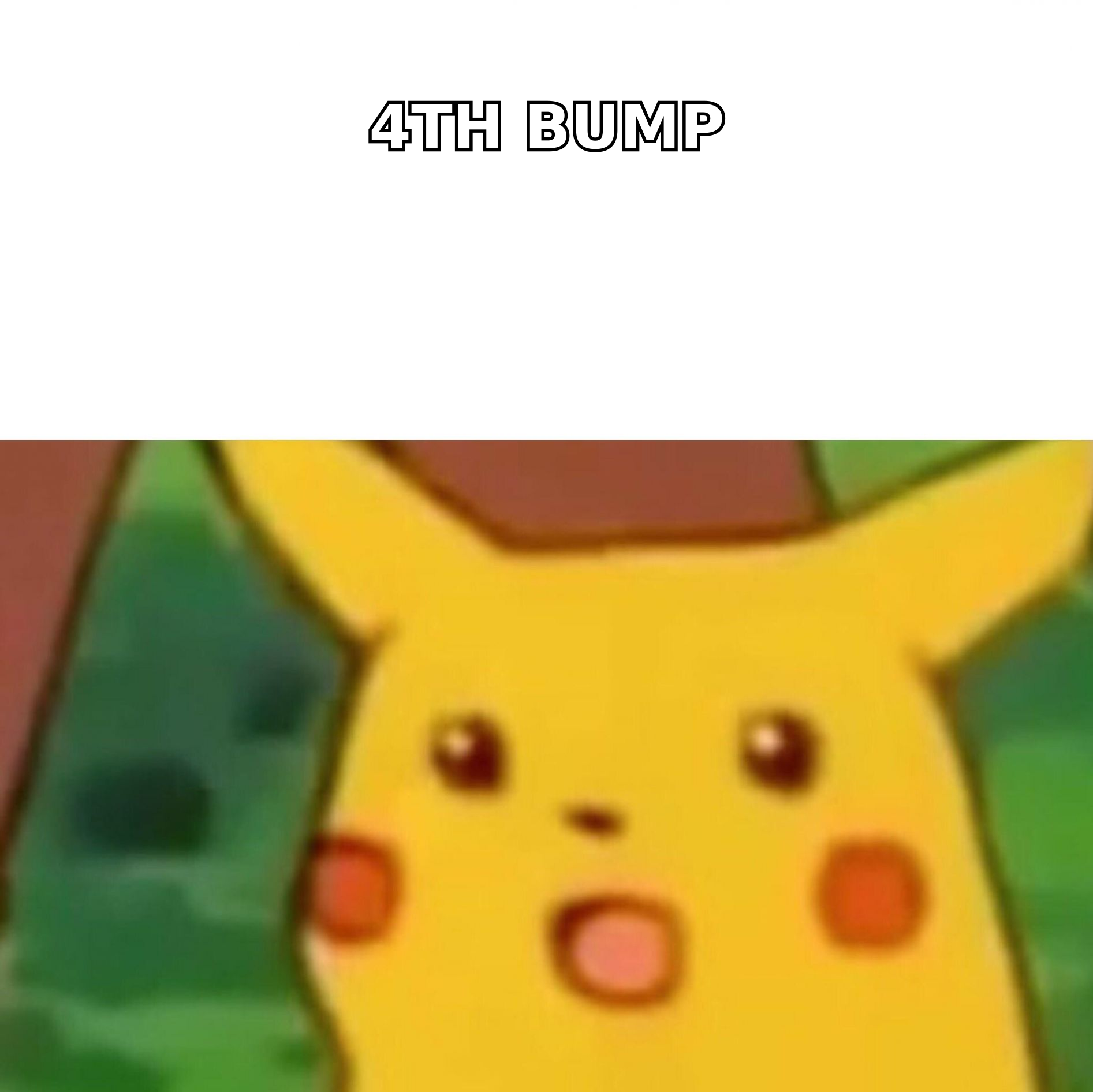
The Phrases to Delete and What to Write Instead#
| Delete this | Why it fails | Write this instead |
|---|---|---|
| "Just following up" | Zero new information; signals low confidence | "Quick update on the pricing question you raised —" |
| "Circling back" | Corporate filler; reader has heard it 40 times this week | "One thing I forgot to mention:" |
| "Did you get my last email?" | Passive-aggressive; forces a guilt reply | "Sending this to the top of your inbox with the numbers attached." |
| "Let me know your thoughts" | Open-ended; requires composition effort | "Yes or no on a 15-min call Thursday?" |
| "I hope this finds you well" | Burns your first line, the only one visible in preview | Lead with the new value directly |
| "Sorry to bother you again" | Frames your own message as a nuisance | "Last note from me on this —" |
| "Per my last email" | Reads as an accusation | "Recapping the two options:" |
What Is the Right Timing and Cadence for Follow-Ups?#
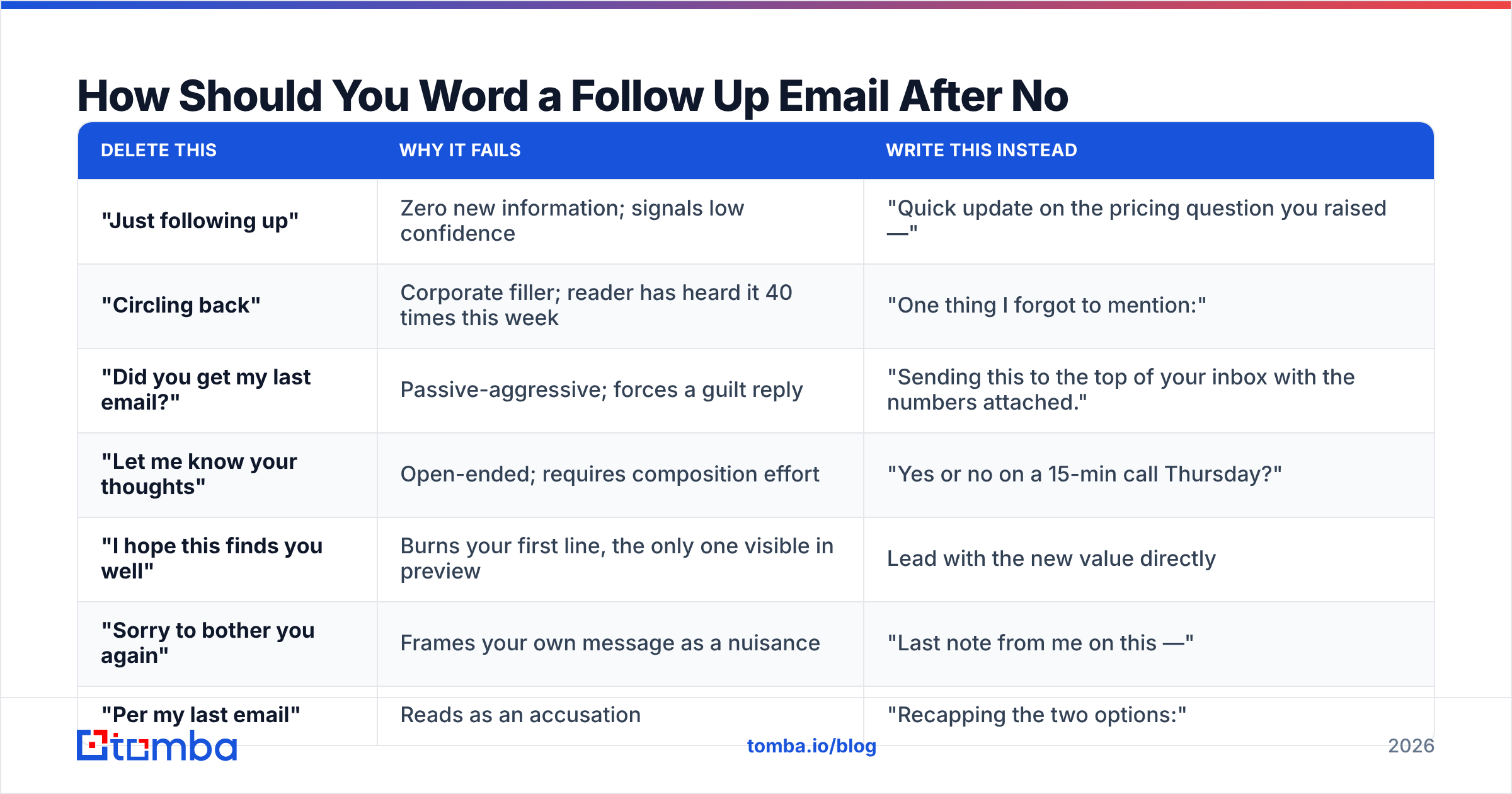
Wording and timing are one system. Perfect copy on day 21 loses to average copy on day 3.
Here's a cadence that works for most B2B outbound and warm inbound alike:
| Touch | Day | Angle | Word count target |
|---|---|---|---|
| Initial email | 0 | Problem + specific relevance | 90–120 |
| Follow-up 1 | 2–3 | Add proof (case study, number) | 50–70 |
| Follow-up 2 | 6–8 | Reframe: different pain, same offer | 40–60 |
| Follow-up 3 | 12–14 | Pure value, no ask (resource, article) | 40–60 |
| Follow-up 4 | 20–25 | Referral request — "wrong person?" | 30–45 |
| Break-up | 30–35 | Permission to close the file | 25–40 |
Two rules that matter more than the exact days:
- Each follow-up gets shorter. The reader's willingness to read declines with each unanswered message. Match it.
- Reply in-thread for touches 1 and 2, start a new thread for 3+. In-thread preserves context. A new thread with a fresh subject escapes a thread the reader has already mentally archived.
If you want to sanity-check your sending volume against your domain's warm-up state, the warmup calculator will tell you whether your cadence is outrunning your infrastructure. Sending five follow-ups a day from a two-week-old domain is a sender reputation problem, not a copy problem.
What Do the Best Follow-Up Templates Actually Look Like?#
Six templates you can lift directly. Swap the brackets, keep the structure.
1. The added-proof bump (follow-up 1, day 2–3)
Subject: Re: [original subject]
[First name] — one number I should have led with: [Similar Company] cut [metric] by [X%] in [timeframe] after fixing the same [problem].
Worth 15 minutes Thursday, or is this not a priority this quarter?
2. The reframe (follow-up 2, day 6–8)
Subject: Re: [original subject]
Different angle on this. Most [job title]s I talk to don't care about [feature] — they care that [adjacent pain] is eating [X hours] a week.
If that's not your problem, say "not it" and I'll stop.
3. The pure-value drop (follow-up 3, day 12–14)
Subject: [Specific resource title] — thought of you
No ask here. We published a teardown of how [Company Type] handles [problem]: [link].
Page 3 has the benchmark table. That's the useful part.
4. The wrong-person check (follow-up 4, day 20–25)
Subject: Wrong person?
[First name] — I may have aimed this at the wrong desk. Is [topic] owned by you, or by someone in [department]?
Happy to take it there instead.
5. The break-up (final touch)
Subject: Closing the file
Assuming [problem] isn't on your list for now — I'll stop here.
If it moves up, reply to this and I'll pick it back up. No hard feelings either way.
6. The post-meeting silence (warm thread)
Subject: Re: [meeting name]
[First name] — you mentioned wanting [specific thing] before deciding. Attached.
Still a go for [next step], or has the timeline shifted?
Notice what none of them do: apologize, explain themselves, or ask an open question. Every close is binary. If you want a starting library to adapt, the cold email templates collection covers the first-touch side of the same system.
How Does Subject Line Wording Change the Reply Rate?#
The subject line decides whether your carefully-worded body is ever seen. Two approaches, and the choice depends on the touch number.
Keep "Re:" for touches 1–2. Threading preserves context and signals an existing conversation. Don't fake it — if you're genuinely replying in-thread, the "Re:" is honest.
Break to a new subject for touch 3+. Once a thread is dead in the reader's mind, replying to it is like knocking on a door they've already walked away from. Fresh subject, fresh look.
What works in follow-up subject lines:
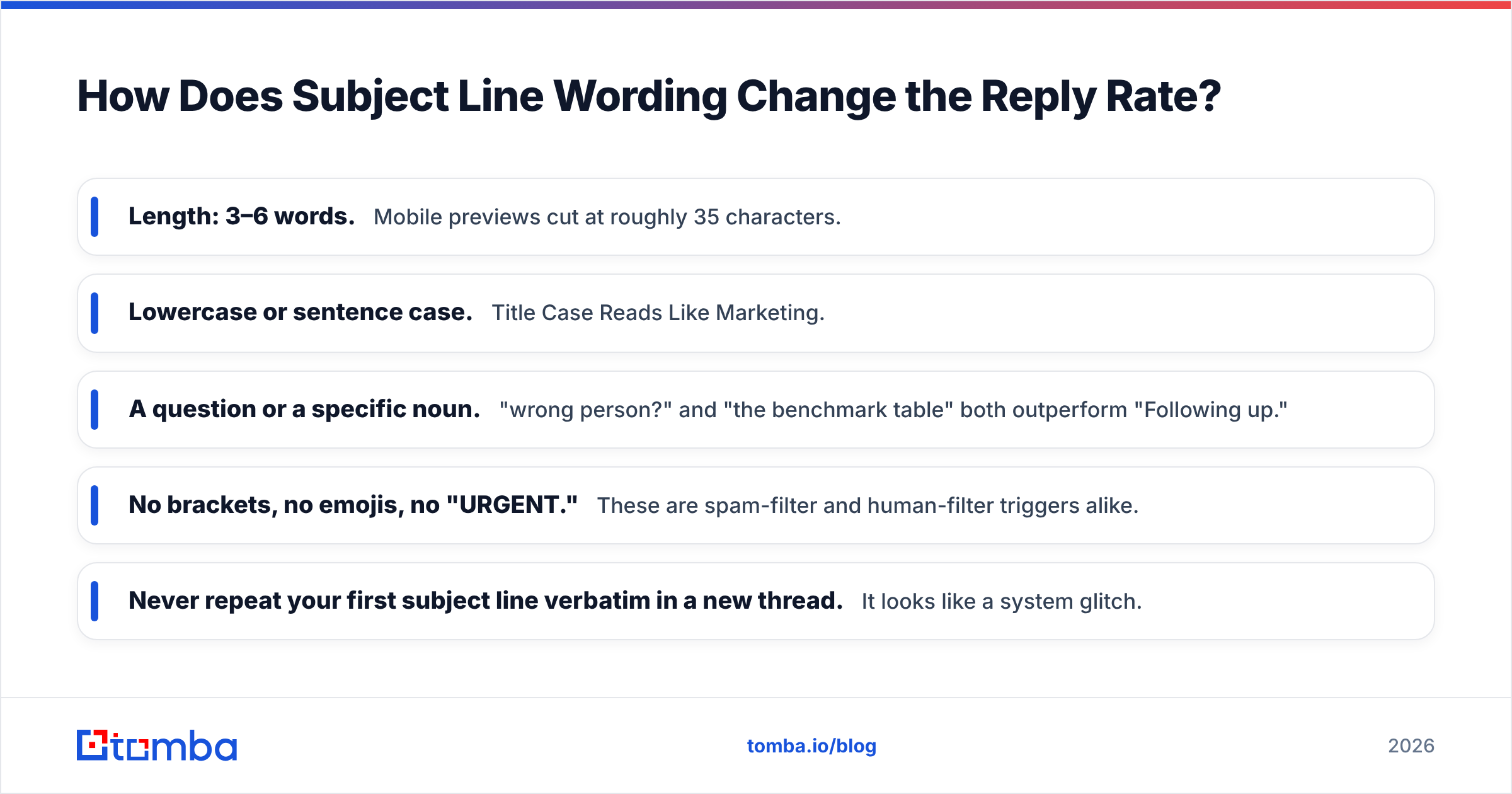
- Length: 3–6 words. Mobile previews cut at roughly 35 characters.
- Lowercase or sentence case. Title Case Reads Like Marketing.
- A question or a specific noun. "wrong person?" and "the benchmark table" both outperform "Following up."
- No brackets, no emojis, no "URGENT." These are spam-filter and human-filter triggers alike.
- Never repeat your first subject line verbatim in a new thread. It looks like a system glitch.
If you want to pressure-test variants before you send them, run them through a subject line tester rather than guessing.
Is Personalization Worth the Time in a Follow-Up?#
Yes, but not the kind most people mean. Mentioning that you saw their LinkedIn post is table stakes and reads as automated. The personalization that moves reply rates is situational: referencing something that changed in their business between your first email and your follow-up.
New funding round. A job posting that reveals a team they're building. A product launch. A regulatory shift in their industry. These give you a legitimate reason to write again — which is the entire problem a follow-up needs to solve.
Both HubSpot's research on sales email performance and buyer-behavior data compiled by Gartner on the B2B buying journey point the same direction: buyers spend the majority of their evaluation time not talking to vendors. Your follow-up isn't interrupting a decision — it's trying to be present when one starts forming. Relevance to their current moment is what earns that presence.
Practical way to do this at scale without writing 200 bespoke emails: build your personalization from structured data rather than manual research. Contact enrichment gives you role, seniority, company size, and tech stack — enough to write four or five genuinely distinct follow-up variants and route each contact to the right one.
What Should You Do When Nothing Works?#
After five or six well-worded touches with no reply, the problem is usually one of three things, and none of them are fixed by writing a seventh email.
1. The address is wrong or dead. Bounces don't always surface cleanly, and catch-all domains accept everything then silently discard. Confirm the address resolves before you keep spending touches on it.
2. You're talking to the wrong person. A director who doesn't own the budget has no incentive to reply. The "wrong person?" template exists precisely to convert silence into a routing answer — it's often the highest-reply-rate message in the whole sequence.
3. There's genuinely no problem to solve right now. This is fine. Log it, set a reminder for 90 days, and move on. A polite break-up email keeps the door open in a way that a seventh bump does not.
The channel question comes up here too. Switching to LinkedIn or a phone call after three unanswered emails often works — not because the channel is magic, but because it forces you to compress your message to a single sentence, which is what your email should have been.
Quick Reference: Follow-Up Wording Checklist#
Before you hit send, check every one of these:
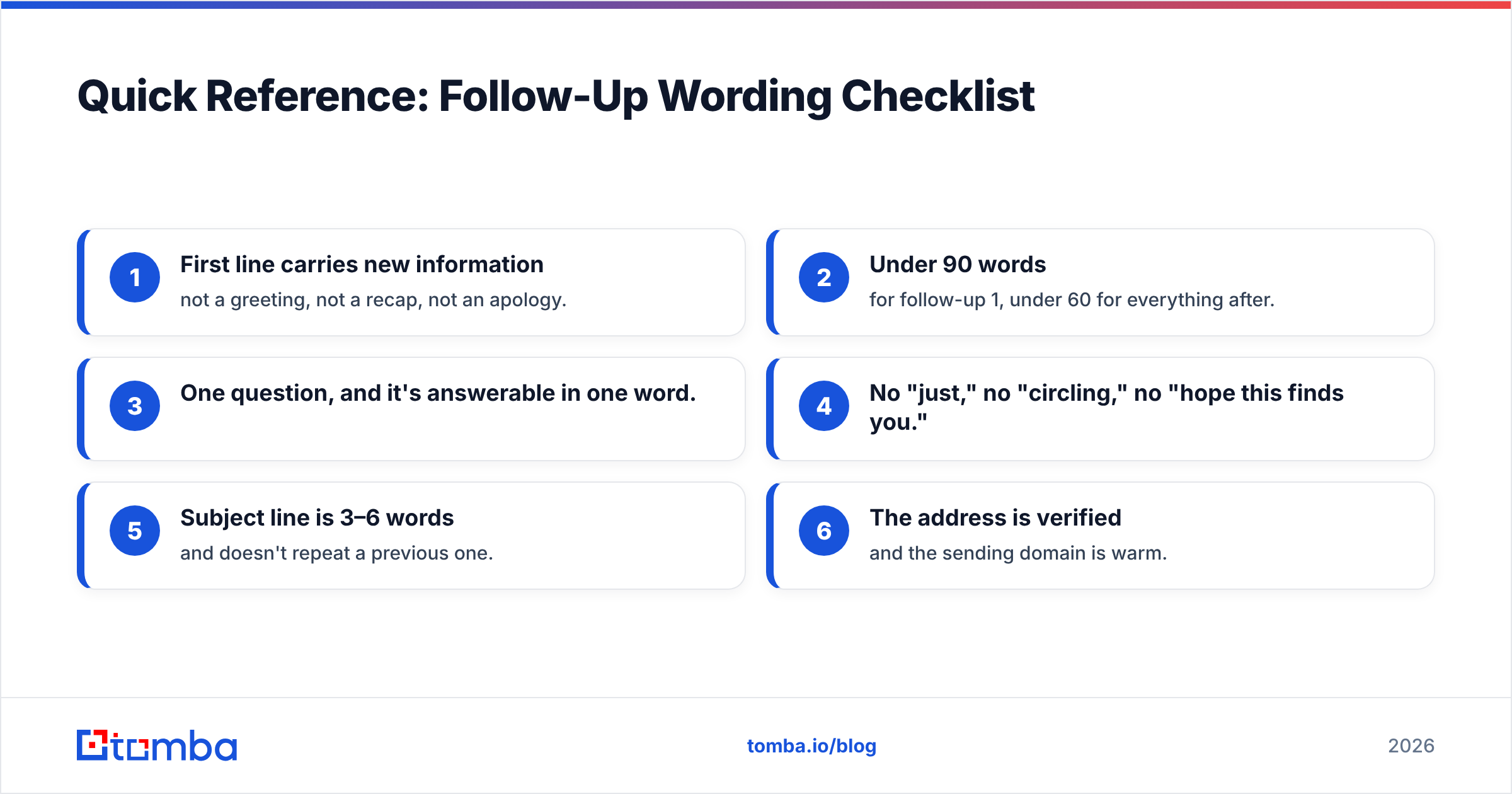
- First line carries new information — not a greeting, not a recap, not an apology.
- Under 90 words for follow-up 1, under 60 for everything after.
- One question, and it's answerable in one word.
- No "just," no "circling," no "hope this finds you."
- Subject line is 3–6 words and doesn't repeat a previous one.
- The address is verified and the sending domain is warm.
Run that list on your last five follow-ups. Most people find they fail three of the six.
Where Should You Start?#
Fix deliverability and data quality first, then wording. A perfectly worded follow-up to an address that bounces is a rounding error, and a great sequence sent from a cold domain lands in spam regardless of how sharp your binary question is.
Start by making sure the addresses in your sequence are real and current. Tomba's Email Finder returns verified professional addresses with a confidence score, so you know whether silence means "not interested" or "never arrived." The free tier covers 25 searches a month, and paid plans start at $49/mo — check the Tomba pricing page for the full breakdown. Get the addresses right, then let the wording do the job it's actually good at.
Related guides#
// get started
Find, verify and enrich your first contacts today
Start on the free plan with 25 searches a month, then scale when your team is ready.
Free plan · No credit card required · GDPR & CCPA
// about the author