How to Write a Follow Up Reminder Email That Gets Replies
Most reminder emails get ignored because they say "just checking in" and nothing else. Here are the exact structures, timing windows, and templates that pull replies out of silent threads.
TL;DR
- Knowing how to write a follow up reminder email comes down to one rule: add one new thing — a deadline, a resource, a decision path — instead of restating that you're waiting.
- Reply to your original thread for bumps 1–2, then start a fresh thread with a new subject line for bump 3+.
- The best-performing cadence for B2B reminders is day 3, day 7, day 14, then a breakup at day 21–30.
- Keep the body under 90 words, use one question, and never make the recipient scroll to find the ask.
- Delivery matters more than copy: a reminder sent to an invalid or stale address counts as a bounce, not a follow-up.
You send a proposal. Silence. You send "just checking in." More silence. Then you send a third one that opens with "I know you're busy" and you can feel the deal dying in real time.
The problem is rarely persistence. It's that most reminder emails carry no new information. The reader already knows you're waiting. That's why they feel guilty, and guilt makes people archive instead of reply. This guide shows you how to write a follow up reminder email that reads like help, not pressure: the structure, the timing, the subject lines, and seven templates.
What is a follow-up reminder email, exactly?#
A follow-up reminder email is a short message that prompts action on something already discussed: an unanswered proposal, an unsigned contract, a missed meeting, an overdue invoice, or a stalled next step.
It is different from a cold email. In a cold email you earn attention from scratch. In a reminder you already have permission. You're just competing with 120 other unread messages for a slice of the recipient's afternoon.
That distinction changes the copy. Cold emails need a hook. Reminders need friction removal. Every sentence you write should make replying easier, not make your case louder.
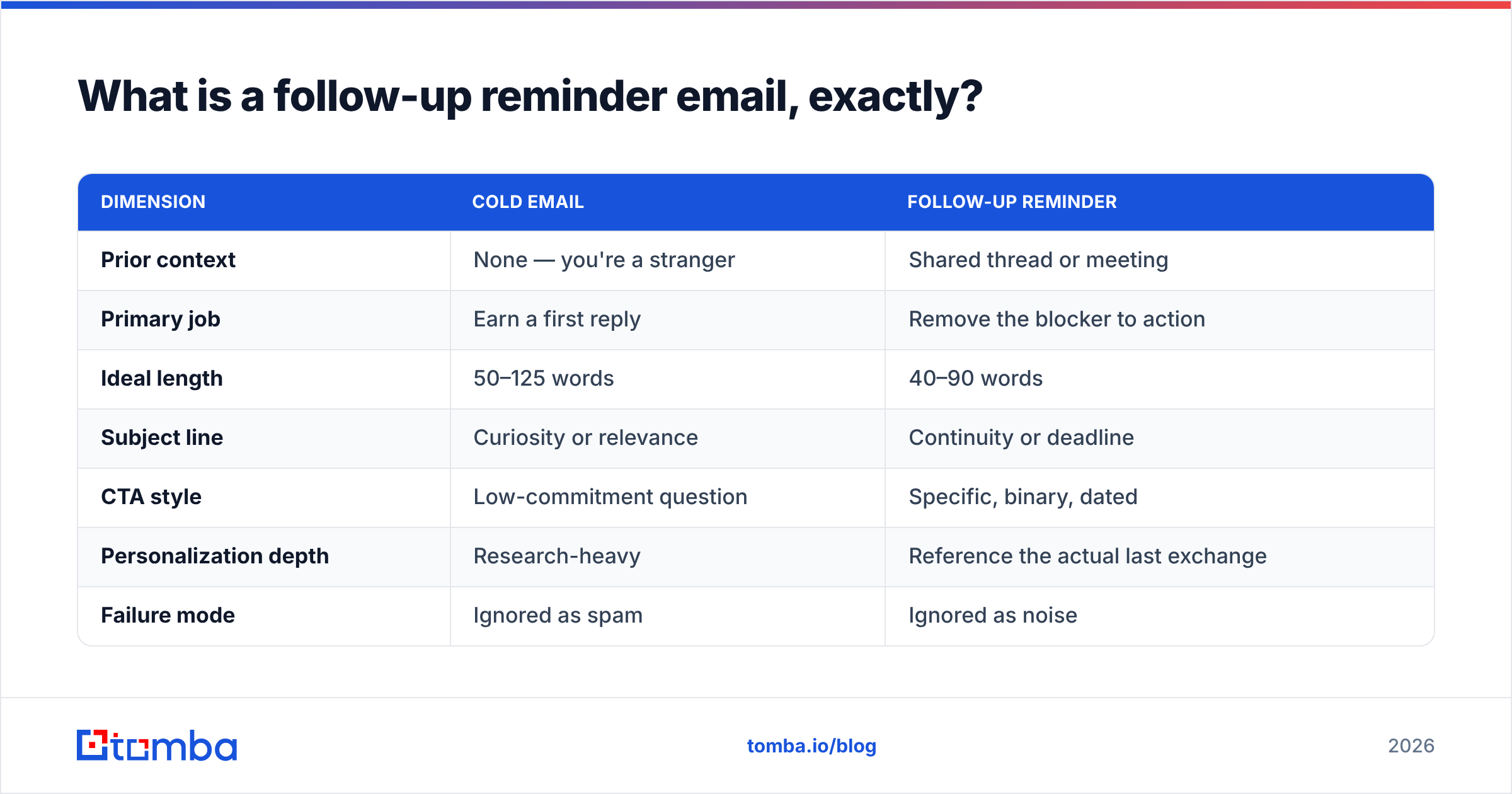
Here's how the two differ in practice:
| Dimension | Cold email | Follow-up reminder |
|---|---|---|
| Prior context | None — you're a stranger | Shared thread or meeting |
| Primary job | Earn a first reply | Remove the blocker to action |
| Ideal length | 50–125 words | 40–90 words |
| Subject line | Curiosity or relevance | Continuity or deadline |
| CTA style | Low-commitment question | Specific, binary, dated |
| Personalization depth | Research-heavy | Reference the actual last exchange |
| Failure mode | Ignored as spam | Ignored as noise |
The failure mode is the key row. Cold emails die from irrelevance. Reminders die from repetition. If your reminder just re-states the message above it, you give the reader no reason to act today.
How to write a follow up reminder email: the 5-part structure#
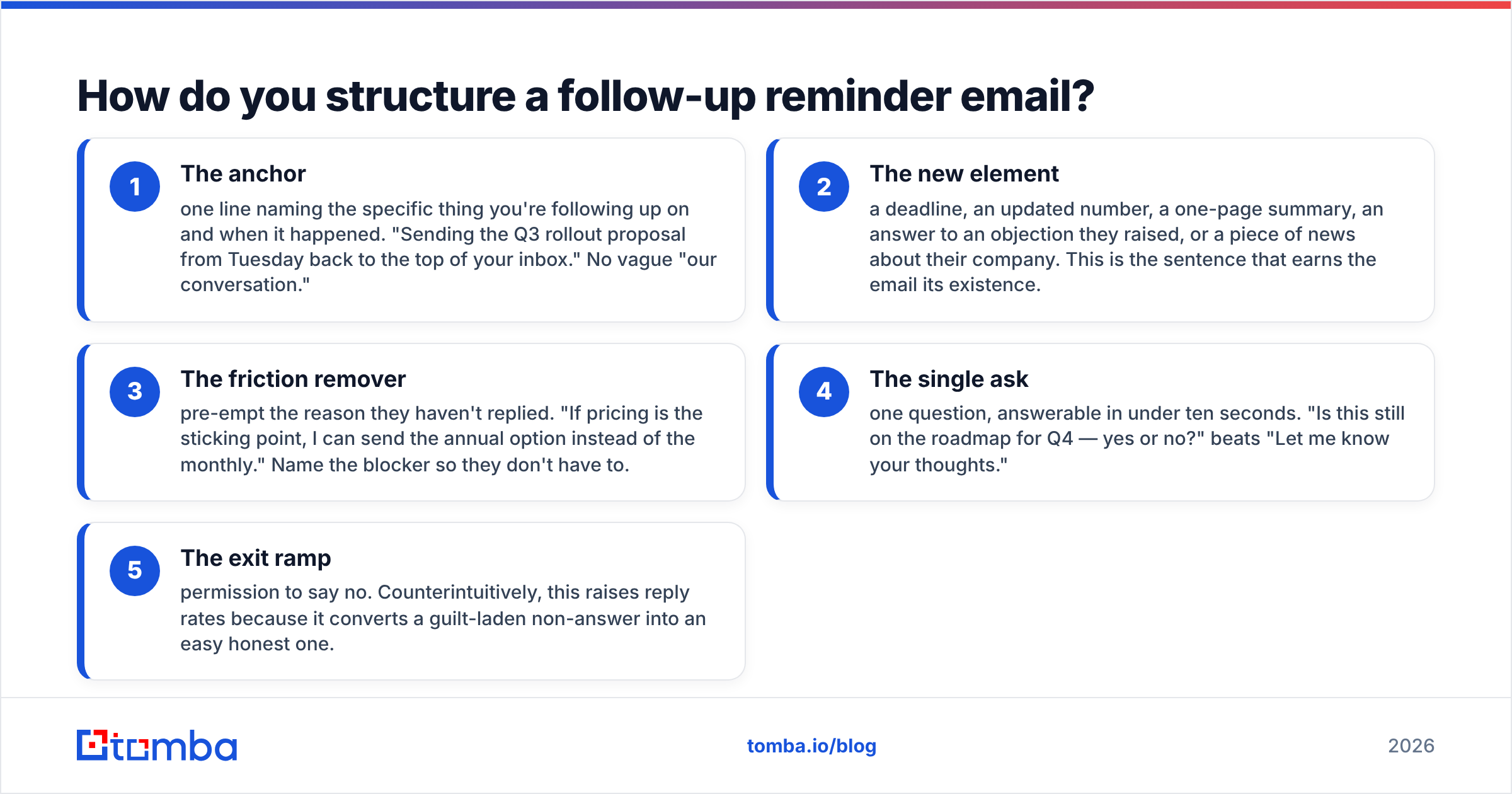
Use five components, in this order. Each one is one or two sentences, no more.
- The anchor — name the exact thing you're following up on and when it happened. "Sending Tuesday's Q3 rollout proposal back to the top of your inbox." No vague "our conversation."
- The new element — a deadline, an updated number, a one-page summary, or an answer to an objection they raised. This is the sentence that earns the email its existence.
- The friction remover — name the reason they haven't replied yet. "If pricing is the sticking point, I can send the annual option instead of the monthly." Then they don't have to say it.
Those three give the email a reason to exist. The last two make it easy to answer.
- The single ask — one question they can answer in ten seconds. "Is this still on the roadmap for Q4 — yes or no?" beats "Let me know your thoughts."
- The exit ramp — permission to say no. It sounds backwards, but it lifts reply rates. It turns a guilty non-answer into an easy honest one.
Drop any component and the email gets weaker. Add a sixth and you've written a pitch again.
What about subject lines?#
For bumps 1 and 2, reply in-thread and keep the existing subject with the Re: prefix. The thread history does your context work for free.
For bump 3 onward, start a new thread. The original one is buried and probably muted. Fresh subject lines that consistently pull:
Quick yes/no on the [project] timelineClosing the loop on [topic][Company] rollout — should I park this?One question about [specific thing they mentioned]
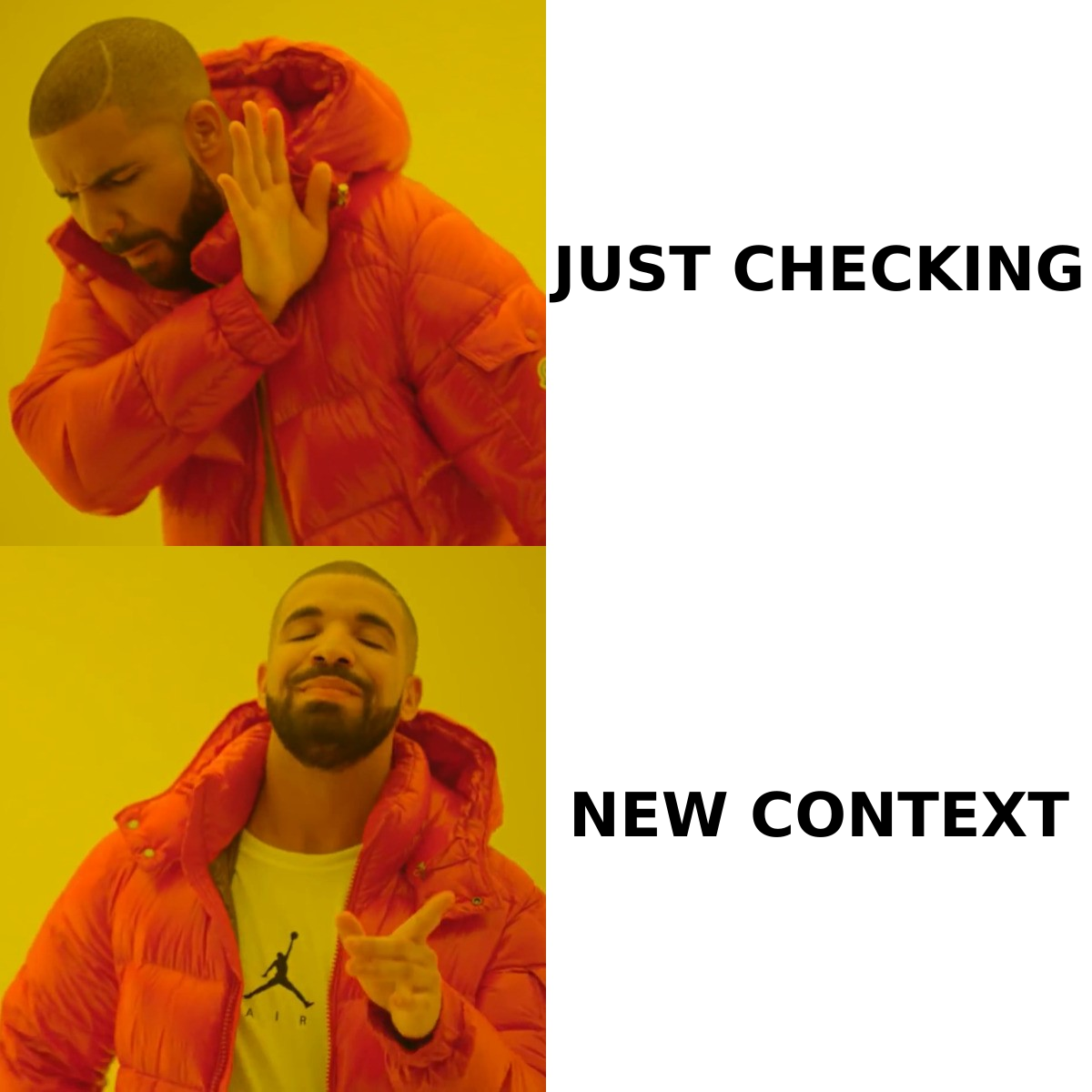
Avoid Following up, Touching base, and Checking in. They telegraph that the email contains nothing new, and experienced buyers have learned to archive on sight.
When should you send each follow-up reminder?#
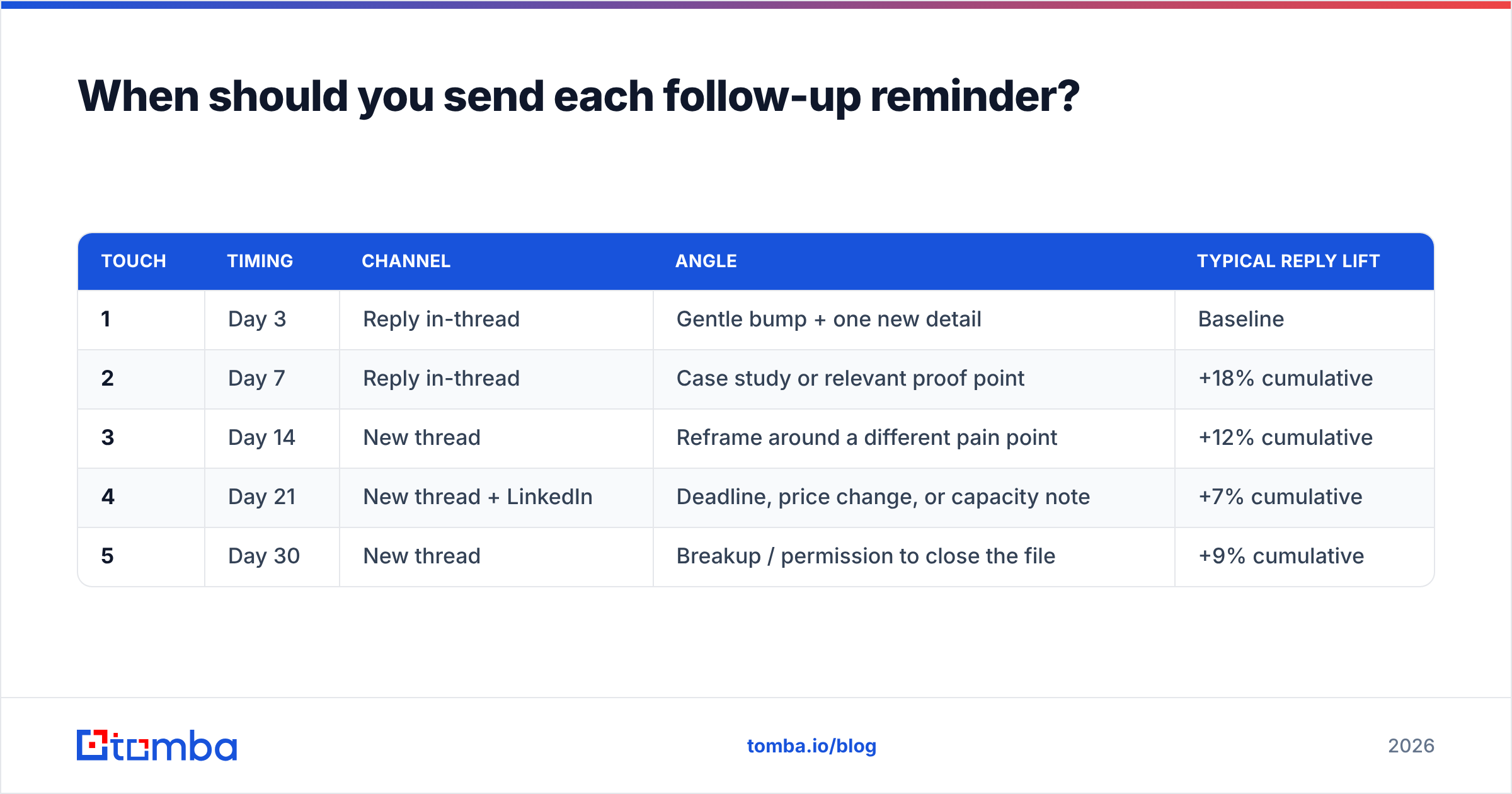
Timing beats copy. A mediocre email sent at the right interval outperforms a beautiful one sent at the wrong moment.
| Touch | Timing | Channel | Angle | Typical reply lift |
|---|---|---|---|---|
| 1 | Day 3 | Reply in-thread | Gentle bump + one new detail | Baseline |
| 2 | Day 7 | Reply in-thread | Case study or relevant proof point | +18% cumulative |
| 3 | Day 14 | New thread | Reframe around a different pain point | +12% cumulative |
| 4 | Day 21 | New thread + LinkedIn | Deadline, price change, or capacity note | +7% cumulative |
| 5 | Day 30 | New thread | Breakup / permission to close the file | +9% cumulative |
Three rules that override the table:
- Same-day reminders only for hard deadlines. Invoice due today, webinar starting in two hours, contract expiring at midnight. Otherwise you look frantic.
- Never follow up on a Monday morning or Friday afternoon. Tuesday through Thursday, 8–10am in the recipient's timezone, is where the replies live.
- Stop after the breakup. A sixth and seventh bump doesn't wear people down; it gets you marked as spam, and that damage follows your whole domain.
That last point is where most teams underestimate the cost. Repeated unanswered sends to a shrinking engaged audience quietly erode your sender reputation, and once inbox providers start filtering you, your good emails stop landing too.
What are the best follow-up reminder email templates?#
Seven that map to the situations you'll actually hit. Swap the brackets, keep the length.
1. The post-proposal bump (day 3)
Subject: Re: [Project] proposal
Hi [Name] — putting Tuesday's proposal back on top.
One update: we can start the pilot two weeks earlier than quoted if the January cohort works better for you.
Is the timeline still the main open question, or is it something else?
Happy to close the file if priorities shifted.
2. The post-meeting reminder (day 2)
Subject: Re: [Meeting] — the two things you asked for
Hi [Name], attaching the security overview and the reference contact from Thursday.
You mentioned wanting [Stakeholder]'s sign-off before the 15th — want me to join a 15-minute call with them, or is the doc enough?
3. The unsigned contract nudge (day 5)
Subject: [Company] agreement — anything blocking signature?
Hi [Name], the agreement's been sitting unsigned since [date]. Usually that means legal has a question rather than a change of heart.
Is there a redline I should be looking at? I can turn edits around today.
4. The overdue invoice reminder (day 7 past due)
Subject: Invoice #[number] — 7 days past due
Hi [Name], invoice #[number] for $[amount] was due on [date]. Copy attached in case it got lost.
If it's already in your payment run, tell me the date and I'll stop chasing. If it needs a different PO reference, send it over and I'll reissue.
5. The no-show recovery (same day)
Subject: Missed you at [time] — reschedule?
Hi [Name], looks like we crossed wires at [time]. No problem at all.
Here are two slots this week: [option A] or [option B]. If this quarter's the wrong time, say the word and I'll follow up in [month].
6. The reframe (day 14, new thread)
Subject: A different angle on [problem]
Hi [Name] — I pitched us on [original angle], which may not have been your priority.
The thing most [role] teams at [company size] actually bring up first is [second pain point]. We handle that too, and here's a 90-second example: [link].
Worth ten minutes, or should I stop?
7. The breakup (day 30)
Subject: Closing your file
Hi [Name] — I've reached out a few times about [topic] without hearing back, so I'll assume the timing isn't right and close things out.
If that's wrong, one line back and I'll pick it up. Otherwise, good luck with [initiative] this year.
The breakup consistently outperforms everything before it. Loss aversion is real: people who ignored five value-forward emails will reply to the one that takes the option away.
What phrases kill your reply rate?#
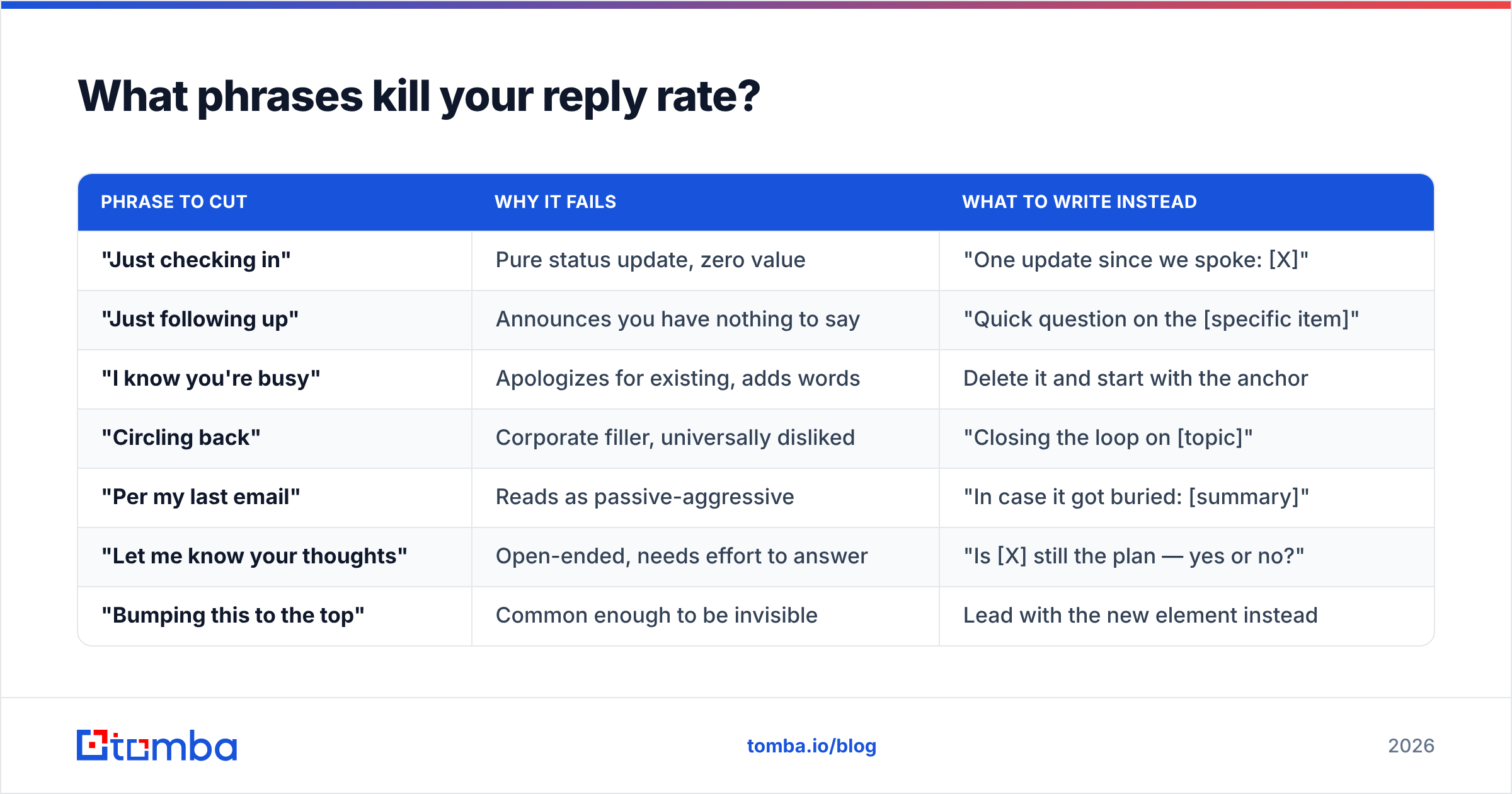
Some openers signal "no new information" so reliably that recipients archive before reading the body.
| Phrase to cut | Why it fails | What to write instead |
|---|---|---|
| "Just checking in" | Pure status update, zero value | "One update since we spoke: [X]" |
| "Just following up" | Announces you have nothing to say | "Quick question on the [specific item]" |
| "I know you're busy" | Apologizes for existing, adds words | Delete it and start with the anchor |
| "Circling back" | Corporate filler, universally disliked | "Closing the loop on [topic]" |
| "Per my last email" | Reads as passive-aggressive | "In case it got buried: [summary]" |
| "Let me know your thoughts" | Open-ended, needs effort to answer | "Is [X] still the plan — yes or no?" |
| "Bumping this to the top" | Common enough to be invisible | Lead with the new element instead |
Also cut every hedge: just, maybe, I was wondering if, sorry to bother. Each one shrinks your perceived authority. Each one adds words to an email whose whole advantage is brevity. HubSpot's sales research keeps finding the same thing: short, specific asks beat long qualified ones. You can read more of their breakdowns in the HubSpot sales blog.
Does deliverability affect follow-up reminders?#
More than copy does, and most teams find out too late.
A reminder is only a reminder if it reaches a live inbox. Three delivery problems quietly sabotage otherwise good sequences:
- Stale addresses. Roughly a quarter of B2B contact data decays per year through job changes. The person you're reminding may have left six months ago, and every send to that address is a hard bounce charged against your domain.
- Catch-all domains. Many enterprise domains accept every message at the server then discard unknown recipients silently. You see "delivered." Nobody ever reads it. A catch-all verifier is the only way to separate genuinely live mailboxes from black holes.
- Authentication gaps. If SPF, DKIM, and DMARC aren't aligned, follow-up volume gets filtered before it reaches a human. Run a quick SPF checker on your sending domain before you blame the copy.
The practical order is simple. Verify the address. Confirm the domain isn't a catch-all. Check your authentication. Then worry about whether your subject line is clever enough. Running a list through an email verifier before a follow-up campaign typically removes 5–15% of addresses that would bounce and drag your email deliverability down for months.
Building the list is a different problem from cleaning one, and the tradeoffs between providers matter. Tomba, BookYourData, and the larger sales-intelligence suites each optimize for something different. Tomba is built for verified email discovery at a low per-contact cost. BookYourData sells prebuilt segmented lists outright. The big suites cover full CRM-integrated workflows. Check current reviews on G2 before you sign an annual contract; the category moves fast.
How many follow-ups is too many?#
Five touches over 30 days is the ceiling for most B2B sales contexts. Past that, three things happen at once and they compound:
- Reply rates flatten. Marginal lift from touch 6 onward is close to zero in most published datasets.
- Spam complaints spike. One complaint per thousand sends is the danger threshold at most providers; heavy repeat sending to non-responders is the fastest way to cross it.
- Brand damage sticks. The prospect who marks you as spam in 2026 is also the prospect who won't take your call in 2028, at a different company.
The exception is genuine transactional reminders — invoices, renewals, expiring credentials — where the recipient has a real obligation and a legitimate need to be reminded. Those can run longer, but they should escalate in specificity, not in frequency.
A cleaner strategy than more email: switch channels. Touch 4 as a LinkedIn message and touch 5 as a phone call reach a different part of the prospect's attention. If you need direct dials for that, a phone finder fills the gap that email-only sequences leave open.
What does a good follow-up cadence look like end to end?#
Put it all together for a stalled proposal:
- Day 0 — Proposal sent. Confirm the address is verified and the thread has a clear next step written into the final line.
- Day 3 — In-thread bump. Anchor + one new detail (earlier start date, revised scope, a relevant customer).
- Day 7 — In-thread. Proof point: a case study from their industry, one paragraph, one link.
- Day 14 — New thread. Reframe around a second pain point. Different subject line, different angle, no reference to being ignored.
- Day 18 — LinkedIn message. Two sentences, no attachment, no pitch.
- Day 21 — New thread. Deadline or capacity note if one genuinely exists. Do not invent urgency; buyers spot it instantly.
- Day 30 — Breakup. Close the file, leave the door open, mean it.
- Day 120 — Re-entry with a genuine trigger: funding round, new hire in the relevant role, product launch.
Log every touch in your CRM so a colleague doesn't restart the sequence from scratch three weeks later. Duplicate outreach from two reps at the same company is the single most avoidable way to lose a warm account.
Getting the address right before you write a word#
Knowing how to write a follow up reminder email is only half the job. The other half is making sure it lands. Verify before you follow up: check that the address is deliverable, that the domain isn't swallowing mail silently, and that the person still works there.
The Tomba Email Finder locates verified professional addresses by name, domain, or company, with confidence scoring on every result. Your sequence starts from a list that actually receives mail. Free tier includes 25 searches a month, Starter runs $49/mo, and Growth is $99/mo; see full Tomba pricing for bulk and API limits. Clean the list first, then write the reminder that says something new.
Related guides#
// get started
Find, verify and enrich your first contacts today
Start on the free plan with 25 searches a month, then scale when your team is ready.
Free plan · No credit card required · GDPR & CCPA
// about the author