How to Write a Follow Up Email to a Client (2026 Guide)
Most client follow-ups fail because they add pressure instead of value. Here are the timing rules, structures, and 7 copy-paste templates that actually get replies in 2026.
TL;DR
- The average client reply doesn't come from the first email. Roughly 80% of closed deals need five or more touches, and most reps stop after two.
- "Just following up" is the weakest sentence in B2B email. Every follow-up needs a new reason to exist: a resource, a question, a deadline, or a decision.
- Space follow-ups on a widening ladder — day 3, day 7, day 14, day 30 — not a rigid every-other-day drip.
- Keep the follow-up under 90 words, ask exactly one question, and make the CTA a yes/no rather than a calendar negotiation.
- If your follow-ups bounce, the problem isn't your copy. Verify the address before you blame the words.
Why do most client follow-up emails get ignored?#
Because they ask the client to do work without giving them anything in return.
Look at the typical follow-up: "Hi Sarah, just circling back on my last email — did you get a chance to review the proposal?" That message transfers 100% of the effort to Sarah. She has to remember what the proposal said, reopen it, form an opinion, and write a reply. You contributed a reminder.
The follow-ups that get answered do the opposite. They carry a small piece of new value — a benchmark, a shortened option, a competitor teardown, a one-line summary of the decision she needs to make — so that replying is easier than ignoring.
There's a second reason follow-ups die: they never arrive. A message sent to a stale address, a role account that was decommissioned, or a domain that silently blackholes mail looks identical to being ignored. Before you rewrite your copy for the fourth time, confirm the address is live with an email verifier. A 6% invalid rate on your client list will distort every reply-rate number you look at.
What is the right structure for a follow-up email to a client?#
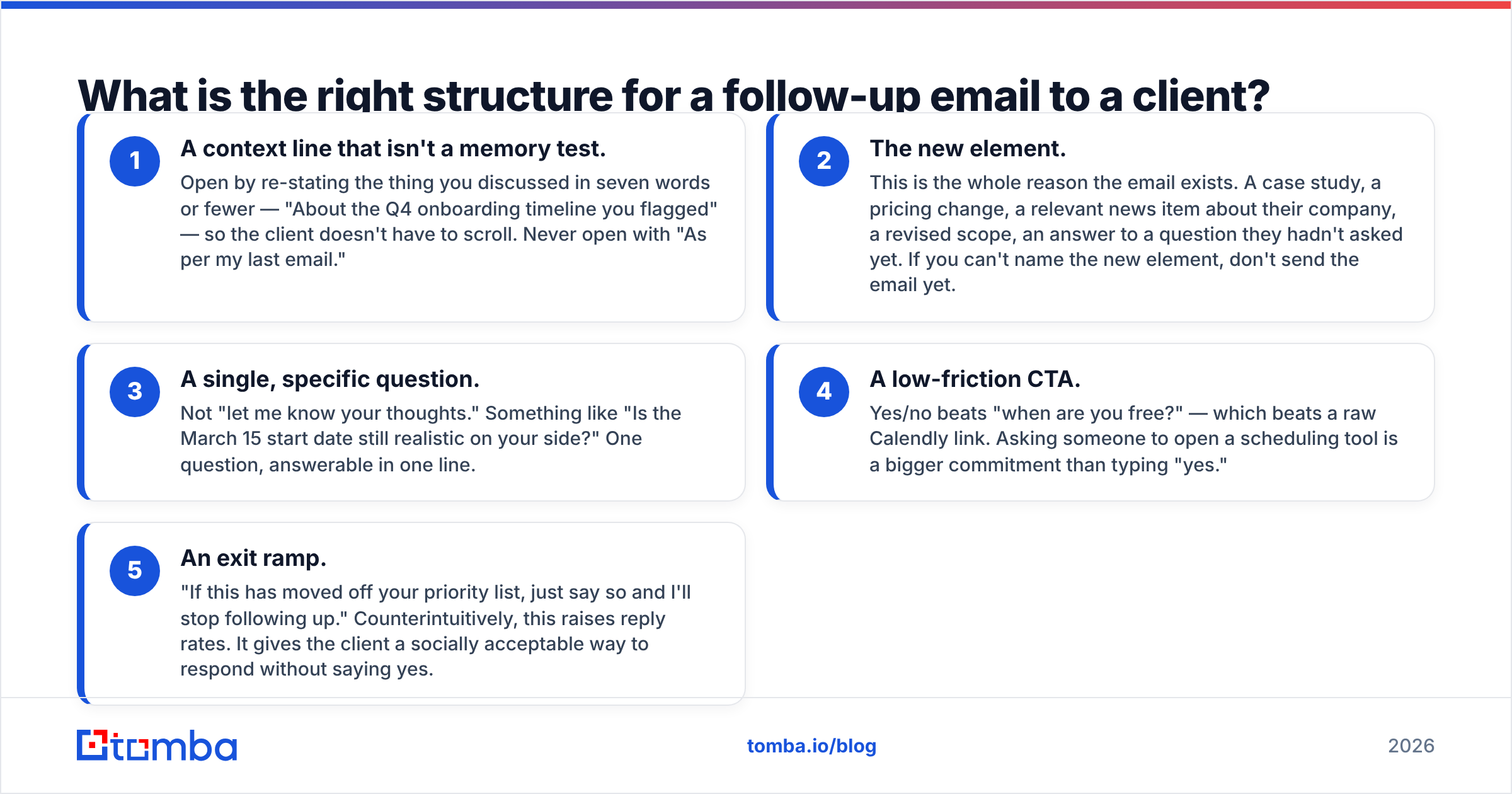
Five parts, in this order. Each one does a specific job, and dropping any of them costs you replies.
- A context line that isn't a memory test. Open by re-stating the thing you discussed in seven words or fewer — "About the Q4 onboarding timeline you flagged" — so the client doesn't have to scroll. Never open with "As per my last email."
- The new element. This is the whole reason the email exists. A case study, a pricing change, a relevant news item about their company, a revised scope, an answer to a question they hadn't asked yet. If you can't name the new element, don't send the email yet.
- A single, specific question. Not "let me know your thoughts." Something like "Is the March 15 start date still realistic on your side?" One question, answerable in one line.
- A low-friction CTA. Yes/no beats "when are you free?" — which beats a raw Calendly link. Asking someone to open a scheduling tool is a bigger commitment than typing "yes."
- An exit ramp. "If this has moved off your priority list, just say so and I'll stop following up." Counterintuitively, this raises reply rates. It gives the client a socially acceptable way to respond without saying yes.
Total length: 60 to 90 words. Anything over 120 words in a follow-up reads as anxiety.
How long should you wait before following up?#
Widen the gap each time. A follow-up cadence that fires every 48 hours reads as desperation by touch three; one that fires on a widening ladder reads as persistence.
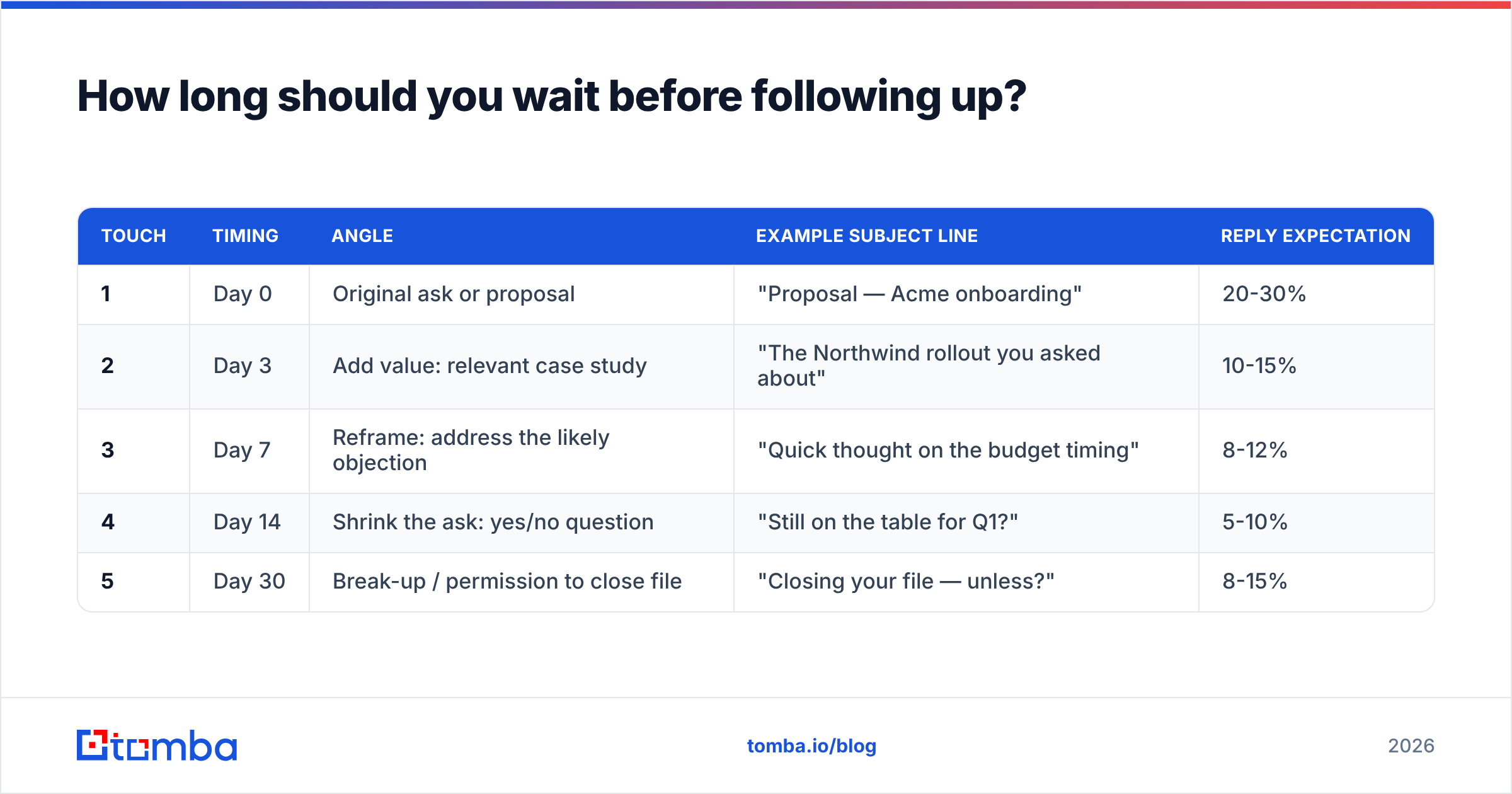
Here's the cadence that works across most B2B client scenarios, mapped against what each touch should actually contain:
| Touch | Timing | Angle | Example subject line | Reply expectation |
|---|---|---|---|---|
| 1 | Day 0 | Original ask or proposal | "Proposal — Acme onboarding" | 20-30% |
| 2 | Day 3 | Add value: relevant case study | "The Northwind rollout you asked about" | 10-15% |
| 3 | Day 7 | Reframe: address the likely objection | "Quick thought on the budget timing" | 8-12% |
| 4 | Day 14 | Shrink the ask: yes/no question | "Still on the table for Q1?" | 5-10% |
| 5 | Day 30 | Break-up / permission to close file | "Closing your file — unless?" | 8-15% |
Two notes on that table. First, the break-up email at day 30 often outperforms touches three and four — the finality triggers a response. Second, these windows assume a warm client relationship. For cold prospecting, stretch every interval by roughly 50% and cap at four touches.
Timing within the day matters less than most guides claim. HubSpot's ongoing email send-time research keeps landing on the same conclusion: mid-morning on Tuesday through Thursday performs marginally better, but the effect is small compared to relevance. Don't over-engineer send time at the expense of the message.
Which follow-up templates actually work?#
Seven templates below, each mapped to a specific situation. Change the specifics — the structure is what's doing the work.
1. After a proposal, no response (day 3)
Subject: The Northwind rollout you asked about
Hi Sarah,
You mentioned worrying about onboarding time. Northwind had the same concern — they were live in 11 days, and I've attached their two-page rollout plan.
Is the March 15 start date still realistic on your end?
— Ben
2. After a discovery call, no response (day 4)
Subject: The two things you said mattered most
Hi Marcus,
From our call, the priorities were (1) cutting manual data entry and (2) getting your reps off spreadsheets by Q2. I built the scope around exactly those two — nothing else.
Does that match what you'd need to take internally?
3. Waiting on an internal decision (day 10)
Subject: Anything I can send to Legal?
Hi Priya,
Sounds like this is with Legal now. Most clients get asked for our DPA and SOC 2 summary at this stage — want me to send both so you're not chasing them later?
4. After a price objection (day 7)
Subject: A smaller version of the same thing
Hi Tom,
The full scope was the sticking point. Here's a 60% version that covers the two workflows you called critical, at roughly half the annual cost.
Worth 10 minutes, or is budget frozen until the new fiscal year?
5. The re-engagement (90 days cold)
Subject: We shipped the thing you wanted
Hi Lena,
Last spring you passed because we didn't have native Salesforce sync. We shipped it in June.
Is that still a live problem for your team, or did you solve it another way?
6. The check-in on an existing client
Subject: Your Q3 numbers vs. the goal we set
Hi Dan,
You're at 62% of the pipeline target we set in January, mostly from the two campaigns launched in May. I pulled the breakdown into one page.
Want me to walk you through where the gap is, or is the summary enough?
7. The break-up (day 30)
Subject: Closing your file — unless?
Hi Sarah,
I've sent a few notes and haven't heard back, which usually means the timing is wrong. I'm going to close this out on my end.
If I've got that wrong, just reply "not yet" and I'll hold off.
You can adapt more starting points from our library of cold email templates, then run the final draft through a subject line tester before it goes out.
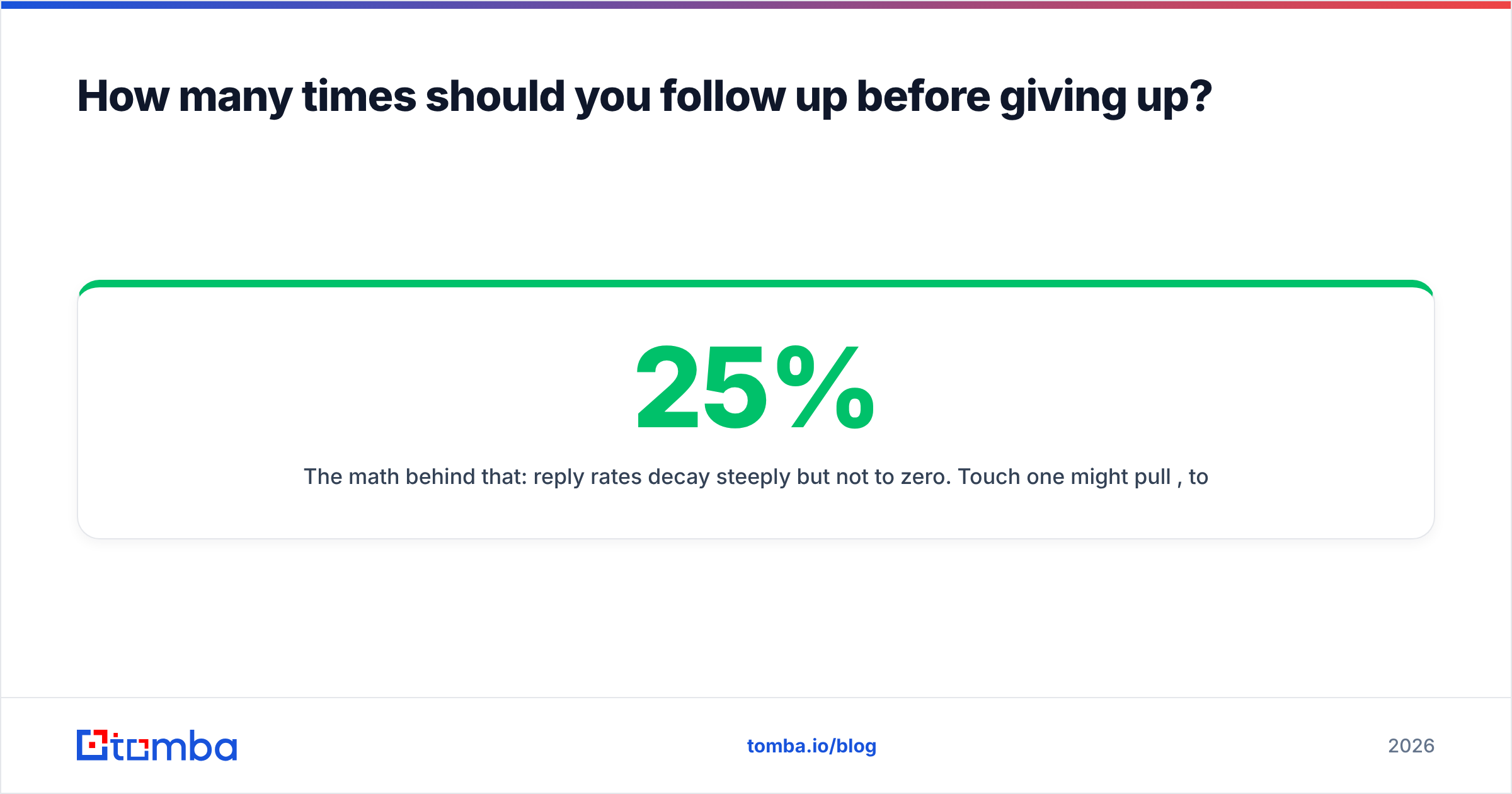
How many times should you follow up before giving up?#
Five touches over 30 days, then stop — or move to a quarterly nurture.
The math behind that: reply rates decay steeply but not to zero. Touch one might pull 25%, touch two 12%, touch three 9%, touch four 6%, touch five 10% (the break-up bump). Touch six typically lands under 3% and starts generating spam complaints, which costs you more in sender reputation than the marginal reply is worth.
Stop earlier if you see any of these:
- Hard bounce. Remove immediately. Repeated sends to a dead address is the fastest way to tank your domain reputation.
- An explicit no. "Not interested" means move them to a 6-month nurture list, not to touch four.
- Opens with zero replies across five touches. They're seeing it and choosing not to answer. Change channel or change contact.
- Out-of-office beyond your window. Reset the clock to their return date rather than burning touches into an empty inbox.
Should follow-ups go to one contact or the whole buying group?#
Multi-thread — but do it openly, not by ambushing the champion's boss.
Gartner's research on B2B buying has consistently put the typical enterprise buying group at six to ten decision makers. If you follow up with one contact for 30 days while five other people control the decision, you're negotiating with someone who can't say yes.
The clean way to widen: after touch two, ask your primary contact who else needs to weigh in, and offer to send them a version tailored to their concern. If they go silent through touch four, it's fair to reach a peer directly — referencing the existing conversation, never pretending it doesn't exist.
Finding those additional contacts is a data problem, not a copy problem. A domain search surfaces the other people at the account and their email pattern, so you're not guessing at firstname.lastname@ and generating bounces that hurt the thread you already have.
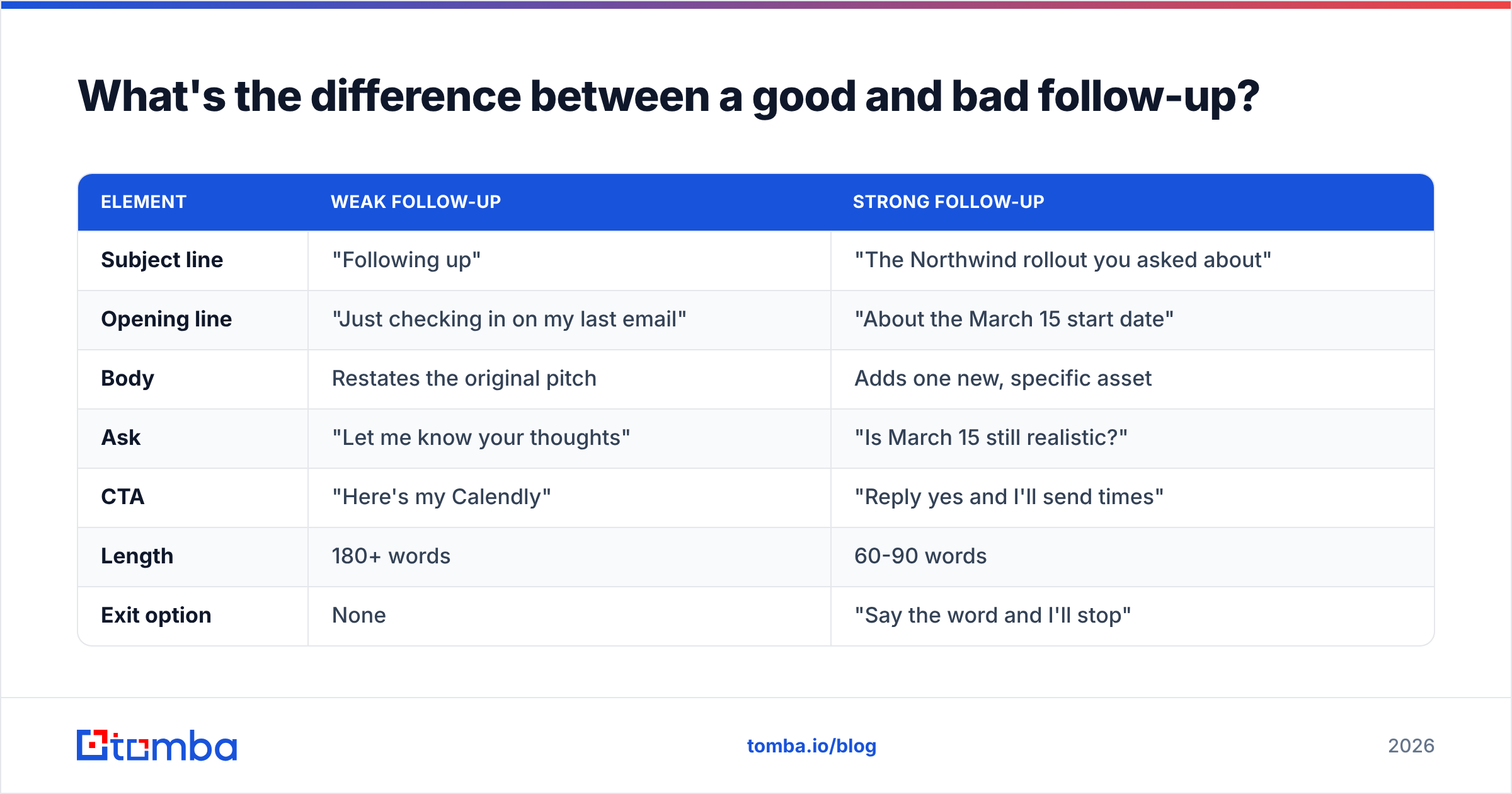
What's the difference between a good and bad follow-up?#
Side by side, the gap is mostly about who does the work:
| Element | Weak follow-up | Strong follow-up |
|---|---|---|
| Subject line | "Following up" | "The Northwind rollout you asked about" |
| Opening line | "Just checking in on my last email" | "About the March 15 start date" |
| Body | Restates the original pitch | Adds one new, specific asset |
| Ask | "Let me know your thoughts" | "Is March 15 still realistic?" |
| CTA | "Here's my Calendly" | "Reply yes and I'll send times" |
| Length | 180+ words | 60-90 words |
| Exit option | None | "Say the word and I'll stop" |
| Cadence | Every 2 days, 8 times | Day 3, 7, 14, 30 |
The pattern: every row on the right moves effort from the client to you.
What tools help you run follow-ups at scale?#
Three categories, and they're not interchangeable.
- Contact data. You need the right address before anything else matters. Tools like Tomba, Hunter, Apollo, and BookYourData all supply verified B2B contacts; BookYourData leans toward pre-built list purchase, while Tomba and Hunter lean toward on-demand lookup from a domain or name.
- Sequencing. Instantly, Smartlead, Saleshandy, and HubSpot Sequences handle the actual send cadence and auto-stop on reply. Check G2's outbound category for current comparisons — the leaderboard shifts every couple of quarters.
- Deliverability hygiene. Warmup, SPF/DKIM/DMARC configuration, and list cleaning. If your follow-ups aren't landing in the primary tab, none of the copy above matters. Start with an SPF checker and a spam checker on your template.
A practical stack for a small team: verified contact data feeding a sequencer, with a verification pass before every send batch. Bulk-cleaning a list of a few thousand contacts takes minutes with a bulk email finder and saves you from the bounce spiral that quietly kills a sending domain.
What should you do next?#
Rewrite one follow-up you sent this week using the five-part structure — context line, new element, single question, low-friction CTA, exit ramp — and cut it to 90 words. Then check the cadence table and space your next four touches on the widening ladder instead of the every-other-day drip.
The one thing to fix before any of that: your data. A perfectly written follow-up to a dead address is a rounding error in your metrics and a slow leak in your sender reputation.
Tomba Email Finder gets you the verified address, the right person at the account, and the email pattern for everyone else in the buying group — so your follow-ups reach an inbox instead of a bounce log. The free tier covers 25 searches a month if you want to test it against a live list; paid plans start at $49/mo on the Starter tier, with full Tomba pricing laid out per credit volume. Verify the list first, then send the follow-up.
Related guides#
// get started
Find, verify and enrich your first contacts today
Start on the free plan with 25 searches a month, then scale when your team is ready.
Free plan · No credit card required · GDPR & CCPA
// about the author