Howdygo Pricing Reviews Pros and Cons: 2026 Buyer's Guide
Howdygo sells interactive product demos at a price that undercuts most of the category. Here is what the plans really cost, where the limits bite, and which teams should pick something else.
Looking for Howdygo pricing reviews pros and cons in one place? Here it is. This guide covers what the plans cost, what users praise, where the tool falls short, and who should buy something else.
TL;DR
- Howdygo is a lightweight interactive demo builder for small B2B SaaS teams. It puts a clickable demo on your landing page without a six-figure enablement budget.
- Pricing sits at the low end of the category. You get a free or trial tier plus paid plans in the tens to low hundreds of dollars per month. Navattic, Storylane, and Reprise ask for four-figure annual contracts.
- The pros: fast capture, clean editing, no per-seat fees, and demos that load fast enough to embed above the fold.
- The cons: thinner analytics, fewer personalization hooks, and limited CRM depth. Demo and workspace caps also bite once demos become a real acquisition channel.
- A demo tool only converts traffic you already have. Pair it with verified contact data. Otherwise you are polishing the last 5% of a funnel that is starving at the top.
What is Howdygo, and who is it actually for?#
Howdygo is an interactive demo tool. You record a flow through your product in the browser. The tool captures the page itself, not just video frames. You get a clickable, embeddable walkthrough with tooltips, hotspots, and editable text. Prospects click through your product on your website instead of booking a call.
That category — sometimes called demo automation — has three tiers of buyer:
- Enterprise demo platforms (Reprise, Consensus): sandboxed environments, deep personalization, six-figure contracts, and dedicated setup help.
- Mid-market demo builders (Navattic, Storylane, Walnut): strong analytics, CRM sync, and demo sequences. Budget $500–$2,000+/month, billed annually.
- Self-serve demo builders (Howdygo, Supademo, Arcade, Fable): credit-card signup, low monthly cost, single-marketer workflows.
Howdygo sits firmly in the third bucket. Its whole pitch is price-to-value. It is built for a founder, a product marketer, or a two-person growth team that wants a demo live this week. Compare it to Navattic or Reprise on features alone and you will find gaps. That is not the point. The real question is simpler: does the cheaper tool get you 80% of the conversion lift for 15% of the cost?
How much does Howdygo cost in 2026?#
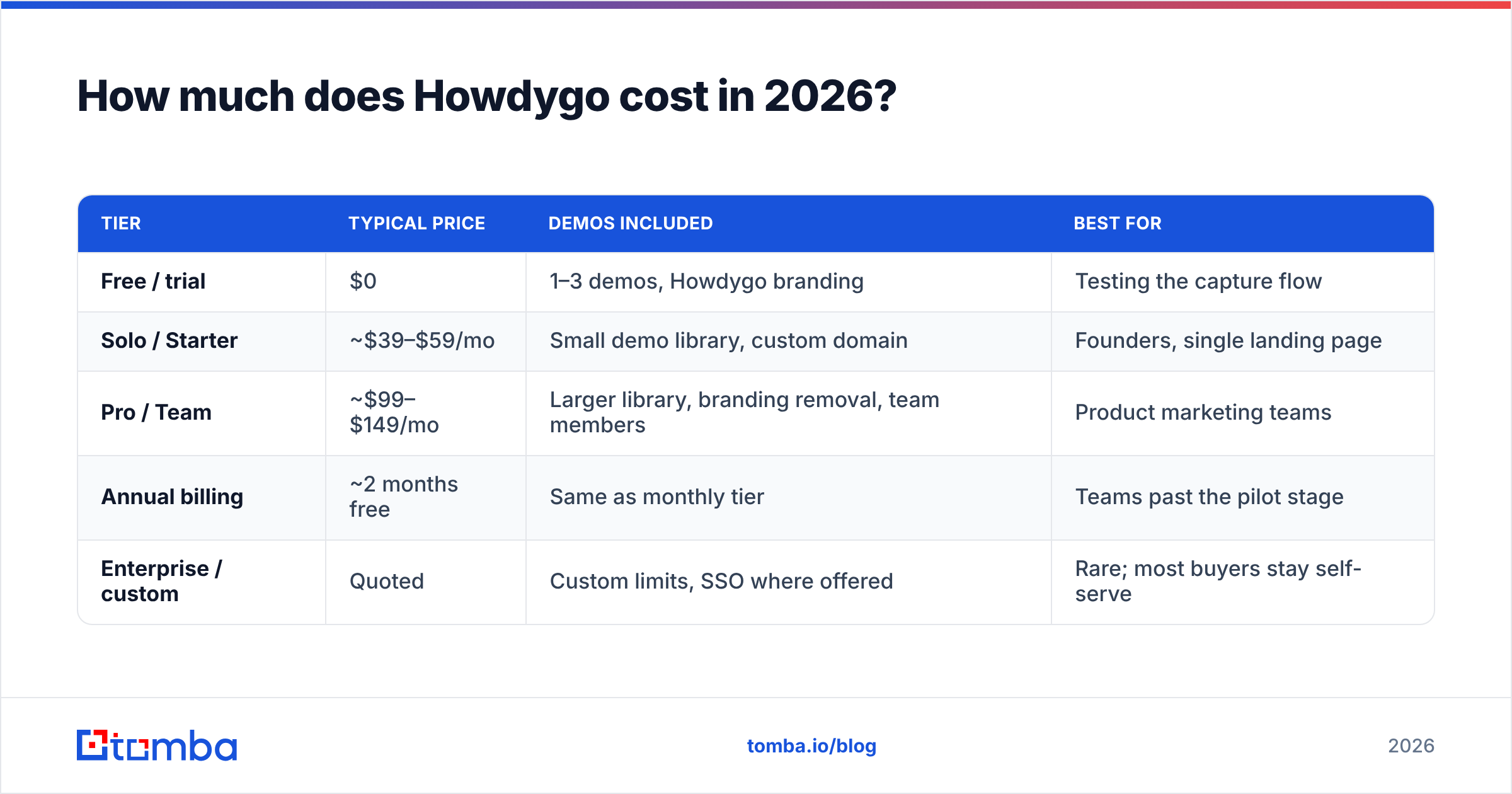
Price is the first thing buyers weigh in any Howdygo pricing reviews pros and cons comparison, so start there. Howdygo keeps a short price list. There is usually a free or trial tier plus one or two paid tiers, priced per workspace rather than per seat. The table below shows the shape of the pricing at the time of writing. Vendor pricing changes without notice. Confirm current numbers on the Howdygo pricing page before you budget.
| Tier | Typical price | Demos included | Best for |
|---|---|---|---|
| Free / trial | $0 | 1–3 demos, Howdygo branding | Testing the capture flow |
| Solo / Starter | ~$39–$59/mo | Small demo library, custom domain | Founders, single landing page |
| Pro / Team | ~$99–$149/mo | Larger library, branding removal, team members | Product marketing teams |
| Annual billing | ~2 months free | Same as monthly tier | Teams past the pilot stage |
| Enterprise / custom | Quoted | Custom limits, SSO where offered | Rare; most buyers stay self-serve |
Three pricing mechanics matter more than the sticker number:
- Workspace pricing, not seat pricing. This is the biggest cost gap against mid-market tools. Adding a third teammate to Navattic-class software often adds a seat fee. On a workspace plan, it does not.
- Demo count is the real meter. These tools meter published demos, and sometimes captured steps. They do not meter viewers. One demo per persona is fine. A demo per campaign will hit the ceiling.
- Branding removal is a paid feature. The free tier carries vendor branding. If the demo lives on your pricing page, you are buying the paid tier on day one. Treat the free plan as a trial, not a plan.
What do Howdygo reviews actually say?#
Public review volume is thin next to Navattic or Storylane. It is a smaller, newer product. You will find more first-hand accounts on LinkedIn and founder communities than on G2. That is a data point in itself. If you need dozens of verified enterprise reviews before you buy, this is not that kind of purchase.
The consistent themes in what does exist:
What reviewers praise
- Setup time measured in minutes, not a kickoff call. Most users publish their first demo the same day.
- Demo load speed. Captures are light, so the embed does not tank Core Web Vitals on a marketing page.
- Editing after capture. Fixing a typo or masking a customer name needs no re-record.
- Support responsiveness. It is a small-team advantage that usually fades as vendors grow.
What reviewers flag
- Analytics depth. You get views and completions. You do not get the per-step drop-off heatmaps or account-level rollups that mid-market tools ship.
- Limited branching. Multi-path demos, where a prospect picks their own journey, are weaker here than in Storylane or Walnut.
- Integration surface. Native CRM sync is narrower. Many teams route data through Zapier or a webhook instead.
- Capture edge cases. Canvas-heavy apps, WebGL views, and iframe dashboards capture less cleanly than standard pages. Test your own app before you commit. This is the most common reason a demo tool gets dropped.
Howdygo pricing reviews pros and cons: the honest ledger#
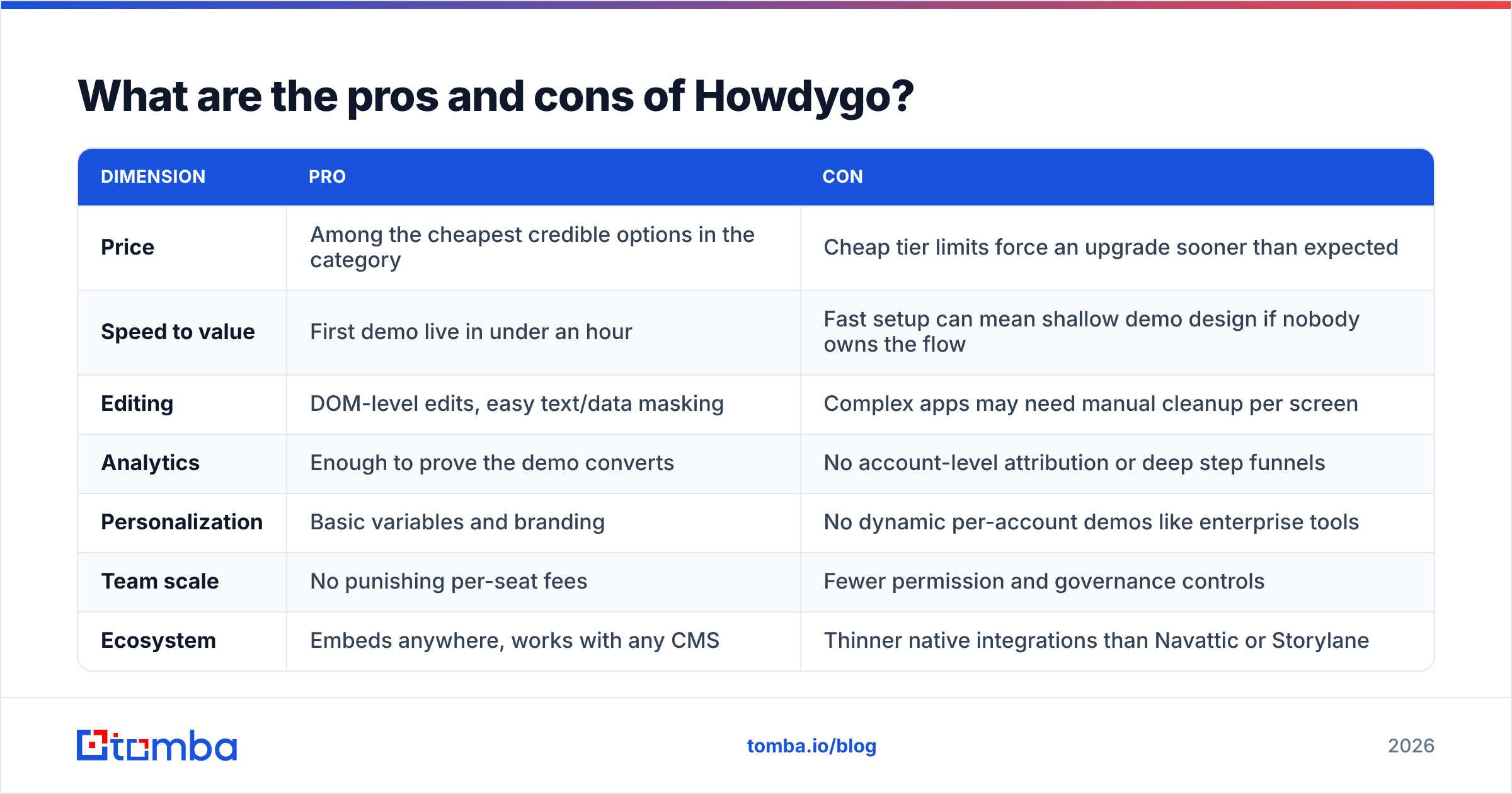
Here is the trade-off in one table.
| Dimension | Pro | Con |
|---|---|---|
| Price | Among the cheapest credible options in the category | Cheap tier limits force an upgrade sooner than expected |
| Speed to value | First demo live in under an hour | Fast setup can mean shallow demo design if nobody owns the flow |
| Editing | Page-level edits, easy text and data masking | Complex apps may need manual cleanup per screen |
| Analytics | Enough to prove the demo converts | No account-level attribution or deep step funnels |
| Personalization | Basic variables and branding | No dynamic per-account demos like enterprise tools |
| Team scale | No punishing per-seat fees | Fewer permission and governance controls |
| Ecosystem | Embeds anywhere, works with any CMS | Thinner native integrations than Navattic or Storylane |
The pattern is predictable, and it is not a criticism. A self-serve tool at self-serve pricing spends its budget on capture quality and speed, not on enterprise governance. You trade analytics depth and personalization for a bill that needs no CFO sign-off.
How does Howdygo pricing compare to alternatives?#
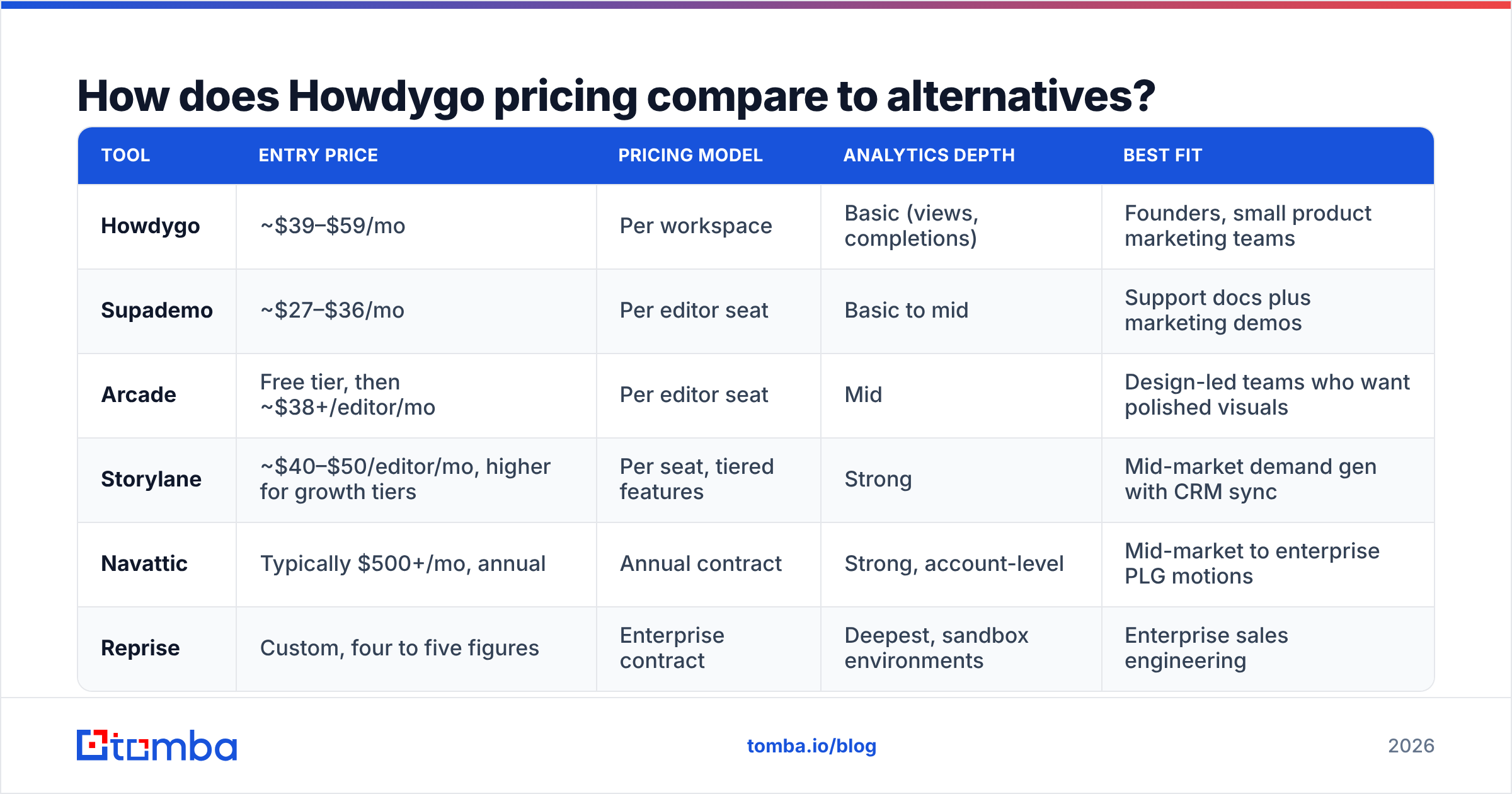
Interactive demo pricing spreads across nearly two orders of magnitude. So the table below compares the shape of each offer, not every feature. Prices are approximate published entry points. Verify them with each vendor.
| Tool | Entry price | Pricing model | Analytics depth | Best fit |
|---|---|---|---|---|
| Howdygo | ~$39–$59/mo | Per workspace | Basic (views, completions) | Founders, small product marketing teams |
| Supademo | ~$27–$36/mo | Per editor seat | Basic to mid | Support docs plus marketing demos |
| Arcade | Free tier, then ~$38+/editor/mo | Per editor seat | Mid | Design-led teams who want polished visuals |
| Storylane | ~$40–$50/editor/mo, higher for growth tiers | Per seat, tiered features | Strong | Mid-market demand gen with CRM sync |
| Navattic | Typically $500+/mo, annual | Annual contract | Strong, account-level | Mid-market to enterprise PLG motions |
| Reprise | Custom, four to five figures | Enterprise contract | Deepest, sandbox environments | Enterprise sales engineering |
Read the table by pricing model, not by price. Seat-priced tools get expensive the moment demo creation spreads beyond one person. Three editors on a $38/seat plan cost more than a $99 workspace plan. Workspace-priced tools get expensive when demo count grows. Pick the model that matches how your team will work in twelve months, not how you work in week one.
A rough decision rule:
- One to five demos, one or two editors, under $150/mo → Howdygo or a self-serve peer.
- A demo per persona, campaign, and region, with CRM attribution → Storylane or Navattic.
- Sales engineers need live-data sandboxes → Reprise or Consensus. Expect procurement.
- You just need a 30-second product GIF → you may not need a demo platform at all.
What does Howdygo not solve?#
An interactive demo converts attention that already exists. It does nothing about the two failure modes that kill most B2B pipelines:
- Not enough qualified traffic on the page holding the demo.
- No way to reach the people who watched it.
The second one costs the most. You publish a demo. 400 people click through it. 22 fill in the form. The other 378 disappear. Demo analytics can often tell you which company visited, but rarely who to email.
That is a data problem, not a demo problem. The fix is a contact layer sitting behind the demo:
- Spot the companies engaging with your demo. Then use a domain search to pull the right contacts at those accounts instead of waiting on a form.
- Run every address through an email verifier before it enters a sequence. Bad addresses shred your sender reputation.
- Push company context into the CRM with data enrichment so the follow-up references what the account actually looked at.
- Track the response rate per demo, not just the completion rate. Completions are a vanity metric if nobody replies.
The sequence is simple. The demo captures intent. Enrichment names the account. Verified contact data enables the follow-up. The reply becomes a meeting. Howdygo owns one link in that chain, and prices itself accordingly.
Is Howdygo worth it in 2026?#
Yes for a specific buyer, and clearly no for another. Weigh the Howdygo pricing reviews pros and cons against your own demo plans.
Buy it if: you are a founder or a small marketing team, your app is standard page-based SaaS, you need one to five polished demos on a website, and your budget is under roughly $150/month. At that profile, paying Navattic-class prices for analytics you will not read is waste.
Skip it if: you need per-account personalized demos, step-level funnels feeding an attribution model, SSO and granular permissions, or a live sandbox for sales engineers. Those needs are what mid-market and enterprise pricing buys. No workspace-priced tool substitutes.
Test before you commit: capture your three most important product screens on the free tier. If the capture is clean, the rest of the evaluation is a spreadsheet exercise. If it is not, no pricing tier fixes it.
One last budgeting note. Demo tools are cheap next to the rest of the go-to-market stack. That makes them easy to approve and easy to under-use. The failure mode is not overspending on Howdygo. It is paying for a demo nobody sends traffic to. Decide who owns the demo, what page it lives on, and which campaign feeds it before you enter a card number.
Where should you spend the budget you just saved?#
If a self-serve demo tool freed up a few hundred dollars a month, put it into the top of the funnel. A brilliant demo with 60 monthly visitors loses to an average demo with 6,000.
That means outbound and enrichment. You need to know which companies to reach, find the right person at each one, and get a deliverable address for them. The Tomba Email Finder does exactly that. Search by domain, name, or company, get verified professional addresses, and push them into your sequencing tool or CRM. The free tier covers 25 searches a month, so you can test the workflow first. Paid plans start at $49/month. See Tomba pricing for the full breakdown.
Build the demo once. Then spend the rest of your effort getting the right people in front of it.
Related guides#
Ready to find emails that actually work?
Join 150,000+ professionals who stopped guessing and started sending. Free credits on signup — no credit card required.
Get the Tomba newsletter
Practical outbound tactics and product updates — once every two weeks.
About the author