HubSpot Email Deliverability Issues: Causes and Fixes
HubSpot marketing emails landing in spam? The platform is rarely the root cause. Here is a diagnostic order of operations for authentication, list hygiene, sending IPs, and suppression logic that actually moves inbox placement.
TL;DR
- HubSpot is almost never the reason your email lands in spam. In nearly every case the cause is your authentication setup, your list quality, or your sending pattern — in that order.
- HubSpot puts marketing sends on shared IP pools by default. Your reputation is domain-level, so a clean DKIM-signed sending domain matters far more than which IP you sit on.
- The single biggest lever most teams ignore: bounce rate. HubSpot will throttle, warn, and eventually suspend sending above roughly 5% hard bounces, and Google and Microsoft start filtering long before that.
- HubSpot's built-in health tooling tells you that you have a problem. It does not tell you which addresses are bad. That gap is where a standalone verification step pays for itself.
- Run the nine checks in this post in order. Most teams find the fix within the first three.
If your open rates fell off a cliff, your unsubscribe link stopped getting clicks, or your ops lead forwarded you a screenshot of a Gmail spam folder, you're in the right place. This is a diagnostic guide, not a checklist of platitudes.
Why do HubSpot emails land in spam?#
Because mailbox providers judge you, not HubSpot. Gmail, Outlook, and Yahoo evaluate the authenticated sending domain, the engagement history of that domain, the complaint rate from real recipients, and how many of your sends hit nonexistent addresses. HubSpot supplies the infrastructure; you supply the signal.
That distinction matters because the instinct — "we should switch ESPs" — usually fixes nothing. Teams migrate from HubSpot to Marketo, Klaviyo, or a cold-email tool, carry the same dirty list and the same unauthenticated subdomain across, and land in the same spam folder six weeks later with a new invoice.
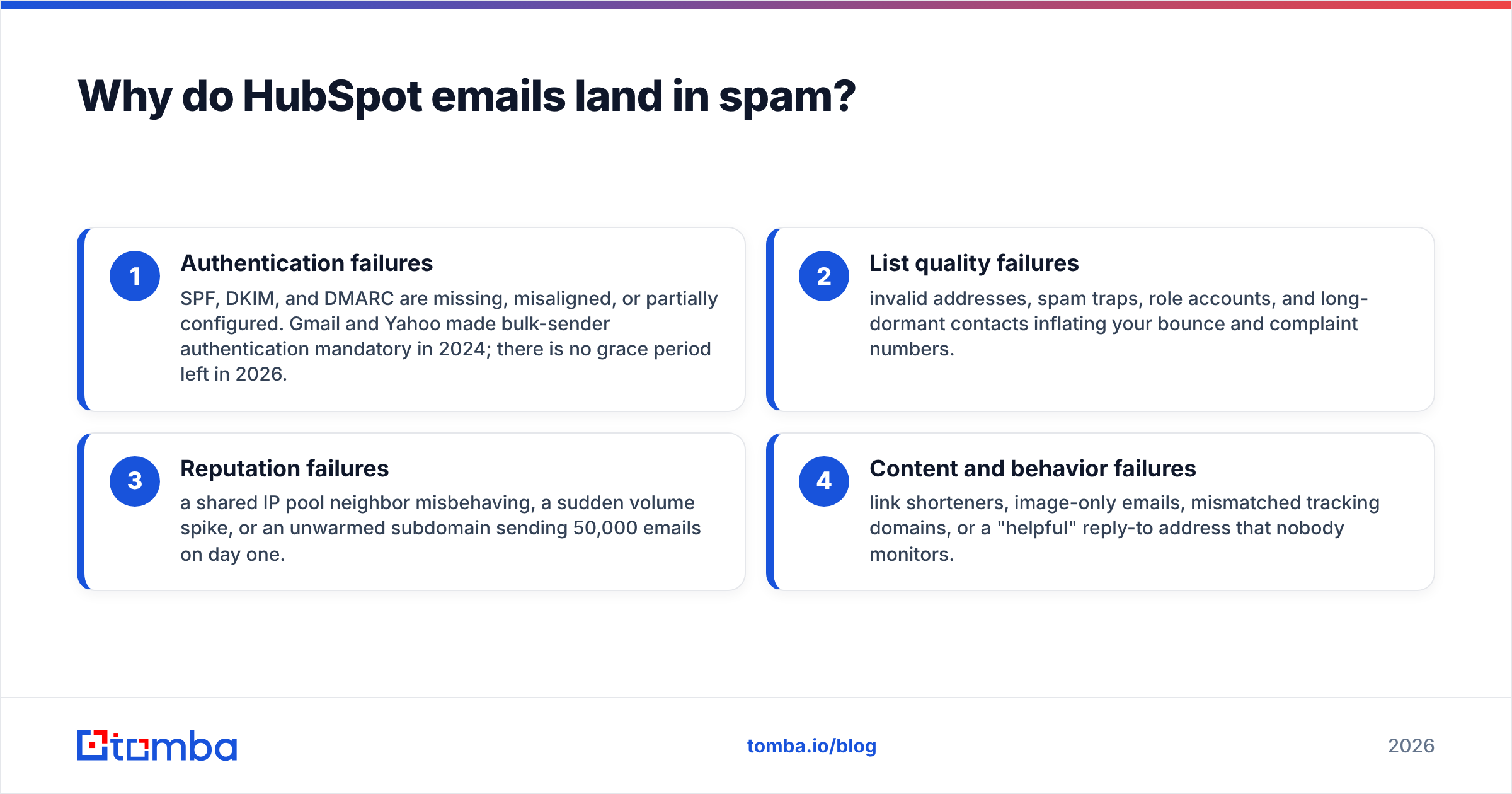
There are four categories of failure, and they compound:
- Authentication failures — SPF, DKIM, and DMARC are missing, misaligned, or partially configured. Gmail and Yahoo made bulk-sender authentication mandatory in 2024; there is no grace period left in 2026.
- List quality failures — invalid addresses, spam traps, role accounts, and long-dormant contacts inflating your bounce and complaint numbers.
- Reputation failures — a shared IP pool neighbor misbehaving, a sudden volume spike, or an unwarmed subdomain sending 50,000 emails on day one.
- Content and behavior failures — link shorteners, image-only emails, mismatched tracking domains, or a "helpful" reply-to address that nobody monitors.
Work them in that order. Fixing subject-line wording while your DKIM record is broken is rearranging deck chairs.
What are the nine most common HubSpot deliverability problems?#
Here is the diagnostic order. Each item includes the symptom you'd actually observe and the fix.
1. Email sending domain not connected. Symptom: HubSpot's Email Health tab shows a warning banner, and your emails are signed by hubspotemail.net instead of your domain. Fix: connect your sending domain in Settings → Marketing → Email → Domains. HubSpot then publishes the DKIM CNAME records you add to DNS. Until this is live, every send is unaligned and DMARC-failing.
2. SPF record over the 10-lookup limit. Symptom: intermittent SPF permerror, worse for recipients on strict filters. Fix: audit your record with a SPF checker and flatten or remove dead includes. Every third-party tool you've ever trialed left an include: behind.
3. DMARC set to p=none forever. Symptom: no visible breakage, but no protection and no enforcement signal to mailbox providers. Fix: move to p=quarantine with pct=25, watch aggregate reports for two weeks, then escalate.
4. Bounce rate above 3%. Symptom: HubSpot flags the send, then progressively restricts it. Fix: this is a list problem, not a platform problem. Verify before you import, not after you send.
5. Sending to purchased or scraped lists. Symptom: complaint spikes and spam-trap hits within one or two sends. Fix: don't. If a list was acquired in bulk, verify every address and treat the whole segment as cold — separate subdomain, separate ramp.
6. No engagement-based suppression. Symptom: gradual open-rate decay over six to twelve months. Fix: suppress contacts with zero opens in 180 days. HubSpot's "graymail" suppression option does part of this automatically; use it, then build a stricter list on top.
7. Tracking domain mismatch. Symptom: links in your email resolve to a HubSpot-branded domain while the From address is yours. Fix: configure a branded tracking domain (links.yourdomain.com) so link domain and sending domain align.
8. Volume spikes on a cold subdomain. Symptom: fine at 2,000/day, spam folder at 30,000/day. Fix: ramp. Double volume every two or three days, not every day, and monitor bounce and complaint rates at each step.
9. Unmonitored reply-to and no list-unsubscribe. Symptom: complaints instead of unsubscribes. Fix: HubSpot adds List-Unsubscribe headers on marketing emails automatically — verify it's actually present in the raw source of a received message, and make the visible unsubscribe link obvious rather than 8px grey text.
How does HubSpot's deliverability tooling compare to dedicated tools?#
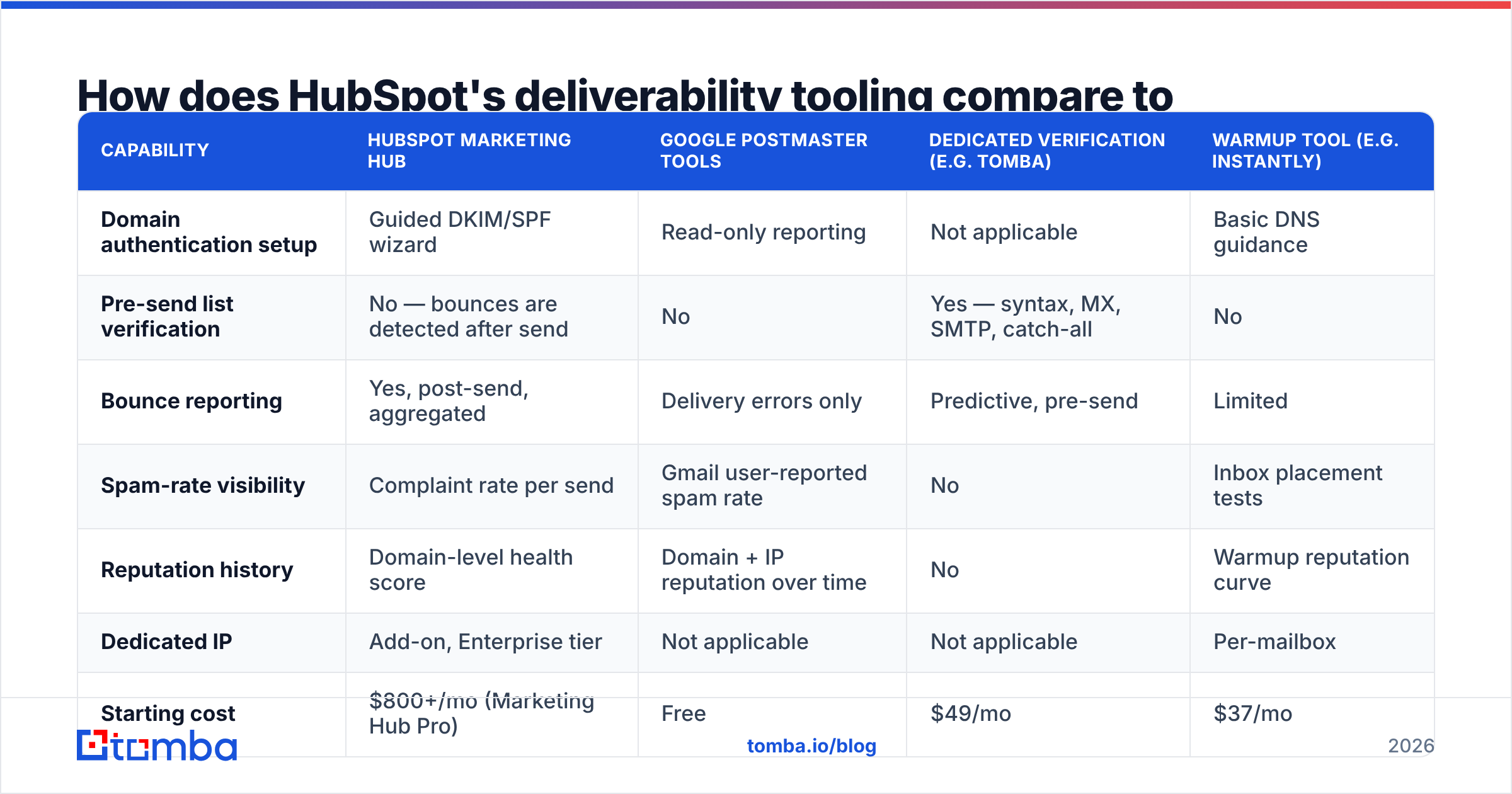
HubSpot gives you diagnostics and guardrails. It does not give you list hygiene, and it does not give you granular sender-reputation forensics. That's not a knock — it's a scope decision, and it means most serious senders run HubSpot alongside two or three focused tools.
| Capability | HubSpot Marketing Hub | Google Postmaster Tools | Dedicated verification (e.g. Tomba) | Warmup tool (e.g. Instantly) |
|---|---|---|---|---|
| Domain authentication setup | Guided DKIM/SPF wizard | Read-only reporting | Not applicable | Basic DNS guidance |
| Pre-send list verification | No — bounces are detected after send | No | Yes — syntax, MX, SMTP, catch-all | No |
| Bounce reporting | Yes, post-send, aggregated | Delivery errors only | Predictive, pre-send | Limited |
| Spam-rate visibility | Complaint rate per send | Gmail user-reported spam rate | No | Inbox placement tests |
| Reputation history | Domain-level health score | Domain + IP reputation over time | No | Warmup reputation curve |
| Dedicated IP | Add-on, Enterprise tier | Not applicable | Not applicable | Per-mailbox |
| Starting cost | $800+/mo (Marketing Hub Pro) | Free | $49/mo | $37/mo |
| Catch-all domain handling | Treated as deliverable, bounces later | No | Explicit catch-all verification | No |
The row that costs teams the most money is the second one. HubSpot discovers a bad address by sending to it — and every send to a dead mailbox is a deposit into your reputation debt. Verification moves that discovery to before the send, where it's free.
Is your list the real problem?#
Probably, if your bounce rate is above 2%. Here's how to tell the difference between a list problem and an infrastructure problem in about ten minutes:
- Bounces are concentrated in one import batch or one lifecycle stage → list problem. A trade-show scrape or a two-year-old webinar list is usually the culprit.
- Bounces are evenly distributed across all segments → infrastructure problem. Look at authentication and IP reputation first.
- Gmail placement is bad but Outlook is fine (or vice versa) → reputation problem specific to one provider's filter. Check Google Postmaster Tools for your domain reputation grade.
- Everything was fine until a specific date → something changed. A DNS edit, a new integration writing contacts into HubSpot, a volume jump, or a shared-IP neighbor.
The trap in HubSpot specifically: contacts flow in from forms, chat, integrations, Salesforce syncs, and CSV imports, and only some of those paths have validation. A Zapier automation writing typo'd addresses from a third-party form will quietly poison a list that looked pristine last quarter.
Verifying an existing HubSpot list is straightforward. Export the contact emails, run them through an email verifier, and re-import the results as a suppression list for anything that comes back invalid or risky. For teams doing this at scale, a bulk verify run before each quarterly campaign is cheaper than one throttled send.

Should you get a dedicated IP in HubSpot?#
Usually no. This is the most commonly requested fix and the least commonly correct one.
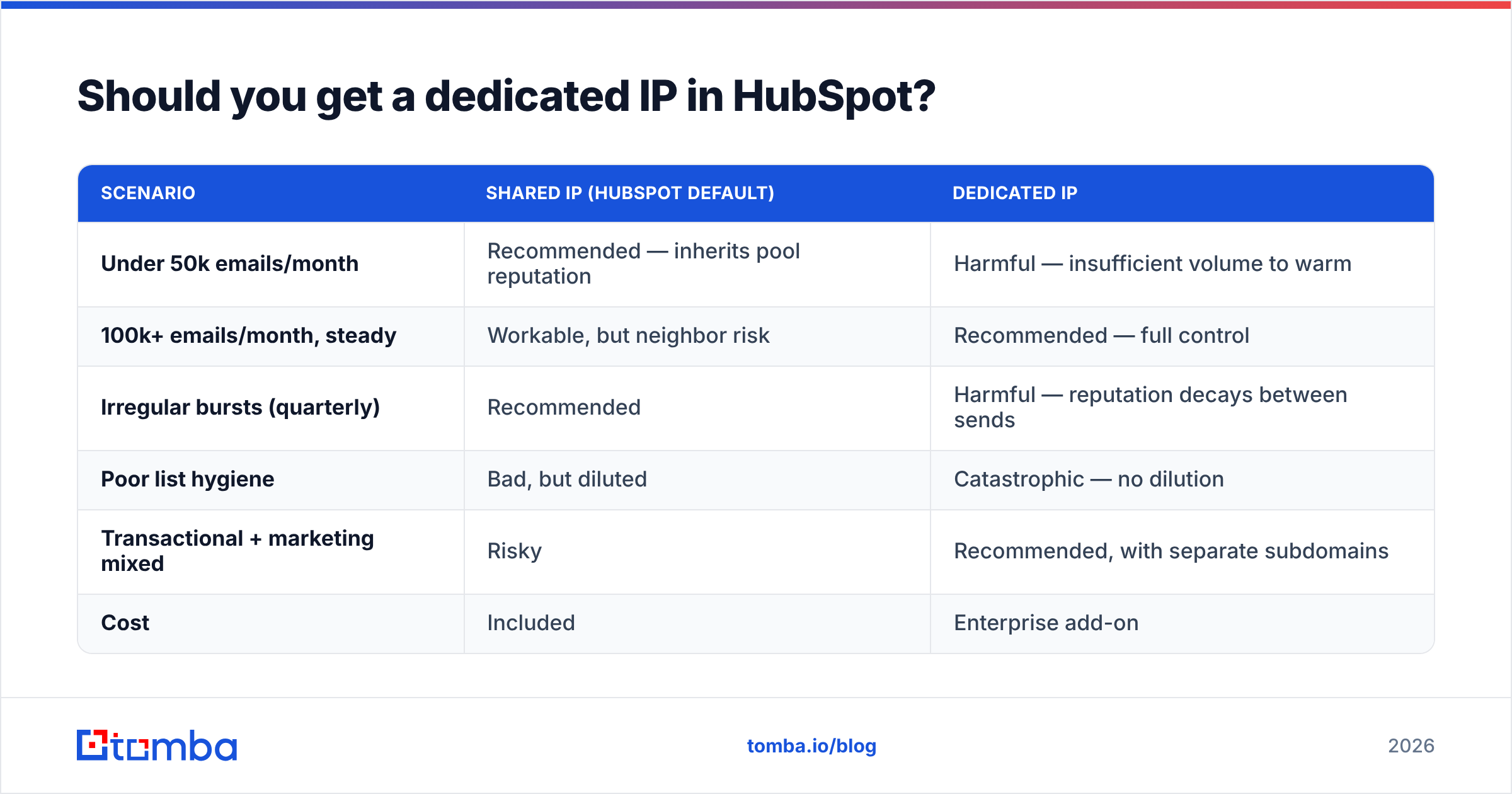
A dedicated IP only helps if you send enough consistent volume to establish and maintain its reputation — the rough industry threshold is 100,000+ emails per month, sent on a regular cadence. Below that, an IP with no history is worse than a shared pool with a good one, because mailbox providers have nothing to go on and default to suspicion.
| Scenario | Shared IP (HubSpot default) | Dedicated IP |
|---|---|---|
| Under 50k emails/month | Recommended — inherits pool reputation | Harmful — insufficient volume to warm |
| 100k+ emails/month, steady | Workable, but neighbor risk | Recommended — full control |
| Irregular bursts (quarterly) | Recommended | Harmful — reputation decays between sends |
| Poor list hygiene | Bad, but diluted | Catastrophic — no dilution |
| Transactional + marketing mixed | Risky | Recommended, with separate subdomains |
| Cost | Included | Enterprise add-on |
Note the fourth row. A dedicated IP doesn't fix a bad list — it removes the pool that was masking it. Several teams who "upgraded" to a dedicated IP watched deliverability get measurably worse in week two, and the diagnosis was always the same: they moved the problem into a spotlight.
How do you prevent bad addresses from entering HubSpot?#
Fix the intake, not the exports. Three layers, cheapest first:
- Form-level validation. Real-time verification on your HubSpot forms rejects typos and disposable domains at the point of capture. This is the highest-ROI fix because it's permanent.
- Integration-level validation. Anything writing contacts via API — your CRM sync, a Zapier flow, an enrichment vendor — should verify before writing. The Tomba API handles this as a single call in the middleware, and the HubSpot integration covers the no-code path.
- Periodic re-verification. B2B email decays at roughly 22–30% per year as people change jobs. A list you verified in January is measurably worse in September. Re-verify quarterly.
For outbound teams building lists rather than collecting them, the ordering is different: find, verify, then import. Sourcing addresses through a domain search and verifying them before they touch HubSpot means your bounce rate is a known number before you ever hit send — instead of a number you learn from a warning banner.
What does a healthy HubSpot sending setup look like?#
Concretely, in 2026:
- Separate subdomains by mail type.
marketing.yourdomain.comfor campaigns,mail.yourdomain.comfor transactional, and a third for cold outbound if you do it. Reputation problems then stay contained. - DKIM signing on the sending subdomain, verified in HubSpot's domain settings with a green status, not a pending one.
- SPF under 10 DNS lookups, with no orphaned includes from tools you no longer use.
- DMARC at
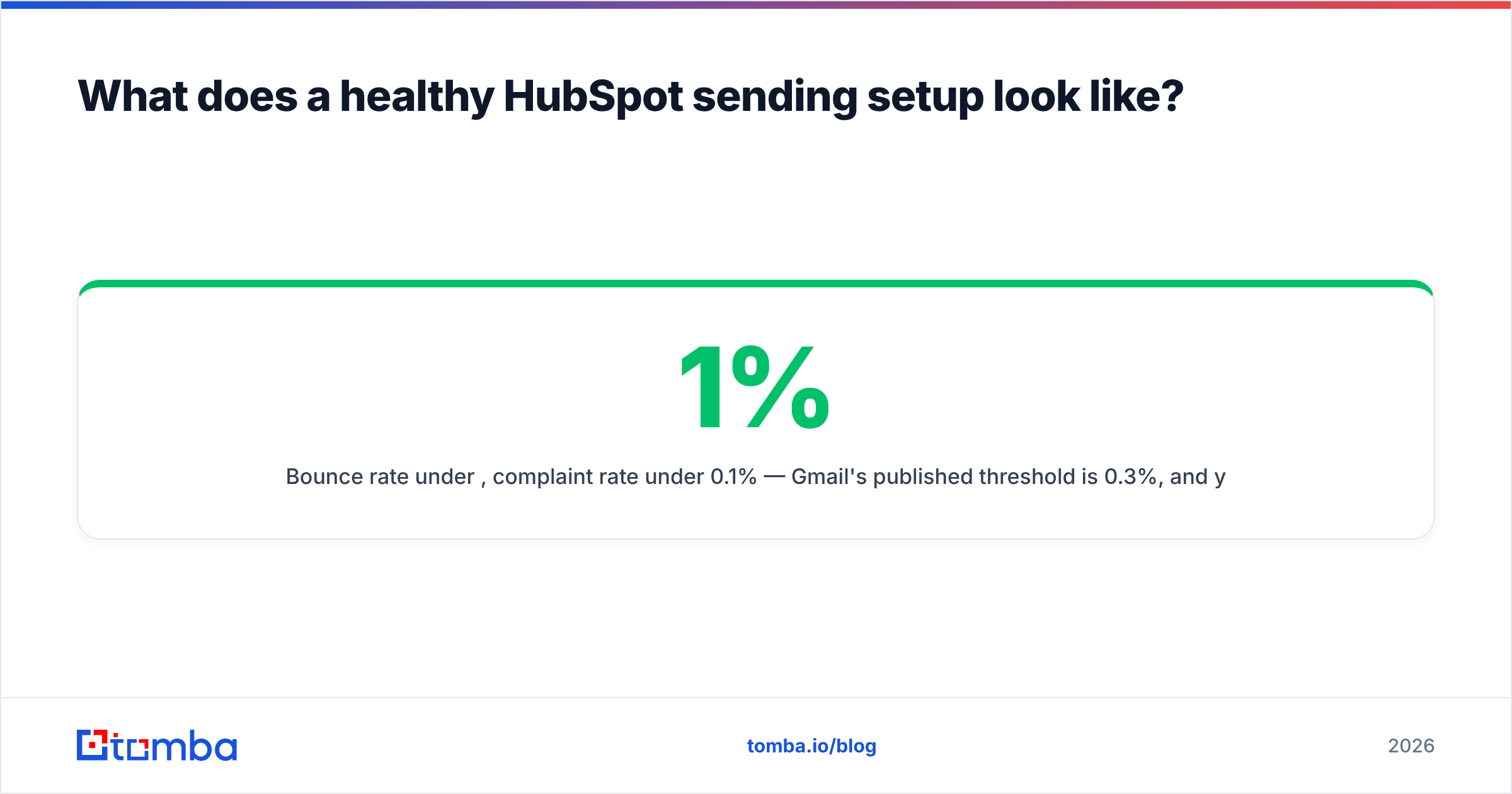
p=quarantineminimum, with an aggregate report address you actually read. - Bounce rate under 1%, complaint rate under 0.1% — Gmail's published threshold is 0.3%, and you want headroom.
- A branded tracking domain so click links match your sending domain.
- Engagement suppression at 180 days, tightened to 90 if your open rates are soft.
- Postmaster Tools and Microsoft SNDS registered for the sending domain, checked monthly.
If all eight are true and you're still seeing placement issues, then — and only then — is it worth opening a HubSpot support ticket about IP pool assignment.
How long does it take to recover deliverability?#
Two to six weeks of consistent, clean sending, assuming you've actually fixed the root cause. Reputation is a trailing indicator; mailbox providers weight recent behavior heavily but not instantly.
The recovery pattern that works: cut volume by 70%, send only to your most-engaged segment (opened in the last 30 days), keep bounces near zero, and ramp back up over three weeks. Sending more to prove you're legitimate is the instinct, and it's exactly wrong.
Track it with real data, not vibes. Google Postmaster Tools gives you a domain reputation grade that updates daily, and a sender reputation checker tells you whether you've landed on any blocklists during the bad stretch. If you're blocklisted, delisting is a separate workflow and no amount of good sending fixes it until you request removal.
For a deeper primer on the underlying mechanics, HubSpot's own deliverability documentation is genuinely good, and Validity's Sender Score research publishes benchmark data worth calibrating against.
Where should you start today?#
Run these three checks in the next thirty minutes:
- Open the raw source of an email HubSpot sent you and confirm
dkim=passandspf=passwith your domain — not HubSpot's — in the Authentication-Results header. - Pull your last three campaign reports and write down the hard bounce rate. If it's above 2%, your list is the problem and nothing else matters until it's clean.
- Check your domain in Google Postmaster Tools. A "Low" or "Bad" reputation grade means you're already being filtered and need the recovery ramp described above.
Most teams find their answer in step two.
Clean the list before you blame the platform. The fastest way to cut HubSpot bounce rates is to stop bad addresses from reaching HubSpot in the first place. Tomba's Email Finder sources verified professional addresses with confidence scoring on every result, so the contacts entering your CRM are validated before your first send — not discovered as bounces after it. The free tier covers 25 searches a month; paid plans start at $49/mo. See Tomba pricing for the full breakdown, or wire verification directly into your HubSpot intake with the Tomba API.
Related guides#
// get started
Find, verify and enrich your first contacts today
Start on the free plan with 25 searches a month, then scale when your team is ready.
Free plan · No credit card required · GDPR & CCPA
// about the author