Hunter Email Scraper: What It Does and Better Options
Hunter is often called an email scraper, but that label hides how it actually works — and where it breaks. Here's an honest 2026 breakdown of Hunter's finder, its limits, and the alternatives worth testing.
TL;DR
- Hunter is not really a scraper. It's a pattern-inference engine plus a crawled index — it guesses
first.last@domain.comfrom observed patterns, then runs an SMTP-style check. Calling it a "scraper" sets the wrong expectations. - Scraping raw emails off web pages gets you role accounts (
info@,sales@) and stale addresses. Pattern inference plus verification gets you deliverable personal inboxes. Those are different products. - Hunter's free tier is 25 searches/month with limited verification; paid starts around $34/mo for 500 searches. Tomba's free tier is 25 searches/mo, Starter is $49/mo, Growth $99/mo.
- Catch-all domains are where every tool in this category quietly fails. Ask any vendor how they handle catch-alls before you compare accuracy claims.
- If you need a browser-based scraper, Hunter's extension is fine. If you need volume, API access, and catch-all handling, look at Tomba, Findymail, or BookYourData depending on whether you want a tool or a prebuilt list.
What is a "Hunter email scraper" and does it actually scrape?#
Short answer: Hunter doesn't scrape in the way most people mean it, and that gap is why teams get disappointed.
Think of it like a phone book versus a naming convention. A scraper is someone photocopying every phone book page they find — you end up with whatever numbers happened to be printed, including a lot of disconnected lines and main switchboards. Hunter works more like someone who noticed that everyone at a company uses firstname.lastname, then constructs the number for the person you actually want and dials once to check it rings.
Technically, Hunter combines three things:
- A crawled index. Hunter's bots have visited millions of public pages — team pages, press releases, author bylines, PDFs — and recorded email addresses that appeared there in plain sight. This is the closest thing to scraping in the product.
- Pattern inference. From those observed addresses, Hunter derives the dominant email format for a domain (
{first}@,{f}{last}@,{first}.{last}@). When you ask for someone Hunter has never seen, it builds the address from the pattern. - A verification step. Before returning a result, Hunter runs an SMTP handshake and syntax/MX checks, then attaches a confidence score.
The practical consequence: Hunter's coverage is excellent on domains with a lot of public exposure (SaaS companies, agencies, media) and thin on domains that never publish anything. A genuine scraper would fail on both. A pure database would fail differently — it'd have stale records rather than no records.
If what you actually want is text-level extraction from pages or files you already have, that's a different job. A dedicated email extractor pulls addresses out of pasted text, and there's a file-based version for bulk documents. Don't pay finder-tier pricing for extraction work.
How does Hunter compare to actual scraping tools?#
Here's the distinction that costs teams money. Scraping and finding produce different data with different economics.
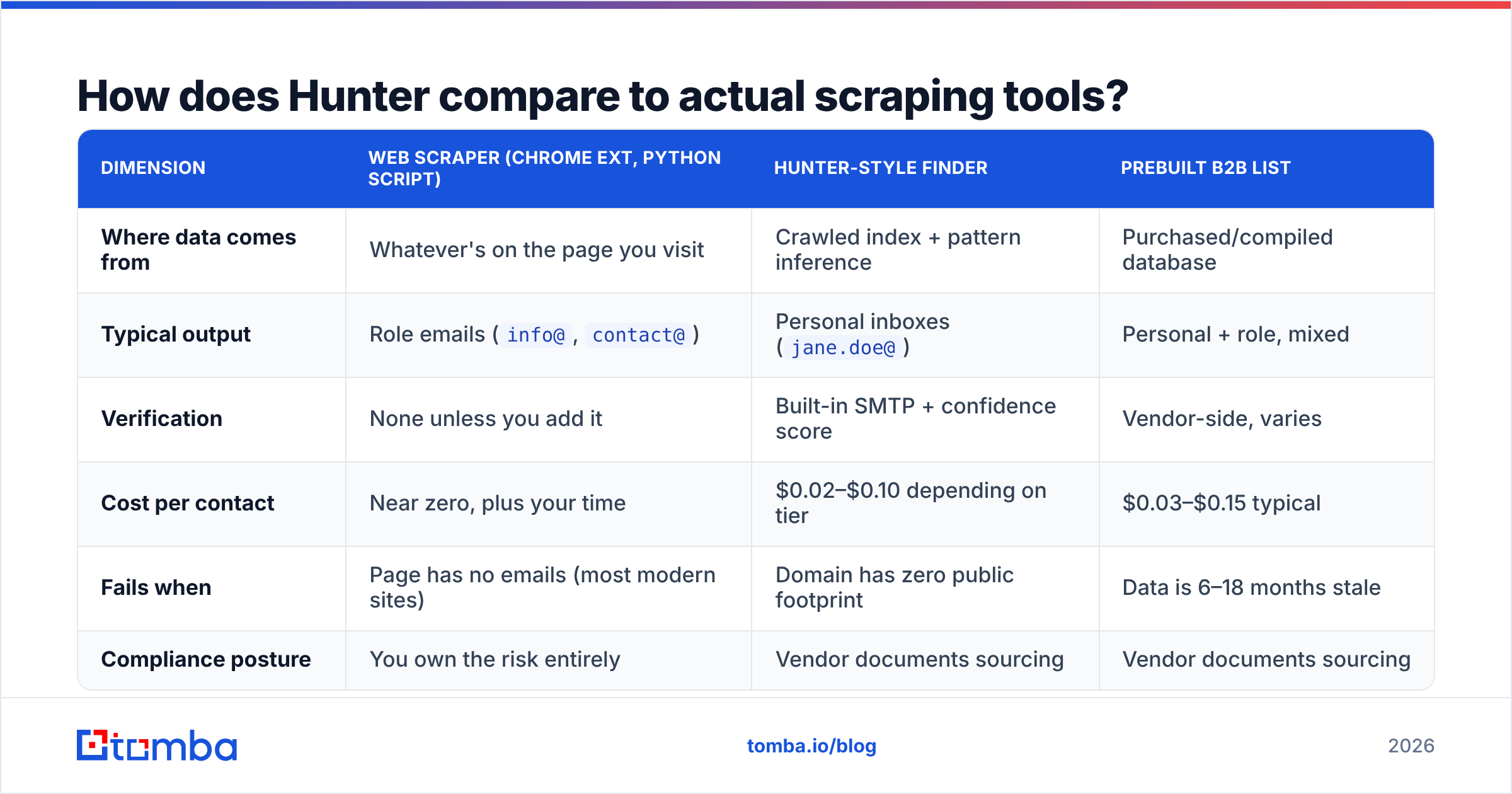
| Dimension | Web scraper (Chrome ext, Python script) | Hunter-style finder | Prebuilt B2B list |
|---|---|---|---|
| Where data comes from | Whatever's on the page you visit | Crawled index + pattern inference | Purchased/compiled database |
| Typical output | Role emails (info@, contact@) |
Personal inboxes (jane.doe@) |
Personal + role, mixed |
| Verification | None unless you add it | Built-in SMTP + confidence score | Vendor-side, varies |
| Cost per contact | Near zero, plus your time | $0.02–$0.10 depending on tier | $0.03–$0.15 typical |
| Fails when | Page has no emails (most modern sites) | Domain has zero public footprint | Data is 6–18 months stale |
| Compliance posture | You own the risk entirely | Vendor documents sourcing | Vendor documents sourcing |
Most B2B sites stopped publishing email addresses around 2018 — contact forms replaced mailto: links precisely because scrapers existed. That's why pure scraping has collapsed as a strategy. You'll pull a hundred pages and get eleven hello@ addresses that route to a shared inbox nobody reads.
Pattern-based finding survives because it doesn't need the address to be published. It needs one address on the domain to be published, plus a name from LinkedIn or a conference speaker list.
Where does Hunter's accuracy actually break down?#
Three failure modes, in order of how often they bite.
Catch-all domains. A catch-all server accepts mail to any address at the domain — asdfghjkl@company.com returns "valid" because the server says yes to everything. Roughly 15–25% of B2B domains run catch-all, and the share is rising as companies move behind Microsoft 365 with default-accept policies. Hunter marks these as "accept-all" and hands you a lower confidence score, which is honest but not useful. You still don't know if the person exists.
This is where tools differentiate. A catch-all verifier that layers pattern confidence, historical engagement signals, and secondary sources will beat a tool that just shrugs and returns "unknown." When you compare vendors, run 200 known-catch-all domains through each and count usable results — not the vendor's headline accuracy number, which is measured on easy domains.
Small and non-English domains. Hunter's index skews toward companies that publish in English on the open web. A 40-person manufacturing firm in Bavaria with a static site and no team page will return nothing. That's not a bug — there's genuinely no signal — but it means your ICP determines your hit rate more than the tool does.
Pattern drift after acquisitions. When Company A acquires Company B, the acquired staff often keep old addresses for 12–24 months while new hires get the parent format. Pattern engines pick the dominant format and get the minority wrong. If you're prospecting into recently acquired companies, verify every address individually.

The honest framing: no tool in this category is 95%+ accurate across all domains. Vendors that claim it are measuring on a favorable sample. What you should measure instead is cost per verified, deliverable contact in your ICP — which folds accuracy, coverage, and pricing into one number you can act on.
What are the real alternatives to Hunter in 2026?#
The market split into three shapes: finders (find + verify on demand), databases (search a prebuilt index), and hybrid platforms (finder plus sequencing).
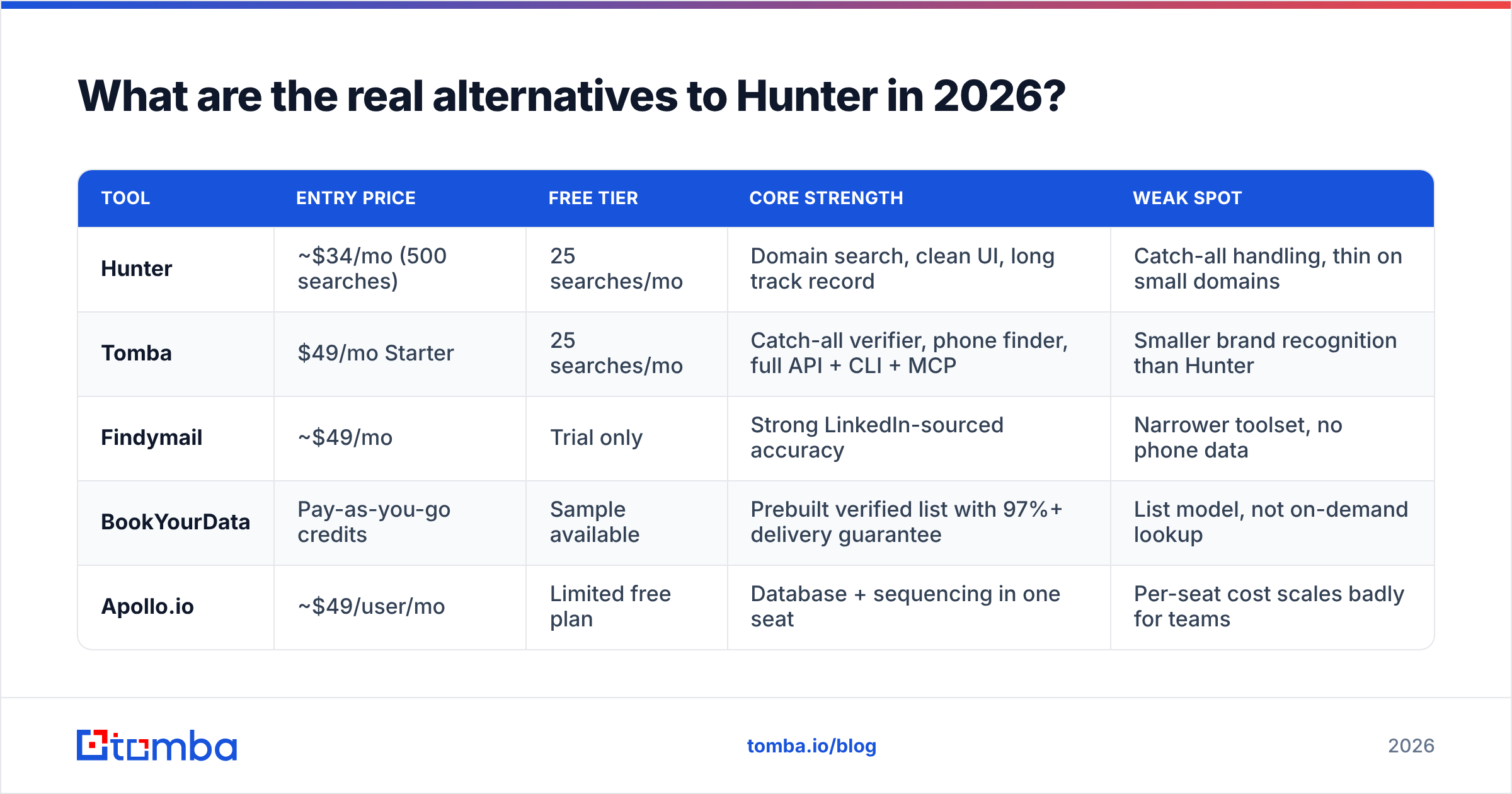
| Tool | Entry price | Free tier | Core strength | Weak spot |
|---|---|---|---|---|
| Hunter | ~$34/mo (500 searches) | 25 searches/mo | Domain search, clean UI, long track record | Catch-all handling, thin on small domains |
| Tomba | $49/mo Starter | 25 searches/mo | Catch-all verifier, phone finder, full API + CLI + MCP | Smaller brand recognition than Hunter |
| Findymail | ~$49/mo | Trial only | Strong LinkedIn-sourced accuracy | Narrower toolset, no phone data |
| BookYourData | Pay-as-you-go credits | Sample available | Prebuilt verified list with 97%+ delivery guarantee | List model, not on-demand lookup |
| Apollo.io | ~$49/user/mo | Limited free plan | Database + sequencing in one seat | Per-seat cost scales badly for teams |

A few notes on picking between these.
- If you already have names and companies, you want a finder. Feed a CSV into a bulk email finder and pay only for what resolves.
- If you don't have a target list yet, a database or list vendor saves you the sourcing step. BookYourData is a solid option here — you filter by title, industry, and geography and get a verified file rather than running lookups one by one. Different workflow, different cost curve.
- If you're building this into a product or an internal workflow, API quality matters more than UI. Check rate limits, whether verification is a separate call, and whether there's a CLI or MCP server for agent-driven work. The Tomba API covers finder, verifier, and enrichment under one key, which matters when you're metering credits across services.
- If you need phone numbers too, most email-first tools bolt them on badly. Test the mobile-vs-switchboard ratio before committing.
Is scraping emails even legal in 2026?#
Depends on jurisdiction and what you do next — and this is the part most "email scraper" guides skip.
Under GDPR, scraping publicly visible business emails isn't automatically illegal, but processing them for outreach requires a lawful basis (usually legitimate interest) plus a documented balancing test, plus notice at first contact. Under CAN-SPAM in the US, harvesting addresses from websites that have posted a no-harvest notice is explicitly called out as an aggravated violation with higher penalties.
Practical guardrails:
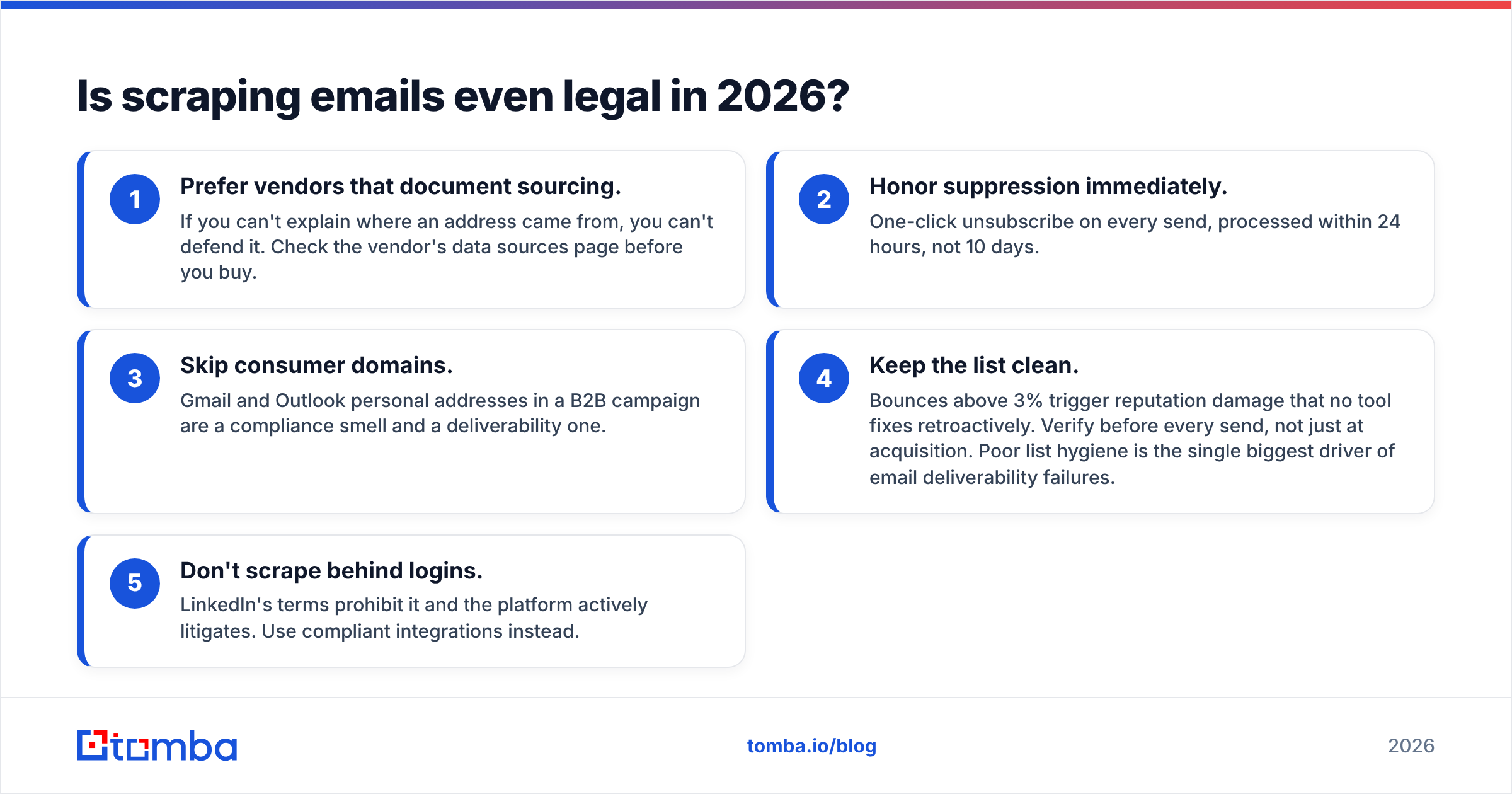
- Prefer vendors that document sourcing. If you can't explain where an address came from, you can't defend it. Check the vendor's data sources page before you buy.
- Honor suppression immediately. One-click unsubscribe on every send, processed within 24 hours, not 10 days.
- Skip consumer domains. Gmail and Outlook personal addresses in a B2B campaign are a compliance smell and a deliverability one.
- Keep the list clean. Bounces above 3% trigger reputation damage that no tool fixes retroactively. Verify before every send, not just at acquisition. Poor list hygiene is the single biggest driver of email deliverability failures.
- Don't scrape behind logins. LinkedIn's terms prohibit it and the platform actively litigates. Use compliant integrations instead.
For a vendor-neutral read on the compliance landscape, G2's category page shows how buyers actually rate these tools, and Hunter's own documentation is straightforward about what it does and doesn't collect.

How should you evaluate an email finder before you buy?#
Run the same test on every candidate. Vendor accuracy claims are unfalsifiable marketing until you put your own domains through them.
The 100-contact bake-off:
- Build a control list. 100 real prospects in your ICP — names, companies, domains. Include at least 20 you already have verified emails for. Those 20 are your ground truth.
- Run identical inputs through each tool. Same names, same domains, same day. Record hit rate (found anything) and match rate (found the correct address for your 20 known contacts).
- Count catch-alls separately. Note how many results come back "accept-all" or "unknown." A tool with 90% hit rate where a third are catch-alls has a real hit rate closer to 60%.
- Send a real test batch. Fifty addresses through your actual sending infrastructure. Measure hard bounces. This is the only number that matters — everything upstream is a proxy for it.
- Divide cost by deliverable contacts. Not by credits, not by searches. Total monthly spend ÷ contacts that actually landed in an inbox.
Most teams skip step 4 and buy on the strength of a demo. Then they burn a sending domain three weeks later and blame the sequencer.
One more thing worth checking: what happens when a search fails. Some vendors charge a credit for a miss, some don't. Over 10,000 monthly lookups against a hard ICP, that difference alone can be 30% of your bill. Read the pricing details line by line, and do the same for whichever competitor you're comparing against.
What's the fastest workflow if you already use Hunter?#
You don't have to rip anything out. The cheapest upgrade is usually a second tool used as a fallback, not a replacement.
The pattern that works:
- Primary lookup stays where it is. Whatever tool your team already knows, keep it as the first pass.
- Fallback lookup catches the misses. Route anything that returns null or "accept-all" to a second provider. On most ICPs this recovers 15–30% of the list your primary tool gave up on.
- Verification runs last, always. Independent of who found the address, run a final email verifier pass 24–48 hours before send. Addresses go stale — roughly 2% per month through job changes alone.
- Enrichment fills gaps. Once you have a valid address, data enrichment attaches title, seniority, company size, and tech stack so your sequencing has something to personalize on.
If you work in spreadsheets, the Google Sheets add-on and the Chrome extension both cover the ad-hoc lookups without a context switch. If you work in code, the CLI and MCP server let you wire lookups directly into an agent workflow — increasingly the default for teams building internal GTM tooling.
The bottom line#
"Hunter email scraper" is a search term, not a product category. What you're actually shopping for is a pattern-inference engine with honest verification and a sane price per deliverable contact. Hunter does that well on well-indexed domains. It struggles on catch-alls and on companies with no public footprint — and so does everything else, to varying degrees.
Pick your tool by running the 100-contact bake-off on your own ICP, count catch-alls honestly, and measure cost per landed email rather than per credit. That's the whole evaluation.
If you want to run that test against a tool built for catch-all-heavy domains, the Tomba Email Finder gives you 25 free searches a month — enough to bake off a meaningful sample before you commit a dollar. Bring your 100 known contacts, compare the match rate against whatever you're using now, and let the bounce data decide.
Related guides#
// get started
Find, verify and enrich your first contacts today
Start on the free plan with 25 searches a month, then scale when your team is ready.
Free plan · No credit card required · GDPR & CCPA
// about the author