Hyper Personalization Email Marketing: A 2026 Playbook
Hyper personalization only works when the data underneath it is real. Here is the 2026 playbook: which signals move reply rates, which tools supply them, and where the whole thing quietly falls apart.
Hyper personalization email marketing works when your data is fresh. It fails when your data is old. That is the whole story in two lines. The rest of this guide shows which signals move replies, which tools supply them, and where the method breaks.
TL;DR
Hyper personalization email marketing means writing to a situation, not a merge tag. First-name tokens stopped counting as personalization around 2015.
The lift is real, but it has a catch. Fresh, verified, behavior-linked data raises reply rates. Stale scraped data does worse than a clean generic email.
Your bottleneck is almost never the copy. It is data coverage, data freshness, and whether you land in the inbox.
A workable 2026 stack runs $150-$400 a month for a small team. You need a contact data layer, a signal layer, a sending layer, and a verification step that stops you burning your domain.
Personalize three things at most per email: one trigger, one detail, one ask. Past that, returns drop and the email gets creepy.
What is hyper personalization email marketing?#
Hyper personalization email marketing builds each email from live data about one person and one business moment. Basic personalization drops a variable into a fixed template. That is the whole difference.
Think of a tailor versus a vending machine. The vending machine prints your name on the wrapper. The tailor measures your shoulders, notices you always wear the jacket open, and cuts to fit. Same product, different result.
It has four parts:
Identity data — verified email, role, seniority, company, location. This is the base layer.
Company context — headcount band, funding stage, industry, and the tools running on their website.
Behavior and intent signals — pages visited, guides downloaded, job posts, product updates, hiring spikes, review activity.
Timing — the trigger that makes the email make sense this week rather than any week.
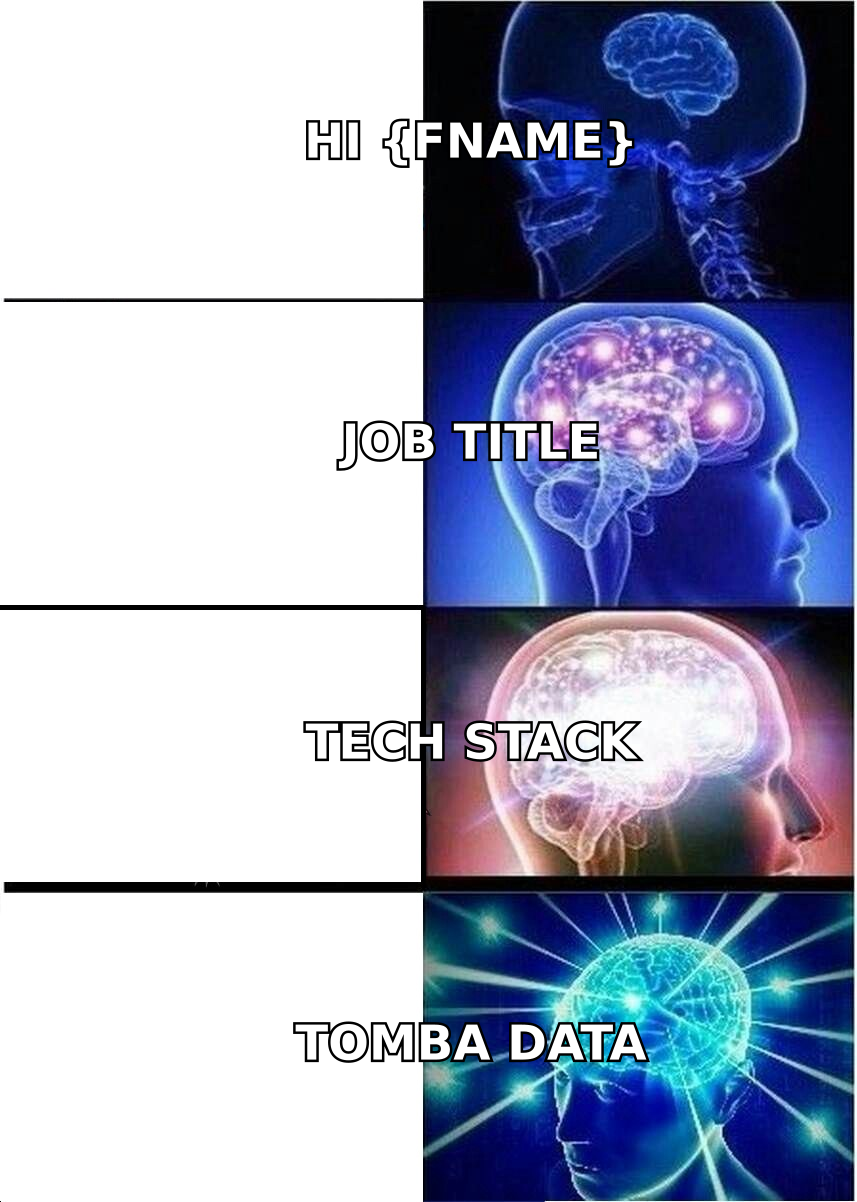
Drop one of those and you are back to mail merge with extra steps. Most teams have layer 1 only. They still call it hyper personalization.
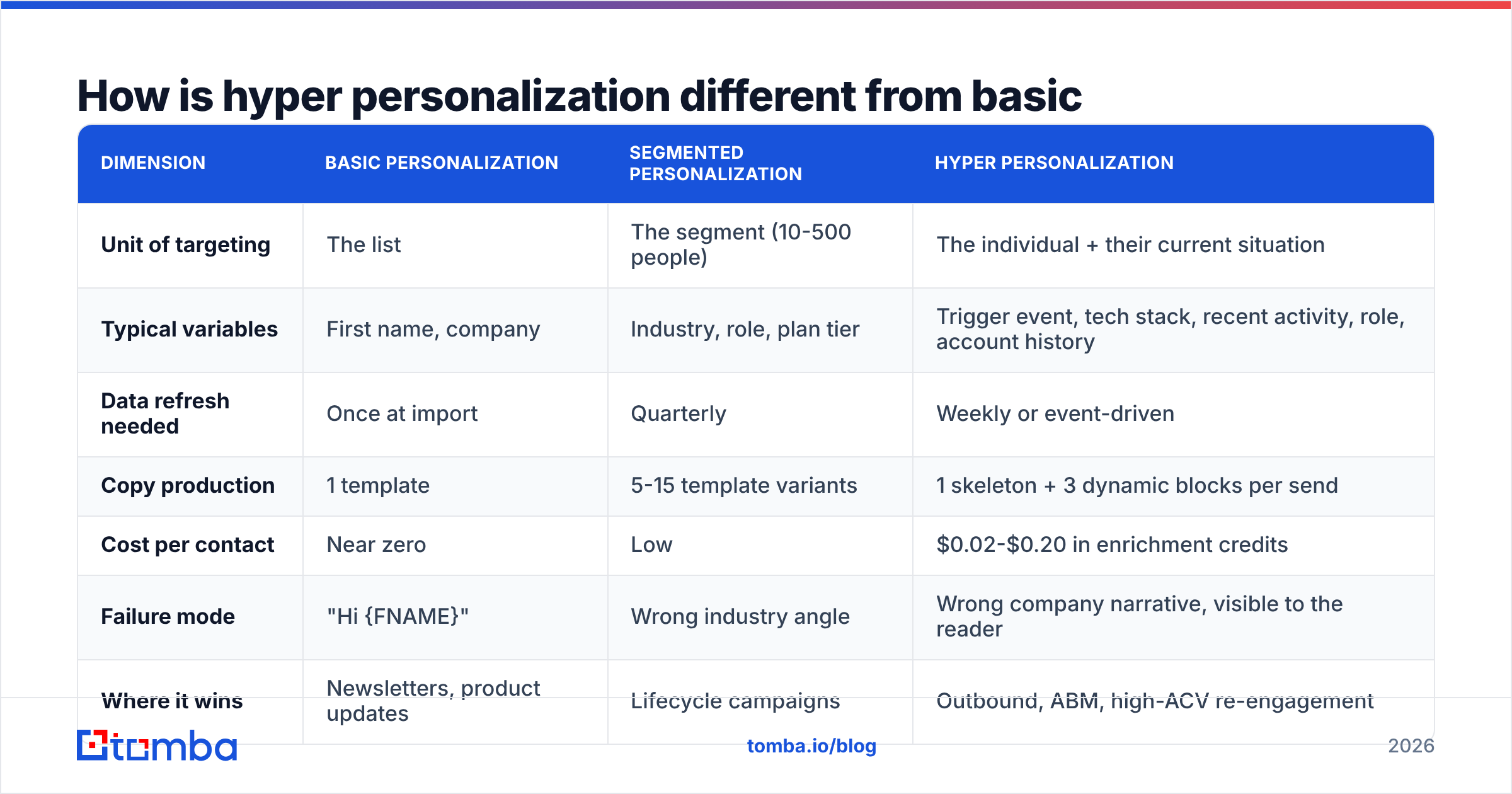
How is hyper personalization different from basic personalization?#
The difference shows up when the data is wrong. A basic email with bad data is awkward. A hyper-personalized email with bad data does real damage. You told the reader you did your homework. Then you proved you did it badly.
Dimension
Basic personalization
Segmented personalization
Hyper personalization
Unit of targeting
The list
The segment (10-500 people)
The individual + their current situation
Typical variables
First name, company
Industry, role, plan tier
Trigger event, tech stack, recent activity, role, account history
Data refresh needed
Once at import
Quarterly
Weekly or event-driven
Copy production
1 template
5-15 template variants
1 skeleton + 3 dynamic blocks per send
Cost per contact
Near zero
Low
$0.02-$0.20 in enrichment credits
Failure mode
"Hi {FNAME}"
Wrong industry angle
Wrong company narrative, visible to the reader
Where it wins
Newsletters, product updates
Lifecycle campaigns
Outbound, ABM, high-ACV re-engagement
Read the last row again. Hyper personalization email marketing is not a universal upgrade. For a 40,000-person newsletter, segmentation wins on cost every time. It earns its keep when the deal size covers the research cost. As a rule, that means contracts above $5,000 a year, or any account you would hate to lose.
What data actually drives hyper personalization email marketing in 2026?#
Here is an honest ranking. It tracks what correlates with replies, not what vendors like to sell.
A verified, deliverable email address. Dull, and non-negotiable. A brilliant email to a dead address is worse than no email. It hurts your sender reputation and burns your research time. Run every list through an email verifier before it touches a sequence.
Role and scope, not just job title. A "VP Marketing" at a 30-person company runs the website herself. At a 3,000-person company she has never opened the CMS. Same title, opposite email.
Trigger events. New funding. A new hire on a team you care about. A launch, an office opening, a job post that names a tool. A trigger tells you what to say and why to say it now.
Tech stack data. If you know they run HubSpot, Segment, and Snowflake, you can skip three paragraphs of qualifying. Lead with the integration question instead.
First-party behavior. Someone who visited your pricing page twice this month needs a different email than a cold name off a list. Website visitor identification turns anonymous traffic into a warm list.
Relationship history. Past demos, churned accounts, a colleague who replied in 2024. It already sits in your CRM. It is the most ignored input in outbound.
Only items 4 and 5 need paid tooling. The rest is process discipline.
Does hyper personalization email marketing actually lift reply rates?#
Yes. Two caveats get left out of most case studies.
Caveat one: the baseline matters more than the method. If your emails are long, generic, and all about you, any specificity will lift replies. That lift is not proof the method is magic. HubSpot's marketing statistics research has tracked this for years. Relevance improves engagement. The gain shrinks as your baseline improves.
Caveat two: personalization cannot beat bad deliverability. An email in the spam folder replies at zero. Good research does not change that. Before you spend $300 a month on data, spend a week on setup. Check your SPF record. Confirm DKIM and DMARC line up. Keep volume per inbox low. Sound email deliverability multiplies everything else.
What we can say with confidence:
Emails that name a recent, checkable, company-specific event beat emails about generic industry pain.
First-line-only personalization has decayed badly. You know the type: "I saw your podcast episode," then a stock pitch. Buyers spot it in two seconds.
Personalize the offer, not the opener. Changing what you propose beats changing the compliment at the top.
That last line is the most important one in this guide. Most teams personalize the wrapper and leave the product the same. Buyers reply to a new proposal, not a new greeting.
What does a hyper-personalized email actually look like?#
Here is a before and after. Both run 80 words.
Before (basic personalization):
Hi Marcus,
I noticed Northwind Logistics is doing great things in the freight space. A lot of companies like yours struggle with lead quality and pipeline predictability. We help logistics companies book more qualified meetings using AI-powered outreach. Would you be open to a quick 15-minute call this week to discuss how we could help Northwind?
After (hyper personalization):
Hi Marcus,
You posted two SDR roles in Rotterdam last month and your careers page lists Salesloft in the requirements. That usually means the team is scaling faster than the data can keep up — new reps burning through a list that was built for three people, not seven.
We fixed the same bottleneck for two 3PLs on Salesloft. Worth 15 minutes, or should I send the 2-page writeup instead?
The second email is not more flattering. It is more specific about their situation. It also offers a way out of a meeting. The research behind it is three data points: job posts, tech stack, headcount trend. That is a five-minute job by hand, or one enrichment call.
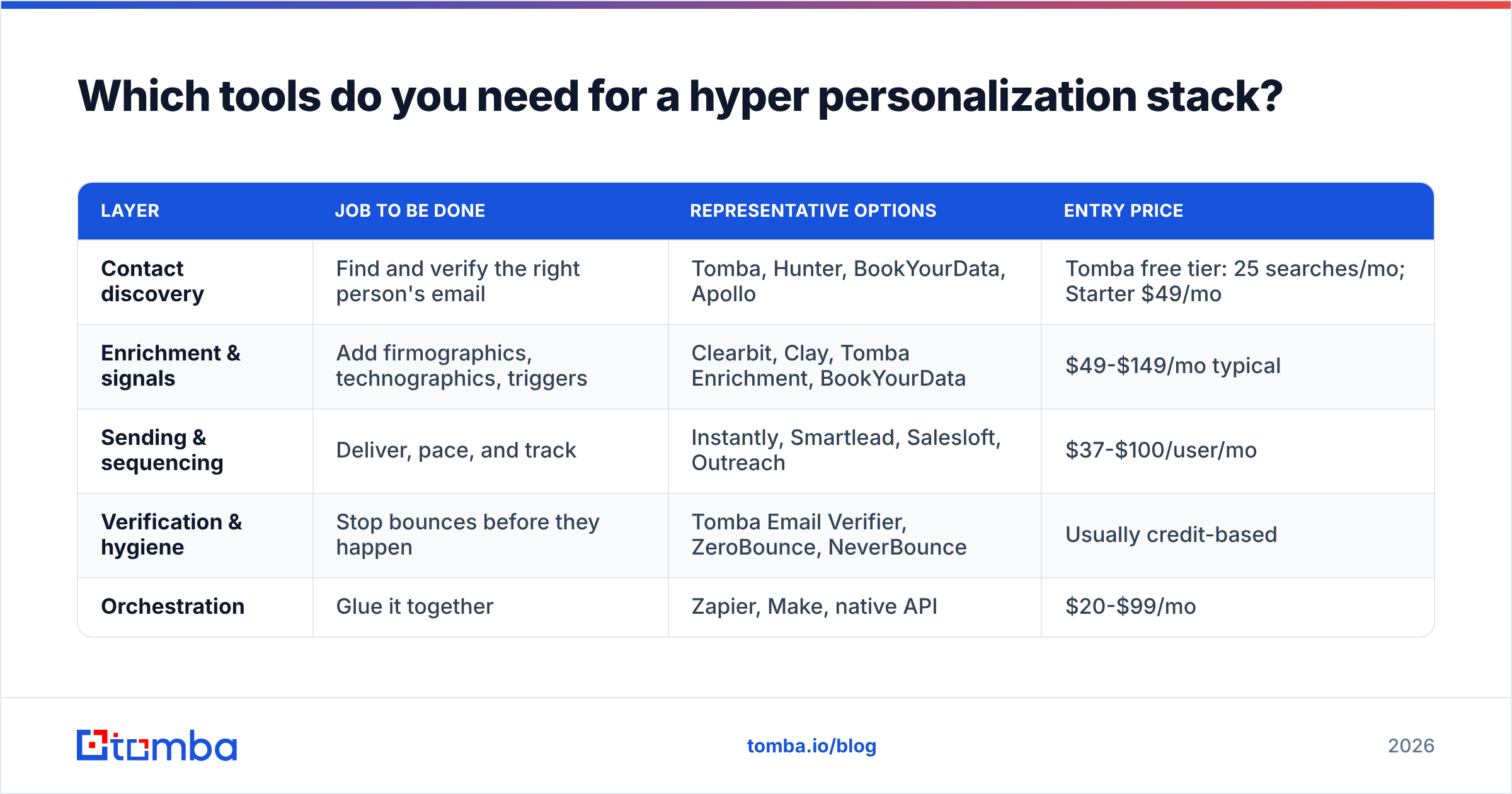
Which tools do you need for a hyper personalization email marketing stack?#
You need a few layers. You do not need a separate vendor for each one. You almost never need the all-in-one platform that runs $1,500 a month at the tier where the useful features live.
Layer
Job to be done
Representative options
Entry price
Contact discovery
Find and verify the right person's email
Tomba, Hunter, BookYourData, Apollo
Tomba free tier: 25 searches/mo; Starter $49/mo
Enrichment & signals
Add firmographics, technographics, triggers
Clearbit, Clay, Tomba Enrichment, BookYourData
$49-$149/mo typical
Sending & sequencing
Deliver, pace, and track
Instantly, Smartlead, Salesloft, Outreach
$37-$100/user/mo
Verification & hygiene
Stop bounces before they happen
Tomba Email Verifier, ZeroBounce, NeverBounce
Usually credit-based
Orchestration
Glue it together
Zapier, Make, native API
$20-$99/mo
A few notes on choosing.
On discovery. Accuracy compounds here. A 92%-accurate finder versus a 78%-accurate one is not a 14-point gap. It is the gap between a clean sequence and a bounce problem that follows your domain around.
Tomba's email finder does pattern detection and shows where each address came from. The free tier is enough to test it against contacts you already know.
BookYourData takes another route. You pay as you go for verified B2B records, with no subscription. That suits teams who buy in bursts. Both models work. Pick based on whether you prospect year-round or in campaigns.
On enrichment. Vendors quote coverage across their whole database, not your target list. Always test on 100 accounts from your own list. Coverage on US SaaS companies over 200 staff is a solved problem. Coverage on 40-person European manufacturers is not, and the gap widens fast.
On sending. Check G2 category reviews filtered to your company size. Sequencing tools review very differently at 5 seats than at 50 seats. The average score hides that.
How do you build the workflow in five steps?#
Step 1 — Define the trigger, then the list. This is backwards from how most teams work. Start with "companies that posted a role mentioning Snowflake in the last 30 days." Do not start with "all Series B fintechs." The trigger is the segment.
Step 2 — Resolve contacts. For each account, find the two or three people the trigger touches. A domain search returns the email pattern and the roster in one call. Filter to the right department. Do not email everyone with a pulse.
Step 3 — Enrich and verify in one pass. Add tech stack and company data, then verify deliverability. Use bulk processing so this is one job, not 400 clicks. Drop anything unverified. Catch-all domains need their own handling, and a catch-all verifier tells you which ones are safe to risk.
Step 4 — Build a skeleton with three dynamic blocks. One trigger sentence. One relevance sentence tied to their stack or size. One ask. Everything else stays fixed. Now you are reviewing three variables, not 400 unique emails.
Step 5 — Read a sample before every launch. Pull 10 rendered emails at random and read them as the recipient. This one habit catches most disasters: the wrong company suffix, the trigger that is 14 months old, the tech signal that is really a stale tracking pixel.
Where does hyper personalization email marketing break?#
Stale signals. A 2024 funding round quoted as "congrats on the raise" reads as a bot. Put an age limit on every trigger. Ninety days is a fair default. Thirty days for hiring signals.
The uncanny valley. There is a line between "you did your homework" and "you have been watching me." Public business activity is fair game. Personal posts, family details, and location details are not. When in doubt, ask if you would cite the source out loud on a call.
Scale delusion. Doing this at 5,000 contacts a week is not hyper personalization. It is templating with more variables. If your volume is that high, segment properly and accept it. Gartner's research has found that buyers punish volume-driven outreach, and more variables do not change that. Gartner's sales insights cover the pattern in depth.
Compliance drift. GDPR, CCPA, and their successors need a lawful basis and a real opt-out. Buying data does not exempt you. Keep the source on every record so you can answer "where did you get this?" honestly. Tomba publishes its data sources for that reason. A vendor that will not is a liability.
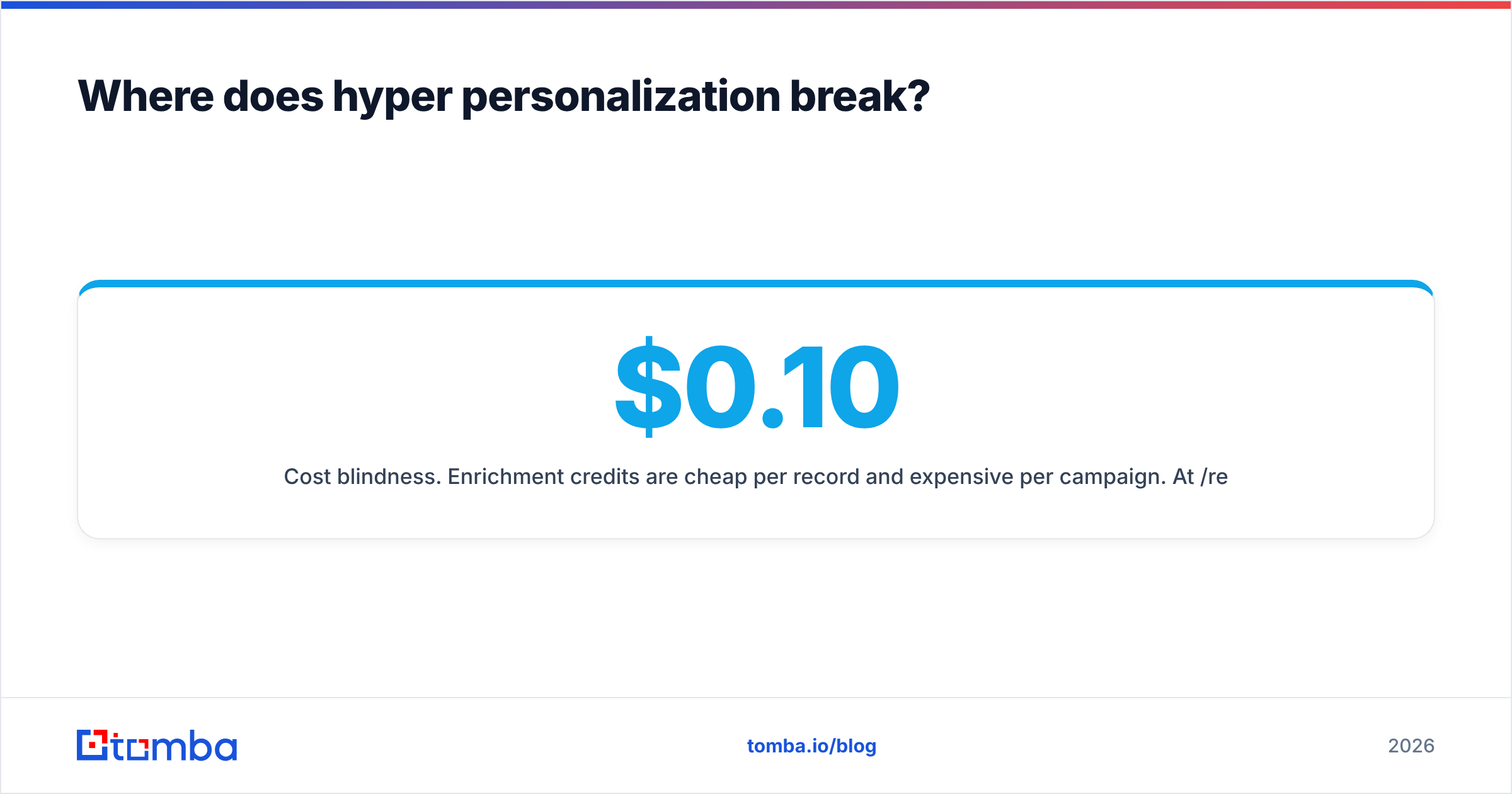
Cost blindness. Enrichment credits are cheap per record and expensive per campaign. At $0.10 a record and 2,000 records a week, that is $10,400 a year. Fine if your ACV is $30k. Not fine if it is $600.
How do you measure whether it's working?#
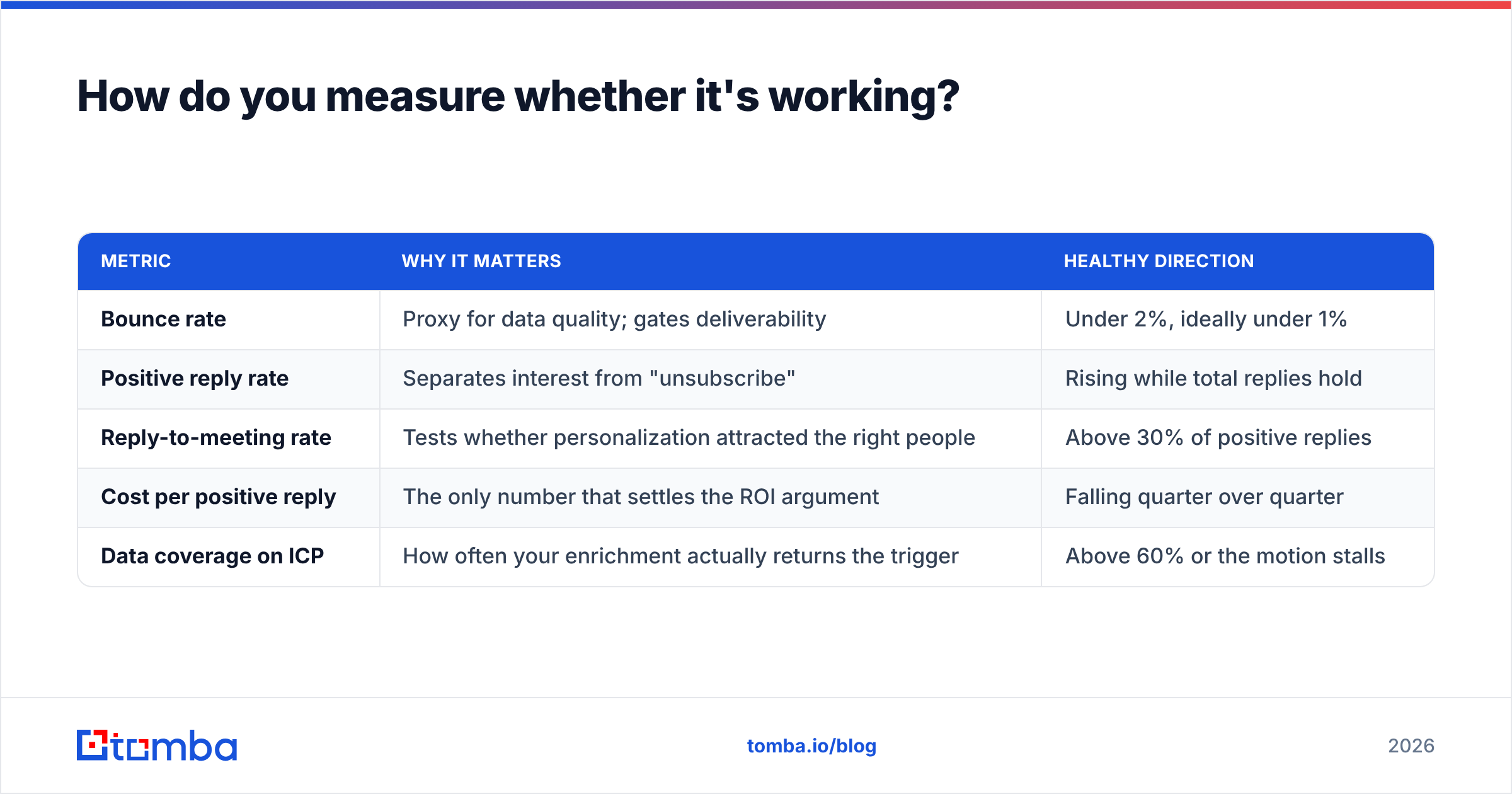
Reply rate is the headline number. It is also noisy at low volume. Track these instead:
Metric
Why it matters
Healthy direction
Bounce rate
Proxy for data quality; gates deliverability
Under 2%, ideally under 1%
Positive reply rate
Separates interest from "unsubscribe"
Rising while total replies hold
Reply-to-meeting rate
Tests whether personalization attracted the right people
Above 30% of positive replies
Cost per positive reply
The only number that settles the ROI argument
Falling quarter over quarter
Data coverage on ICP
How often your enrichment actually returns the trigger
Above 60% or the motion stalls
Run personalization depth as a test, not an article of faith. Take one segment. Send the three-block version to half of it. Send a well-written generic email to the rest. Plenty of teams find the generic email performs about the same. That is useful news. It means the money belongs in the offer and the targeting. Track it against your baseline response rate so the comparison stays honest.
What should you do first?#
If you are starting from zero, work in this order. Fix authentication. Verify your existing list. Pick one trigger. Write one skeleton. Send 50 emails. Read every reply. That sequence costs almost nothing and teaches you more than any vendor demo.
Contact data gates everything else. You cannot personalize to someone you cannot reach. You cannot measure lift while bounces pollute your numbers.
Start with the Tomba Email Finder. The free tier gives you 25 searches a month, which is enough to benchmark accuracy against contacts you already know. Starter runs $49 a month when you are ready to scale. Test it on your own ICP, not a vendor's demo list, and let the bounce rate settle the argument.
Related guides#
// get started
Find, verify and enrich your first contacts today
Start on the free plan with 25 searches a month, then scale when your team is ready.
Free plan · No credit card required · GDPR & CCPA
// about the author