Implementing a Sales Engagement Platform: 2026 Rollout Guide
Most sales engagement platform rollouts stall in month two — bad data, no adoption, no attribution. Here is the 90-day sequence that actually works, with the data-quality checks nobody schedules.
TL;DR
- Implementing a sales engagement platform is a data project wearing a software project's clothes. Tools do not fail — the contact records feeding them do.
- Budget 90 days: 30 for data and process cleanup, 30 for a pilot pod, 30 for rollout. Skipping the first 30 is why most rollouts stall in month two.
- Pick your platform on three axes only: how it handles sequences, how it writes back to your CRM, and whether it charges you for data you already own.
- Rep adoption follows one rule — if the platform saves a rep more minutes than it costs them, they use it. Measure minutes, not logins.
- Verify and enrich your contact list before the first sequence goes out. An 18% bounce rate in week one will burn a sending domain you cannot un-burn.
Sales engagement platforms — Outreach, Salesloft, Apollo, Reply.io, Saleshandy and a dozen others — promise the same thing: put every touch a rep makes into one sequenced, measurable system. The promise is real. The implementation is where teams lose two quarters.
This guide covers what actually happens when you roll one out, in the order it happens.
What is a sales engagement platform, exactly?#
A sales engagement platform (SEP) is the layer between your CRM and your prospects. The CRM stores what happened. The SEP decides what happens next and executes it.
Think of your CRM as a filing cabinet and the SEP as the assistant who works the cabinet — pulling files, making the calls, sending the emails, and putting notes back in the right folder. The cabinet does not do anything on its own.
Concretely, an SEP handles:
- Sequences (cadences) — multi-step, multi-channel outreach: email on day 1, call on day 3, LinkedIn on day 5, email on day 8. The platform enforces the timing so reps do not silently drop prospects at step two.
- Dialer and call logging — click-to-call from the browser, automatic call recording, and disposition codes that write back to the CRM without manual entry.
- Email execution and tracking — sending from the rep's real mailbox (not a marketing IP), with open, click and reply attribution per step.
- Task management — a single prioritized queue so a rep opens one screen in the morning instead of six tabs.
- Analytics — reply rate by step, by persona, by rep, by template. This is the part teams buy for and the part they configure last.
- CRM sync — bidirectional write-back so activity, contact status and opportunity stage stay consistent.
The category is roughly fifteen years old and well-documented; G2's sales engagement grid is the least-biased public comparison surface if you want vendor-by-vendor reviews from actual users.
What an SEP is not: a data provider. Almost every vendor now bundles a contact database to raise contract value, and that bundled data is usually the weakest part of the product. More on that below.
Why do most sales engagement platform rollouts stall?#
Because teams sequence the work backwards. The typical failed rollout looks like this:
Week 1–2: Contract signed, admin provisions seats, everyone gets a login. Week 3: Reps import their existing prospect lists — spreadsheets accumulated over eighteen months, never verified. Week 4: First sequences launch. Bounce rate is 14–22%. Reply rate is under 1%. Week 6: Gmail and Outlook start filtering. The team blames the platform. Week 9: Reps quietly go back to manual sending. The SEP becomes an expensive activity logger. Month 6: Renewal conversation. Nobody can prove pipeline attribution.
Every step of that failure chain traces to one decision: importing unverified data into a system that sends at volume. A rep sending 20 manual emails a day can absorb a 15% bad-data rate. A platform sending 400 a day across five mailboxes cannot — your sender reputation degrades faster than warmup can repair it.
The fix is unglamorous: clean before you connect.
What should you do in the first 30 days?#
Nothing that involves sending. Days 1–30 are audit and preparation.
Audit your existing contact data. Pull every list your team plans to import and run it through an email verifier before it touches the platform. You are looking for three numbers: hard-bounce rate, catch-all percentage, and unknown-status percentage. If hard-bounces exceed 3%, the list is not importable — it is a re-enrichment project.
Decide your catch-all policy in writing. Catch-all domains accept every address at the SMTP layer, so standard verification returns "unknown." Roughly 15–20% of B2B domains are catch-all, and they include a lot of enterprise targets you actually want. Your options: exclude them entirely (safest, costs you accounts), send to them in a separate low-volume mailbox (pragmatic), or run them through a catch-all verifier that probes further before you commit. Pick one now — not after the first bounce report.
Map your CRM fields before anyone configures a sequence. Which system owns lead status? What happens when a rep marks someone "not interested" in the SEP — does the CRM record update, and does it block future sequences? Unresolved field ownership is the number one source of month-four data corruption.
Document your current process before automating it. If your reps do not agree on what a qualified prospect looks like, the platform will simply help them contact the wrong people faster.
Warm the sending infrastructure. New domains and new mailboxes need 3–4 weeks of graduated volume. Start this on day 1 so it finishes when your pilot starts. Check your SPF record, DKIM and DMARC alignment in the same week — Google and Yahoo's bulk sender requirements have made authentication non-optional, and their published sender guidelines are the authoritative reference.
Which sales engagement platform should you choose?#
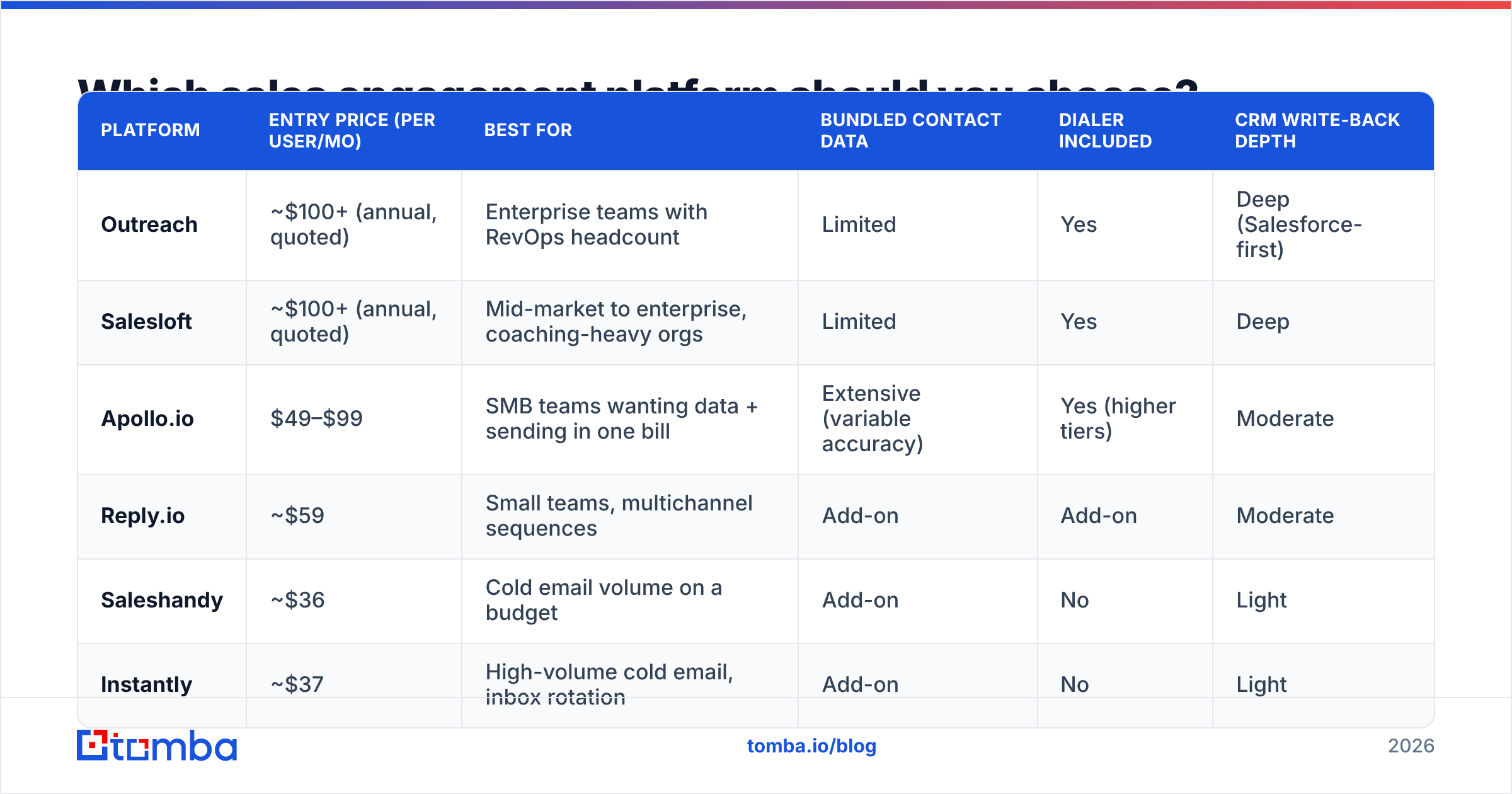
Pricing below reflects publicly listed rates as of early 2026; enterprise deals vary considerably and most vendors negotiate at 10+ seats.
| Platform | Entry price (per user/mo) | Best for | Bundled contact data | Dialer included | CRM write-back depth |
|---|---|---|---|---|---|
| Outreach | ~$100+ (annual, quoted) | Enterprise teams with RevOps headcount | Limited | Yes | Deep (Salesforce-first) |
| Salesloft | ~$100+ (annual, quoted) | Mid-market to enterprise, coaching-heavy orgs | Limited | Yes | Deep |
| Apollo.io | $49–$99 | SMB teams wanting data + sending in one bill | Extensive (variable accuracy) | Yes (higher tiers) | Moderate |
| Reply.io | ~$59 | Small teams, multichannel sequences | Add-on | Add-on | Moderate |
| Saleshandy | ~$36 | Cold email volume on a budget | Add-on | No | Light |
| Instantly | ~$37 | High-volume cold email, inbox rotation | Add-on | No | Light |
Three questions cut through the feature matrices:
Does it write back to your CRM the way your RevOps lead needs? If you run Salesforce and your ops team lives in it, Outreach and Salesloft's native objects will save you months. If you run HubSpot or Pipedrive, cheaper tools often sync fine. Check the vendor's own docs — HubSpot's integration directory tells you more than a sales call will.
Are you paying twice for data? This is the trap in bundled platforms. You buy the SEP for sequencing, get a contact database thrown in, and discover the database's accuracy on your specific ICP is mediocre. Now you are paying $99/user/month partly for data you have to supplement anyway. Running a dedicated email finder alongside a lean sending tool is frequently cheaper and measurably more accurate than one expensive bundle. Teams evaluating this route often compare against an Apollo alternative or an Outreach alternative specifically on cost-per-verified-contact rather than seat price.
What is the real cost at your seat count? Sticker price times seats is not the number. Add: implementation fees (common at enterprise tier), the data add-on, the dialer add-on, and the mailbox/warmup tooling. A "$100/user" platform routinely lands at $160–$180 all-in.

How do you run the pilot (days 31–60)?#
One pod. Three to five reps. Two sequences. Ninety days of runway before you judge it.
Pick the pod deliberately. You want one strong rep, one average rep, and one skeptic. The strong rep proves the ceiling. The average rep proves the floor. The skeptic finds the problems your vendor's SE glossed over.
Limit to two sequences. One for cold outbound, one for inbound follow-up or re-engagement. More than that and you cannot attribute results to anything.
Set the volume ceiling low and hold it. 30–50 emails per mailbox per day during the pilot, regardless of what the platform allows. You are testing message-market fit, not throughput.
Instrument three metrics, not fifteen:
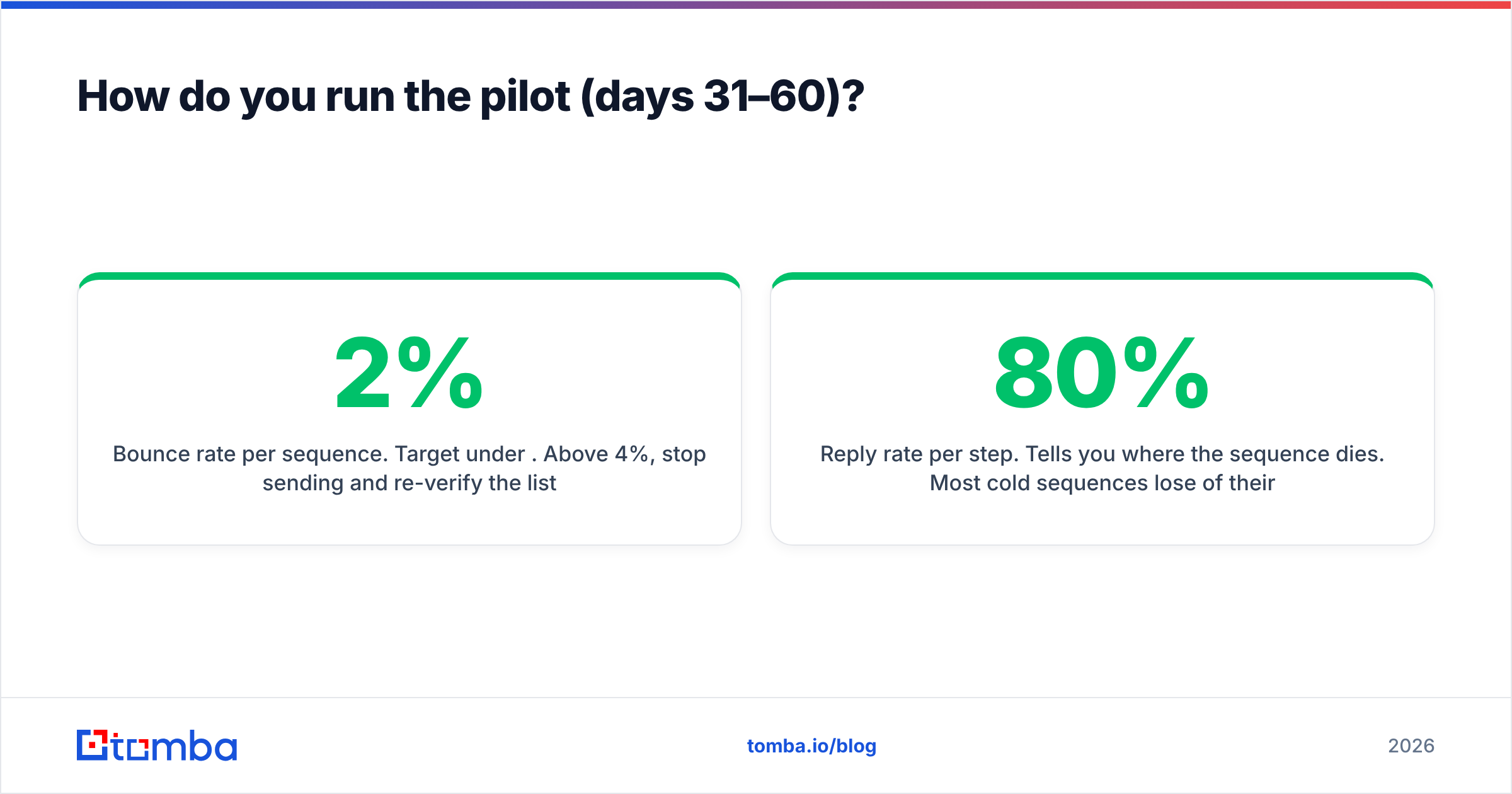
- Bounce rate per sequence. Target under 2%. Above 4%, stop sending and re-verify the list.
- Reply rate per step. Tells you where the sequence dies. Most cold sequences lose 80% of their potential replies because steps 4–7 are lazy "just bumping this" follow-ups.
- Minutes saved per rep per day. Ask them. If the answer is negative, adoption will fail at rollout regardless of what the dashboard says.
Run a weekly 30-minute pod review. Not a status meeting — a sequence autopsy. Read the actual replies out loud. Teams that do this find their messaging problems in week three instead of month five.
How do you get reps to actually use it?#
Adoption is not a training problem. It is a time-arithmetic problem.
A rep will use any tool that returns more minutes than it takes. The platform's job is to eliminate: manual CRM logging, tab-switching between dialer and email, list building, and follow-up scheduling. If your configuration adds a required custom field to every task, you have inverted the arithmetic and no amount of enablement will fix it.
Practical levers, in order of effectiveness:
- Delete required fields. Every mandatory input at task-completion time costs 5–10 seconds and buys you a data point nobody reports on. Audit them ruthlessly.
- Pre-build the sequences. Reps should never start from a blank cadence. Ship 4–6 approved sequences with tested copy; let reps clone and edit, never author from scratch.
- Put list building on RevOps, not reps. A rep building lists manually is a rep not selling. Centralize sourcing through bulk email finder runs or a shared domain search workflow, then push clean, verified records into the platform.
- Report on the platform's numbers, publicly, weekly. If pipeline reviews use SEP data, reps keep the SEP accurate. If pipeline reviews use a spreadsheet, the SEP dies.
- Name one owner. Not a committee. One person who owns sequence quality, template library, and data hygiene — usually a RevOps analyst or the SDR manager.
The revenue operations function exists largely because this ownership gap kills tool investments. If you have nobody to name, you are not ready to buy.
What breaks between month three and month six?#
Four things, predictably.
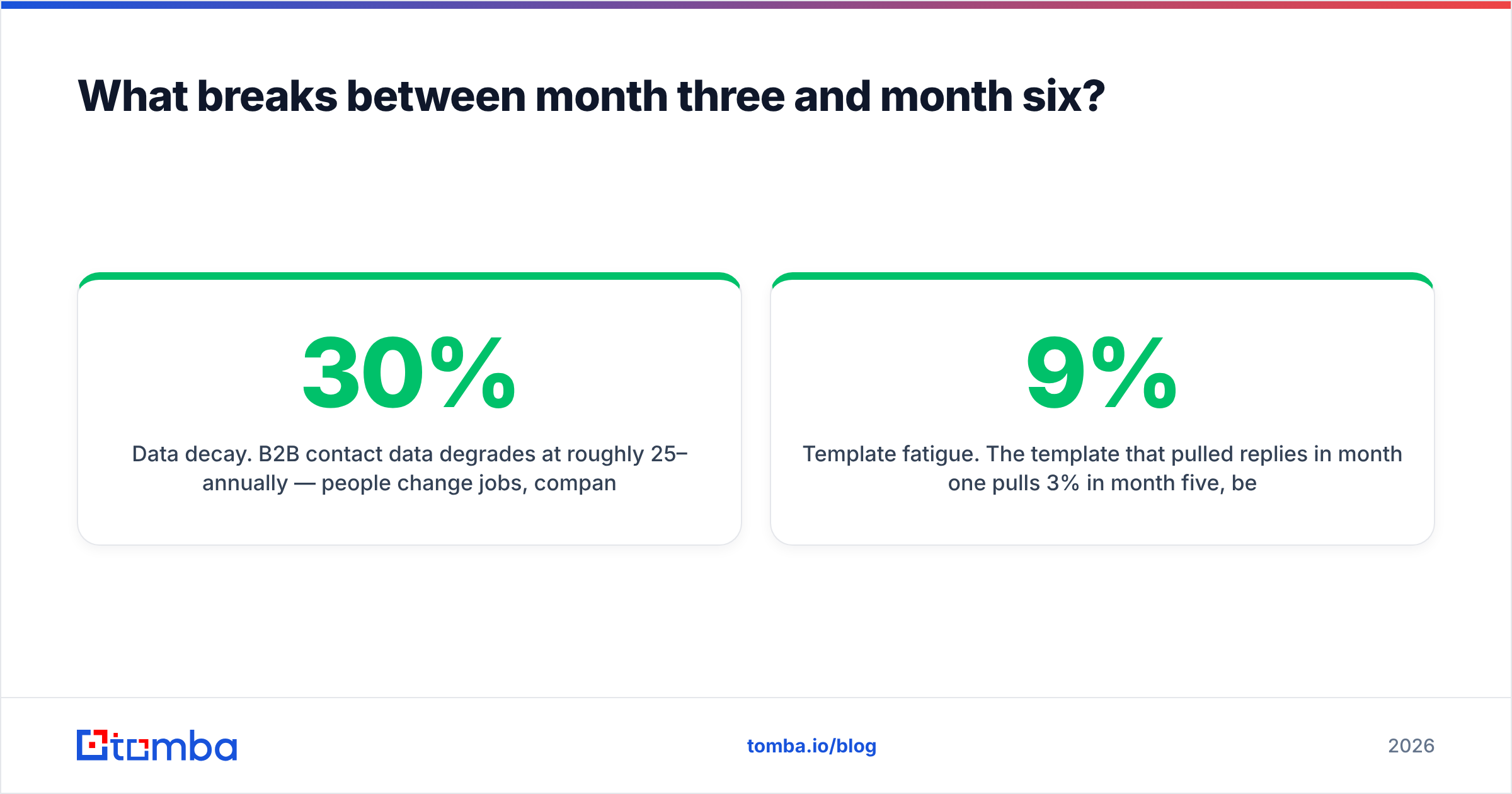
Data decay. B2B contact data degrades at roughly 25–30% annually — people change jobs, companies restructure, domains change. Your beautifully clean day-30 list is measurably worse by day 180. Build a quarterly re-verification job into the calendar, not into someone's good intentions. Ongoing data enrichment on your CRM records is cheaper than re-acquiring contacts.
Sequence sprawl. Month one: 2 sequences. Month six: 47 sequences, 31 of which have sent fewer than 20 emails and none of which anyone can compare. Cap the library. Archive anything with under 100 sends and no reply.
Template fatigue. The template that pulled 9% replies in month one pulls 3% in month five, because your ICP has now seen it from four vendors. Rotate copy quarterly and test subject lines deliberately rather than by vibes.
Attribution arguments. Marketing claims the reply was a nurtured lead; the SDR claims it was the cold sequence. Settle the attribution model in month one, in writing, before there is money attached to the answer. Forrester's B2B research covers multi-touch attribution models in depth if you need an external reference to end the debate.
What does a realistic 90-day timeline look like?#
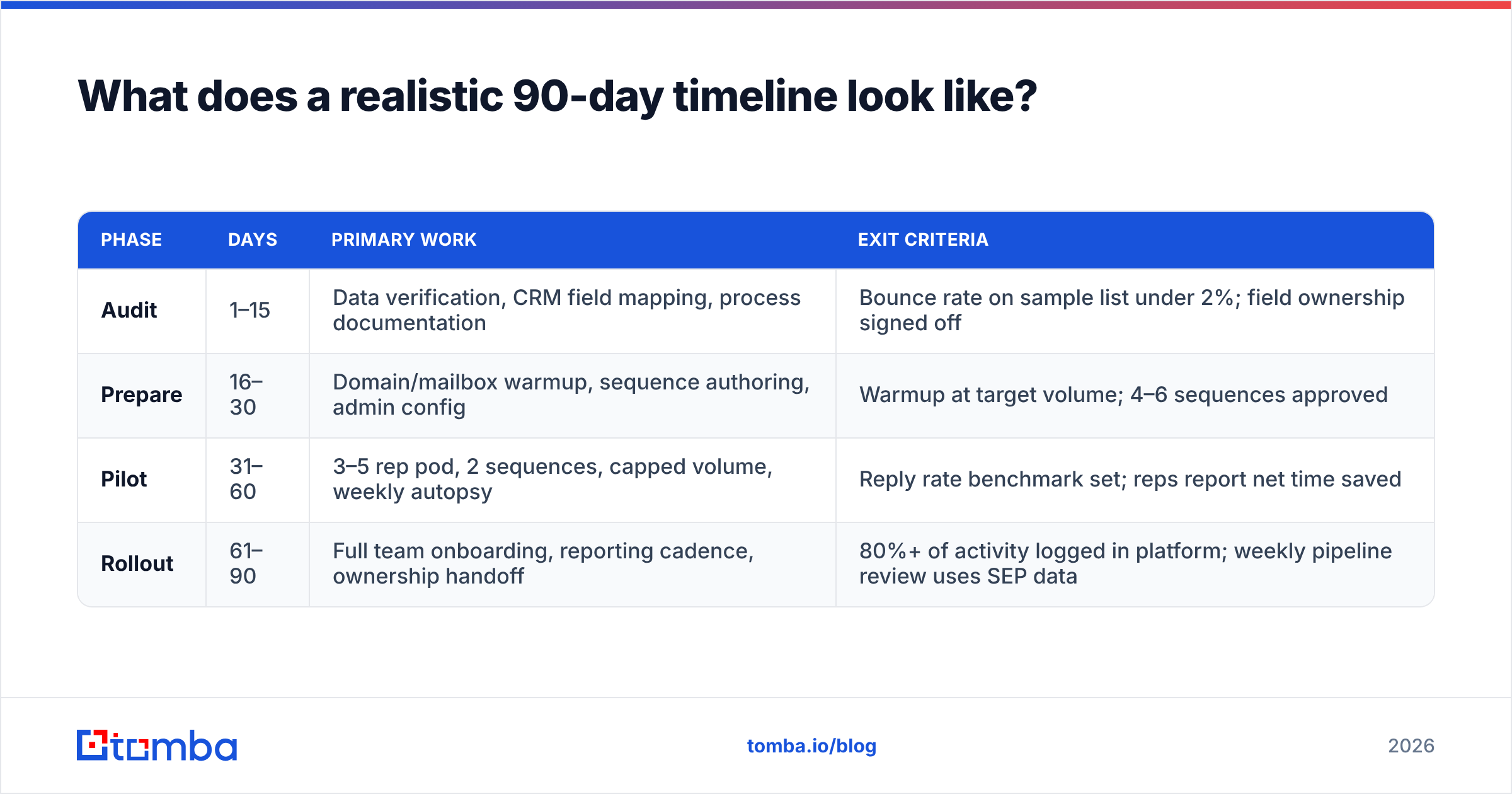
| Phase | Days | Primary work | Exit criteria |
|---|---|---|---|
| Audit | 1–15 | Data verification, CRM field mapping, process documentation | Bounce rate on sample list under 2%; field ownership signed off |
| Prepare | 16–30 | Domain/mailbox warmup, sequence authoring, admin config | Warmup at target volume; 4–6 sequences approved |
| Pilot | 31–60 | 3–5 rep pod, 2 sequences, capped volume, weekly autopsy | Reply rate benchmark set; reps report net time saved |
| Rollout | 61–90 | Full team onboarding, reporting cadence, ownership handoff | 80%+ of activity logged in platform; weekly pipeline review uses SEP data |
Teams that compress this to 30 days do not go faster — they arrive at month six with the same problems, just less documented.
Is a sales engagement platform worth it for a small team?#
Below roughly six reps, often no — at least not the enterprise tier.
A three-person outbound team gets most of the value from a much simpler stack: a reliable source of verified contacts, a lightweight sending tool with warmup, and disciplined CRM hygiene. The sequencing and analytics an SEP adds only pay off once you have enough volume to make statistical comparisons between sequences, and enough reps for coaching data to matter.
The honest threshold: if you cannot generate at least 500 sequenced touches a month, you do not have the sample size to use the analytics you are paying for. Spend that budget on data quality instead. It compounds; seat licenses do not.
For teams that do clear the threshold, the ROI case is straightforward — the platform typically returns 45–70 minutes per rep per day in eliminated admin work. At six reps, that is roughly one additional full-time selling capacity for the price of six licenses. That math holds only if the data underneath is clean, which brings us back to where this started.
Where should you start?#
Start with your list, not your vendor shortlist.
Before you book a single demo, take 500 contacts from your current prospect database and run them through verification. The result tells you which problem you actually have. If 90%+ come back deliverable, you have a process problem and a sales engagement platform will help. If 25% bounce, you have a data problem, and buying a sending platform will make it worse, faster.
Tomba's Email Finder handles that first step — finding and verifying professional email addresses by domain, name, or company, with a free tier at 25 searches per month to test your list before you commit to anything. Paid plans start at $49/month (Starter), $99/month (Growth), and $249/month (Pro); full Tomba pricing is public. Feed a clean, verified list into whichever engagement platform you choose, and the 90-day plan above stops being aspirational.
Related guides#
// get started
Find, verify and enrich your first contacts today
Start on the free plan with 25 searches a month, then scale when your team is ready.
Free plan · No credit card required · GDPR & CCPA
// about the author