ImportFromWeb Pricing, Reviews, Pros and Cons (2026)
ImportFromWeb turns Google Sheets into a scraper, but request credits, silent errors, and per-cell math decide whether it is cheap or expensive. Here is the honest pricing breakdown, what real reviews say, and when an API is the better buy.
TL;DR
- ImportFromWeb is a Google Sheets add-on that pulls live web data into cells with a single
=IMPORTFROMWEB()formula. It is a scraper wearing a spreadsheet costume. - Pricing is credit-based: every request (roughly, every URL you pull) burns one credit, and a 500-row sheet that auto-refreshes can eat a month's quota in a weekend.
- Reviews are consistently positive on ease of use and support, and consistently critical on quota transparency, refresh loops, and pages that return empty cells after a site redesign.
- It is excellent for scraping public pages you already have URLs for. It is a poor fit for finding and verifying B2B contact data, where a purpose-built API costs less per usable record.
- The honest verdict: worth it under ~10,000 requests/month for structured public pages; switch to a dedicated data API once contact accuracy, not page fetching, is the bottleneck.
What is ImportFromWeb and who actually uses it?#
ImportFromWeb is a Google Sheets add-on built by the team at importfromweb.com that gives you a custom function: =IMPORTFROMWEB(url, selectors). You give it a URL and a CSS selector, XPath, or one of its named shortcuts, and it returns the value straight into your sheet.
The everyday analogy: Google's native IMPORTXML is a bicycle with a bent wheel. It works on simple static pages, dies on anything JavaScript-rendered, and gets blocked the moment a site notices Google's servers hammering it. ImportFromWeb is the same bicycle with an engine, headlights, and someone else paying the tolls — it renders JavaScript, rotates proxies, and retries failures on the vendor's infrastructure instead of yours.
Who uses it in practice:
- E-commerce and pricing analysts tracking competitor prices, stock status, and Amazon or Shopify listings on a daily refresh.
- SEO teams pulling meta titles, H1s, word counts, and schema markup across a few hundred URLs without leaving a sheet.
- Growth and ops people enriching a list of company domains with headcount, tech stack hints, or social links scraped off public pages.
- Finance and research teams grabbing tickers, exchange rates, and public filings into models that already live in Sheets.
- Solo founders who need a scraper but refuse to maintain a Python script and a proxy bill.
Notice what is missing from that list: nobody uses it as a primary source of verified email addresses. That distinction drives most of the pricing analysis below.
How does ImportFromWeb pricing work in 2026?#
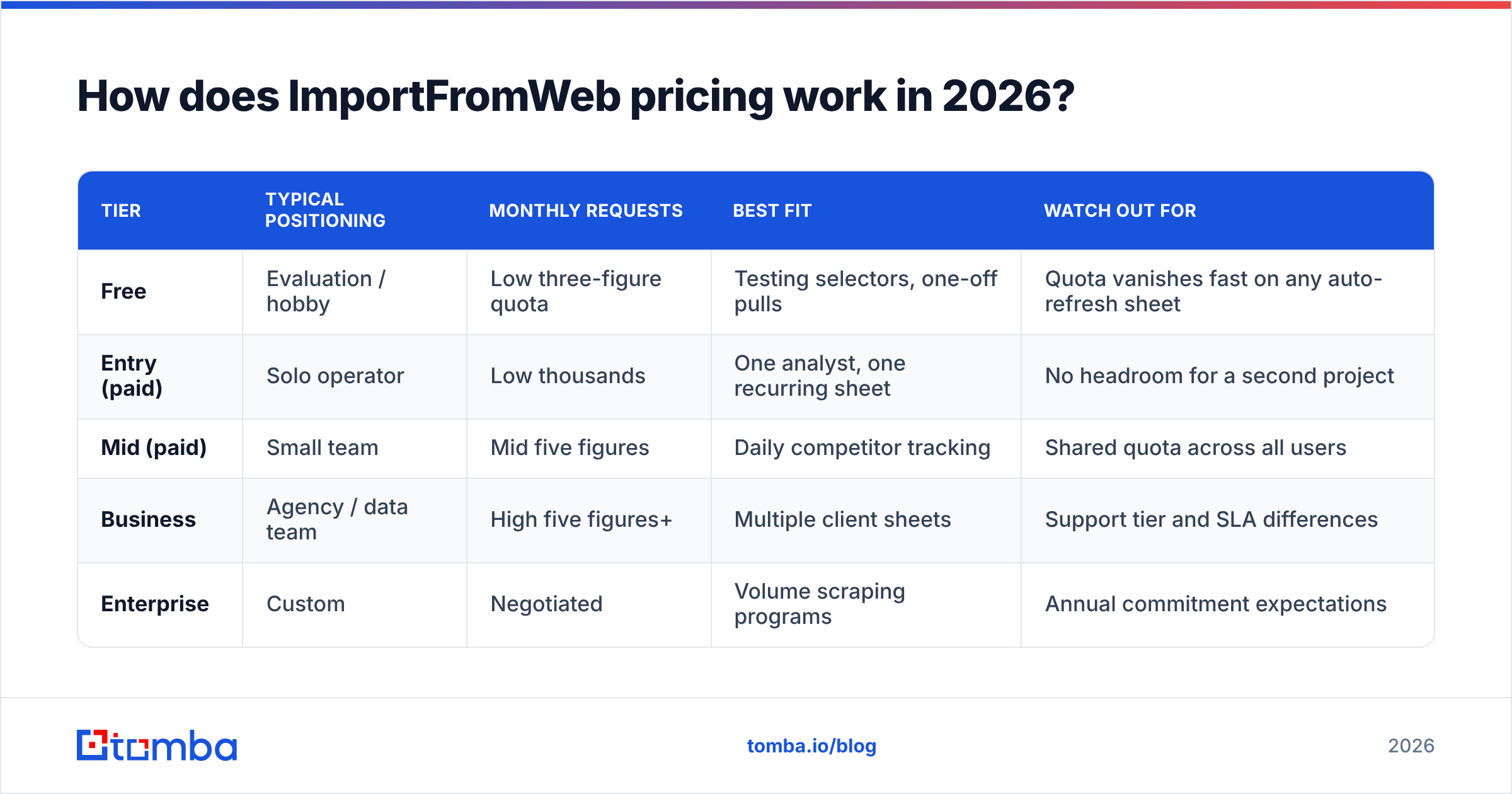
ImportFromWeb sells requests (also called credits), not seats. One request is broadly one URL fetch, regardless of how many selectors you extract from that page. That is the single most important detail in the whole pricing model, and it cuts both ways: pulling 20 fields off one product page costs one credit, but re-checking 20 product pages once a day costs 600 credits a month.
Plans follow a standard SaaS ladder — a free tier for evaluation, an entry plan for individuals, a mid plan for small teams, and a business tier with higher quotas plus priority support. Vendor prices move, so treat the bands below as the shape of the offer and confirm today's exact numbers on the vendor's own pricing page before you buy.
| Tier | Typical positioning | Monthly requests | Best fit | Watch out for |
|---|---|---|---|---|
| Free | Evaluation / hobby | Low three-figure quota | Testing selectors, one-off pulls | Quota vanishes fast on any auto-refresh sheet |
| Entry (paid) | Solo operator | Low thousands | One analyst, one recurring sheet | No headroom for a second project |
| Mid (paid) | Small team | Mid five figures | Daily competitor tracking | Shared quota across all users |
| Business | Agency / data team | High five figures+ | Multiple client sheets | Support tier and SLA differences |
| Enterprise | Custom | Negotiated | Volume scraping programs | Annual commitment expectations |
Two structural notes that matter more than the sticker price:
- Quota is per workspace, not per user. One colleague who leaves a sheet on hourly refresh can drain the plan everyone shares.
- Failed requests can still consume quota. If a target site returns a soft block or an empty DOM, you paid for the fetch and got a blank cell. Budget for a real-world success rate below 100%, not for the theoretical maximum.

What are the hidden costs of ImportFromWeb pricing?#
Most complaints about ImportFromWeb pricing are not really about the price. They are about credit burn that nobody modelled up front. Five specific traps:
- Refresh multiplication. A 500-row sheet set to refresh daily is 15,000 requests a month, not 500. Sheets also recalculates volatile formulas on open, on edit, and sometimes on collaborator activity. Pin refreshes to a manual trigger or a scheduled script before you touch a paid plan.
- Selector churn. Sites redesign. When a class name changes, your formula returns nothing — and you burn credits re-running it while you debug. Teams tracking 20+ domains report spending real hours per quarter on selector maintenance.
- Duplicate URLs. Copy-pasting a lead list without deduplicating means paying twice for the same fetch. Run a remove duplicates pass on any URL column before it hits a formula.
- The blocked-page tax. Anything behind a login, aggressive bot detection, or a rate limiter will fail intermittently. Your effective cost per usable row is the plan price divided by successful pulls, which is always the smaller number.
- Sheets itself becomes the bottleneck. Google Sheets slows noticeably past a few thousand live custom-function calls. The fix is usually splitting into multiple sheets — which multiplies refresh events, which multiplies credits.
None of these are dishonest pricing. They are the normal physics of scraping, and ImportFromWeb is more transparent about them than most. But they explain why a plan that looks generous on paper feels tight in month two.
What do ImportFromWeb reviews say?#
Public sentiment on the Google Workspace Marketplace and software review sites like G2 clusters into a consistent picture. Reviewers who compare it against writing their own scraper are enthusiastic; reviewers who expected a finished data product are more mixed.
What reviewers consistently praise:
- Setup time measured in minutes, not days. If you can write a VLOOKUP, you can write an IMPORTFROMWEB.
- Responsive human support, including help writing selectors for specific sites — an unusually hands-on level of service for a sub-$100 tool.
- It genuinely handles JavaScript-rendered pages that
IMPORTXMLcannot touch. Google's own IMPORTXML documentation is upfront that it parses static XML/HTML only. - Named shortcuts for common targets (product prices, meta tags, social counts) that remove the need to inspect the DOM at all.
What reviewers consistently criticise:
- Credit consumption is easier to trigger than to predict, especially for new users.
- Silent failures. An empty cell does not tell you whether the page changed, the request was blocked, or the selector is wrong.
- Performance degradation on large sheets.
- It solves fetching, not data quality. You still own the cleanup, deduplication, and verification of whatever comes back.
That last point is the one that decides most purchase decisions, so it deserves its own section.
Is ImportFromWeb better than IMPORTXML or a dedicated data API?#
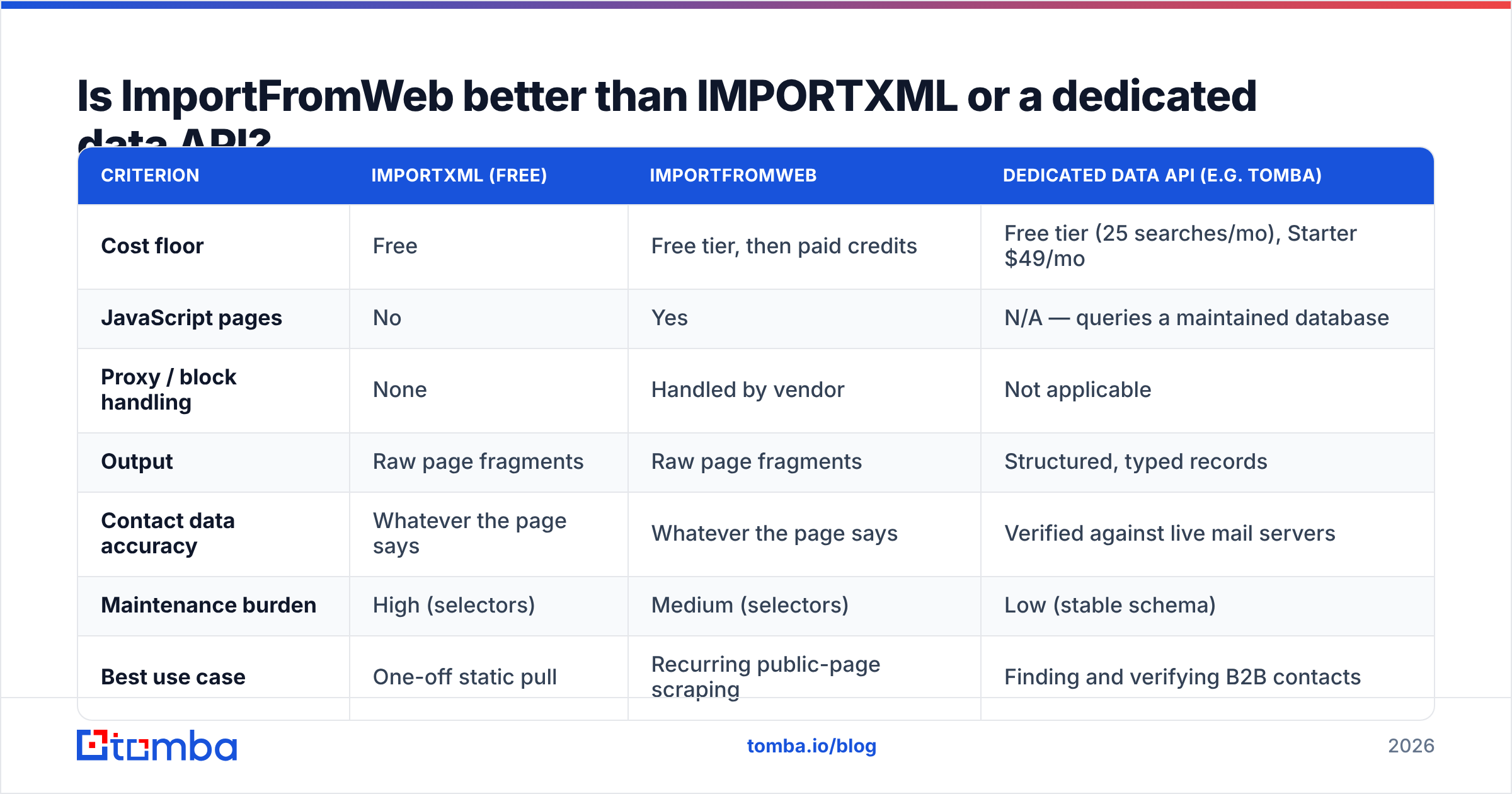
Different jobs. Comparing them head-on only makes sense once you name the task.
| Criterion | IMPORTXML (free) | ImportFromWeb | Dedicated data API (e.g. Tomba) |
|---|---|---|---|
| Cost floor | Free | Free tier, then paid credits | Free tier (25 searches/mo), Starter $49/mo |
| JavaScript pages | No | Yes | N/A — queries a maintained database |
| Proxy / block handling | None | Handled by vendor | Not applicable |
| Output | Raw page fragments | Raw page fragments | Structured, typed records |
| Contact data accuracy | Whatever the page says | Whatever the page says | Verified against live mail servers |
| Maintenance burden | High (selectors) | Medium (selectors) | Low (stable schema) |
| Best use case | One-off static pull | Recurring public-page scraping | Finding and verifying B2B contacts |
| Fails when | Site uses JS | Site redesigns or blocks | Contact genuinely does not exist |
The honest framing: ImportFromWeb is a fetching layer. A B2B data API is an answer layer. If you already know exactly which URL holds the number you want, ImportFromWeb is close to unbeatable for the price. If your actual question is "who is the head of marketing at these 400 companies, and will an email to them bounce," no amount of scraping credits gets you a reliable answer — because that data is not sitting in a <div> waiting to be selected.
When should you use an email finder API instead?#
Run the cost math per usable record rather than per request, and the two categories separate immediately.
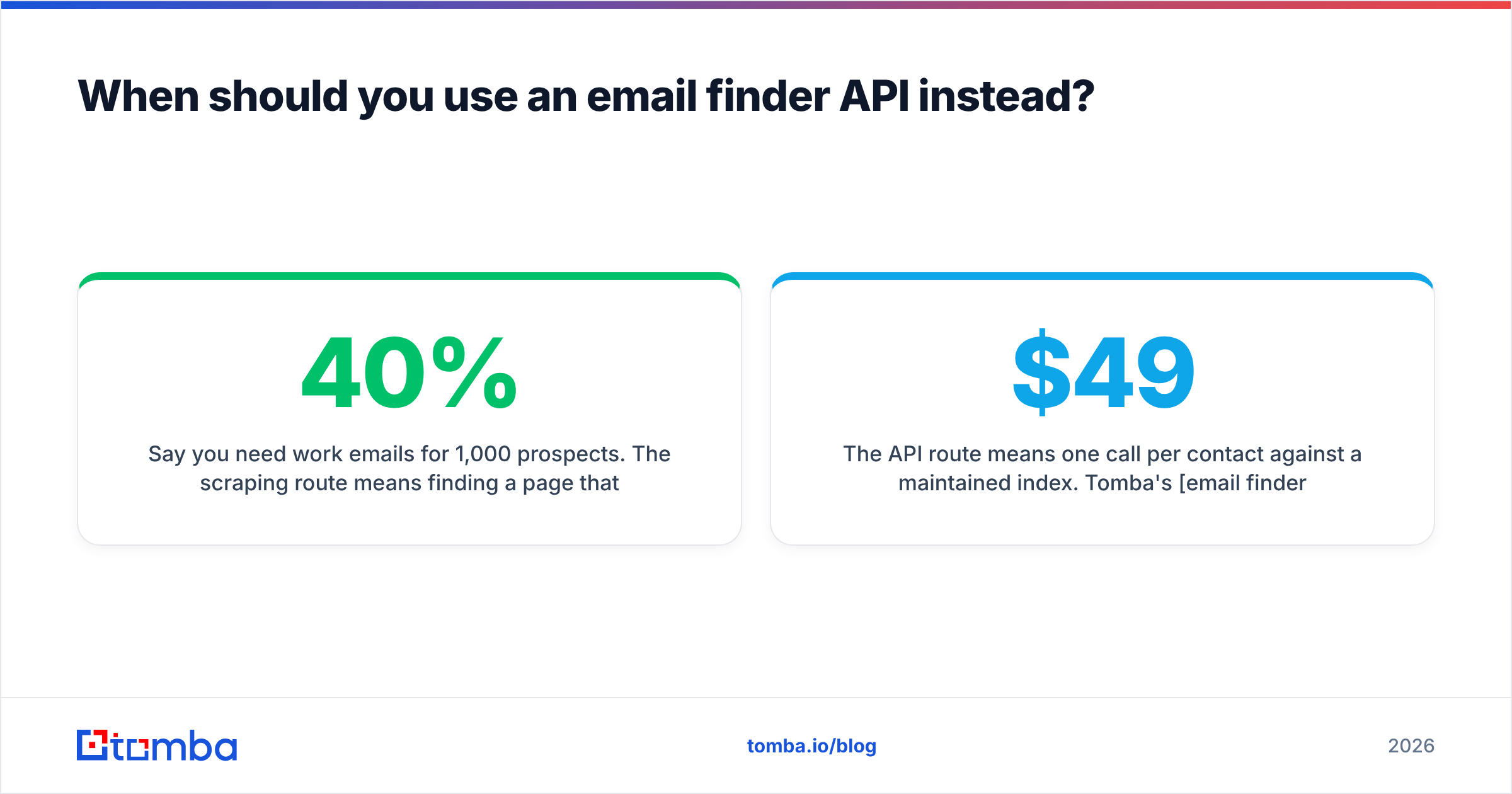
Say you need work emails for 1,000 prospects. The scraping route means finding a page that lists each person, extracting a name, guessing the email pattern, and hoping. Realistically you burn 2,000–3,000 requests (company page, team page, retries), land maybe 30–40% coverage, and none of it is verified — so you then pay a verification tool on top and still eat bounces.
The API route means one call per contact against a maintained index. Tomba's email finder returns a confidence score and source list per result, the email verifier checks deliverability before you send, and the Tomba API does both in one pipeline. Pricing runs Free (25 searches/mo), Starter $49/mo, Growth $99/mo, Pro $249/mo, and custom Enterprise — see full Tomba pricing for current credit allocations.
Where it gets interesting for ImportFromWeb users specifically: you do not have to leave the spreadsheet. Tomba's Google Sheets add-on works the same way — formula in, contact data out — so the workflow you already like stays intact while the underlying data source changes from "whatever this page renders" to "a verified record."
What are the real pros and cons of ImportFromWeb?#
| Pros | Cons | |
|---|---|---|
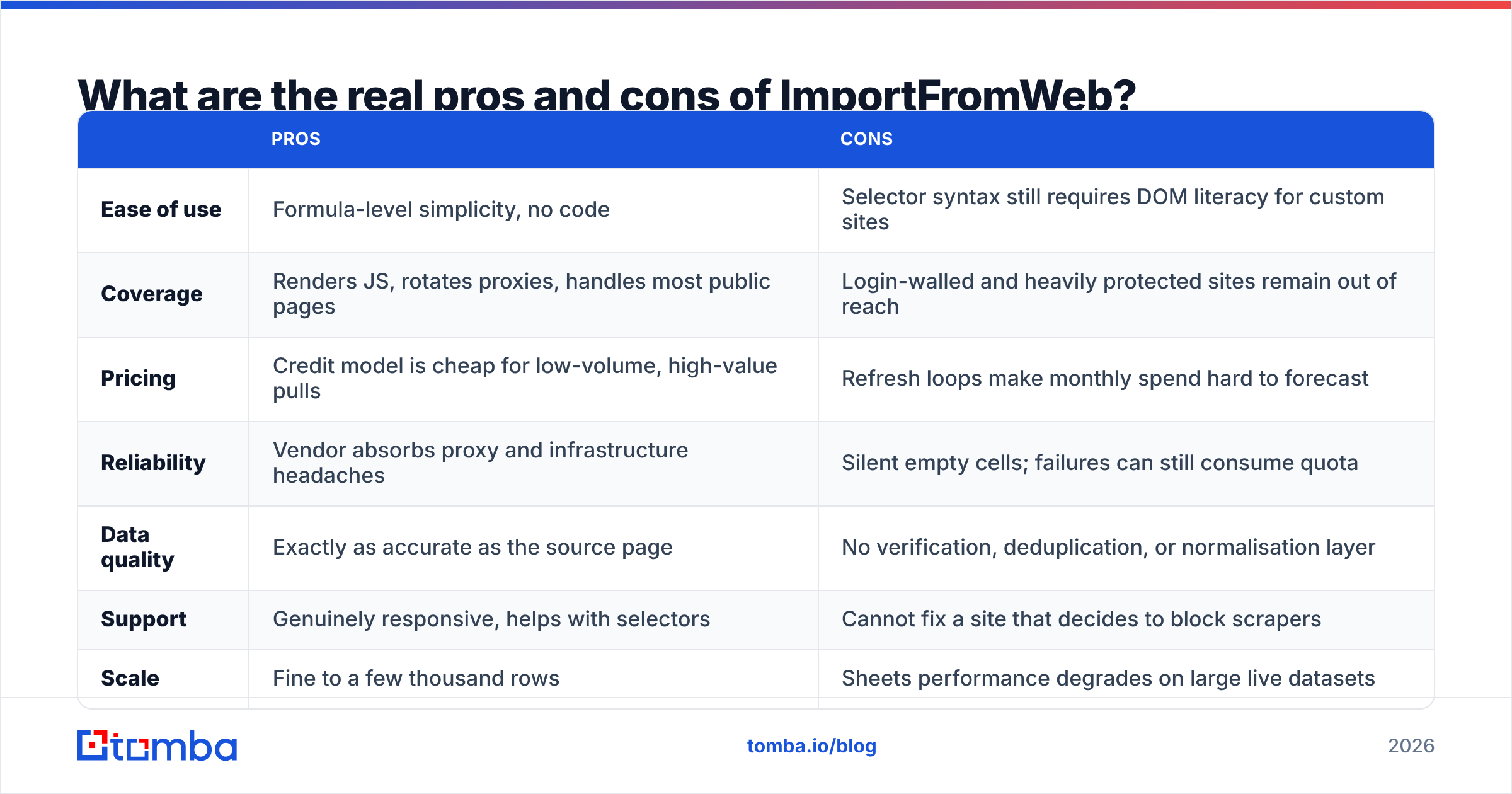
| Ease of use | Formula-level simplicity, no code | Selector syntax still requires DOM literacy for custom sites |
| Coverage | Renders JS, rotates proxies, handles most public pages | Login-walled and heavily protected sites remain out of reach |
| Pricing | Credit model is cheap for low-volume, high-value pulls | Refresh loops make monthly spend hard to forecast |
| Reliability | Vendor absorbs proxy and infrastructure headaches | Silent empty cells; failures can still consume quota |
| Data quality | Exactly as accurate as the source page | No verification, deduplication, or normalisation layer |
| Support | Genuinely responsive, helps with selectors | Cannot fix a site that decides to block scrapers |
| Scale | Fine to a few thousand rows | Sheets performance degrades on large live datasets |
Read that table as a fit test, not a verdict. Rows one, two, and six are why people love it. Rows three and five are why people churn.
Is ImportFromWeb worth it in 2026?#
Yes, if your job is pulling structured values off public pages you can already point to, and your monthly volume sits comfortably under your plan's quota with refreshes under control. For competitor price tracking, SEO audits, and market research inside Sheets, it remains one of the best value-per-dollar tools in the category, and the support quality is a real differentiator against faceless scraping APIs.
No, if you are buying it as a lead-generation engine. Scraping gets you names and URLs. It does not get you a deliverable inbox, and the gap between those two things is where cold-outreach campaigns die. Teams that try to bridge it with permutation guessing end up paying twice — once in credits, once in sender reputation damage from bounces.
A practical hybrid many teams land on: use ImportFromWeb for the discovery layer (find companies, pull firmographic signals off their sites), then hand the resulting domain list to a contact API for the part scraping cannot do. Run domains through domain search to get the people, verify before sending, and keep the scraper focused on what it is actually good at.
How should you decide? A three-question test#
- Do you already know the exact URL that contains your answer? If yes, ImportFromWeb. If no, you need a database, not a scraper.
- Would a wrong value cost you money or reputation? Prices and stock levels are self-correcting on the next refresh. A bad email address costs you a bounce, a spam complaint, and eventually a domain.
- Can you cap your refresh schedule? If you cannot govern who refreshes what, credit-based pricing will surprise you every month. Fixed-quota APIs with per-lookup billing are easier to forecast.
Ready to stop guessing at contact data?#
If your ImportFromWeb sheets keep ending at "I found the company but not the person," that is the gap to close first. Tomba's Email Finder returns verified, source-backed work emails by name and domain, with a confidence score on every result so you know what is safe to send. Start on the free tier — 25 searches a month, no card — and run it against the same list your scraper just built. If the coverage and bounce rate beat what you are getting today, you have your answer.
Related guides#
// get started
Find, verify and enrich your first contacts today
Start on the free plan with 25 searches a month, then scale when your team is ready.
Free plan · No credit card required · GDPR & CCPA
// about the author