How to Improve Domain Reputation in 2026: A Practical Guide
Your domain reputation is the single biggest lever on whether cold email lands in the inbox or the spam folder. Here's how to measure it, diagnose the damage, and repair it on a realistic 30-day timeline.
TL;DR
- Domain reputation is a per-mailbox-provider score built from complaint rate, bounce rate, spam-trap hits, authentication pass rate, and engagement — not from one number you can look up in a single dashboard.
- The fastest way to improve domain reputation is to stop the bleeding first: pause the campaign that broke it, cut invalid addresses, and fix SPF/DKIM/DMARC alignment before you send anything else.
- Keep complaint rate under 0.10% and hard bounces under 2%. Google's published threshold is 0.30%, but that is the ceiling where enforcement begins, not a target.
- Recovery is slower than damage. A mild dip takes 7–14 days of clean sending; a spam-trap-driven collapse takes 6–10 weeks, and sometimes a subdomain reset is cheaper than the wait.
- List hygiene does more for reputation than any warmup tool. Verifying before you send removes the bounce and trap risk that warmup can only paper over.
What is domain reputation, and who decides it?#
Domain reputation is the trust score that each mailbox provider assigns to your sending domain based on how recipients react to your mail. Think of it like a credit score that gets rebuilt from scratch at every bank you walk into: Google, Microsoft, Yahoo, and Proofpoint each keep their own file on you, and none of them share it.
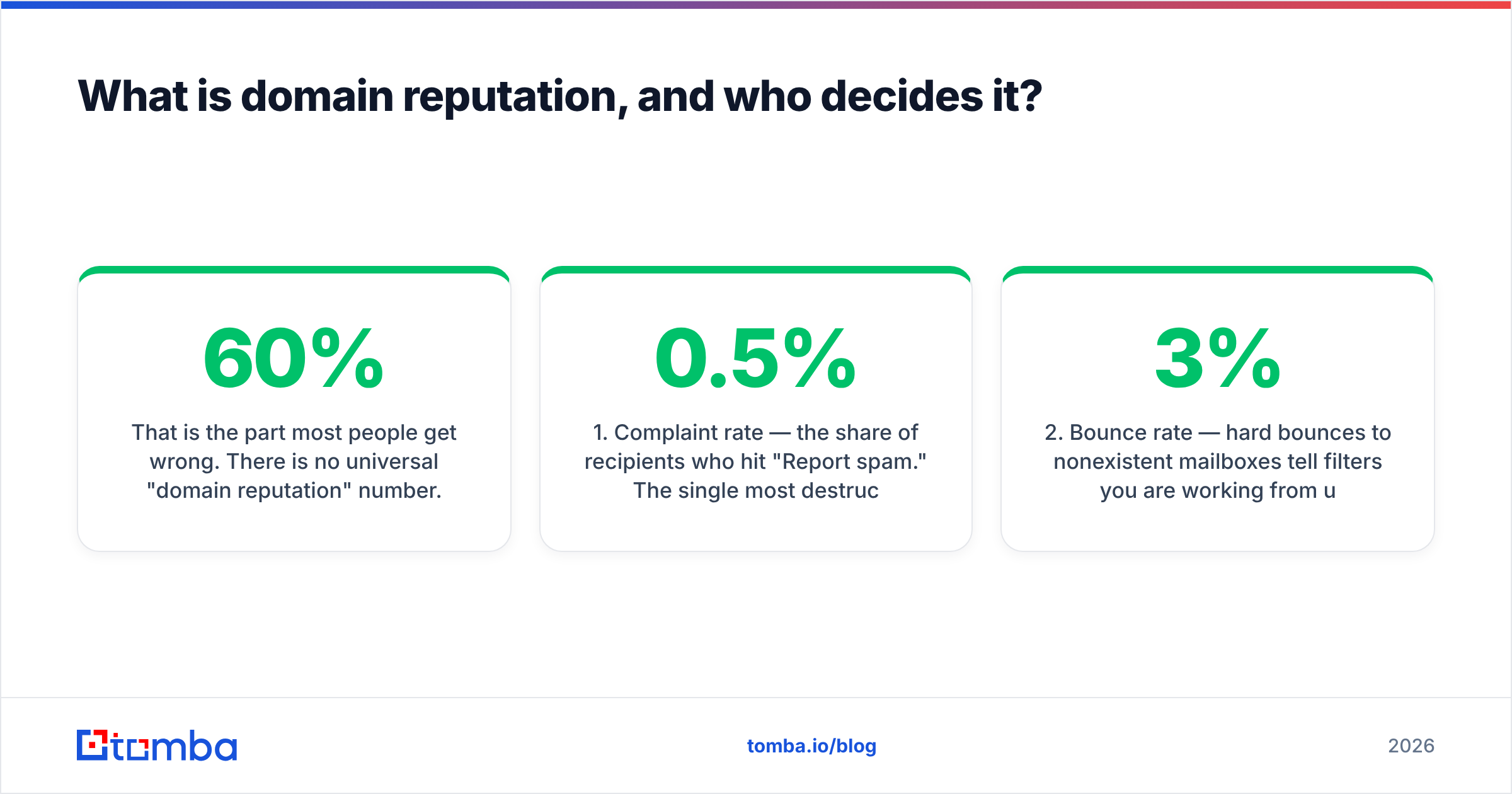
That is the part most people get wrong. There is no universal "domain reputation" number. Gmail can rate you High while Outlook silently routes you to Junk, because Microsoft weighs different signals and runs a separate filtering stack. When someone says their email deliverability tanked, they usually mean it tanked at one provider that happens to hold 60% of their list.
Domain reputation also outlives IP reputation. If you send through a shared pool at a large ESP, your IP reputation is diluted across thousands of senders — but your domain travels with you. Change ESPs and your domain history follows. That asymmetry is why providers increasingly weight the domain over the IP, and why a burned domain is a genuine business problem rather than a configuration annoyance.
Five inputs carry most of the weight:
- Complaint rate — the share of recipients who hit "Report spam." The single most destructive signal. One bad campaign at 0.5% can undo two months of good sending.
- Bounce rate — hard bounces to nonexistent mailboxes tell filters you are working from unverified data. Above ~3% and throttling starts.
- Spam-trap hits — recycled or pristine trap addresses. Pristine traps (never owned by a human) are the most damaging because they prove scraping.
- Authentication alignment — SPF, DKIM, and DMARC passing and aligning with the visible From domain. Since 2024 this is a hard gate at Gmail and Yahoo for bulk senders.
- Engagement — opens, replies, moves out of spam, and "not spam" clicks. Positive engagement is the only signal that actively rebuilds a damaged score.

How do you check your domain reputation right now?#
Before you fix anything, get a baseline. You need data from the providers themselves, not from a third-party "reputation score" widget.
Google Postmaster Tools. Free, and the only direct view into how Gmail rates you. Verify your domain, then read the Domain Reputation chart (High / Medium / Low / Bad) alongside the Spam Rate chart. Google's own sender guidelines spell out the 0.30% complaint threshold and the authentication requirements for anyone sending over 5,000 messages a day. Postmaster only populates when you have meaningful Gmail volume, so a small sender may see empty charts — that is not a bug.
Microsoft SNDS and JMRP. Microsoft's Smart Network Data Services exposes IP-level complaint and trap data, and the Junk Mail Reporting Program gives you a feedback loop so Outlook complaints come back to you as removable addresses. Enrolling in JMRP is the cheapest reputation insurance available.
Blacklist status. Check the major DNSBLs — Spamhaus, SURBL, Barracuda — for both your sending IP and your domain. A blacklist checker run takes thirty seconds and rules out the one failure mode that no amount of warmup will fix.
Authentication records. Run your SPF, DKIM, and DMARC records through a validator. Common breakages: more than ten DNS lookups in SPF, a DKIM key rotated at the ESP but never updated in DNS, or DMARC set to p=none forever. An SPF checker will surface lookup-limit failures that silently downgrade every message you send.
Seed and placement tests. Send to a seed list across Gmail, Outlook, Yahoo, and a corporate Microsoft 365 tenant. Placement data tells you where mail lands; Postmaster tells you why.
Why did your domain reputation drop in the first place?#
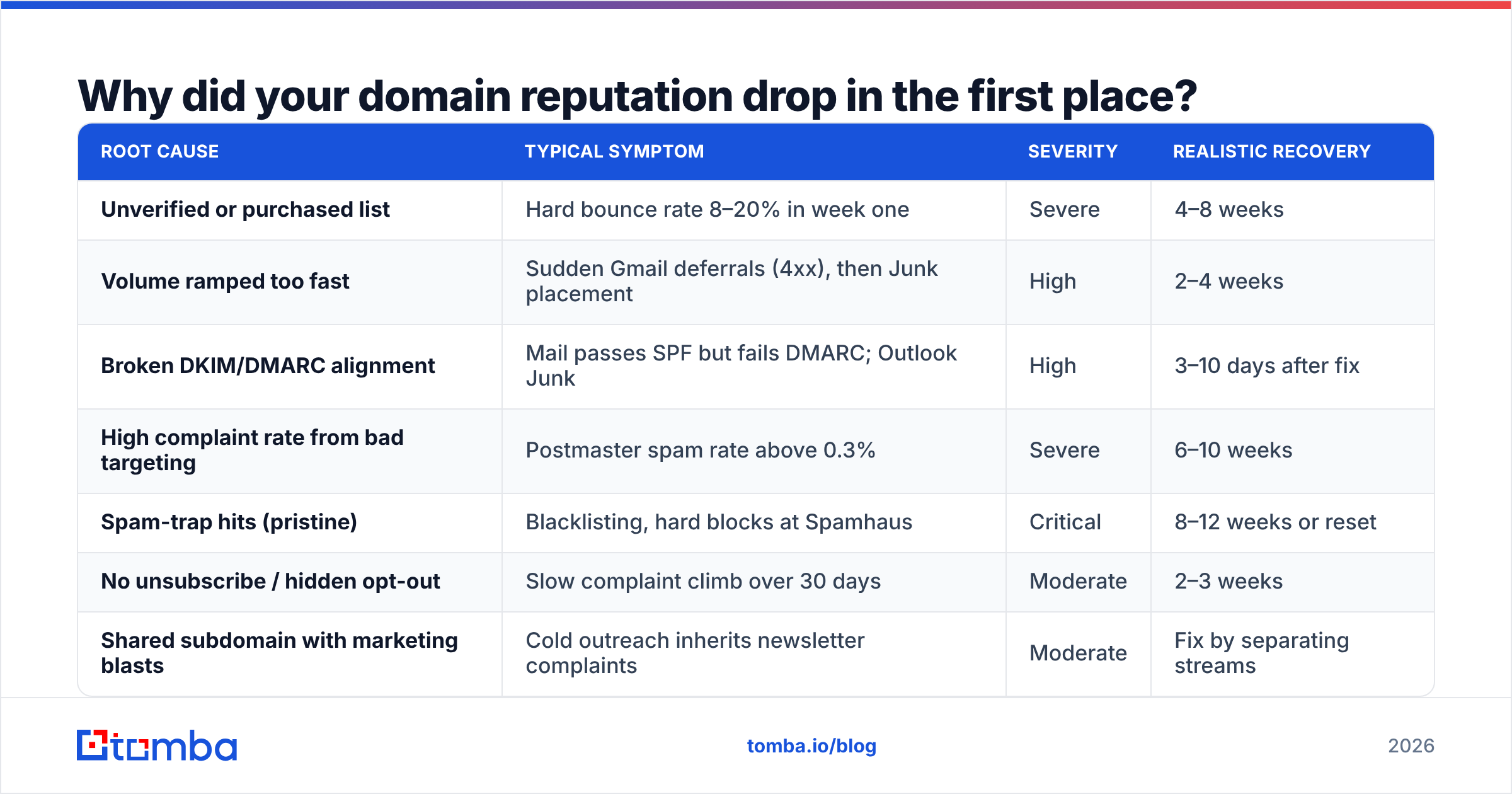
Reputation rarely falls for one reason. It falls because two or three risk factors stacked in the same week.
| Root cause | Typical symptom | Severity | Realistic recovery |
|---|---|---|---|
| Unverified or purchased list | Hard bounce rate 8–20% in week one | Severe | 4–8 weeks |
| Volume ramped too fast | Sudden Gmail deferrals (4xx), then Junk placement | High | 2–4 weeks |
| Broken DKIM/DMARC alignment | Mail passes SPF but fails DMARC; Outlook Junk | High | 3–10 days after fix |
| High complaint rate from bad targeting | Postmaster spam rate above 0.3% | Severe | 6–10 weeks |
| Spam-trap hits (pristine) | Blacklisting, hard blocks at Spamhaus | Critical | 8–12 weeks or reset |
| No unsubscribe / hidden opt-out | Slow complaint climb over 30 days | Moderate | 2–3 weeks |
| Shared subdomain with marketing blasts | Cold outreach inherits newsletter complaints | Moderate | Fix by separating streams |
The pattern worth internalizing: causes that come from data quality take the longest to repair, because the damage keeps compounding for as long as the bad list is in rotation. Causes that come from configuration — a misaligned DKIM key, a missing DMARC record — often clear within days once corrected, since the underlying recipient behavior was fine all along.
Which signals actually move the needle?#
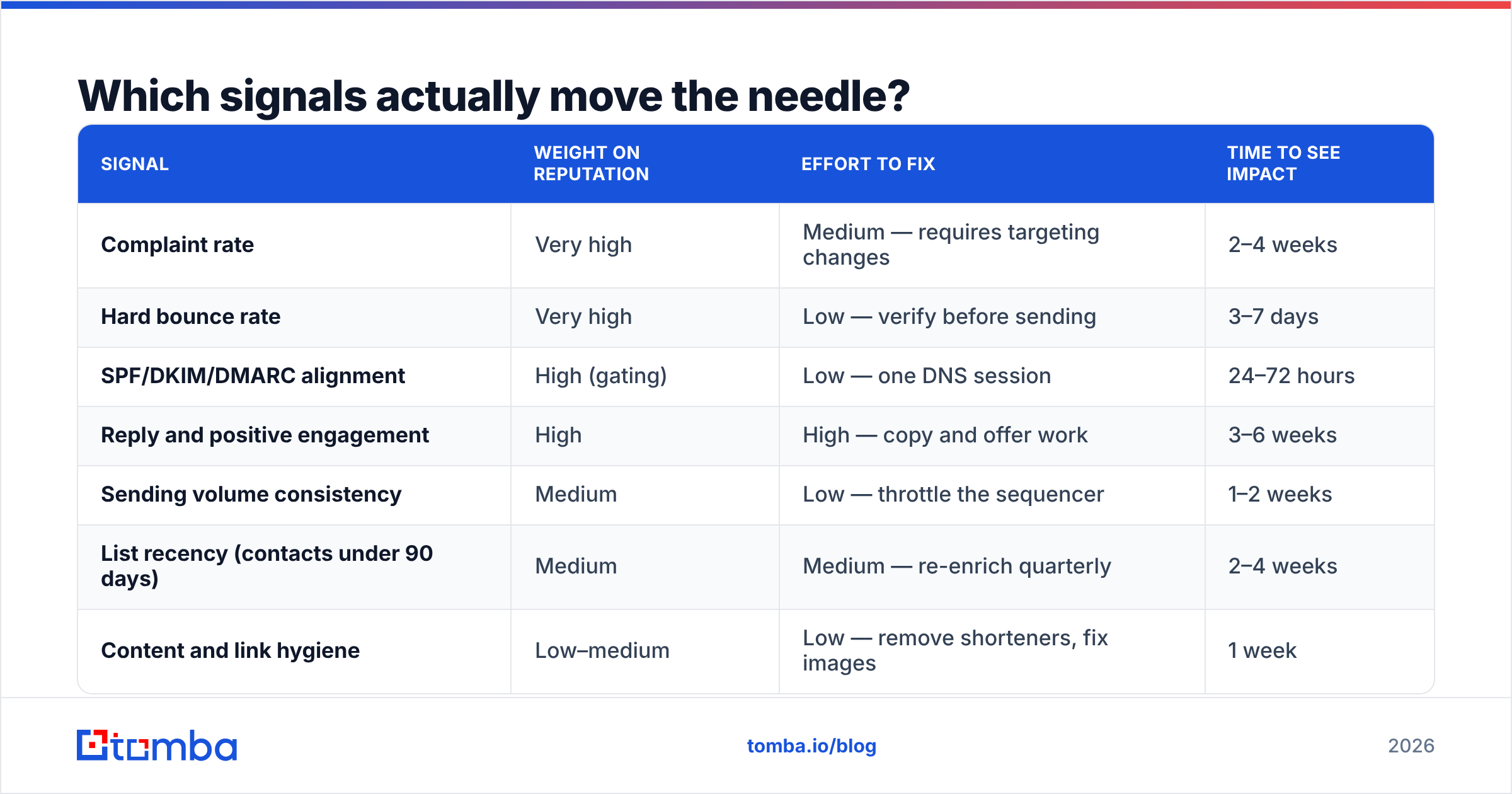
Not all fixes are worth the same. If you have one week and limited engineering time, here is where the leverage sits.
| Signal | Weight on reputation | Effort to fix | Time to see impact |
|---|---|---|---|
| Complaint rate | Very high | Medium — requires targeting changes | 2–4 weeks |
| Hard bounce rate | Very high | Low — verify before sending | 3–7 days |
| SPF/DKIM/DMARC alignment | High (gating) | Low — one DNS session | 24–72 hours |
| Reply and positive engagement | High | High — copy and offer work | 3–6 weeks |
| Sending volume consistency | Medium | Low — throttle the sequencer | 1–2 weeks |
| List recency (contacts under 90 days) | Medium | Medium — re-enrich quarterly | 2–4 weeks |
| Content and link hygiene | Low–medium | Low — remove shorteners, fix images | 1 week |
The cheapest high-impact move on that table is bounce control. Every hard bounce is an unambiguous, machine-verifiable signal that you are sending to addresses you did not confirm exist. Running your list through an email verifier before a campaign converts a 12% bounce rate into a sub-2% one in a single batch job — no warmup, no waiting, no negotiation with a filtering team.
Complaint rate is harder because it is a targeting and messaging problem wearing a technical costume. A perfectly valid address belonging to someone who has no reason to hear from you will complain, and no amount of infrastructure hygiene prevents that.
How do you improve domain reputation in 30 days?#
Here is the sequence that works, in order. Do not reorder it — sending more mail before the data and authentication are clean just deepens the hole.
Days 1–3: Stop and stabilize. Pause every active sequence on the affected domain. Pull the last 60 days of bounce and complaint logs. Fix SPF (under ten lookups), publish or repair DKIM at 2048-bit, and move DMARC to at least p=quarantine with rua reporting enabled. Confirm each record resolves publicly before moving on.
Days 4–7: Clean the data. Verify the entire remaining list, not just new additions. Remove hard bounces, role accounts (info@, sales@, admin@), and anything you cannot attribute to a real named person. Treat catch-all domains as a separate risk tier — a catch-all verifier tells you which catch-alls are safe to send to and which are silently accepting everything, including traps.
Days 8–14: Restart small and human. Resume at 10–20% of your previous daily volume, targeting your warmest, most recent contacts first. These are the recipients most likely to reply — and replies are the strongest positive signal available. Keep the copy short, plain-text-weighted, and free of tracking links for the first week.
Days 15–21: Scale by 25% every three days. Watch Postmaster daily. If spam rate ticks above 0.10%, hold volume flat instead of climbing. Add a visible one-click unsubscribe to every message; a hidden opt-out converts would-be unsubscribes into complaints, which cost roughly fifty times more.
Days 22–30: Return to normal and instrument. By now you should see the Gmail domain reputation chart move from Low toward Medium. Lock in the gains: schedule monthly re-verification, set an alert on complaint rate, and separate your transactional, marketing, and cold-outreach traffic onto distinct subdomains so one stream can never poison the others.

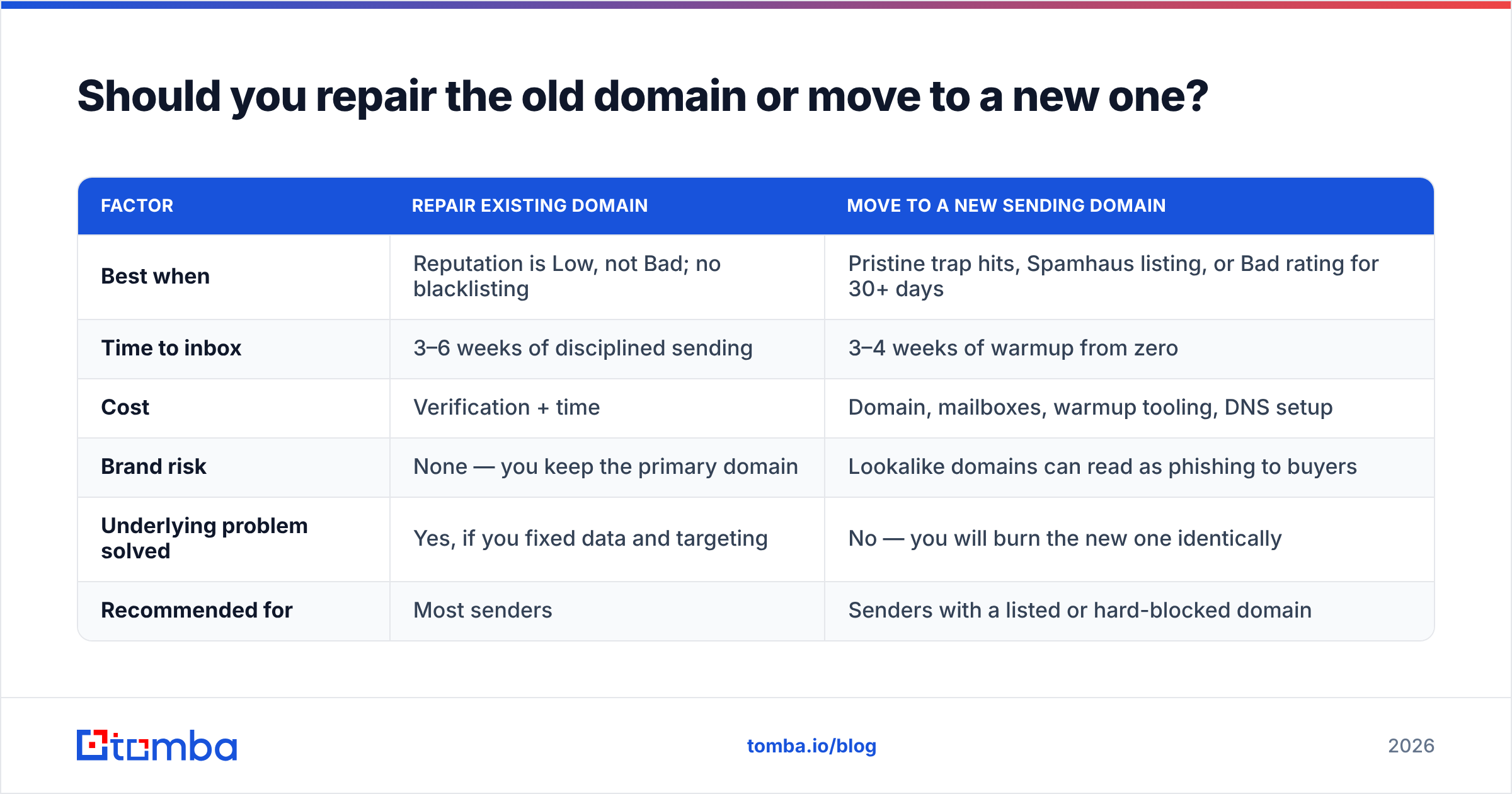
Should you repair the old domain or move to a new one?#
The honest answer is that it depends on how deep the damage goes, and most people switch too early.
| Factor | Repair existing domain | Move to a new sending domain |
|---|---|---|
| Best when | Reputation is Low, not Bad; no blacklisting | Pristine trap hits, Spamhaus listing, or Bad rating for 30+ days |
| Time to inbox | 3–6 weeks of disciplined sending | 3–4 weeks of warmup from zero |
| Cost | Verification + time | Domain, mailboxes, warmup tooling, DNS setup |
| Brand risk | None — you keep the primary domain | Lookalike domains can read as phishing to buyers |
| Underlying problem solved | Yes, if you fixed data and targeting | No — you will burn the new one identically |
| Recommended for | Most senders | Senders with a listed or hard-blocked domain |
The trap here is treating a new domain as a reset button. If the list, targeting, and cadence that burned domain one are unchanged, domain two follows the same curve on the same timeline. Rotating domains without fixing data quality is how teams end up managing fourteen sending domains and still landing in spam.
One legitimate structural change is worth making regardless: send cold outreach from a dedicated subdomain (mail.yourcompany.com or a separate outreach domain), and keep your corporate @yourcompany.com for human correspondence and transactional mail. That way, an outreach experiment can never threaten your invoices, password resets, or support replies.
What does good long-term hygiene look like?#
Reputation is maintained, not achieved. The teams that never think about deliverability are the ones doing these five things quietly in the background.
- Verify at capture and at send. Data decays around 2–3% per month as people change jobs. A list verified in January is measurably worse in April. Re-run verification on anything older than 90 days.
- Source contacts, don't scrape them. Where the address came from determines trap exposure. Provider-sourced, pattern-validated addresses carry far lower trap risk than scraped pages — Tomba publishes its data sources for exactly this reason.
- Cap daily volume per mailbox. 30–50 cold sends per mailbox per day is the durable ceiling. Scaling means more mailboxes, not more sends per mailbox.
- Monitor weekly, not after the crisis. Postmaster, SNDS, and a blacklist check take ten minutes a week. Catching a complaint-rate climb at 0.12% is trivial; catching it at 0.6% is a two-month project.
- Watch sender reputation as a leading indicator of pipeline. Reply rate falling with no change in copy is almost always a placement problem, not a messaging problem. Check the inbox before you rewrite the email.
Vendor reviews on G2 will tell you which warmup and monitoring tools people like, but no tool substitutes for the two disciplines above: clean data in, controlled volume out.
What should you do first?#
Start where the leverage is highest and the effort is lowest: remove the invalid addresses that are generating your hard bounces. Authentication fixes take an afternoon, targeting fixes take a quarter, but bounce elimination happens in one batch and shows up in Postmaster within a week.
Tomba's Email Finder sources and pattern-verifies professional addresses at the point of discovery, so bounce-prone guesses never enter your sequencer in the first place — with real-time verification, catch-all detection, and bulk processing built in. The free tier covers 25 searches a month, Starter is $49/mo, and Growth is $99/mo; full Tomba pricing is public. If your domain reputation is already damaged, clean the list first, then rebuild the volume. The order matters more than the tooling.
Related guides#
// get started
Find, verify and enrich your first contacts today
Start on the free plan with 25 searches a month, then scale when your team is ready.
Free plan · No credit card required · GDPR & CCPA
// about the author