Inbound Lead Conversion: The 2026 Playbook That Works
Most inbound leads die between the form fill and the first reply. Here is what actually moves inbound lead conversion — speed, routing, enrichment, and the follow-up cadence buyers respond to in 2026.
TL;DR
- Inbound lead conversion is mostly a speed-and-routing problem, not a copywriting problem. Response time inside 5 minutes is the single largest controllable variable.
- Form fills are incomplete by design. Enrich them before routing, or your reps will spend the first 10 minutes doing research instead of selling.
- Scoring beats sorting. A 4-signal model (fit, intent, engagement, timing) routes the top 20% of leads to humans and the rest to nurture.
- Most teams stop at 1-2 follow-ups. The compounding gains sit at attempts 4-8, across email and phone.
- Track conversion at every stage — form → MQL → SQL → opportunity → closed. A single blended "conversion rate" hides the leak.
What is inbound lead conversion, exactly?#
Inbound lead conversion is the percentage of self-initiated prospects — people who filled a form, booked a demo, started a trial, or downloaded something — who progress to the next defined stage of your funnel, and ultimately to revenue.
The word "conversion" is doing too much work in most companies. Marketing means form-to-MQL. Sales means SQL-to-opportunity. Finance means visitor-to-revenue. When a CRO asks "what's our inbound conversion rate?" and gets one number, that number is almost always useless.
Break it into a stage ladder instead:
- Visitor → form fill — a website and offer problem. Owned by marketing.
- Form fill → contactable lead — an enrichment and data-hygiene problem. Owned by RevOps.
- Contactable → engaged (replied, answered, showed) — a speed and routing problem. Owned by SDRs.
- Engaged → qualified (SQL) — a discovery and fit problem. Owned by SDRs/AEs.
- SQL → closed won — a sales-execution problem. Owned by AEs.
Every one of those five has a different failure mode and a different fix. Reporting them as one blended number is how teams end up rewriting landing-page headlines when the actual leak is that 40% of form emails bounce.
Wait — that syntax matters. Here it is properly:

Why do most inbound leads never convert?#
Because they go cold before anyone talks to them. The research on this is old and boringly consistent: the odds of qualifying a lead drop off a cliff after the first few minutes. HubSpot's research on response time and the widely cited MIT/InsideSales lead-response study both land in the same place — contacting a lead within five minutes dramatically outperforms contacting them within an hour, and by 24 hours the lead is functionally a cold list.
The five most common structural causes:
- Routing latency. The lead sits in a queue, a Zap, or an unassigned view. Nobody owns it for 6+ hours.
- Incomplete records. The form captured
nameandwork emailand nothing else. No company size, no title, no phone. The rep has to research before they can act. - Bad email data. Personal Gmail addresses, typos, role accounts, and catch-all domains mean your "reply" never had a chance to arrive.
- Under-following-up. One email, one call, then the record rots in the CRM as "no response."
- Undifferentiated treatment. A 5,000-employee enterprise demo request gets the same auto-sequence as a student downloading an ebook.
None of those are fixed by a better subject line.
How fast do you actually need to respond?#
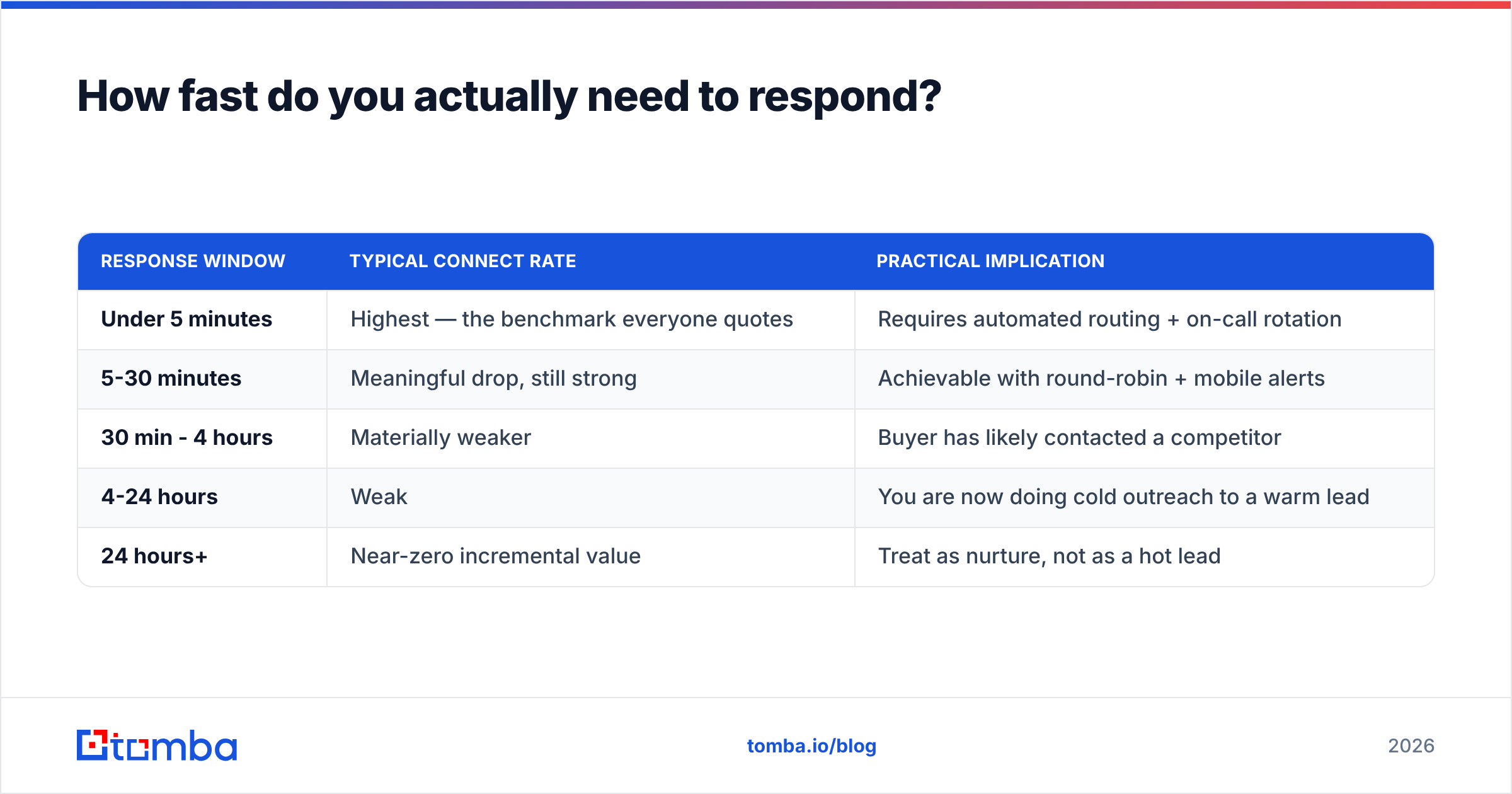
Fast enough that you are the first vendor the buyer talks to. In practice that means an SLA, not an aspiration.
| Response window | Typical connect rate | Practical implication |
|---|---|---|
| Under 5 minutes | Highest — the benchmark everyone quotes | Requires automated routing + on-call rotation |
| 5-30 minutes | Meaningful drop, still strong | Achievable with round-robin + mobile alerts |
| 30 min - 4 hours | Materially weaker | Buyer has likely contacted a competitor |
| 4-24 hours | Weak | You are now doing cold outreach to a warm lead |
| 24 hours+ | Near-zero incremental value | Treat as nurture, not as a hot lead |
Two things make a sub-5-minute SLA realistic without hiring a night shift:
Tier your speed by lead grade. Not every lead deserves an instant human. Demo requests and pricing-page fills get the 5-minute SLA. Ebook downloads get an automated sequence and a 24-hour human touch if they re-engage. This is the whole point of scoring — it buys you the capacity to be fast where speed pays.
Pre-load the context. A rep who has to look up the company, find the direct line, and figure out the buyer's role will never hit five minutes. Enrichment has to happen between the form submit and the CRM write, not after.
What does a lead-scoring model that works look like?#
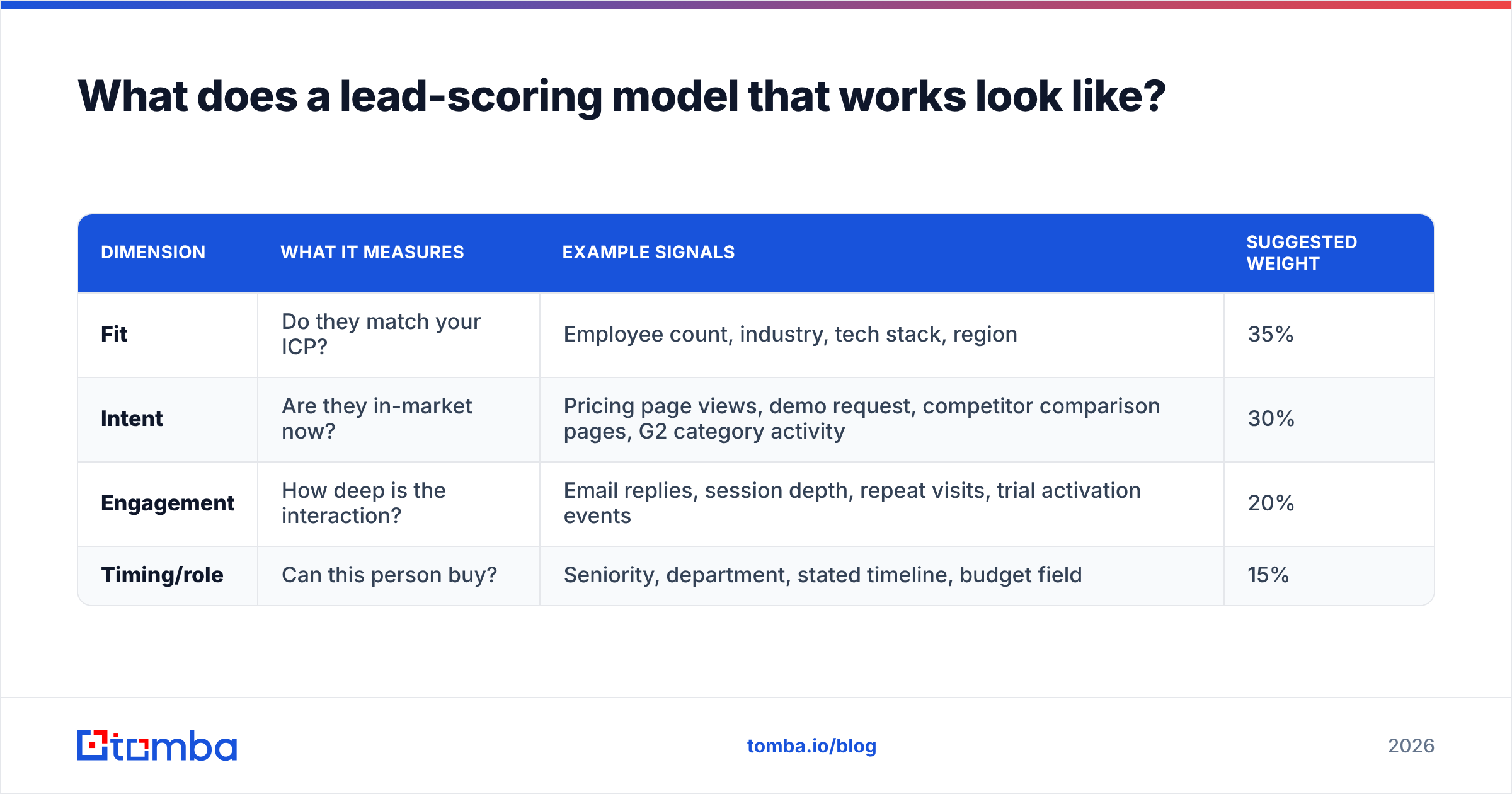
Four dimensions, weighted, recalculated on every meaningful event. Anything more elaborate than this tends to become a black box nobody trusts.
| Dimension | What it measures | Example signals | Suggested weight |
|---|---|---|---|
| Fit | Do they match your ICP? | Employee count, industry, tech stack, region | 35% |
| Intent | Are they in-market now? | Pricing page views, demo request, competitor comparison pages, G2 category activity | 30% |
| Engagement | How deep is the interaction? | Email replies, session depth, repeat visits, trial activation events | 20% |
| Timing/role | Can this person buy? | Seniority, department, stated timeline, budget field | 15% |
A few rules that keep the model honest:
- Decay intent scores. A pricing-page visit from March should not still be inflating a September score. Halve intent points every 14 days.
- Use negative scoring. Student email domain, competitor domain, unsubscribed, "just researching" — subtract points. A model that only adds points turns everything into an MQL by week three.
- Validate against closed-won, not against gut feel. Pull your last 200 won deals, score them retroactively, and check that your threshold would have caught them. If your MQL threshold misses a third of your actual customers, the threshold is wrong.
- Publish the model to sales. If reps can't explain why a lead scored 82, they'll ignore the score. Full stop. This is the most common reason scoring projects die.
For the shared vocabulary around this — marketing qualified lead, SQL, and the handoff definitions — it helps to have one written definition both teams signed off on. Ambiguity here produces the classic "these leads are garbage" / "sales doesn't work them" standoff.
How does data enrichment change inbound lead conversion?#
It shortens forms and shortens time-to-first-touch simultaneously — which is why it's the highest-leverage unglamorous fix available.
The trade-off every demand-gen team knows: long forms give you routing data but tank submission rates; short forms convert better but hand sales an empty record. Enrichment resolves it. Ask for work email and company. Derive the rest.
From a single work email or domain you can typically resolve:
- Company firmographics — size, industry, revenue band, location, funding stage
- Person attributes — full name, job title, seniority, department, LinkedIn profile
- Contact channels — direct dial or mobile via a phone finder, verified alternate email addresses
- Technographics — CRM, marketing automation, and hosting stack, useful for both fit scoring and talk tracks
Two enrichment moves matter most for conversion specifically:
Verify the email before it hits your sequencer. A hard bounce on a form-fill lead is a double loss: you lose the lead and you take a sender reputation hit on a domain you need for every other lead. Run inbound addresses through an email verifier at the point of capture. Typos in form fields are far more common than people assume — "gmial.com," missing TLDs, and copy-paste errors are routine.
Recover the work email when someone submits a personal one. A Gmail address on a demo form is a routing dead end — you can't firmographically enrich it, you can't score it for fit, and it often signals the buyer is hiding from vendor spam. If you can resolve the company from other form fields or the session, an email finder or domain search can surface the corporate address and pattern, giving you a routable, enrichable record.
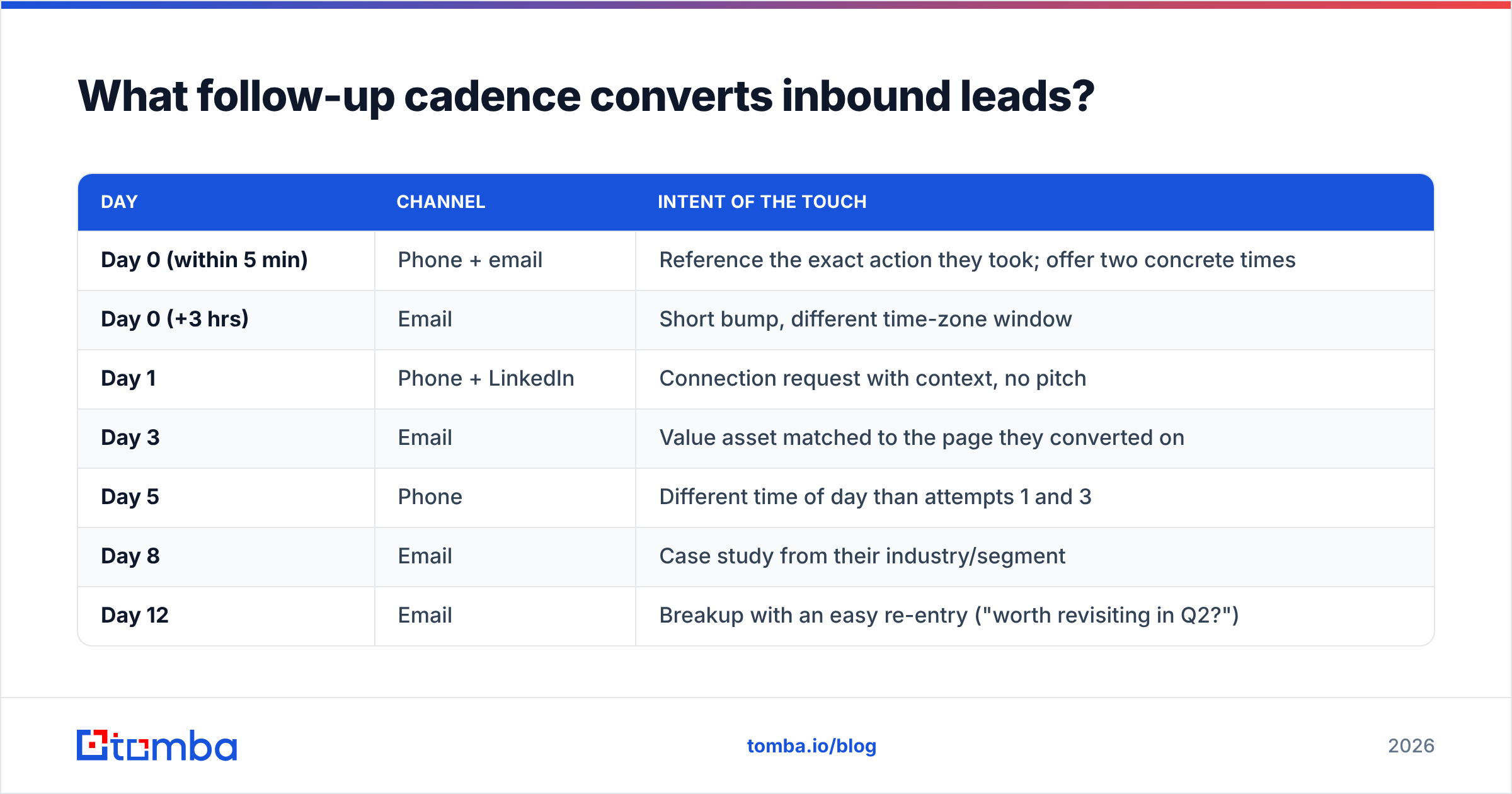
What follow-up cadence converts inbound leads?#
Longer than yours, almost certainly. Most teams quit at attempt two; the marginal returns are still positive well past attempt five.
A workable inbound cadence for a high-score lead:
| Day | Channel | Intent of the touch |
|---|---|---|
| Day 0 (within 5 min) | Phone + email | Reference the exact action they took; offer two concrete times |
| Day 0 (+3 hrs) | Short bump, different time-zone window | |
| Day 1 | Phone + LinkedIn | Connection request with context, no pitch |
| Day 3 | Value asset matched to the page they converted on | |
| Day 5 | Phone | Different time of day than attempts 1 and 3 |
| Day 8 | Case study from their industry/segment | |
| Day 12 | Breakup with an easy re-entry ("worth revisiting in Q2?") | |
| Day 30+ | Nurture | Back to marketing, re-scored on new intent signals |
Three details that separate cadences that work from cadences that annoy:
Reference the trigger explicitly. "You looked at our pricing page for the API tier" beats "I saw you were interested in our solution." Inbound leads have given you a specific reason to call; use it or you've thrown away your only advantage over cold outbound.
Vary the time of day, not just the day. Six calls all at 10:15 a.m. is one experiment repeated six times.
Keep marketing and sales touches from colliding. If the nurture engine and the SDR both email on Tuesday morning, you look disorganized. Suppress nurture while a lead is in an active sales cadence — this is basic sales automation hygiene that a surprising number of stacks get wrong.
Which metrics should you actually track?#
Five, reported weekly, segmented by lead source.
- Median time-to-first-touch — not average. Averages hide the 3-day outliers that drag conversion down. Median plus 90th percentile.
- Touch-to-connect ratio — attempts required per meaningful conversation, by channel. Tells you whether your contact data or your messaging is the constraint.
- Stage-by-stage conversion — form → contactable → engaged → SQL → opportunity → won. Look for the single worst step; fix that before anything else.
- Deliverability health — bounce rate, spam complaint rate, and inbox placement on your outreach domain. A 4% bounce rate on inbound leads means your capture data is broken. See email deliverability for the thresholds mailbox providers enforce.
- Source-level revenue, not source-level MQLs — the source producing the most MQLs and the source producing the most revenue are frequently not the same source, and optimizing for the former actively destroys the latter.
Segment all five by source. Paid search demo requests and organic ebook downloads behave nothing alike, and blending them produces a number that describes neither.
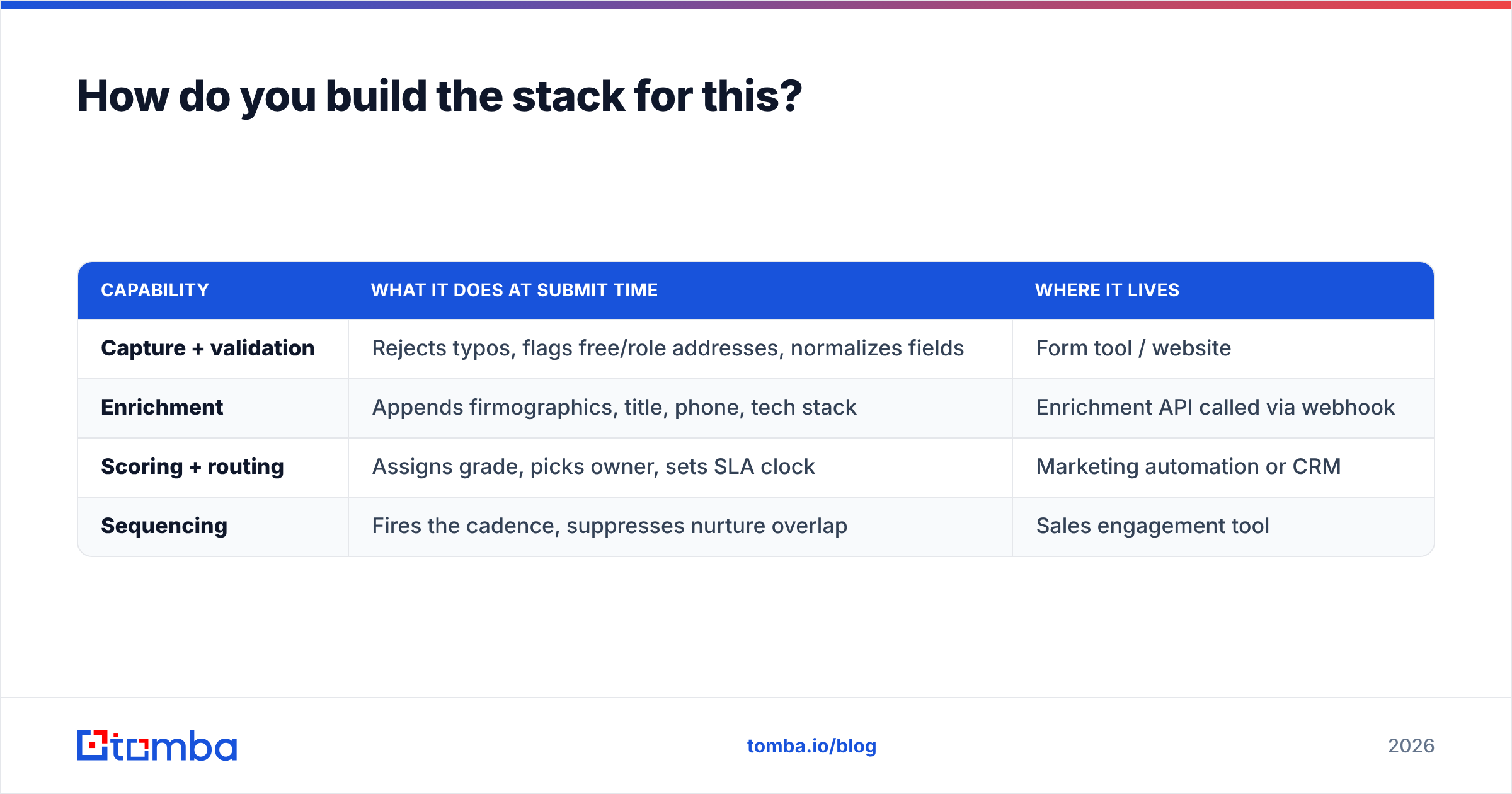
How do you build the stack for this?#
You need four capabilities. They can come from four tools or one platform; what matters is that they fire in order, automatically, within seconds of a form submit.
| Capability | What it does at submit time | Where it lives |
|---|---|---|
| Capture + validation | Rejects typos, flags free/role addresses, normalizes fields | Form tool / website |
| Enrichment | Appends firmographics, title, phone, tech stack | Enrichment API called via webhook |
| Scoring + routing | Assigns grade, picks owner, sets SLA clock | Marketing automation or CRM |
| Sequencing | Fires the cadence, suppresses nurture overlap | Sales engagement tool |
Practical build notes:
- Do enrichment server-side via webhook, not in a nightly batch. A record enriched tomorrow morning is a record you responded to slowly.
- Write enrichment output to structured CRM fields, not notes. Unstructured enrichment can't be scored, filtered, or reported on.
- Set up a fallback path. When enrichment returns nothing — genuinely small companies, stealth startups, personal domains — route to a human for a 60-second manual look rather than dumping into the low-score bucket automatically.
- Instrument the SLA clock. If you can't see time-to-first-touch per rep in a dashboard, the SLA is a suggestion.
For teams building this into an existing stack, an API-first approach usually beats another UI. The Tomba API handles the enrichment and verification step inside the webhook, and native connectors for HubSpot and Salesforce cover the write-back if you'd rather not build it. If you're buying rather than building lists, vendors like BookYourData offer prepaid B2B contact data that pairs well with an inbound motion when you want to enrich accounts that haven't converted yet.
What should you fix first?#
Run this diagnostic in order and stop at the first "no."
- Is median time-to-first-touch under 15 minutes for your highest-grade leads? If no, fix routing before anything else. This is the biggest single lever and usually the cheapest to pull.
- Is your bounce rate on inbound-captured emails under 2%? If no, add verification at capture. You're currently burning domain reputation on data-entry errors.
- Do reps have title, company size, and a phone number before the first touch? If no, add enrichment to the webhook.
- Does your average high-grade lead get 6+ touches across 2+ channels? If no, extend the cadence. Most of your "no response" leads never got a real attempt.
- Can a rep explain your scoring model in one sentence? If no, simplify and republish it. An ignored score is worse than no score, because it creates false confidence in your reporting.
Most teams find their answer at step 1 or step 3. Those are also the two steps that can be fixed in a sprint rather than a quarter.
Vendor comparison sites like G2's lead intelligence category are useful for shortlisting the enrichment layer, but the review scores won't tell you whether the coverage is good on your ICP. Test on 100 of your own recent closed-won accounts and measure match rate and accuracy yourself. Any vendor that won't let you run that test on a free tier is telling you something.
Where to start this week#
Pick the leak, not the whole funnel. Export last quarter's inbound leads, calculate stage-by-stage conversion, and find the worst step. Then fix the data underneath it before you touch the messaging on top of it — enriched, verified, correctly routed leads make mediocre copy work, while perfect copy sent to a bounced address converts at exactly zero.
If your first bottleneck is contact data — missing work emails, no direct dials, personal addresses on demo forms — start there. The Tomba Email Finder resolves work emails from a name and domain and returns confidence scores and sources, so your routing logic can branch on data quality instead of guessing. The free tier includes 25 searches a month to test coverage against your own accounts, and Tomba pricing starts at $49/mo on Starter with Growth at $99/mo when you're ready to run it through the API on every form submit.
Related guides#
// get started
Find, verify and enrich your first contacts today
Start on the free plan with 25 searches a month, then scale when your team is ready.
Free plan · No credit card required · GDPR & CCPA
// about the author