Inbound Lead Follow Up: The 2026 Playbook That Converts
Speed-to-lead is the whole game for inbound. Here is the cadence, routing logic, and data hygiene that turn form fills into booked meetings, plus the mistakes that quietly kill conversion.
TL;DR
- Inbound lead follow up is won or lost in the first hour. After 60 minutes, your odds of a live conversation fall off a cliff, and after 24 hours most leads are effectively cold.
- Speed alone is not enough. A fast reply to the wrong person, at the wrong email, with the wrong message, still fails.
- The highest-leverage fix for most teams is not a new sequence tool. It is enrichment and verification at the moment of form submission, so reps get a routable, reachable contact instead of
jimmy@gmail.com. - A working cadence is 6 to 9 touches over 14 days across email, phone, and LinkedIn, front-loaded into days 1 to 3.
- Measure speed-to-first-touch, touch completion rate, and inbound-to-meeting rate. If you only track "leads created," you are flying blind.
What Counts as an Inbound Lead in 2026?#
An inbound lead is any prospect who raised a hand on your owned channels: a demo request, a pricing page form, a content download, a free-trial signup, a chatbot conversation, a webinar registration, or a reply to your newsletter.
That list matters because those signals are wildly different in intent. A demo request and an ebook download both land in your CRM as "new lead," but one wants a sales conversation this week and the other wanted a PDF. Treating them identically is the original sin of inbound lead follow up. It produces two failures at once: your hottest leads wait in a queue behind low-intent downloads, and your low-intent leads get a pushy call that burns the relationship.
The practical split most teams land on:
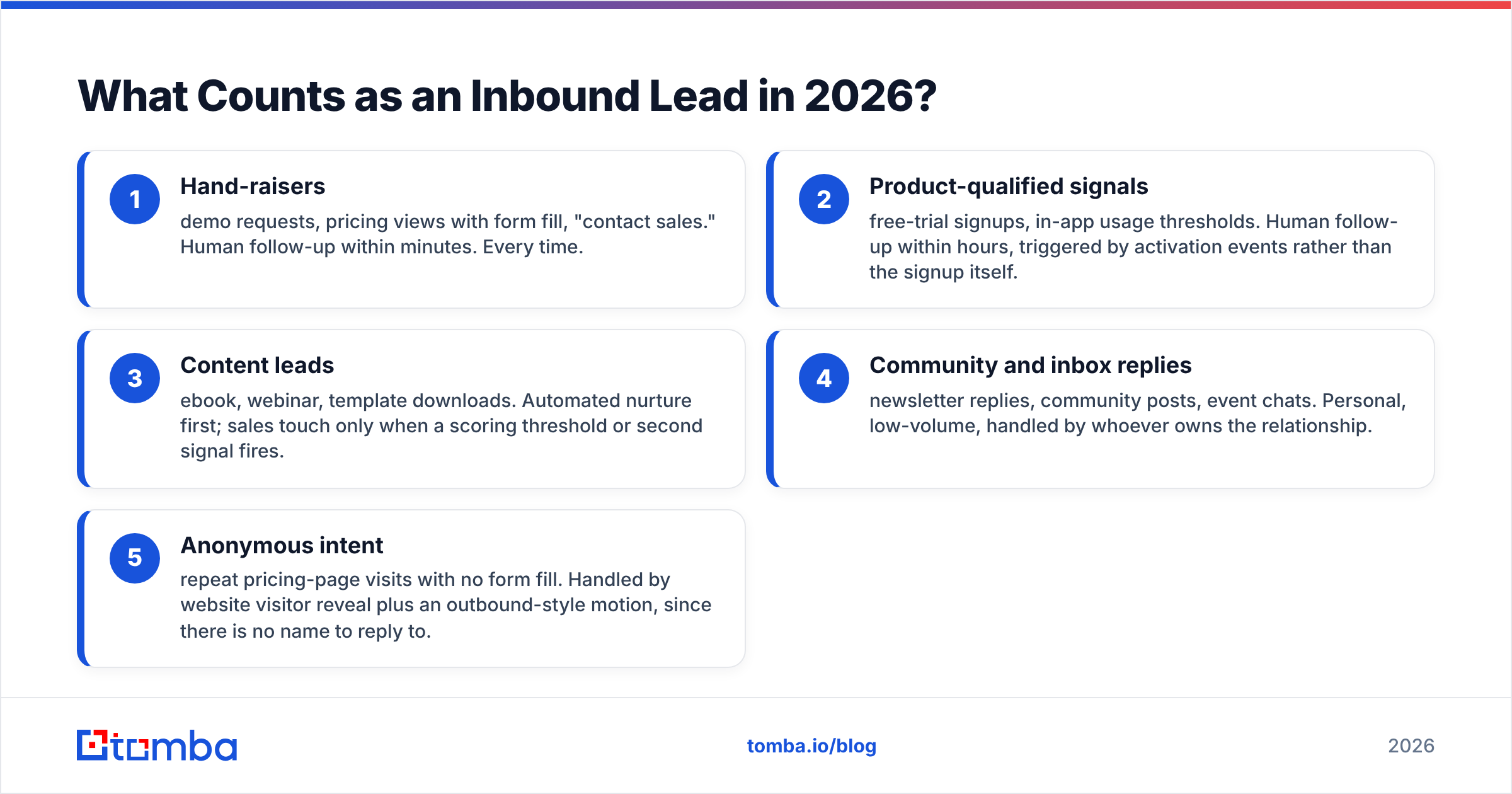
- Hand-raisers — demo requests, pricing views with form fill, "contact sales." Human follow-up within minutes. Every time.
- Product-qualified signals — free-trial signups, in-app usage thresholds. Human follow-up within hours, triggered by activation events rather than the signup itself.
- Content leads — ebook, webinar, template downloads. Automated nurture first; sales touch only when a scoring threshold or second signal fires.
- Community and inbox replies — newsletter replies, community posts, event chats. Personal, low-volume, handled by whoever owns the relationship.
- Anonymous intent — repeat pricing-page visits with no form fill. Handled by website visitor reveal plus an outbound-style motion, since there is no name to reply to.
Get this taxonomy right before you touch cadences. A marketing qualified lead definition that lumps all five together will produce a follow-up process that serves none of them well.
Why Does Inbound Lead Follow Up Fail So Often?#
Because the failure is structural, not motivational. Reps are not lazy; the pipeline leaks in five predictable places.
The routing lag. The form fires a webhook, the CRM creates a record, an assignment rule runs on a five-minute cycle, and a notification lands in a Slack channel nobody has muted-checked since Tuesday. Forty minutes gone before a human sees anything.
The data gap. Your form asked for name, work email, and company. It got a personal Gmail address and "ACME" typed in lowercase. Now the rep has no company domain, no phone number, no seniority, and no way to decide whether this is a 12-person startup or a division of a Fortune 500.
The ownership ambiguity. Round-robin assigns the lead to a rep who is on PTO. Or two reps see it, both assume the other has it, and neither calls.
The one-and-done touch. A single email goes out, nobody replies, the lead is marked "not interested." Most inbound conversions happen on touch three through six, not touch one.
The channel monoculture. Email-only follow-up ignores the fact that a hand-raiser who just requested a demo will almost always answer a phone that rings within five minutes of their submission. They are still on your website.
Fixing the last three is a process problem. Fixing the first two is a tooling and data problem, and it is where the fastest wins live.
How Fast Does Inbound Lead Follow Up Need to Be?#
Fast enough that the prospect is still on your site. The research on this is old and consistent: the odds of qualifying a lead drop by roughly an order of magnitude between a five-minute response and a thirty-minute response, and again between one hour and 24 hours. HubSpot and Salesforce have both published versions of the same curve for over a decade, and nothing about buyer behavior since has made people more patient.
The practical target ladder:
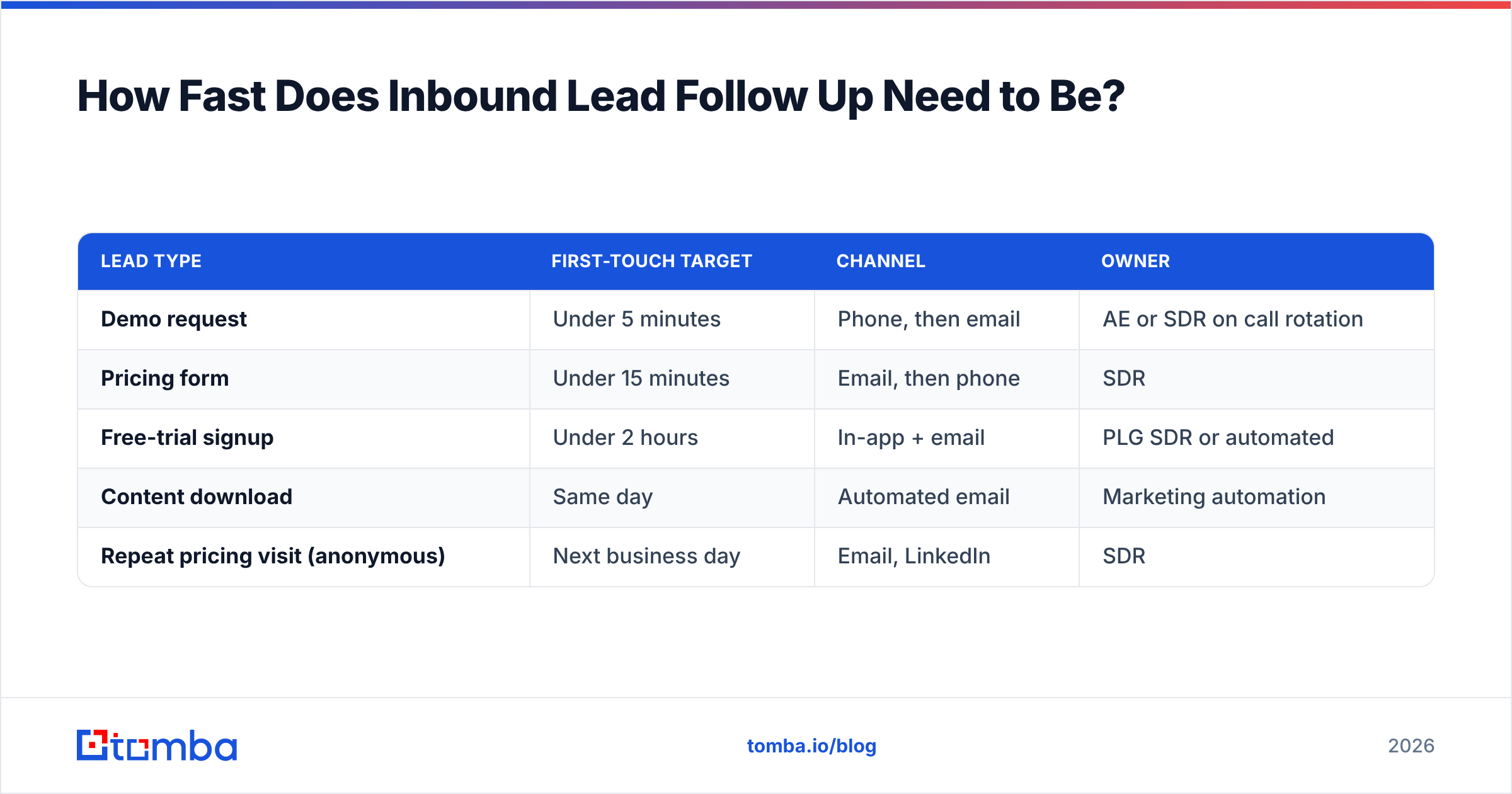
| Lead type | First-touch target | Channel | Owner |
|---|---|---|---|
| Demo request | Under 5 minutes | Phone, then email | AE or SDR on call rotation |
| Pricing form | Under 15 minutes | Email, then phone | SDR |
| Free-trial signup | Under 2 hours | In-app + email | PLG SDR or automated |
| Content download | Same day | Automated email | Marketing automation |
| Repeat pricing visit (anonymous) | Next business day | Email, LinkedIn | SDR |
Two things make this achievable without hiring. First, a live routing rule that pages an on-duty rep directly rather than posting to a shared channel. Second, pre-enriched lead records so the rep does not spend the first ten minutes researching who they are about to call.
The teams that hit five minutes consistently are not working harder. They removed the research step from the critical path.
What Should the First Hour Look Like?#
Here is the sequence that actually fits into a working rep's day.
- Minute 0 — enrich on submit. The form webhook fires an enrichment call before the CRM record is even visible. Company domain, company size, industry, job title, LinkedIn profile, and a direct dial where available.
- Minute 0 — verify the email. If the submitted address is a free provider or a typo, the enrichment step should attach the corporate address so your reply lands in a monitored inbox rather than a personal one they check weekly.
- Minute 1 — score and route. Fit score from firmographics, intent score from the form type and page history. Above threshold goes to a human; below goes to nurture. Route to a named rep, not a queue.
- Minute 2 to 5 — call. Not email first. Call. A hand-raiser who submitted a demo request 90 seconds ago answers at a rate that no cold call ever will.
- Minute 5 — email regardless of call outcome. Reference the specific form and the specific page. "You looked at the pricing page and asked about the API tier" outperforms "Thanks for your interest" by a wide margin.
- Minute 10 — LinkedIn connect with a one-line note. No pitch. Just recognition, so your name appears in a second place before they forget the first.
That is six actions, four of which are automated, and it fits inside a single rep interruption. The reason most teams cannot run it is step 1 and step 2 — without automated contact enrichment and email verification, steps 3 through 6 all inherit garbage input.
What Does a Full Inbound Cadence Look Like?#
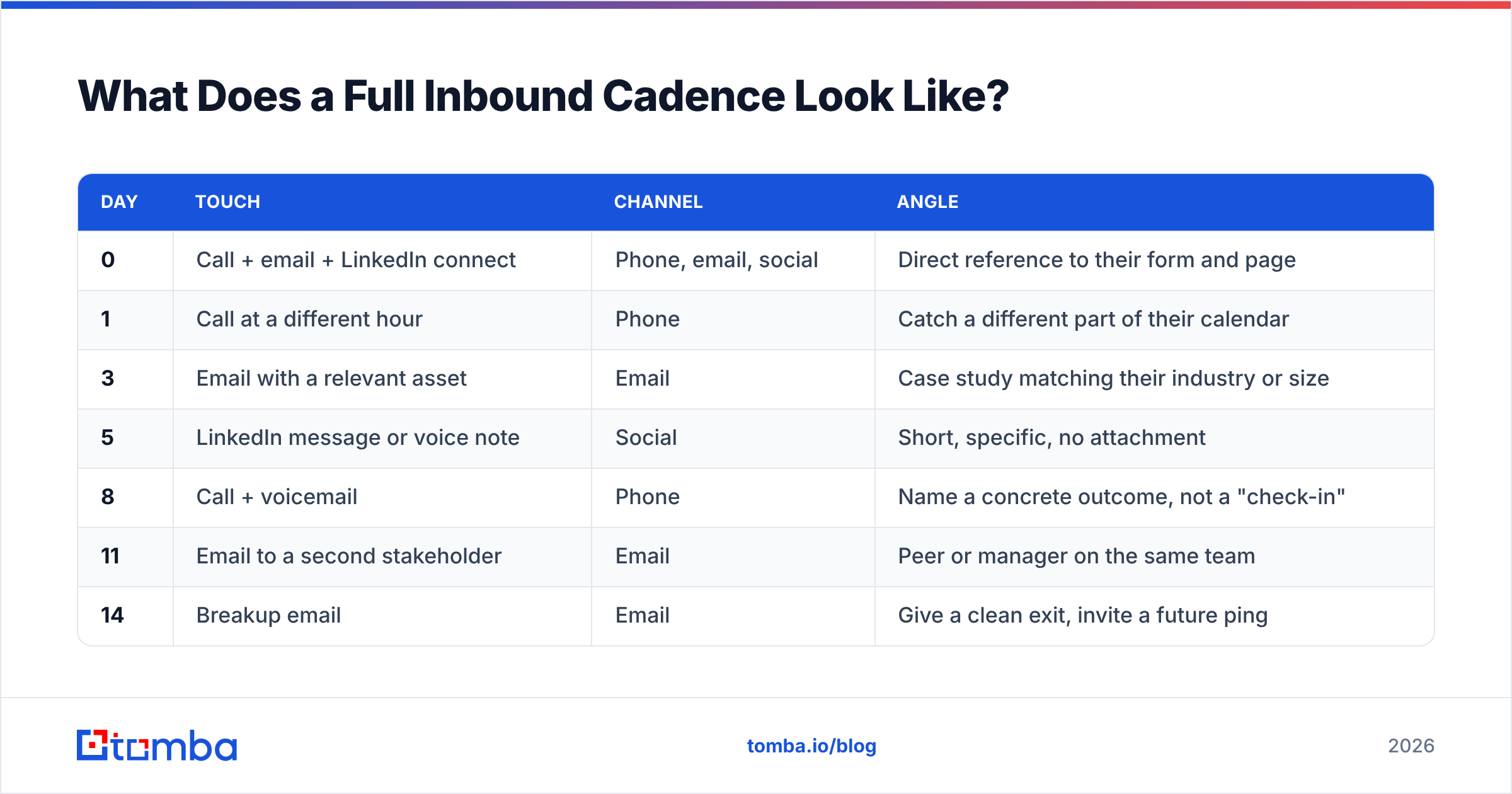
The first hour buys you a conversation with maybe a fifth of your hand-raisers. The rest need a cadence. Here is a 14-day structure that holds up across most B2B price points:
| Day | Touch | Channel | Angle |
|---|---|---|---|
| 0 | Call + email + LinkedIn connect | Phone, email, social | Direct reference to their form and page |
| 1 | Call at a different hour | Phone | Catch a different part of their calendar |
| 3 | Email with a relevant asset | Case study matching their industry or size | |
| 5 | LinkedIn message or voice note | Social | Short, specific, no attachment |
| 8 | Call + voicemail | Phone | Name a concrete outcome, not a "check-in" |
| 11 | Email to a second stakeholder | Peer or manager on the same team | |
| 14 | Breakup email | Give a clean exit, invite a future ping |
Two design rules. First, vary the hour of day on phone touches — calling the same person at 10:15 five times just proves they have a 10 a.m. standing meeting. Second, day 11 is the highest-ROI touch most teams skip. Inbound leads are frequently researchers, not buyers. Finding the economic buyer on the same domain and looping them in is often what converts the account, and a domain search turns one form fill into the three or four contacts you actually need.
What Tools Do You Actually Need to Run This?#
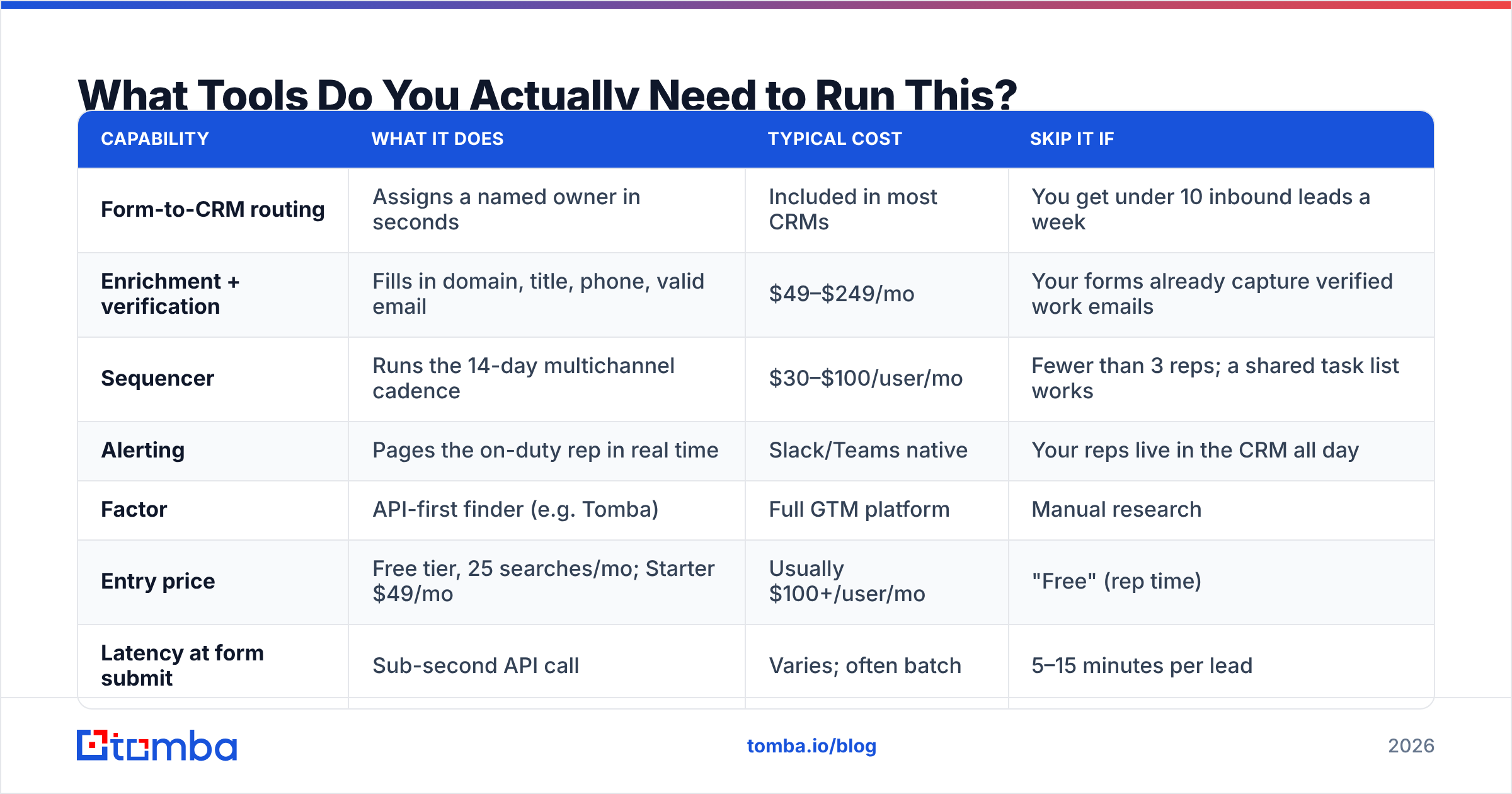
You need four capabilities. You do not need four separate vendors, and you almost certainly do not need the all-in-one platform your peers are complaining about on G2.
| Capability | What it does | Typical cost | Skip it if |
|---|---|---|---|
| Form-to-CRM routing | Assigns a named owner in seconds | Included in most CRMs | You get under 10 inbound leads a week |
| Enrichment + verification | Fills in domain, title, phone, valid email | $49–$249/mo | Your forms already capture verified work emails |
| Sequencer | Runs the 14-day multichannel cadence | $30–$100/user/mo | Fewer than 3 reps; a shared task list works |
| Alerting | Pages the on-duty rep in real time | Slack/Teams native | Your reps live in the CRM all day |
On the enrichment layer specifically, the market splits into three shapes. Database-first providers such as BookYourData sell prebuilt, filterable contact lists and are strong when you want to build a target universe up front. API-first finders resolve a specific person on demand at the moment of form submission. Full GTM platforms bundle both with a sequencer and charge accordingly.
For inbound follow-up, the API-first shape usually wins, because the trigger is real-time and the volume is unpredictable. Here is how a few common options compare on the dimensions that matter for a submit-time enrichment call:
| Factor | API-first finder (e.g. Tomba) | Full GTM platform | Manual research |
|---|---|---|---|
| Entry price | Free tier, 25 searches/mo; Starter $49/mo | Usually $100+/user/mo | "Free" (rep time) |
| Latency at form submit | Sub-second API call | Varies; often batch | 5–15 minutes per lead |
| Verified email included | Yes, with catch-all handling | Usually | No |
| Direct dial coverage | Available via phone finder | Yes, often gated to top tier | No |
| Fits a webhook workflow | Native | Sometimes | Never |
| Cost at 2,000 leads/mo | $99/mo (Growth) | $1,000+ | ~80 rep hours |
Check current Tomba pricing before you build a business case around any of these numbers, and price the platforms per seat rather than per lookup — that is where the cost curves diverge.
The point is not that one category always wins. It is that if your inbound follow-up is failing because reps spend ten minutes researching each lead, buying a bigger sequencer will not fix it. Fix the input, then automate the output.
How Do You Handle Personal-Email and Junk Form Fills?#
Roughly a quarter of B2B form fills arrive with a personal address, a typo, or a role account like info@. Three moves handle almost all of it:
- Resolve the company from context. Use the referring page, the IP, or the email domain to identify the employer, then find the person's corporate address at that domain.
- Verify before you send. Sending to an unverified address risks a bounce, and bounces compound into sender reputation damage that hurts every other campaign you run.
- Do not gate on it. If you cannot resolve a work address, still reply to the personal one. A slightly lower-quality touch beats no touch. Just do not put unverified addresses into a high-volume automated sequence.
For catch-all domains — where the mail server accepts everything and verification is inconclusive — treat the address as "risky, send once manually" rather than dropping it. A catch-all verifier narrows the ambiguity but rarely eliminates it, and inbound leads are valuable enough to justify one careful manual send.
What Should You Measure?#
Four metrics, reviewed weekly:
- Median speed-to-first-touch, split by lead type. Median, not average — one rep who replies in three days will wreck an average and hide a healthy process.
- Touch completion rate. What percentage of assigned leads actually received all seven scheduled touches? Below 70% means your cadence is aspirational fiction.
- Inbound-to-meeting rate, by source. Demo requests and ebook downloads should be reported separately or the number is meaningless.
- Reachability rate. What share of inbound leads ended up with a verified email and a phone number? This is the leading indicator for everything else, and it is the one most teams never instrument.
If your response rate on inbound is under 20%, the problem is almost never copy. It is speed, reachability, or persistence, in that order. Gartner research on buyer behavior keeps landing on the same conclusion: buyers spend a small fraction of their process talking to any vendor, so the window you get is short and you do not get a second one.
Where Should You Start?#
Pick the leak that is costing you the most, and fix only that one this quarter. For most teams with fewer than 500 inbound leads a month, it is the data gap — reps are researching instead of calling, and the five-minute window closes while they are on LinkedIn confirming a job title.
If that is you, wire enrichment into your form webhook this week. The Tomba Email Finder resolves a verified work email from a name and domain in a single API call, so the CRM record your rep opens is already routable, already scored, and already dialable. The free tier covers 25 searches a month if you want to test the workflow before you commit; Starter is $49/mo and Growth is $99/mo when the volume justifies it.
Speed is a process. Reachability is a data problem. Solve the second one and the first gets a lot easier.
Related guides#
// get started
Find, verify and enrich your first contacts today
Start on the free plan with 25 searches a month, then scale when your team is ready.
Free plan · No credit card required · GDPR & CCPA
// about the author