Inbound SDR Metrics: The 12 Numbers That Actually Matter
Most inbound SDR dashboards track activity, not outcomes. Here are the 12 metrics that predict pipeline, the benchmarks to hold them against, and the vanity numbers to delete.
TL;DR
- Inbound SDR metrics split into three tiers: speed (how fast you respond), conversion (how many leads survive each stage), and quality (how many accepted meetings become pipeline). Most teams over-measure activity and under-measure the first and third.
- Speed-to-lead is the single highest-leverage number on the board. Response inside 5 minutes converts dramatically better than response inside an hour — and most teams still average over an hour.
- A healthy inbound funnel in 2026 looks roughly like: 25-35% MQL→contacted-and-engaged, 20-30% engaged→meeting booked, 75-85% meeting booked→meeting held, and 65-80% held→SQL accepted by AE.
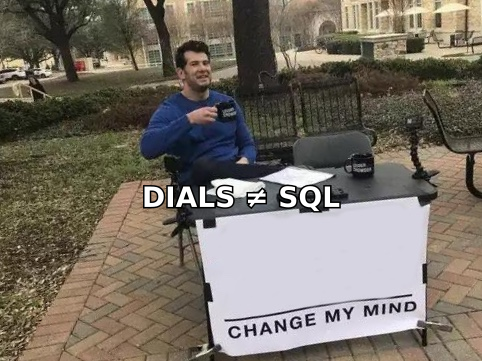
- Delete dials-per-day and emails-sent as goal metrics. Keep them as diagnostic metrics only — they explain a shortfall, they don't cause a win.
- Enrichment quality quietly caps every downstream metric. If 30% of your form fills have a personal Gmail and no company, your SDR is doing research instead of selling.
What are inbound SDR metrics?#
Inbound SDR metrics measure how efficiently a sales development rep converts hand-raisers — demo requests, content downloads, trial signups, chat conversations — into qualified pipeline for an account executive.
The distinction from outbound matters more than most dashboards admit. An outbound SDR controls their own volume: they decide how many accounts to work, so activity metrics are a legitimate input. An inbound SDR does not control lead volume at all. Marketing does. Measuring an inbound rep on "calls made" is like grading a restaurant's waiter on how many plates they carried — the number depends entirely on how busy the kitchen is that night.
So inbound SDR metrics have to answer three different questions:
- How fast did we respond? Speed-to-lead, first-touch SLA compliance, time-to-first-dial.
- How much of the funnel survived? MQL→engaged, engaged→booked, booked→held, held→accepted.
- Was the pipeline real? SQL acceptance rate, opportunity-to-close rate on SDR-sourced deals, average deal size by lead source.
- What did it cost? Cost per SQL, SDR capacity utilization, ramp time to full quota.
Only the last group belongs in a board deck. The first three belong on the rep's own screen, checked daily.
Which inbound SDR metrics actually predict pipeline?#
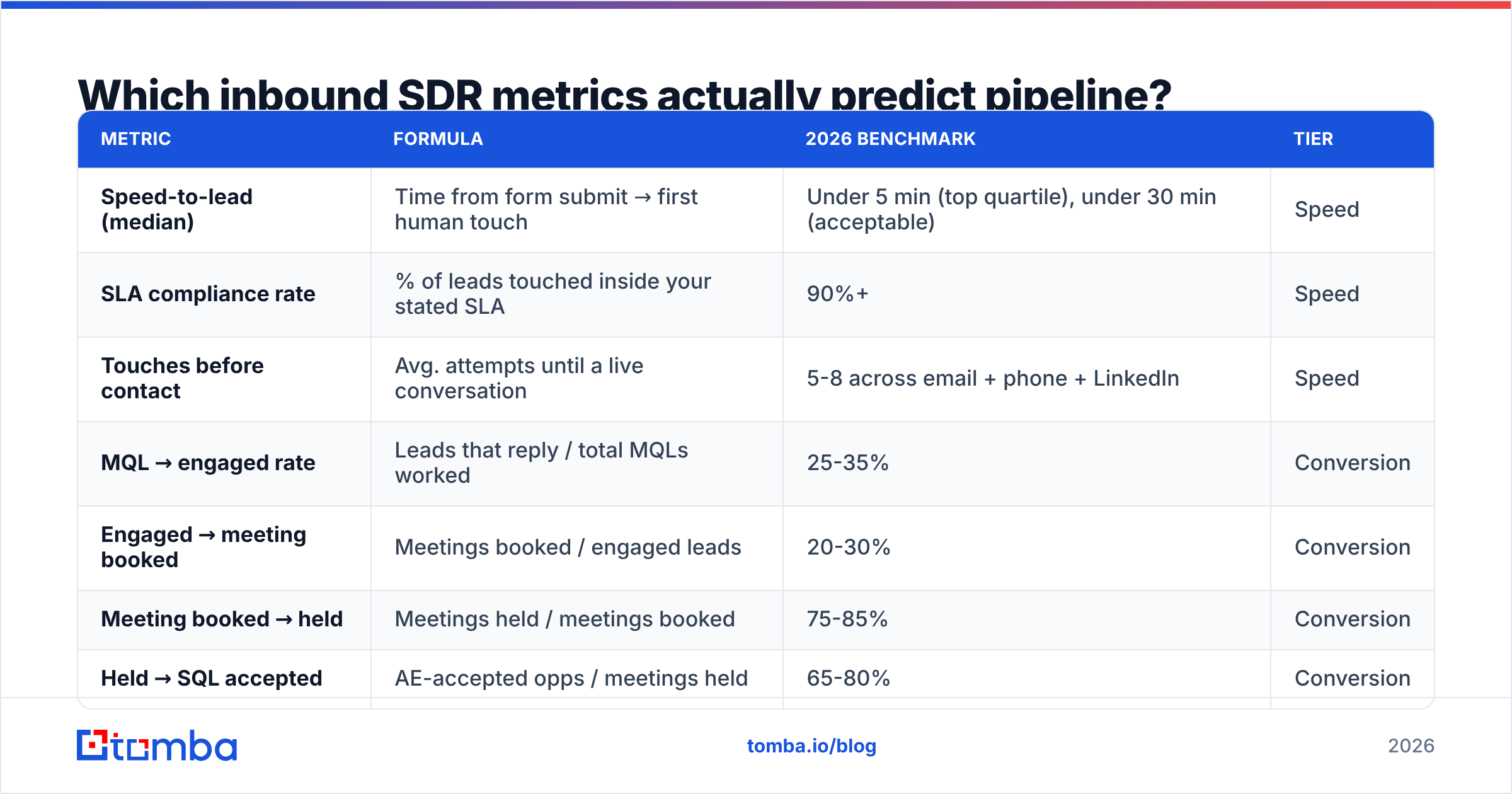
Here is the core set. Twelve metrics, grouped by tier, with the formula and a 2026 benchmark range. Treat benchmarks as directional — they shift hard by ACV, motion, and whether your product has a free tier.
| Metric | Formula | 2026 benchmark | Tier |
|---|---|---|---|
| Speed-to-lead (median) | Time from form submit → first human touch | Under 5 min (top quartile), under 30 min (acceptable) | Speed |
| SLA compliance rate | % of leads touched inside your stated SLA | 90%+ | Speed |
| Touches before contact | Avg. attempts until a live conversation | 5-8 across email + phone + LinkedIn | Speed |
| MQL → engaged rate | Leads that reply / total MQLs worked | 25-35% | Conversion |
| Engaged → meeting booked | Meetings booked / engaged leads | 20-30% | Conversion |
| Meeting booked → held | Meetings held / meetings booked | 75-85% | Conversion |
| Held → SQL accepted | AE-accepted opps / meetings held | 65-80% | Conversion |
| SQL → closed won | Won deals / accepted SQLs | 15-25% | Quality |
| Pipeline per SDR per month | Sum of accepted opp value | 3-5× SDR fully loaded cost | Quality |
| Cost per SQL | (SDR cost + tooling) / accepted SQLs | $200-$600 mid-market | Efficiency |
| Lead data completeness | % of leads with verified work email + company | 85%+ | Efficiency |
| Ramp to full productivity | New hire → 100% of quota | 60-90 days | Efficiency |
The four conversion rates multiply. That is the part teams miss. If each stage sits at the low end — 25% × 20% × 75% × 65% — you convert 2.4% of MQLs into accepted opportunities. At the high end — 35% × 30% × 85% × 80% — you get 7.1%. Same lead volume, three times the pipeline, and nobody made a single extra dial.
Why is speed-to-lead the metric that beats everything else?#
Because inbound intent decays like fresh produce, not like canned goods.
The research everyone cites is the Harvard Business Review audit of 2,241 US companies, which found firms that responded within an hour were roughly seven times more likely to have a meaningful conversation with a decision-maker than those that waited even one hour longer — and 60 times more likely than those waiting 24 hours. The HBR write-up is old enough to have grandchildren and it has never stopped being true. Buyers who fill out a form are, at that moment, in a browser tab with three of your competitors open.
Track speed-to-lead as a median, not a mean. One rep who picks up a lead after 11 days will wreck a mean and hide a team that's otherwise fast. Also segment it:
- By hour of day. Most teams have a 4pm-to-9am black hole. If 40% of your inbound arrives outside coverage, the fix is routing and rotation, not coaching.
- By lead type. A demo request deserves a 5-minute SLA. An ebook download does not — and forcing one creates rushed, low-value touches that burn the lead.
- By channel. Chat and demo-request forms should be near-instant. Webinar lists can wait a day.
The operational fix is usually boring: round-robin routing with an escalation timer, a shared "unclaimed leads" queue, and a Slack alert when anything sits untouched past SLA. No AI required.
What inbound SDR metrics should you stop tracking?#
Kill these as targets. Keep them as diagnostics.
- Dials per day. An inbound rep working 30 high-intent leads should not be making 120 dials. If they are, either the leads are junk or they're padding. Use dials to explain a low contact rate, never to set a quota.
- Emails sent. Same logic, worse side effects. Volume targets on inbound email push reps toward templated sends that torch sender reputation and hurt everyone's deliverability, including the AE team sharing the domain.
- Raw MQL count. This is marketing's metric. Putting it on the SDR scorecard makes the SDR an advocate for lead volume over lead quality, which is exactly backwards.
- Meetings booked (alone). Booked-not-held is the most gameable number in sales development. Always pair it with held rate and acceptance rate, or you'll reward calendar spam.
- Talk time. Useful for call coaching. Meaningless as a KPI. A great inbound qualification call can be nine minutes.
- Activity score composites. Any weighted blend of "points" for dials, emails, and LinkedIn touches optimizes for whatever's cheapest to fake.
The test for whether a metric belongs on a scorecard: if a rep maximized this number and nothing else, would the business be better off? Dials fail that test instantly. SQL acceptance rate passes.
How do inbound and outbound SDR metrics differ?#
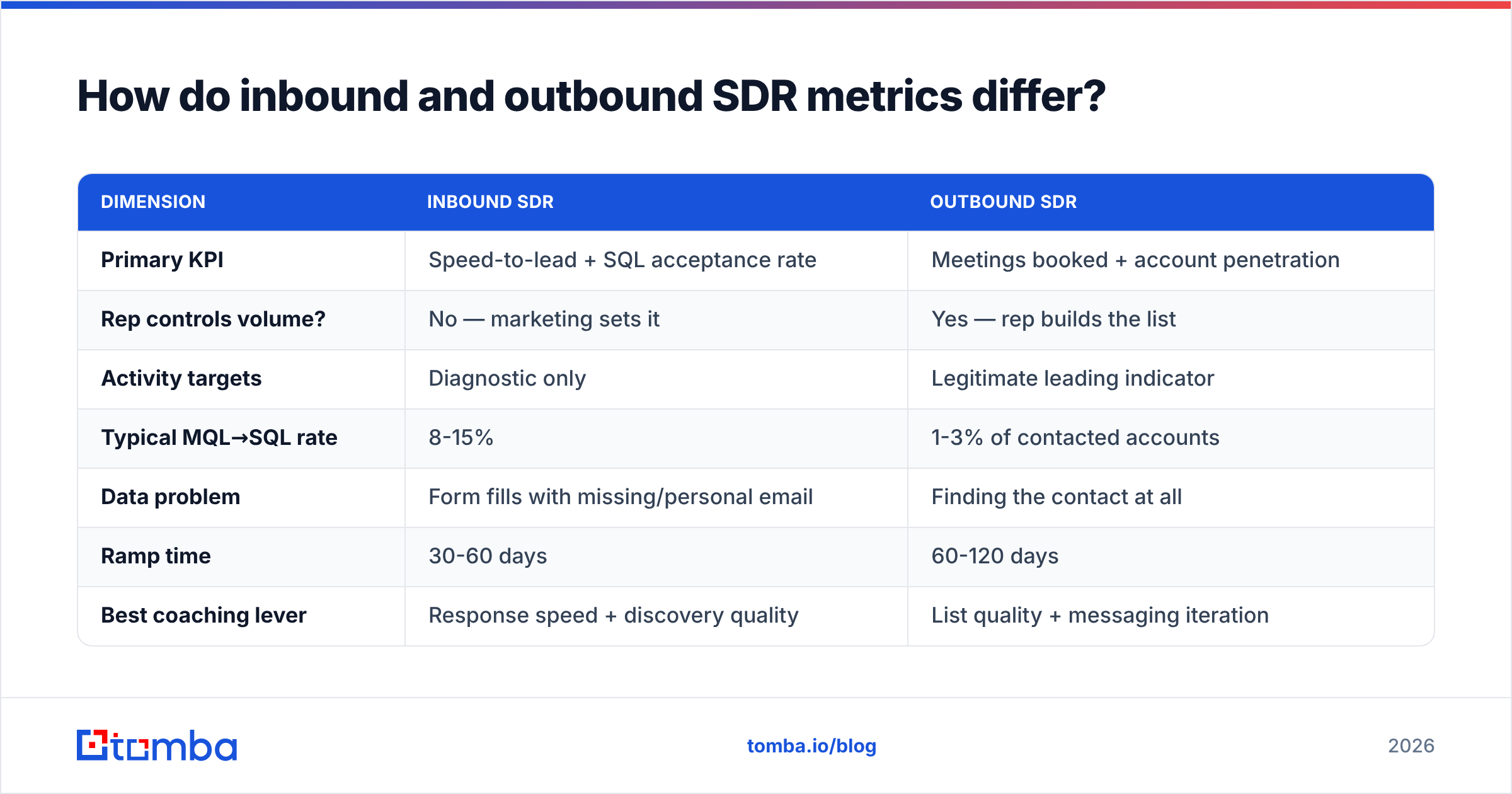
They share vocabulary and almost nothing else. Comparing them on one dashboard is how teams end up managing both badly.
| Dimension | Inbound SDR | Outbound SDR |
|---|---|---|
| Primary KPI | Speed-to-lead + SQL acceptance rate | Meetings booked + account penetration |
| Rep controls volume? | No — marketing sets it | Yes — rep builds the list |
| Activity targets | Diagnostic only | Legitimate leading indicator |
| Typical MQL→SQL rate | 8-15% | 1-3% of contacted accounts |
| Data problem | Form fills with missing/personal email | Finding the contact at all |
| Ramp time | 30-60 days | 60-120 days |
| Best coaching lever | Response speed + discovery quality | List quality + messaging iteration |
| Comp weighting | Heavier on accepted opps | Heavier on meetings held |
The one thing they genuinely share is a dependency on contact data quality. Outbound teams feel this immediately — a bad list means no conversations. Inbound teams feel it more slowly and mistake it for a rep problem.
How does contact data quality cap your inbound metrics?#
Every conversion rate in the table above has a ceiling set by what you know about the lead when it arrives.
Consider a typical B2B form fill. The prospect types jsmith@gmail.com, leaves "Company" blank because it's optional, and picks "Other" for role. Your SDR now has three choices: guess, research manually, or route it to the generic nurture bucket. All three are bad. Manual research on a single lead — finding the company, the LinkedIn profile, the work email, the headcount — takes 6-12 minutes. Do that across 30 leads a day and you have burned four hours of selling time.
Enrichment closes the gap at the moment of submission:
- Reverse email lookup turns a personal address into a name, employer, and role. A reverse email lookup call at form-submit time is the difference between routing to an SDR and routing to nurture.
- Domain-level enrichment takes the company from the email domain or the website field and returns headcount, industry, and tech stack — the three fields most routing rules depend on. Domain search also surfaces adjacent contacts at the same company, which matters when the form-filler turns out to be an intern.
- Verification before the first send. Sending to a bogus address on an inbound lead is a bounce you fully deserve. Run every submitted address through an email verifier before the first sequence step so your bounce rate stays under 2% and your email deliverability survives.
- Phone append for anything above your ACV threshold. A demo request from a 500-person company should trigger a dial within five minutes, and you cannot dial a field you don't have.

Track lead data completeness as a first-class metric — the percentage of inbound leads that arrive (or get enriched into) a state with verified work email, company name, and headcount. Teams that push this above 85% see the downstream effect on speed-to-lead first, because the rep stops opening LinkedIn before every touch.
What should an inbound SDR dashboard actually look like?#
Three screens, three audiences. Don't build one dashboard and hope.
Screen 1 — the rep's daily view. Unclaimed leads sorted by age, SLA countdown timer per lead, today's booked meetings, today's held meetings. Nothing historical. The rep needs a to-do list, not analytics.
Screen 2 — the manager's weekly view. Median speed-to-lead by rep and by hour, the four conversion rates by rep with team median as a reference line, booked-vs-held gap by rep, and a list of every lead that breached SLA. This is the coaching screen. The single most useful chart on it is speed-to-lead by hour of day, because it exposes coverage gaps that look like performance gaps.
Screen 3 — the exec monthly view. Pipeline sourced per SDR, cost per SQL, SQL→closed-won by lead source, ramp curve for the last three hires. No activity metrics whatsoever.
A note on attribution: agree in advance whether an inbound SDR gets credit for pipeline the AE later expands. Most teams that get this wrong either credit the SDR for the full expanded value (inflating SDR ROI to absurd levels) or credit them only at the initial opp value (which undercounts good qualification). Pick one, write it down, and stop relitigating it every quarter. G2's software buyer behavior research is a reasonable external reference for how much of the buying journey happens before the form fill — useful ammunition when someone claims the SDR "just took the order."
How do you improve each metric, in order?#
Fix them in dependency order. Improving acceptance rate while speed-to-lead sits at 90 minutes is polishing a car with a flat tire.
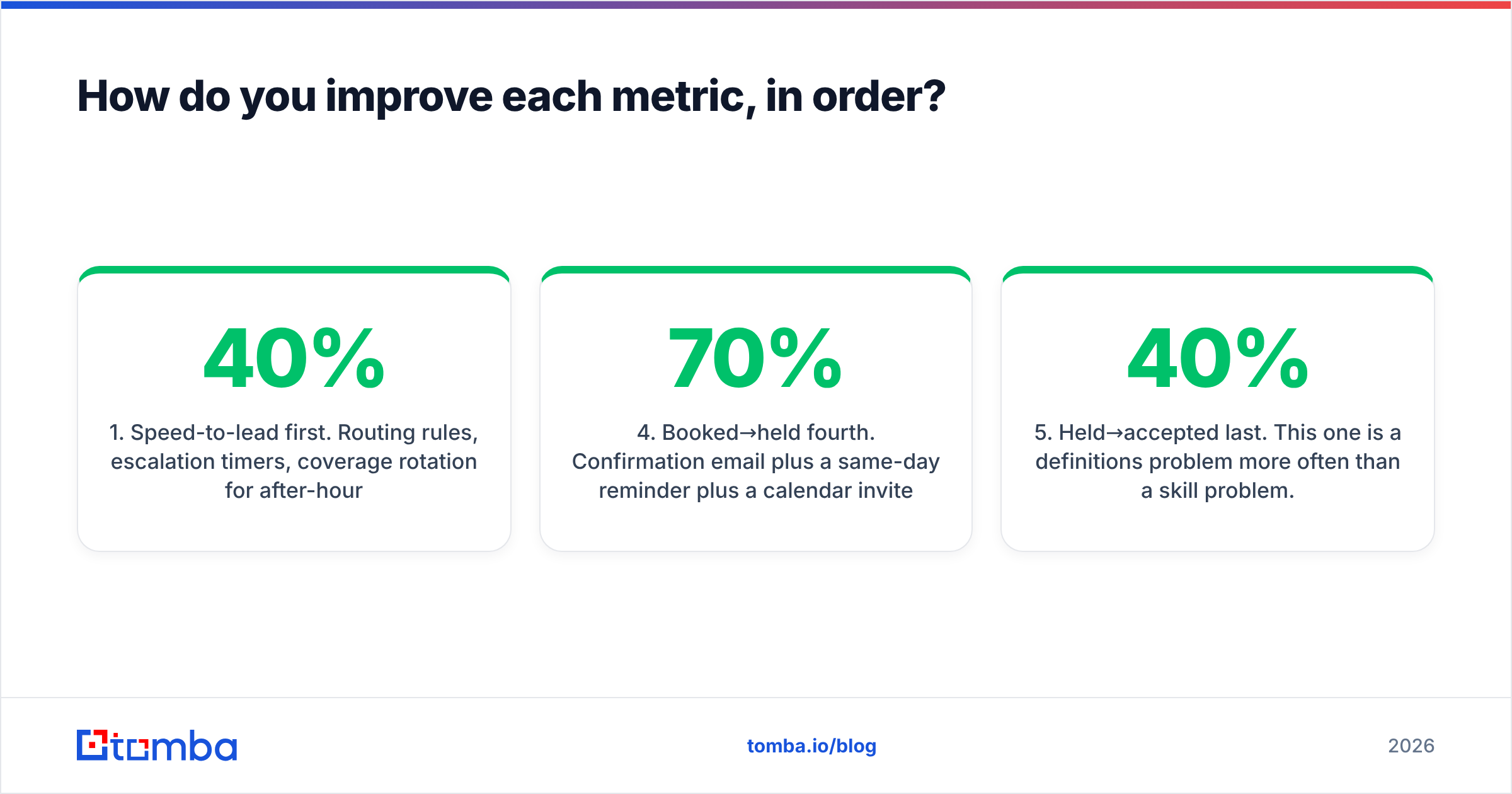
- Speed-to-lead first. Routing rules, escalation timers, coverage rotation for after-hours. Expect the biggest single lift here — often a 20-40% increase in connect rate with zero change to messaging.
- Data completeness second. Enrich at submit, not at touch. This directly buys back rep time, which feeds back into speed.
- Engaged→booked third. This is a messaging and discovery problem. Listen to five calls per rep per week. The most common failure is pitching before qualifying on an inbound call, which feels natural — they asked, after all — and kills the meeting.
- Booked→held fourth. Confirmation email plus a same-day reminder plus a calendar invite with a real agenda gets most teams from 70% to 85%. Add a "reschedule" link that doesn't require an email exchange.
- Held→accepted last. This one is a definitions problem more often than a skill problem. If your AEs reject 40% of meetings, you don't have a bad SDR — you have an unwritten qualification standard. Write it down, jointly, with examples of accepted and rejected opps.
For teams running structured sales automation around this funnel, the sequencing matters: automate routing and enrichment before you automate outreach. Automating outreach on bad data just accelerates the bounce rate. HubSpot's sales benchmark data is a decent sanity check on your conversion ranges if you're building the first version of this scorecard from scratch.
What's a realistic 90-day rollout?#
- Days 1-14: Instrument speed-to-lead. Just measure it. Do not set a target yet. Most teams are shocked by the actual median.
- Days 15-30: Fix routing and set the SLA. Publish SLA compliance daily. Add the after-hours coverage rule.
- Days 31-60: Add enrichment at form-submit. Measure lead data completeness weekly. Retire dials-per-day from the scorecard and announce why.
- Days 61-90: Define SQL acceptance criteria jointly with AEs. Start reviewing booked-vs-held and held-vs-accepted in the weekly forecast call.
By day 90 you'll have a scorecard where every metric survives the "would maximizing this help the business?" test. That's the whole goal.
Ready to stop losing inbound leads to bad data?#
The fastest lift in inbound SDR metrics isn't a new cadence or a new script — it's knowing who the lead actually is before the first touch. Tomba's Email Finder resolves partial form fills into verified work emails, company domains, and role data so your reps respond in minutes instead of researching for ten. It runs standalone, through the Tomba API at form-submit time, or inside your CRM. Start on the free tier at 25 searches a month, or move to Starter at $49/mo once routing is live — full Tomba pricing is public, with Growth at $99/mo and Pro at $249/mo for teams running high inbound volume.
Related guides#
// get started
Find, verify and enrich your first contacts today
Start on the free plan with 25 searches a month, then scale when your team is ready.
Free plan · No credit card required · GDPR & CCPA
// about the author