Inbox Placement Testing: The Complete 2026 Guide for Cold Email
Your ESP says 98% delivered. Gmail says spam folder. Inbox placement testing is how you find out which one is telling the truth — and what to fix first.

TL;DR
- "Delivered" in your ESP dashboard only means the receiving server accepted the message. It says nothing about whether it landed in Inbox, Promotions, or Spam.
- Inbox placement testing closes that gap by sending to accounts you control (seed lists) or by reading anonymized data from real mailboxes (panel data), then reporting the folder split per provider.
- Seed lists are cheap and fast but easy to fool — they have no engagement history, they cluster on a few IPs, and Gmail treats them differently than real recipients.
- The best setup is layered: seed tests for pre-flight checks, panel or Postmaster data for reality, and reply rate as the final arbiter.
- Most placement failures trace back to list quality, not copy. Verify contacts before you test, or you're measuring the wrong variable.
What is inbox placement testing?#
Inbox placement testing is the practice of sending a copy of a real campaign to a set of monitored mailboxes across major providers — Gmail, Outlook, Yahoo, Apple, and a spread of corporate domains — then recording which folder each message actually landed in.
Think of it like a restaurant health inspection. Your kitchen staff (your sending platform) will tell you every plate went out. The inspector opens the walk-in fridge and checks the temperature. One is a report of intent, the other is a measurement of outcome. Inbox placement testing is the fridge thermometer.
The distinction matters because the two numbers routinely disagree by 30 points or more. An ESP reports a 98% delivery rate the instant the receiving MTA returns a 250 OK. That acceptance happens before Gmail's classifier has decided anything about folder routing. A message can be accepted, scored, and dropped into Spam — and your dashboard will still show it as delivered.
If you want the formal definition of the umbrella concept, email deliverability covers the whole chain from DNS authentication through folder placement. Inbox placement is the last mile of that chain, and it's the only part your prospect ever experiences.
Why doesn't your ESP's delivered rate tell you anything useful?#
Because "delivered" and "not bounced" are the same number.
Here's the sequence when you send a cold email to a Gmail-hosted address:
- Your MTA opens an SMTP connection to Google's inbound servers.
- Google checks SPF, DKIM, DMARC, connection reputation, and rate limits.
- If nothing is disqualifying, Google returns
250 2.0.0 OK— the message is accepted. Your ESP logs this as delivered. - Google's content and reputation classifiers then decide: Primary, Promotions, Updates, or Spam.
- Or the message is silently discarded — accepted, then never shown to the user at all.
Steps 4 and 5 are invisible to the sender. There is no bounce, no webhook, no error code. This is why cold email teams can stare at a 97% delivery rate while their reply rate sits at 0.3% and conclude the problem is subject lines.
Open rate isn't a rescue either. Apple Mail Privacy Protection pre-fetches images for a large share of Apple users, which inflates opens with pixel fires that no human triggered. A 45% open rate can be almost entirely machine traffic on a list heavy with Apple domains.

How does a seed list test actually work?#
A seed list is a set of mailboxes the testing vendor owns across every major provider. You add those addresses to your campaign, send, and the vendor's system logs in to each account and records the folder.
The mechanics break into five steps:
- Get the seed addresses. The vendor generates a fresh list per test — usually 30 to 100 addresses spanning Gmail, Outlook.com, Yahoo, AOL, Apple iCloud, Zoho, GMX, and a handful of corporate mailboxes on Microsoft 365 and Google Workspace.
- Inject them into a live send. Best practice is to seed inside a real campaign, mixed with genuine recipients, so your sending pattern and volume look normal. Sending only to seeds produces a clean, unrepresentative test.
- Send from the exact production setup. Same domain, same sending IP or shared pool, same warmup state, same ESP. Any variation invalidates the result.
- Wait for classification to settle. Give it 10 to 30 minutes. Some providers re-file messages after initial delivery, and reading too early gives you a false Inbox result.
- Read the per-provider breakdown. A useful report separates Gmail Primary from Gmail Promotions, and shows Microsoft consumer separately from Microsoft 365 business tenants — those two behave nothing alike.
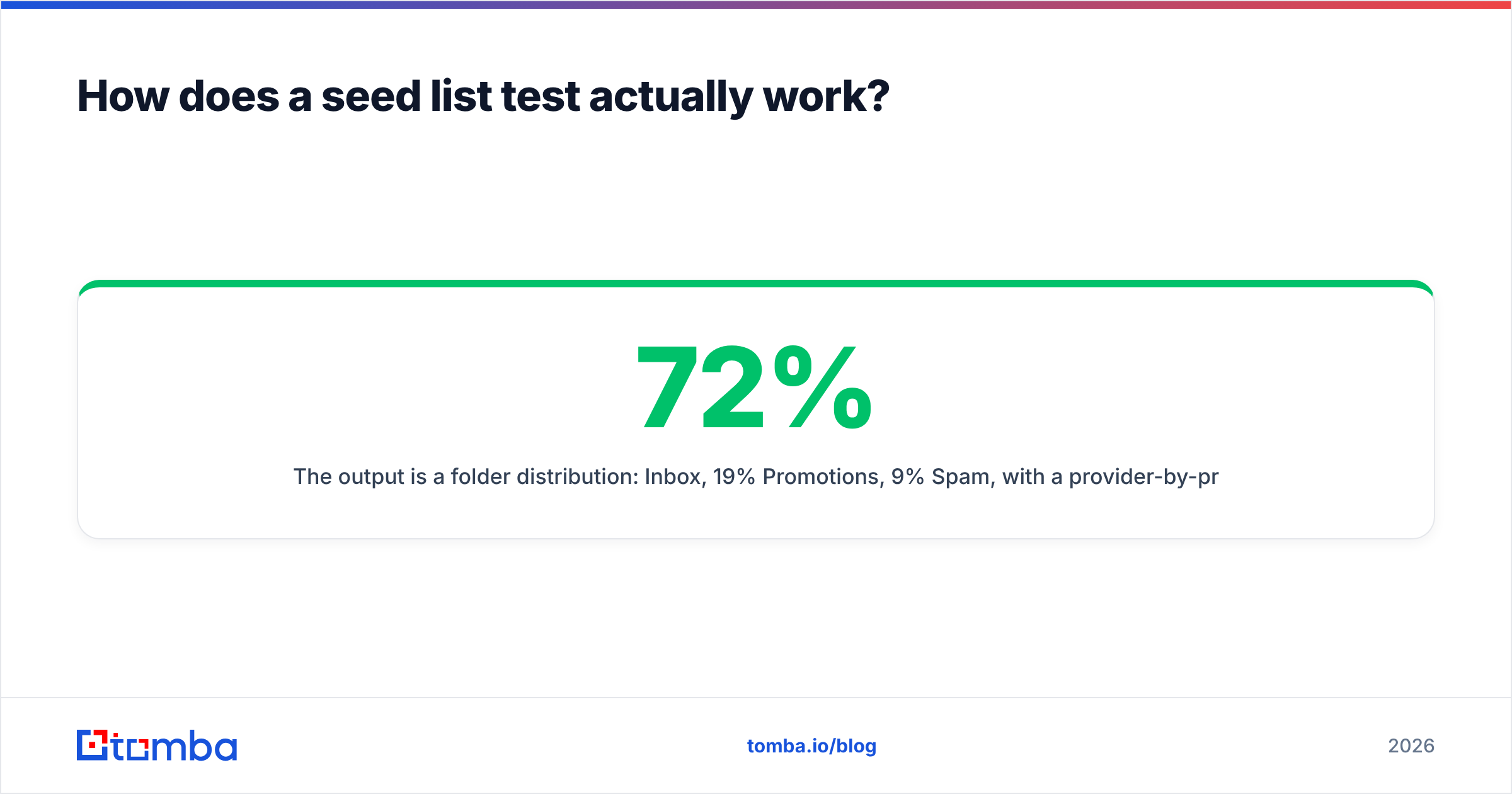
The output is a folder distribution: 72% Inbox, 19% Promotions, 9% Spam, with a provider-by-provider split underneath. That split is the actual deliverable. An aggregate "inbox rate" averaged across providers hides the one thing you need to know — which provider is punishing you.
What are the main types of inbox placement testing?#
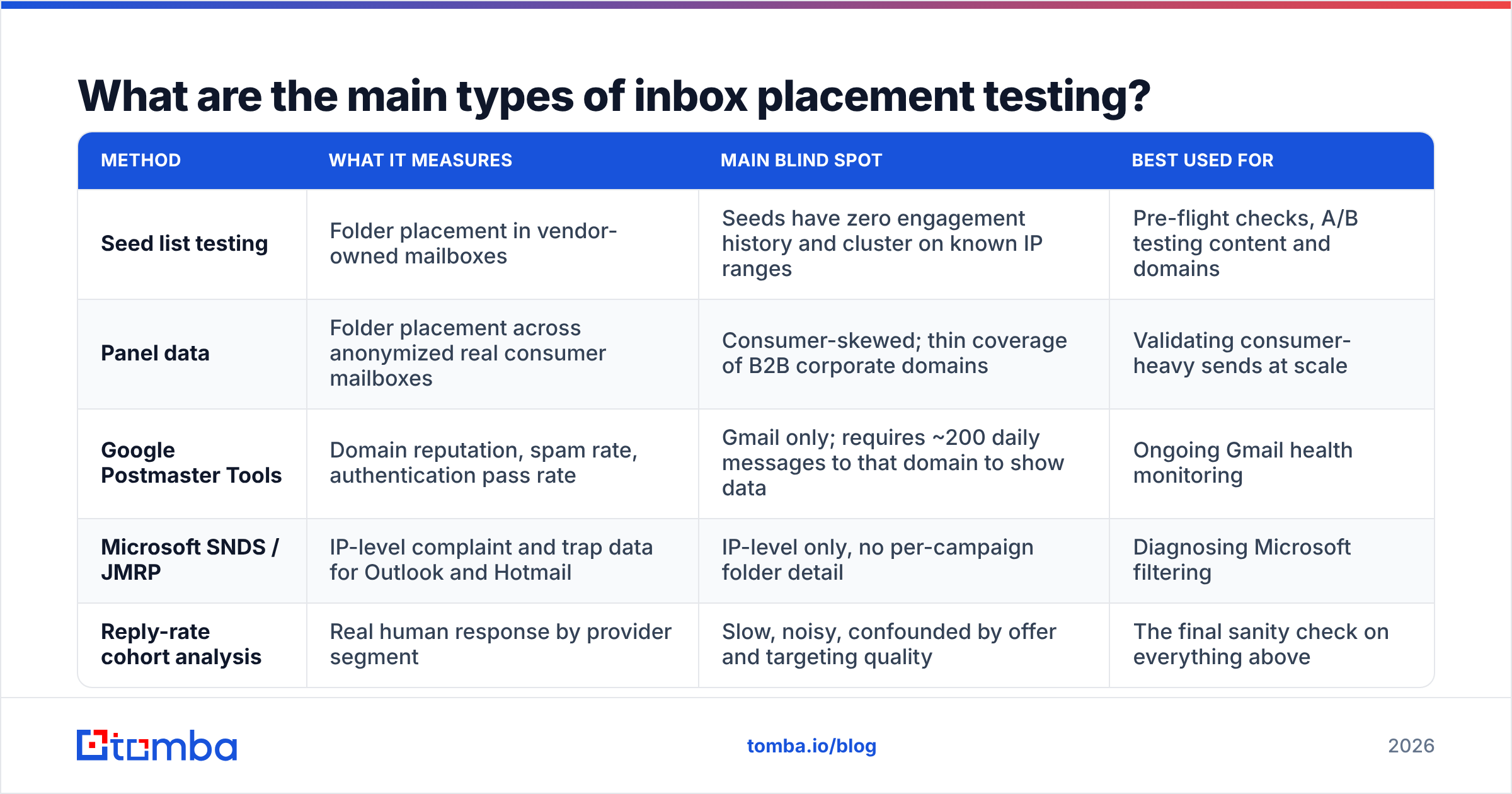
| Method | What it measures | Main blind spot | Best used for |
|---|---|---|---|
| Seed list testing | Folder placement in vendor-owned mailboxes | Seeds have zero engagement history and cluster on known IP ranges | Pre-flight checks, A/B testing content and domains |
| Panel data | Folder placement across anonymized real consumer mailboxes | Consumer-skewed; thin coverage of B2B corporate domains | Validating consumer-heavy sends at scale |
| Google Postmaster Tools | Domain reputation, spam rate, authentication pass rate | Gmail only; requires ~200 daily messages to that domain to show data | Ongoing Gmail health monitoring |
| Microsoft SNDS / JMRP | IP-level complaint and trap data for Outlook and Hotmail | IP-level only, no per-campaign folder detail | Diagnosing Microsoft filtering |
| Reply-rate cohort analysis | Real human response by provider segment | Slow, noisy, confounded by offer and targeting quality | The final sanity check on everything above |
The right answer for most B2B teams is layering three of these: seed tests before launch, Google Postmaster Tools for continuous Gmail reputation, and a reply-rate breakdown by recipient domain as your ground truth. No single method is trustworthy alone.
What do seed lists get wrong?#
Seed lists are a proxy, and proxies drift. Four failure modes show up constantly:
No engagement history. Gmail's routing decision is heavily personalized. It weighs whether this recipient has previously opened, replied to, or moved mail from your domain. A seed mailbox has done none of that with anyone. It represents a cold, historyless recipient — which is arguably the right model for cold email, but it means seed results systematically underestimate placement for warm lists and overestimate the value of content tweaks.
IP and pattern clustering. Seed accounts get created in batches, log in from datacenter IPs, and receive mail from thousands of senders running the same tests. Providers notice. Some seed pools get quietly deprioritized, which produces pessimistic results that don't reflect real recipients.
Provider mix that doesn't match your list. If 60% of your prospects sit on Microsoft 365 business tenants and your seed list is 60% consumer Gmail and Yahoo, the aggregate number is fiction. Ask any vendor for the exact provider composition before you buy.
Tenant-level filtering is invisible. Corporate domains layer their own security gateways — Proofpoint, Mimecast, Barracuda — on top of the provider. Those gateways have per-tenant policies that no shared seed list can replicate. A message that hits Inbox on a generic Microsoft 365 seed can be quarantined at a specific customer's tenant.
None of this makes seed testing useless. It makes it a comparative instrument rather than an absolute one. Use it to answer "is variant B better than variant A on the same day from the same domain," not "what percentage of my prospects will see this."
Which inbox placement testing tools should you compare?#
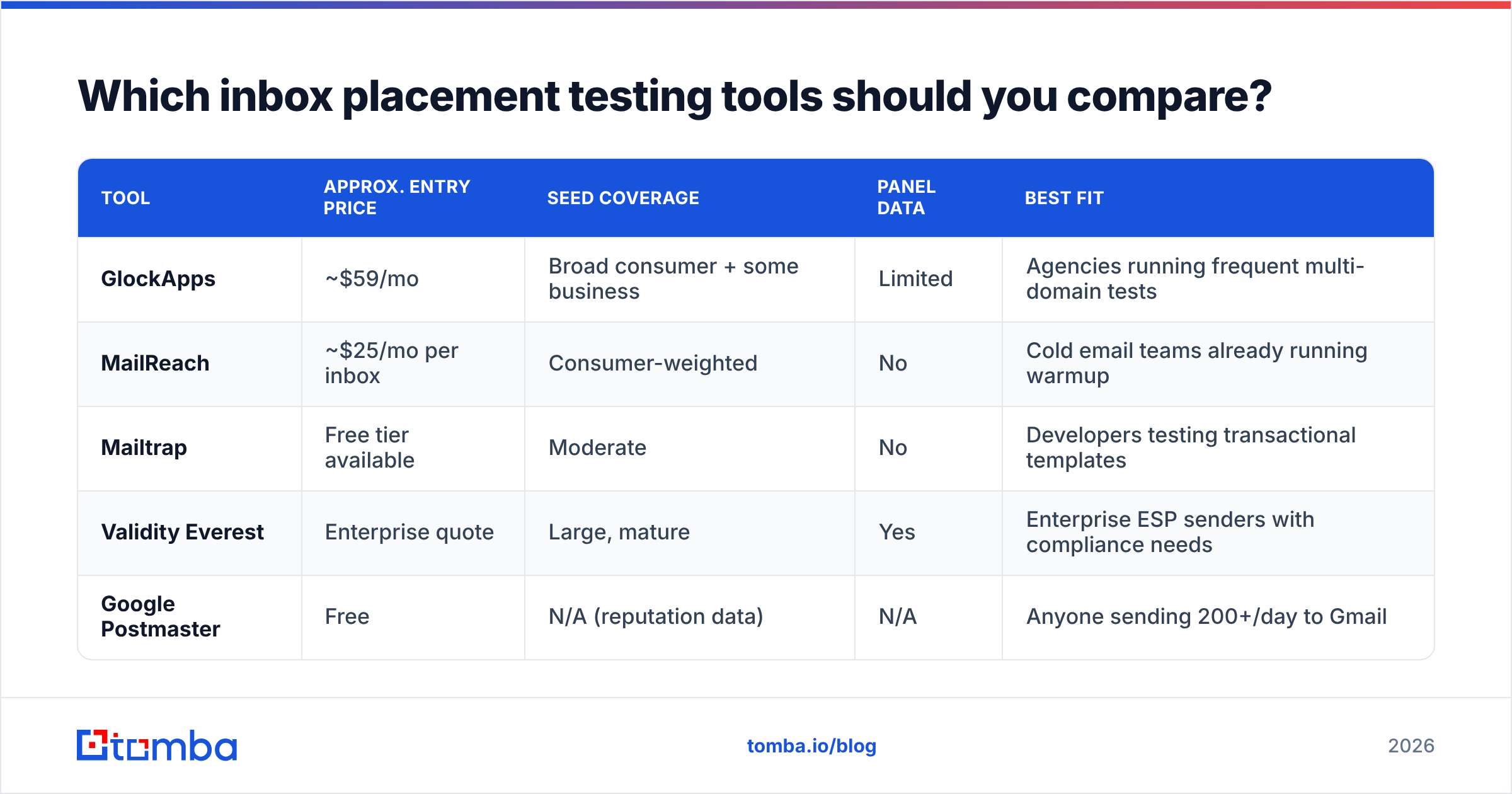
| Tool | Approx. entry price | Seed coverage | Panel data | Best fit |
|---|---|---|---|---|
| GlockApps | ~$59/mo | Broad consumer + some business | Limited | Agencies running frequent multi-domain tests |
| MailReach | ~$25/mo per inbox | Consumer-weighted | No | Cold email teams already running warmup |
| Mailtrap | Free tier available | Moderate | No | Developers testing transactional templates |
| Validity Everest | Enterprise quote | Large, mature | Yes | Enterprise ESP senders with compliance needs |
| Google Postmaster | Free | N/A (reputation data) | N/A | Anyone sending 200+/day to Gmail |
Prices move — verify current tiers on each vendor's site and cross-check recent reviews on G2 before committing to an annual plan. Two practical filters when you evaluate: does the tool separate Gmail Promotions from Primary, and does it show you the raw per-provider table rather than a single blended score? Tools that only give you one number are selling reassurance, not diagnostics.
How do you run an inbox placement test that isn't garbage?#
Control your variables the way you would in any experiment.
Test from production, not a staging domain. A fresh test domain with no history will produce placement numbers unrelated to your real sending domain. If you want to know how outbound.yourcompany.com performs, test from outbound.yourcompany.com.
Fix authentication first. SPF, DKIM, and a DMARC policy at minimum p=none with reporting enabled. Running a placement test with broken alignment is like taking a car to a track day with a flat tire — you'll learn something, but not what you came for. Check your records with an SPF checker before you spend a credit on testing.
Change one thing at a time. Domain, sending volume, copy, link count, sending time. Run the baseline, change one variable, run again within the same 24-hour window. Reputation shifts day to day, so tests separated by a week aren't comparable.
Seed inside real volume. If your normal daily send is 200 messages, don't send a 40-message seed-only blast. Put the seeds in the 200.
Repeat before you react. Placement has real variance. Two consecutive tests on an identical setup can differ by 10 to 15 points. Run three, take the median, and only act on a change larger than that spread.
Log everything in one sheet. Date, domain, mailbox, variant, per-provider result. Placement work is longitudinal — the pattern across 20 tests tells you far more than any single report.

Why does list quality dominate your placement results?#
Because spam complaints and hard bounces are the two strongest negative signals a provider tracks, and both come from your list, not your copy.
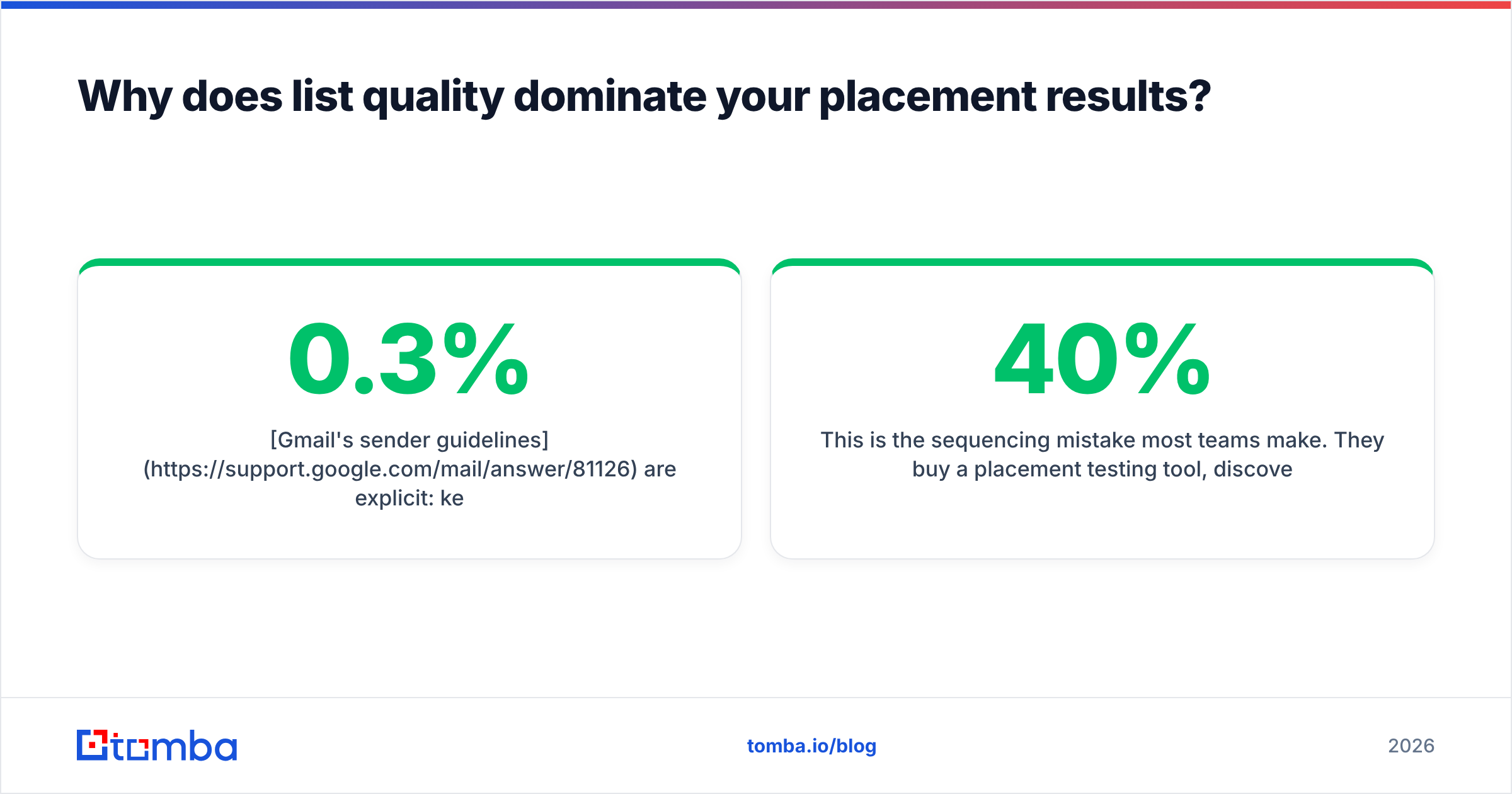
Gmail's sender guidelines are explicit: keep spam complaint rates below 0.3% and ideally under 0.1%. A list with dead addresses, role accounts, and spam traps blows past that threshold no matter how good your writing is. You can rewrite a subject line 40 times and never recover the reputation a single trap-heavy send costs you.
This is the sequencing mistake most teams make. They buy a placement testing tool, discover they're at 40% inbox, and start rewriting emails. But the causal chain runs the other way:
- Bad list → bounces and complaints → domain reputation drops → placement collapses.
- Good list → low bounces, some replies → reputation holds → placement recovers.
So the pre-work matters more than the test. Run every list through an email verifier before it touches a campaign, and use a catch-all verifier for the domains that accept everything — catch-all addresses are where unverified lists hide most of their dead weight. Then run your content through a spam checker to catch the obvious content triggers before you burn seed credits diagnosing them.
Once list hygiene is clean, placement testing becomes genuinely useful, because the remaining variance is actually attributable to the things you're testing.
How often should you test inbox placement?#
Match the cadence to what changes.
- Before any new sending domain goes live — a baseline test at the end of warmup, before real volume.
- Weekly during active campaigns — one test per sending domain, same day and time each week, to catch drift early.
- Immediately after any infrastructure change — new IP, new ESP, DNS edits, volume increases above 25%.
- After any spike in complaints or bounces — treat it as an incident, test the same day.
- Monthly for dormant domains — domains you rotate in and out still need a pulse check before reuse.
Alongside that, keep Google Postmaster Tools and Microsoft SNDS open as continuous monitors. Those are free, they're first-party, and they'll often show reputation degrading days before a seed test catches it.
What should you do when the test comes back bad?#
Work the stack from the bottom up, because fixes at the bottom invalidate diagnoses at the top.
- Authentication. SPF, DKIM alignment, DMARC. Non-negotiable, and free to fix.
- Blacklists. Check your sending IP and domain against the major RBLs with a blacklist checker. A Spamhaus listing explains everything and nothing else matters until it's cleared.
- List hygiene. Re-verify. Remove role accounts, catch-alls you can't confirm, and anything that bounced.
- Volume and ramp. Cut daily volume by half and rebuild. Reputation damage repairs slowly.
- Content. Link count, image-to-text ratio, tracking domain reputation, spam-trigger phrasing. This is last on the list for a reason.
If you're at step 5 and still failing, the problem is usually the tracking domain — a shared link-shortener or a tracking subdomain on a burned root domain will tank placement independently of everything else. Give tracking its own subdomain, and never share it.
Where should you start?#
Placement testing measures a symptom. The disease is almost always list quality — addresses that were guessed, scraped, or bought without verification, generating the bounces and complaints that make every subsequent test come back red.
Fix the input first. Tomba's Email Finder returns verified professional addresses with a confidence score and the source signals behind each one, so the list you seed-test is one your sending reputation can survive. The free tier gives you 25 searches a month to check the data quality yourself; paid plans start at $49/mo on Starter, with Growth at $99/mo and Pro at $249/mo — full breakdown on the Tomba pricing page. Clean the list, then run the test, and the numbers will finally mean something.
Related guides#
// get started
Find, verify and enrich your first contacts today
Start on the free plan with 25 searches a month, then scale when your team is ready.
Free plan · No credit card required · GDPR & CCPA
// about the author