InboxIgniter Pricing, Reviews, Pros and Cons (2026 Guide)
A neutral breakdown of what InboxIgniter costs per inbox, what reviewers praise and complain about, and the cases where a cheaper warmup stack does the same job.
TL;DR — InboxIgniter pricing at a glance
- InboxIgniter is an email warmup tool. It trades mail between your mailbox and a peer pool, pulls notes out of spam, and tracks where your mail lands.
- InboxIgniter pricing is per mailbox, and it scales in a straight line. Plan on $20–$30 per inbox a month at low volume. Big bundles fall to $8–$15. Check the vendor page first, since warmup tools reprice often.
- Users like the reports and the fast setup. They gripe that warmup alone cannot fix a bad list, bad DNS, or bad copy.
- The real cost is not the invoice. It is the 30–90 days you spend warming inboxes that then get burned by dead contacts and hard bounces.
- Fix your auth records and your list first. Warmup is the last 20% of the job, not the first 80%.
What is InboxIgniter, and what does it do?#
InboxIgniter is a warmup and inbox-tracking tool for cold outbound teams. You link a mailbox — Google Workspace, Microsoft 365, or plain SMTP/IMAP. The tool then trades small, human-looking notes with a pool of other mailboxes. Those peers open your mail. They reply to some of it. They drag anything that hit spam back to the main tab. Over weeks, Gmail and Outlook see a mailbox that gets read and answered. Your inbox rate climbs.
Think of it like a credit score. You do not get a mortgage by saying you are good for it. You get one by having a year of on-time payments on file. Warmup builds that file for a brand-new domain.
The tool also runs seed tests. It sends a copy of your campaign to a set of Gmail, Outlook, and Yahoo addresses. Then it reports where each copy landed. That is the part most buyers pay for. It turns "my replies dropped" into "72% main tab, 19% promos, 9% spam on Outlook."
What it does not do is send your campaigns. It sits beside your sending tool (Instantly, Smartlead, Lemlist, Salesloft, or whatever you run). It does not take its place. So treat InboxIgniter pricing as an add-on line, not as a swap.

InboxIgniter pricing in 2026: what does each plan cost?#
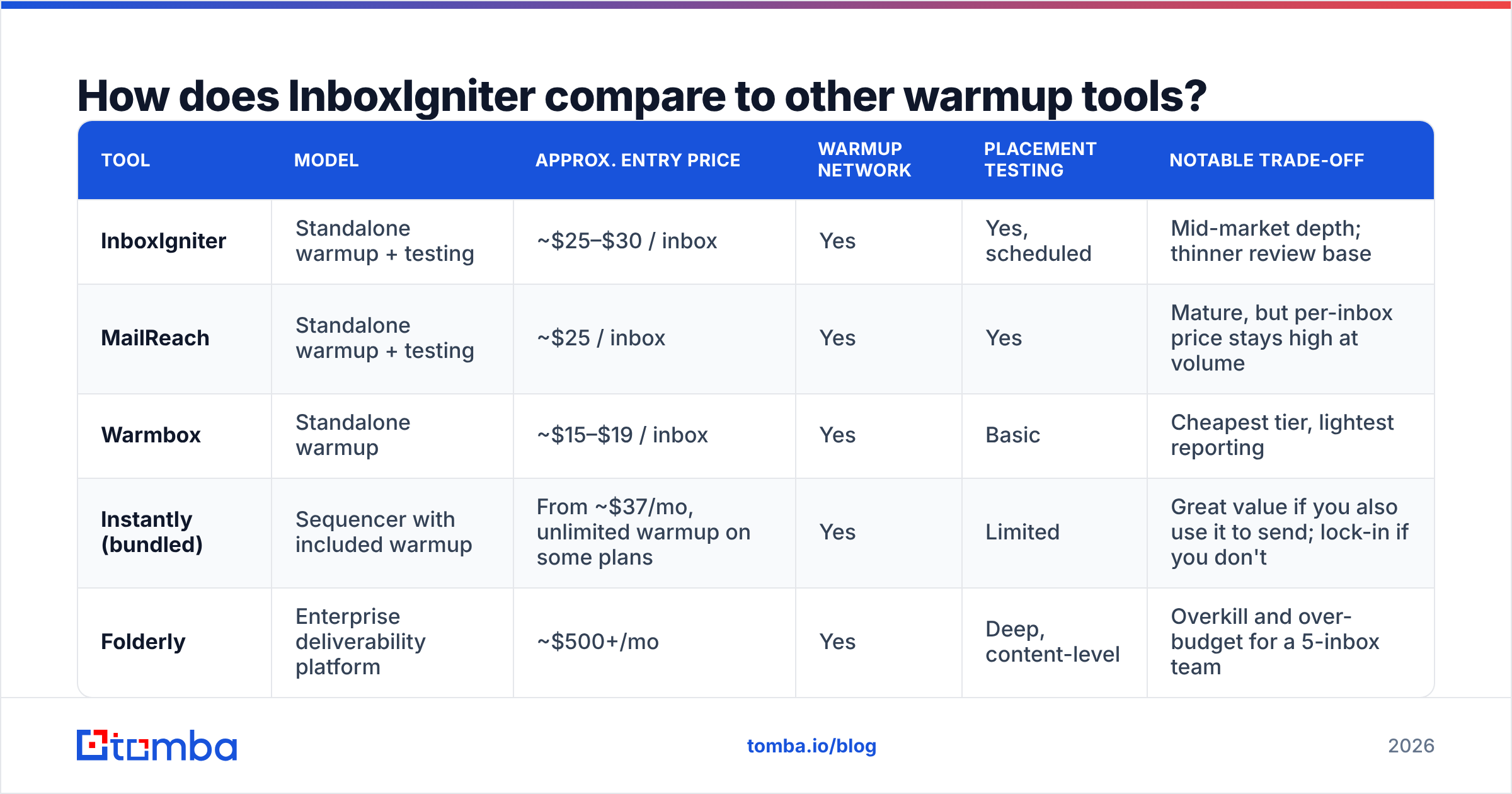
You pay per linked mailbox. You can bill monthly or yearly. The rate per inbox drops as you buy more seats. That shape is the norm across the whole warmup field. The table below shows list rates at the time of writing. Check InboxIgniter's own site before you buy, since these plans reprice two or three times a year.
| Tier | Mailboxes included | Approx. cost per inbox / mo | Placement tests | Best fit |
|---|---|---|---|---|
| Entry / Solo | 1–3 | ~$25–$30 | Limited monthly runs | Founders sending from one domain |
| Growth | 5–15 | ~$15–$20 | Regular scheduled tests | A 2–5 rep SDR team on 2 domains |
| Agency | 25–50 | ~$10–$15 | Multi-client reporting | Lead-gen agencies running client inboxes |
| Enterprise / custom | 50+ | ~$8–$12 (negotiated) | API + white-label reporting | Outbound at 100+ mailbox scale |
Three quirks in InboxIgniter pricing matter more than the headline rate:
- You pay per mailbox, not per send. A 40-inbox setup costs 40× the unit rate. That holds whether each inbox sends 20 mails a day or none. Idle inboxes bleed cash.
- Yearly billing tends to cut 15–25%. That is normal here. But it locks you into a tool whose worth peaks in the first 90 days of a new domain, then falls.
- Warmup is not your only per-inbox fee. Google Workspace or Microsoft 365 seats, domains, and your sending tool are all per inbox too. A 20-mailbox setup runs $600–$1,200 a month all-in, before anyone writes a line of copy.
Do the math before you commit to InboxIgniter pricing. Our free email warmup calculator shows how many mailboxes your send goal really needs. Most teams buy 30–50% more than that. Then they pay warmup fees on inboxes they never use.
What do InboxIgniter reviews say?#
There are fewer public reviews here than for the big names. So treat the scores on G2 and Capterra as a hint, not proof. Read across user reviews, Reddit threads in r/coldemail, and agency teardowns, and the same themes come up.
What users like
- Setup takes minutes, not hours. There is OAuth for Google and Microsoft, plus an app-password or SMTP path for the rest. People who have fought with IMAP folder maps on other tools call this out by name.
- The reports are easy to read. The split by mailbox host (main tab vs promos vs spam) is the screen people say they open each week.
- Support answers. Small vendor, small queue. Some users say they got a human within a day. That is not the norm at the top of this market.
- The per-inbox rate is fair at mid volume. Agencies buying 25+ seats report a lower unit cost than the warmup baked into big sending suites.
What users gripe about
- Warmup did not fix their problem. The top bad review reads: "we warmed for six weeks and still hit spam." That almost always traces back to auth records, list quality, or spammy copy. A peer pool cannot repair any of those.
- Reports lag reality. Seed tests run on a schedule. If your sender score tanks on a Tuesday, you may not see it until the next test runs.
- Less depth than the leaders. People moving from Folderly or MailReach miss the fine grain: spam scoring at the copy level, drilldowns by recipient domain, deeper blocklist watch.
- Pool risk. Every peer-pool tool shares this. Your good name rests in part on who else is in the pool. If the pool fills with junk senders, the signal fades for all. That is a market-wide caveat, not a knock on this tool alone.
Few users fight about InboxIgniter pricing itself. The gripes land elsewhere. The honest read: reviews describe a solid, fairly priced, mid-size tool that does what it claims. They do not describe a magic fix. Buyers who wanted one wrote the two-star reviews.
What are the pros and cons in one view?#
| Dimension | Pro | Con |
|---|---|---|
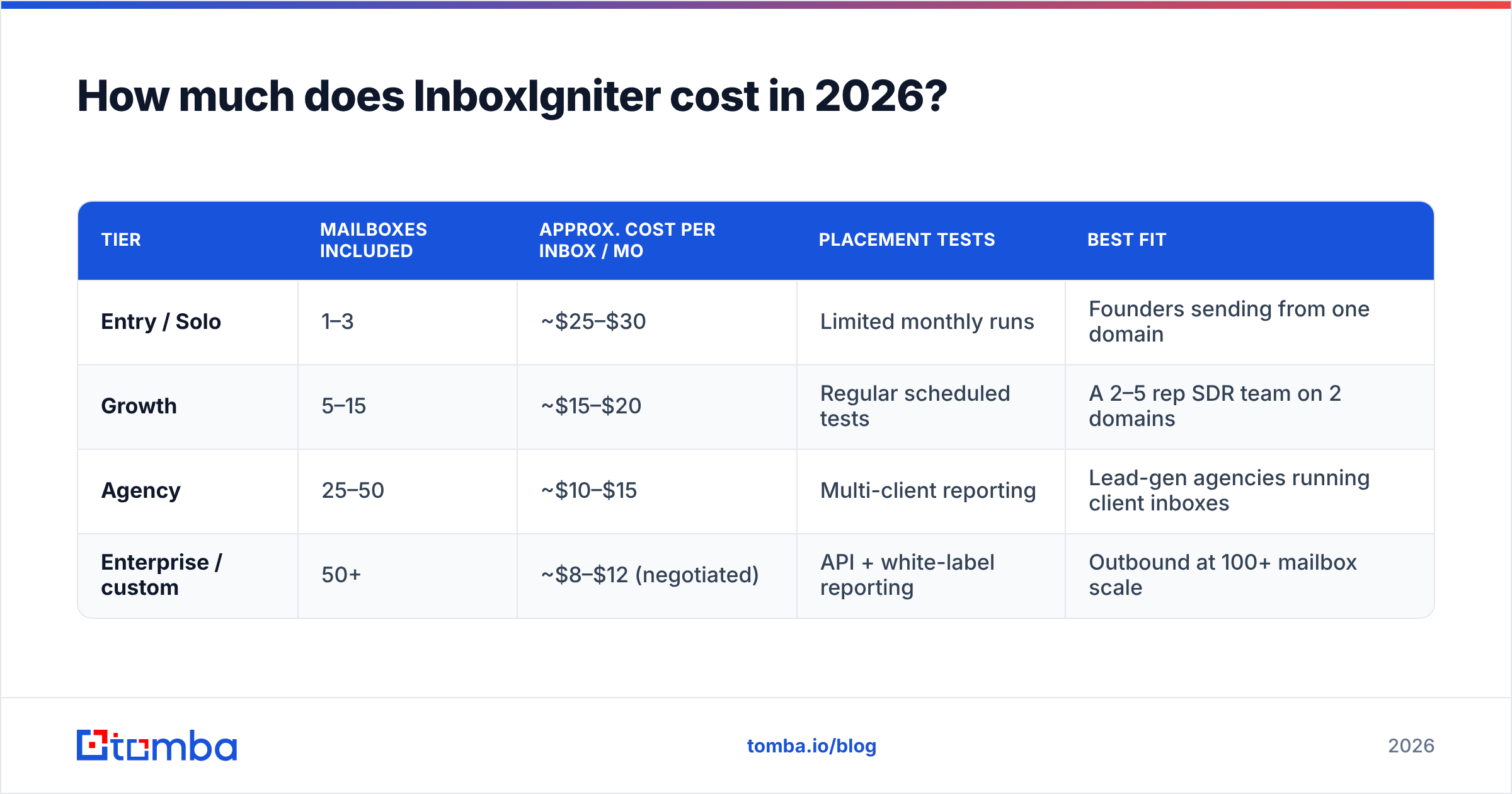
| Pricing | Per-inbox rate drops sharply at agency volume; transparent tiers | Linear cost — 50 inboxes cost 50× the unit price, idle or not |
| Setup | OAuth for Google/Microsoft, SMTP fallback, minutes to first send | Multi-domain teams still connect mailboxes one at a time |
| Warmup engine | Peer network with reply and spam-rescue behavior | Network quality is outside your control and not fully auditable |
| Placement testing | Clear per-provider inbox/spam/promo breakdown | Periodic snapshots, not continuous monitoring |
| Reporting | Readable enough for a non-technical client review | Less granular than Folderly-class content analysis |
| Support | Fast, human responses reported by reviewers | Smaller docs library and community than category leaders |
| Scope | Focused, does one job well | Does not send campaigns, verify lists, or fix DNS |
How does InboxIgniter compare to other warmup tools?#
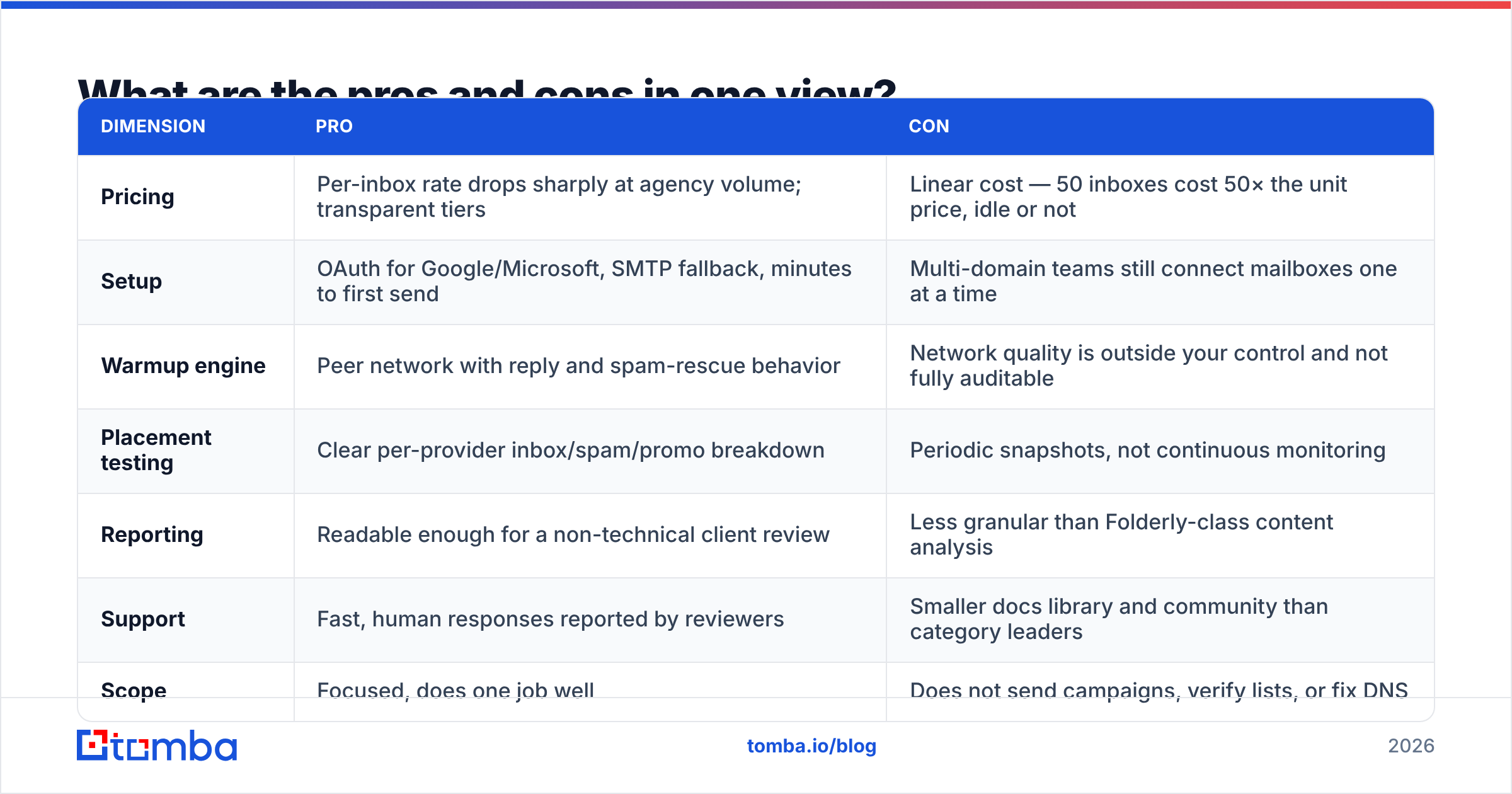
The field splits three ways. Some tools do warmup alone. Some bake it into a sending suite. Some sell deep email help as software. Rates below are rough list rates at the time of writing.
| Tool | Model | Approx. entry price | Warmup network | Placement testing | Notable trade-off |
|---|---|---|---|---|---|
| InboxIgniter | Standalone warmup + testing | ~$25–$30 / inbox | Yes | Yes, scheduled | Mid-market depth; thinner review base |
| MailReach | Standalone warmup + testing | ~$25 / inbox | Yes | Yes | Mature, but per-inbox price stays high at volume |
| Warmbox | Standalone warmup | ~$15–$19 / inbox | Yes | Basic | Cheapest tier, lightest reporting |
| Instantly (bundled) | Sequencer with included warmup | From ~$37/mo, unlimited warmup on some plans | Yes | Limited | Great value if you also use it to send; lock-in if you don't |
| Folderly | Enterprise deliverability platform | ~$500+/mo | Yes | Deep, content-level | Overkill and over-budget for a 5-inbox team |
Set InboxIgniter pricing next to the bundled options before you sign. The rule of thumb is short. If your send tool already bundles warmup, a second tool is double spend. The one exception is when you need better inbox reports. If you send from Salesloft, Outreach, or a home-built stack with no warmup, a tool like this one is the right shape of buy. If inbox rates are a board-level issue at 500+ mailboxes, you are shopping in Folderly's tier, not this one.

Is InboxIgniter pricing worth it in 2026?#
Yes, but warmup is the smallest lever on the board. Gmail and Yahoo have also moved the goalposts.
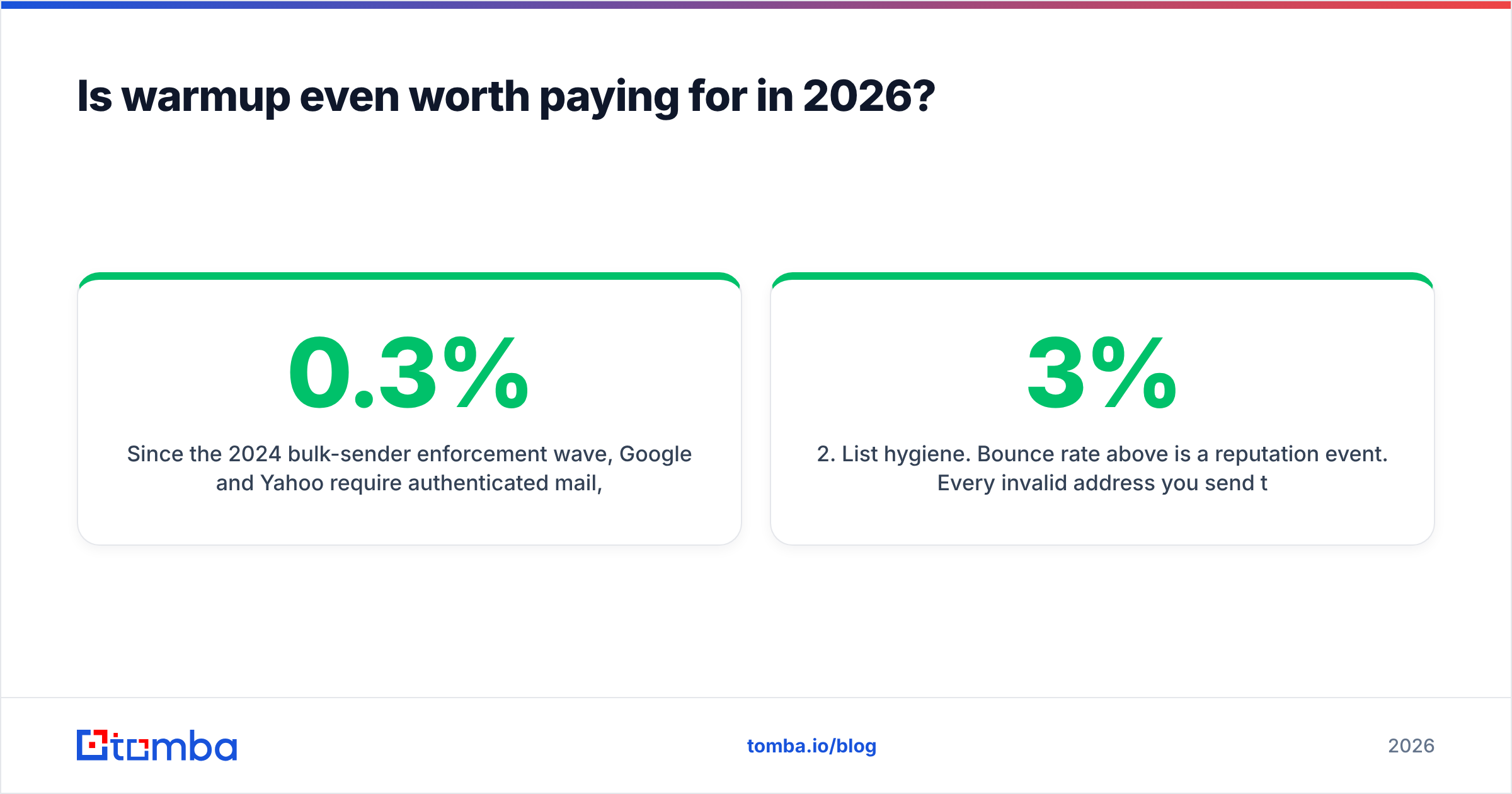
Since the 2024 bulk-sender rules, both require signed mail, one-click unsubscribe on bulk sends, and a spam rate under 0.3%. Google's own sender guidelines are blunt: spam rate and auth records are the gates. No amount of fake warmup traffic beats a 0.5% spam rate or a broken DMARC record.
Here is the order of work that truly moves inbox rates, worst first:
- Auth records. Publish SPF, DKIM, and DMARC, aligned. Run an SPF checker on each sending domain first. A missing DKIM key costs you more than six weeks of warmup buys back.
- List hygiene. A bounce rate above 3% is an event you will feel for months. Each dead address you mail is a draw on your sender reputation. Check the list before you send, not after you bounce.
- Volume ramp. New domain, 5–10 sends a day, double it each week. Warmup tools handle the fake half of this. Your real campaign volume has to ramp too.
- Copy. Watch link count, image-to-text ratio, spam-trigger words, and opt-out handling. A spam checker run before launch catches most of it in thirty seconds.
- Warmup. Now, and only now, does a peer pool truly help. It holds your signal steady between campaigns, and shortens the ramp on new domains.
Teams that buy warmup first and fix auth records fifth are the ones who write the sad reviews.
Who should buy InboxIgniter, and who should skip it?#
Buy it if:
- You are launching new domains and need a 30–60 day ramp with proof of where mail lands.
- Your send tool has no built-in warmup (Salesloft, Outreach, custom SMTP stacks).
- You run an agency and need per-client reports you can drop in a deck.
- You want a tight tool at a mid-size rate, not a big platform.
Skip it if:
- Your send tool already bundles warmup. You would pay twice for one signal.
- You send a few hundred mails a month from an old domain with years of real history.
- Your real problem is a 12% bounce rate. That is a data problem, and warmup will not touch it.
- Your budget is fixed and your list is not checked yet. Spend that cash on list checks first. The gap in return is not close.
What should you fix before you spend a dollar on warmup?#
The cheapest win here is not a plan at all. It is pulling dead addresses out before they bounce.
A 5,000-name list scraped off the open web tends to hold 15–25% bad or dead addresses. Mail it and you get 750–1,250 hard bounces. That is enough to tank a warmed domain in one afternoon. Months of warmup spend, gone in one export.
The fix is dull but it works. Pull contacts from a kept-up source, not a scrape. Then check what you pull. An email verifier run costs a sliver of a cent per address. It drags your bounce rate under 2% before your first send. Pair it with a blacklist checker on your sending IP and domain. That covers the two ways to fail that warmup cannot solve.
Only then does the warmup bill start to earn its keep.
The bottom line#
InboxIgniter is a fair buy for what it is. It is a tight warmup and seed-test tool at a mid-size rate per inbox, with quick support and reports clear enough to show a client. It is not the deepest tool in the field. It will not rescue a campaign built on a bad list. The reviews say exactly that. Happy buyers used it as the last 20% of a plan. Unhappy ones used it as the first 80%.
So weigh InboxIgniter pricing against what sits upstream of it. If the next $200 of your outbound budget is in play, spend it on the list. Good contact data is the input that decides whether every dollar after it works. Tomba's Email Finder pulls checked work addresses by domain, name, or company, with checks built into the same flow. The list that hits your warmed inboxes is then one that lands. The free tier gives you 25 lookups a month to test the gap. Paid plans start at $49 a month, and full Tomba pricing scales with your send volume, not your mailbox count.
Related guides#
// get started
Find, verify and enrich your first contacts today
Start on the free plan with 25 searches a month, then scale when your team is ready.
Free plan · No credit card required · GDPR & CCPA
// about the author