How to Increase Email Response Rate in 2026: 11 Fixes
Reply rates collapsed in 2026 because everyone bought the same AI sequencer. Here are the 11 levers that actually move replies — ranked by effort, with real benchmarks.
TL;DR
- Median cold email response rate in 2026 sits around 3-5%. Anything under 1% is almost always a list problem, not a copy problem.
- The three levers with the highest return per hour: tighter targeting, verified deliverable addresses, and a shorter first email. Everything else is optimization on top.
- Personalization only pays when it is specific. AI-generated "I loved your post about X" openers now underperform plain, direct emails in most tests.
- Follow-ups still carry 35-50% of total replies. Most teams stop at two. Send four to five.
- Sending volume is the fastest way to destroy a response rate. Fewer, better emails from a warm domain beat 2,000/day from a burner.
Reply rates are down across the board, and the reason is boring: the tooling got cheap. When a $79/mo sequencer can generate 500 "personalized" openers before lunch, every prospect's inbox fills with the same three-sentence template wearing different hats. The prospect's filter is no longer "is this relevant?" — it is "does this look automated?" Anything that pattern-matches to a sequence gets deleted in under two seconds.
So the goal is not to write better cold email. It is to stop looking like cold email while still being useful. Below are the levers that actually move the number, ranked by how much reply lift you get per hour of work.
What is a good email response rate in 2026?#
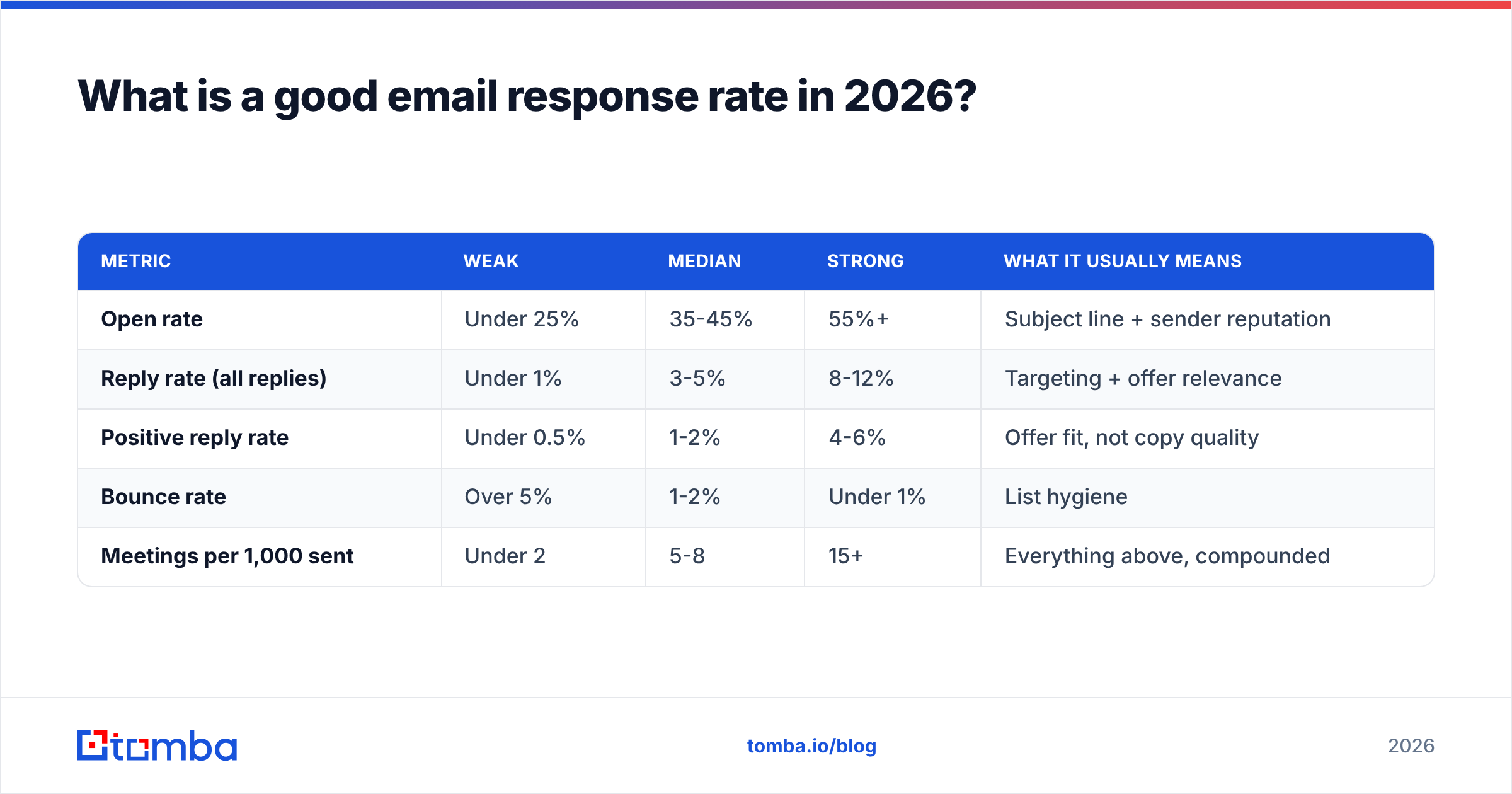
Start with an honest baseline, because most teams are benchmarking against numbers that were true in 2019.
| Metric | Weak | Median | Strong | What it usually means |
|---|---|---|---|---|
| Open rate | Under 25% | 35-45% | 55%+ | Subject line + sender reputation |
| Reply rate (all replies) | Under 1% | 3-5% | 8-12% | Targeting + offer relevance |
| Positive reply rate | Under 0.5% | 1-2% | 4-6% | Offer fit, not copy quality |
| Bounce rate | Over 5% | 1-2% | Under 1% | List hygiene |
| Meetings per 1,000 sent | Under 2 | 5-8 | 15+ | Everything above, compounded |
Two caveats. First, open rate is now close to meaningless as a standalone metric — Apple Mail Privacy Protection and corporate scanning gateways inflate it, sometimes by 20 points. Treat it as a directional signal for deliverability, not engagement. Second, "reply rate" without a positive/negative split is vanity. A 12% reply rate that is 90% "unsubscribe" is worse than a 4% rate that is half interested.
If you are under 1% total replies, stop optimizing copy. You have a list problem, a deliverability problem, or both. Copy A/B tests on a broken list produce noise.
Why did response rates drop so hard?#
Three compounding forces, and only one of them is about you.
1. Inbox provider filtering got stricter. Google and Yahoo's bulk-sender requirements — authenticated sending, one-click unsubscribe, spam complaints under 0.3% — went from "recommended" to enforced. Microsoft followed with similar rules for high-volume senders into Outlook. Mail that would have landed in Promotions in 2023 now goes to spam outright. Check the official Google bulk sender guidelines if you have not read them since they shipped.
2. Volume exploded. The average B2B decision-maker gets meaningfully more unsolicited email than three years ago, and the marginal email is worse — generated, not written. Attention per message collapsed.
3. Pattern recognition. Buyers now recognize sequence architecture. The "quick question" subject line, the {{first_name}} opener, the "worth a chat?" close, the breakup email — these are cultural artifacts at this point. Using them signals "you are #47 in a list of 3,000."

The uncomfortable implication: tactics that "work" do so partly because they are unusual. Any tactic that gets written up and adopted widely decays. That is why this post ranks levers by durability, not novelty.
What are the highest-impact levers to increase email response rate?#
Here are the eleven, grouped by where they sit on the effort/impact curve.
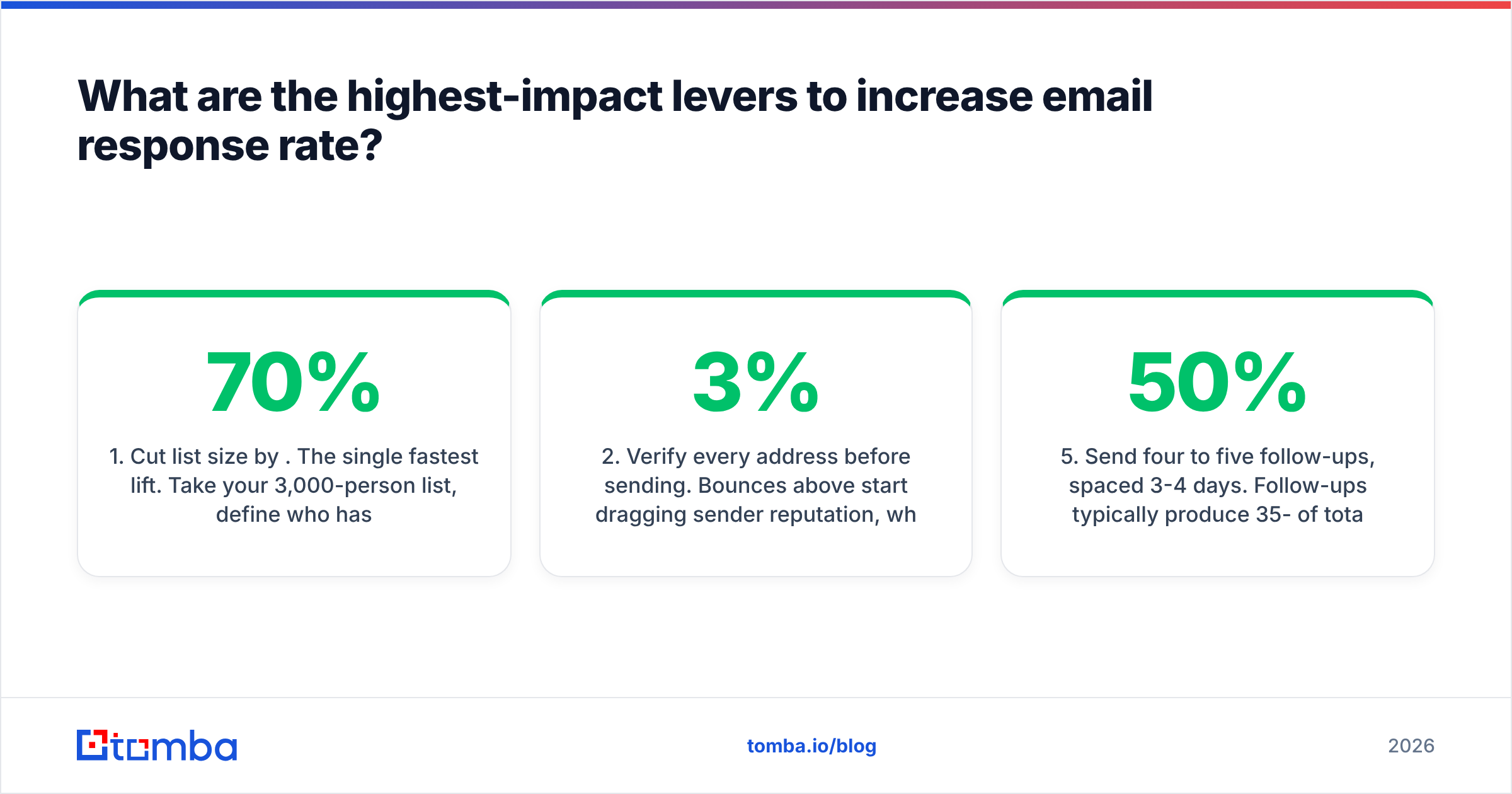
- Cut list size by 70%. The single fastest lift. Take your 3,000-person list, define who has actually bought from you in the last four quarters, and keep only the people matching that shape. A 900-person list with 8% replies beats 3,000 at 1.5% — same absolute replies, a fifth of the domain risk, and far better conversations.
- Verify every address before sending. Bounces above 3% start dragging sender reputation, which drags inbox placement, which caps replies regardless of copy quality. Run the list through an email verifier and drop anything not marked deliverable. Handle catch-all domains separately — a catch-all verifier tells you which of them are actually safe.
- Shorten the first email to under 90 words. Long first emails signal "I want something big." Short ones read like a colleague. The most reliable structure: one line establishing why them specifically, one line on the observed problem, one line asking a question they can answer in five words.
- Ask a question, not for a meeting. "Are you handling X in-house or outsourcing it?" gets answered. "Do you have 15 minutes Thursday?" gets ignored, because it asks for a commitment before establishing why. Meeting asks belong in email three, not email one.
- Send four to five follow-ups, spaced 3-4 days. Follow-ups typically produce 35-50% of total replies. Most teams send two. Each follow-up should add something — a new angle, a specific data point, a relevant customer — never "just bumping this up."
- Fix authentication before touching anything else. SPF, DKIM, and DMARC properly aligned. If your DMARC policy is
p=nonewith no reporting, you are flying blind. Run a quick SPF checker and confirm your record resolves in a single lookup chain. - Cap volume per mailbox at 30-50/day. Higher than that and even a warmed domain starts tripping heuristics. Scale with more mailboxes, not more per mailbox.
- Segment by trigger, not by title. "VP Marketing at 50-200 person SaaS" is a filter. "VP Marketing who posted a job for a demand gen hire in the last 21 days" is a reason to write. Trigger-based segments routinely double reply rates versus static firmographics.
- Write the subject line last, in lowercase, under five words. Match how a colleague would write it. "pricing page question" outperforms "Unlock 3x Pipeline Growth" by a wide margin in nearly every test worth trusting.
- Drop the calendar link from email one. It reads as presumptuous and adds a tracked link, which mildly hurts placement. Add it after they reply.
- Reply to negatives. "Not right now" is data. A polite "Understood — when does budget for this typically get reviewed?" converts a meaningful share of soft nos into calendared conversations two quarters out.
Items 1-3 are where the money is. If you only do three things this quarter, do those.
Does personalization still increase reply rates?#
Yes, but the definition changed, and this is where most teams waste their effort.
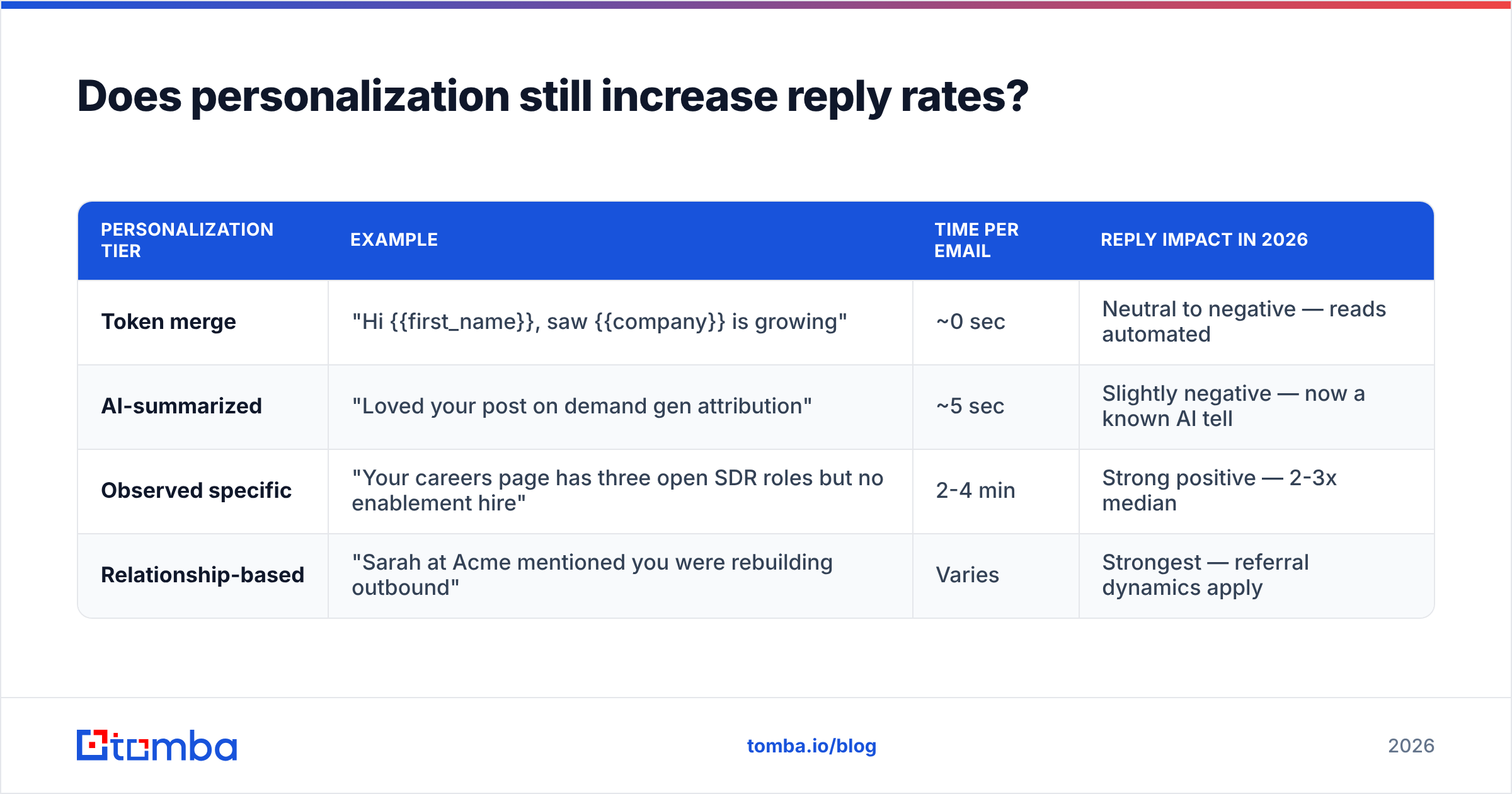
There are three tiers, and only two of them work now:
| Personalization tier | Example | Time per email | Reply impact in 2026 |
|---|---|---|---|
| Token merge | "Hi {{first_name}}, saw {{company}} is growing" | ~0 sec | Neutral to negative — reads automated |
| AI-summarized | "Loved your post on demand gen attribution" | ~5 sec | Slightly negative — now a known AI tell |
| Observed specific | "Your careers page has three open SDR roles but no enablement hire" | 2-4 min | Strong positive — 2-3x median |
| Relationship-based | "Sarah at Acme mentioned you were rebuilding outbound" | Varies | Strongest — referral dynamics apply |
The AI-summarized tier died fast. When every tool shipped "AI personalization" in the same eighteen months, prospects learned the pattern: a compliment about recent content followed by a pivot. It now actively signals automation.
What still works is observed specificity — something you noticed that required looking, and that connects to a problem you solve. Job postings, tech-stack changes, pricing page updates, a new office, a leadership hire. You can find much of this at scale: a website tech stack checker surfaces tooling changes, and data enrichment fills in headcount, funding, and role data so your segments are built on facts rather than guesses.
The practical compromise for teams that cannot spend four minutes per prospect: personalize the segment, not the individual. Write one genuinely specific email for 40 companies that all just hired a Head of RevOps. The specificity is real, the leverage is real, and the reply rate holds.
How much does deliverability actually affect response rate?#
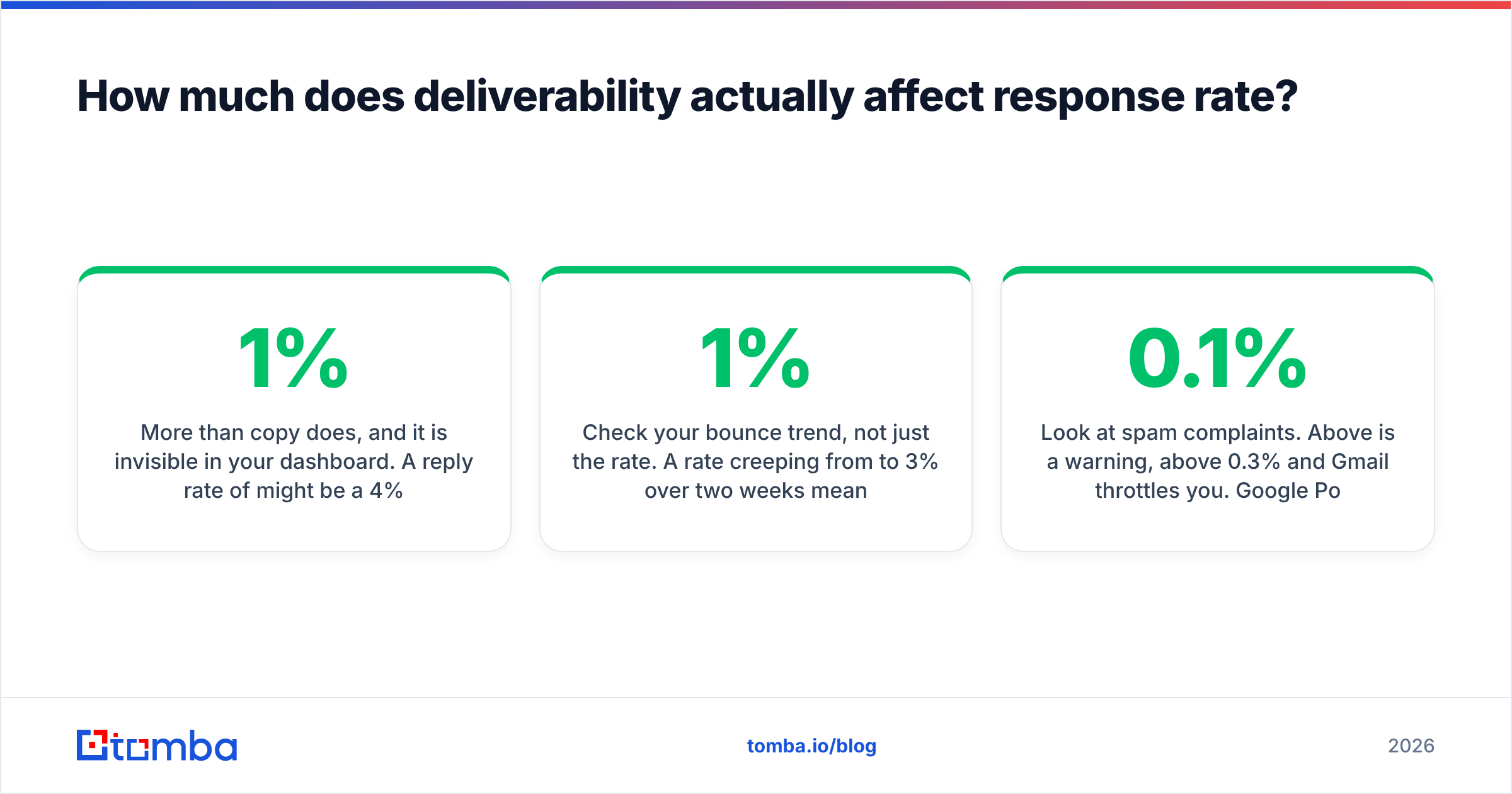
More than copy does, and it is invisible in your dashboard. A reply rate of 1% might be a 4% reply rate landing in 25% of inboxes.
Run this diagnostic before your next copy test:
- Send a seed test. Ten addresses across Gmail, Outlook, and a corporate domain. Where does it land? If more than two go to spam or Promotions, stop the campaign.
- Check your bounce trend, not just the rate. A rate creeping from 1% to 3% over two weeks means your list is aging or your source is decaying.
- Look at spam complaints. Above 0.1% is a warning, above 0.3% and Gmail throttles you. Google Postmaster Tools shows this for free.
- Verify domain age and warmup. A domain under 30 days old sending 50/day is a red flag pattern regardless of content.
- Audit link count. More than one link in a cold email, or any link shortener, measurably hurts placement.
Sender reputation is cumulative and slow to repair. Two weeks of high bounces can take two months to recover from. This asymmetry is why list verification is not optional — the cost of sending to a bad address is not one wasted email, it is a slice of your placement for every future email from that domain. If you want the mechanics in more depth, our glossary entry on email deliverability covers the underlying signals.

What does a high-reply email actually look like?#
Structure over cleverness. Here is a frame that consistently outperforms, with the reasoning attached:
Subject: sdr enablement — two words, lowercase, descriptive. No question mark, no curiosity gap.
Line 1 — the observed thing. "Saw you're hiring three SDRs this quarter but the enablement role has been open since June." No greeting flourish, no "hope you're well." You have earned attention by demonstrating you looked.
Line 2 — the implication, stated neutrally. "Usually means ramp time stretches to five months and the first cohort churns before quota." Do not claim to know their situation. Describe the pattern and let them correct you — correcting you is a reply.
Line 3 — a question they can answer without a meeting. "Are you building the ramp curriculum internally or bringing someone in?" Answerable in six words. No commitment implied.
Sign-off. Name. That is it. No signature block with four links, no banner image, no "P.S. check out our case study."
Total: 47 words. It does not read as a sequence because it is not shaped like one — no value prop paragraph, no social proof stack, no CTA button. And critically, it works without the reader knowing who you are, which is the actual test of a cold email.
For follow-ups, change the angle each time rather than restating. Email two: a specific customer with the same shape of problem and one number. Email three: a relevant resource with no ask attached. Email four: the direct meeting ask. Email five: a genuine close-out ("I'll stop here — if the timing shifts, I'm around"), which reliably produces replies from people who meant to respond and forgot.
If you want starting points rather than a blank page, our cold email templates library has frames per use case — but rewrite them. A template used verbatim is a template a thousand other people are also using verbatim.
What should you measure and how often?#
Weekly, three numbers, in this order of priority:
- Positive reply rate — the only number tied to revenue. Track it per segment, not per campaign, so you learn which ICP slices respond rather than which subject line won a coin flip.
- Bounce rate by list source — tells you which data source is decaying. If your scraped list bounces at 6% and your verified list bounces at 0.8%, that gap is your real cost of "free" data.
- Replies per follow-up position — if email four still produces replies, add a fifth. If it produces nothing, cut it and put the effort into targeting instead.
Do not A/B test copy until you have at least 400 sends per variant. Below that, you are reading noise and making confident decisions from it. Most teams run 100-send tests, declare a winner, and rebuild their sequence around random variation. Test the big things — offer, segment, first line — not button colors and comma placement. Vendor benchmark libraries like HubSpot's sales statistics roundup are useful for sanity-checking your numbers, but treat them as ranges, not targets; the underlying samples skew toward inbound-heavy teams.
One more discipline: keep a kill list. Any segment that has produced under 1% positive replies across 500+ sends gets retired. Sunk-cost persistence on a bad segment is the most common reason a good team's aggregate response rate stays flat while individual campaigns "look fine."
Where do you start if you only have one week?#
Day one and two: rebuild the list. Pull your closed-won accounts from the last four quarters, find the shared attributes, and build a new list from that shape only. Use domain search to pull contacts at target companies and confirm the email pattern before you generate a single address.
Day three: verify everything and split out catch-alls. Drop the risky ones.
Day four: check SPF, DKIM, DMARC, and run a seed test. Fix anything that lands outside the primary inbox before sending a real campaign.
Day five: write one email — 90 words, observed opener, answerable question — plus four follow-ups with distinct angles.
Day six and seven: send at 30/day per mailbox, then leave it alone for two weeks before judging anything.
That sequence gets most teams from under 1% to the 4-6% range without any copywriting talent required, because it fixes the layers underneath copy.
Better targeting and cleaner data are what actually move response rate — copy is the last 20%. If your list is the bottleneck, start there: Tomba's Email Finder finds professional addresses by domain, name, or company, with verification built into the same workflow so you are not paying for bounces. The free tier includes 25 searches per month to test your ICP hypothesis before committing, and paid plans start at $49/mo — see Tomba pricing for the full breakdown. Fix the list, then worry about the subject line.
Related guides#
// get started
Find, verify and enrich your first contacts today
Start on the free plan with 25 searches a month, then scale when your team is ready.
Free plan · No credit card required · GDPR & CCPA
// about the author