Inframail Alternatives: 7 Cold Email Infrastructure Tools
Inframail sells inboxes, domains and warmup in one flat-fee bundle. Here are seven alternatives compared on real cost per inbox, deliverability control, setup time, and who each one actually fits.
TL;DR
- Inframail sells the boring part of cold email: mailboxes, secondary domains, DNS records, and warmup, bundled into one flat monthly fee instead of per-seat billing.
- The strongest alternatives split into three camps: flat-fee inbox vendors (Mailforge, Maildoso, Zapmail, Mailscale), sequencer-bundled inboxes (Instantly, Smartlead), and DIY Google Workspace or Microsoft 365.
- Per-inbox math beats headline pricing. A $99/mo bundle is cheap at 40 mailboxes and expensive at 6.
- Provider matters more than brand. Microsoft-based infrastructure and Google-based infrastructure fail in different ways, and most vendors only give you one.
- No infrastructure vendor fixes a bad list. Bounce rate is a list problem, not a mailbox problem, so verify contacts before you blame the inboxes.
What is Inframail and what does it actually sell?#
Inframail is cold email infrastructure, not a cold email tool. You do not write sequences in it or track replies there. You buy sending capacity: mailboxes on secondary domains, with SPF, DKIM and DMARC pre-configured, handed over as SMTP/IMAP credentials you plug into whatever sequencer you already use.
The pitch is flat-fee pricing. Traditional mailbox licensing charges per user per month, so 40 mailboxes means 40 licenses. Inframail and its peers bundle a large block of mailboxes under one monthly price (Inframail's headline tier has sat around $99/mo; check their current page before budgeting, since this category re-prices constantly).
Think of it like renting a fleet of delivery vans versus buying each van separately. The fleet deal only wins if you actually drive all the vans.
That is the whole decision. Everything below is about whether the fleet fits your route.
Why do teams look for Inframail alternatives?#
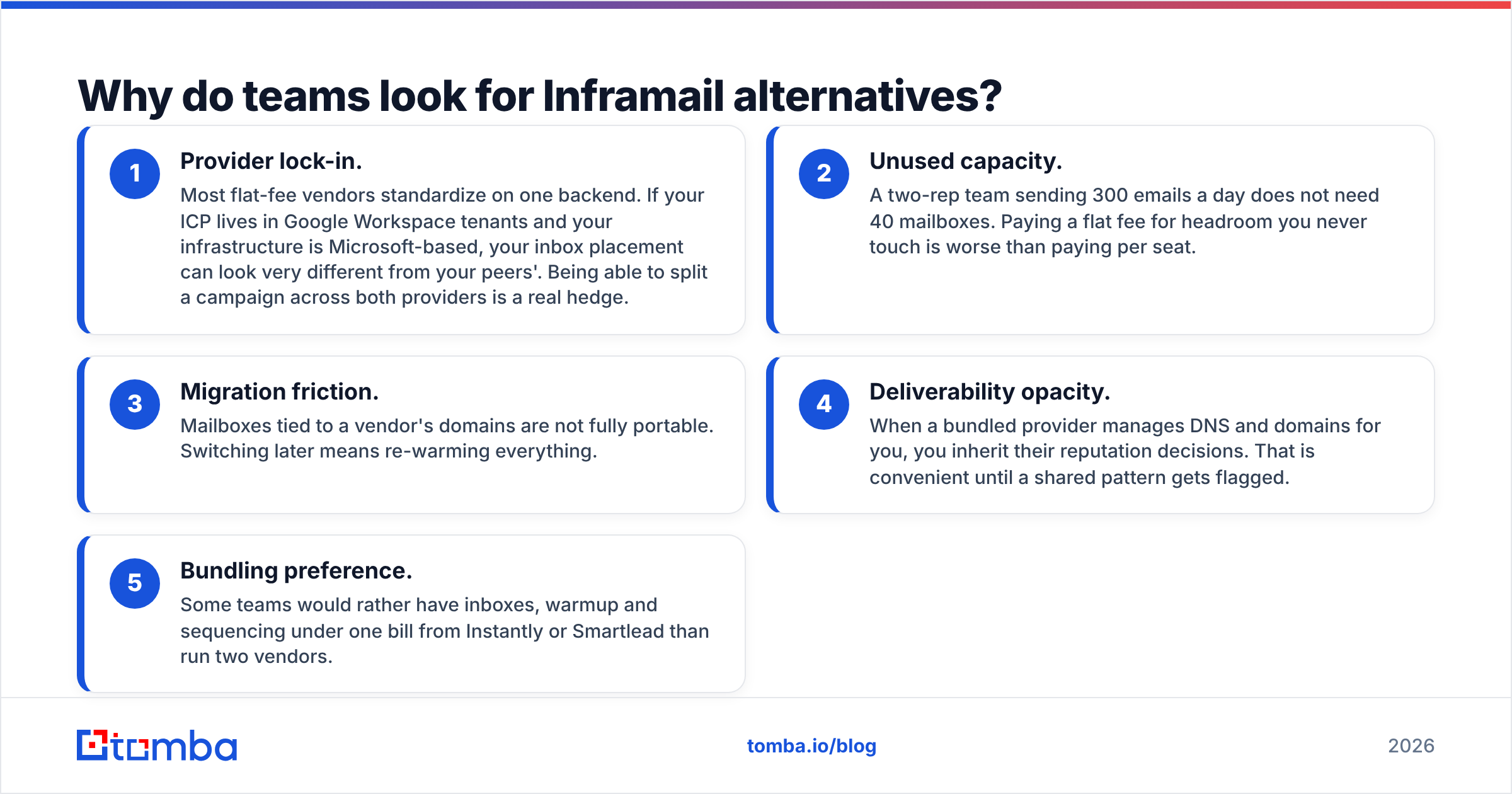
Five reasons come up repeatedly in procurement conversations:
- Provider lock-in. Most flat-fee vendors standardize on one backend. If your ICP lives in Google Workspace tenants and your infrastructure is Microsoft-based, your inbox placement can look very different from your peers'. Being able to split a campaign across both providers is a real hedge.
- Unused capacity. A two-rep team sending 300 emails a day does not need 40 mailboxes. Paying a flat fee for headroom you never touch is worse than paying per seat.
- Migration friction. Mailboxes tied to a vendor's domains are not fully portable. Switching later means re-warming everything.
- Deliverability opacity. When a bundled provider manages DNS and domains for you, you inherit their reputation decisions. That is convenient until a shared pattern gets flagged.
- Bundling preference. Some teams would rather have inboxes, warmup and sequencing under one bill from Instantly or Smartlead than run two vendors.

How does cold email infrastructure actually work?#
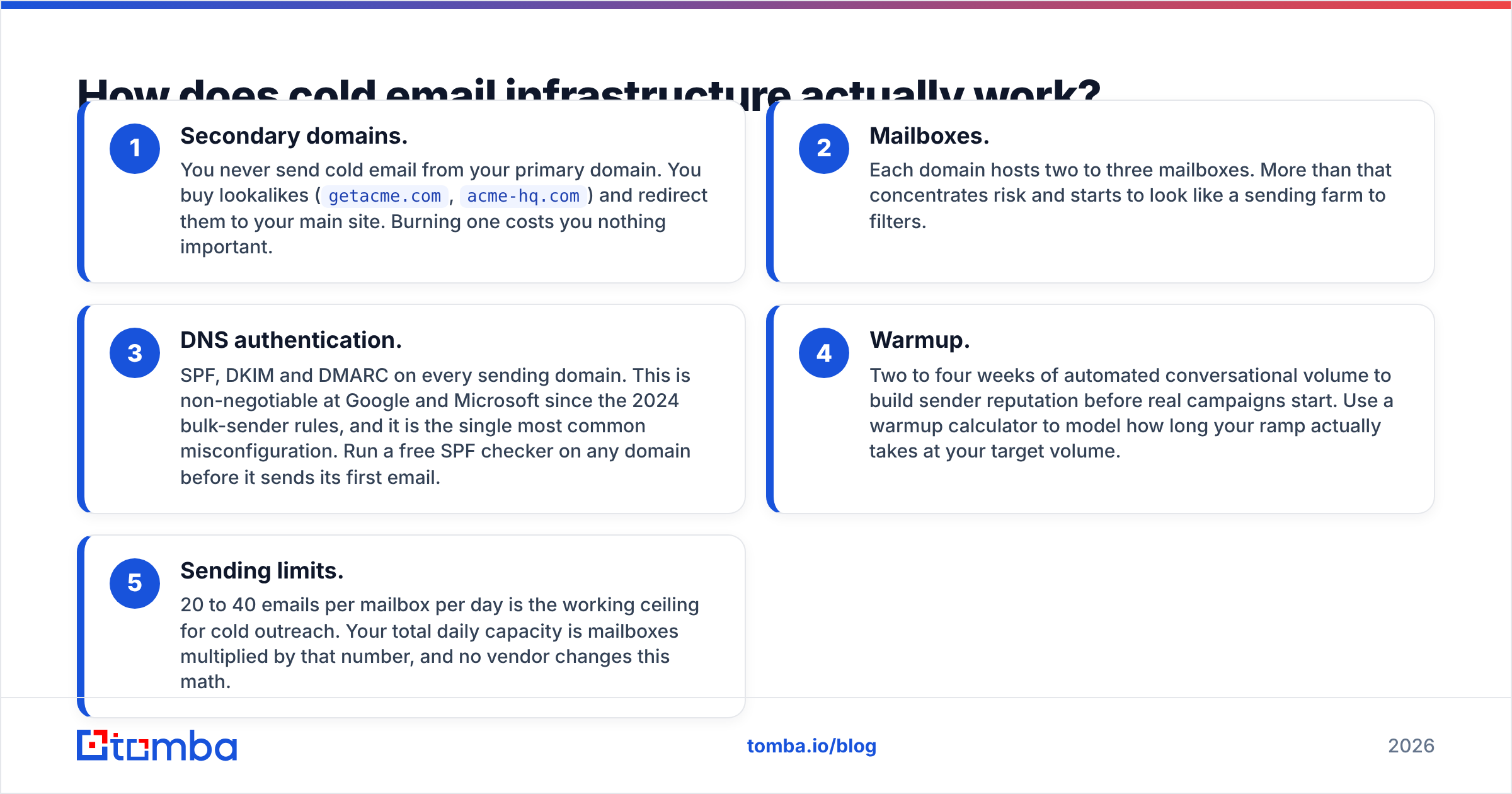
Before comparing vendors, get the stack straight. Every provider in this category is assembling the same five layers, and the differences live in which layers they own.
- Secondary domains. You never send cold email from your primary domain. You buy lookalikes (
getacme.com,acme-hq.com) and redirect them to your main site. Burning one costs you nothing important. - Mailboxes. Each domain hosts two to three mailboxes. More than that concentrates risk and starts to look like a sending farm to filters.
- DNS authentication. SPF, DKIM and DMARC on every sending domain. This is non-negotiable at Google and Microsoft since the 2024 bulk-sender rules, and it is the single most common misconfiguration. Run a free SPF checker on any domain before it sends its first email.
- Warmup. Two to four weeks of automated conversational volume to build sender reputation before real campaigns start. Use a warmup calculator to model how long your ramp actually takes at your target volume.
- Sending limits. 20 to 40 emails per mailbox per day is the working ceiling for cold outreach. Your total daily capacity is mailboxes multiplied by that number, and no vendor changes this math.
Vendors differ on how much of layers 1 through 4 they hand you pre-built. None of them can sell you a shortcut around layer 5.
What are the best Inframail alternatives in 2026?#
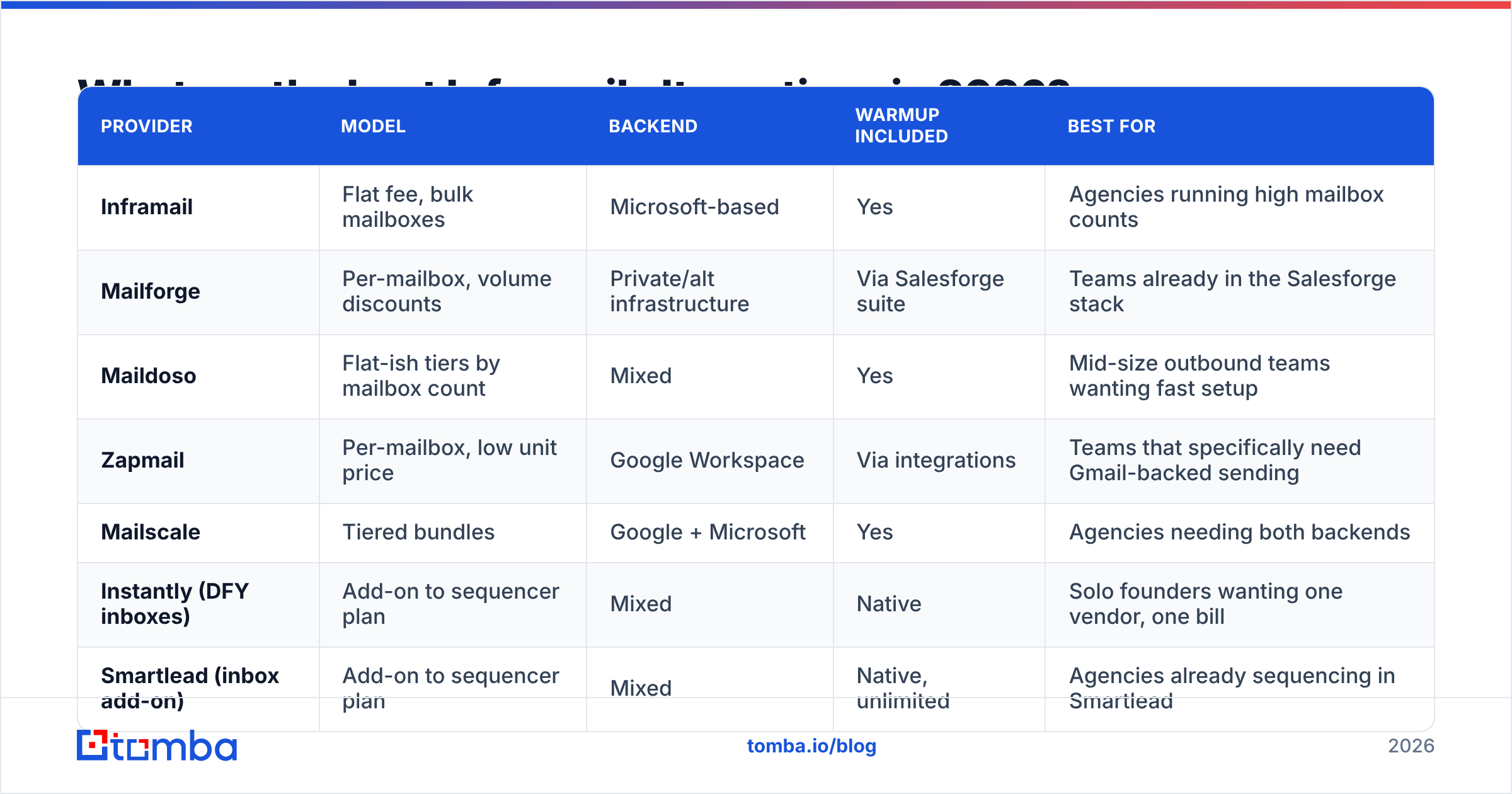
| Provider | Model | Backend | Warmup included | Best for |
|---|---|---|---|---|
| Inframail | Flat fee, bulk mailboxes | Microsoft-based | Yes | Agencies running high mailbox counts |
| Mailforge | Per-mailbox, volume discounts | Private/alt infrastructure | Via Salesforge suite | Teams already in the Salesforge stack |
| Maildoso | Flat-ish tiers by mailbox count | Mixed | Yes | Mid-size outbound teams wanting fast setup |
| Zapmail | Per-mailbox, low unit price | Google Workspace | Via integrations | Teams that specifically need Gmail-backed sending |
| Mailscale | Tiered bundles | Google + Microsoft | Yes | Agencies needing both backends |
| Instantly (DFY inboxes) | Add-on to sequencer plan | Mixed | Native | Solo founders wanting one vendor, one bill |
| Smartlead (inbox add-on) | Add-on to sequencer plan | Mixed | Native, unlimited | Agencies already sequencing in Smartlead |
| DIY Google Workspace / Microsoft 365 | Per user, per month | Native | No (buy separately) | Low-volume senders under 10 mailboxes |
Pricing in this category changes faster than any blog post can track. Treat the model column as durable and verify the numbers on each vendor's page.
Mailforge#
Mailforge (from the Salesforge family) sells mailboxes on infrastructure it controls rather than reselling Google or Microsoft seats. The advantage is unit cost at scale and fast provisioning. The trade-off is that you are not sending from a mainstream tenant, which some prospects' filters weigh differently. It is the natural pick if you already use Salesforge for sequencing.
Maildoso#
Maildoso targets the same buyer as Inframail — outbound teams that want mailboxes ready in minutes, not a DNS afternoon. Domains, mailboxes and records arrive configured. The differentiator is setup speed and support responsiveness rather than a fundamentally different architecture.
Zapmail#
Zapmail is the option for teams that specifically want Google Workspace mailboxes at below list price, provisioned in bulk. If your buyers are heavily Gmail-based and you have seen better placement from Google-to-Google sending, this is the closest alternative to "just buy Workspace" without the per-seat admin work.
Mailscale#

Mailscale's selling point is running both Google and Microsoft backends under one dashboard. That matters more than it sounds: you can A/B inbox placement by provider and shift volume toward whichever is landing this quarter. For agencies managing client campaigns across mixed ICPs, dual-backend is a genuine operational advantage.
Instantly and Smartlead inbox add-ons#
Both sequencers now sell done-for-you inboxes alongside their sending platform. You give up backend choice and portability, and you gain a single vendor, a single invoice, and warmup that is already wired into the sending engine. For a solo founder or a two-person team, that consolidation is usually worth more than the marginal per-inbox savings. If you outgrow the bundle, our Instantly alternative breakdown covers where the ceilings show up.
DIY Google Workspace or Microsoft 365#
Buying seats directly from Microsoft 365 or Google is the baseline everything else is measured against. You get the cleanest reputation story, full ownership of domains and mailboxes, and native admin controls. You also do all the work: register domains, configure DNS per domain, create users, buy warmup separately, and monitor each tenant in Gmail Postmaster Tools.
Is DIY Google Workspace cheaper than Inframail?#
Below roughly 10 mailboxes, yes. Above 25, almost never.
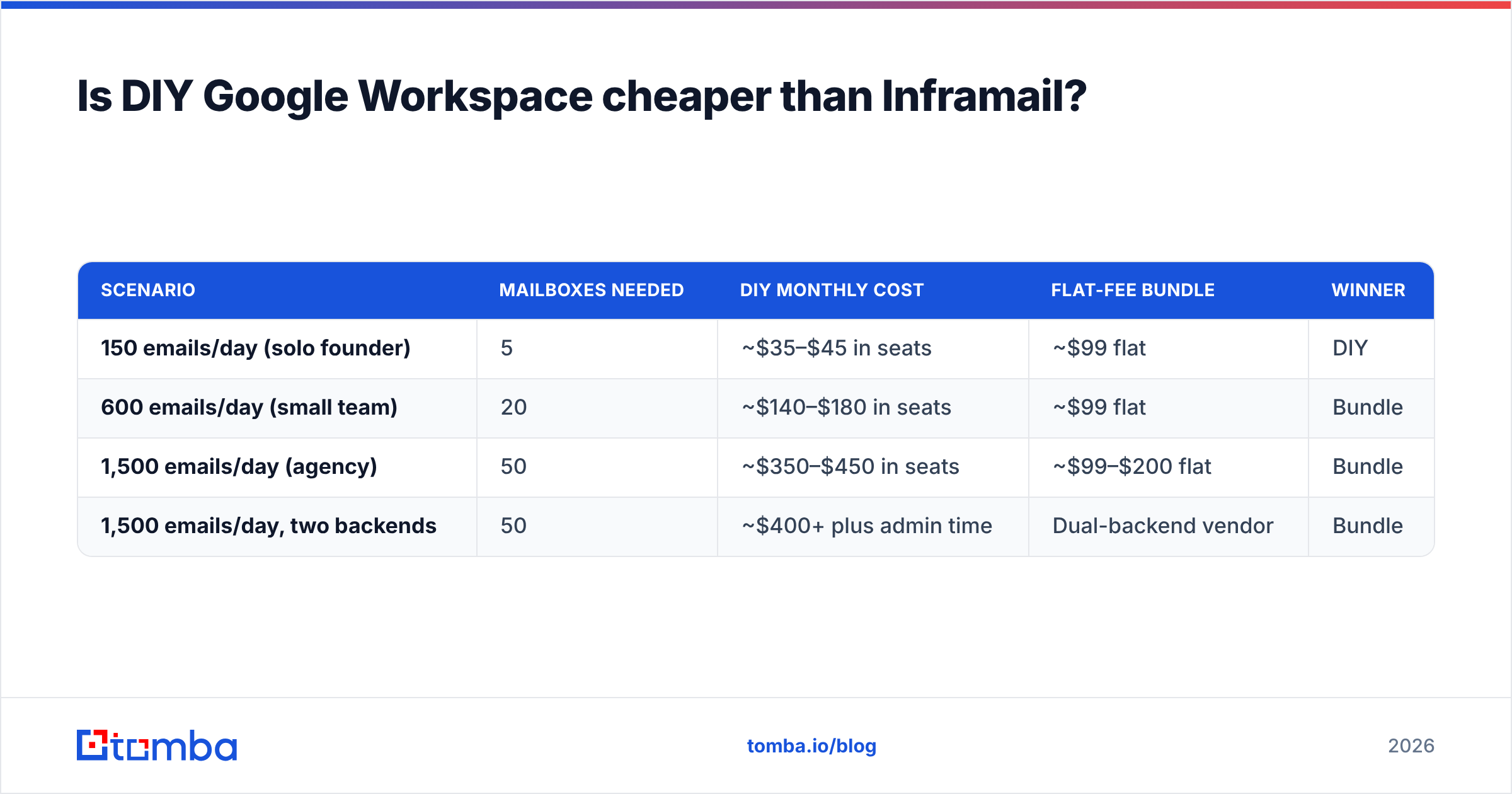
Run the arithmetic on your actual volume rather than the vendor's example. Take your target daily send, divide by 30 emails per mailbox per day, and that is your mailbox count. Then compare:
| Scenario | Mailboxes needed | DIY monthly cost | Flat-fee bundle | Winner |
|---|---|---|---|---|
| 150 emails/day (solo founder) | 5 | ~$35–$45 in seats | ~$99 flat | DIY |
| 600 emails/day (small team) | 20 | ~$140–$180 in seats | ~$99 flat | Bundle |
| 1,500 emails/day (agency) | 50 | ~$350–$450 in seats | ~$99–$200 flat | Bundle |
| 1,500 emails/day, two backends | 50 | ~$400+ plus admin time | Dual-backend vendor | Bundle |
The column DIY always loses is time. Fifty mailboxes across 20 domains is a full day of DNS work and a permanent maintenance surface. If your team's hourly rate is meaningful, that gap closes fast.

What should you check before switching providers?#
Run this list against any vendor on the shortlist. It separates the ones that survive a Google policy update from the ones that do not.
- Domain ownership. Are the secondary domains registered to you, or to the vendor? If you cannot transfer them out, you cannot leave without re-warming from zero.
- Backend disclosure. Ask directly whether mailboxes sit on Google, Microsoft, or private infrastructure. A vendor that will not answer is telling you something.
- IP and tenant sharing. How many other customers share the reputation pool your mailboxes live in? One bad neighbor can drag placement down.
- DMARC policy defaults. Check that new domains ship with a real DMARC record, not a placeholder.
p=noneis acceptable to start; missing entirely is not. - Export path. Can you pull mailbox credentials and connect them to any sequencer, or are they locked to the vendor's platform?
- Ramp policy. Does warmup run continuously alongside campaigns, or stop once sending starts? Continuous is better for long-running outbound.
Does better infrastructure fix a bad list?#
No, and this is where most infrastructure spending gets wasted.
Inbox providers judge you on engagement signals: bounces, spam complaints, deletes without opens. A hard bounce rate above 2–3% damages sender reputation regardless of how well your DNS is configured. Forty perfectly warmed mailboxes sending to a list that is 18% invalid will still degrade — the infrastructure just fails more expensively.
The order of operations matters:
- Source contacts from a defensible dataset. Providers like BookYourData sell verified B2B contacts outright, while tools like the Tomba Email Finder resolve contacts from a domain or a name when you are targeting specific accounts.
- Run the full list through an email verifier before it touches a sequencer. Catch-all domains need a separate verification pass, since a standard SMTP check accepts everything.
- Only then scale mailbox count.
Teams that invert this order buy infrastructure to solve a data problem, see no improvement, and conclude the vendor was bad. The vendor was fine. The list was the problem. For a deeper primer on how the signals interact, see our glossary entry on email deliverability.
Which Inframail alternative is right for you?#
Solo founder, under 300 emails/day. Buy 5–8 seats directly from Google or Microsoft, or take the Instantly/Smartlead inbox add-on for the convenience. Flat-fee bundles are overkill at this volume.
Small outbound team, 500–1,500 emails/day. This is the sweet spot for Inframail, Maildoso or Mailscale. The flat fee amortizes well, and you stop paying yourself to configure DNS records.
Agency running multiple client workspaces. Prioritize dual-backend support and clean domain ownership. Mailscale and Mailforge both do well here. Being able to isolate one client's reputation from another's is worth more than $20/mo in unit savings.
Team selling into enterprise Microsoft tenants. Test Microsoft-backed sending against Google-backed sending on the same list before committing. Placement differences between backends are real, measurable in a week, and entirely specific to your ICP.
Anyone with a bounce rate above 3%. Do not switch vendors yet. Fix the list first, re-measure, then decide whether infrastructure was ever the constraint.
The honest verdict#
Inframail is a reasonable product doing an unglamorous job, and the main reason to leave is fit, not quality. If you are under-using the bundle, need a backend it does not offer, or want domains you fully own, one of the seven alternatives above will serve you better. If you are running 30+ mailboxes on a single backend and it is landing, switching for the sake of switching is a bad trade — re-warming 30 mailboxes costs you three weeks of pipeline.
Pick infrastructure by volume, backend and portability. Then spend the energy you saved on the part that actually moves reply rate: who you email and whether the address is real.
Start with the data layer. Before you provision another mailbox, run your target accounts through the Tomba Email Finder to pull verified contacts by domain, name or company — then verify the whole list before your first send. The free tier covers 25 searches a month so you can test accuracy on your own ICP, and paid plans start at $49/mo on the Tomba pricing page. Clean contacts make cheap infrastructure look brilliant. Bad contacts make expensive infrastructure look broken.
Related guides#
// get started
Find, verify and enrich your first contacts today
Start on the free plan with 25 searches a month, then scale when your team is ready.
Free plan · No credit card required · GDPR & CCPA
// about the author