Infusionsoft Email Deliverability: The 2026 Fix Guide
Keap (formerly Infusionsoft) buries a lot of deliverability behind its own compliance layer. Here is what actually controls your inbox placement — and the fixes that move it fastest.
TL;DR
- Infusionsoft email deliverability is governed by two layers: the mailbox providers (Gmail, Yahoo, Microsoft) and Keap's own compliance system, which can throttle or suspend your account before Gmail ever sees the mail.
- The single biggest cause of sudden drops is list quality — Keap runs shared IP pools, so your bounces and complaints leak onto other senders' reputation and theirs onto yours.
- Authentication is non-negotiable in 2026: SPF, DKIM signed on your own domain, and a DMARC record with at least
p=noneand a reporting address. - Keap's contact statuses (Unconfirmed, Marketable, Opted-out, Hard Bounce) decide who is reachable at all — most "low open rate" problems are actually "half the list was never marketable" problems.
- Clean the list before you import, not after. Verifying addresses up front is cheaper than repairing a shared-IP reputation.
What is Infusionsoft email deliverability, exactly?#
Infusionsoft — rebranded as Keap years ago but still called Infusionsoft by most of its long-time users — is a CRM with marketing automation bolted on, not a pure email service provider. That distinction is the whole story.
When you send from a dedicated sending platform, your reputation is roughly yours. When you send from Infusionsoft, you are sending through infrastructure shared with thousands of other small businesses, under a compliance policy that Keap enforces aggressively because its own IP ranges are the asset being protected.
So "Infusionsoft email deliverability" means three separate things at once:
- Platform-level acceptance — will Keap let the broadcast go out at all, or will its automated review flag the list, the content, or the bounce rate first?
- Gateway acceptance — do Gmail, Yahoo, and Outlook accept the message from Keap's IPs on your behalf?
- Placement — does it land in Primary, Promotions, or Spam once accepted?
Most people only measure the third one, and only through open rates, which have been unreliable since Apple Mail Privacy Protection started pre-fetching images. You need the first two instrumented too.
Why does Keap deliverability break more often than ESP averages?#
Five structural reasons, in rough order of how often they bite:
- Shared IP pools by default. Your mail leaves on IPs shared with other Keap accounts. A neighbouring sender importing a scraped list degrades the pool for everyone on it. You cannot audit who your neighbours are.
- CRM data is old data. Infusionsoft accounts are frequently 5–10 years old. A contact record captured in 2018 has roughly a coin-flip chance of still being a live mailbox. B2B email decays at roughly 22–30% per year as people change jobs, and CRMs almost never prune.
- Automation sequences fire at dead addresses forever. A 12-step campaign built in 2019 keeps mailing a hard-bounced address unless someone explicitly built a goal to stop it. Repeat hits on invalid addresses are one of the clearest spam signals a mailbox provider tracks.
- Confirmed opt-in friction. Keap's compliance model wants confirmed opt-in for imported contacts. Teams work around it, mark contacts marketable manually, and then wonder why complaints spike.
- Content that reads like 2014. Heavy HTML templates, image-only emails, link shorteners, and a tracking domain that does not match the sending domain — all still common in legacy Infusionsoft templates, all still penalised.
None of these are fixable with a subject-line tweak. They are infrastructure and data problems.
What do Gmail, Yahoo, and Outlook require in 2026?#
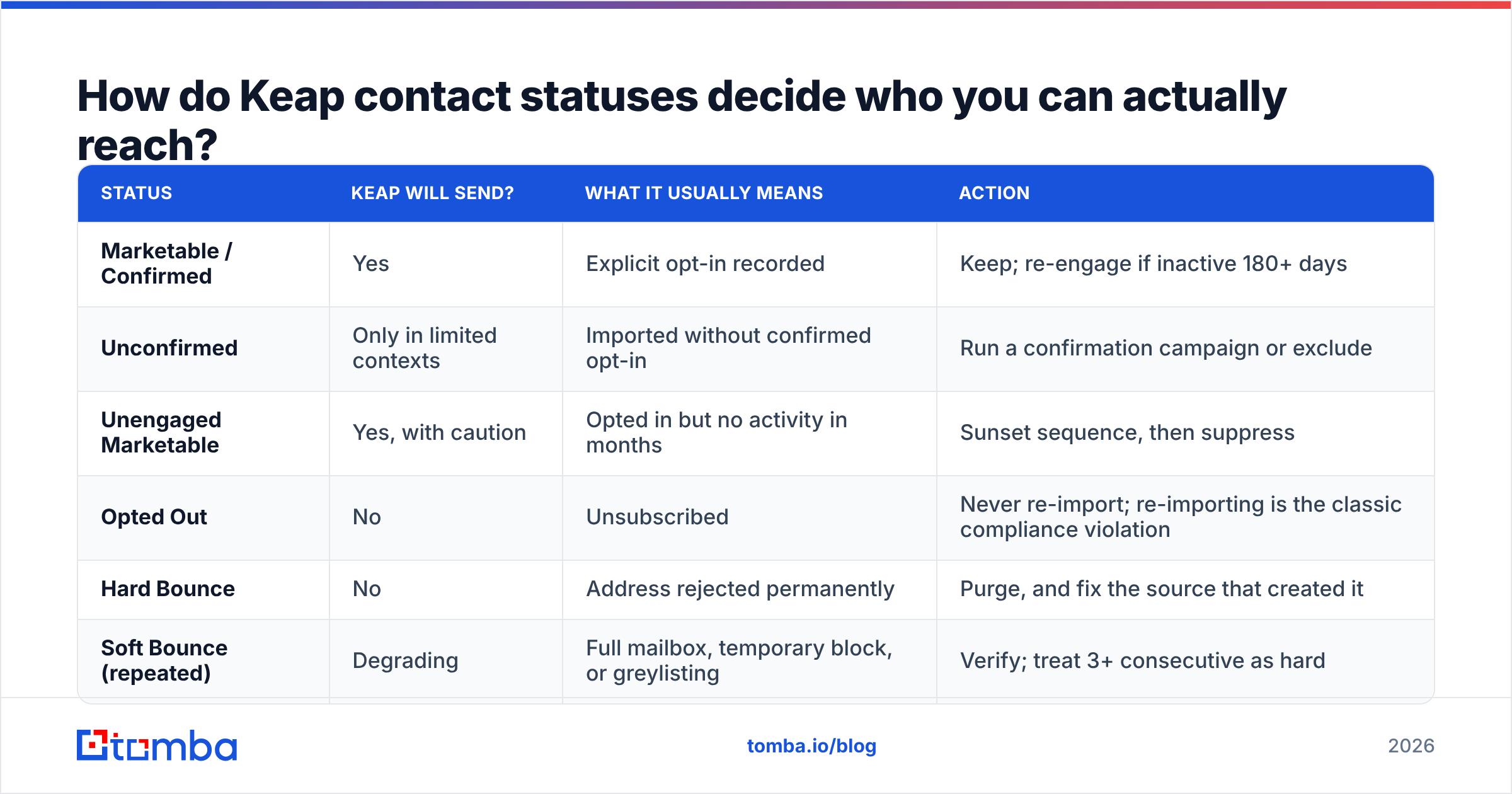
The bulk-sender rules that landed in February 2024 are now simply the floor, and Microsoft extended equivalent enforcement to Outlook.com consumer mail in 2025. If you send more than ~5,000 messages a day to any one of these, you are in scope.
| Requirement | Gmail | Yahoo | Outlook.com | Where you set it in Keap |
|---|---|---|---|---|
| SPF | Required | Required | Required | DNS at your registrar, per Keap's authentication guide |
| DKIM on your domain | Required | Required | Required | Keap Email Authentication / branded domain setup |
| DMARC record published | Required at 5k+/day | Required at 5k+/day | Required at 5k+/day | DNS (_dmarc.yourdomain.com) |
| Alignment (From domain matches SPF or DKIM) | Required | Required | Required | Use a branded sending domain, not a Keap default |
| One-click unsubscribe (RFC 8058) | Required | Required | Required | Keap footer merge fields + list-unsubscribe header |
| Spam complaint rate | Under 0.3%, ideally under 0.1% | Under 0.3% | Under 0.3% | Postmaster Tools / SNDS |
| Valid reverse DNS + TLS | Required | Required | Required | Handled by Keap |
Two notes that trip up Infusionsoft users specifically. First, publishing DMARC is your job, not Keap's — the platform can sign DKIM for you but it cannot create a DNS record in your zone. Run your domain through an SPF checker before you assume it is correct; a second v=spf1 record or more than ten DNS lookups silently voids the whole thing.
Second, "under 0.3%" is a ceiling, not a target. Google Postmaster Tools shows complaint rate per day, and anything sustained above 0.1% correlates with Promotions-tab relegation long before you hit an outright block. Sign up for it if you have not — it is free, and it is the only honest view of how Gmail sees you.
How do Keap contact statuses decide who you can actually reach?#
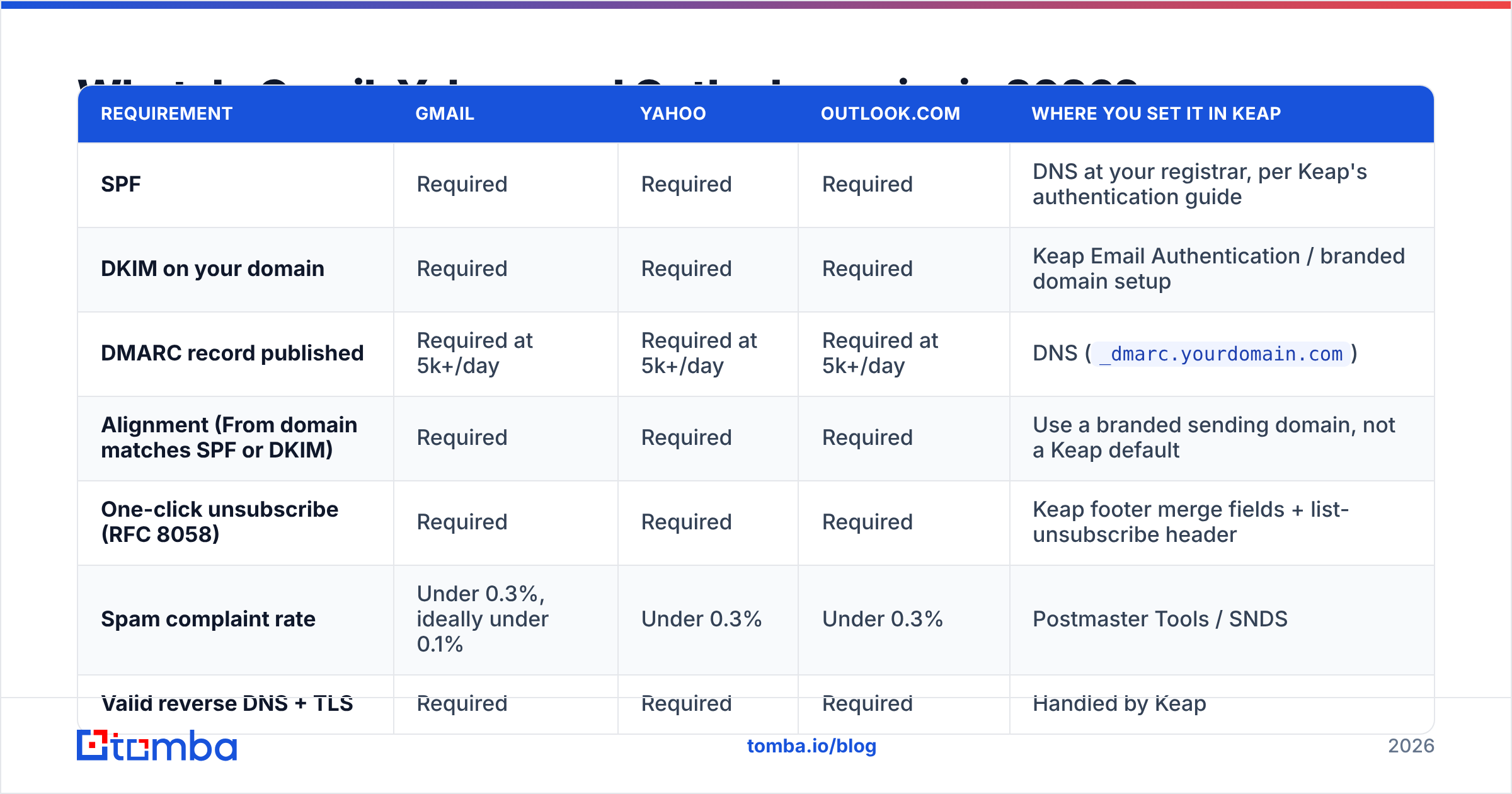
This is where most Infusionsoft audits find the real problem. Keap tracks an email status per address, and several of those statuses mean "we will never deliver to this person again", regardless of what your campaign reports say.
| Status | Keap will send? | What it usually means | Action |
|---|---|---|---|
| Marketable / Confirmed | Yes | Explicit opt-in recorded | Keep; re-engage if inactive 180+ days |
| Unconfirmed | Only in limited contexts | Imported without confirmed opt-in | Run a confirmation campaign or exclude |
| Unengaged Marketable | Yes, with caution | Opted in but no activity in months | Sunset sequence, then suppress |
| Opted Out | No | Unsubscribed | Never re-import; re-importing is the classic compliance violation |
| Hard Bounce | No | Address rejected permanently | Purge, and fix the source that created it |
| Soft Bounce (repeated) | Degrading | Full mailbox, temporary block, or greylisting | Verify; treat 3+ consecutive as hard |
Pull those counts before you touch anything else. A list of 40,000 contacts that is 55% Unconfirmed and 12% Hard Bounce is not a 40,000-person list — it is a 13,000-person list with a reputation liability attached.
The fix is unglamorous: export, verify, segment, re-import only the clean and consenting portion. A bulk email verifier run over the export will separate deliverable from invalid, catch-all, and role-based addresses in one pass. Role addresses (info@, sales@, admin@) deserve their own bucket — they rarely complain, but they rarely engage either, and engagement is now a ranking signal.
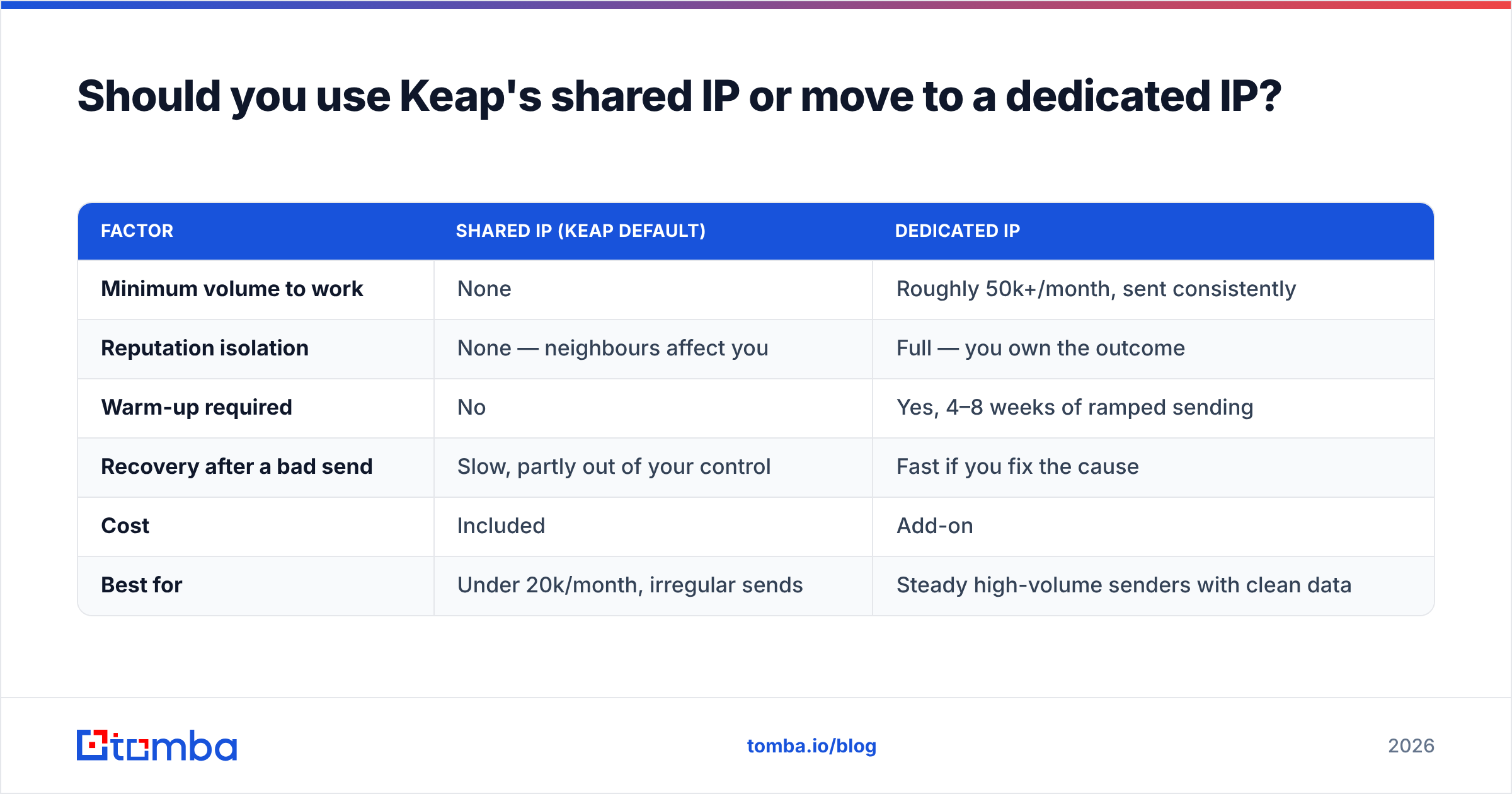
Should you use Keap's shared IP or move to a dedicated IP?#
Keap offers dedicated IP arrangements on higher-tier plans. Whether it helps depends almost entirely on volume consistency.
| Factor | Shared IP (Keap default) | Dedicated IP |
|---|---|---|
| Minimum volume to work | None | Roughly 50k+/month, sent consistently |
| Reputation isolation | None — neighbours affect you | Full — you own the outcome |
| Warm-up required | No | Yes, 4–8 weeks of ramped sending |
| Recovery after a bad send | Slow, partly out of your control | Fast if you fix the cause |
| Cost | Included | Add-on |
| Best for | Under 20k/month, irregular sends | Steady high-volume senders with clean data |
The trap: a dedicated IP with low or spiky volume performs worse than a shared pool, because mailbox providers have no established pattern for it and treat silence-then-spike as suspicious. If you send 8,000 emails one month and 40,000 the next, stay on the shared pool and fix your data instead.
How do you fix Infusionsoft deliverability in 30 days?#
A sequence that works, in order. Do not skip ahead — steps 3 and 4 are wasted if step 1 is broken.
- Days 1–2: Authenticate properly. Confirm SPF passes, DKIM is signed with your own domain (not a Keap shared domain), and DMARC exists with
rua=reporting. Set up a branded tracking/click domain so link hostnames match your From domain. Mismatched click domains are a persistent, under-diagnosed Promotions-tab cause. - Days 3–5: Audit the list. Export every contact with status, last open, last click, and date added. Verify the whole file. Anything invalid, hard-bounced, or opted-out gets suppressed permanently. Anything unconfirmed goes to a separate re-permission track.
- Days 6–10: Kill zombie automation. Walk every active campaign sequence. Add stop-goals on bounce and on unsubscribe. Find the sequences still mailing contacts added before 2022 and pause them.
- Days 11–20: Re-warm with your best segment. Send only to contacts who opened or clicked in the last 90 days. Plain-ish HTML, one clear link, real reply-to address. Hold volume flat, then increase ~25% every three days. Watch sender reputation in Postmaster Tools daily.
- Days 21–30: Re-engage the middle tier. Contacts inactive 90–365 days get a two-email sunset sequence with a genuine "still want these?" ask. No response, no more mail. Suppress, do not delete — you need the record so nobody re-imports them.
- Ongoing: Verify at the point of entry. Every new contact from a form, webinar, list purchase, or manual import gets verified before it becomes marketable. This is the difference between a one-time cleanup and a permanent fix.
Step 6 is the one that determines whether you are back here in nine months. Wiring verification into the intake path — via the Tomba API on form submission, or a bulk verify pass before any import — costs less per record than a single blocked send costs in pipeline.
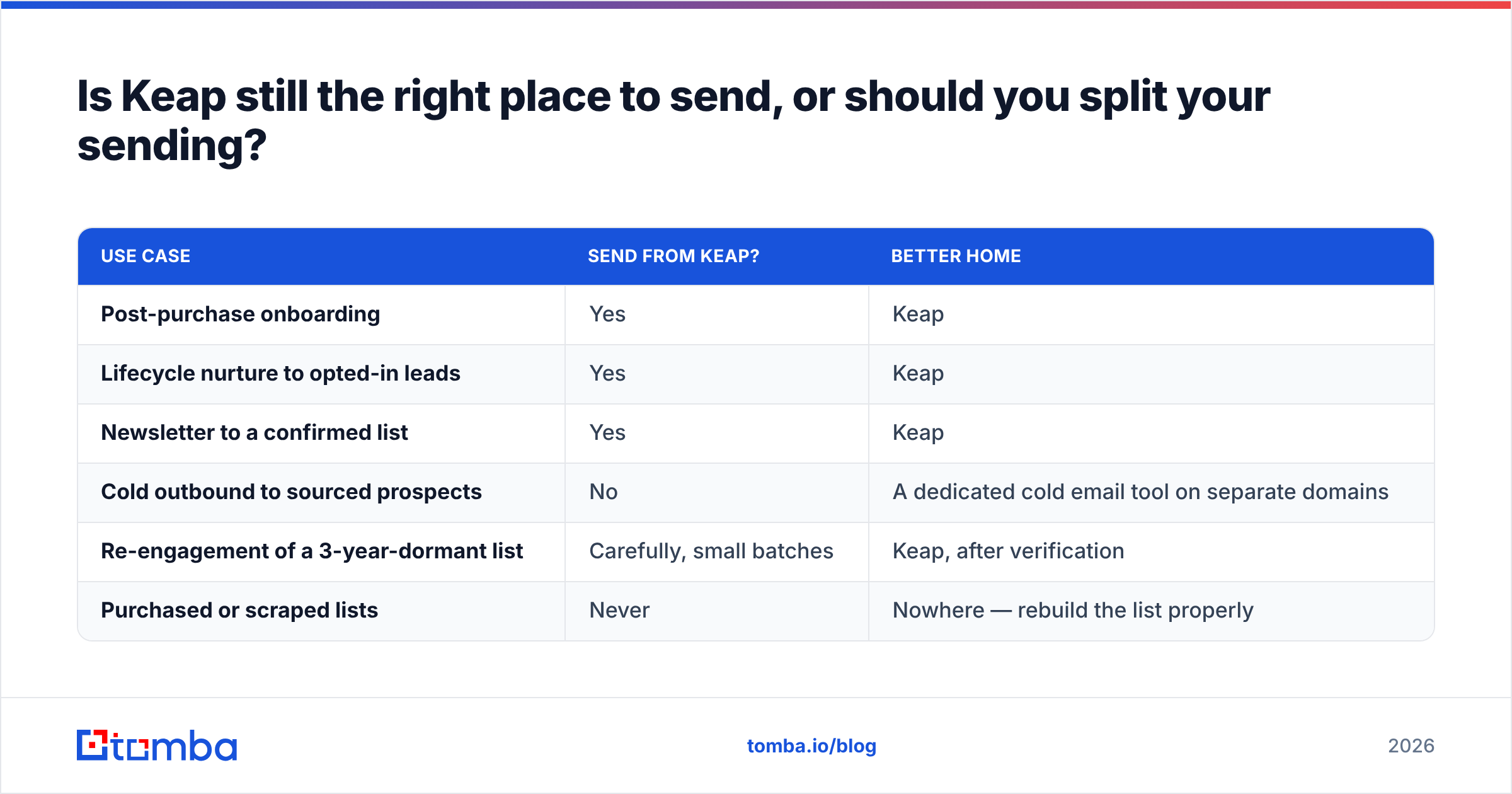
Is Keap still the right place to send, or should you split your sending?#
Honest answer: Keap is a good lifecycle and follow-up tool for people who already know you. It is a poor cold outreach tool, and trying to use it as one is the fastest way to burn an account.
| Use case | Send from Keap? | Better home |
|---|---|---|
| Post-purchase onboarding | Yes | Keap |
| Lifecycle nurture to opted-in leads | Yes | Keap |
| Newsletter to a confirmed list | Yes | Keap |
| Cold outbound to sourced prospects | No | A dedicated cold email tool on separate domains |
| Re-engagement of a 3-year-dormant list | Carefully, small batches | Keap, after verification |
| Purchased or scraped lists | Never | Nowhere — rebuild the list properly |
If you run both motions, run them on separate sending domains. A cold campaign that torches yourbrand.com also torches the invoices, receipts, and password resets going out from the same domain. Use getyourbrand.com or similar for outbound, keep the primary clean, and never cross them.
For teams evaluating whether the platform still fits, the honest comparison points are on G2 rather than vendor pages — pay attention to the deliverability-specific reviews, not the overall star rating.
What should you watch every week?#
Four numbers, tracked in a sheet, not in your head:
- Hard bounce rate per send. Target under 2%. Over 5% and you should expect Keap's compliance team to intervene.
- Spam complaint rate from Postmaster Tools. Target under 0.1%. Not Keap's number — Google's.
- Click rate, not open rate. Opens are inflated by privacy pre-fetching. Clicks still mean something.
- Percentage of list that is marketable and active in 90 days. If this falls below 25%, your next send is a reputation risk regardless of content.
Any single bad week is survivable. A trend is not — reputation damage compounds, and recovery from a Gmail spam-folder placement typically takes 4–8 weeks of disciplined sending, not a weekend of fixes.
Where to start#
If you inherited an Infusionsoft account with a big list and shaky numbers, do the boring thing first: export it, verify it, and only then decide what to send. Verification is the cheapest lever in the entire deliverability stack, and it is the one that makes every other fix actually work.
Tomba's email verifier handles bulk CRM exports with syntax, MX, SMTP, and catch-all checks in a single pass, and the Tomba Email Finder covers the other half of the problem — replacing the contacts who left, instead of mailing addresses that stopped existing three years ago. The free tier gives you 25 searches a month to test the data quality on your own records; paid plans start at $49/mo, with full Tomba pricing published up front. Clean data in, inbox placement out.
Related guides#
// get started
Find, verify and enrich your first contacts today
Start on the free plan with 25 searches a month, then scale when your team is ready.
Free plan · No credit card required · GDPR & CCPA
// about the author