Instantly Reviews 2026: Honest Pros, Cons, Pricing & Limits
Instantly is one of the most-recommended cold email platforms and one of the most misunderstood. Here is what its pricing, warmup, and built-in lead data actually deliver in 2026 — and where you will still need outside tools.
TL;DR
- Instantly is a cold email sending platform: unlimited connected mailboxes on paid plans, inbox rotation, warmup, a unified inbox, and campaign sequencing. It is genuinely good at that job.
- The sticker price is not the real price. Sending plans and lead-data credits are billed separately, so a realistic working setup lands well above the headline number most reviews quote.
- The most common complaints across review sites are consistent: support response times, credit/upsell confusion, and lead-data accuracy that varies a lot by industry and region.
- Warmup still helps, but after the 2024 Google and Yahoo bulk-sender rules, authentication, list hygiene, and complaint rate matter far more than warmup volume.
- Buy Instantly for sending infrastructure. Source and verify your contact data separately — that split is where most teams fix their bounce rate.
What is Instantly and who is it actually for?#
Instantly is an outbound email platform built around one idea: run many sending mailboxes at once, rotate between them, and keep each one under a safe daily volume. You connect Google Workspace, Microsoft 365, or SMTP mailboxes, load a lead list, write a sequence, and the platform spreads sends across every inbox you own.
That design tells you exactly who it fits. Agencies running outbound for a dozen clients, lead-gen shops, and founder-led sales teams sending thousands of emails a month get real leverage from it. A five-person team sending 200 highly personalised emails a month does not — a simpler tool or even a CRM sequencer covers that.
Instantly has also expanded well past sending. There is a B2B lead database, a deliverability monitoring suite, a light CRM, and AI copy assistance. That expansion is the source of most confusion in current Instantly reviews: buyers read "$37/mo," sign up, and then discover the lead credits they need sit on a separate subscription.

What does Instantly actually do well?#
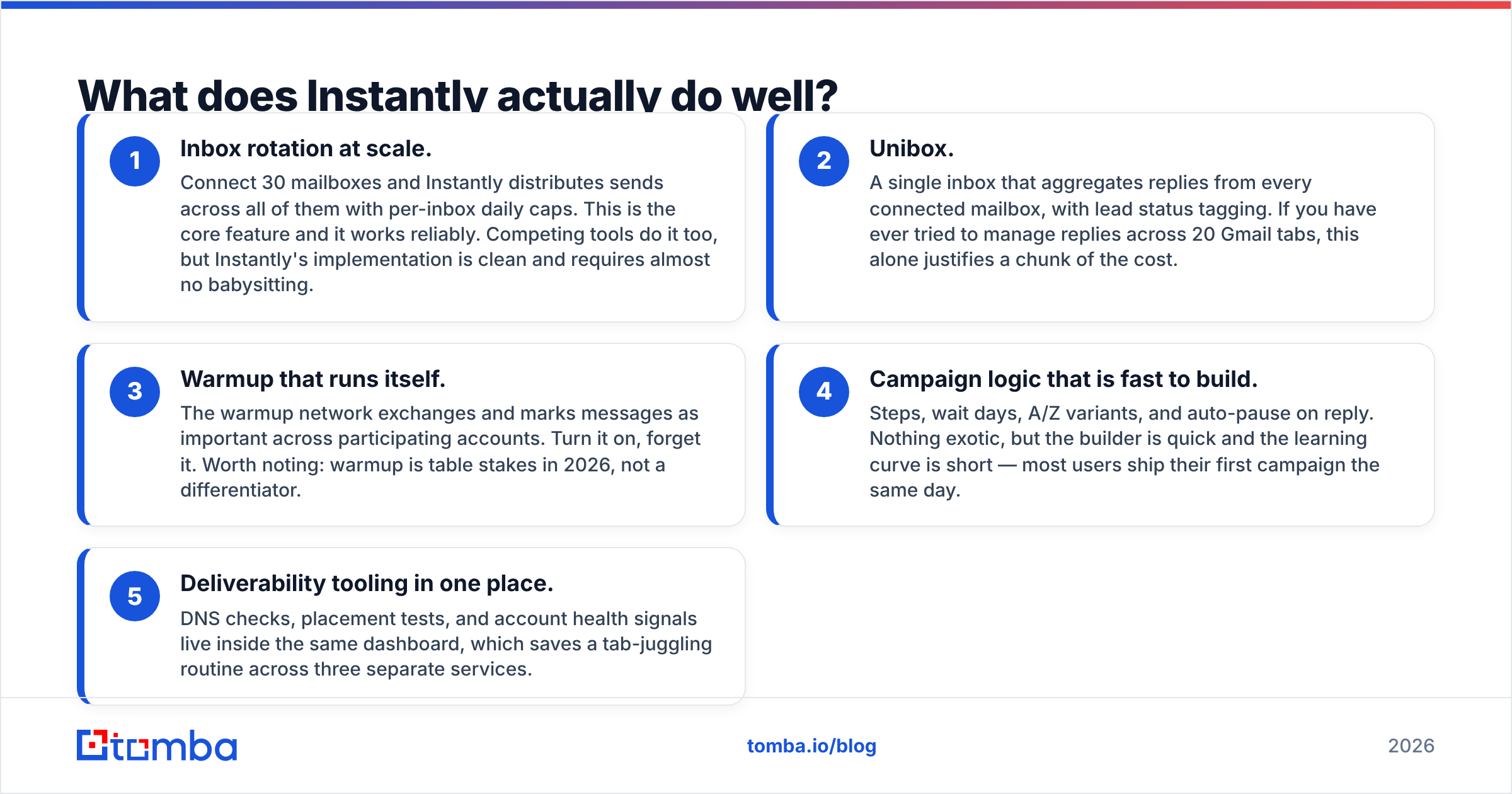
Strip away the marketing and five things hold up under real use:
- Inbox rotation at scale. Connect 30 mailboxes and Instantly distributes sends across all of them with per-inbox daily caps. This is the core feature and it works reliably. Competing tools do it too, but Instantly's implementation is clean and requires almost no babysitting.
- Unibox. A single inbox that aggregates replies from every connected mailbox, with lead status tagging. If you have ever tried to manage replies across 20 Gmail tabs, this alone justifies a chunk of the cost.
- Warmup that runs itself. The warmup network exchanges and marks messages as important across participating accounts. Turn it on, forget it. Worth noting: warmup is table stakes in 2026, not a differentiator.
- Campaign logic that is fast to build. Steps, wait days, A/Z variants, and auto-pause on reply. Nothing exotic, but the builder is quick and the learning curve is short — most users ship their first campaign the same day.
- Deliverability tooling in one place. DNS checks, placement tests, and account health signals live inside the same dashboard, which saves a tab-juggling routine across three separate services.
That is a strong core. The criticisms below are about everything wrapped around it.
What do real Instantly reviews complain about in 2026?#
Read enough verified reviews on G2 and Capterra and the same four themes repeat.
Support latency. The most frequent complaint by volume. Support is primarily chat and email, and paid tiers do not guarantee a fast human. When a mailbox disconnects mid-campaign, a 24-hour wait is expensive.
Credit model confusion. Sending plans, lead credits, verification credits, and the deliverability suite are separate purchases. Buyers routinely report an expected bill that doubled once they added the data layer.
Lead database accuracy varies. The built-in database is large, but coverage is uneven. US tech and SaaS contacts are solid. European SMBs, non-English markets, and niche verticals return noticeably thinner results and more stale titles. If you export without verifying, bounce rates climb fast.
Account disconnects and sync hiccups. Google and Microsoft OAuth tokens drop periodically. Instantly is not uniquely bad here, but at 30 mailboxes the failure rate becomes visible.
None of these are dealbreakers on their own. Together they explain why experienced operators treat Instantly as a sending layer and bring their own data.
How much does Instantly really cost?#
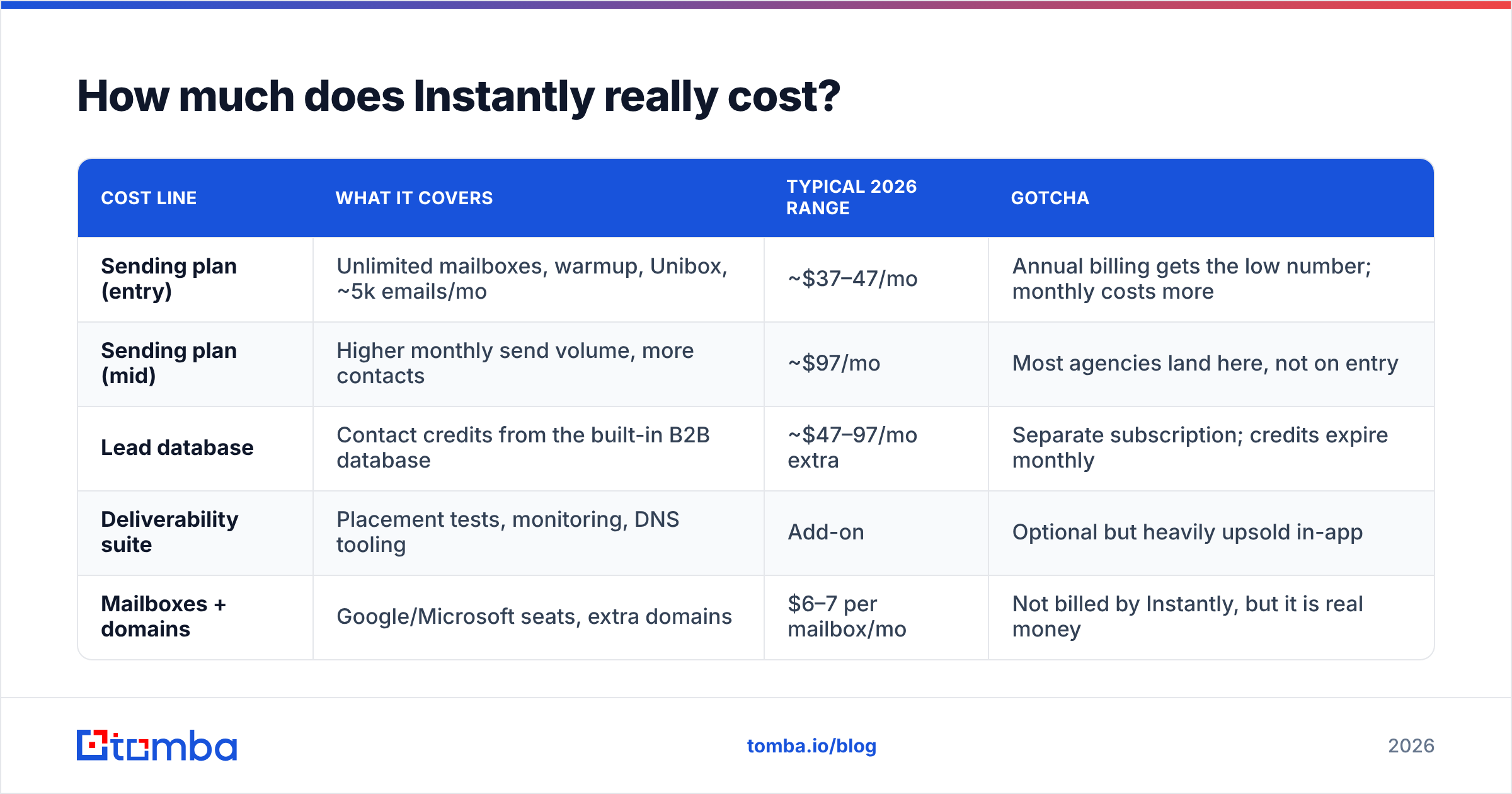
Pricing moves, so treat the table below as a shape rather than a quote — confirm current numbers on the vendor's own pricing page before you buy. The point is the structure: sending and data are two bills, not one.
| Cost line | What it covers | Typical 2026 range | Gotcha |
|---|---|---|---|
| Sending plan (entry) | Unlimited mailboxes, warmup, Unibox, ~5k emails/mo | ~$37–47/mo | Annual billing gets the low number; monthly costs more |
| Sending plan (mid) | Higher monthly send volume, more contacts | ~$97/mo | Most agencies land here, not on entry |
| Lead database | Contact credits from the built-in B2B database | ~$47–97/mo extra | Separate subscription; credits expire monthly |
| Deliverability suite | Placement tests, monitoring, DNS tooling | Add-on | Optional but heavily upsold in-app |
| Mailboxes + domains | Google/Microsoft seats, extra domains | $6–7 per mailbox/mo | Not billed by Instantly, but it is real money |
Run the maths on a realistic agency setup: mid-tier sending, a lead plan, and 20 mailboxes across four domains. You are comfortably past $300/month before a single reply lands. That is not an argument against buying — it is an argument against budgeting off the headline price.
How does Instantly compare to other cold email platforms?#
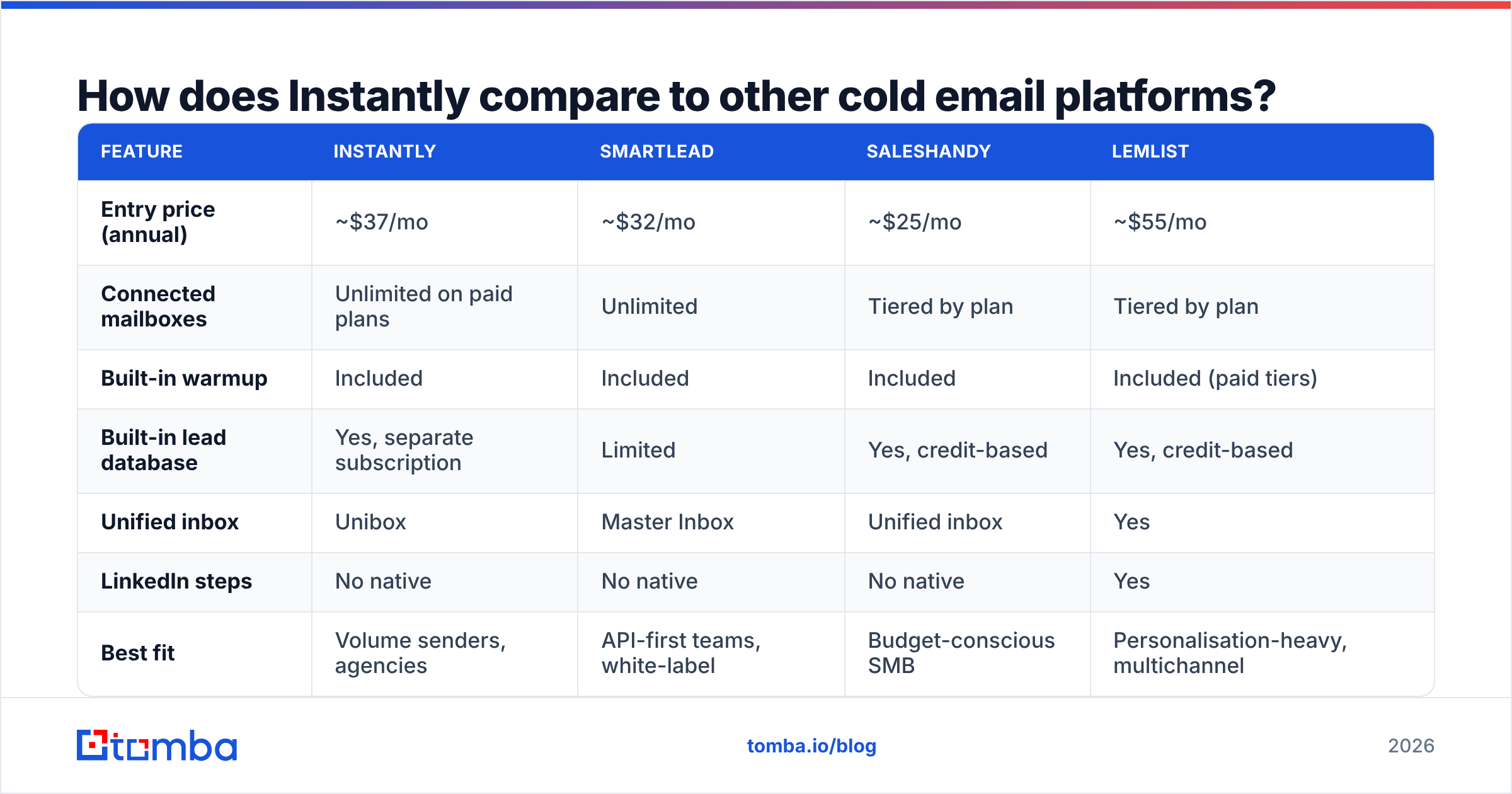
The sending-tool market has converged. Every serious player now offers inbox rotation, warmup, a unified inbox, and sequence logic. Differences show up in pricing model, data strategy, and support.
| Feature | Instantly | Smartlead | Saleshandy | lemlist |
|---|---|---|---|---|
| Entry price (annual) | ~$37/mo | ~$32/mo | ~$25/mo | ~$55/mo |
| Connected mailboxes | Unlimited on paid plans | Unlimited | Tiered by plan | Tiered by plan |
| Built-in warmup | Included | Included | Included | Included (paid tiers) |
| Built-in lead database | Yes, separate subscription | Limited | Yes, credit-based | Yes, credit-based |
| Unified inbox | Unibox | Master Inbox | Unified inbox | Yes |
| LinkedIn steps | No native | No native | No native | Yes |
| Best fit | Volume senders, agencies | API-first teams, white-label | Budget-conscious SMB | Personalisation-heavy, multichannel |
| Main criticism | Support speed, credit upsells | UI depth | Feature ceiling at scale | Price per seat |
Read that table honestly and the verdict is boring: for pure sending volume, Instantly and Smartlead are close substitutes, Saleshandy undercuts both, and lemlist wins if you need LinkedIn touches and image personalisation in the same sequence. If you are weighing the switch, our Instantly alternative breakdown goes deeper on migration friction.
What none of them solve well is the input. Every platform on that list sends what you give it.
Is Instantly's warmup enough for deliverability in 2026?#
No — and that is not really Instantly's fault.
Since Google and Yahoo tightened bulk-sender requirements, the levers that decide inbox placement changed. Read the Google sender guidelines and the priorities are explicit: SPF and DKIM alignment, a DMARC record, one-click unsubscribe on bulk mail, and a spam complaint rate held under 0.3%. Warmup volume is not on that list.
Here is the practical order of operations, ranked by actual impact on email deliverability:
- Authentication first. SPF, DKIM, DMARC on every sending domain. A missing SPF record will sink a campaign that has perfect copy.
- List hygiene second. Bounces above roughly 3% damage sender reputation directly. This is the single biggest lever most teams ignore.
- Complaint rate third. One aggressive subject line across 5,000 unverified contacts can push you over the threshold in a week.
- Volume ramp fourth. Warmup and gradual scaling matter, but only after the first three are clean. If you want a sane ramp schedule, run the numbers through a warmup calculator instead of guessing.
Instantly handles the fourth item well and gives you tooling for the first. Items two and three are on you.

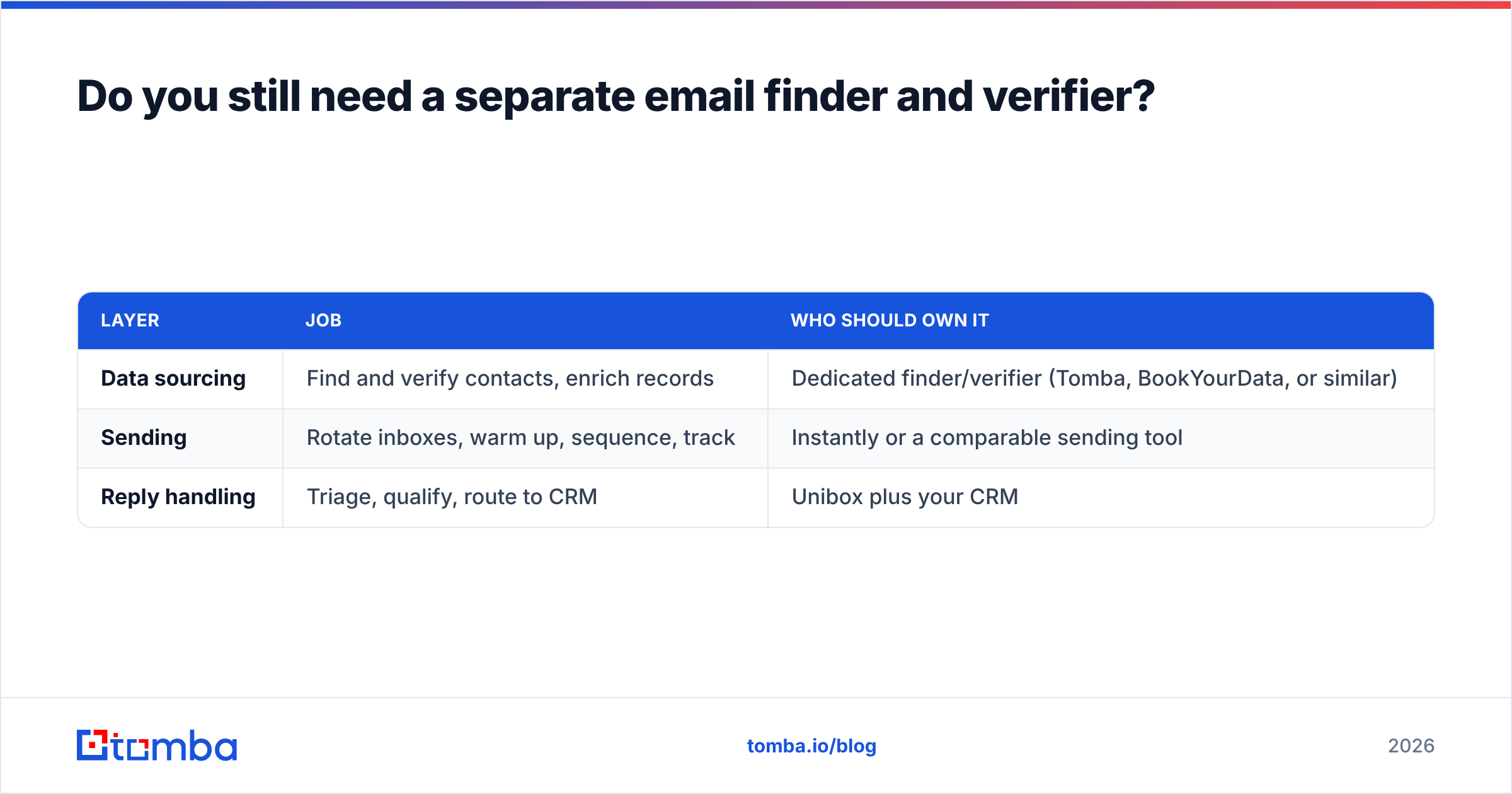
Do you still need a separate email finder and verifier?#
In almost every case, yes — and this is the most useful thing to take from any Instantly review.
Bundled lead databases inside sending platforms exist to reduce checkout friction, not to win accuracy benchmarks. They are refreshed on the vendor's schedule, they rarely expose their sources, and the credits expire whether you use them or not. When the data is stale, the platform still sends, and your domain absorbs the bounce.
A cleaner architecture separates the two jobs:
| Layer | Job | Who should own it |
|---|---|---|
| Data sourcing | Find and verify contacts, enrich records | Dedicated finder/verifier (Tomba, BookYourData, or similar) |
| Sending | Rotate inboxes, warm up, sequence, track | Instantly or a comparable sending tool |
| Reply handling | Triage, qualify, route to CRM | Unibox plus your CRM |
Both approaches to sourcing are legitimate. A curated database like BookYourData suits teams that want to buy a clean list by ICP filters and move on. A real-time email finder suits teams building lists continuously from domains, LinkedIn profiles, or scraped company sets — it looks the address up fresh rather than serving whatever was cached last quarter.
Whichever you choose, verify before import. Running a list through an email verifier ahead of upload typically strips 8–20% of a scraped list — catch-alls, role accounts, and contacts who left six months ago. That deletion is the cheapest deliverability work you will ever do. For larger lists, a bulk verify pass before each campaign launch is worth building into your checklist.
Who should buy Instantly, and who should skip it?#
Buy it if:
- You send more than roughly 2,000 cold emails a month and need inbox rotation to do it safely.
- You run outbound for multiple clients or brands and want one dashboard across all of them.
- You value speed to first campaign over deep customisation.
- You already have a data source you trust and just need infrastructure.
Skip it if:
- Your outbound is under a few hundred emails a month. Your CRM's sequencer is enough.
- You need LinkedIn and email in the same automated sequence — look at multichannel tools instead.
- You need guaranteed same-day support. Check the SLA before you commit.
- You expected the built-in database to replace a dedicated data vendor. It will not, in most verticals.
What is the honest verdict on Instantly?#
Instantly is a good sending platform with an aggressive upsell layer attached. The core product — rotation, warmup, Unibox, sequencing — is mature, stable, and fast to learn. The friction shows up in billing structure, support responsiveness, and a lead database that flatters US tech data and struggles elsewhere.
If you go in treating it as infrastructure rather than an end-to-end outbound solution, you will be happy with it. If you go in expecting the bundled data to carry your campaigns, you will be writing a one-star review about bounce rates in three months.
The teams getting the best results follow the same pattern: source and verify contacts with a dedicated tool, import a clean list, then let Instantly handle delivery. Two tools, two clear jobs, no ambiguity about which one to blame when numbers slip.
Start with the input. Use Tomba's Email Finder to build verified contact lists from any domain, name, or company before they ever reach a sending platform — with real-time verification and transparent sourcing. The free tier covers 25 searches a month, and paid Tomba plans start at $49/month with bulk processing, an API, and catch-all handling included. Clean data in, fewer bounces out.
Related guides#
// get started
Find, verify and enrich your first contacts today
Start on the free plan with 25 searches a month, then scale when your team is ready.
Free plan · No credit card required · GDPR & CCPA
// about the author