Introduce Yourself to Client Email: Templates That Work
A self-introduction email to a client gets about eight seconds of attention. Here is the structure, six templates, and the deliverability checks that decide whether your intro lands in the inbox or the spam folder.
TL;DR
- A self-introduction email is not an "about me" email. It is a relevance email with your name attached — the client should understand why you are writing before they understand who you are.
- The four-part structure that works: specific trigger, one-line credibility, one concrete value statement, one low-friction ask. Everything else is decoration.
- Length beats eloquence. Intro emails under 120 words consistently outperform long ones, because the reply decision happens on a phone screen in under ten seconds.
- Your send infrastructure matters as much as your copy. A perfect intro to a mistyped or catch-all address is a bounce, and bounces damage the domain you need for every future client.
- Follow up twice, on days 3 and 8, with new information each time. Most replies to introduction emails arrive on the second or third touch, not the first.
What Is an "Introduce Yourself to Client" Email, Exactly?#
It is the first written contact between you and someone who could pay you money, and it has exactly one job: earn a reply that opens a conversation.
Think of it like walking into a room where someone is already busy. You do not start with your résumé. You start with the reason you are standing at their desk. The résumé comes later, and only if they ask.
That framing kills the most common failure mode immediately. Most people writing an introduction email lead with identity — "My name is X, I'm the new account manager at Y, I've been in the industry for eleven years." All true, all irrelevant to a person who has not yet decided whether you are worth thirty seconds. Identity is the cost of the email. Relevance is the payment.
There are three distinct situations that get lumped together under the same phrase, and they need different emails:
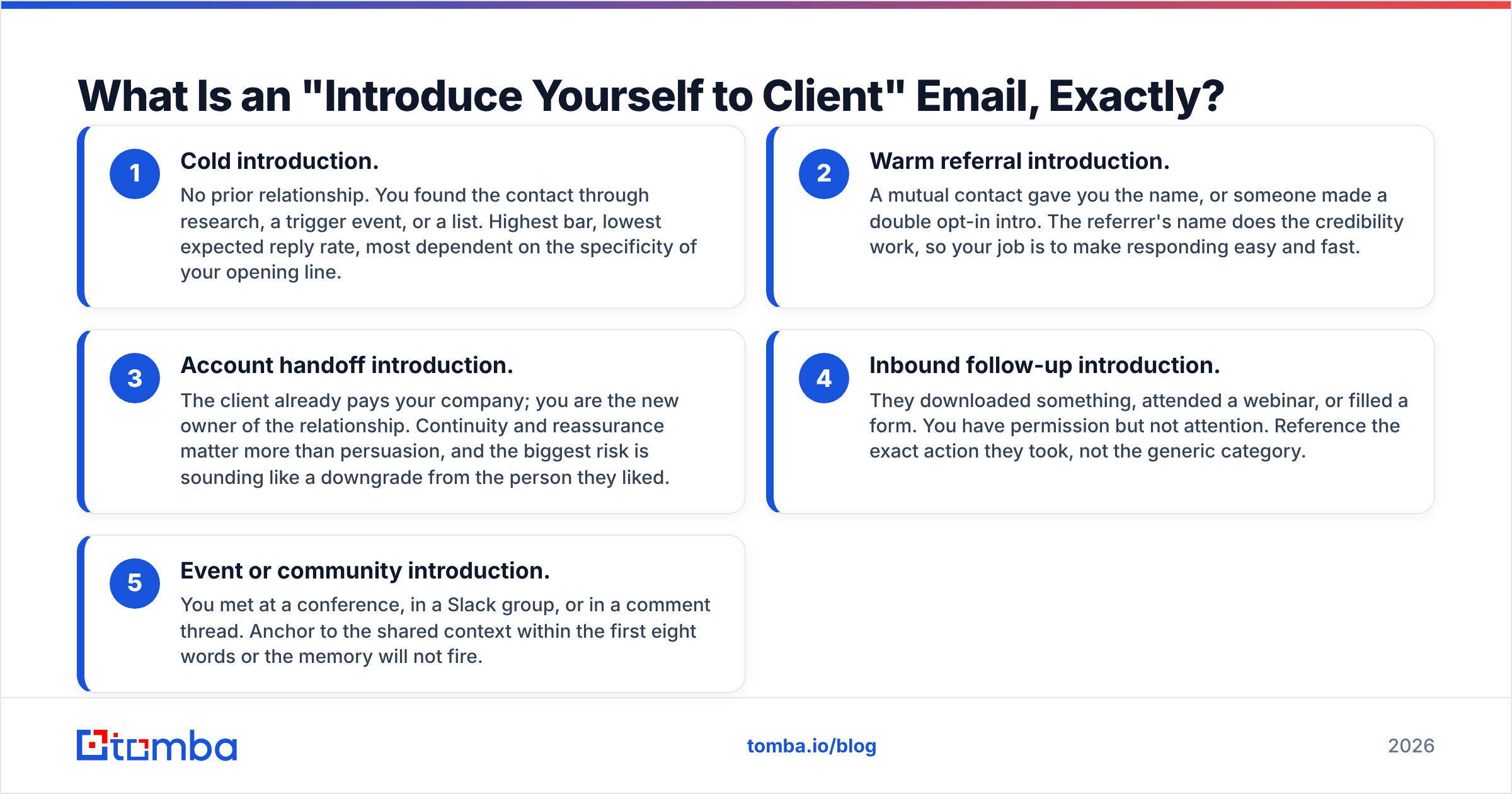
- Cold introduction. No prior relationship. You found the contact through research, a trigger event, or a list. Highest bar, lowest expected reply rate, most dependent on the specificity of your opening line.
- Warm referral introduction. A mutual contact gave you the name, or someone made a double opt-in intro. The referrer's name does the credibility work, so your job is to make responding easy and fast.
- Account handoff introduction. The client already pays your company; you are the new owner of the relationship. Continuity and reassurance matter more than persuasion, and the biggest risk is sounding like a downgrade from the person they liked.
- Inbound follow-up introduction. They downloaded something, attended a webinar, or filled a form. You have permission but not attention. Reference the exact action they took, not the generic category.
- Event or community introduction. You met at a conference, in a Slack group, or in a comment thread. Anchor to the shared context within the first eight words or the memory will not fire.
Each of those changes the opening line and the ask. None of them change the underlying structure.
Why Do Most Self-Introduction Emails Get Ignored?#
Because they are written from the sender's point of view, and the reader can feel it in the first sentence.
Here are the five failure patterns that show up over and over in real pipelines:
- The résumé opener. "I'm reaching out to introduce myself and my company." This sentence carries zero information. The client already knows you are introducing yourself — that is what the email is. Delete it and start at sentence two.
- The fake personalisation. "I loved your recent post!" without naming the post, the claim in it, or anything that proves you read it. Generic flattery now reads as an automation tell, and readers pattern-match it faster than they used to.
- The multi-ask. Asking for a call, a referral, a whitepaper download, and a LinkedIn connection in one email. Every additional ask reduces the chance of any of them being fulfilled. One ask, one decision.
- The wall of text. Four paragraphs of context before the point. On mobile, that is three full scrolls before the reader learns what you want. They will not scroll.
- The invisible send. The copy was fine, but the email hit a spam folder, a bounced address, or a catch-all domain that silently swallowed it. This is the failure nobody sees in their reply-rate dashboard, and it is often the biggest single cause of a flat campaign.
The fifth one deserves more attention than it usually gets. If 18 percent of your list is stale — a completely normal figure for B2B contact data that is a year old — then nearly one in five of your carefully written introductions never existed from the client's perspective.
What Should Go in the Email?#
Four blocks, in this order. Keep the whole thing between 70 and 120 words.
1. The trigger (1 sentence). Why this person, why now. A funding round, a job change, a hiring signal, a product launch, a specific line in their annual report, a comment they made publicly. The trigger is the single highest-leverage sentence in the email because it answers "why me" before the reader has to ask.
2. The credibility line (1 sentence, max 15 words). Who you are, compressed. Not your title and tenure — the fact about you that makes the trigger sentence worth acting on. "I run onboarding for three other Series B fintechs" beats "I'm a Senior Solutions Consultant with 11 years of experience."
3. The value statement (1-2 sentences). One concrete, falsifiable claim about the outcome you produce. Numbers help, but specificity matters more than size. "We cut their contract review time from nine days to two" is stronger than "we drive significant efficiency gains."
4. The ask (1 sentence). Low friction, binary, and answerable in one word. "Worth a 15-minute look next week?" or "Want me to send the two-page breakdown?" Avoid "let me know if you'd like to explore synergies." Nobody has ever replied to that sentence.
A signature that includes a real phone number and a real company page does quiet credibility work here, and it also helps with filtering. If you want a clean one, Tomba's email signature generator produces plain-HTML blocks that do not trigger image-heavy spam heuristics.
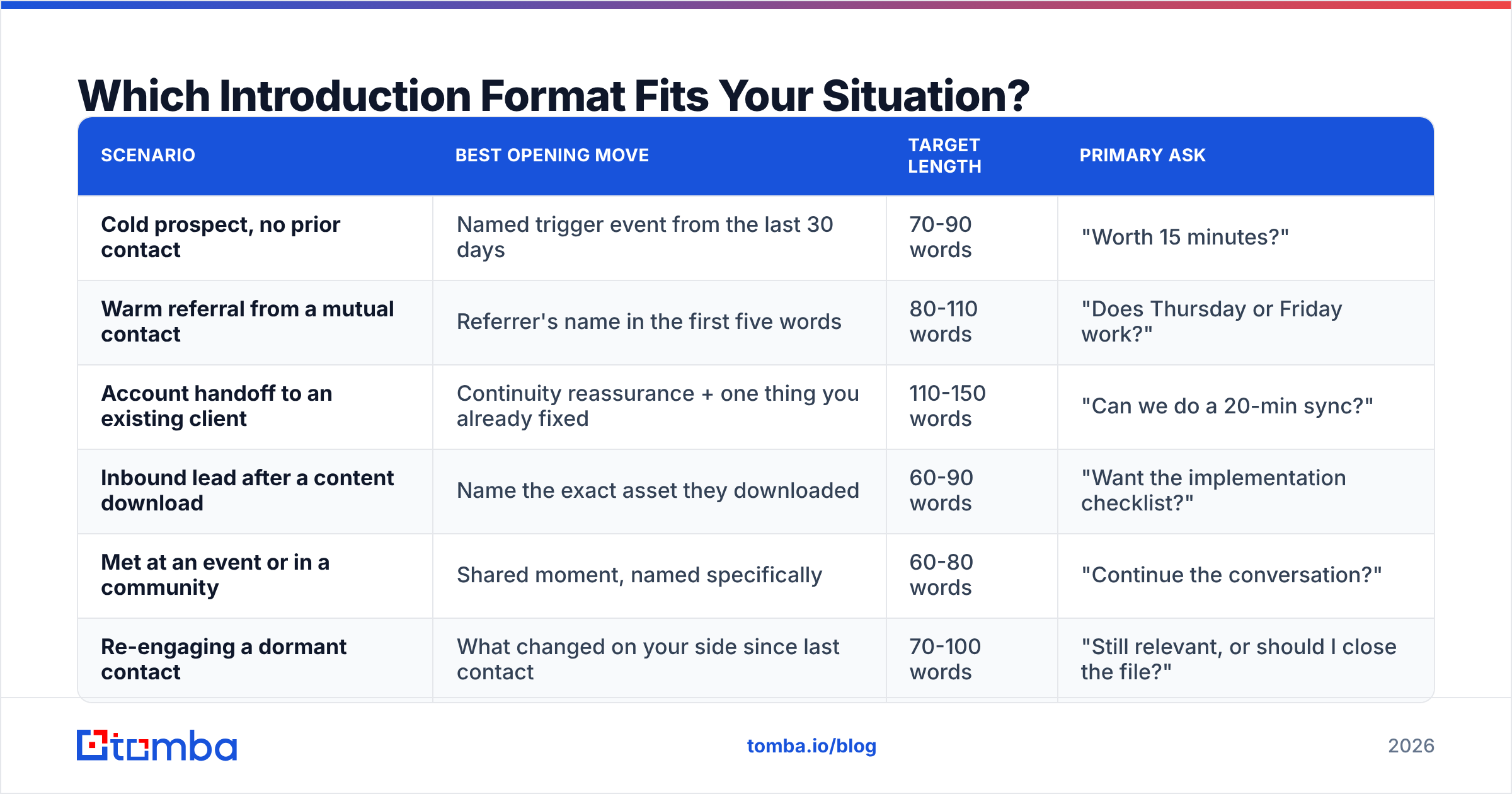
Which Introduction Format Fits Your Situation?#
Pick the row that matches your context, then write to that opening move. The formats are not interchangeable.
| Scenario | Best opening move | Target length | Primary ask |
|---|---|---|---|
| Cold prospect, no prior contact | Named trigger event from the last 30 days | 70-90 words | "Worth 15 minutes?" |
| Warm referral from a mutual contact | Referrer's name in the first five words | 80-110 words | "Does Thursday or Friday work?" |
| Account handoff to an existing client | Continuity reassurance + one thing you already fixed | 110-150 words | "Can we do a 20-min sync?" |
| Inbound lead after a content download | Name the exact asset they downloaded | 60-90 words | "Want the implementation checklist?" |
| Met at an event or in a community | Shared moment, named specifically | 60-80 words | "Continue the conversation?" |
| Re-engaging a dormant contact | What changed on your side since last contact | 70-100 words | "Still relevant, or should I close the file?" |
The handoff email is the only one that earns extra length, because the client's real question is "am I losing the person who knew my account?" You answer that by demonstrating you already read the history — reference a past ticket, a renewal date, a stated goal — rather than promising you will.
What Do Good Introduce-Yourself Emails Look Like?#
Template 1 — Cold, trigger-based
Subject: your Frankfurt warehouse
Hi Nadia — saw the Frankfurt facility announcement last week. Congrats.
I handle EU fulfilment integrations for three DTC brands that opened a second warehouse in the last 18 months. The common problem: inventory sync breaks for about six weeks during the cutover.
We cut that window to nine days for Kinloch by pre-mapping SKUs before go-live.
Worth 15 minutes before your cutover starts?
Template 2 — Warm referral
Subject: Marcus suggested I reach out
Hi Priya — Marcus Oyelaran mentioned you're rebuilding the reporting layer this quarter and thought we should talk.
I built the same thing for his team last year; the part that saved them most time was killing manual CSV exports between the CRM and the warehouse.
Happy to walk through what we did, or just send the architecture diagram if that's more useful. Which do you prefer?
Template 3 — Account handoff
Subject: taking over your account from Dana
Hi Tom — Dana has moved to our product team, and I'm now your point of contact.
I went through your account history this morning. Two things: your custom export job has been failing intermittently since the June release, and I've already filed it with engineering. Your renewal is 14 March, so we have time to get the reporting gaps closed before that conversation.
Can we do 20 minutes on Tuesday or Wednesday so I can hear what's actually bothering you, rather than what the notes say?
Template 4 — Inbound follow-up
Subject: the RFP scoring template
Hi Andre — you downloaded our RFP scoring template on Tuesday.
Most teams that grab it are mid-vendor-evaluation and stuck on weighting security requirements. If that's you, I have a filled-in example from a 400-person healthcare company that might save you an afternoon.
Want me to send it?
Notice what is absent from all four: no "I hope this email finds you well," no company boilerplate, no three-sentence mission statement. HubSpot's sales team has published similar findings in its sales email research — brevity and specificity beat polish almost every time.
How Do You Make Sure the Email Reaches the Right Inbox?#
Write the best introduction of your career and it still fails if the address is wrong. This is the unglamorous half of the job.
Three checks, in order:
Find the real address, do not guess it. Pattern-guessing (first.last@company.com) works maybe 60 percent of the time and produces a bounce the other 40. Use a proper email finder that returns a confidence score and the public sources it used, so you can judge borderline results yourself rather than trusting a binary verdict.
Verify before you send, especially on aged lists. A contact you sourced four months ago has roughly a one-in-six chance of having changed jobs. Running the list through an email verifier before a send is cheap insurance; a bounce rate above 3 percent starts measurably degrading how mailbox providers treat your domain.
Handle catch-all domains deliberately. Many enterprise domains accept mail for any address, so standard verification returns "unknown" rather than valid or invalid. Those contacts are not worthless — they just need a separate, lower-volume sending lane. A dedicated catch-all verifier narrows the guesswork considerably.

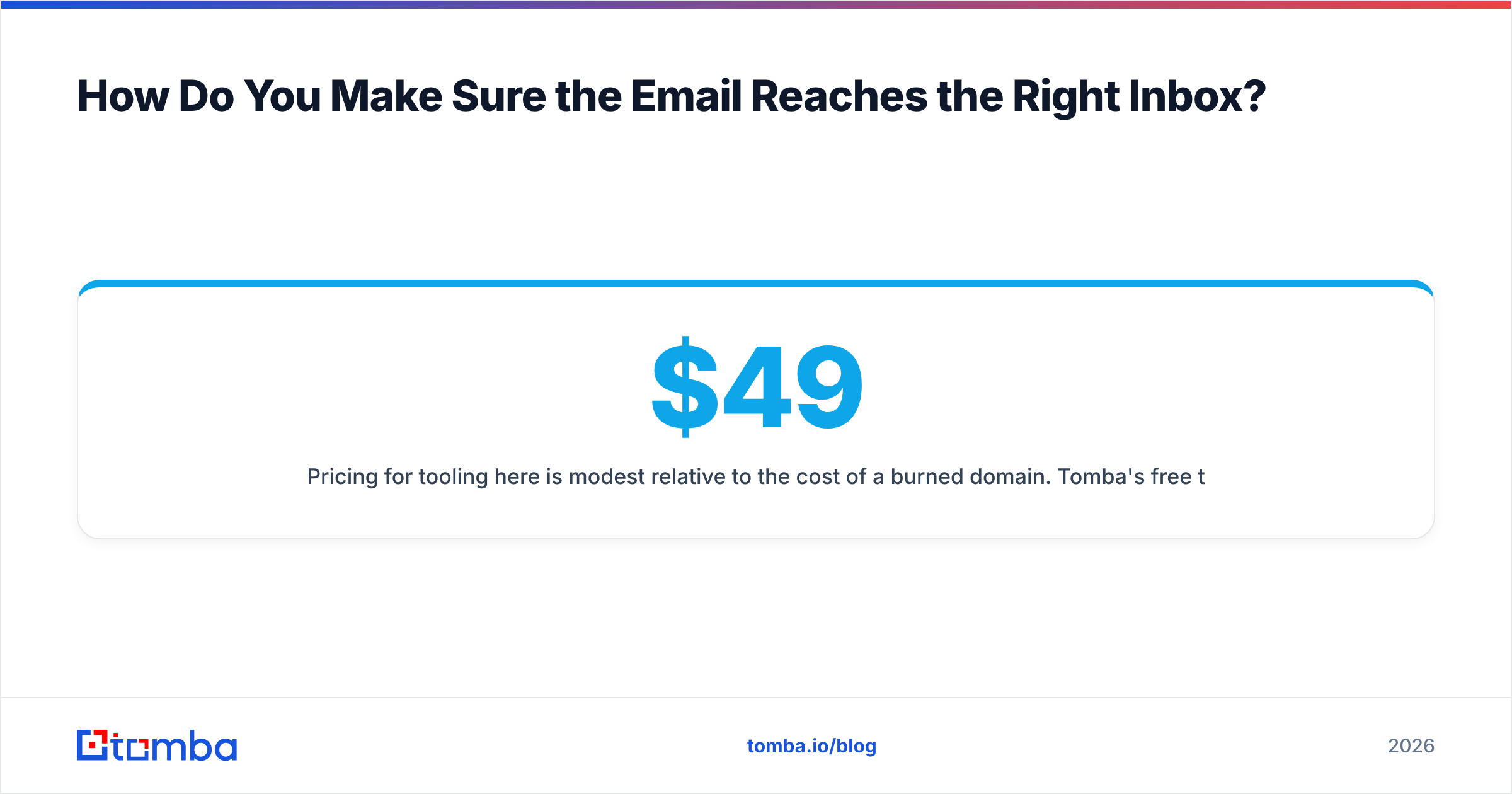
Pricing for tooling here is modest relative to the cost of a burned domain. Tomba's free tier covers 25 searches a month, Starter is $49/mo, Growth is $99/mo, and Pro is $249/mo; full Tomba pricing is public. The point is not which vendor you pick — BookYourData, for instance, is a solid option when you want purchased, pre-verified contact lists rather than on-demand lookups, and vendor comparisons on G2 are a reasonable starting point. The point is that "send and hope" is not a strategy.
When Should You Send and How Often Should You Follow Up?#
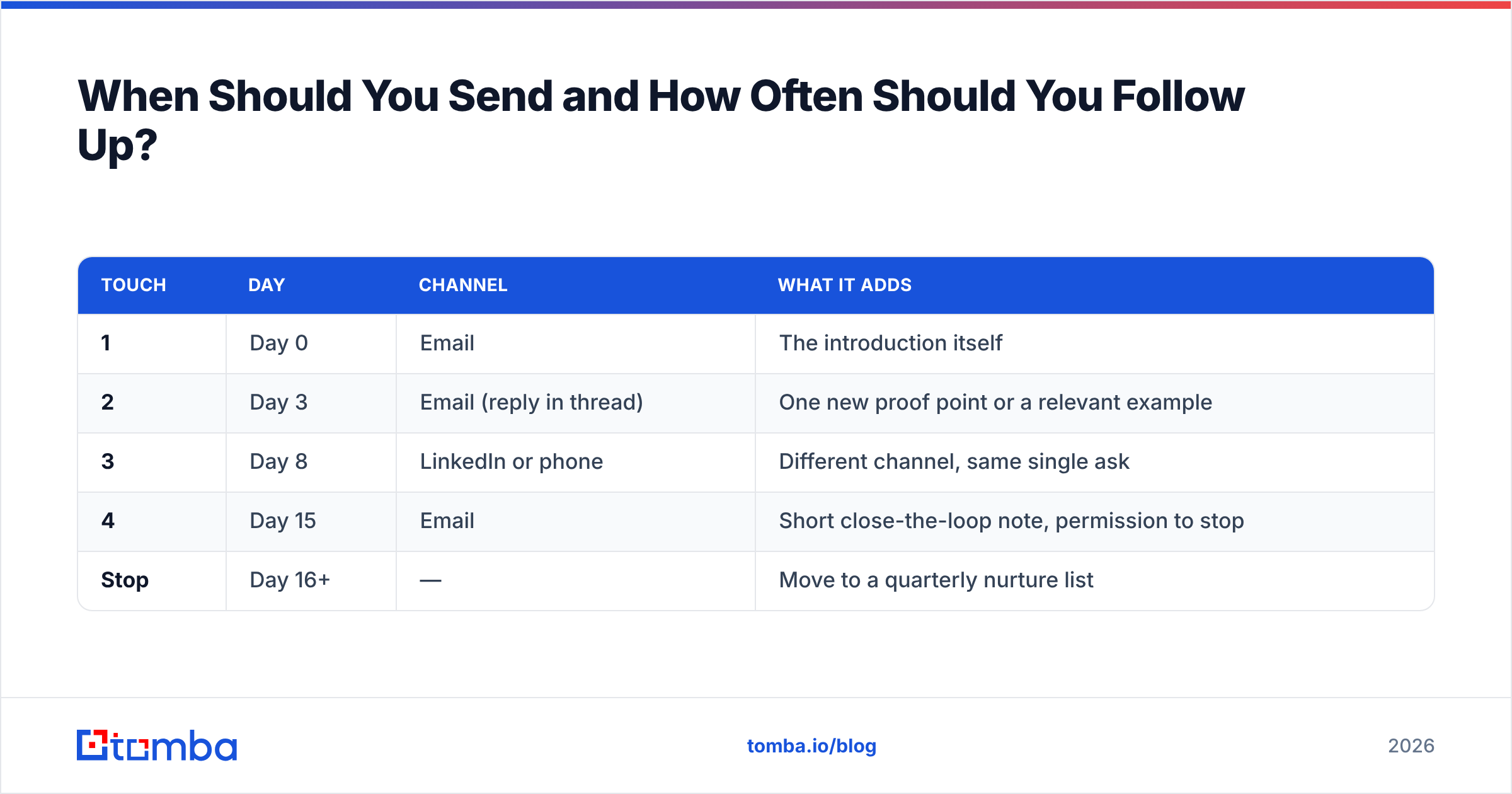
Send Tuesday through Thursday, between 7:00 and 9:00 in the recipient's local time zone. That window is not magic; it simply lands your email near the top of the morning triage queue rather than buried under the day's accumulation.
Then follow up. Most introduction emails that get replies get them on touch two or three.
| Touch | Day | Channel | What it adds |
|---|---|---|---|
| 1 | Day 0 | The introduction itself | |
| 2 | Day 3 | Email (reply in thread) | One new proof point or a relevant example |
| 3 | Day 8 | LinkedIn or phone | Different channel, same single ask |
| 4 | Day 15 | Short close-the-loop note, permission to stop | |
| Stop | Day 16+ | — | Move to a quarterly nurture list |
Two rules for the follow-ups. First, never send "just bumping this to the top of your inbox" — it adds nothing and signals you had nothing to add. Second, the day-15 close-the-loop note ("I'll assume the timing is wrong and stop here — happy to revisit in Q3") produces a surprising number of replies, because it removes the social cost of saying no.
If your intro emails are consistently opened but not answered, the problem is the ask, not the subject line. If they are not opened at all, the problem is the subject line or your deliverability. Tracking the split between those two is what separates a fixable campaign from a mysterious one; Gartner's sales research has been making the same point about buyer-side email fatigue for several years, and the practical takeaway is that fewer, better-targeted introductions outperform volume.
What Mistakes Kill the First Impression?#
- Attachments on first contact. They trigger filters and signal effort you have not earned the right to ask for. Link instead, or offer to send.
- Images and tracking pixels in a cold intro. Both are spam signals in a first-touch email from an unknown sender. Plain text performs better and looks more human.
- Getting the name or company wrong. This is unrecoverable. A merge-field error in the first line is the fastest possible way to teach someone you are running a list, not writing an email.
- Over-qualifying yourself. Three credentials read as insecurity. One reads as confidence.
- Asking for "a quick chat to learn about your business." That is a request for the client to do free work. Offer something first.
- Ignoring the reply you get. A "not now" that goes unanswered for five days undoes the entire introduction. Reply within one business day, always.
One more, less obvious: do not write the same introduction to five people at the same company in the same week. Colleagues compare notes, and identical emails land as spam even when each one is individually well written. Vary the trigger per person, or pick one entry point and commit to it.
Ready to Send Introductions That Actually Arrive?#
Good copy plus a wrong address equals nothing. Start by getting the contact right: the Tomba Email Finder returns verified professional addresses with confidence scores and public sources, so your carefully written introduction reaches a real person on the first attempt. Free tier gives you 25 searches a month to test it against contacts you already know — run ten, check the hit rate yourself, then decide.
Related guides#
// get started
Find, verify and enrich your first contacts today
Start on the free plan with 25 searches a month, then scale when your team is ready.
Free plan · No credit card required · GDPR & CCPA
// about the author