Introduction Email to Customer Template: 9 Examples That Work
Nine tested introduction email templates for new customers, handoffs, and cold prospects — plus the structure, subject lines, and send timing that decide whether anyone replies.
TL;DR
- An introduction email to customer template is not one template — there are at least four distinct situations (new customer onboarding, account handoff, cold prospect, warm referral), and using the wrong one is why most intros get ignored.
- The structure that works is the same every time: context line → who you are → one specific reason this matters to them → one clear ask. Six sentences or fewer.
- Subject lines that name the account, the referrer, or the change outperform clever ones. "Taking over your account from Dana" beats "Quick hello!" every time.
- Send timing matters more than word choice for handoff emails: within 24 hours of the internal change, before the customer notices on their own.
- Every template below fails at the same point — a bad email address. Verify before you send, especially for cold intros where you guessed the format.
What Is an Introduction Email to a Customer?#
An introduction email to a customer is the first message that establishes a working relationship between a specific person and a specific account. It answers three questions the recipient is silently asking: who are you, why am I hearing from you now, and what do you want from me.
That's it. Most introduction emails fail because they answer question one at length, skip question two entirely, and bury question three in a closing paragraph nobody reaches.
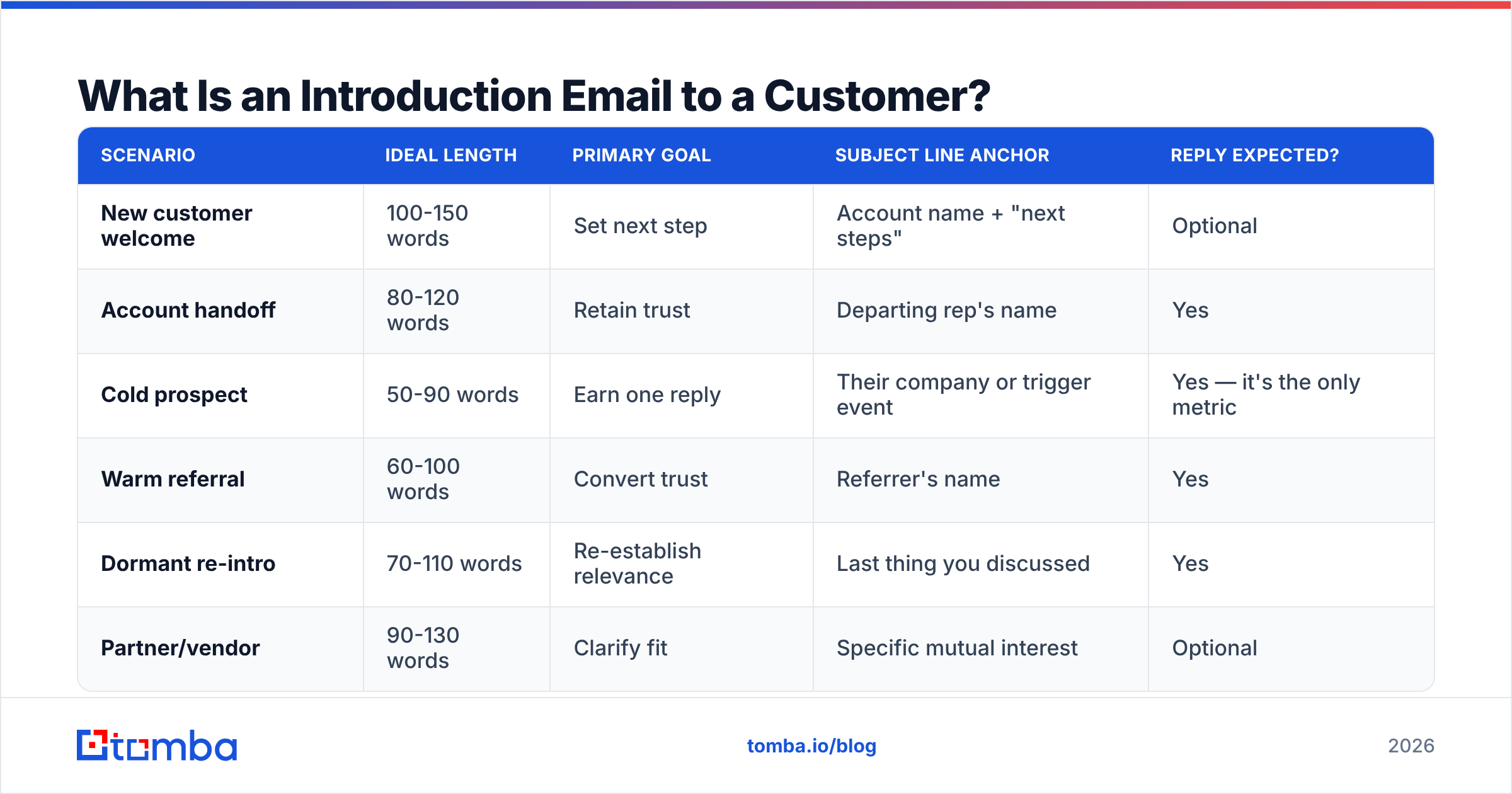
The confusion comes from lumping four different scenarios under one label. They have different goals, different tones, and different acceptable lengths:
- New customer welcome — the deal closed, you're the person they'll work with. Goal: reduce anxiety and set the next step. They already know your company; they don't know you.
- Account handoff / rep change — someone is leaving, you're inheriting. Goal: prevent churn risk during the transition. Highest-stakes of the four.
- Cold prospect introduction — no prior relationship. Goal: earn a reply, not a meeting. Shortest of the four by far.
- Warm referral introduction — a mutual contact connected you. Goal: convert borrowed trust into a conversation. The referrer's name does most of the work.
- Re-introduction after dormancy — the account went quiet for six months and you're back. Goal: re-establish relevance without guilt-tripping.
- Partner or vendor introduction — you're introducing your company to a business contact, not a buyer. Goal: clarity on fit, low pressure.
| Scenario | Ideal length | Primary goal | Subject line anchor | Reply expected? |
|---|---|---|---|---|
| New customer welcome | 100-150 words | Set next step | Account name + "next steps" | Optional |
| Account handoff | 80-120 words | Retain trust | Departing rep's name | Yes |
| Cold prospect | 50-90 words | Earn one reply | Their company or trigger event | Yes — it's the only metric |
| Warm referral | 60-100 words | Convert trust | Referrer's name | Yes |
| Dormant re-intro | 70-110 words | Re-establish relevance | Last thing you discussed | Yes |
| Partner/vendor | 90-130 words | Clarify fit | Specific mutual interest | Optional |
Note the pattern: the colder the relationship, the shorter the email. That is backwards from how most people write them.
What Makes an Introduction Email Actually Get Replies?#
Four elements, in order of impact.
Specificity in the first line. Not "I hope this email finds you well." Something only you could write to only them: "Saw you shipped the Shopify integration last week" or "Dana mentioned you're consolidating vendors before Q1." Generic openers train the reader to skim.
A stated reason for the timing. Why now? Handoffs have a built-in reason (someone left). Cold emails usually don't, so you have to manufacture one honestly — a funding round, a job posting, a product launch, a competitor switch. "Why now" is the single most-skipped element in bad intro emails.
One ask, phrased as a question. "Are you the right person for this?" gets more replies than "Let me know if you'd like to schedule a 30-minute call." Low-commitment questions get answered; calendar requests get postponed.
A signature that proves you're a real person. Full name, role, company, and a link that isn't a tracking redirect. If your signature looks like a marketing automation footer, your email reads like one. A clean email signature generator handles this in two minutes.

What doesn't move the needle as much as people think: personalized images, video thumbnails, emoji in subject lines, and elaborate formatting. HubSpot's own sales email research has consistently found plain-text, short-form emails outperform designed templates in one-to-one sales contexts. The designed version signals "campaign"; the plain version signals "person."
What Are the Best Introduction Email Templates?#
Below are templates for each scenario. Replace the bracketed parts. Do not add paragraphs.
Template 1 — New customer welcome#
Subject: Your [Product] setup — first steps
Hi [First name],
I'm [Your name], your account manager at [Company]. Congrats on getting started — I saw [specific thing from the deal: your team size, your use case, the plan you picked].
Two things before you dig in:
- [Concrete first action they should take]
- [The one setting most new customers miss]
I've blocked time on Thursday to walk through either of those if it's useful. Want me to send an invite, or would you rather start solo and ping me when you hit something?
[Signature]
Why it works: it gives them a choice between two easy options instead of one hard one. Both choices are a reply.
Template 2 — Account handoff#
Subject: Taking over from [Departing rep] on your account
Hi [First name],
[Departing rep] is moving to [new role/company] and asked me to take over your account. I'm [Your name] — I've been at [Company] [duration] and I've read through everything from your last three calls.
Quick context so you don't have to repeat yourself: I know you're [specific open issue or goal from the notes]. That's still my priority.
Anything [Departing rep] didn't get to that I should pick up first?
[Signature]
Why it works: "you don't have to repeat yourself" is the exact fear a customer has during a handoff. Naming it defuses it. Send this within 24 hours of the internal change — customers who find out from an auto-reply bounce are already halfway to a competitor.
Template 3 — Cold prospect#
Subject: [Their company] + [specific trigger]
Hi [First name],
Noticed [trigger event — hiring three SDRs, launched in EMEA, switched to HubSpot]. When teams do that, [specific problem] usually shows up about a month in.
We handle [one-sentence what you do] for [2 comparable companies].
Are you the person who'd own that, or should I be talking to someone else?
[Signature]
Why it works: 60 words, one trigger, one proof point, one question that's easy to answer even if the answer is "no, talk to Marcus." That redirect is still a win.
Template 4 — Warm referral#
Subject: [Referrer] suggested I reach out
Hi [First name],
[Referrer name] mentioned you're [specific thing the referrer said]. We worked together on [context], and they thought this might be relevant to you.
Short version: [one sentence]. [Referrer] got [specific outcome] out of it.
Worth 15 minutes, or is this not a priority right now?
[Signature]
Why it works: it gives an explicit out ("not a priority right now"). Referral emails that assume interest feel like an obligation; ones that offer an exit feel like a favor.
Template 5 — Dormant account re-introduction#
Subject: Following up on [specific thing from last conversation]
Hi [First name],
We talked in [month] about [specific topic]. You said [their actual words or position] — I wanted to check whether that's changed.
On our side, [genuinely new thing since then, one sentence].
Still not a fit? Totally fine, I'll stop here. If it is, happy to pick up where we left off.
[Signature]
Why it works: the explicit permission to say no is what makes dormant-account emails get replies instead of silence.
How Do You Pick the Right Template for Each Situation?#
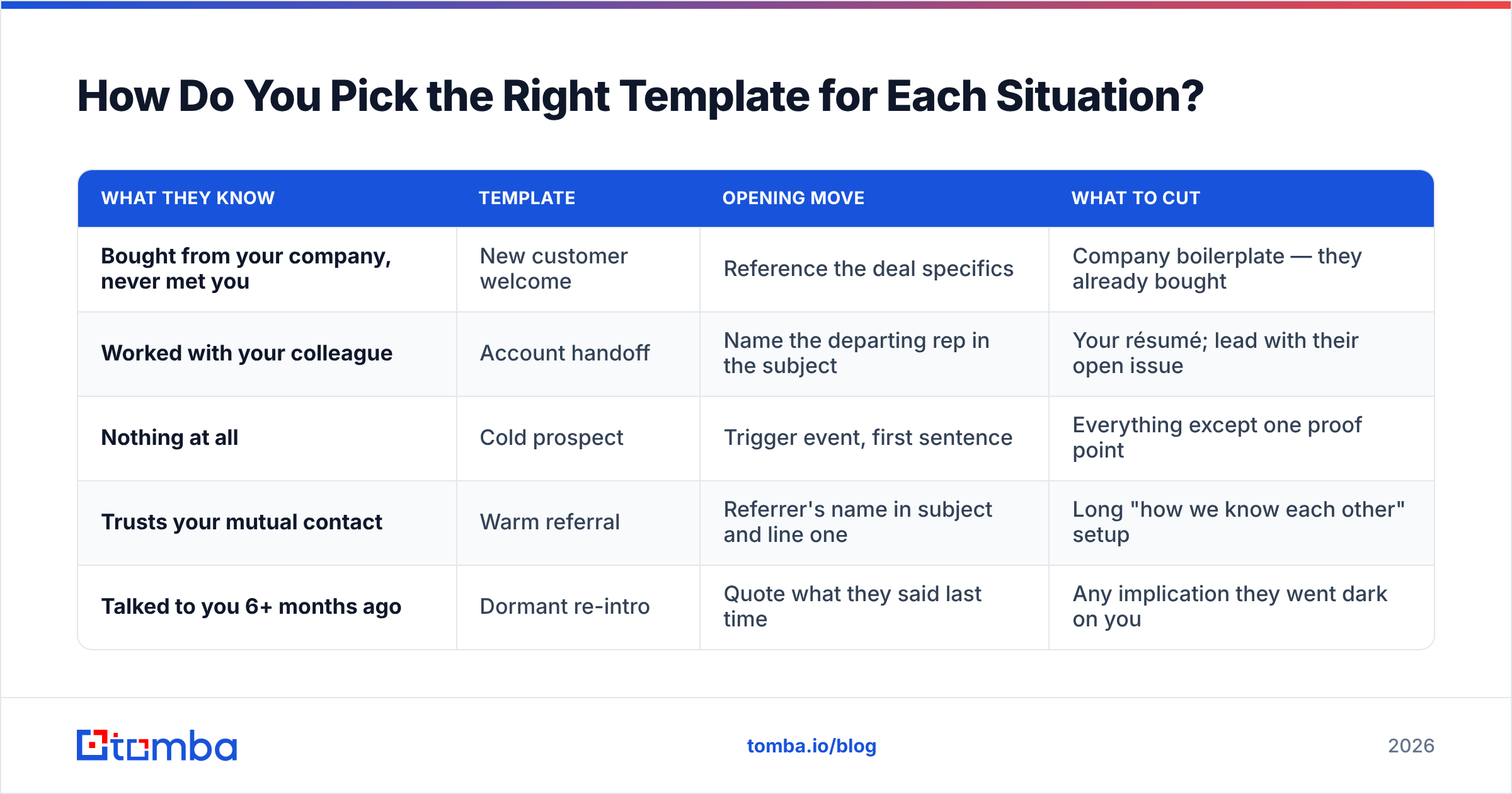
Use the decision table. The variable that matters most is what the recipient already knows about you.
| What they know | Template | Opening move | What to cut |
|---|---|---|---|
| Bought from your company, never met you | New customer welcome | Reference the deal specifics | Company boilerplate — they already bought |
| Worked with your colleague | Account handoff | Name the departing rep in the subject | Your résumé; lead with their open issue |
| Nothing at all | Cold prospect | Trigger event, first sentence | Everything except one proof point |
| Trusts your mutual contact | Warm referral | Referrer's name in subject and line one | Long "how we know each other" setup |
| Talked to you 6+ months ago | Dormant re-intro | Quote what they said last time | Any implication they went dark on you |
The most common mistake is using the new-customer template on a cold prospect. It's four times too long and assumes a relationship that doesn't exist yet. The second most common is using the cold template on a handoff, which reads as impersonal at precisely the moment the customer needs reassurance.
If you're building a sequence rather than a one-off, pair the intro with a structured follow-up cadence — the intro email's job is only to open the door. Our cold email templates library covers the messages that come after.
What Subject Lines Work for Introduction Emails?#
Subject lines for introductions have one job: make the open feel low-risk. Curiosity gaps work for newsletters and fail here, because an unknown sender plus a vague subject reads as spam.
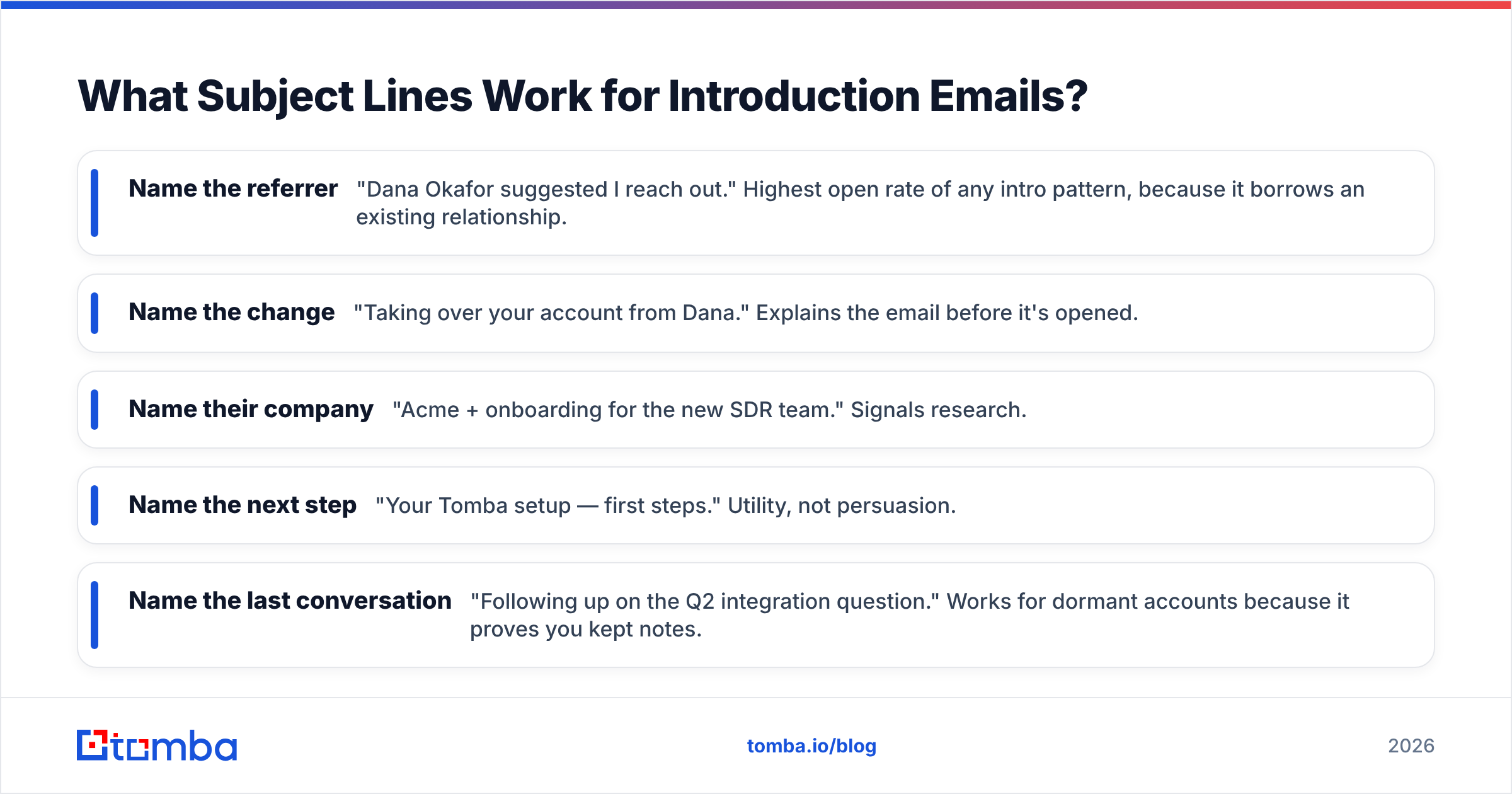
Patterns that perform:
- Name the referrer — "Dana Okafor suggested I reach out." Highest open rate of any intro pattern, because it borrows an existing relationship.
- Name the change — "Taking over your account from Dana." Explains the email before it's opened.
- Name their company — "Acme + onboarding for the new SDR team." Signals research.
- Name the next step — "Your Tomba setup — first steps." Utility, not persuasion.
- Name the last conversation — "Following up on the Q2 integration question." Works for dormant accounts because it proves you kept notes.
Patterns that don't: "Quick question," "Hi [First name]," "Introducing [Company]," anything with "!" and anything over nine words. If you want to pressure-test a line before sending, run it through a subject line tester rather than guessing.
Keep it under 50 characters so it doesn't truncate on mobile, where more than half of B2B email is now first opened.
Why Do Good Introduction Emails Still Bounce?#
Because the template was never the bottleneck. The address was.
A perfectly written cold introduction sent to j.smith@acme.com when the company format is jsmith@acme.com produces a hard bounce, not a reply. Do that at volume and you damage your sender reputation, which quietly kills deliverability for every other email you send — including the ones to customers who actually want to hear from you.

Three failure points to close before you send any intro sequence:
- Guessed formats. Permutating
first.last@,flast@, andfirstl@and sending to all three is a bounce generator. Confirm the company's actual pattern first. - Stale addresses. B2B contact data decays roughly 25-30% per year as people change jobs. A list from twelve months ago is meaningfully worse than one from last week. Industry reviews on G2 consistently rank data freshness above raw database size for this reason.
- Role and catch-all addresses.
info@andsales@rarely reach a decision-maker, and catch-all domains accept everything — including addresses that don't exist — so a "valid" result there means nothing without a catch-all verifier.
The workflow that avoids all three: find the address from the domain rather than guessing it, verify it before it enters your sequence, and re-verify anything older than 90 days. A domain search returns the confirmed pattern plus known contacts at a company, and an email verifier catches the rest before your ESP does.
How Should You Measure Whether Your Intro Emails Work?#
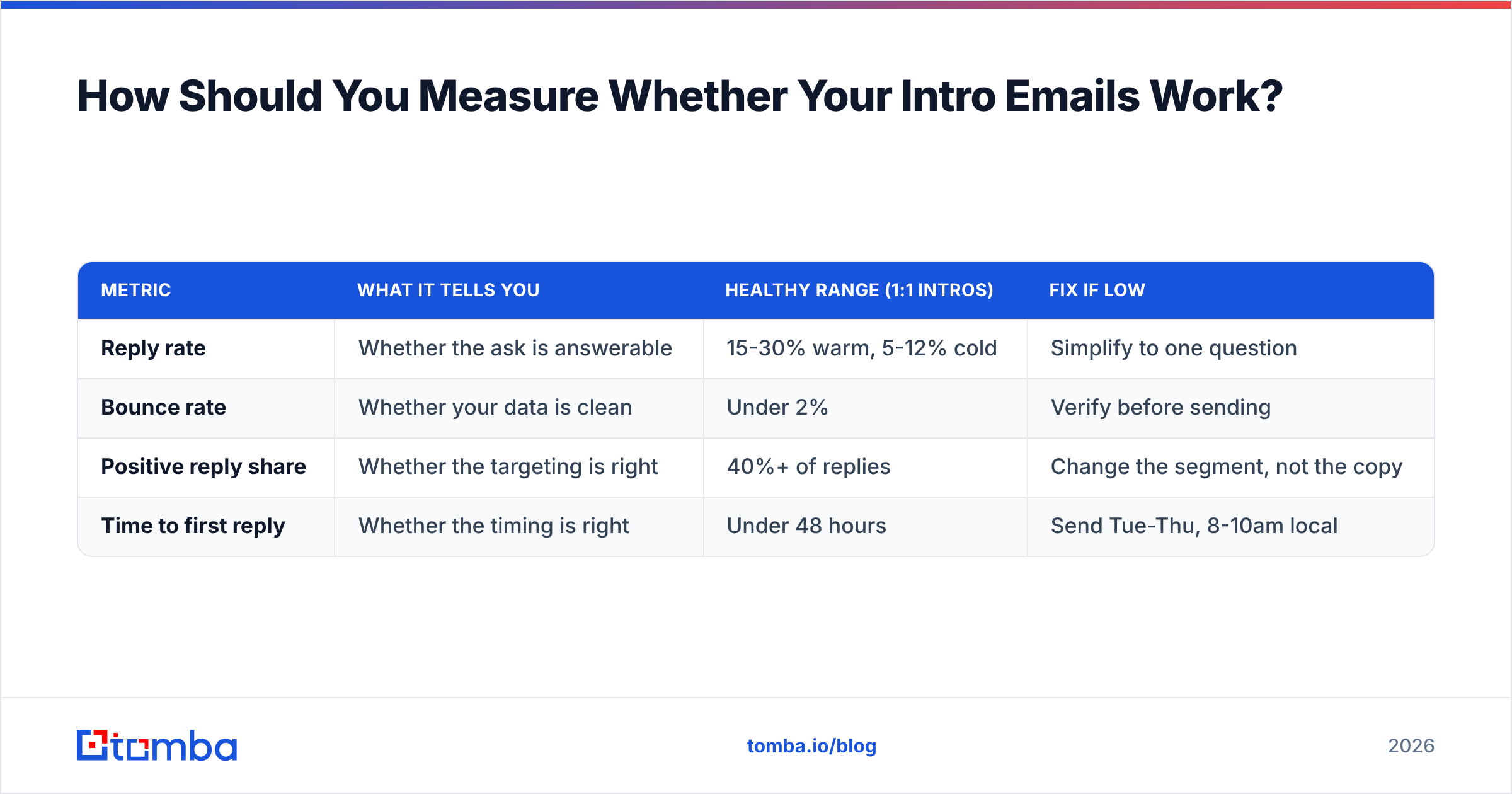
Reply rate, not open rate. Open tracking has been unreliable since Apple Mail Privacy Protection started pre-fetching images, and for one-to-one introduction emails it was never the right metric anyway — an open with no reply is a failure.
Track three numbers per template:
| Metric | What it tells you | Healthy range (1:1 intros) | Fix if low |
|---|---|---|---|
| Reply rate | Whether the ask is answerable | 15-30% warm, 5-12% cold | Simplify to one question |
| Bounce rate | Whether your data is clean | Under 2% | Verify before sending |
| Positive reply share | Whether the targeting is right | 40%+ of replies | Change the segment, not the copy |
| Time to first reply | Whether the timing is right | Under 48 hours | Send Tue-Thu, 8-10am local |
If bounce rate is above 2%, stop optimizing copy. Nothing you write fixes an address that doesn't exist, and mailbox providers will start filtering you long before your prospects do. Fix the data, then return to the templates.
One more habit worth building: log which template produced which reply. After 100 sends you'll have a real answer about which opener works for your market, and it's usually not the one you'd have guessed.
Ready to Send Intros That Actually Land?#
Templates are the easy part — you have nine of them above. The part that decides your reply rate is whether the message reaches a real inbox belonging to the right person.
Tomba's Email Finder confirms the address before you send, using the company's verified email pattern instead of a guess, with verification built into the same step. The free tier covers 25 searches a month if you just want to test it against a handful of accounts; paid plans start at $49/mo on Starter and scale to $99/mo on Growth — full Tomba pricing is public. Find the address, verify it, then send the six sentences that do the work.
Related guides#
// get started
Find, verify and enrich your first contacts today
Start on the free plan with 25 searches a month, then scale when your team is ready.
Free plan · No credit card required · GDPR & CCPA
// about the author