Introductory Email Template: 9 Examples That Get Replies
Most introductory emails die because they are about the sender. Here are nine introductory email templates, the five-part structure behind them, and the reply-rate benchmarks to judge them against.
TL;DR
- An introductory email template is a reusable five-part skeleton: reason for writing, relevance proof, value claim, credibility, and one low-friction ask. Everything else is variable.
- The nine templates below cover cold prospecting, warm referrals, new account manager handoffs, event follow-ups, investor intros, and vendor outreach. Each is under 120 words.
- Length beats cleverness. Intros between 50 and 125 words consistently out-reply 300-word essays, and a single question out-converts a calendar link.
- Your template is only as good as your list. A 40% bounce rate makes the best copy in the world irrelevant, so verify addresses before you send.
- Benchmark yourself honestly: 8-12% reply rate on a well-targeted cold intro is solid, 20%+ on warm intros, and anything under 3% means the targeting, not the wording, is broken.
What is an introductory email template?#
An introductory email template is a fixed structure you reuse every time you email someone who does not know you yet, with clearly marked slots for the details that change. Think of it like a chef's mise en place: the pan, the heat, and the sequence stay the same, and only the ingredients swap out. The structure carries the reliability; the personalization carries the relevance.
The mistake most teams make is treating the template as a script to paste verbatim. A template is a constraint, not a copy-paste. It stops you from rambling, forgetting the ask, or opening with three sentences about your own company. It does not do your research for you.
A working introductory email has exactly five jobs, in this order:
- Name the reason you are writing — the first line must answer "why me, why now?" before the reader decides to archive. "I saw you just opened a second warehouse in Rotterdam" beats "I hope this email finds you well."
- Prove the relevance is real — one specific, verifiable detail about their company, role, post, funding round, or job listing. Generic flattery reads as a mail merge and gets treated like one.
- Make one value claim, not three — a single sentence on the outcome you help produce, ideally with a number attached to a comparable customer.
- Add a credibility anchor — a named customer in their segment, a relevant metric, or a mutual connection. Without it, the value claim is just an assertion.
- Ask for one small thing — a yes/no question or a reply-to-this-email request. Asking for 30 minutes from a stranger is asking for a commitment they have no basis to make.
- Sign off short — name, role, company. No 14-line signature block with four social icons and a banner image, which also drags your spam score up.
Anything that does not serve one of those six jobs is cuttable, and in most drafts it is about 40% of the email.
Why do most introductory emails get ignored?#
Because they are written from the sender's point of view. The average cold intro opens with the company name, pivots to a feature list, and closes with a demand for a meeting. The reader gets no reason to care in the first seven words, which is roughly how much of the preview text they actually scan on a phone.
The four failure modes, in order of how often they show up in audits:
- Wrong person. You emailed the VP of Marketing about a problem the Head of RevOps owns. No template fixes a targeting error.
- Wrong address. The email bounces, or lands on a catch-all domain that silently swallows it. This is invisible failure — your dashboard shows "delivered" and nothing happened.
- Wrong length. Anything over ~200 words on a first touch reads as work. People defer work.
- Wrong ask. "Do you have 30 minutes Thursday?" from a stranger is a bigger commitment than "Is inbound lead routing something you own?"
There is also a deliverability tax most people never account for. If your sending domain has no authentication records, a meaningful share of perfectly good intros never reach the inbox at all. Run your domain through an SPF checker before you blame the copy, and read up on email deliverability fundamentals if bounce and spam-folder rates are above a couple of percent.
Which introductory email template should you use?#
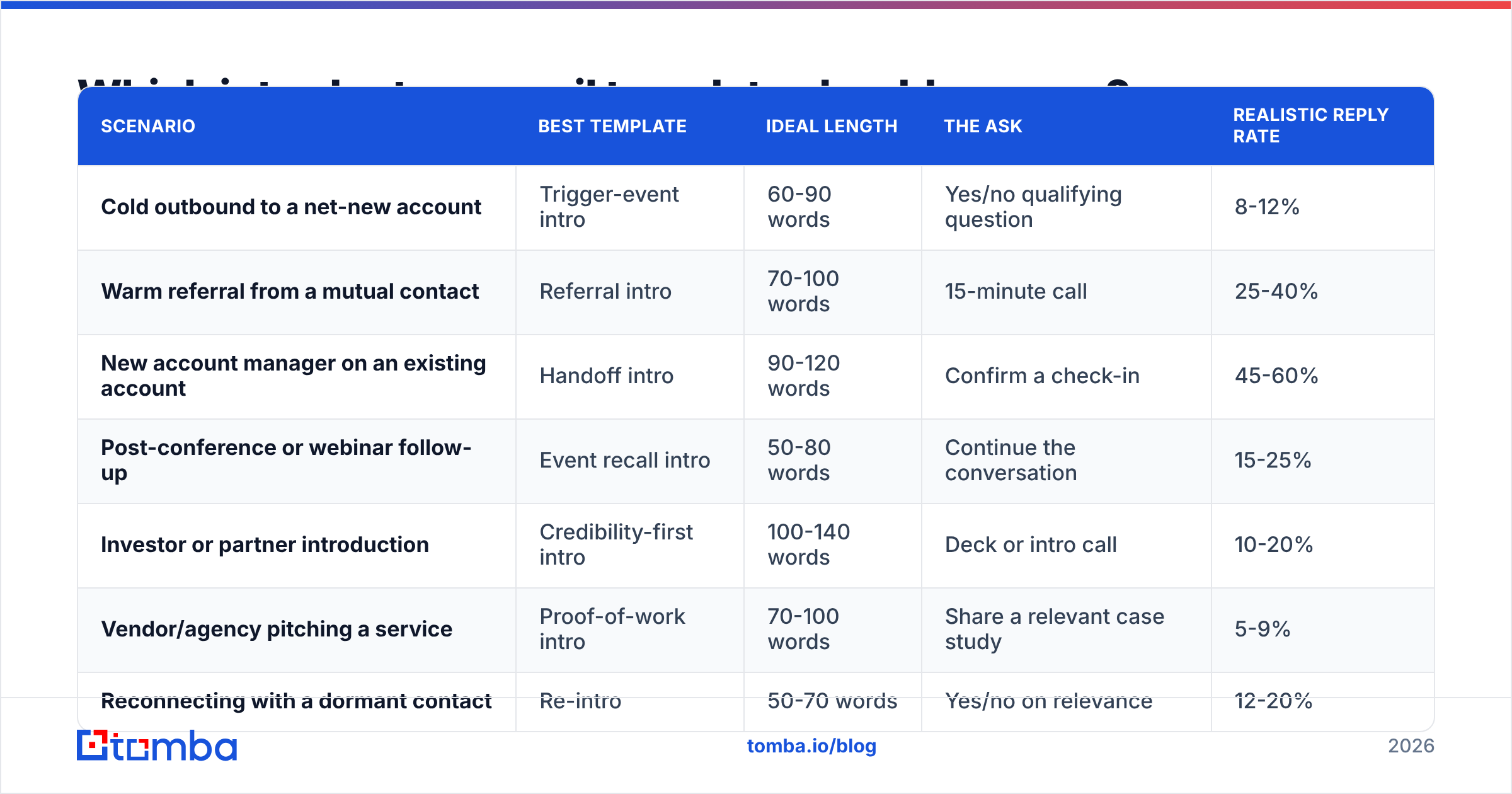
Pick by scenario, not by preference. The relationship context changes the ask, the length, and how much proof you need to include.
| Scenario | Best template | Ideal length | The ask | Realistic reply rate |
|---|---|---|---|---|
| Cold outbound to a net-new account | Trigger-event intro | 60-90 words | Yes/no qualifying question | 8-12% |
| Warm referral from a mutual contact | Referral intro | 70-100 words | 15-minute call | 25-40% |
| New account manager on an existing account | Handoff intro | 90-120 words | Confirm a check-in | 45-60% |
| Post-conference or webinar follow-up | Event recall intro | 50-80 words | Continue the conversation | 15-25% |
| Investor or partner introduction | Credibility-first intro | 100-140 words | Deck or intro call | 10-20% |
| Vendor/agency pitching a service | Proof-of-work intro | 70-100 words | Share a relevant case study | 5-9% |
| Reconnecting with a dormant contact | Re-intro | 50-70 words | Yes/no on relevance | 12-20% |
Now the templates themselves. Square brackets are the variables. Keep them short when you fill them in — the temptation to over-explain in a bracket is what turns a 70-word email into a 200-word one.
Template 1 — Cold trigger-event intro#
Subject: [Company]'s Rotterdam expansion
Hi [First name],
Saw [Company] opened the Rotterdam site last month — congrats. Usually when ops teams add a second EU location, order routing rules become the first thing that breaks.
We helped [Comparable customer] cut mis-routed orders by 31% during their second-site launch.
Is routing something your team owns, or does that sit with [other function]?
[Your name], [Role] at [Company]
The closing question is the whole trick. It is answerable in four words, and any answer tells you whether to continue.
Template 2 — Warm referral intro#
Subject: [Mutual contact] suggested I reach out
Hi [First name],
[Mutual contact] mentioned you're rebuilding the outbound motion at [Company] and thought this might be worth 15 minutes.
Context: we do [one-line value claim] — [Mutual contact]'s team went from [before metric] to [after metric] in [timeframe].
Happy to send the short version by email if that's easier than a call. Which do you prefer?
[Your name]
Always name the referrer in the subject line. It is the single highest-leverage word in the email.
Template 3 — New account manager handoff#
Subject: Taking over your account from [Previous AM]
Hi [First name],
I'm [Your name], taking over [Company]'s account from [Previous AM] as of [date]. She briefed me on [specific open item] and [second specific item], so you won't need to re-explain anything.
Two things from me: [open item] is now scheduled for [date], and I'd like 20 minutes in the next two weeks to hear what's changed on your side.
Does [day] or [day] work better?
[Your name]
Naming two specifics from the handoff notes is what separates this from a form letter. It proves continuity.
Template 4 — Event follow-up intro#
Subject: Your question about attribution at [Event]
Hi [First name],
You asked during the [session name] panel how to attribute pipeline when deals touch six channels. I didn't get a good answer out in the hallway, so here's the version I'd give with a whiteboard: [two-sentence answer].
If it's useful, I'll send the model we use. Want it?
[Your name]
Template 5 — Re-intro to a dormant contact#
Subject: Picking this back up?
Hi [First name],
We spoke in [month/year] about [topic] and the timing wasn't right — you were mid-[migration/hiring freeze/replatform].
[Relevant change] happened since then, which changes the math a bit.
Worth another look, or should I close the file?
[Your name]
"Should I close the file?" gets replies from people who have ignored four previous emails. It gives them a clean exit, which is why they take the conversation instead.
Template 6 — Proof-of-work vendor intro#
Subject: [Competitor of theirs] problem, solved
Hi [First name],
We rebuilt [Comparable company]'s onboarding flow last quarter — activation went from 34% to 52% in nine weeks.
Looking at [Company]'s signup, I think the same two friction points exist at step 3 and step 5.
Want the two-page teardown? No call required.
[Your name]
Templates 7-9 — the compressed set#
- Investor intro: Lead with traction numbers in the first line, not the mission statement. "$1.4M ARR, 11% MoM, 140% NRR" earns the next sentence.
- Content/author outreach: Reference the specific paragraph, not the article. Finding the writer's address is a solved problem with an author finder, so there is no excuse for "Hi there."
- Internal cross-team intro: State your team's goal, the one thing you need from them, and the deadline. Three sentences, no pleasantries.
More scenario variants live in Tomba's cold email templates library if none of the nine map cleanly to your motion.
How long should an introductory email be?#
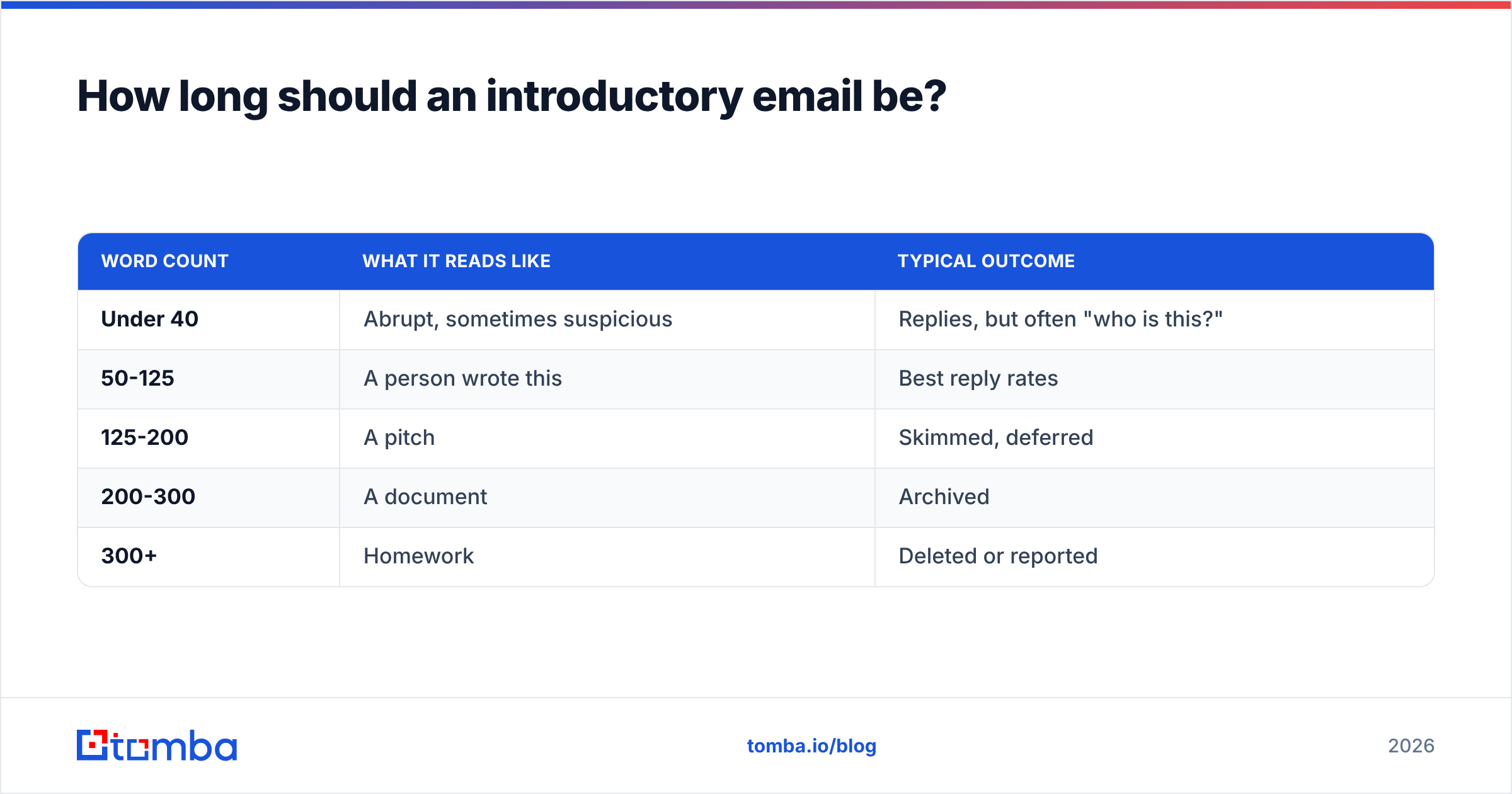
Between 50 and 125 words for a first touch. That is roughly five to nine sentences.
| Word count | What it reads like | Typical outcome |
|---|---|---|
| Under 40 | Abrupt, sometimes suspicious | Replies, but often "who is this?" |
| 50-125 | A person wrote this | Best reply rates |
| 125-200 | A pitch | Skimmed, deferred |
| 200-300 | A document | Archived |
| 300+ | Homework | Deleted or reported |
Two format rules matter as much as the count. Break every two sentences into their own paragraph, because a wall of text on mobile is a scroll-past. And put the ask on its own line, so a reader who skims the middle still hits the question.
HubSpot's sales blog has published repeatedly on the same pattern, and buyer-behavior research from Gartner on B2B buying groups points the same direction: the first email's job is to get permission for a second, not to sell.
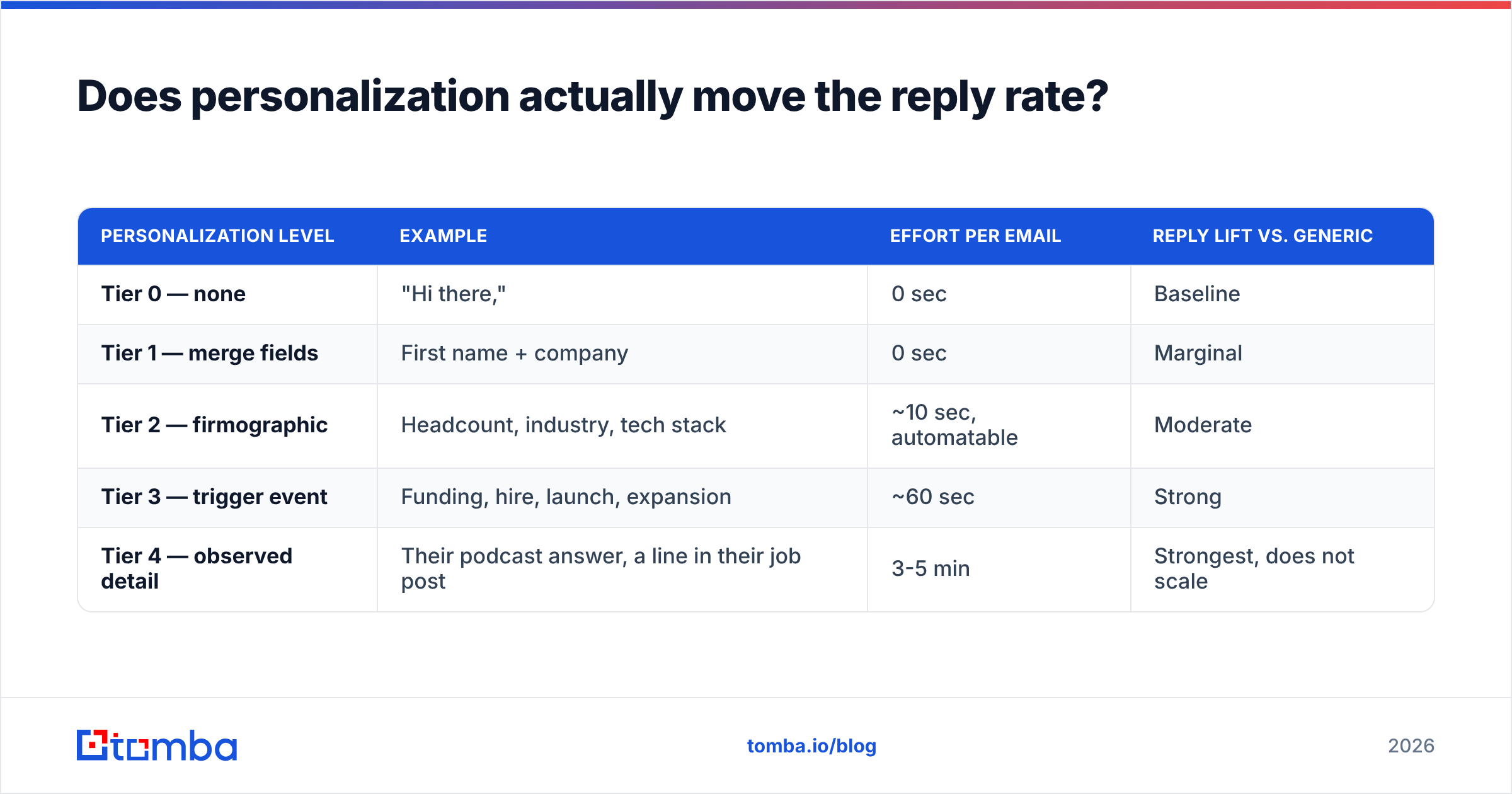
Does personalization actually move the reply rate?#
Yes, but only the kind that could not have been mail-merged. There is a hierarchy:
| Personalization level | Example | Effort per email | Reply lift vs. generic |
|---|---|---|---|
| Tier 0 — none | "Hi there," | 0 sec | Baseline |
| Tier 1 — merge fields | First name + company | 0 sec | Marginal |
| Tier 2 — firmographic | Headcount, industry, tech stack | ~10 sec, automatable | Moderate |
| Tier 3 — trigger event | Funding, hire, launch, expansion | ~60 sec | Strong |
| Tier 4 — observed detail | Their podcast answer, a line in their job post | 3-5 min | Strongest, does not scale |
The practical answer for most teams is Tier 3 with automated enrichment doing the heavy lifting. Pull firmographics and role data programmatically through data enrichment, then spend your human minutes only on accounts worth a Tier 4 line.

What kills a good introductory email before anyone reads it?#
A bad address. This is the least glamorous part of the job and the one that decides everything else.
If you send 1,000 intros with an unverified list, expect 15-30% hard bounces. Mailbox providers read that as spam behavior and start routing your good sends to the junk folder, which means your next campaign underperforms even with a clean list. One bad week can cost a domain months of reputation.
The sequence that works:
- Find the address properly. Guessing
first.last@works maybe 60% of the time and silently fails the rest. A real email finder resolves the actual pattern per domain. - Verify before sending. An email verifier separates valid, invalid, and risky. Drop the invalids, hold the risky.
- Handle catch-all domains separately. Catch-alls accept everything and confirm nothing. A catch-all verifier is the difference between a false positive and a real contact.
- Deduplicate. Two reps emailing the same person from the same domain in one week is the fastest way to get blocked at the account level.
- Warm the domain if it is new. Ramp volume over weeks, not days.
If you want to compare vendor approaches on this, the sales intelligence category on G2 is a reasonable neutral starting point — review volume there at least tells you which tools are actually in production somewhere.
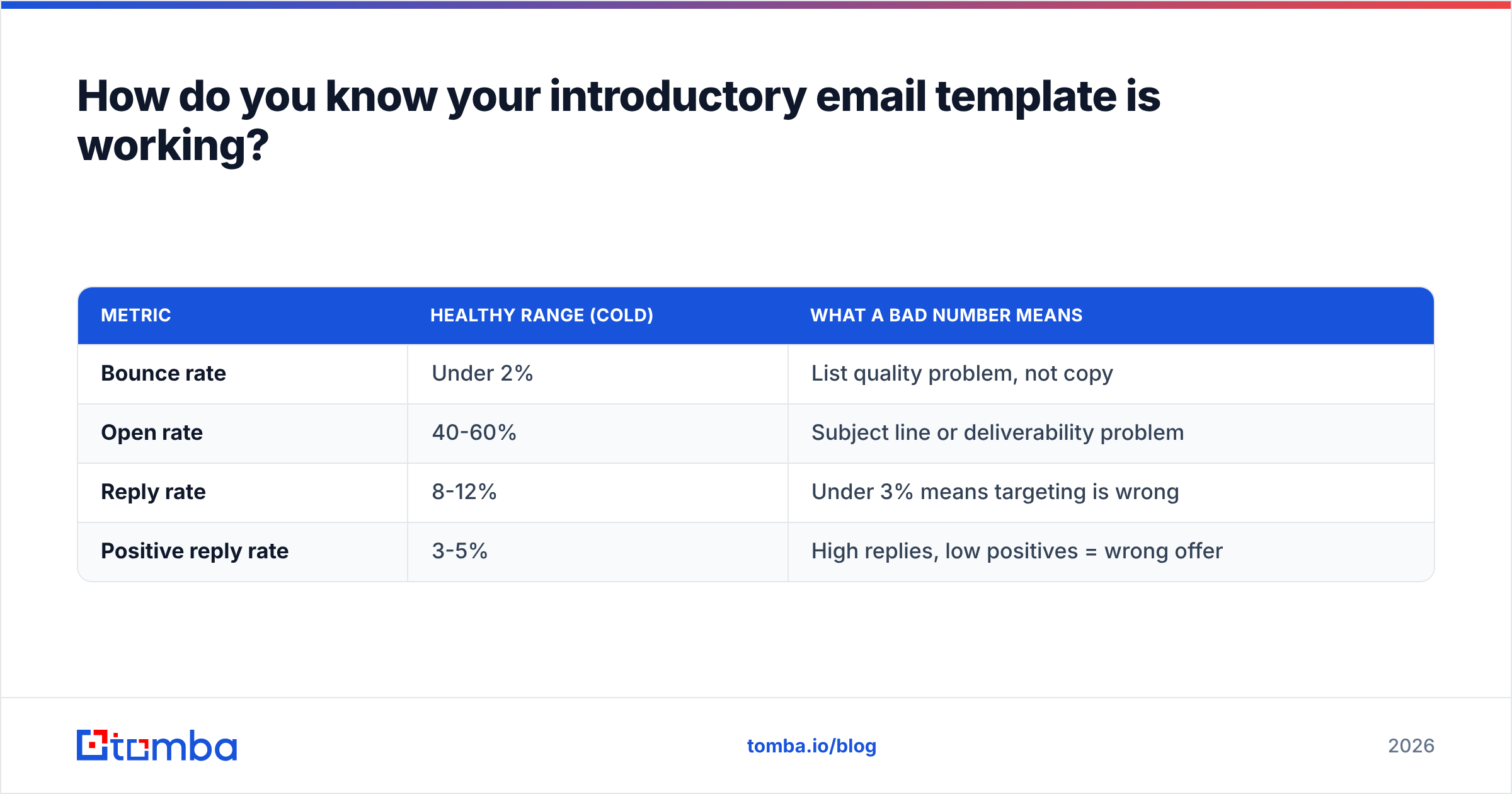
How do you know your introductory email template is working?#
Track four numbers and ignore the rest at this stage:
| Metric | Healthy range (cold) | What a bad number means |
|---|---|---|
| Bounce rate | Under 2% | List quality problem, not copy |
| Open rate | 40-60% | Subject line or deliverability problem |
| Reply rate | 8-12% | Under 3% means targeting is wrong |
| Positive reply rate | 3-5% | High replies, low positives = wrong offer |
Change one variable at a time. If you rewrite the subject line, the opener, and the CTA in the same week, you learn nothing from the result. Run the subject line separately through a subject line tester before you burn a segment on it, and give each variant at least 200 sends before you call a winner.
One more honest caveat: reply rate is a lagging indicator of list quality more than of writing quality. Teams obsess over the third sentence of their intro while sending to a list where a third of the contacts changed jobs eighteen months ago.
What should you do next?#
Pick the one template that matches your actual scenario, fill the brackets with details you can prove, and cut it to under 120 words. Then fix the input side, because good copy sent to wrong addresses produces exactly zero meetings.
Start with a clean list. Tomba's Email Finder resolves verified professional addresses by name and domain, with the verifier, domain search, and catch-all checks built into the same workflow — so the template you just wrote lands in a real inbox instead of a bounce log. The free tier gives you 25 searches a month to test the difference, and paid plans start at $49/mo on Tomba pricing when you are ready to run volume.
Related guides#
// get started
Find, verify and enrich your first contacts today
Start on the free plan with 25 searches a month, then scale when your team is ready.
Free plan · No credit card required · GDPR & CCPA
// about the author