Invalid Email Format: Causes, Fixes, and Validation Rules
An invalid email format error is rarely an exotic RFC edge case. It is usually a stray space, a typo'd TLD, or a rule your regex invented. Here is what actually breaks an address, and how to catch it before you send.
TL;DR#
- "Invalid email format" is a syntax verdict, not a delivery verdict. It means the string does not parse as an address. It says nothing about whether the mailbox exists.
- Nine causes explain almost every real-world case: whitespace, double dots, missing or duplicated
@, typo'd TLDs, smart quotes and unicode look-alikes, display names pasted along with the address, trailing punctuation, encoded HTML entities, and over-strict validators rejecting legal addresses. - Your own regex is frequently the bug. Rules like "TLDs are 2-4 characters" or "no plus signs" reject perfectly valid addresses and quietly shrink your addressable list.
- Syntax checking is layer one of four. Syntax, domain/MX, mailbox (SMTP), and risk scoring each catch different failures, and only the full stack protects your bounce rate.
- Fix the list before you send. A run through an email verifier costs cents per thousand records; a 6% bounce rate costs you the sending domain.
What does "invalid email format" actually mean?#
It means a parser looked at a string and decided it is not a well-formed email address. That is the whole claim. The check happens locally, in milliseconds, with no network call, and it has no opinion about whether jordan@acme.com belongs to a real person.
The confusion comes from where you see the error. A signup form says "invalid email format" and the user assumes their address is broken. A CRM import says "invalid email format" on 340 rows and the ops team assumes the data vendor is bad. An ESP says it on upload and a marketer assumes the list is dead. Three different systems, three different rule sets, one shared message.
An address has exactly two parts separated by the last unquoted @: the local part and the domain. The formal grammar lives in RFC 5322, and the email address entry on Wikipedia summarises it more readably than the spec does. The grammar is also far more permissive than most developers believe. "very.unusual.@.unusual.com"@example.com is legal. So is user+tag+another@example.co.uk. So is a local part with an apostrophe, which matters more than you would think once you start selling into Ireland.
So when a system rejects an address, there are two possible stories: the address really is malformed, or the validator is stricter than the standard. In production lists, the second story is common enough that you should always check the validator before you blame the data.
Which rules decide if an email address is syntactically valid?#
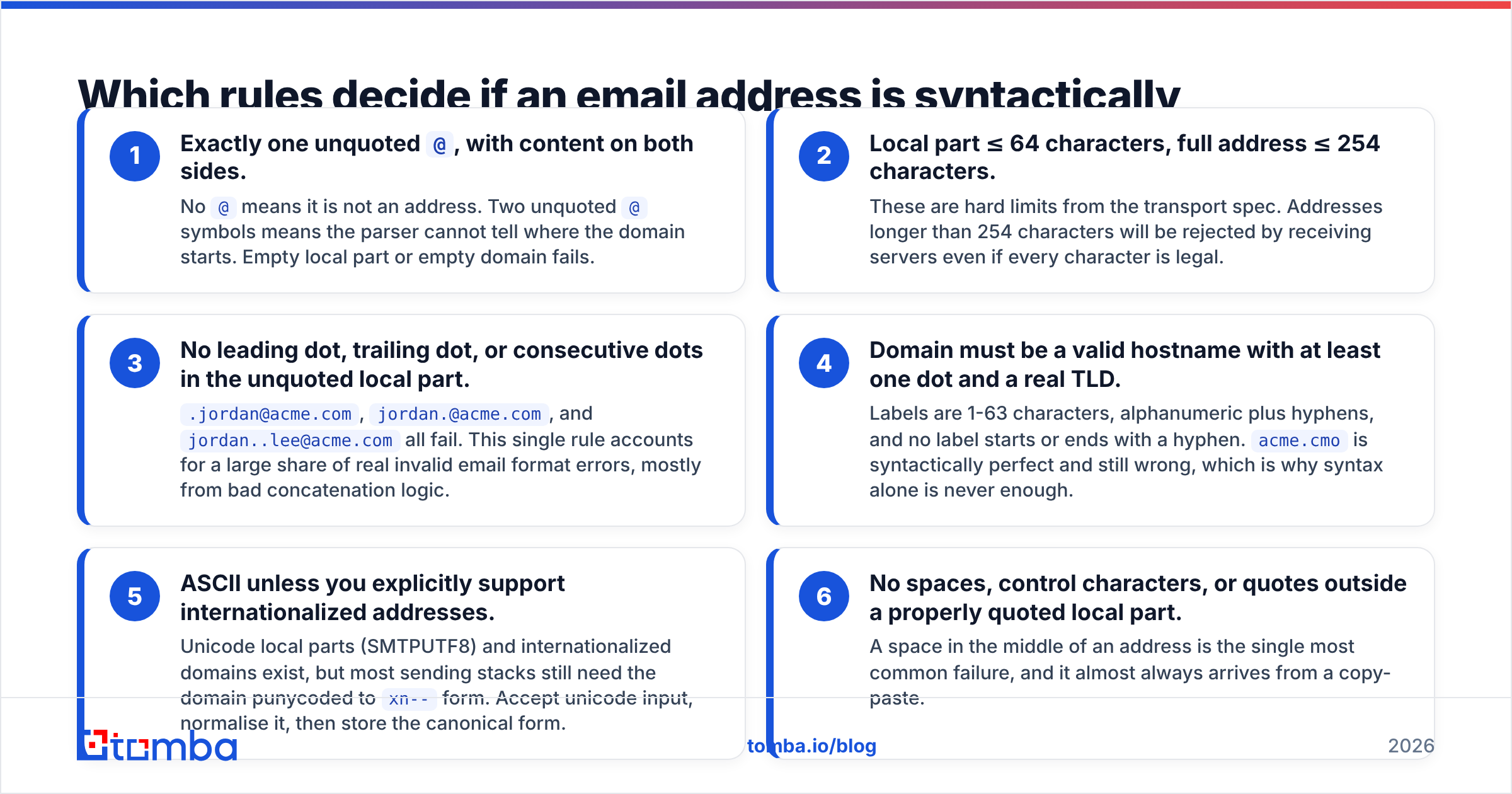
These are the checks that matter in practice. Anything beyond them is usually a validator inventing policy.
- Exactly one unquoted
@, with content on both sides. No@means it is not an address. Two unquoted@symbols means the parser cannot tell where the domain starts. Empty local part or empty domain fails. - Local part ≤ 64 characters, full address ≤ 254 characters. These are hard limits from the transport spec. Addresses longer than 254 characters will be rejected by receiving servers even if every character is legal.
- No leading dot, trailing dot, or consecutive dots in the unquoted local part.
.jordan@acme.com,jordan.@acme.com, andjordan..lee@acme.comall fail. This single rule accounts for a large share of real invalid email format errors, mostly from bad concatenation logic. - Domain must be a valid hostname with at least one dot and a real TLD. Labels are 1-63 characters, alphanumeric plus hyphens, and no label starts or ends with a hyphen.
acme.cmois syntactically perfect and still wrong, which is why syntax alone is never enough. - ASCII unless you explicitly support internationalized addresses. Unicode local parts (SMTPUTF8) and internationalized domains exist, but most sending stacks still need the domain punycoded to
xn--form. Accept unicode input, normalise it, then store the canonical form. - No spaces, control characters, or quotes outside a properly quoted local part. A space in the middle of an address is the single most common failure, and it almost always arrives from a copy-paste.
Everything else — banning plus addressing, requiring a 2-4 character TLD, rejecting subdomains, blocking - in the domain — is a business rule someone added. Sometimes those rules are defensible. They are never "format" rules, and labelling them as such is how support tickets get born.
What are the most common causes of invalid email format errors?#
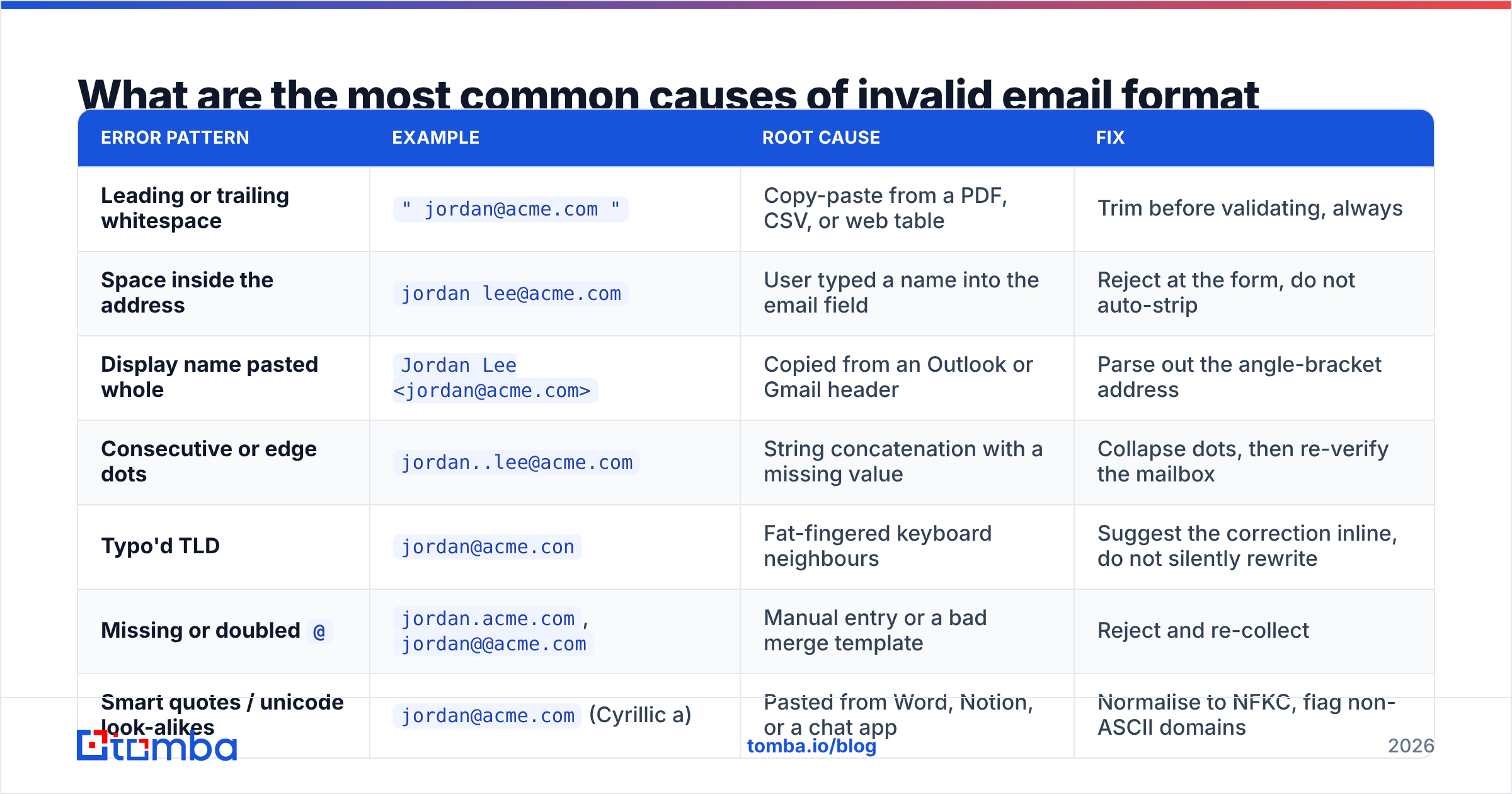
Sort a few hundred rejected rows and the same patterns repeat. Here is what they look like and what actually fixes them.
| Error pattern | Example | Root cause | Fix |
|---|---|---|---|
| Leading or trailing whitespace | " jordan@acme.com " |
Copy-paste from a PDF, CSV, or web table | Trim before validating, always |
| Space inside the address | jordan lee@acme.com |
User typed a name into the email field | Reject at the form, do not auto-strip |
| Display name pasted whole | Jordan Lee <jordan@acme.com> |
Copied from an Outlook or Gmail header | Parse out the angle-bracket address |
| Consecutive or edge dots | jordan..lee@acme.com |
String concatenation with a missing value | Collapse dots, then re-verify the mailbox |
| Typo'd TLD | jordan@acme.con |
Fat-fingered keyboard neighbours | Suggest the correction inline, do not silently rewrite |
Missing or doubled @ |
jordan.acme.com, jordan@@acme.com |
Manual entry or a bad merge template | Reject and re-collect |
| Smart quotes / unicode look-alikes | jordan@аcme.com (Cyrillic а) |
Pasted from Word, Notion, or a chat app | Normalise to NFKC, flag non-ASCII domains |
| HTML entities left encoded | jordan@acme.com |
Scraped page content not decoded | Decode entities before parsing |
| Over-strict validator | jordan+news@acme.io |
Homegrown regex banning + or long TLDs |
Fix the regex, not the address |
That last row deserves its own warning. Plus addressing is used by a meaningful share of privacy-conscious buyers, and new gTLDs like .marketing, .technology, and .consulting are now everywhere in B2B. A validator written in 2014 will reject those addresses and your team will file the rejections as "bad data". They are not bad data. They are lost pipeline.
Two more sources worth naming. Scraped addresses often arrive with obfuscation intact — jordan [at] acme [dot] com — and need a normalisation pass before validation; an email extractor handles the parsing step so you are not writing one-off scripts. And role-based addresses like info@ and sales@ are perfectly valid in format terms but usually worthless for one-to-one outreach, so treat "valid format" and "worth contacting" as separate columns in your data model.
Is regex enough to validate email format?#
No, and the reason is not that regex is weak. It is that regex answers the wrong question.
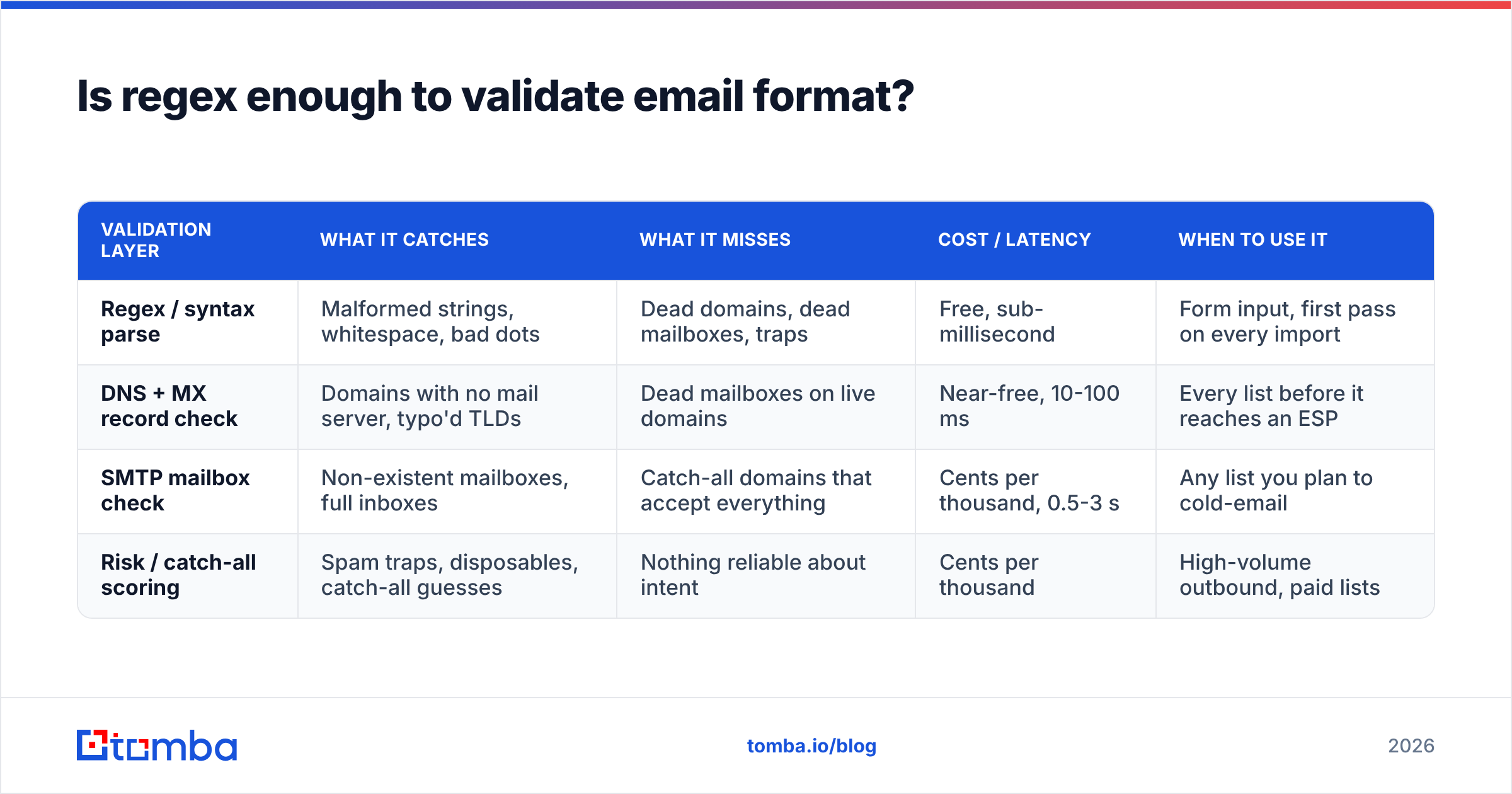
A regex tells you whether a string looks like an address. It cannot tell you whether the domain resolves, whether the mailbox exists, whether the server accepts everything sent to it, or whether the address is a spam trap that will get your domain blocklisted. Those are four separate lookups, and each one catches failures the previous layer waves through.
| Validation layer | What it catches | What it misses | Cost / latency | When to use it |
|---|---|---|---|---|
| Regex / syntax parse | Malformed strings, whitespace, bad dots | Dead domains, dead mailboxes, traps | Free, sub-millisecond | Form input, first pass on every import |
| DNS + MX record check | Domains with no mail server, typo'd TLDs | Dead mailboxes on live domains | Near-free, 10-100 ms | Every list before it reaches an ESP |
| SMTP mailbox check | Non-existent mailboxes, full inboxes | Catch-all domains that accept everything | Cents per thousand, 0.5-3 s | Any list you plan to cold-email |
| Risk / catch-all scoring | Spam traps, disposables, catch-all guesses | Nothing reliable about intent | Cents per thousand | High-volume outbound, paid lists |
The practical takeaway: use regex at the point of entry because it is instant and free, and use a verification API everywhere else. A catch-all verifier matters specifically because catch-all domains — common in enterprise — accept any address at the SMTP layer, so a naive check marks garbage as valid. Roughly one in five B2B domains behaves this way, which is enough to wreck a bounce forecast if you ignore it.
If you only want a spot check on one address, a free email checker runs the syntax and domain layers without an account. For anything over a hundred rows, batch it.

What does an invalid email format cost you?#
Two things: deliverability and revenue. The deliverability side is the one that ends careers.
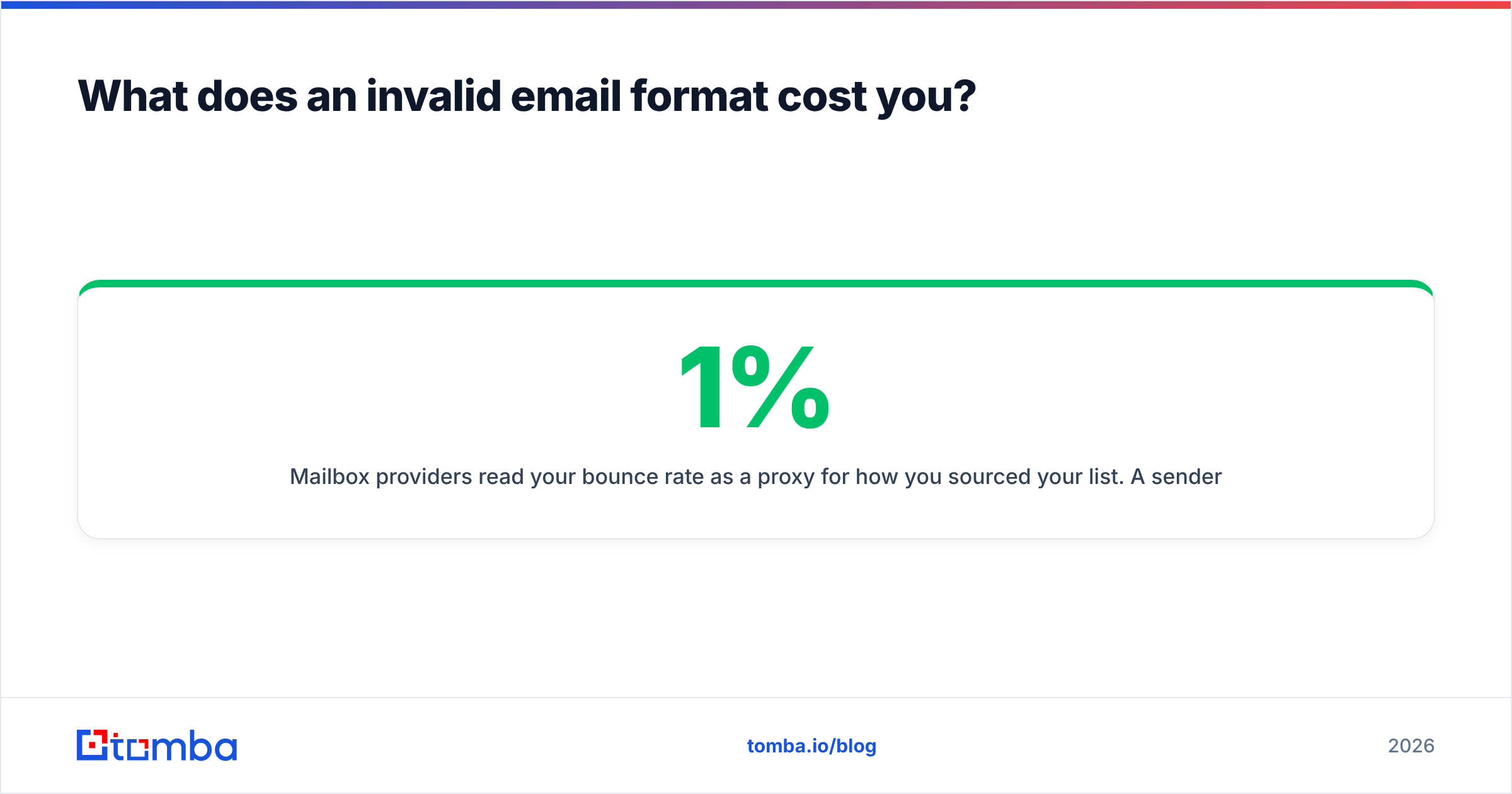
Mailbox providers read your bounce rate as a proxy for how you sourced your list. A sender bouncing 1% looks like someone with clean data. A sender bouncing 8% looks like someone who bought a CSV. Google's sender guidelines are explicit that consistently high bounce and complaint rates lead to throttling and outright rejection, and most ESPs will suspend an account well before Google gets involved. The common industry line — keep hard bounces under 2% — is a floor, not a target. Under 1% is where healthy programs live.
The damage compounds. A throttled domain does not just hurt the campaign that caused it; it hurts transactional email, recruiting outreach, and the reply-to address on your invoices. Recovering sender reputation takes weeks of reduced volume, which means the cheap shortcut of skipping verification is one of the most expensive decisions in outbound.
The revenue side is quieter. Every address your over-strict validator rejects at signup is a customer who either retyped with a different address, used a competitor, or left. Every malformed address sitting in your CRM is a contact your sequences silently skip. Nobody files a ticket for a lead that never got an email, so the loss never shows up in a dashboard.
How do you fix invalid email format errors in an existing list?#
Work in this order. Each step reduces the volume the next step has to handle, which keeps your verification costs down.
- Normalise before you judge. Trim whitespace, lowercase the domain, decode HTML entities, strip display names and angle brackets, and normalise unicode. A surprising share of "invalid" rows become valid here with zero data loss.
- Split the rejects into fixable and unfixable. Consecutive dots, trailing punctuation, and stripped-out obfuscation are mechanically fixable. A missing
@or a space in the middle is not — that address needs to be re-sourced, not repaired. - Audit your validator against a known-good sample. Feed it fifty legal-but-unusual addresses: plus tags, long TLDs, hyphenated domains, apostrophes, subdomains. Anything it rejects is a rule you invented. Fix the rule.
- Re-source rather than guess. If a contact's address is broken beyond repair, do not permutate a replacement and hope. Run the person and domain back through an email finder and get a sourced, confidence-scored address instead of a coin flip.
- Verify in bulk, then segment. Push the cleaned file through bulk verify and split the output three ways: safe to send, catch-all or risky (send at low volume from a secondary domain), and dead (suppress permanently, never delete — you need the suppression record).
- Close the loop at the source. Validate on the form, on CRM save, and on API ingest. A list that gets cleaned quarterly and dirtied daily is a list you will clean forever.
Step six is where most teams stop short. Validation at the point of entry is a few lines of code and it prevents the quarterly cleanup from being necessary. If your stack is API-first, wiring the email verification API into your form handler and your CRM webhook takes an afternoon.
How should form validation differ from list validation?#
Different jobs, different tolerances.
On a form, you have a human watching. Be permissive on syntax and helpful on typos. Accept anything that parses, check the domain's MX record asynchronously, and if someone types gmial.com show an inline "did you mean gmail.com?" suggestion rather than a red error. Never block submission on a slow network call, and never reject a legal address because it has a plus sign. HubSpot's own guidance on list hygiene makes the same point from the marketing side: friction at capture costs more than the occasional bad address.
On a list import, nobody is watching and the stakes are inverted. Be strict. Run every layer, mark catch-alls explicitly, quarantine anything unverifiable, and log why each row was rejected so you can distinguish "malformed" from "mailbox does not exist" later. The worst import behaviour is a single boolean valid column with no reason code — six months on, nobody can tell whether those 340 rows were fixable.
One more distinction worth building in: format validity, deliverability, and usefulness are three separate flags. info@acme.com can be valid, deliverable, and useless for a founder-level outbound sequence all at once. Collapsing those into one field is how teams end up sending to shared inboxes and wondering why the response rate is flat.
Clean the format, then confirm the mailbox#
An invalid email format error is the cheapest problem in your data pipeline — a parser catches it for free in under a millisecond. The expensive problem is the address that passes every syntax check and still bounces, because no regex on earth can tell you whether a mailbox exists.
That is the gap Tomba is built to close. Use the Tomba Email Finder to source addresses that are correct at the point of discovery, with a confidence score and the sources behind it, instead of permutating patterns and hoping. The free tier gives you 25 searches a month to test against your own known-good contacts; Starter is $49/mo and Growth is $99/mo if you need volume, with full pricing details available upfront. Fix the format, then confirm the mailbox — in that order, every time.
Related guides#
// get started
Find, verify and enrich your first contacts today
Start on the free plan with 25 searches a month, then scale when your team is ready.
Free plan · No credit card required · GDPR & CCPA
// about the author