Invalid Emails in 2026: Causes, Costs, and How to Fix Them
Invalid emails do more than bounce. They burn sender reputation, inflate CRM counts, and quietly kill campaigns. Here is how to spot and remove them before you hit send.
TL;DR
- An invalid email is any address that cannot accept mail at the moment you send: the mailbox does not exist, the domain has no MX record, the syntax is broken, or the server permanently rejects it.
- Invalid emails cause hard bounces, and hard bounces are the fastest way to damage sender reputation. Keep hard bounces under 2% and total complaints under 0.3%.
- Roughly 2-3% of a B2B list goes stale every month through job changes, domain migrations, and offboarding. A list you verified in January is not a clean list in June.
- Syntax checks catch maybe 5% of the problem. MX lookups, SMTP probes, role-account detection, and catch-all handling catch the rest.
- Verify at capture, verify in bulk before every campaign, and suppress permanently. Cleaning after the bounce is already too late.
What counts as an invalid email?#
An invalid email is an address that will not deliver, permanently. That is narrower than "an address that bounced" and broader than "an address with a typo."
Think of it like a postal address. A letter can fail for very different reasons: the street does not exist, the house number was never built, the resident moved out two years ago, or the mailbox is simply full this week. Only the first three are permanent. The fourth is temporary. Email works the same way, and conflating the two is where most list hygiene goes wrong.
Here are the five categories you will actually encounter, in rough order of how often they show up in a B2B list:
- Nonexistent mailbox — the domain is live and accepting mail, but
jane.doe@was never created or was deleted. This is the single largest bucket in scraped or guessed lists. The server answers with a 550 5.1.1 "user unknown." - Dead or parked domain — the company rebranded, got acquired, or shut down. There is no MX record, so there is nothing to deliver to. Cheap to detect, and you should never let one of these reach your sending infrastructure.
- Syntax and formatting errors — double dots, missing TLD, stray spaces, a trailing comma from a CSV paste. Free to catch with a regex, and yet still present in most CRM exports.
- Disposable and throwaway addresses — Mailinator, 10minutemail, and thousands of rotating burner domains. Technically valid for about ten minutes, useless to you forever.
- Spam traps and recycled addresses — an address that was real, got abandoned, and was reactivated by the mailbox provider purely to catch senders who never clean their lists. These do not bounce. They silently torch your reputation, which makes them the most dangerous item on this list.
There is a sixth category that deserves its own treatment: catch-all domains. These accept mail for any address at the domain, so an SMTP probe returns "accepted" whether or not the mailbox exists. Around 15-20% of B2B domains are configured this way, especially at enterprises using Microsoft 365 with a wildcard rule. A basic verifier marks every catch-all address as valid, which is how "99% accuracy" claims survive contact with reality. You need a dedicated catch-all verifier that uses pattern confidence and secondary signals instead of a single SMTP handshake.
How do invalid emails differ from bounces and unsubscribes?#
These three terms get used interchangeably in stand-ups and they mean very different things to your mail server.
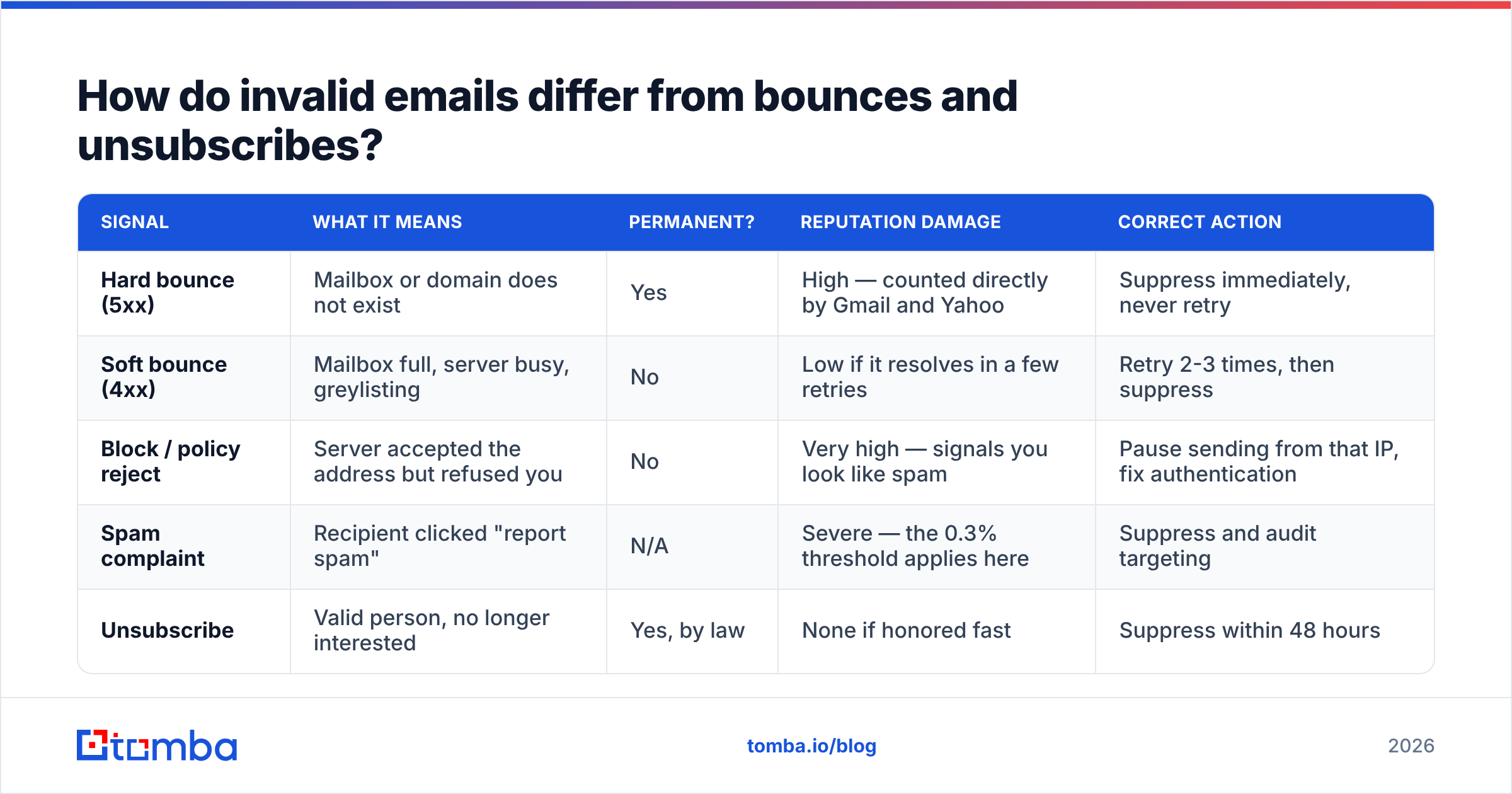
| Signal | What it means | Permanent? | Reputation damage | Correct action |
|---|---|---|---|---|
| Hard bounce (5xx) | Mailbox or domain does not exist | Yes | High — counted directly by Gmail and Yahoo | Suppress immediately, never retry |
| Soft bounce (4xx) | Mailbox full, server busy, greylisting | No | Low if it resolves in a few retries | Retry 2-3 times, then suppress |
| Block / policy reject | Server accepted the address but refused you | No | Very high — signals you look like spam | Pause sending from that IP, fix authentication |
| Spam complaint | Recipient clicked "report spam" | N/A | Severe — the 0.3% threshold applies here | Suppress and audit targeting |
| Unsubscribe | Valid person, no longer interested | Yes, by law | None if honored fast | Suppress within 48 hours |
The practical takeaway: hard bounces are the only category that verification can eliminate before you send. The rest are downstream of targeting, authentication, and copy. If someone tells you a verification tool will fix your spam complaints, they are selling you the wrong product.
Why do invalid emails matter more in 2026?#
Because the mailbox providers stopped being polite about it.
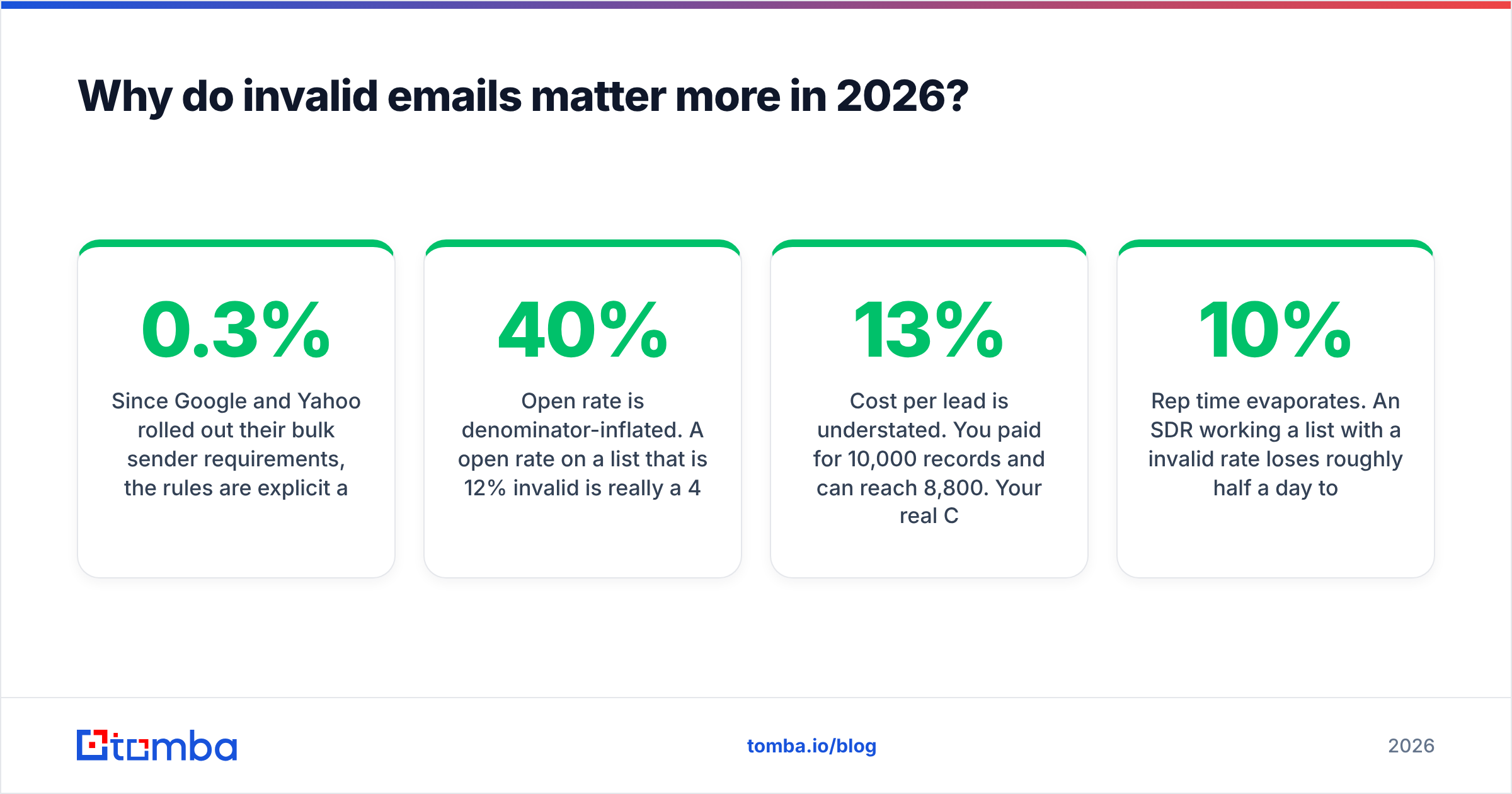
Since Google and Yahoo rolled out their bulk sender requirements, the rules are explicit and enforced. Google's sender guidelines require SPF and DKIM alignment, DMARC on the sending domain, one-click unsubscribe, and a spam complaint rate kept below 0.3%. Yahoo published near-identical requirements. Microsoft followed with its own enforcement for high-volume senders. None of these are suggestions any more — exceed the thresholds and your mail goes to spam, or gets rejected outright at the gateway.
Hard bounces feed directly into that machinery. A sending domain that repeatedly attempts delivery to nonexistent mailboxes looks exactly like a domain running a scraped list, because usually it is. The filter does not need to read your copy to reach that conclusion.
The second cost is quieter and shows up in your board deck. Invalid emails inflate every metric built on list size:
- Open rate is denominator-inflated. A 40% open rate on a list that is 12% invalid is really a 45% open rate on the deliverable portion. You are underestimating your own copy.
- Cost per lead is understated. You paid for 10,000 records and can reach 8,800. Your real CPL is 13% higher than the spreadsheet says.
- Rep time evaporates. An SDR working a list with a 10% invalid rate loses roughly half a day per week to bounce triage and re-research.
- CRM data decays into noise. Duplicate, invalid, and stale records make lead scoring unreliable, and unreliable scoring gets ignored.
What actually causes invalid emails?#
Four sources, and they demand different fixes.
Natural decay. People change jobs. B2B email lists degrade at roughly 22-30% per year, which works out to 2-3% per month. This is not a data-quality failure, it is entropy. The only fix is re-verification on a schedule.
Guessing and permutation. Tools that generate first.last@domain.com without checking anything produce output that is 50-70% wrong at companies with unusual formats. Permutation is a legitimate starting point — Tomba's own email permutator exists for exactly that — but permutation output must be verified before it touches a sequence, never shipped raw.
Form abuse and typos. Users mistype gmial.com, paste with trailing whitespace, or deliberately enter junk to get a gated PDF. A real-time check at the point of capture kills this entire class of problem for effectively zero ongoing cost.
Stale purchased data. Bought lists vary enormously. Reputable providers like BookYourData verify at the point of purchase and are transparent about their refresh cadence, which is the standard to hold any vendor to. The problem is not buying data, it is buying data and then treating the file as permanently accurate. Even a well-verified purchase decays on the same 2-3% monthly curve as everything else.
How do you detect invalid emails before you send?#
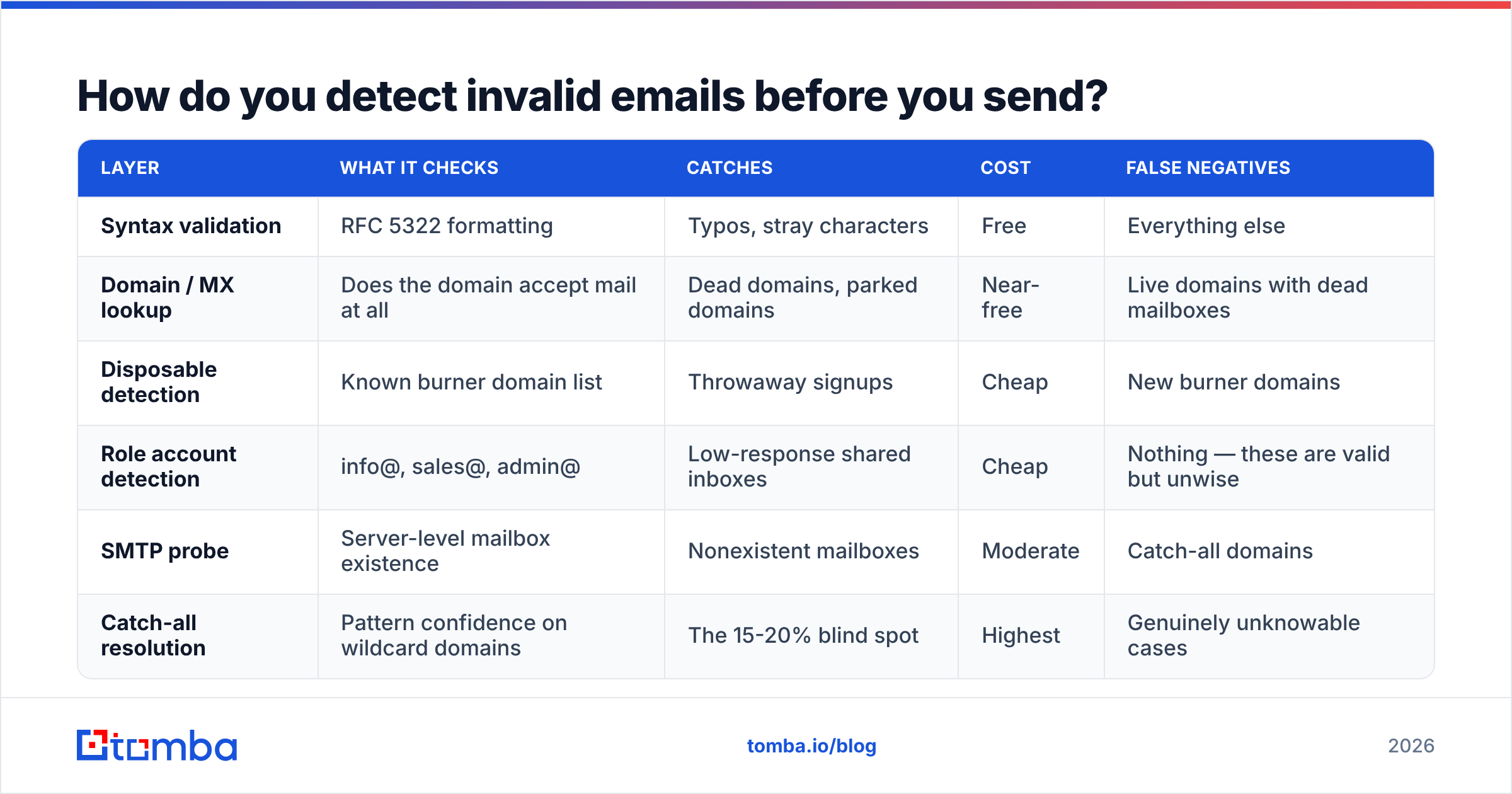
Verification runs as a layered pipeline. Each layer is cheaper than the one after it, so you run them in order and drop records as early as possible.
| Layer | What it checks | Catches | Cost | False negatives |
|---|---|---|---|---|
| Syntax validation | RFC 5322 formatting | Typos, stray characters | Free | Everything else |
| Domain / MX lookup | Does the domain accept mail at all | Dead domains, parked domains | Near-free | Live domains with dead mailboxes |
| Disposable detection | Known burner domain list | Throwaway signups | Cheap | New burner domains |
| Role account detection | info@, sales@, admin@ | Low-response shared inboxes | Cheap | Nothing — these are valid but unwise |
| SMTP probe | Server-level mailbox existence | Nonexistent mailboxes | Moderate | Catch-all domains |
| Catch-all resolution | Pattern confidence on wildcard domains | The 15-20% blind spot | Highest | Genuinely unknowable cases |
Layers one through four run in milliseconds and cost almost nothing. The SMTP probe is where real verification happens, and catch-all resolution is where tools separate themselves. If a vendor's documentation does not explain how it handles catch-all domains, assume it does not handle them.
For one-off checks, a free email checker is enough to sanity-test a single address. For anything at list scale, run the file through a proper email verifier and export the categorized result rather than a single valid/invalid flag. You want four buckets — valid, invalid, catch-all, and unknown — because they carry different levels of risk and belong in different sending tiers.

What bounce rate should you actually target?#
Under 2% hard bounces per campaign. Under 1% if you are on a shared IP or a newly warmed domain.
The reason the number is that low: bounce rate is a lagging indicator of list quality, and mailbox providers evaluate it as a trailing average, not per-send. One bad campaign at 8% will suppress your deliverability for weeks after you fix the underlying list. Reputation recovers slowly and on the provider's timetable, not yours.
A reasonable set of thresholds to wire into your workflow:
- Under 1% — healthy. Continue at current volume.
- 1-2% — acceptable but drifting. Re-verify before the next send.
- 2-5% — stop and clean. Do not send again from that domain until the list is re-run.
- Over 5% — assume the list source is compromised. Re-verify everything from that source, and consider pausing the sending domain entirely while you audit.
Pair this with Google Postmaster Tools so you are watching domain reputation directly rather than inferring it from your ESP's dashboard. Your ESP tells you what it sent. Postmaster tells you what Google thought of it.
Should you verify at capture or in bulk?#
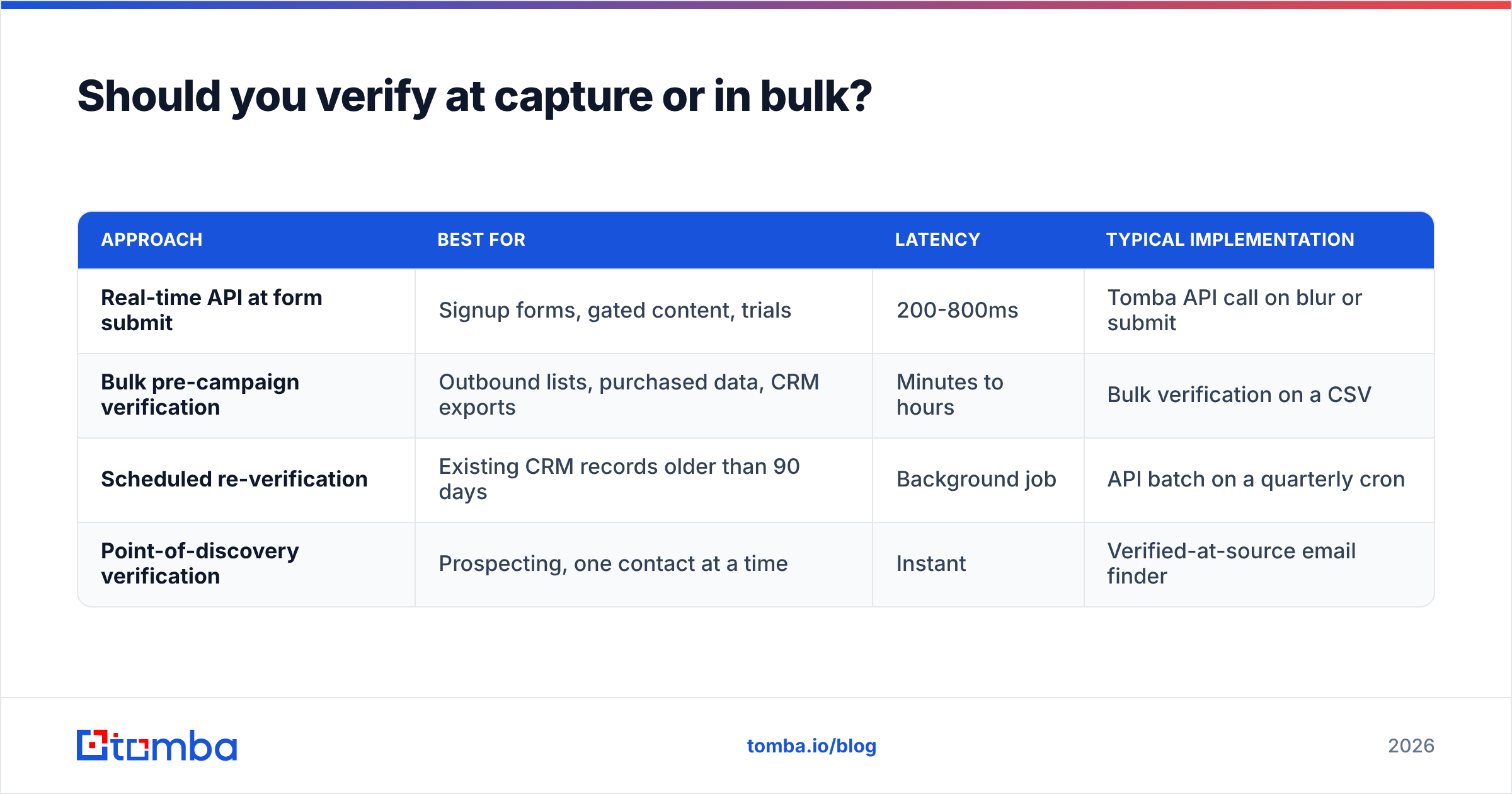
Both, and they solve different problems.
| Approach | Best for | Latency | Typical implementation |
|---|---|---|---|
| Real-time API at form submit | Signup forms, gated content, trials | 200-800ms | Tomba API call on blur or submit |
| Bulk pre-campaign verification | Outbound lists, purchased data, CRM exports | Minutes to hours | Bulk verification on a CSV |
| Scheduled re-verification | Existing CRM records older than 90 days | Background job | API batch on a quarterly cron |
| Point-of-discovery verification | Prospecting, one contact at a time | Instant | Verified-at-source email finder |
Real-time capture verification is the highest-ROI item on this list and the one most teams skip. Rejecting test@test.com at the form costs you one API call. Letting it into the CRM costs you a bounce, a suppression record, a duplicate, and a slightly worse lead score model forever.
The fourth row matters for outbound teams specifically. If your prospecting tool verifies at the moment it returns the address, you never accumulate an invalid backlog in the first place. That is structurally different from finding 5,000 addresses and cleaning them next Tuesday.
How do you keep a list clean long term?#
Treat it as a standing process, not a quarterly panic.
Suppress permanently, never re-import. Every hard bounce goes into a global suppression list that survives CRM migrations, ESP changes, and enthusiastic marketers re-uploading an old file. This is the single most common cause of repeat bounces: the same dead address gets re-added from a stale spreadsheet three times a year.
Re-verify on a 90-day cycle. At 2-3% monthly decay, a quarterly re-run keeps you under the 2% bounce threshold with margin. High-churn industries — agencies, startups, anything in tech — justify 60 days.
Segment by confidence, not just valid/invalid. Send to "valid" records on your primary domain. Send to "catch-all" records on a secondary domain with lower volume. Never send to "unknown" until you have resolved it.
Deduplicate before you verify. Running the same address through verification four times because it appears in four segments is pure waste. Run a deduplication pass first, then verify the unique set.
Instrument the source, not just the outcome. Tag every record with where it came from. When bounce rates spike, you want to know it was the March conference list rather than guessing across the whole database. Vendor comparisons on G2 are useful for shortlisting, but your own per-source bounce data is the only benchmark that reflects your actual market.
Where does verification fit against just finding better emails?#
The cheapest invalid email is the one you never collect.
Verification is remediation. It is necessary, and it will always be necessary because of decay, but a workflow that finds addresses accurately in the first place reduces how much remediation you need. If your prospecting motion starts from a domain and a name and returns an address with a confidence score attached, the downstream cleanup burden drops by an order of magnitude compared to scraping, permutating, and hoping.
That is the practical argument for pairing the two. Find with verification built in, then re-verify on a schedule to handle decay. You cannot skip the second step — nothing protects you from a prospect changing jobs — but you can stop manufacturing invalid records at the source.
Stop cleaning lists you should never have built. The Tomba Email Finder returns professional addresses with a verification status and confidence score attached, so invalid records get filtered before they ever reach your CRM or your sequencer. Start on the free tier with 25 searches a month, or move to the $49/mo Starter plan when you are running real volume — full details on the Tomba pricing page. Find it verified, send it clean, and keep your bounce rate where the mailbox providers want it.
Related guides#
// get started
Find, verify and enrich your first contacts today
Start on the free plan with 25 searches a month, then scale when your team is ready.
Free plan · No credit card required · GDPR & CCPA
// about the author