IP Reputation Check Free: How to Test and Fix Your Sender IP
Most free IP reputation tools tell you that you're listed, not why. Here's how to run a free IP reputation check, read the scores honestly, and fix the sending behavior that caused the listing.
Your sending IP has a record. Mail servers look it up before they accept your message. An IP reputation check free of charge will show you that record in about ten minutes. No card, no signup. This guide covers the five tools worth running, the order to run them in, and what to do when one comes back red.
TL;DR
- A free IP reputation check tells you whether your sending IP appears on public blocklists and how security vendors currently score it. It does not tell you what Gmail or Outlook think of you — only Postmaster Tools and SNDS do that.
- Use three tools, not one: a blocklist aggregator (Spamhaus + MXToolbox), a vendor reputation score (Cisco Talos), and the mailbox-provider dashboards (Google Postmaster Tools, Microsoft SNDS).
- Only a handful of the ~100 blocklists in existence actually affect inbox placement. Spamhaus SBL/XBL/PBL, Spamhaus DBL, SURBL, and Barracuda are the ones worth panicking about.
- Delisting is the easy part. Fixing the cause — bad list hygiene, no authentication, a volume spike, a compromised account — is the part that keeps you delisted.
- If you send from a shared IP (most ESPs), your reputation is partly other people's behavior. Domain reputation is what you actually control.
What is an IP reputation check, and what does it actually measure?#
An IP reputation check is a lookup that asks public and commercial databases one question: has this IP address been observed sending abusive mail?
Think of it like a credit check on a rental applicant. The landlord doesn't watch you live your life — they query a handful of bureaus that have each recorded some slice of your history. A clean report doesn't mean everyone will rent to you. A bad report means several will refuse before reading your application.
Concretely, a free IP reputation check queries three different kinds of source:
- DNS blocklists (DNSBLs) — Spamhaus, SORBS, Barracuda, SpamCop and friends. These are binary: you're listed or you're not, with a reason code. Receiving mail servers query them in real time during the SMTP handshake and can reject your mail outright.
- Vendor reputation scores — Cisco Talos, Trend Micro, Sender Score. These are graded (Good / Neutral / Poor, or 0–100) and are derived from spam-trap hits, complaint volume, and traffic patterns across the vendor's own customer base.
- Mailbox-provider telemetry — Google Postmaster Tools and Microsoft SNDS. These are the only sources that reflect what actually happens when your mail hits their users' inboxes: complaint rate, spam-folder rate, authentication pass rate.
Most people run step 1, see "not listed," and assume they're fine. That's the mistake. A clean blocklist report with a 4% Gmail spam-complaint rate means you are in serious trouble and just don't know it yet.

Why does IP reputation still matter in 2026?#
It matters less than it did in 2016, and more than the "domain reputation is everything" crowd admits.
Here's the honest split:
- IP reputation gates delivery at the connection layer. If your IP is on Spamhaus SBL, many receiving servers reject the connection before your DKIM signature is ever evaluated. No amount of great domain reputation saves you from a 550 at the gate.
- Domain reputation gates placement at the inbox layer. Once your mail is accepted, Gmail and Outlook primarily score the sending domain — plus the domains in your links — to decide inbox vs spam.
- Shared IPs blur the line. If you send through an ESP on a shared pool, your IP reputation is an average of everyone in that pool. Your domain reputation is yours alone. That asymmetry is exactly why Google's sender guidelines lean on domain-level authentication rather than IP allowlists.
So: check your IP because a listing is a hard blocker. Invest in your domain because that's where day-to-day placement is decided.
Which free IP reputation check tools are actually worth using?#
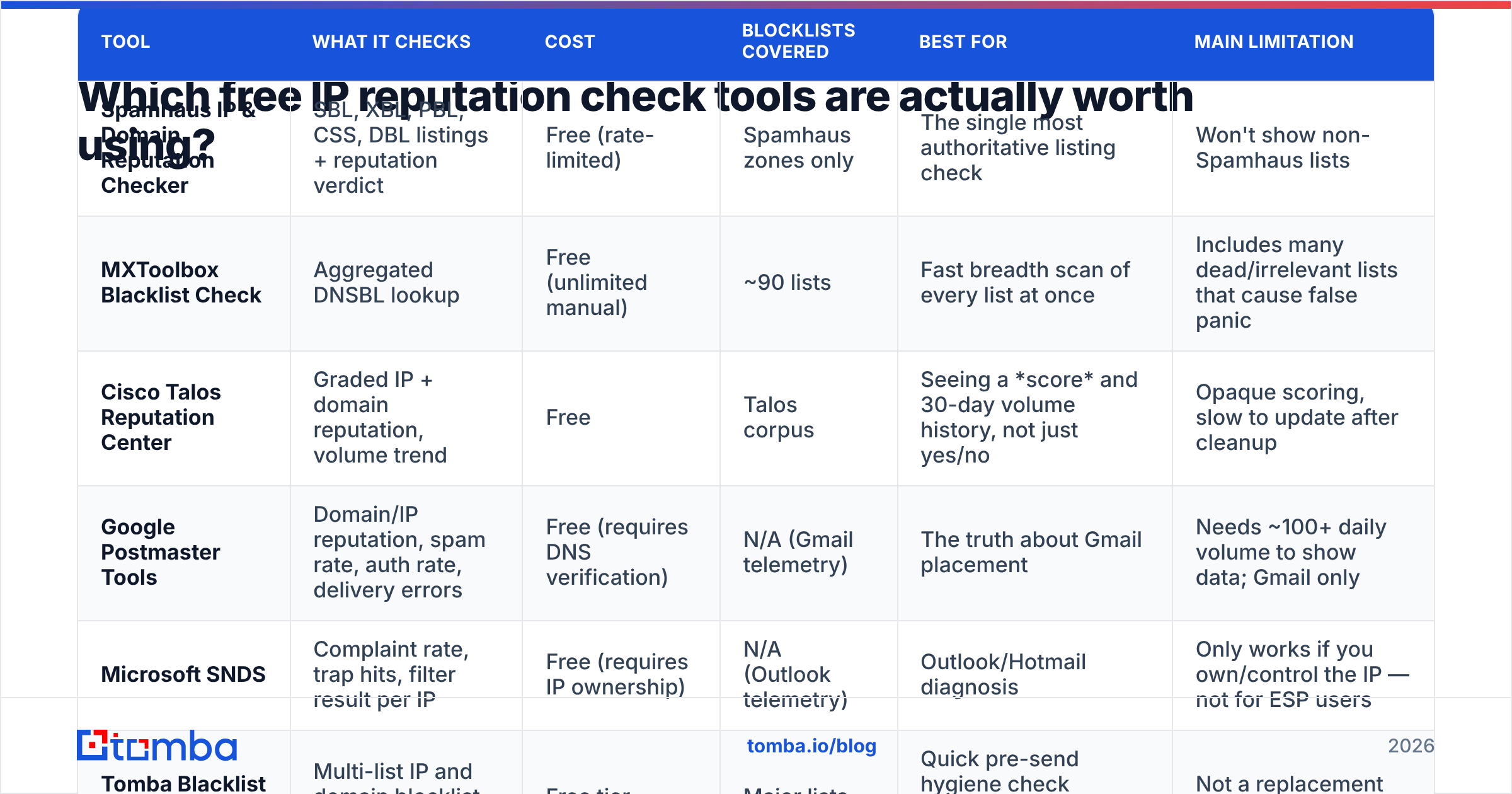
There are dozens. Five do real work. Here's the comparison, with what each one covers and where it falls short.
| Tool | What it checks | Cost | Blocklists covered | Best for | Main limitation |
|---|---|---|---|---|---|
| Spamhaus IP & Domain Reputation Checker | SBL, XBL, PBL, CSS, DBL listings + reputation verdict | Free (rate-limited) | Spamhaus zones only | The single most authoritative listing check | Won't show non-Spamhaus lists |
| MXToolbox Blacklist Check | Aggregated DNSBL lookup | Free (unlimited manual) | ~90 lists | Fast breadth scan of every list at once | Includes many dead/irrelevant lists that cause false panic |
| Cisco Talos Reputation Center | Graded IP + domain reputation, volume trend | Free | Talos corpus | Seeing a score and 30-day volume history, not just yes/no | Opaque scoring, slow to update after cleanup |
| Google Postmaster Tools | Domain/IP reputation, spam rate, auth rate, delivery errors | Free (requires DNS verification) | N/A (Gmail telemetry) | The truth about Gmail placement | Needs ~100+ daily volume to show data; Gmail only |
| Microsoft SNDS | Complaint rate, trap hits, filter result per IP | Free (requires IP ownership) | N/A (Outlook telemetry) | Outlook/Hotmail diagnosis | Only works if you own/control the IP — not for ESP users |
| Tomba Blacklist Checker | Multi-list IP and domain blocklist lookup | Free tier | Major lists | Quick pre-send hygiene check alongside list verification | Not a replacement for Postmaster Tools |
The practical stack: Spamhaus for authority, MXToolbox for breadth, Talos for trend, Postmaster Tools + SNDS for truth. You can run all five in under ten minutes and it costs nothing.
For the blocklist half of that workflow, Tomba's blacklist checker and sender reputation checker run the lookups without the ad-heavy interstitials most free tools bolt on.
Is an IP reputation check free, or do you hit a paywall?#
Free is enough for almost everyone. Every tool in the table above runs at no cost. The two that matter most, Postmaster Tools and SNDS, are free by design. Mailbox providers want you to see your own data.
Paid tools add three things: alerts when a listing appears, history you can chart, and an API. Those are worth money if you send daily at scale. They add nothing to the diagnosis itself. Run the free stack first. Buy monitoring later, once you know what normal looks like for your IP.
How do you run a free IP reputation check in ten minutes?#
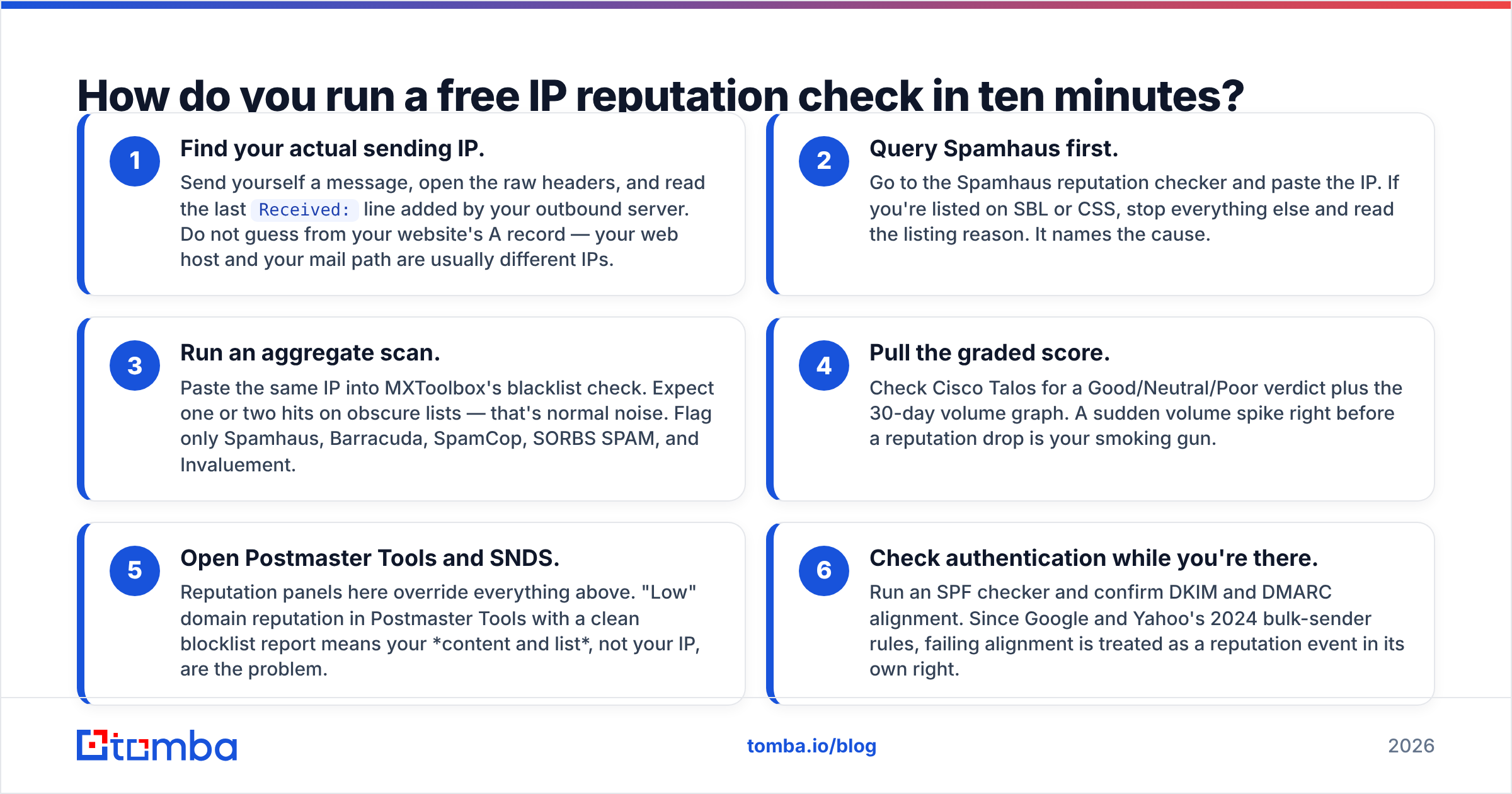
Follow this order. It goes from cheapest signal to most meaningful.
- Find your actual sending IP. Send yourself a message, open the raw headers, and read the last
Received:line added by your outbound server. Do not guess from your website's A record — your web host and your mail path are usually different IPs. - Query Spamhaus first. Go to the Spamhaus reputation checker and paste the IP. If you're listed on SBL or CSS, stop everything else and read the listing reason. It names the cause.
- Run an aggregate scan. Paste the same IP into MXToolbox's blacklist check. Expect one or two hits on obscure lists — that's normal noise. Flag only Spamhaus, Barracuda, SpamCop, SORBS SPAM, and Invaluement.
Those three steps take about four minutes. The next three are the ones that tell you the truth.
- Pull the graded score. Check Cisco Talos for a Good/Neutral/Poor verdict plus the 30-day volume graph. A sudden volume spike right before a reputation drop is your smoking gun.
- Open Postmaster Tools and SNDS. Reputation panels here override everything above. "Low" domain reputation in Postmaster Tools with a clean blocklist report means your content and list, not your IP, are the problem.
- Check authentication while you're there. Run an SPF checker and confirm DKIM and DMARC alignment. Since Google and Yahoo's 2024 bulk-sender rules, failing alignment is treated as a reputation event in its own right.
What counts as a "good" result — and what should you ignore?#
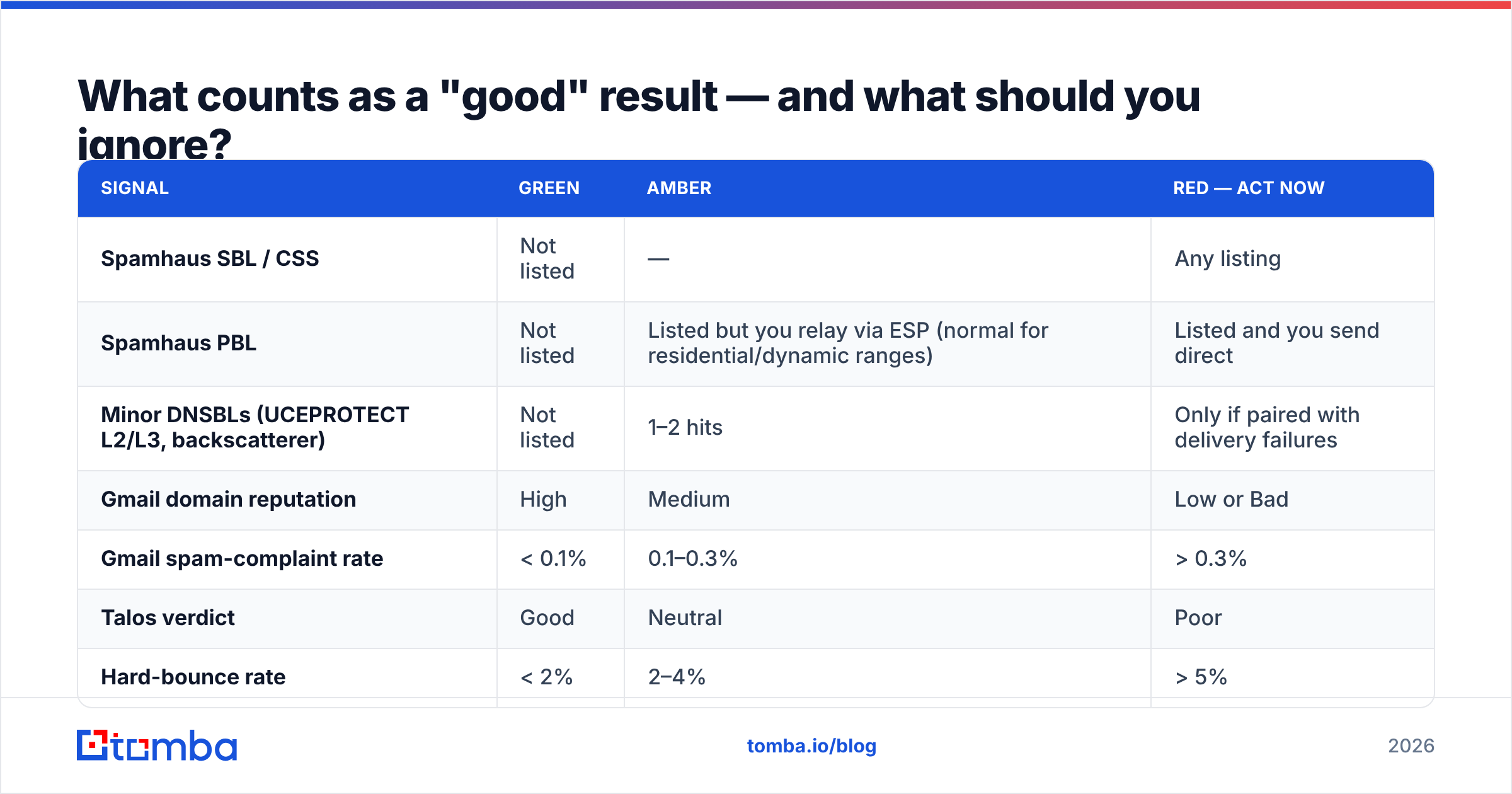
Free tools love showing red. Most of that red is meaningless. Here's how to triage.
| Signal | Green | Amber | Red — act now |
|---|---|---|---|
| Spamhaus SBL / CSS | Not listed | — | Any listing |
| Spamhaus PBL | Not listed | Listed but you relay via ESP (normal for residential/dynamic ranges) | Listed and you send direct |
| Minor DNSBLs (UCEPROTECT L2/L3, backscatterer) | Not listed | 1–2 hits | Only if paired with delivery failures |
| Gmail domain reputation | High | Medium | Low or Bad |
| Gmail spam-complaint rate | < 0.1% | 0.1–0.3% | > 0.3% |
| Talos verdict | Good | Neutral | Poor |
| Hard-bounce rate | < 2% | 2–4% | > 5% |
Two rules that save a lot of wasted afternoons:
- UCEPROTECT Level 2 and Level 3 list entire /24 and ASN ranges. Being on them usually means a neighbor misbehaved. Almost no major mailbox provider consults them. Don't pay their "express delisting" fee.
- A PBL listing on a residential IP is not a problem unless you are running your own mail server from that connection — which you shouldn't be.
What actually causes a bad IP reputation?#
Five causes account for nearly every listing I've seen diagnosed:
- Spam traps from stale or purchased lists. Recycled traps are old abandoned addresses; pristine traps were never real. Hitting either is the fastest route to Spamhaus SBL. This is why verifying emails before a send is not optional — it's the single highest-leverage deliverability control you have.
- Volume spikes on a cold IP. Going from 200/day to 20,000/day overnight looks identical to a compromised server. Ramp over 3–4 weeks.
- A compromised account or open relay. Check your outbound queue for mail you didn't send. If Talos shows volume you can't account for, this is it.
- High complaint rate. Above 0.3% at Gmail and you are on a timer. Usually caused by weak opt-in, missing unsubscribe, or a list bought as "opt-in" that wasn't.
- Broken or misaligned authentication. SPF that doesn't cover your ESP, DKIM signing on the wrong domain, DMARC set to
p=noneforever. Fix the record, then re-check.

How do you fix it — and how long does recovery take?#
Delisting requests take minutes. Reputation recovery takes weeks. Do them in this order.
Step 1 — Stop sending from the affected IP. Continuing to send into a listing deepens it. Pause the campaign.
Step 2 — Find and remove the cause. Purge every address you can't prove engaged in the last 90 days. Run the remainder through verification and remove unknowns, role accounts, and disposable domains. If you send to catch-all domains, treat them as a separate risk bucket — a catch-all verifier distinguishes "accepts everything" from "actually deliverable."
Step 3 — Request delisting. Spamhaus's removal form is self-service for most listing types and typically clears within a few hours if the cause is gone. Barracuda and SpamCop are similar. Do not submit a request before step 2 — repeat listings after a self-delisting are treated far more harshly.
Step 4 — Re-warm. Restart at roughly 10% of prior volume, sending only to your most engaged segment (opened or clicked in the last 30 days). Double every 2–3 days while watching Postmaster Tools. Full recovery to "High" domain reputation usually takes 3–6 weeks.
Step 5 — Monitor continuously. Set a weekly automated blocklist check. By the time you notice a delivery drop manually, you've already lost a week of pipeline. Sender reputation is a slow-moving metric on the way up and a fast-moving one on the way down.
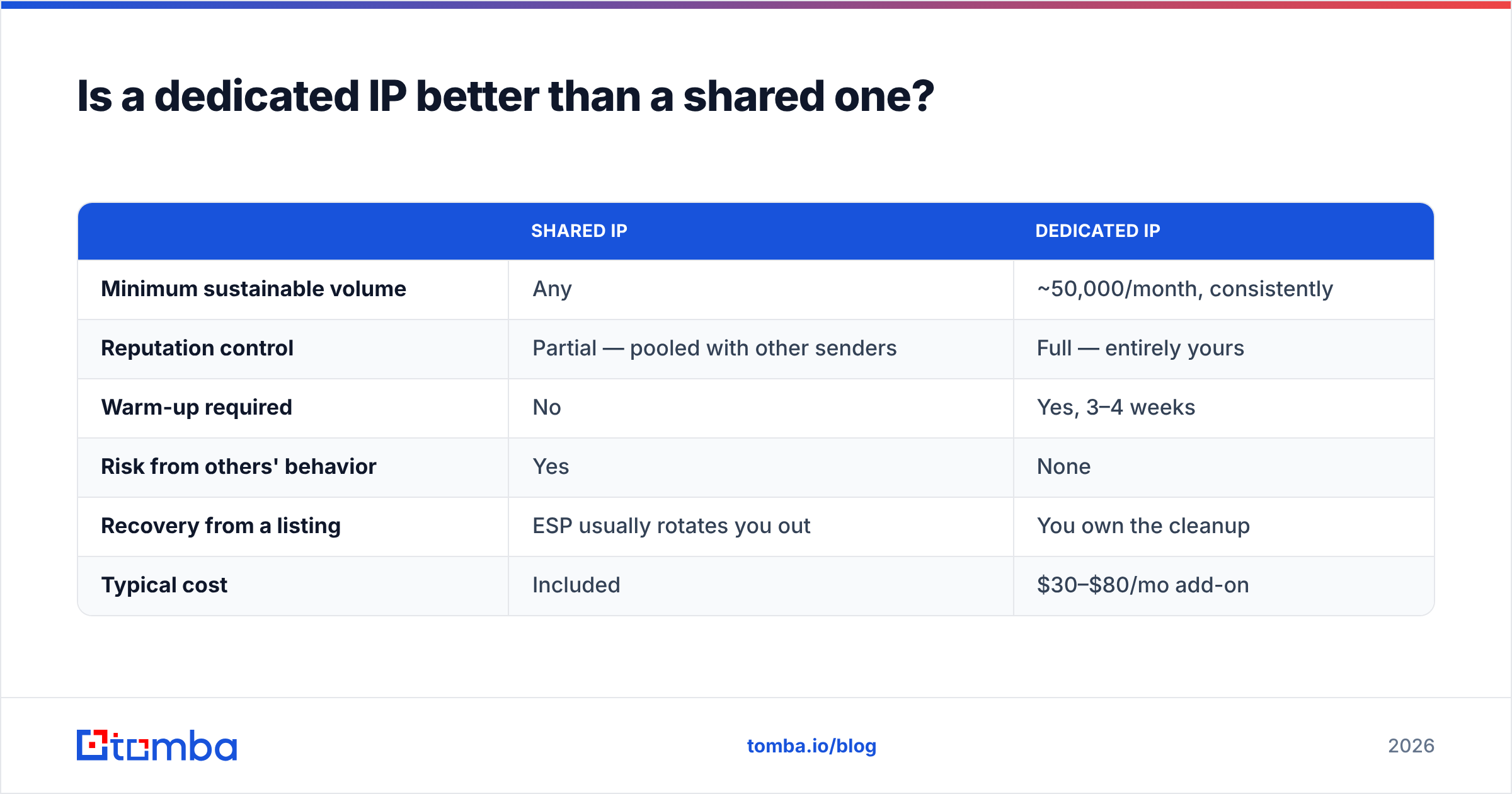
Is a dedicated IP better than a shared one?#
Only above a volume threshold. Below it, a dedicated IP is actively worse.
| Shared IP | Dedicated IP | |
|---|---|---|
| Minimum sustainable volume | Any | ~50,000/month, consistently |
| Reputation control | Partial — pooled with other senders | Full — entirely yours |
| Warm-up required | No | Yes, 3–4 weeks |
| Risk from others' behavior | Yes | None |
| Recovery from a listing | ESP usually rotates you out | You own the cleanup |
| Typical cost | Included | $30–$80/mo add-on |
The trap: a dedicated IP with low, irregular volume never establishes a stable reputation. Mailbox providers treat inconsistent senders as unknown, and unknown skews toward spam. If you send 5,000 cold emails a month, stay on a good ESP's shared pool and put your energy into list quality and domain reputation instead.
Does prospect data quality change your IP reputation?#
Directly and measurably — it's upstream of everything else on this page.
Every invalid address you send to produces a hard bounce. Every hard bounce is a reputation signal. Every scraped list carries some density of spam traps you cannot detect by inspection. A 10,000-address list at 88% validity throws about 1,200 bounces on the first send. That is enough to trigger throttling at most providers. It is also enough trap exposure to risk a listing.
The fix is boring and it works. Source contacts from a provider that validates at the point of lookup, rather than exporting whatever a scraper found. Then re-verify anything older than 90 days before it goes into a sequence. Reviews on G2 show a clear gap between tools that run real-time SMTP checks and those that return cached guesses. That gap shows up in your bounce rate within one campaign.
Frequently asked questions#
Can I check IP reputation for free without signing up? Yes. Spamhaus, MXToolbox, and Talos all run anonymous lookups. Postmaster Tools and SNDS require verification because they expose private telemetry about your own traffic.
How often should I check? Weekly for active senders, or automatically before each major campaign. Daily is overkill unless you're recovering from a listing.
My IP is clean but mail still lands in spam. Why? Domain reputation, content, or authentication — in that order. Check Postmaster Tools' domain reputation panel, then your link domains (a clean sending domain pointing to a blocklisted tracking domain fails the same way).
Does changing IPs fix a bad reputation? Temporarily, then no. A fresh IP with the same list and the same sending behavior gets listed again within weeks, and providers increasingly correlate across IPs via the sending domain.
Do blocklists expire on their own? Some do — SpamCop entries age out in about 24 hours without new reports. Spamhaus SBL does not; it requires a removal request once the cause is fixed.
Where to start#
Run the five-tool sweep above today and write down the results. If everything is clean, you've spent ten minutes and gained a baseline. If something is red, you now know whether it's a listing problem, a telemetry problem, or an authentication problem — three very different fixes.
Then work on the input side, because that's where most reputation damage starts. Build your prospect lists from verified, current data instead of exports and scrapes. The Tomba Email Finder returns addresses with a confidence score and a verification status attached, so bad addresses never reach your sending infrastructure. The free tier covers 25 searches a month if you want to test the validity rate against a list you already have; paid plans start at $49/mo. Preventing one Spamhaus listing pays for a year of it.
Related guides#
// get started
Find, verify and enrich your first contacts today
Start on the free plan with 25 searches a month, then scale when your team is ready.
Free plan · No credit card required · GDPR & CCPA
// about the author