IP Reputation vs Domain Reputation: Which Matters More in 2026
Your emails land in spam and you don't know whether the IP or the domain is to blame. Here's how mailbox providers weigh each signal, how to diagnose which one broke, and the repair order that actually restores inbox placement.
TL;DR
- Domain reputation outweighs IP reputation at Gmail, and it is the signal that follows you everywhere. Burn the domain and a new IP will not save you; burn the IP and a clean domain can still get delivered after a switch.
- IP reputation is short-memory, domain reputation is long-memory. IPs recover in days to weeks with disciplined volume. Domains can carry a complaint history for months.
- On shared IPs you barely control IP reputation — your neighbors do. That is exactly why Google leaned harder on domain-level signals.
- Most "IP problems" are actually list problems. Bounce spikes and spam-trap hits come from unverified contacts, not from the sending server.
- Diagnose in this order: authentication → domain reputation in Postmaster Tools → IP reputation/blacklists → content and cadence.
What is the difference between IP reputation and domain reputation?#
Think of it like a delivery driver and the company printed on the van. The driver (your sending IP) can be swapped out tomorrow — a new hire, a new route, a clean slate. The company name on the van (your sending domain) is what customers remember after the third smashed parcel. Mailbox providers score both, but they weight the name on the van far more heavily, because it is the thing a spammer cannot cheaply replace.
IP reputation is a trust score attached to the numeric address of the server that opened the SMTP connection. It is built from the behavior of every message ever sent from that address: bounce rates, complaint rates, spam-trap hits, volume patterns, and whether the IP appears on public blocklists like Spamhaus or SURBL.
Domain reputation is a trust score attached to the domains in your message — primarily the From: domain and the DKIM signing domain, and increasingly the domains of the links inside your body copy. It survives infrastructure changes. Move from SendGrid to Amazon SES to a fresh VPS and your domain reputation walks with you.
The two are linked through authentication. DKIM and SPF record checks are what let a provider say "this message really came from acme.com" — which is what makes domain-level scoring possible in the first place. Before widespread authentication, IP was the only durable identifier; that is why legacy deliverability advice over-indexes on IP warmup.
How do Gmail and Outlook actually score you?#
They score differently, and the difference matters for your repair plan.
Gmail publishes both signals separately inside Postmaster Tools, with domain reputation rated High / Medium / Low / Bad and IP reputation on the same scale. In practice, Gmail places far more weight on domain reputation, especially for senders on shared infrastructure — which is nearly everyone under a few hundred thousand sends per month. Since the February 2024 bulk-sender requirements (5,000+ daily messages to Gmail, enforced ever since), the spam complaint threshold is tied to your domain: keep it under 0.3%, ideally under 0.1%.
Microsoft is the mirror image. Outlook and Hotmail still lean heavily on IP-level filtering, which is why Microsoft maintains SNDS — a service that reports complaint rate and trap hits per IP, with no domain view at all. If your Gmail placement is fine and Outlook is a wall, your problem is usually IP-shaped: a noisy shared pool, a cold dedicated IP, or a blocklist entry.
Yahoo, Apple Mail (via iCloud), and most European providers sit between the two, using authentication plus engagement history keyed to the domain.

IP reputation vs domain reputation: which one should you fix first?#
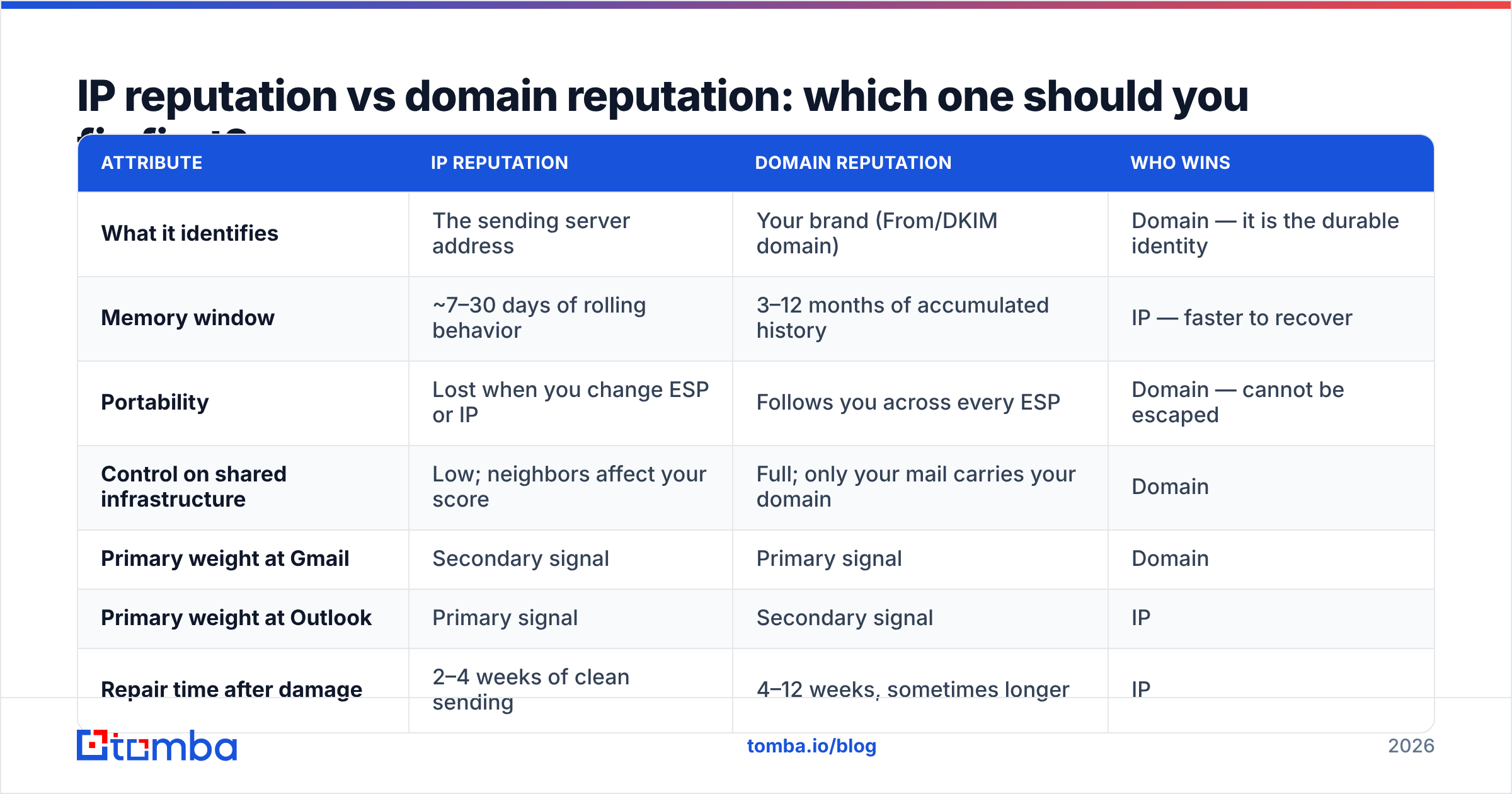
Here is the practical comparison most deliverability guides skip.
| Attribute | IP reputation | Domain reputation | Who wins |
|---|---|---|---|
| What it identifies | The sending server address | Your brand (From/DKIM domain) | Domain — it is the durable identity |
| Memory window | ~7–30 days of rolling behavior | 3–12 months of accumulated history | IP — faster to recover |
| Portability | Lost when you change ESP or IP | Follows you across every ESP | Domain — cannot be escaped |
| Control on shared infrastructure | Low; neighbors affect your score | Full; only your mail carries your domain | Domain |
| Primary weight at Gmail | Secondary signal | Primary signal | Domain |
| Primary weight at Outlook | Primary signal | Secondary signal | IP |
| Repair time after damage | 2–4 weeks of clean sending | 4–12 weeks, sometimes longer | IP |
| Cost to replace | $50–$100/mo for a dedicated IP | New domain = lost brand equity + re-warmup | IP |
| Public visibility | Blocklists are queryable by anyone | Mostly private, provider-side scoring | IP — easier to diagnose |
The asymmetry in that last column is why so many teams misdiagnose. IP problems are loud and checkable — you can look up a blocklist in ten seconds with a blacklist checker. Domain problems are quiet. Nothing tells you your domain slid from Medium to Low except a gradual, unexplained decline in replies.
Fix order that works:
- Authentication first. SPF, DKIM, and DMARC must all pass. Without them, neither reputation can accrue properly, and Gmail will treat you as unidentified bulk mail. Run an SPF checker and confirm DMARC is at least
p=nonewith reporting enabled. - Domain reputation second. Check Postmaster Tools. If domain reputation is Low or Bad, no amount of IP work will rescue placement — you are the company on the van.
- IP reputation third. Check SNDS and public blocklists. A single listing on a major RBL can tank Outlook placement while Gmail looks fine.
- List hygiene fourth. Bounce rate above 3% and complaint rate above 0.2% will re-break whatever you just fixed.
- Content and cadence last. Link domains, image-to-text ratio, and send volume curves matter, but they are amplifiers — they rarely cause a collapse on their own.
Should you use a shared IP or a dedicated IP?#
Volume decides this, not preference.
Under roughly 50,000 messages per month, a shared IP is usually better. You inherit the pool's established warmth, and your own volume is too low to build a meaningful IP reputation anyway. A dedicated IP sending 300 emails a day looks like a brand-new, low-volume sender forever — which providers treat with suspicion indefinitely.
Above roughly 100,000 messages per month with consistent cadence, a dedicated IP wins. You stop absorbing your neighbors' complaint rates, you get clean SNDS data, and you can build a durable Outlook reputation.
The middle zone is genuinely ambiguous. If your Gmail placement is healthy and Outlook is failing, a dedicated IP plus a proper 4–6 week warmup is the highest-leverage move. If Gmail placement is failing, a dedicated IP changes nothing — your domain is the problem.
One more wrinkle: subdomain strategy. Sending cold outbound from mail.acme.com instead of acme.com isolates reputation damage. Google treats subdomain reputation as partially inherited from the root but scores it separately, so a cold-outreach subdomain that catches complaints does not immediately poison your transactional mail or your sales team's one-to-one replies. Most mature outbound programs run three separate domains: root for corporate mail, a subdomain for marketing, and entirely separate lookalike domains for cold sequences.
What actually damages each reputation?#
The causes overlap but are not identical. Sorting them properly is what makes diagnosis fast.
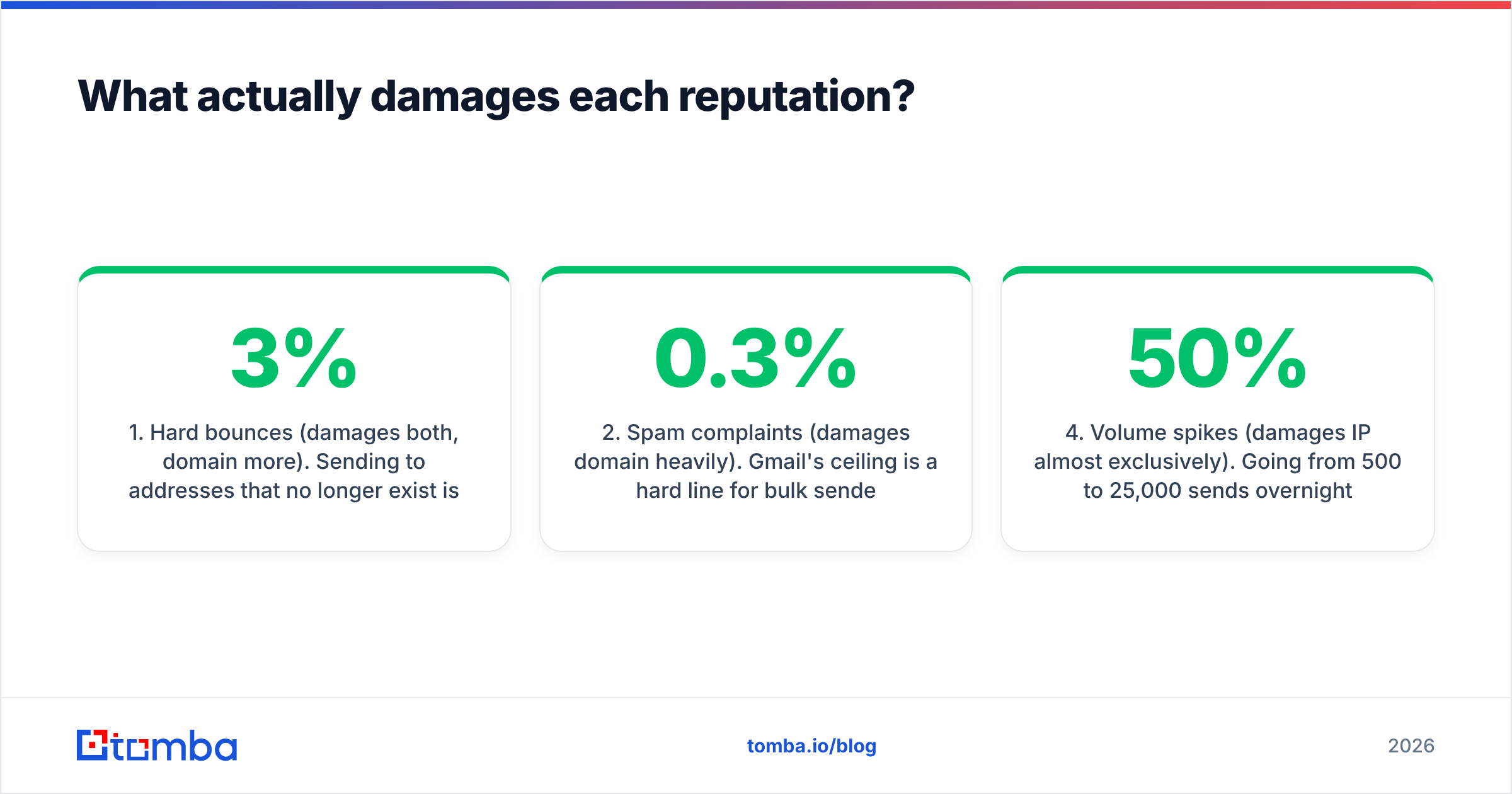
- Hard bounces (damages both, domain more). Sending to addresses that no longer exist is the clearest possible signal that you did not earn your list. Above 3% bounce rate, providers start throttling. Above 5%, expect blocks. This is the single most common root cause and the easiest to eliminate before you ever hit send.
- Spam complaints (damages domain heavily). Gmail's 0.3% ceiling is a hard line for bulk senders. Complaints are attributed to the From domain, which is exactly why a fresh IP does not help a complained-about brand.
- Spam traps (damages IP heavily, domain too). Pristine traps — addresses never used by a human — prove list purchase or scraping. Recycled traps, which are abandoned real addresses reactivated as traps, prove poor hygiene. A handful of pristine trap hits can land an IP on Spamhaus within a day.
- Volume spikes (damages IP almost exclusively). Going from 500 to 25,000 sends overnight looks like a compromised server. Ramp in steps of roughly 30–50% per day during warmup, and never more than double in a single day afterward.
- Poor engagement (damages domain). Zero opens, zero replies, and instant deletes across weeks tell Gmail your mail is unwanted even when nobody clicks "spam." Engagement is domain-keyed because it is brand-keyed.
- Bad link domains (damages domain). Linking to a blocklisted URL shortener or a domain with its own poor reputation drags your message down regardless of how clean your sending infrastructure is.
Notice the pattern: four of the six are downstream of list quality. That is the honest answer to most "our deliverability is broken" tickets.
How do you check both reputations right now?#
A 15-minute audit, in order:
- Google Postmaster Tools — connect your domain via DNS TXT, then read the Domain Reputation and IP Reputation dashboards. Requires meaningful Gmail volume to populate; below a few hundred daily Gmail recipients the charts stay empty.
- Microsoft SNDS — request access per IP range. Gives complaint rate, trap hits, and filter status per IP. Essential if you send to Outlook, Hotmail, or Live addresses.
- Blocklist lookup — check your IP and your domain against Spamhaus SBL/XBL/DBL, Barracuda, and SORBS. Domain-level listings (DBL) are the serious ones.
- DMARC aggregate reports — these reveal whether anyone is spoofing your domain, which quietly destroys domain reputation without you sending a single message.
- Seed testing — send to a set of real inboxes across Gmail, Outlook, Yahoo, and a corporate Microsoft 365 tenant. Placement differences across providers immediately point at IP versus domain.
If domain reputation is Low at Gmail but your IP is clean everywhere, the fault is complaints, engagement, or authentication. If your IP is listed but domain reputation is High, the fault is a neighbor on a shared pool or a volume spike — and swapping IPs genuinely solves it.

Does list quality matter more than technical setup?#
Yes, and it is not close.
Perfect SPF, DKIM, DMARC, a warmed dedicated IP, and a pristine domain will not survive a 12% bounce rate. The technical layer determines whether providers can identify you; the list determines what they conclude about you once they can. Teams routinely spend six weeks on warmup schedules and then feed the system a scraped CSV with a quarter of the addresses dead.
The fix is boring and it works: verify every address before it enters a sequence. A real-time email verifier catches syntax errors, disposable domains, role accounts, and non-existent mailboxes before they become bounces. For domains that accept everything at the SMTP layer, a catch-all verifier distinguishes genuinely deliverable mailboxes from black holes — the category that quietly inflates "delivered" numbers while producing zero engagement and dragging your sender reputation down.
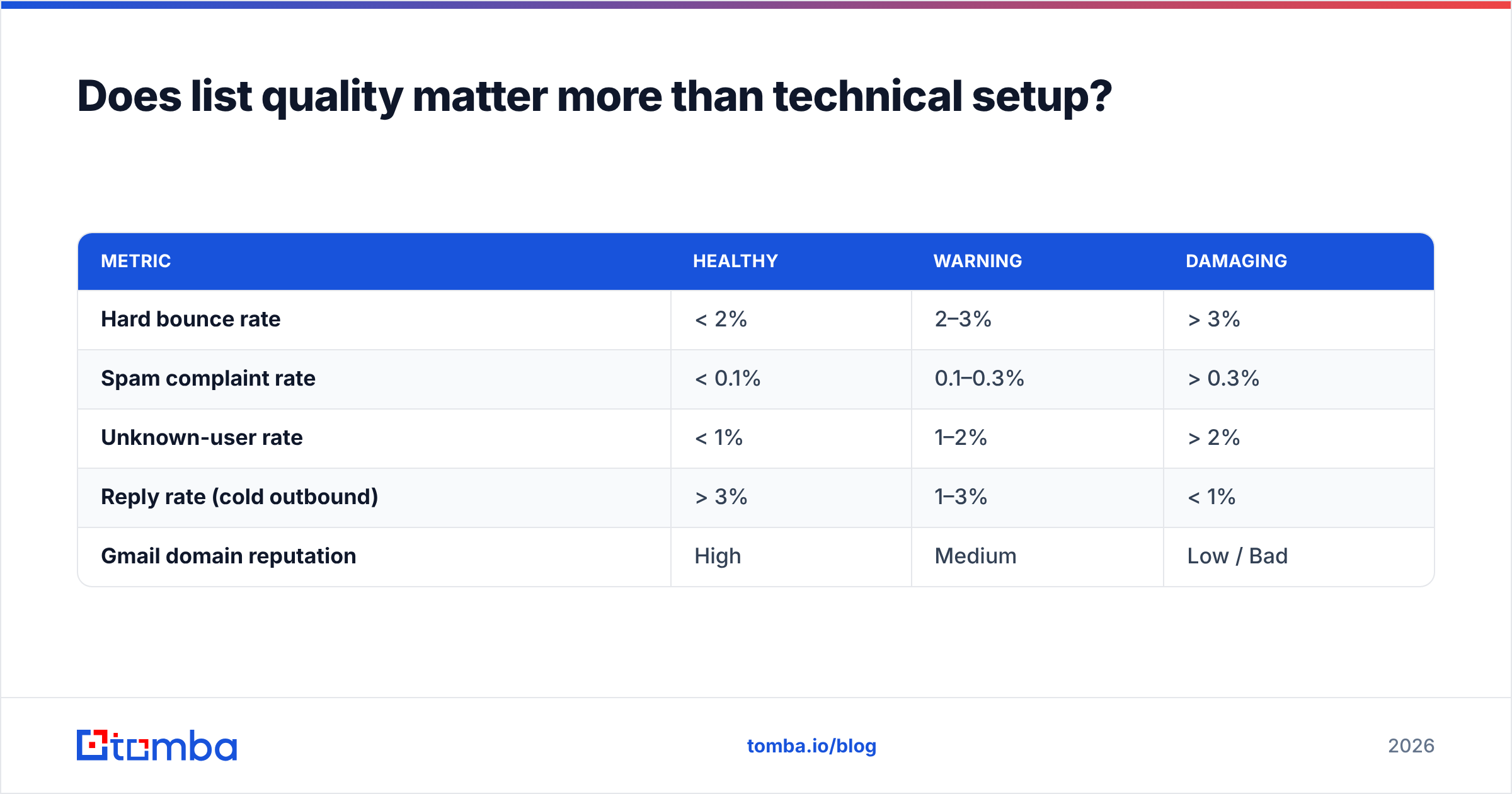
Benchmark your own numbers against what good looks like:
| Metric | Healthy | Warning | Damaging |
|---|---|---|---|
| Hard bounce rate | < 2% | 2–3% | > 3% |
| Spam complaint rate | < 0.1% | 0.1–0.3% | > 0.3% |
| Unknown-user rate | < 1% | 1–2% | > 2% |
| Reply rate (cold outbound) | > 3% | 1–3% | < 1% |
| Gmail domain reputation | High | Medium | Low / Bad |
If your bounce rate sits above 3%, stop tuning infrastructure. Clean the list, then re-measure in two weeks.
What does a 30-day reputation repair plan look like?#
Days 1–3: Freeze all bulk sending. Fix authentication — SPF with no more than 10 DNS lookups, DKIM at 2048-bit, DMARC published. Pull every address that bounced in the last 90 days out of your database permanently.
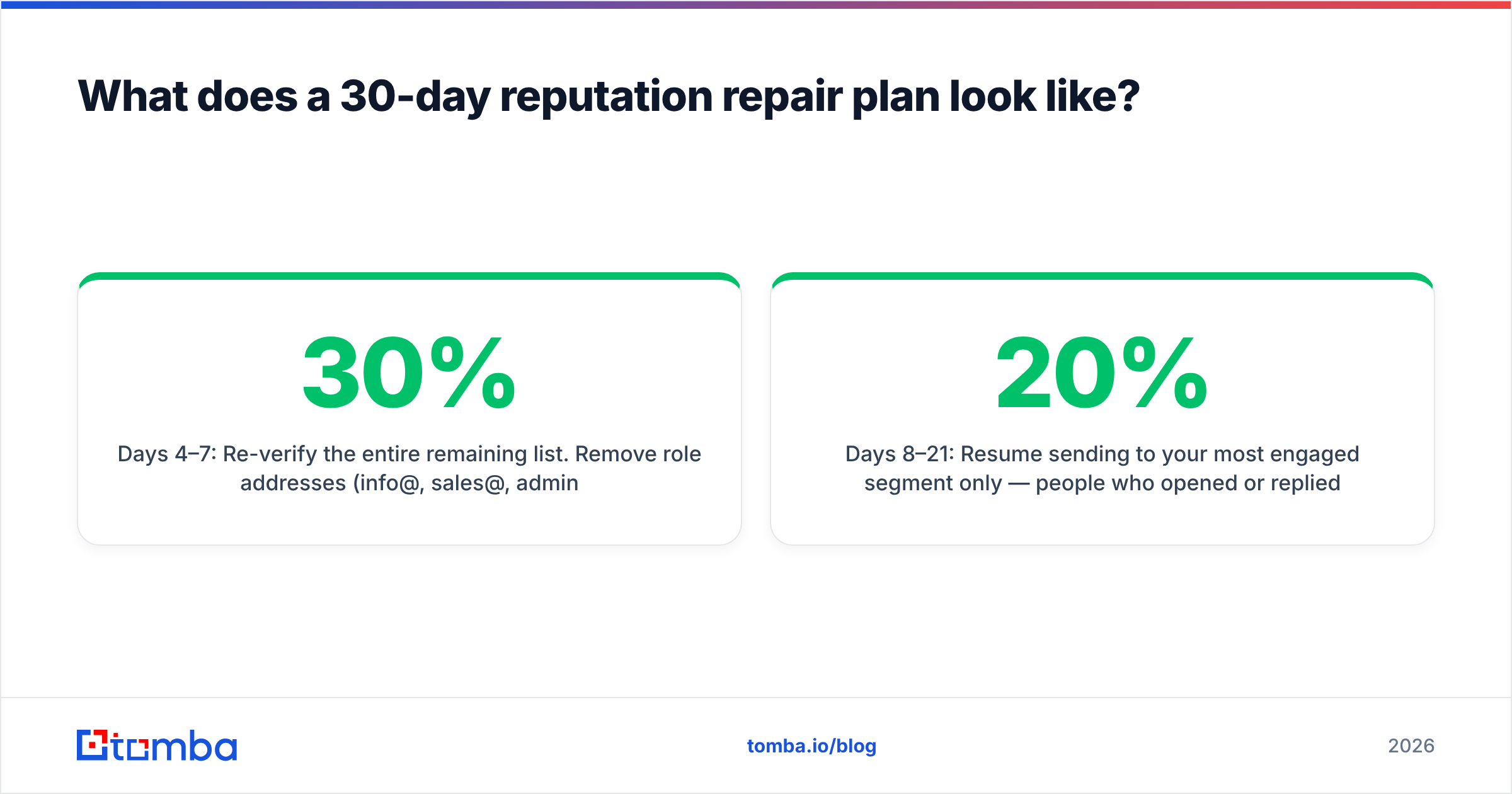
Days 4–7: Re-verify the entire remaining list. Remove role addresses (info@, sales@, admin@), disposable domains, and anything that verification flags as risky. Expect to lose 10–30% of a neglected list. That loss is the point.
Days 8–21: Resume sending to your most engaged segment only — people who opened or replied in the last 60 days. Start at 20% of prior volume and increase ~30% every two days. Watch Postmaster Tools daily; domain reputation moves slowly but it does move.
Days 22–30: Widen to moderately engaged contacts. Keep complaint rate visible on a dashboard. Do not reintroduce cold prospects until domain reputation reads Medium or better for seven consecutive days.
If Outlook remains blocked while Gmail recovers, that is your signal to request delisting through Microsoft's sender support form and, if you have the volume, to move to a dedicated IP with a proper warmup.
Start with contacts that were real in the first place#
The cheapest deliverability fix is not a warmup tool, a dedicated IP, or a DMARC consultant — it is never adding a dead address to your database. Every bounce you prevent is a complaint you never earn, a trap you never hit, and a week of reputation repair you never spend.
Tomba Email Finder returns verified professional addresses with a confidence score and the sources behind each result, so your sequences start from contacts that actually exist. The free tier includes 25 searches per month, Starter is $49/mo, and Growth is $99/mo with bulk processing for full list cleanups — see Tomba pricing for the full breakdown. Verify first, send second, and both your IP and your domain reputation stay boring — which, in deliverability, is exactly what you want.
Related guides#
// get started
Find, verify and enrich your first contacts today
Start on the free plan with 25 searches a month, then scale when your team is ready.
Free plan · No credit card required · GDPR & CCPA
// about the author