IP Spam Check: How to Test If Your Sending IP Is Blacklisted
Most IP spam checks return a wall of red flags that mean almost nothing. Here's which blacklists actually block your mail, how to read the results, and the fastest realistic path to delisting.
An IP spam check asks public blacklists one question: has this sending IP been reported for spam? The answer comes back in seconds. Reading it well takes longer, because most of the lists in a typical IP spam check report carry no real weight.
TL;DR
- An IP spam check tells you whether your sending IP appears on public DNS blacklists (DNSBLs/RBLs). Only a handful of those lists actually influence inbox placement.
- Spamhaus, Spamcop, and Barracuda carry real weight. The long tail of obscure lists most checkers scan is mostly noise you can ignore.
- Gmail, Outlook, and Yahoo care more about domain reputation and engagement than raw IP reputation. For most B2B senders, a clean IP result does not mean you are safe.
- The overwhelming cause of an IP listing is list quality: unverified addresses, scraped data, spam traps, and high bounce rates.
- Fix the input (verified contacts, warm ramp, authenticated domain) and the IP problem usually stops recurring. Delisting without fixing the source is a rental, not a repair.
What is an IP spam check?#
An IP spam check is a lookup. It asks dozens of public blacklists whether your mail server's IP address has been reported for sending spam. You enter an IP, the tool fires a DNS query at each list, and it returns a listed or not-listed verdict for every one.
Think of it like a credit check for your mail server. A good score does not force anyone to lend you money. A bad score does not force anyone to turn you down. But a bad score makes every conversation harder. IP reputation works the same way: a clean check does not win you the inbox, and a listing on an obscure list rarely blocks anything.
Most free checkers scan 80-100 lists and show every hit with the same red badge. That is where the confusion starts. A listing on Spamhaus SBL and a hit on some abandoned regional list run by one admin in 2011 look identical in the results table. They are not the same problem.
Before you panic about a red result, check three things. Which list flagged you. Whether the mailbox providers you care about use that list. And what behavior caused the listing.
How does an IP blacklist actually work?#
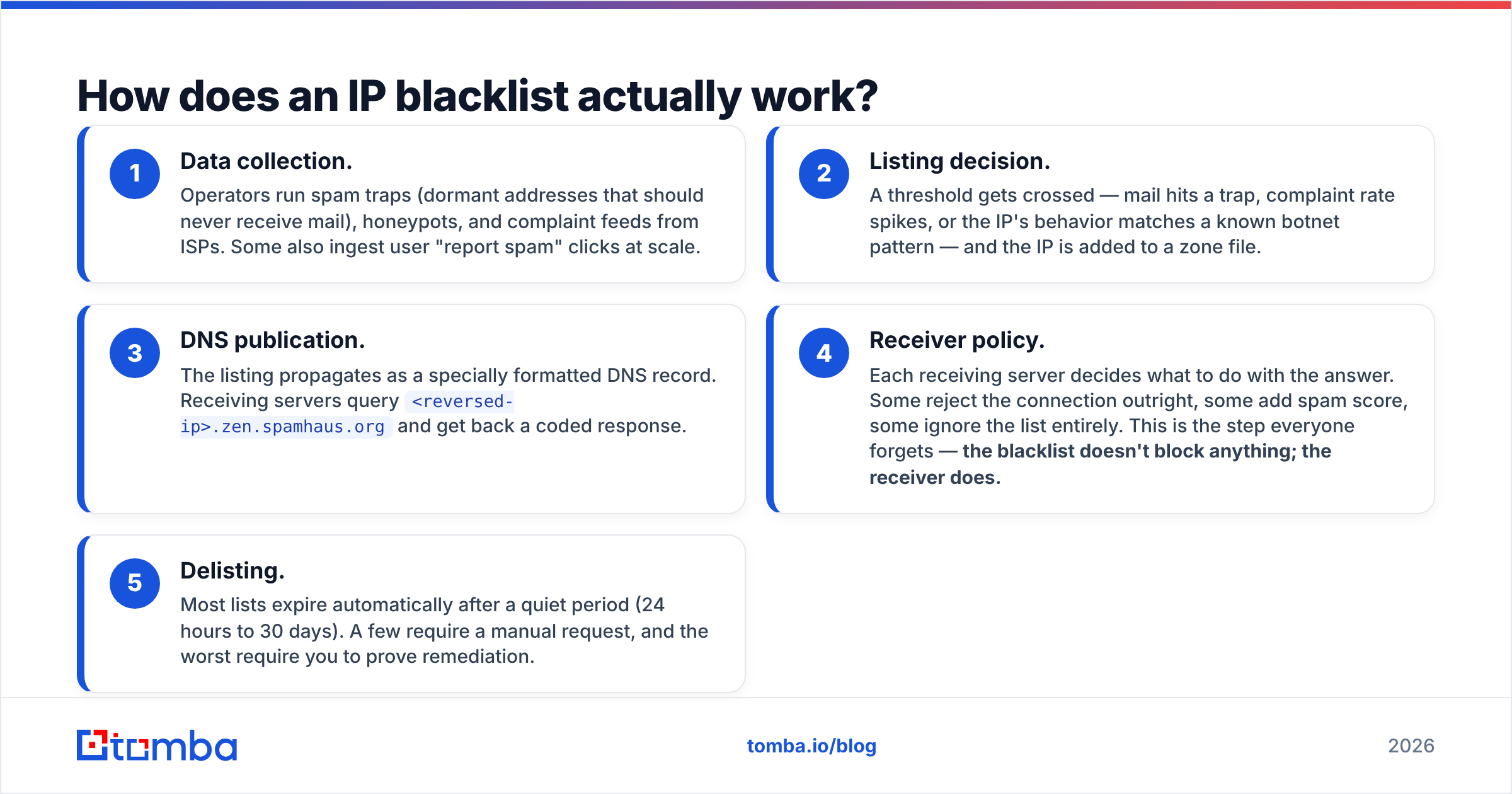
Blacklists run on DNS. When a receiving mail server gets a connection, it can ask a blacklist operator "is this IP dirty?" in a few milliseconds. Here's the chain:
- Data collection. Operators run spam traps (dormant addresses that should never receive mail), honeypots, and complaint feeds from ISPs. Some also ingest user "report spam" clicks at scale.
- Listing decision. A threshold gets crossed — mail hits a trap, complaint rate spikes, or the IP's behavior matches a known botnet pattern — and the IP is added to a zone file.
- DNS publication. The listing propagates as a specially formatted DNS record. Receiving servers query
<reversed-ip>.zen.spamhaus.organd get back a coded response.
The last two steps decide what your IP spam check result actually means:
- Receiver policy. Each receiving server decides what to do with the answer. Some reject the connection outright. Some add spam score. Some ignore the list entirely. This is the step everyone forgets — the blacklist doesn't block anything; the receiver does.
- Delisting. Most lists expire automatically after a quiet period (24 hours to 30 days). A few require a manual request, and the worst require you to prove remediation.
That fourth step is why two senders with the same listing can see very different outcomes. A B2B sender emailing mostly Google Workspace inboxes cares about a different list set than someone blasting consumer Yahoo addresses.

Which blacklists actually matter in 2026?#
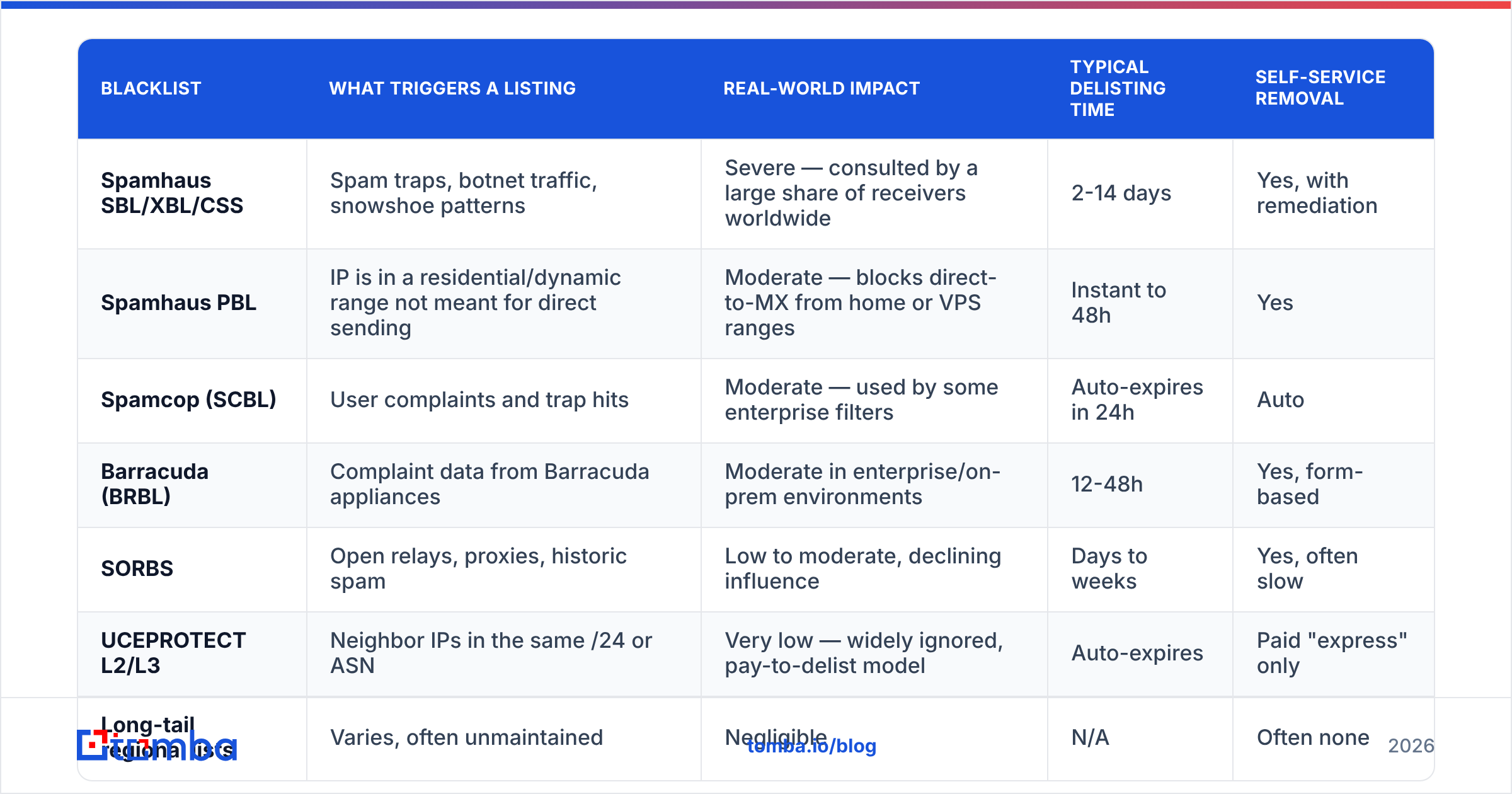
Not all lists are equal. The table below ranks them two ways: how many major receivers consult the list, and how much damage a listing does.
| Blacklist | What triggers a listing | Real-world impact | Typical delisting time | Self-service removal |
|---|---|---|---|---|
| Spamhaus SBL/XBL/CSS | Spam traps, botnet traffic, snowshoe patterns | Severe — consulted by a large share of receivers worldwide | 2-14 days | Yes, with remediation |
| Spamhaus PBL | IP is in a residential/dynamic range not meant for direct sending | Moderate — blocks direct-to-MX from home or VPS ranges | Instant to 48h | Yes |
| Spamcop (SCBL) | User complaints and trap hits | Moderate — used by some enterprise filters | Auto-expires in 24h | Auto |
| Barracuda (BRBL) | Complaint data from Barracuda appliances | Moderate in enterprise/on-prem environments | 12-48h | Yes, form-based |
| SORBS | Open relays, proxies, historic spam | Low to moderate, declining influence | Days to weeks | Yes, often slow |
| UCEPROTECT L2/L3 | Neighbor IPs in the same /24 or ASN | Very low — widely ignored, pay-to-delist model | Auto-expires | Paid "express" only |
| Long-tail regional lists | Varies, often unmaintained | Negligible | N/A | Often none |
Two takeaways. First, if your IP spam check shows green on Spamhaus and red on three lists you've never heard of, you very likely do not have a deliverability problem caused by blacklisting. Second, a UCEPROTECT L3 listing usually means a neighbor on your hosting provider's network misbehaved, not you. Never pay a delisting fee to a list that charges for removal — that's a business model, not a security service.
You can verify any of this yourself at Spamhaus's own lookup tool, which tells you exactly which zone flagged you and why.
How do you run an IP spam check properly?#
Running the check takes thirty seconds. Interpreting it takes judgment. Follow this sequence:
Step 1 — Find the right IP. This is where most people go wrong. If you send through Google Workspace, Microsoft 365, SendGrid, or Instantly, the sending IP is theirs, not your website's IP. Open a raw message header from a sent email and find the IP in the first Received: line added by your provider. Checking your web host's IP tells you nothing about your mail.
Step 2 — Run the IP spam check. Use a multi-list checker to get breadth, then confirm significant hits directly at the source. A blacklist checker gives you the sweep; the operator's own site gives you the reason code.
Step 3 — Separate signal from noise. Group results into three buckets: Spamhaus-tier (act immediately), mid-tier (act within a week), and long-tail (document and ignore).
Step 4 — Check authentication in parallel. A large share of "blacklist problems" are actually authentication failures. Confirm your SPF record passes, DKIM signs correctly, and DMARC is published with at least p=none and a reporting address.
Step 5 — Pull the receiver's own view. Google Postmaster Tools shows IP reputation, domain reputation, spam rate, and authentication pass rates for your Gmail traffic specifically. That dashboard is worth more than every third-party blacklist checker combined, because it's the actual receiver telling you what it thinks.
Step 6 — Check the domain too. Domain blocklists like Spamhaus DBL and SURBL operate separately from IP lists. A clean IP with a listed domain still gets filtered.
Is a shared IP or a dedicated IP riskier?#
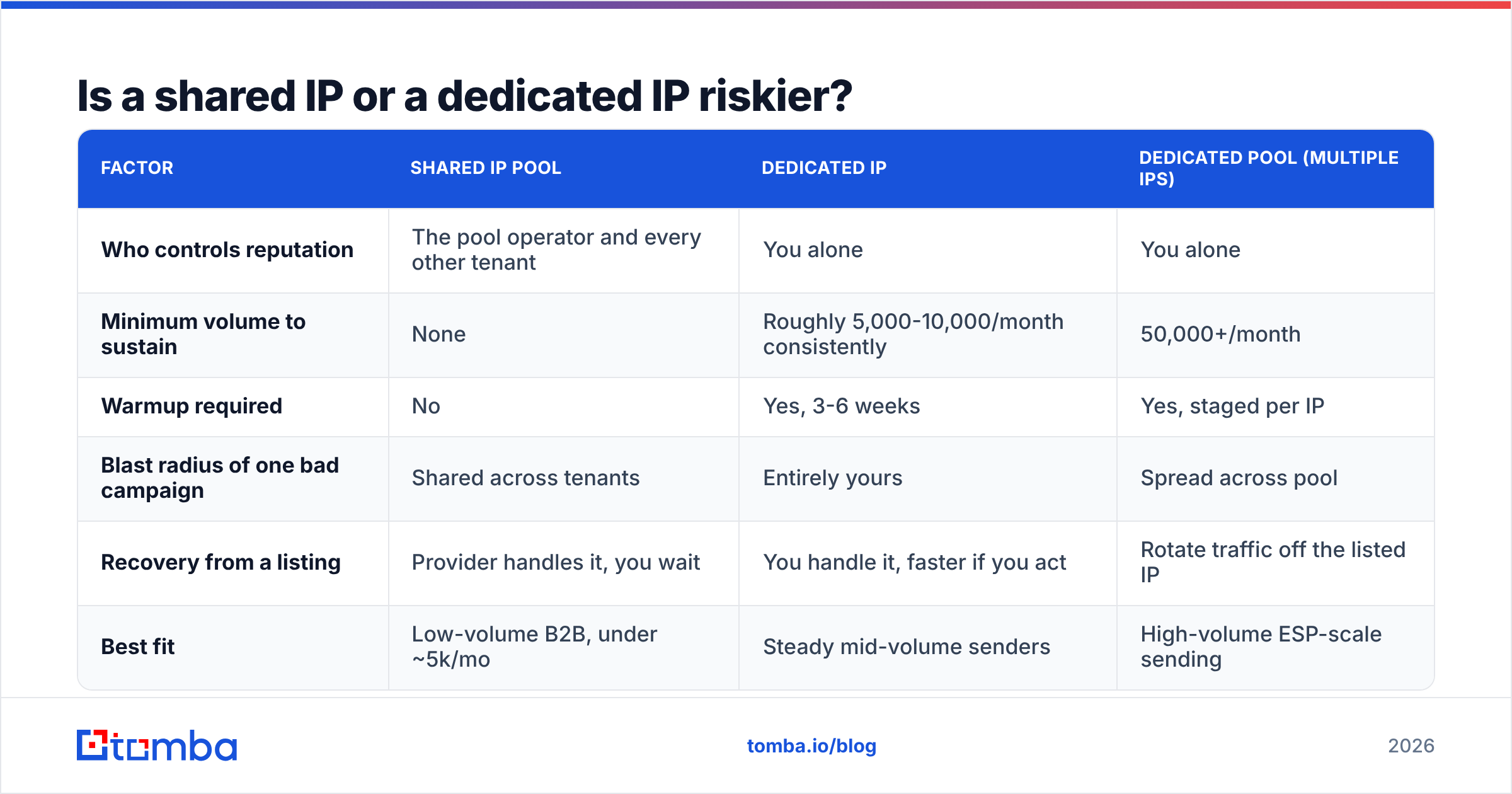
Depends entirely on your volume. This is the single biggest structural decision affecting your IP spam check results.
| Factor | Shared IP pool | Dedicated IP | Dedicated pool (multiple IPs) |
|---|---|---|---|
| Who controls reputation | The pool operator and every other tenant | You alone | You alone |
| Minimum volume to sustain | None | Roughly 5,000-10,000/month consistently | 50,000+/month |
| Warmup required | No | Yes, 3-6 weeks | Yes, staged per IP |
| Blast radius of one bad campaign | Shared across tenants | Entirely yours | Spread across pool |
| Recovery from a listing | Provider handles it, you wait | You handle it, faster if you act | Rotate traffic off the listed IP |
| Best fit | Low-volume B2B, under ~5k/mo | Steady mid-volume senders | High-volume ESP-scale sending |
Most B2B outbound teams send under 10,000 emails a month. Those teams are better off on a reputable shared pool, or on Google Workspace / Microsoft 365 infrastructure. A dedicated IP with low, irregular volume never builds enough positive signal to earn reputation. You get all the risk of isolation with none of the benefit.
If you send from a VPS directly to MX, expect a Spamhaus PBL listing by default. Those ranges are pre-listed as "should not send direct mail." You need your host to remove the range designation or you need to relay through a proper ESP.
Why did your IP get listed in the first place?#
Almost always one of five causes, in descending order of frequency:
- Unverified contact data. You bought or scraped a list, 15% of it bounces, and some of those dead addresses are now spam traps. Trap hits are the fastest route to a Spamhaus listing there is.
- Volume spikes without warmup. Going from 50 sends a day to 2,000 overnight looks exactly like a compromised account. Receivers throttle first and list second.
- Complaint rate above threshold. Gmail's published guidance puts the danger zone around 0.3% spam complaints. Cross it consistently and IP reputation drops before any blacklist gets involved.
Two more causes are easy to miss, and both change how you should respond:
- A compromised account or open relay. Someone's password leaked, or a misconfigured form on your site is being used to relay mail. Check outbound logs before you request delisting. If you delist while still leaking spam, you get relisted within hours, and the second listing is harder to clear.
- Neighbor damage on shared infrastructure. Somebody else on your /24 got listed and a range-based list caught you in the blast. Annoying, mostly low-impact, usually resolves itself.
Notice that four of five are about behavior, not infrastructure. That's why "how do I delist my IP" is usually the wrong question.
How do you get delisted, and how long does it take?#
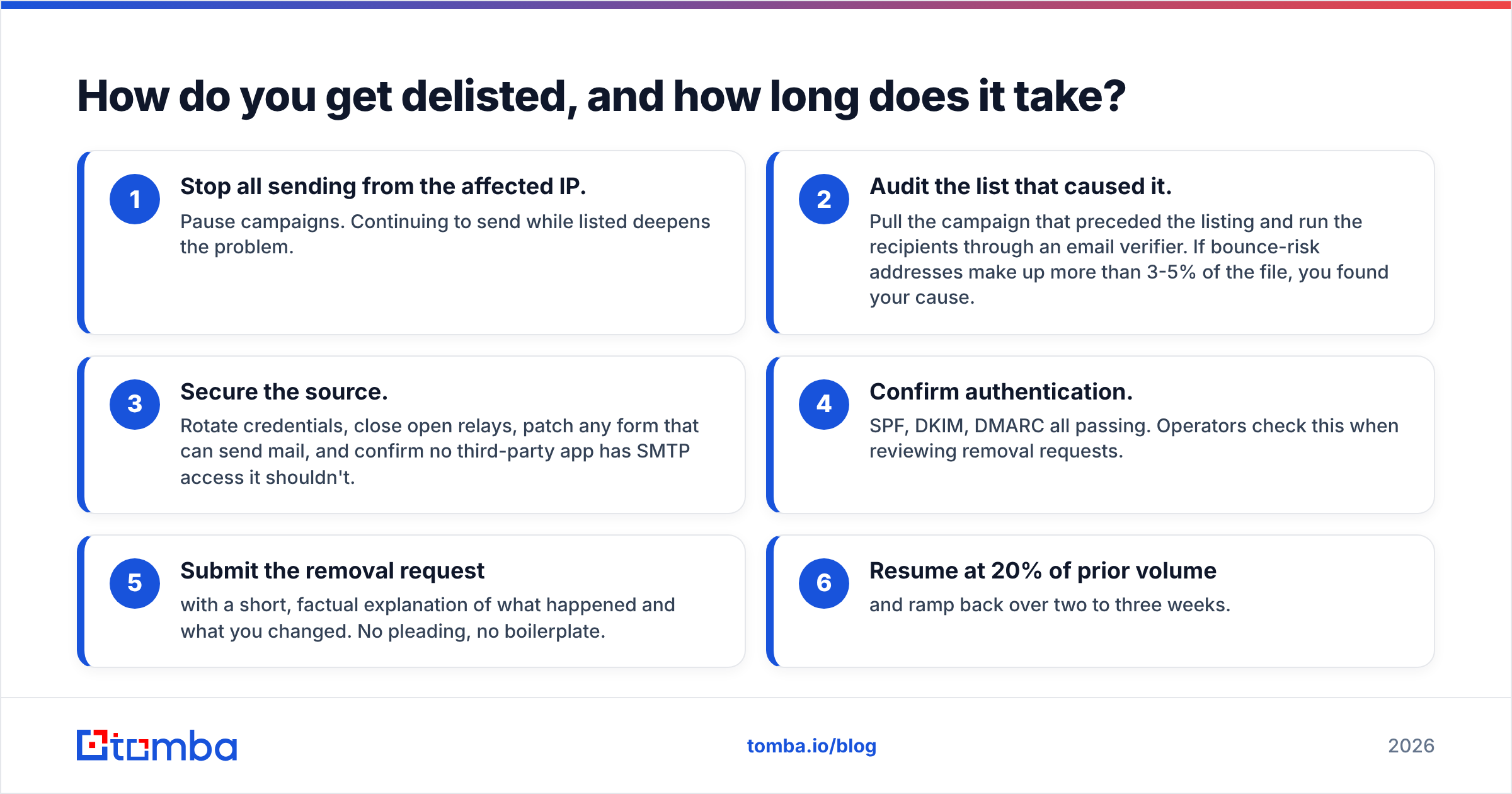
Fix the cause first, then request removal. In that order — every major operator checks whether the underlying behavior stopped, and a premature request burns your one easy removal. A clean IP spam check is the goal, but it is the last step, not the first.
The remediation checklist:
- Stop all sending from the affected IP. Pause campaigns. Continuing to send while listed deepens the problem.
- Audit the list that caused it. Pull the campaign that preceded the listing and run the recipients through an email verifier. If bounce-risk addresses make up more than 3-5% of the file, you found your cause.
- Secure the source. Rotate credentials, close open relays, patch any form that can send mail, and confirm no third-party app has SMTP access it shouldn't.
- Confirm authentication. SPF, DKIM, DMARC all passing. Operators check this when reviewing removal requests.
- Submit the removal request with a short, factual explanation of what happened and what you changed. No pleading, no boilerplate.
- Resume at 20% of prior volume and ramp back over two to three weeks.
Realistic timelines: auto-expiring lists clear in 24-48 hours. Spamhaus manual removals typically resolve in a few business days if remediation is genuine. Repeat listings take much longer and may require direct correspondence.
Does IP reputation still matter more than domain reputation?#
No — and this is the most important shift of the last few years. For B2B senders on shared provider infrastructure, domain reputation and recipient engagement now carry more weight at Gmail and Outlook than the IP itself.
The practical consequence: you can pass every IP spam check and still land in spam, because your domain has low engagement, thin authentication history, or a poor complaint profile. The reverse holds too. A minor listing on a mid-tier list often has zero measurable effect on Gmail placement.
That doesn't make IP checks useless. It makes them a diagnostic, not a diagnosis. Run one when:
- Bounce rates jump suddenly across multiple domains
- A specific corporate receiver (often an on-prem appliance) starts hard-rejecting with a 5xx code that names a blacklist
- You've just moved to a new IP or provider
- You're auditing before a volume increase
Don't run an IP spam check every week and treat every long-tail hit as an emergency. Track sender reputation trends in Postmaster Tools instead, and check your email reputation at the domain level too. For a broader view of how receivers weigh these signals, Google's bulk sender guidelines are the closest thing to an authoritative spec.
What should you actually do next?#
The honest summary: an IP spam check is a smoke detector, not a fire extinguisher. It tells you something burned. It doesn't tell you what, and it definitely doesn't put it out.
If your check came back clean but deliverability is bad, the problem is your list, your copy, your engagement, or your authentication — not your IP. If it came back dirty on Spamhaus, stop sending, clean the source data, remediate, then request removal. If it came back dirty on lists you've never heard of, close the tab.
The durable fix is upstream. Bad contact data is what generates bounces, bounces are what hit traps, and trap hits are what get IPs listed. Teams that verify every address before it enters a sequence mostly stop having blacklist incidents. Not because they're lucky, but because they removed the input that causes them.
Start with the data, not the IP. Use the Tomba Email Finder to source verified, deliverable B2B contacts by domain or name. Verification is built into the lookup, so dead addresses never reach your sending infrastructure. The free tier includes 25 searches a month, and paid plans start at $49/mo on Starter with Growth at $99/mo — see Tomba pricing for the full breakdown. Clean inputs, quiet blacklists.
Related guides#
// get started
Find, verify and enrich your first contacts today
Start on the free plan with 25 searches a month, then scale when your team is ready.
Free plan · No credit card required · GDPR & CCPA
// about the author