Is Email Verification Necessary? The Honest 2026 Answer
Email verification costs money and strips leads from your list. So is it actually necessary, or is it a tax vendors invented? Here's the honest math on when it pays and when you can skip it.
TL;DR
- Email verification is necessary the moment your bounce rate crosses roughly 2%, because Google and Microsoft both treat bounce spikes as a spam signal that suppresses your entire domain — not just the bad send.
- It is not necessary on every list. Opt-in newsletter signups verified at capture, or leads pulled fresh from a source that already validates, rarely need a second pass.
- The real cost is asymmetric: verification runs roughly $0.001–$0.007 per record, while a burned sending domain costs weeks of warmup and every deal in the pipeline behind it.
- Catch-all domains are where most "verification is useless" complaints come from — a generic verifier marks them unknown and you either discard good leads or send blind.
- The efficient setup is verification bundled into the finder, not bought separately. Tomba's Free tier (25 searches/mo) and Starter at $49/mo include finding plus verification in one credit pool.
You have a list of 4,000 contacts. A verification vendor wants a few hundred dollars to tell you that maybe 380 of them are dead. Your instinct says: just send, let the ESP sort it out, and eat the bounces.
That instinct was defensible in 2018. It is expensive in 2026. Here's the actual decision framework, including the cases where skipping verification is the correct call.
What is email verification, actually doing?#
Think of it like a delivery driver checking an address before loading the truck. He can look at the street (does the domain exist?), check the building directory (does the mailbox exist?), and note whether the building accepts mail for anyone (catch-all). What he cannot do is open the mailbox and confirm a human reads it.
Verification runs a sequence of checks, each cheaper and more certain than the next one down:
- Syntax check — is
john@@acme,comeven a valid address shape? Free, instant, catches typos and paste errors. - Domain and MX record lookup — does
acme.comresolve, and does it have mail servers configured? Catches dead companies, parked domains, and misspelled domains (gmial.com). - Disposable and role detection — is this a 10-minute-mail throwaway, or a role account like
info@,sales@,support@? Role accounts aren't invalid, but they convert badly and complain often. - SMTP handshake — the verifier opens a conversation with the receiving mail server and asks whether that specific mailbox exists, without delivering anything. This is the expensive, high-signal step.
- Catch-all detection — does the server accept mail for
kj4h3kjh@acme.comtoo? If yes, the SMTP answer is meaningless and the address is marked "accept-all" or "unknown."
Steps 1 through 3 are essentially free and you should always run them. The argument about whether email verification is necessary is really an argument about steps 4 and 5.
Is email verification necessary, or is it a vendor tax?#
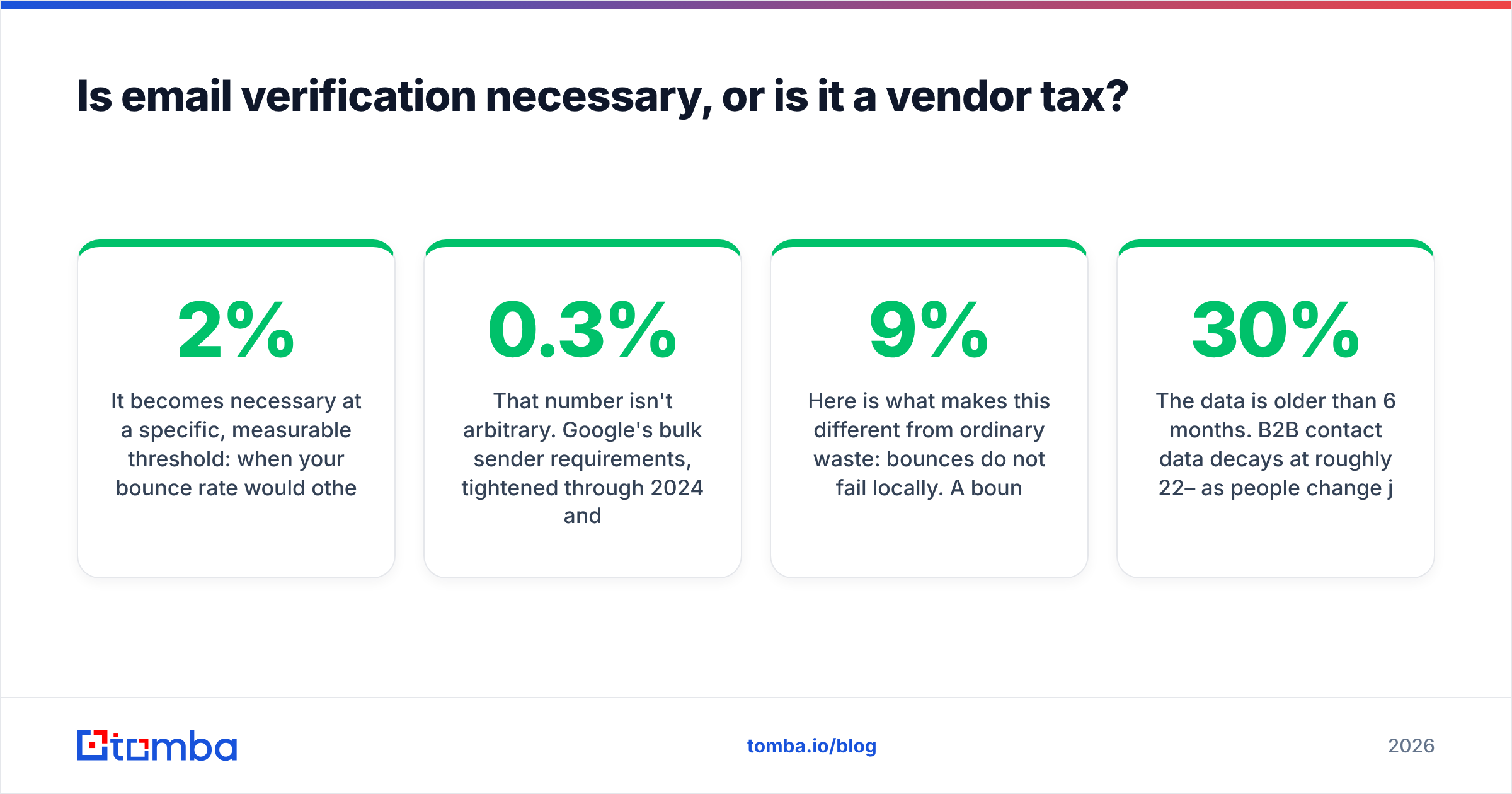
It becomes necessary at a specific, measurable threshold: when your bounce rate would otherwise exceed about 2%.
That number isn't arbitrary. Google's bulk sender requirements, tightened through 2024 and enforced since, put a hard spam-complaint ceiling at 0.3% and expect senders to "avoid sending to invalid addresses." Microsoft followed with similar rules for Outlook and Hotmail traffic in 2025. Neither publishes an exact bounce cutoff, but deliverability practitioners consistently observe filtering pressure starting around 2% and serious throttling past 5%.
Here is what makes this different from ordinary waste: bounces do not fail locally. A 9% bounce rate on one campaign doesn't just lose you 9% of that campaign. It damages your sender reputation at the domain level, which means the next campaign — to your best, most-verified contacts — lands in spam. You paid for one bad list and got charged on every list after it.
So the honest answer breaks into cases.
Verification is necessary when:
- You bought, scraped, or exported a list you did not build yourself.
- The data is older than 6 months. B2B contact data decays at roughly 22–30% per year as people change jobs — the commonly cited figure from HubSpot's own database research.
- You're sending cold outreach from a domain you care about.
- You're about to run a bulk send larger than a few hundred records.
- Your last campaign bounced above 2% and you don't know why.
Verification is genuinely optional when:
- The addresses came from a double opt-in form within the last 90 days.
- You're sending fewer than ~50 emails and can eyeball them.
- Your source already verifies at extraction time — a good email finder returns a confidence score and has already run the SMTP check, so paying a second vendor to re-check it is duplicated spend.
- You're replying to inbound. Someone who just emailed you has a working mailbox.
That fourth case is the one most "do I need this?" articles skip, and it's the one that actually saves money.

What does skipping verification actually cost?#
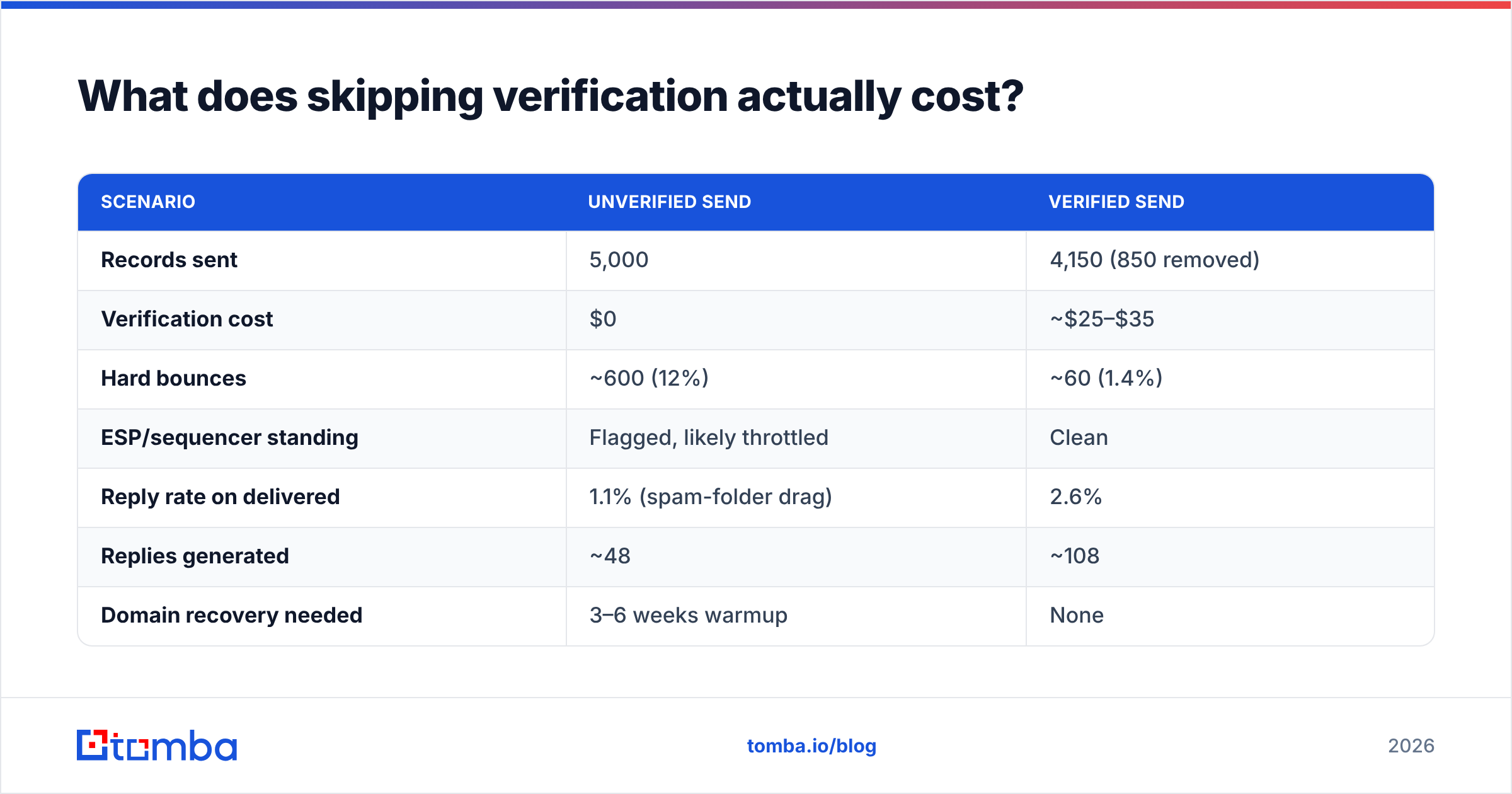
Run the numbers on a realistic mid-size send rather than arguing in the abstract. Assume 5,000 cold contacts, a list roughly 12 months old, sending from one primary domain.
| Scenario | Unverified send | Verified send |
|---|---|---|
| Records sent | 5,000 | 4,150 (850 removed) |
| Verification cost | $0 | ~$25–$35 |
| Hard bounces | ~600 (12%) | ~60 (1.4%) |
| ESP/sequencer standing | Flagged, likely throttled | Clean |
| Reply rate on delivered | 1.1% (spam-folder drag) | 2.6% |
| Replies generated | ~48 | ~108 |
| Domain recovery needed | 3–6 weeks warmup | None |
| Effective cost per reply | High + reputation debt | ~$0.30 in verification |
The reply-rate gap is the part people underestimate. It isn't only that bad addresses bounce — it's that a bouncing send drags the good addresses into promotions and spam folders mid-campaign. You lose the leads you paid most to acquire.
And the recovery line has no dollar figure because it's worse than a dollar figure. Rebuilding a burned domain means buying a new one, waiting through email deliverability warmup, and re-establishing history. Your pipeline stalls for a month. Nobody budgets for that.
If you want to sanity-check your own setup before a send, the free email checker handles single addresses, and the SPF checker confirms your authentication records are actually published correctly — misconfigured SPF produces bounce-like symptoms that verification will never fix.
Why do catch-all domains break most verifiers?#
Because a catch-all server answers "yes" to every address, verification returns no information at all — and that's where the tooling separates.
Roughly 15–20% of B2B domains run catch-all, and they skew toward exactly the companies you want: mid-market and enterprise with legacy mail infrastructure. A verifier that dumps all catch-all results into an "unknown" bucket leaves you with a bad choice. Discard them and you throw away a fifth of your enterprise pipeline. Send to them blind and you reintroduce the bounce risk you just paid to remove.
Better tools resolve catch-alls using pattern inference and cross-source corroboration instead of the SMTP handshake alone. If first.last@acme.com is the confirmed pattern across 40 other Acme employees, and the person exists on the company site with that name, the address is very likely real even though the server won't confirm it. That's what a dedicated catch-all verifier does that a generic syntax-plus-SMTP checker cannot.
When you evaluate vendors, this is the single most useful question to ask: what percentage of catch-all domains do you resolve to a definitive answer? The spread between tools is enormous and it's never on the pricing page.
How do verification approaches compare in 2026?#
Three broad approaches exist, and they suit different situations. None of them is universally wrong.
| Approach | Standalone verifier | Bundled finder + verifier | Verify-at-capture |
|---|---|---|---|
| Typical cost | $0.004–$0.008/record | Included in search credit | Free–$0.001/record |
| Best for | Cleaning inherited lists | Ongoing prospecting | Web forms, signups |
| Catch-all handling | Usually "unknown" | Pattern inference | N/A |
| Latency | Batch, minutes to hours | Real-time with search | Real-time, <1s |
| Double-spend risk | High — re-checks known-good data | None | None |
| Entry price | $29–$99/mo | Tomba Free tier, then $49/mo | Often free |
| API available | Yes | Yes | Yes |

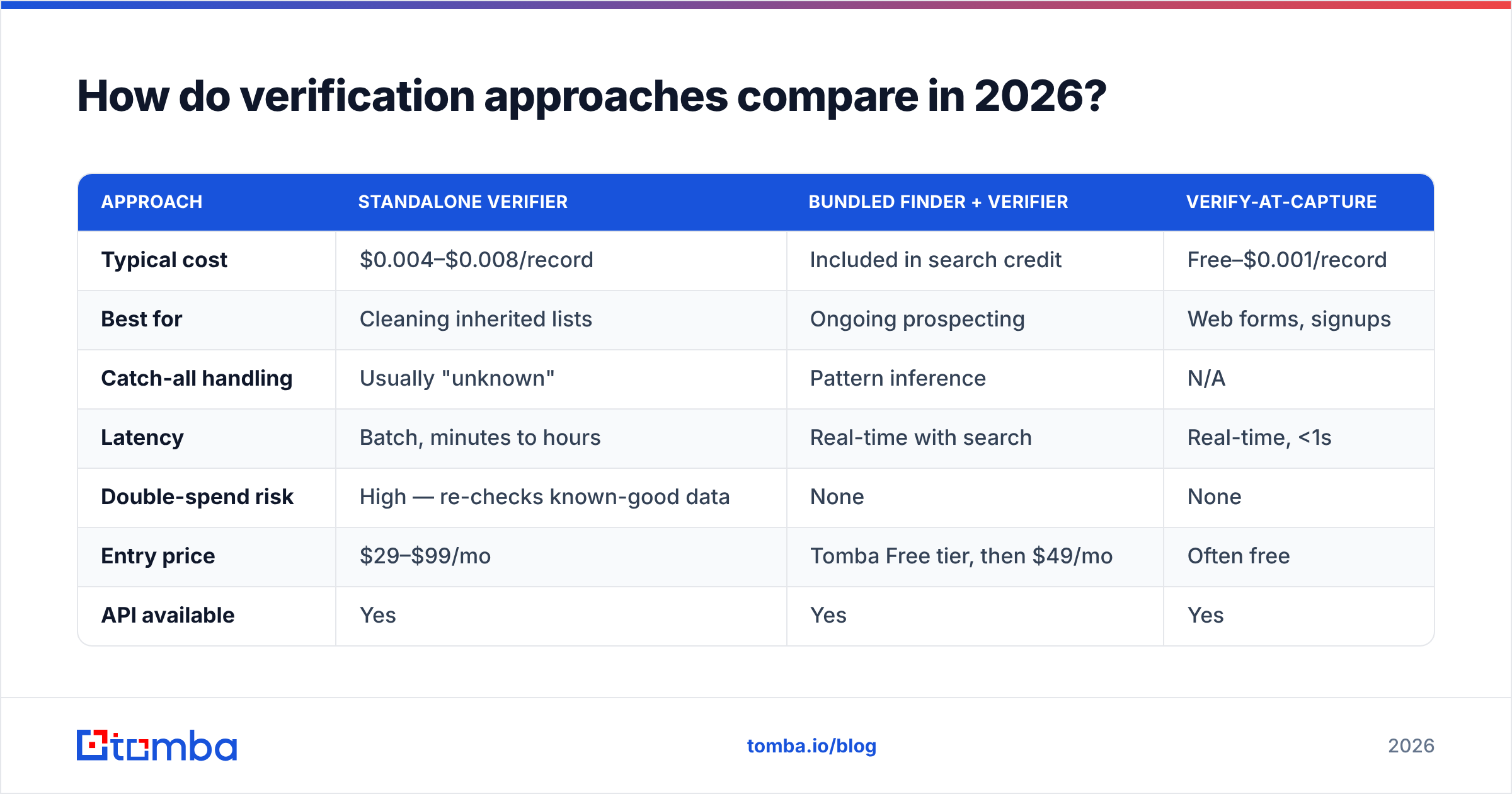
The double-spend row is where most teams quietly waste budget. If your finder already performed an SMTP check and returned a 95% confidence score, routing that same address through a standalone verifier buys you almost nothing. You're paying twice for one answer.
Standalone verifiers earn their keep in one specific situation: you inherited a list of unknown provenance — a CRM export from a predecessor, a trade show scan, a dataset from an acquisition — and you need a clean bill of health before it touches your sending domain. For that, ZeroBounce, Bouncer, and similar dedicated tools are purpose-built and worth the line item. BookYourData takes a different route by verifying at the point of purchase, which removes the second step entirely for teams buying rather than building lists.
For teams doing continuous prospecting, bundling wins on both cost and workflow. You find, you verify, you export — one credit pool, one API, no CSV handoff between vendors.

What bounce rate should you actually target?#
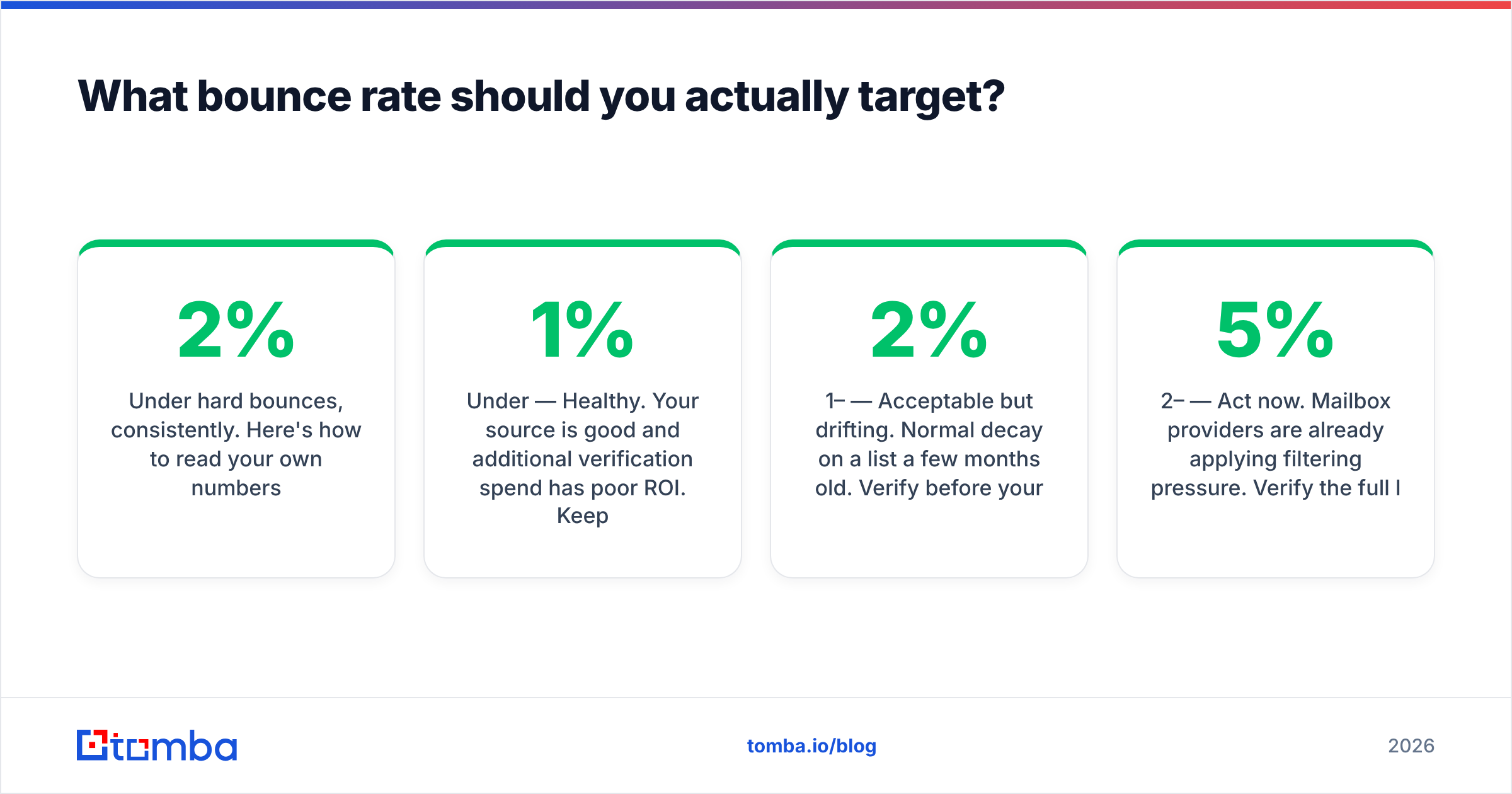
Under 2% hard bounces, consistently. Here's how to read your own numbers.
- Under 1% — Healthy. Your source is good and additional verification spend has poor ROI. Keep doing what you're doing.
- 1–2% — Acceptable but drifting. Normal decay on a list a few months old. Verify before your next large send.
- 2–5% — Act now. Mailbox providers are already applying filtering pressure. Verify the full list before the next campaign, not after.
- 5–10% — Stop sending. Verify everything, and expect reduced inbox placement for two to three weeks even after cleaning.
- Above 10% — Your list source is broken, not just stale. Verification treats the symptom; you need to fix acquisition. Pause the domain and investigate where these addresses came from.
Separate hard from soft bounces before you panic. A soft bounce (full mailbox, temporary server issue) is not a data-quality problem and verification won't prevent it. Hard bounces — nonexistent mailbox, dead domain — are the ones that hurt reputation and the ones verification removes.
One more measurement discipline: track bounce rate per source, not just per campaign. If LinkedIn-sourced contacts bounce at 0.8% and conference-scan contacts bounce at 14%, you've learned something more valuable than any verification report. Kill the bad source.
How often should you re-verify a list?#
Every 90 days for actively used lists, or immediately before any send to a segment you haven't touched in six months.
The driver is job change. When someone leaves a company, their mailbox is typically disabled within 30–90 days, sometimes forwarded first. Across a B2B list, that decay compounds to the 22–30% annual figure. A list verified in January is meaningfully dirtier by April and substantially dirtier by July.
A practical cadence:
- At acquisition — verify once, at the moment the contact enters your system. Cheapest point, highest confidence.
- Every 90 days for active segments — the ones you actually mail. Ignore cold storage until you plan to use it.
- Before any campaign to a dormant segment — non-negotiable. This is where most bounce disasters originate.
- After a bounce event — re-verify the whole segment, not just the addresses that bounced. A bounce cluster usually signals the underlying data went stale together.
- Never for double opt-in signups under 90 days old — you'd be burning credits to confirm something you already know.
If you're running this at volume, do it through the email verification API rather than manual CSV round-trips, or in batch through bulk verify. Manual verification is where good process goes to die — it works for two months and then somebody skips it before a big send.
What about deliverability factors verification doesn't fix?#
Verification is necessary but not sufficient, and vendors rarely say so plainly.
A perfectly verified list still lands in spam if your authentication is broken, your sending volume ramps too fast, your copy trips filters, or your domain has no sending history. Verification removes one failure mode — invalid recipients. It does nothing for the other four.
The full deliverability stack in rough priority order:
- SPF, DKIM, and DMARC published and aligned. Google and Microsoft now require DMARC for bulk senders. Check yours against the Google Postmaster Tools documentation before blaming your list.
- Warmup on any domain younger than 30 days or any mailbox increasing volume. Ramp gradually.
- List quality — this is where verification sits.
- Content and complaint rate — keep spam complaints under 0.3%. One bad subject line can do more damage than 500 bounces.
- Engagement signals — replies and opens from real humans. Sending to disengaged segments hurts even when every address is valid.
Teams that verify religiously and still land in spam almost always have an authentication or warmup problem, not a data problem. Diagnose in that order.
The verdict#
Yes, email verification is necessary — for cold lists, purchased data, anything older than six months, and any send large enough that a bounce spike would be visible to a mailbox provider. The cost is trivial relative to what a burned domain costs, and the reply-rate improvement alone usually pays for it.
No, it is not necessary as a separate line item if your prospecting tool already does it. Paying two vendors to answer the same question is not diligence, it's overhead.
The practical setup for most B2B teams: find and verify in one step, re-verify active segments quarterly, track bounce rate per source, and reserve standalone verifiers for inherited lists of unknown origin.
That's what Tomba is built around. The Tomba Email Finder returns a verified address with a confidence score in the same call — SMTP-checked, catch-all-resolved where possible, no second vendor and no CSV handoff. Start on the Free tier with 25 searches a month to test accuracy against a list you already know the answers to, then move to Starter at $49/mo or Growth at $99/mo when the volume justifies it. Full Tomba pricing is public, credits cover finding and verification from the same pool, and there's no separate verification invoice to reconcile.
Verify because bounces compound. Don't verify twice because vendors sell it twice.
Related guides#
// get started
Find, verify and enrich your first contacts today
Start on the free plan with 25 searches a month, then scale when your team is ready.
Free plan · No credit card required · GDPR & CCPA
// about the author