Is My IP Flagged? How to Check, Confirm, and Fix It in 2026
Open rates collapsed overnight and you suspect a blacklist. Here is the exact diagnostic order to confirm whether your IP is flagged, which lists actually matter, and how to get delisted without making it worse.

TL;DR
- "Is my IP flagged" is usually the wrong first question. Most 2026 deliverability crashes are domain reputation or authentication problems, not IP blacklistings.
- Run the checks in this order: seed-test inbox placement → bounce-code reading → blacklist lookup → Postmaster Tools reputation → SPF/DKIM/DMARC → list hygiene.
- Only a handful of blacklists actually change inbox placement. Spamhaus, Spamcop, and Barracuda matter. Most of the other 80 entries on a lookup report are noise.
- Delisting is the easy part. Staying delisted means fixing the input: bad addresses, spam traps, and unverified lists.
- If you send from a shared IP (Google Workspace, Microsoft 365, most ESPs), the IP is rarely yours to fix. Your domain reputation is.
What does it mean when your IP is flagged?#
An IP being "flagged" means one or more reputation systems have recorded enough negative signal from that address to downgrade or block mail coming from it. Think of it like a delivery driver whose van plates got logged by a building's security desk after repeated complaints. The van still runs fine. It just does not get past the lobby anymore.
Three different things get lumped under the same phrase, and they have completely different fixes:
- DNSBL listing (a true blacklist). Your sending IP appears on a public real-time blocklist like Spamhaus SBL/XBL or Spamcop. Receiving servers query these lists at connection time and reject the message outright. You will see a hard bounce with a URL in the error text.
- Reputation throttling. Gmail, Outlook, and Yahoo run their own private scoring. Nothing public lists you, but your mail goes to spam or gets deferred with
4.7.xcodes. This is the most common case by far and no blacklist lookup will ever show it. - Provider-level filtering. A single large receiver (usually Microsoft) has flagged you internally. Mail lands everywhere except Outlook and Hotmail domains.
Only case one is an actual flagged IP. Cases two and three are what most people are experiencing when they Google the phrase.
Is my IP flagged? The 7-check diagnostic order#
Run these in sequence. Stop when you find the answer, because fixing the wrong layer wastes a week.
- Read the actual bounce code. Open a bounced message and find the SMTP response.
550 5.7.1 Service unavailable; Client host [x.x.x.x] blocked using Spamhausis a blacklist.421 4.7.0 Try again lateris throttling.550 5.1.1 User unknownis a bad address list problem, not a reputation problem. - Find your true sending IP. Send a message to an address you control, open the raw headers, and read the first
Received:line. If you use Google Workspace, Microsoft 365, SendGrid, or Instantly, that IP belongs to your provider and is shared with thousands of senders. - Run a multi-blacklist lookup. Check the IP against the major DNSBLs. MXToolbox queries roughly 90 lists in one pass and is the fastest way to rule this in or out.
- Check the big three individually. Query Spamhaus directly rather than trusting an aggregator. Spamhaus splits results across SBL, CSS, XBL, and PBL, and each one means something different.
- Open Google Postmaster Tools. If you send meaningful volume to Gmail, Postmaster Tools shows domain reputation, IP reputation, spam rate, and authentication pass rates as actual graphs. A spam rate above 0.30% is the line where Gmail starts punishing you.
- Verify your authentication. A broken or missing record will tank placement with zero blacklist activity. Confirm your SPF record resolves, is under 10 DNS lookups, and includes every sending source. A SPF checker and a blacklist checker take about two minutes combined.
- Audit the list you sent to. Pull the last campaign's bounce rate. Anything over 3% on a cold campaign means the list, not the IP, caused the damage.

Which blacklists actually matter?#
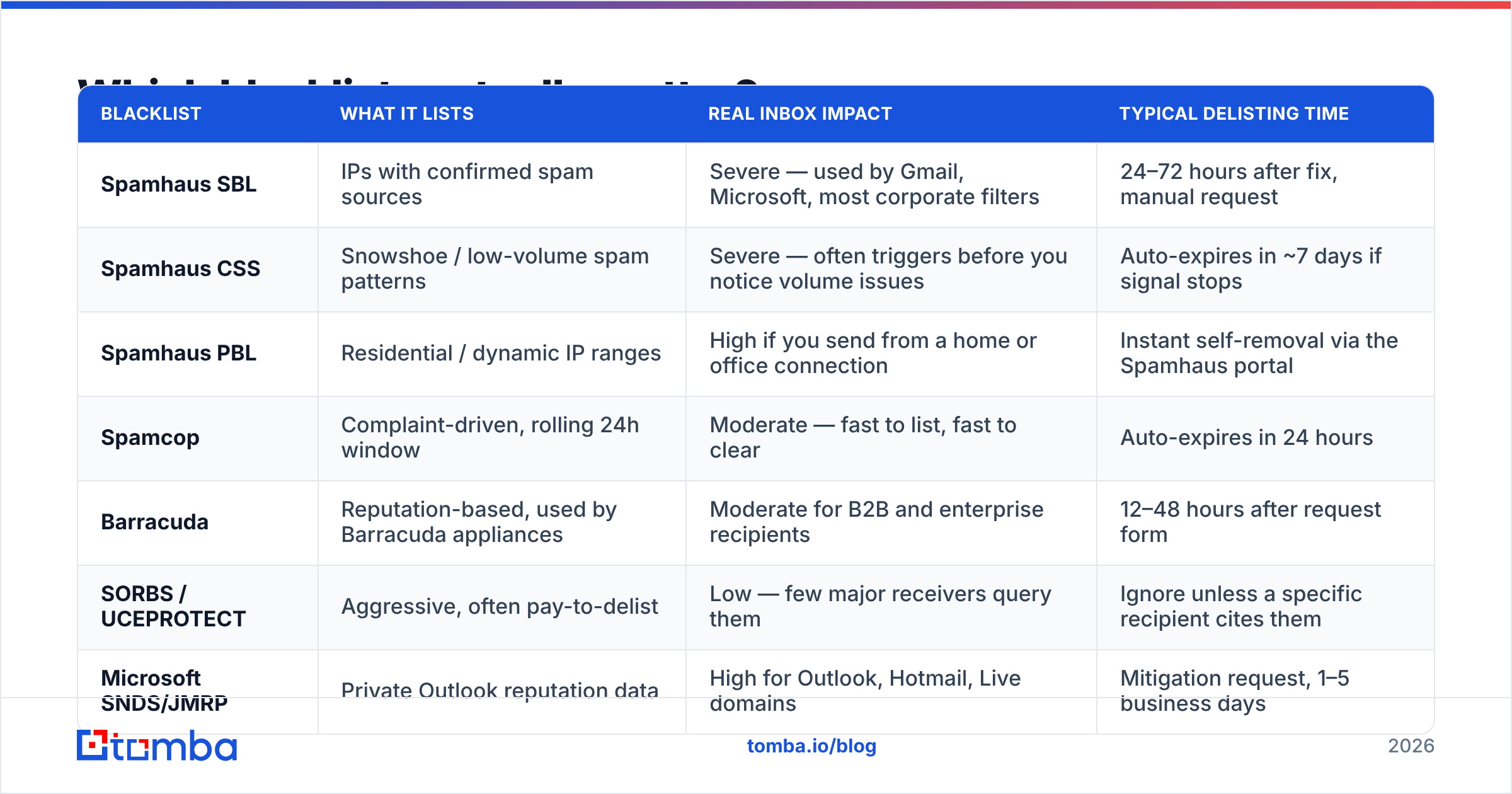
A lookup tool returning "listed on 2 of 91 blacklists" tells you almost nothing on its own. What matters is which two. Most DNSBLs are hobby projects that no major receiver queries. Here is the practical hierarchy.
| Blacklist | What it lists | Real inbox impact | Typical delisting time |
|---|---|---|---|
| Spamhaus SBL | IPs with confirmed spam sources | Severe — used by Gmail, Microsoft, most corporate filters | 24–72 hours after fix, manual request |
| Spamhaus CSS | Snowshoe / low-volume spam patterns | Severe — often triggers before you notice volume issues | Auto-expires in ~7 days if signal stops |
| Spamhaus PBL | Residential / dynamic IP ranges | High if you send from a home or office connection | Instant self-removal via the Spamhaus portal |
| Spamcop | Complaint-driven, rolling 24h window | Moderate — fast to list, fast to clear | Auto-expires in 24 hours |
| Barracuda | Reputation-based, used by Barracuda appliances | Moderate for B2B and enterprise recipients | 12–48 hours after request form |
| SORBS / UCEPROTECT | Aggressive, often pay-to-delist | Low — few major receivers query them | Ignore unless a specific recipient cites them |
| Microsoft SNDS/JMRP | Private Outlook reputation data | High for Outlook, Hotmail, Live domains | Mitigation request, 1–5 business days |
The takeaway: if you are listed on UCEPROTECT alone and your Gmail placement dropped, the listing is a coincidence. Keep diagnosing.
Is it your IP or your domain that's flagged?#
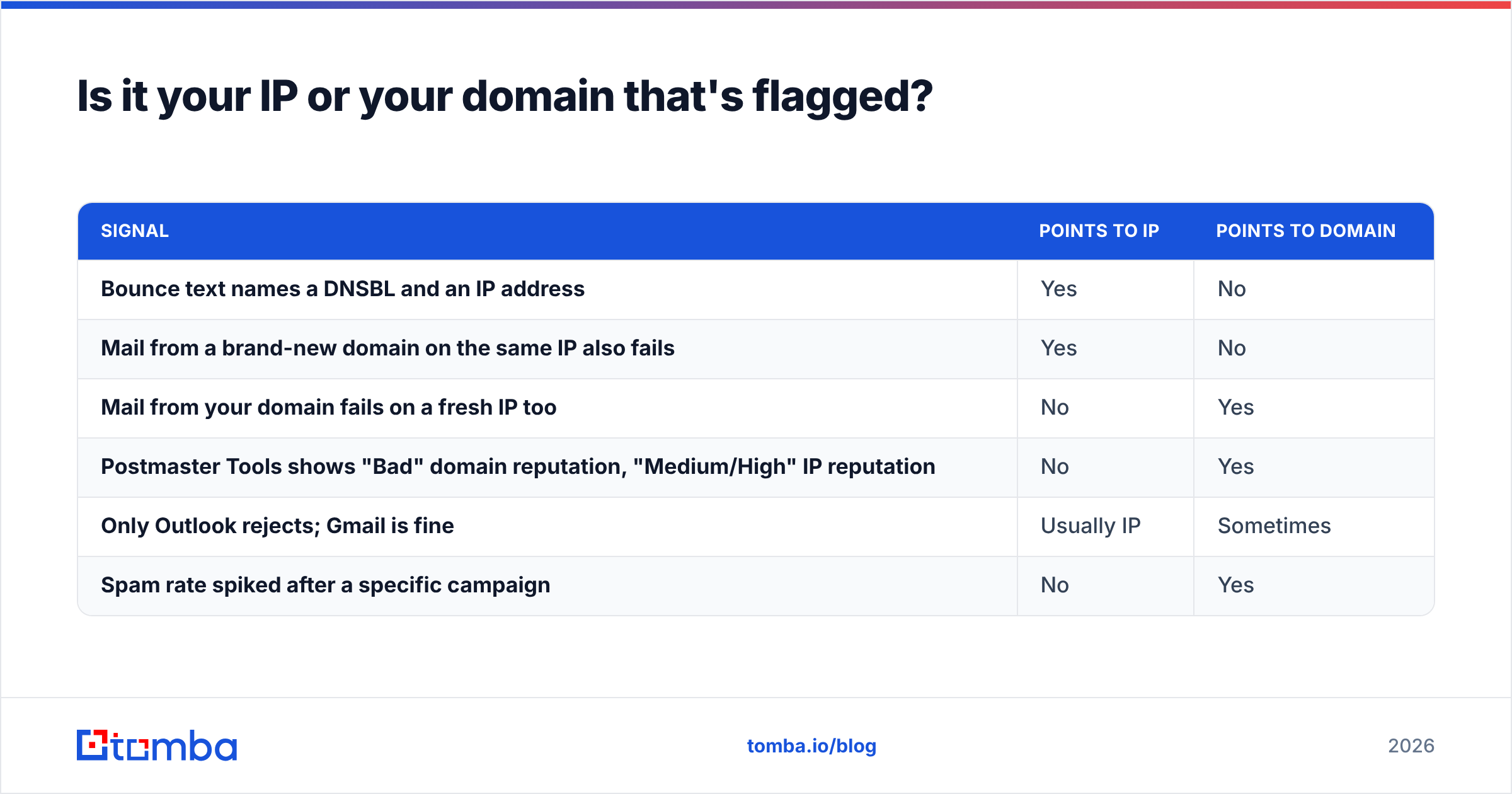
This is the distinction that saves the most time in 2026. Mailbox providers have shifted weight steadily toward domain reputation because IPs rotate and domains do not. Gmail's bulk sender requirements, tightened again through 2024 and 2025, made DMARC enforcement and a sub-0.3% spam rate effectively mandatory for anyone sending at volume.
Here is how to tell them apart quickly:
| Signal | Points to IP | Points to domain |
|---|---|---|
| Bounce text names a DNSBL and an IP address | Yes | No |
| Mail from a brand-new domain on the same IP also fails | Yes | No |
| Mail from your domain fails on a fresh IP too | No | Yes |
| Postmaster Tools shows "Bad" domain reputation, "Medium/High" IP reputation | No | Yes |
| Only Outlook rejects; Gmail is fine | Usually IP | Sometimes |
| Spam rate spiked after a specific campaign | No | Yes |
If you are on Google Workspace or Microsoft 365, you almost certainly cannot be IP-flagged in a way you can fix. Those pools are shared and heavily monitored by the providers themselves. Your domain reputation is the lever you actually control. The sender reputation you build at the domain level is portable across infrastructure changes, which is exactly why providers weight it.
Why do IPs and domains get flagged in the first place?#
Almost every case traces back to one of six inputs. Ranked by how often they are the actual culprit:
- Invalid addresses. Sending to addresses that no longer exist produces hard bounces. A hard bounce rate over 2–3% is read as a signal that you did not acquire the list legitimately. This is the number one cause and the easiest to prevent.
- Spam traps. Recycled traps are abandoned addresses reactivated by providers. Pristine traps were never valid at all and only exist on scraped or purchased lists. Hitting a pristine trap is the fastest route to a Spamhaus CSS listing.
- Complaint rate. Users marking mail as spam. Above 0.3% at Gmail and you are in trouble regardless of anything else.
- Volume spikes. Going from 50 sends a day to 5,000 on a new domain reads as a compromised account. Ramp schedules exist for a reason.
- Broken authentication. SPF that fails to resolve, DKIM that breaks on forwarding, or a DMARC policy that does not align. A sender reputation checker catches most of this before a campaign goes out.
- Shared infrastructure neighbors. On a shared IP, someone else's bad behavior becomes your problem. This is the one case where the correct fix is "change providers," not "clean your list."
Shared, dedicated, or pooled: which setup gets flagged more?#
| Setup | Who controls reputation | Blacklist risk | Best for |
|---|---|---|---|
| Shared IP (Workspace, M365) | Provider | Low IP risk, no IP control | Under ~20k sends/month |
| ESP shared pool (Mailchimp, SendGrid free) | Provider + pool neighbors | Moderate, neighbor-dependent | Newsletters, transactional |
| Dedicated IP | You, entirely | High if mismanaged, low if warmed properly | 100k+ sends/month, consistent volume |
| Multi-domain cold email stack | You, per domain | Moderate — damage is contained per domain | Outbound sales at scale |
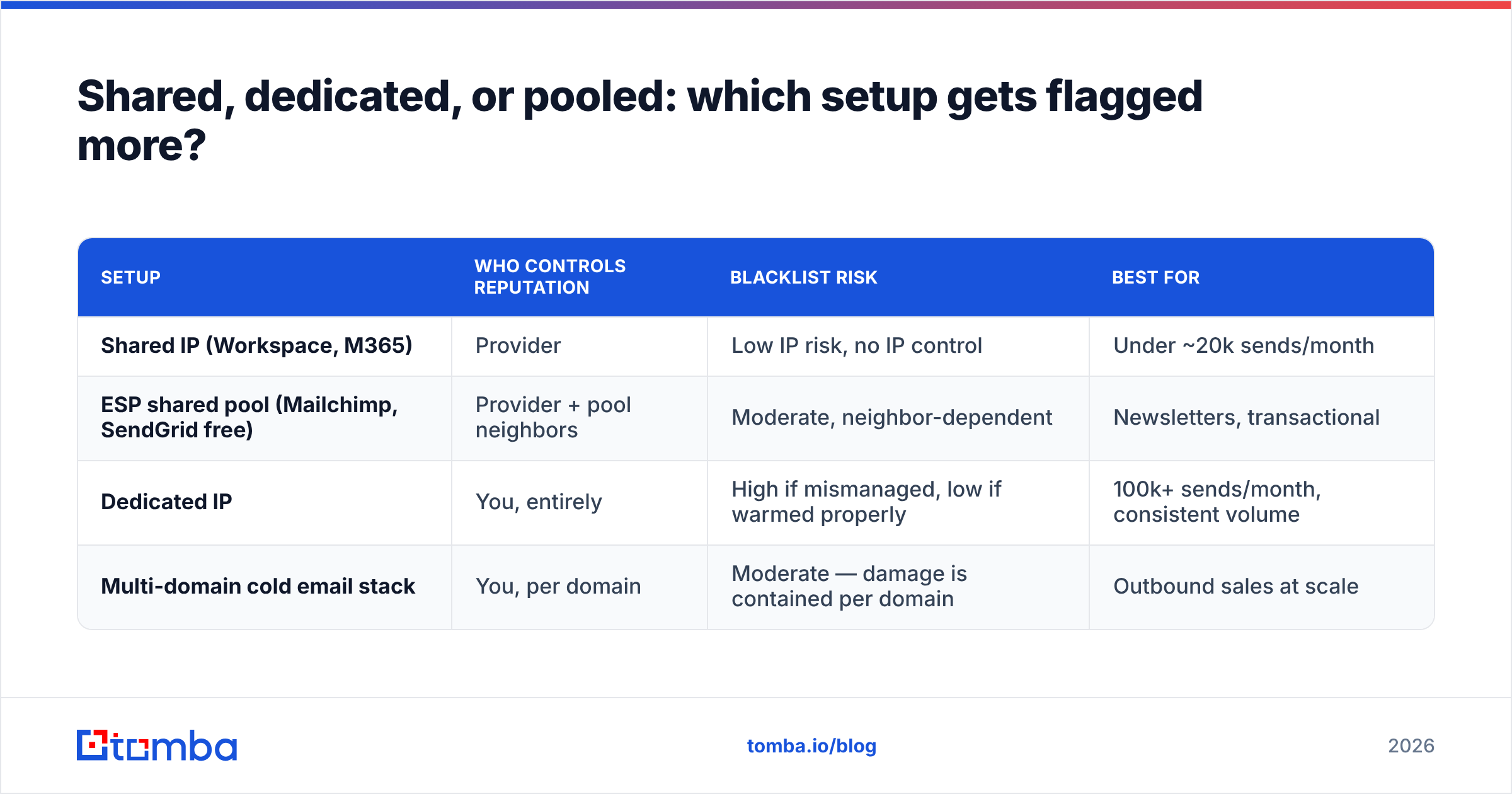
A dedicated IP is not automatically safer. An unwarmed dedicated IP sending 10,000 cold emails on day one will be flagged faster than a shared pool ever would. Dedicated IPs only pay off when you have enough consistent volume to maintain a reputation signal, which realistically starts around 100,000 messages per month.

How do you get delisted once you're flagged?#
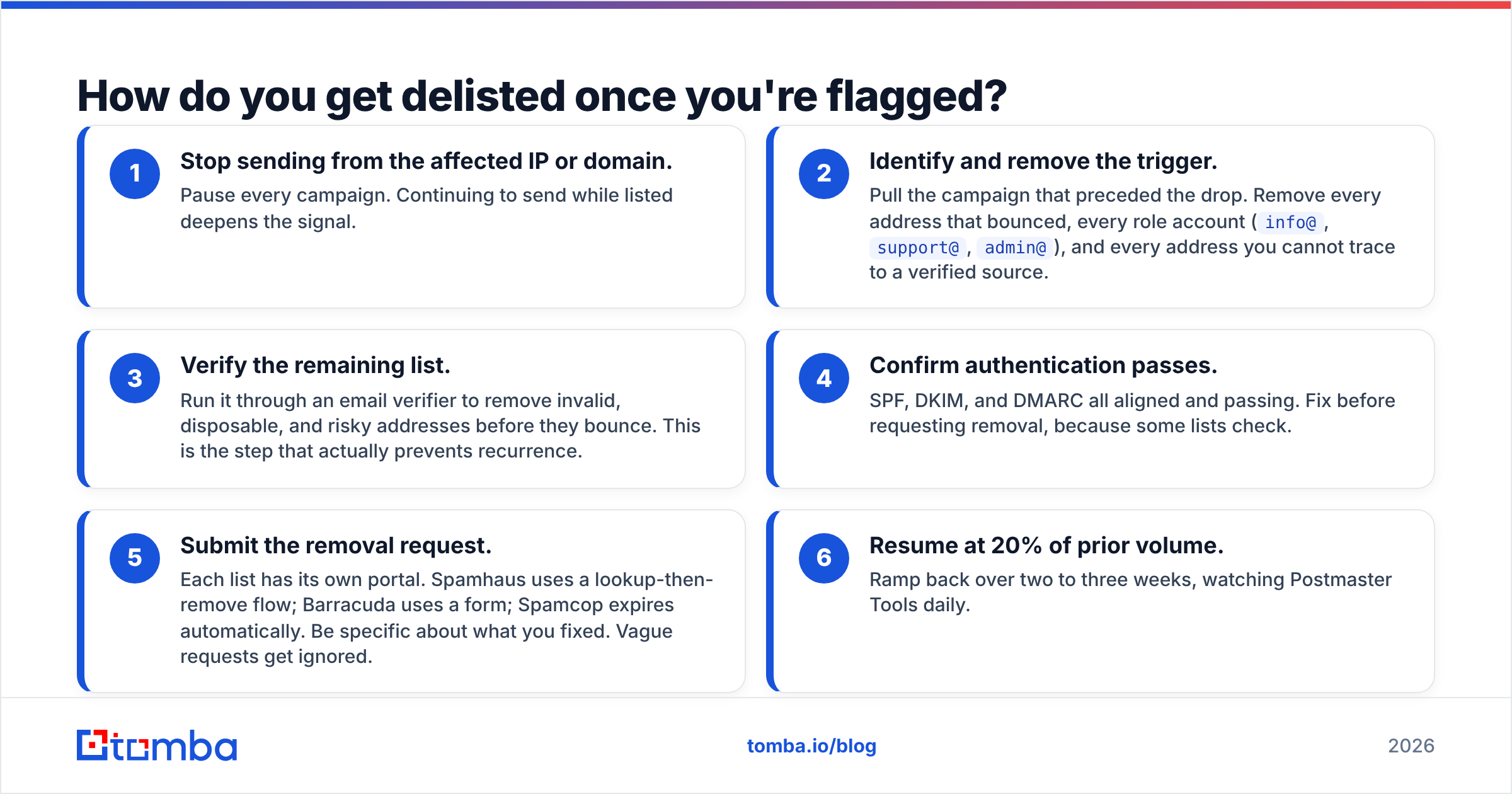
Fix the cause first. Delisting before you fix the input gets you re-listed within days, and repeat listings are treated more harshly.
The sequence:
- Stop sending from the affected IP or domain. Pause every campaign. Continuing to send while listed deepens the signal.
- Identify and remove the trigger. Pull the campaign that preceded the drop. Remove every address that bounced, every role account (
info@,support@,admin@), and every address you cannot trace to a verified source. - Verify the remaining list. Run it through an email verifier to remove invalid, disposable, and risky addresses before they bounce. This is the step that actually prevents recurrence.
- Confirm authentication passes. SPF, DKIM, and DMARC all aligned and passing. Fix before requesting removal, because some lists check.
- Submit the removal request. Each list has its own portal. Spamhaus uses a lookup-then-remove flow; Barracuda uses a form; Spamcop expires automatically. Be specific about what you fixed. Vague requests get ignored.
- Resume at 20% of prior volume. Ramp back over two to three weeks, watching Postmaster Tools daily.
Never pay a delisting fee to a list you had never heard of before the listing. Pay-to-delist operations have minimal influence on real inbox placement, and paying them does not help your case with the lists that matter.
How long does reputation recovery actually take?#
Delisting is fast. Reputation recovery is not.
- DNSBL removal: hours to 72 hours once you request it.
- Gmail domain reputation moving from Bad to Low: typically 2–4 weeks of clean sending.
- Low to Medium/High: another 4–8 weeks at consistent volume.
- Microsoft mitigation: 1–5 business days for the request, then weeks of monitoring.
The uncomfortable truth is that a domain burned badly enough is sometimes cheaper to replace than to rehabilitate. If your primary domain is at stake, that is not an option — which is why cold outbound should always run on separate sending domains, never your corporate root domain.
How do you stop it from happening again?#
Prevention is a data problem before it is an infrastructure problem. Every flagged-IP incident I have seen traced back to addresses that should never have been sent to.
Build the guardrails into the workflow instead of the cleanup:
- Verify at acquisition, not at send time. Every address enters your CRM already validated.
- Re-verify anything older than 90 days. B2B addresses decay at roughly 2–2.5% per month as people change jobs.
- Never send to catch-all domains without checking them. A catch-all verifier distinguishes genuinely deliverable addresses from domains that accept everything and bounce later.
- Suppress role accounts by default. They generate complaints at several times the rate of individual mailboxes.
- Monitor weekly, not after a crash. Postmaster Tools, bounce rate, complaint rate. Ten minutes a week.
- Segment infrastructure. Marketing, transactional, and cold outbound on separate domains and separate sending setups.
If you want a broader primer on the mechanics behind all of this, the email deliverability fundamentals are worth a read before your next ramp-up.
Start with data that does not bounce#
The fastest way to never ask "is my IP flagged" again is to stop feeding your sending infrastructure addresses that were never valid. Bounces cause listings. Listings cause outages. Outages cost pipeline.
Tomba's Email Finder returns professional email addresses with a confidence score and verification status attached, so the addresses entering your sequences are ones that actually resolve. The free tier covers 25 searches per month, and paid plans start at $49/mo on Starter, with Growth at $99/mo for teams running consistent outbound volume. Full Tomba pricing is public.
Clean input, clean reputation. That is the whole game.
Related guides#
// get started
Find, verify and enrich your first contacts today
Start on the free plan with 25 searches a month, then scale when your team is ready.
Free plan · No credit card required · GDPR & CCPA
// about the author