Is My Website Blacklisted? How to Check and Fix It in 2026
A blacklisted domain kills cold email, transactional mail, and sometimes ad approvals. Here's how to check every major blocklist in under 10 minutes, read the listing reason correctly, and get delisted without making it worse.
TL;DR
- "Blacklisted" almost always means a DNS blocklist (DNSBL) listed your sending IP or your domain — not that Google removed your site from search.
- Check the three that actually move the needle first: Spamhaus (SBL/CSS/DBL), SpamCop, and Barracuda. The other 80+ lists rarely change your inbox rate.
- The listing reason matters more than the listing. A spam-trap hit, a compromised form, and a shared-IP neighbor each need a different fix.
- Delisting takes 12 hours to 14 days. Requesting removal before fixing the root cause resets the clock and hardens the listing.
- Roughly 60-70% of blocklist events that hit cold-email senders trace back to one thing: mailing unverified addresses that bounce or hit traps.
If your open rates fell off a cliff, replies stopped, or a customer told you "your email went to spam," the first question is the right one to ask. But most people ask it about the wrong asset. Your website is rarely what got blocked. Your sending infrastructure is.
What does "blacklisted" actually mean?#
Think of DNS blocklists like a neighborhood watch that publishes a list of license plates. When your email arrives at a receiving mail server, that server does a quick lookup: "Has anyone reported this plate?" If yes, the door either closes entirely (hard reject) or you get waved into the side lot (spam folder). The lookup takes milliseconds, and it happens before your subject line is ever evaluated.
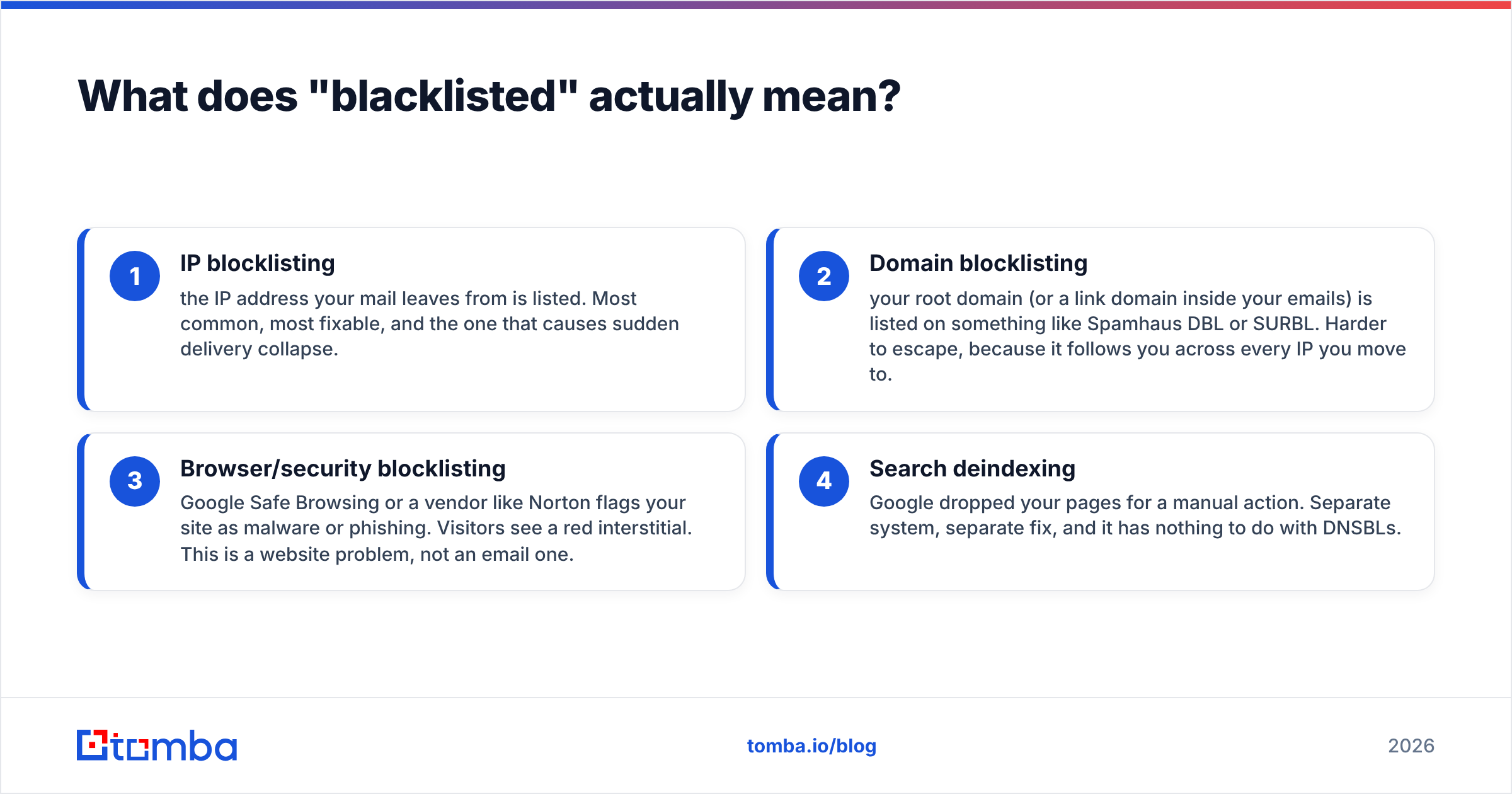
There are four distinct things people mean when they ask "is my website blacklisted":
- IP blocklisting — the IP address your mail leaves from is listed. Most common, most fixable, and the one that causes sudden delivery collapse.
- Domain blocklisting — your root domain (or a link domain inside your emails) is listed on something like Spamhaus DBL or SURBL. Harder to escape, because it follows you across every IP you move to.
- Browser/security blocklisting — Google Safe Browsing or a vendor like Norton flags your site as malware or phishing. Visitors see a red interstitial. This is a website problem, not an email one.
- Search deindexing — Google dropped your pages for a manual action. Separate system, separate fix, and it has nothing to do with DNSBLs.
This guide covers 1 and 2 in depth, and tells you how to rule out 3 and 4 in about ninety seconds.
Is my website blacklisted? How do you check in 10 minutes?#
Work in this order. Each step takes under three minutes and rules out a whole class of problem.
Step 1 — Find your actual sending IP. This is not your web host's IP. Open a message you sent from the affected mailbox, view the full headers, and find the last Received: from line that isn't the recipient's own server. That IP is what blocklists see. If you send through Google Workspace, Microsoft 365, SendGrid, or Amazon SES, the IP belongs to them — shared infrastructure, which changes your remediation path entirely (more on that below).
Step 2 — Run a multi-list lookup. Use a blacklist checker that queries dozens of DNSBLs at once against both the IP and the domain. Do not check lists one at a time; you'll miss the ones that matter and waste twenty minutes on lists nobody queries.
Step 3 — Check the domain separately. A clean IP with a listed domain is a common and confusing pattern. Query your root domain against Spamhaus DBL and SURBL. Also check any shortener or tracking domain you use inside emails — a listed track.yourbrand.com will sink messages sent from a perfectly clean IP.
Step 4 — Rule out browser flags. Paste your URL into Google's Safe Browsing transparency report. If it's clean there and your site loads without a warning in a fresh incognito window, your website is fine and this is purely an email problem.
Step 5 — Read your authentication. Run an SPF checker and confirm DKIM signing and a DMARC policy exist. Since 2024, Google and Yahoo have enforced authentication requirements for bulk senders — failing these produces the exact same symptom as a blocklisting (mail disappearing), and it's far more common than an actual listing. Google's bulk sender guidelines are the canonical reference here.
Which blacklists actually matter?#
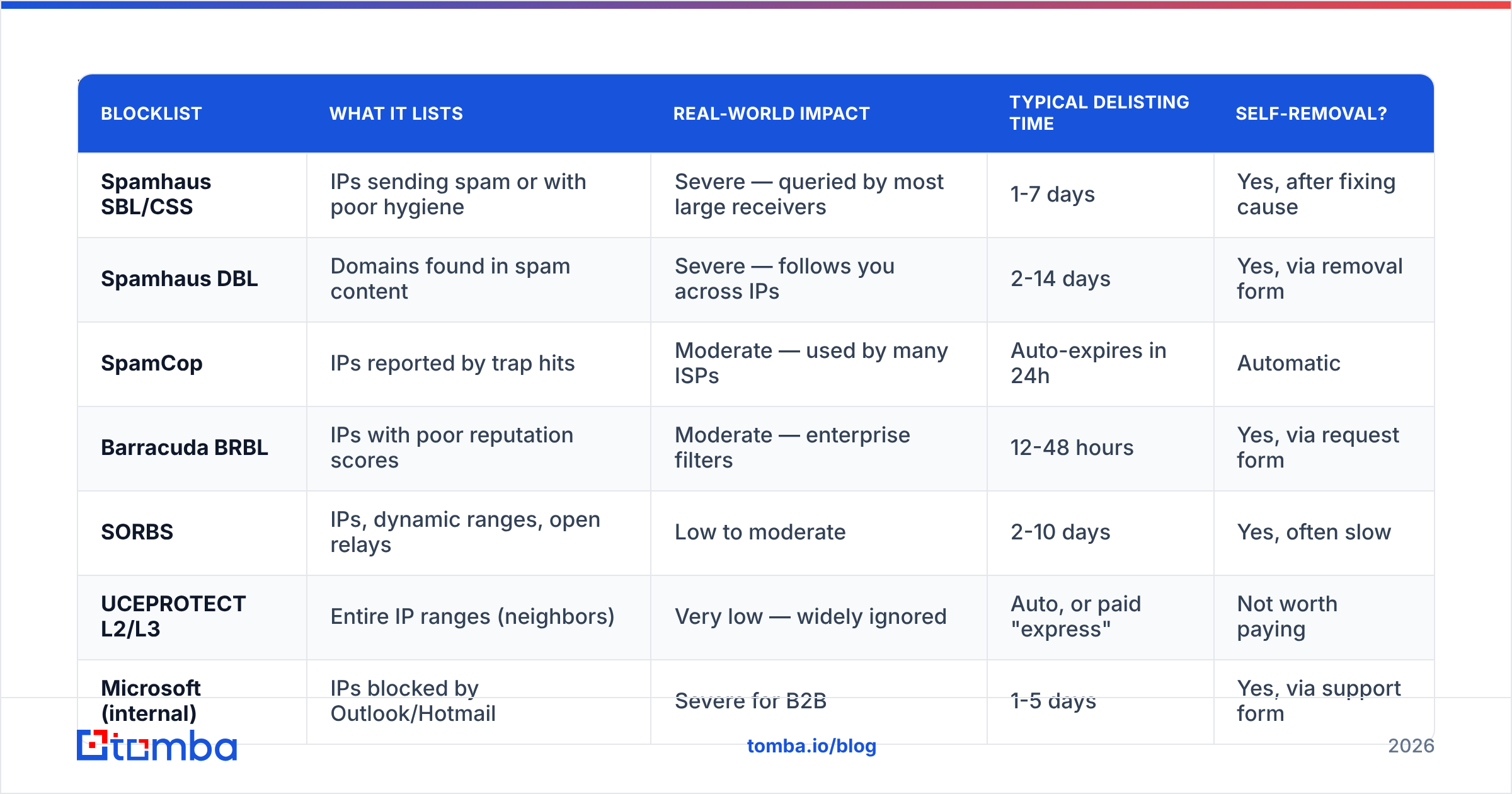
There are over 100 public DNSBLs. Fewer than ten influence meaningful mail volume. Most "you are listed on 3 of 89 blacklists!" scare reports flag obscure lists that no major receiver queries.
| Blocklist | What it lists | Real-world impact | Typical delisting time | Self-removal? |
|---|---|---|---|---|
| Spamhaus SBL/CSS | IPs sending spam or with poor hygiene | Severe — queried by most large receivers | 1-7 days | Yes, after fixing cause |
| Spamhaus DBL | Domains found in spam content | Severe — follows you across IPs | 2-14 days | Yes, via removal form |
| SpamCop | IPs reported by trap hits | Moderate — used by many ISPs | Auto-expires in 24h | Automatic |
| Barracuda BRBL | IPs with poor reputation scores | Moderate — enterprise filters | 12-48 hours | Yes, via request form |
| SORBS | IPs, dynamic ranges, open relays | Low to moderate | 2-10 days | Yes, often slow |
| UCEPROTECT L2/L3 | Entire IP ranges (neighbors) | Very low — widely ignored | Auto, or paid "express" | Not worth paying |
| Microsoft (internal) | IPs blocked by Outlook/Hotmail | Severe for B2B | 1-5 days | Yes, via support form |
Two rules follow from this table. First, if you're only on UCEPROTECT Level 3, do nothing — that list blocks whole ISP ranges and almost no receiver honors it. Second, a Spamhaus listing is an emergency; treat everything else as a maintenance ticket.
The Spamhaus Project publishes the reason for every listing. Read it before you touch anything. The difference between "spam trap hit" and "snowshoe pattern detected" is the difference between a list-hygiene fix and a sending-pattern fix.
Why did my domain or IP get listed in the first place?#
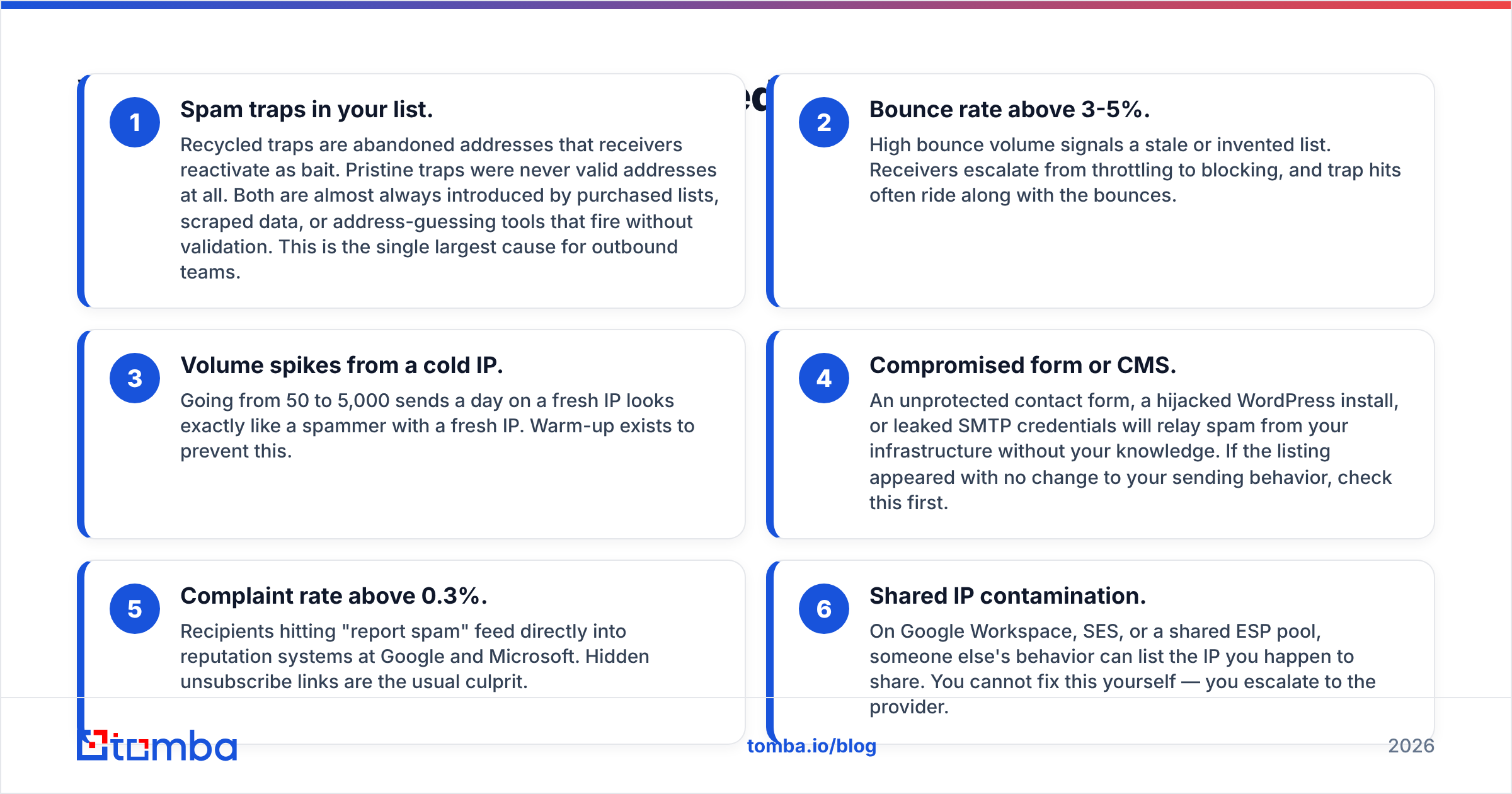
In practice, blocklist events cluster into six causes. Diagnose honestly — the removal request will ask you what you fixed.
- Spam traps in your list. Recycled traps are abandoned addresses that receivers reactivate as bait. Pristine traps were never valid addresses at all. Both are almost always introduced by purchased lists, scraped data, or address-guessing tools that fire without validation. This is the single largest cause for outbound teams.
- Bounce rate above 3-5%. High bounce volume signals a stale or invented list. Receivers escalate from throttling to blocking, and trap hits often ride along with the bounces.
- Volume spikes from a cold IP. Going from 50 to 5,000 sends a day on a fresh IP looks exactly like a spammer with a fresh IP. Warm-up exists to prevent this.
- Compromised form or CMS. An unprotected contact form, a hijacked WordPress install, or leaked SMTP credentials will relay spam from your infrastructure without your knowledge. If the listing appeared with no change to your sending behavior, check this first.
- Complaint rate above 0.3%. Recipients hitting "report spam" feed directly into reputation systems at Google and Microsoft. Hidden unsubscribe links are the usual culprit.
- Shared IP contamination. On Google Workspace, SES, or a shared ESP pool, someone else's behavior can list the IP you happen to share. You cannot fix this yourself — you escalate to the provider.

How do you get delisted without making it worse?#
The sequence matters. Submitting a removal request before the root cause is fixed is the most common way to turn a 24-hour listing into a two-week one — most operators treat a repeat listing after a granted removal as evidence of bad faith.
Fix first, then request. Concretely:
- Stop all outbound sending from the affected IP or domain. Pause sequences. Every message you send while listed adds evidence against you.
- Identify and remove the bad data. Export the list you sent last, run it through an email verifier, and delete every invalid, risky, role-based, and unknown result. Do not "send anyway to see." Traps do not bounce — that's the whole point of them.
- Patch the infrastructure. Rotate SMTP credentials, add rate limits and CAPTCHA to public forms, update the CMS, and scan for injected mailer scripts.
- Verify authentication. SPF, DKIM, and a DMARC record at
p=noneminimum. Fix any SPF record exceeding the 10-DNS-lookup limit — a broken SPF silently fails authentication for every message. - Submit the removal request. Use the blocklist's own form. Write two or three plain sentences: what caused it, what you changed, what prevents recurrence. No apologies, no marketing language, no "we are a legitimate business" — every spammer writes that sentence.
- Resume slowly. Restart at roughly 20% of previous volume and ramp over 10-14 days. Send to your most engaged segment first; positive engagement signals rebuild sender reputation faster than anything else.
If you're on shared infrastructure, skip steps 1 and 5 and open a support ticket with your provider instead, including the exact listing URL and timestamp. Google Workspace and Microsoft 365 both have dedicated deliverability escalation paths; ESPs like SendGrid and Mailgun will usually move you to a different pool.
Does a blacklisting hurt my Google rankings?#
Not directly. DNS blocklists and Google's search index are separate systems that don't share data. A Spamhaus SBL listing has zero effect on your organic rankings.
Two indirect exceptions are real, though:
- Google Safe Browsing flags do affect traffic catastrophically. If your site serves malware or gets flagged for phishing, Chrome shows an interstitial warning, organic clicks collapse, and Search Console issues a security notice. Fix the compromise, then request a review.
- A compromised server often causes both at once. The same injected script that relays spam (causing the blocklisting) frequently also serves cloaked spam pages (causing the manual action). If you find one, look for the other.
So: check Search Console for manual actions and security issues, but don't expect a blocklist delisting to restore rankings. They're unrelated problems that happen to share a root cause more often than people expect.
How do you stay off blacklists permanently?#
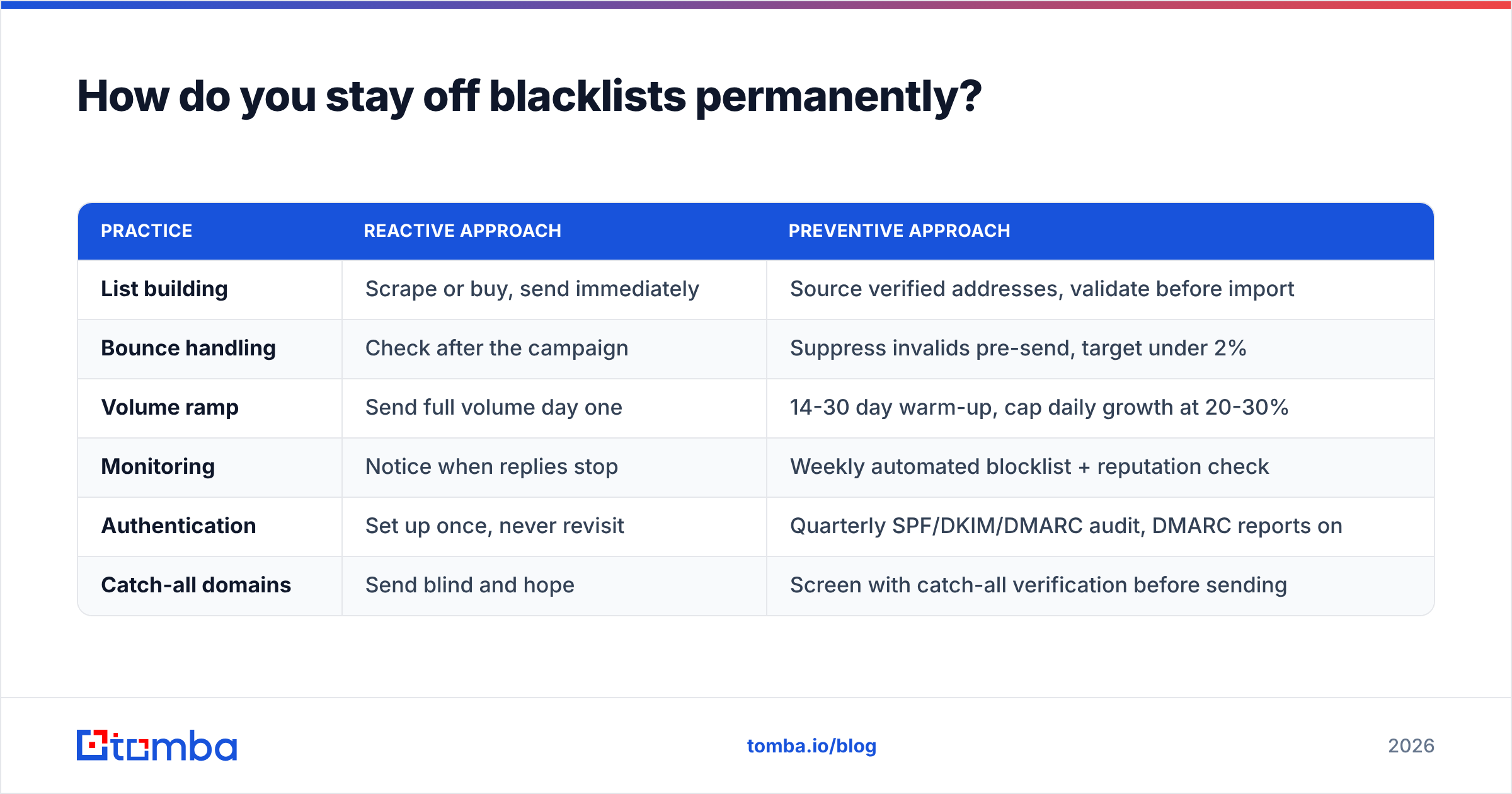
Prevention is unglamorous and mostly comes down to data quality and pacing.
| Practice | Reactive approach | Preventive approach |
|---|---|---|
| List building | Scrape or buy, send immediately | Source verified addresses, validate before import |
| Bounce handling | Check after the campaign | Suppress invalids pre-send, target under 2% |
| Volume ramp | Send full volume day one | 14-30 day warm-up, cap daily growth at 20-30% |
| Monitoring | Notice when replies stop | Weekly automated blocklist + reputation check |
| Authentication | Set up once, never revisit | Quarterly SPF/DKIM/DMARC audit, DMARC reports on |
| Catch-all domains | Send blind and hope | Screen with catch-all verification before sending |
Two details deserve emphasis. First, catch-all domains are where most "clean" lists go wrong — a catch-all accepts everything, so standard validation returns "unknown" and teams send anyway. That's how trap hits enter a supposedly verified list. A catch-all verifier resolves those to a real yes/no instead of a shrug.
Second, monitoring beats remediation by an order of magnitude. A listing caught within hours of appearing usually delists in a day. One discovered three weeks later, after you've continued sending into it, can take a fortnight and may require rebuilding reputation from scratch. Set a weekly automated check on your sending IPs and domains, and route alerts somewhere a human reads them. For the broader picture of how listings, authentication, and engagement interact, the email deliverability fundamentals are worth a read before your next campaign. For background on how DNSBLs work mechanically, Wikipedia's DNSBL entry is accurate and vendor-neutral.
What should you do in the next hour?#
Run the five-step check above. If you come back clean on IP, domain, and Safe Browsing, your problem is authentication or content filtering, not a blocklist — and you just saved yourself a week of chasing the wrong fix.
If you are listed, the honest fix starts upstream of the delisting form. Most blocklist events among B2B outbound teams begin with a list that was never validated in the first place: guessed address patterns, scraped contacts, and stale records that bounce or hit traps. Cleaning that source removes the cause instead of the symptom.
That's where Tomba Email Finder fits. It returns professional email addresses with a confidence score and verification status attached, so invalid and risky contacts never enter your sequence — which means no bounce spike, no trap hits, and no removal form to fill out at 11pm. The free tier includes 25 searches a month; Starter is $49/mo and Growth is $99/mo if you need volume. See Tomba pricing for the full breakdown. Verify before you send, and the blacklist question stops being one you have to ask.
Related guides#
// get started
Find, verify and enrich your first contacts today
Start on the free plan with 25 searches a month, then scale when your team is ready.
Free plan · No credit card required · GDPR & CCPA
// about the author