Jet Leads Pro vs Mailmerge365: Which Tool Wins in 2026?
One sources leads, the other sends mail merges from Outlook. Here is where Jet Leads Pro and Mailmerge365 actually overlap, where they don't, and which one belongs in your outbound stack.
TL;DR
- These two tools are not really competitors. Jet Leads Pro sits on the sourcing side of outbound (find companies and contacts, export a list). Mailmerge365 sits on the sending side (personalised mail merge that goes out through your own Outlook / Microsoft 365 mailbox).
- Pick Mailmerge365 if you already have a clean list, live in Outlook, and want merges that land in your Sent folder and thread properly in Microsoft 365.
- Pick Jet Leads Pro if your bottleneck is list building and you want scraping plus contact discovery in one place.
- Most teams end up needing a third component: a verification and enrichment layer, because mail merge tools amplify bad data instead of catching it.
- Budget reality: sending tools are cheap per seat; data tools are priced per credit. Your real cost is almost always the data, not the sender.
If you searched Jet Leads Pro vs Mailmerge365, you are probably mid-way through building a cold outbound motion and trying to figure out which line item to approve. This comparison treats them as what they are — two different layers of the same pipeline — and tells you which one actually unblocks you.
What is Jet Leads Pro?#
Jet Leads Pro is positioned as a lead-generation tool: you define a target (an industry, a location, a set of companies or a source page), and it returns a list of businesses with contact details attached — typically some mix of website, phone, social profiles and email addresses. The output is a CSV or a list you push into a CRM.
The value proposition is speed of list assembly. Instead of manually pulling companies from a directory, visiting each site, and hunting for a contact, you run one search and get a spreadsheet. That is genuinely useful for local-services, agency, and SMB-focused outbound, where the target list is defined by geography and category rather than by firmographic filters.
The trade-off is the one every scraped-list product shares: coverage is easy, accuracy is hard. Pulling a contact@ address off a website footer is trivial. Finding the named decision-maker's direct address — and confirming it still resolves — is the part that determines whether your campaign gets replies or bounces.
What is Mailmerge365?#
Mailmerge365 is an Outlook-native mail merge add-in. You install it into Outlook (desktop or web), point it at a spreadsheet or a list, write a template with merge fields, and it sends individually addressed emails from your own Microsoft 365 mailbox.
The design philosophy matters here. Mailmerge365 deliberately does not route your mail through a third-party sending infrastructure. Every message goes through your own tenant, lands in your own Sent Items, and replies come back into your normal inbox thread. That is a meaningful difference from platforms that send on your behalf through shared relays.
Feature-wise you get the standard merge toolkit: personalisation tokens, attachments, scheduling, tracking, follow-up sequencing, and unsubscribe handling. The classic reference point is the mail merge feature in Word and Outlook — Mailmerge365 is essentially that concept rebuilt for modern Microsoft 365, with the automation and reporting that the native feature never had.

Jet Leads Pro vs Mailmerge365: how do they actually compare?#
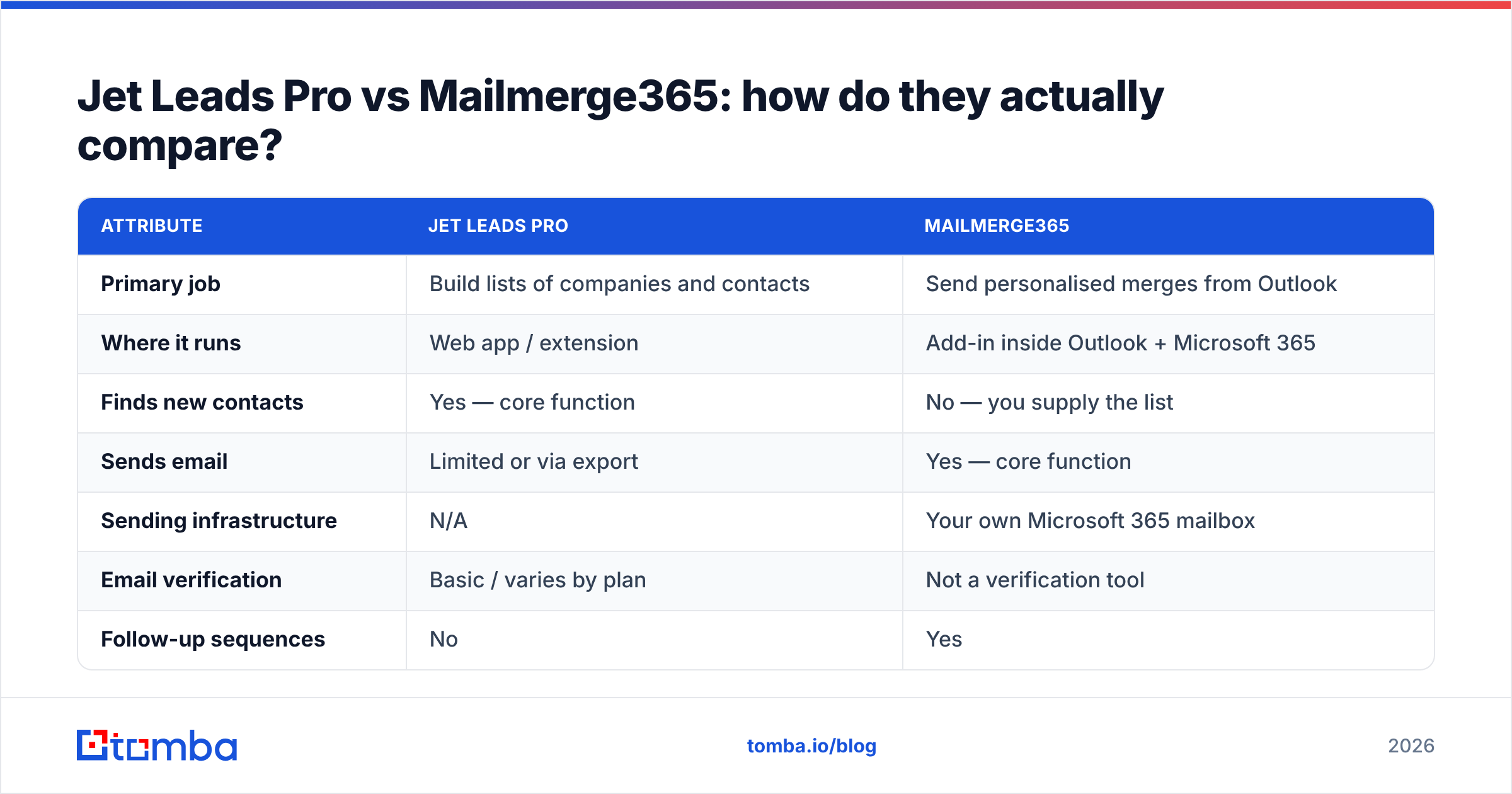
Here is the honest side-by-side. Note that several cells are "not applicable" rather than "worse" — that is the whole point of this comparison.
| Attribute | Jet Leads Pro | Mailmerge365 |
|---|---|---|
| Primary job | Build lists of companies and contacts | Send personalised merges from Outlook |
| Where it runs | Web app / extension | Add-in inside Outlook + Microsoft 365 |
| Finds new contacts | Yes — core function | No — you supply the list |
| Sends email | Limited or via export | Yes — core function |
| Sending infrastructure | N/A | Your own Microsoft 365 mailbox |
| Email verification | Basic / varies by plan | Not a verification tool |
| Follow-up sequences | No | Yes |
| Reply handling | N/A | Native Outlook threads |
| Pricing model | Credit / export volume | Per user, per month |
| Best for | Agencies, local B2B, SMB prospecting | Microsoft-shop sales and ops teams |
| Biggest weakness | Data freshness and bounce risk | Useless without a good list |
The pattern is obvious once you lay it out: they are complements, not substitutes. Jet Leads Pro produces the CSV. Mailmerge365 consumes it. If you buy only one and expect a complete outbound motion, you will be disappointed either way.
Which one do you need first?#
Answer this in one question: do you already know who you want to email?
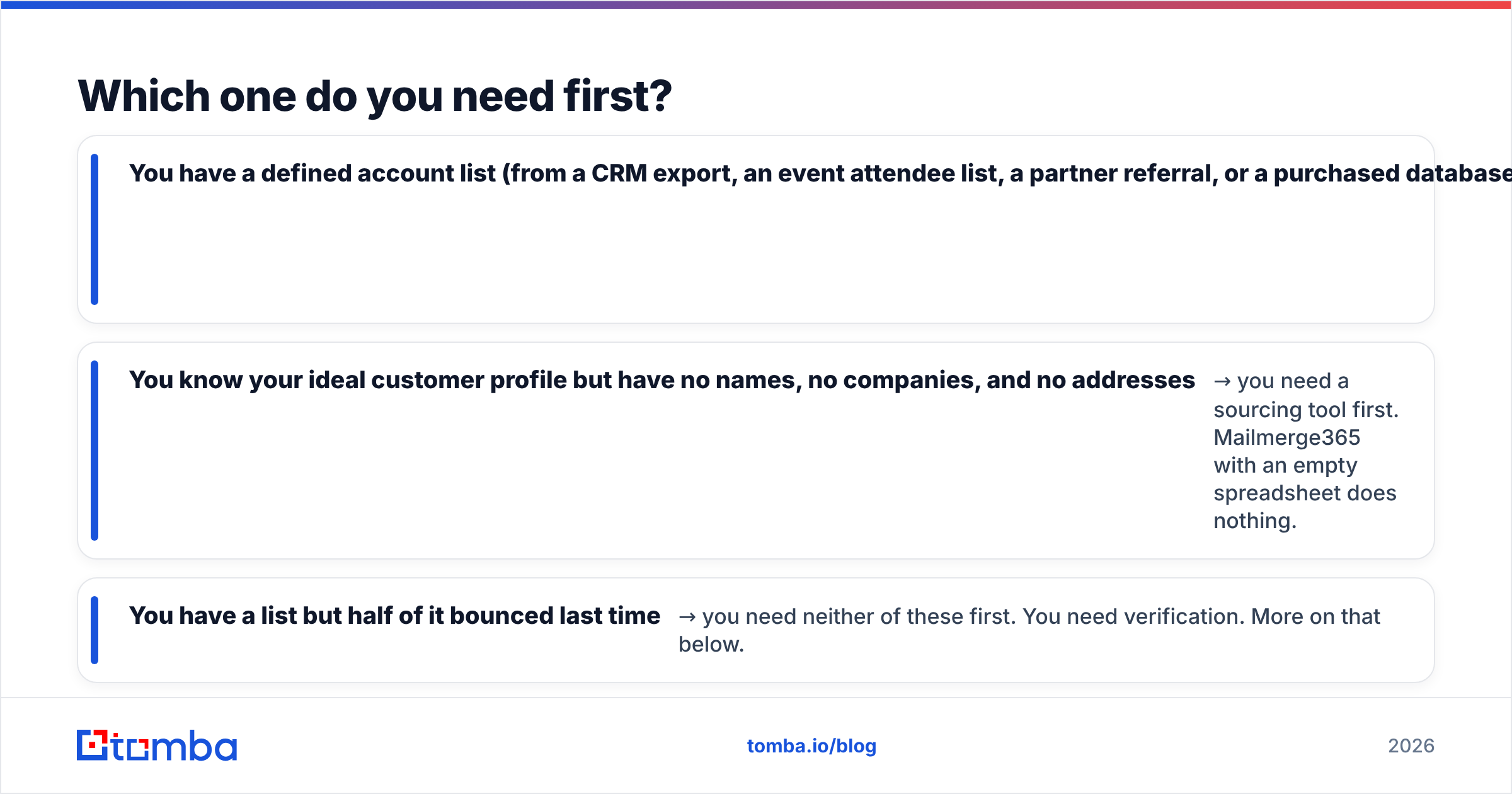
- You have a defined account list (from a CRM export, an event attendee list, a partner referral, or a purchased database) but no way to send at volume from Outlook → you need Mailmerge365. Your problem is sending, not sourcing.
- You know your ideal customer profile but have no names, no companies, and no addresses → you need a sourcing tool first. Mailmerge365 with an empty spreadsheet does nothing.
- You have a list but half of it bounced last time → you need neither of these first. You need verification. More on that below.
The most expensive mistake in this category is buying a sending tool, blasting a scraped list, and torching your primary domain's sender reputation in week one. Because Mailmerge365 sends from your real Microsoft 365 mailbox, that risk is concentrated on the mailbox you actually depend on for day-to-day business. That is a feature when your data is clean and a liability when it isn't.
How much do they cost?#
Pricing on both products moves, so treat these as shapes rather than quotes — check the vendor pages before you budget.
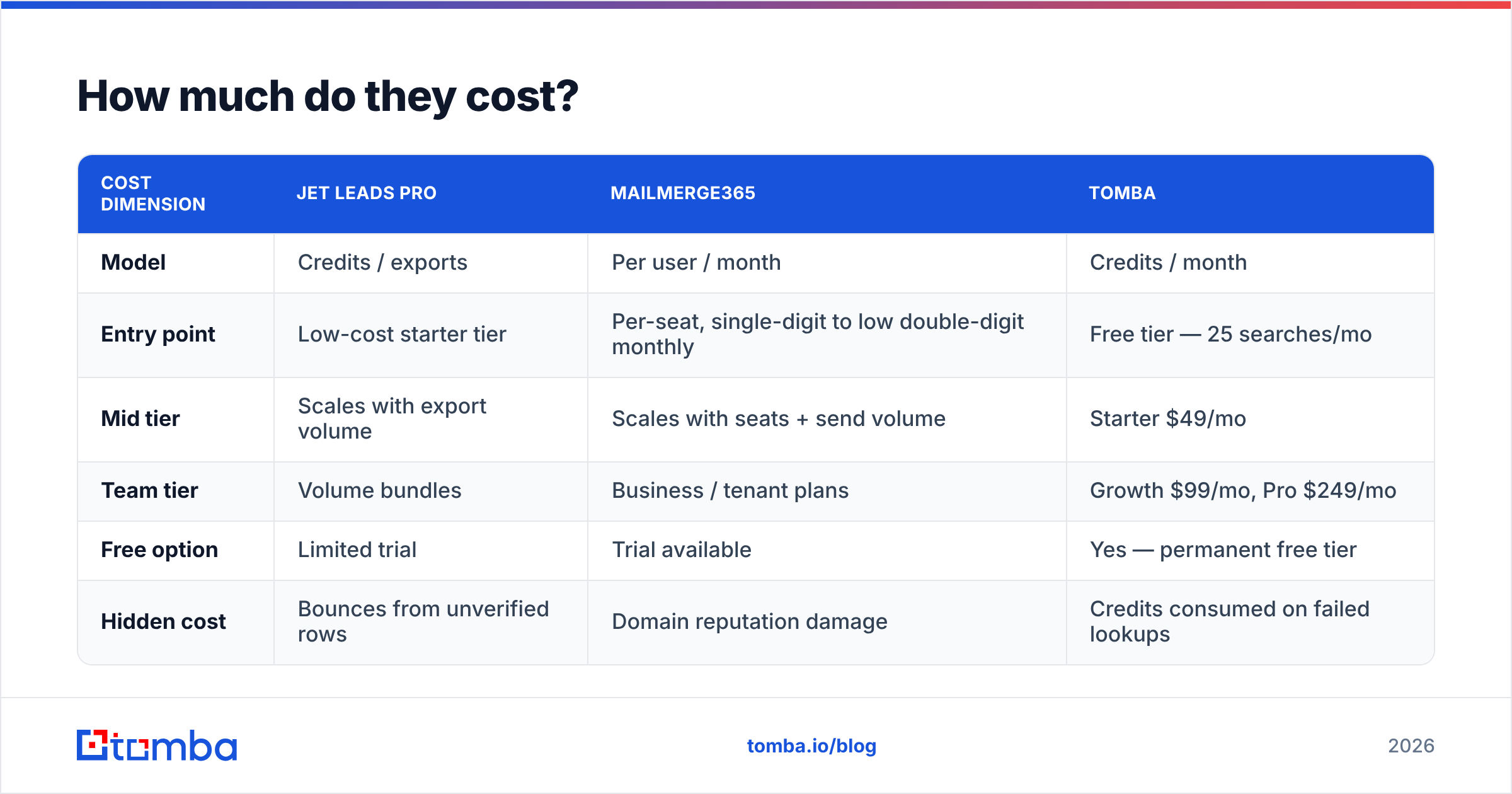
| Cost dimension | Jet Leads Pro | Mailmerge365 | Tomba |
|---|---|---|---|
| Model | Credits / exports | Per user / month | Credits / month |
| Entry point | Low-cost starter tier | Per-seat, single-digit to low double-digit monthly | Free tier — 25 searches/mo |
| Mid tier | Scales with export volume | Scales with seats + send volume | Starter $49/mo |
| Team tier | Volume bundles | Business / tenant plans | Growth $99/mo, Pro $249/mo |
| Free option | Limited trial | Trial available | Yes — permanent free tier |
| Hidden cost | Bounces from unverified rows | Domain reputation damage | Credits consumed on failed lookups |
The important number is not the sticker price. It is cost per delivered, replied-to email. A $9/seat sender attached to a 40% invalid list is far more expensive than a $49/mo data tool attached to a clean one, because the second one doesn't get your domain filtered into spam. See Tomba pricing for how credit-based data pricing compares against per-seat sending tools.
Why does neither tool solve the accuracy problem?#
Because accuracy is a separate discipline, and neither product is built for it.
Scraped lead data decays fast. Industry estimates of B2B contact data decay cluster around 20–30% annually, and job-change churn in sales and marketing roles runs even higher. A list Jet Leads Pro exported in January is measurably worse in June. Meanwhile Mailmerge365 will faithfully send to every row you hand it — it has no opinion about whether j.smith@acme.com still exists.
Three failure modes show up repeatedly:
- Role addresses masquerading as people.
info@,sales@,contact@— high extraction rate, low reply rate, and often monitored by nobody. Scrapers love them because they sit in footers. - Pattern guesses that were never confirmed. Many tools generate
first.last@domain.comand ship it without SMTP confirmation. Some resolve. Many don't. - Catch-all domains. The server accepts everything, so naive verification returns "valid" for addresses that will silently vanish. You need a dedicated catch-all verifier to distinguish a real mailbox from a black hole.
This is where a purpose-built data layer earns its place. Running your list through an email verifier before it touches Mailmerge365 is the single highest-leverage step in the whole workflow — it protects the mailbox you cannot afford to lose.

What does a working 2026 outbound stack look like?#
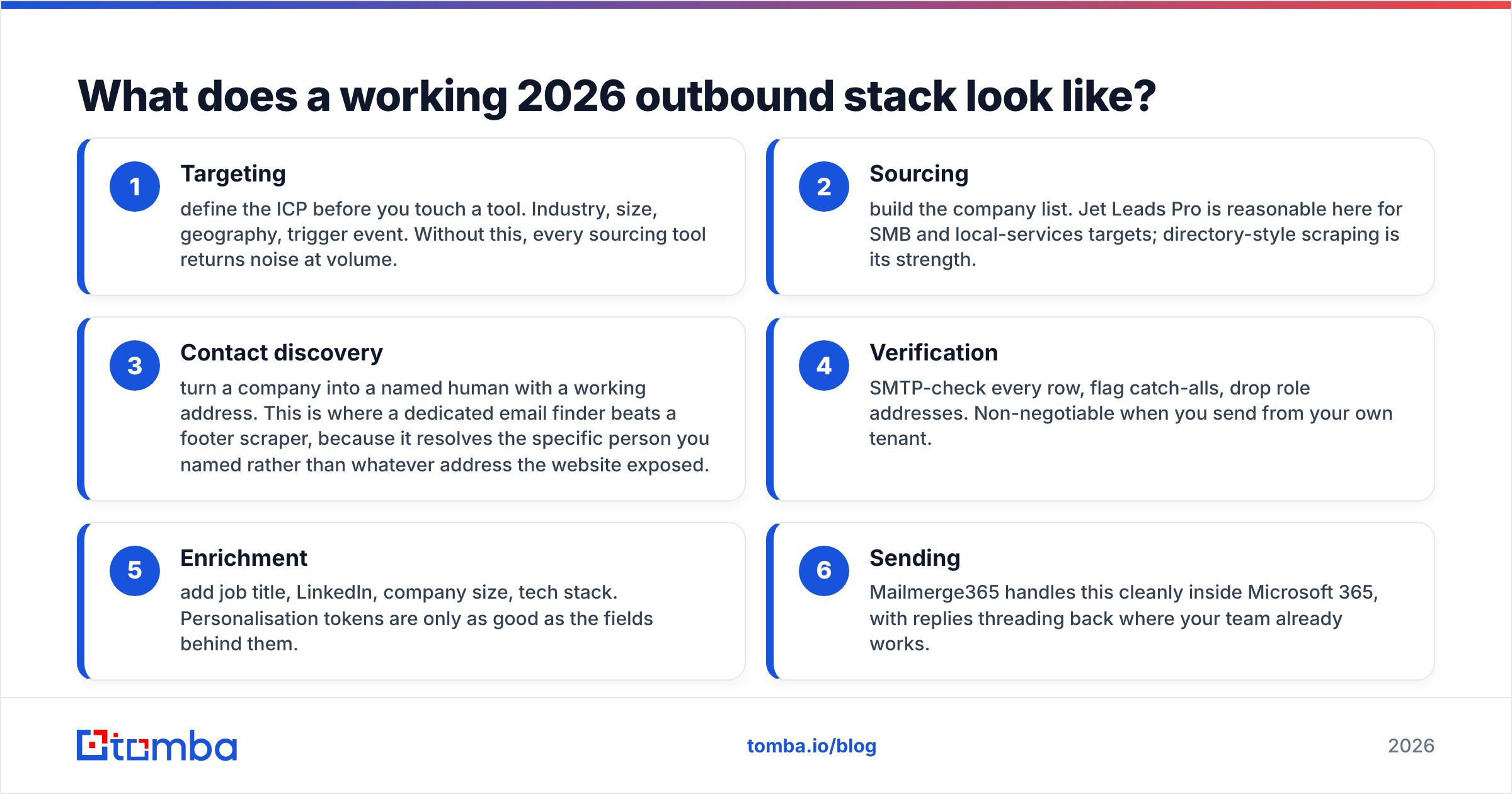
Here is the layered version, with the job each layer owns:
- Targeting — define the ICP before you touch a tool. Industry, size, geography, trigger event. Without this, every sourcing tool returns noise at volume.
- Sourcing — build the company list. Jet Leads Pro is reasonable here for SMB and local-services targets; directory-style scraping is its strength.
- Contact discovery — turn a company into a named human with a working address. This is where a dedicated email finder beats a footer scraper, because it resolves the specific person you named rather than whatever address the website exposed.
- Verification — SMTP-check every row, flag catch-alls, drop role addresses. Non-negotiable when you send from your own tenant.
- Enrichment — add job title, LinkedIn, company size, tech stack. Personalisation tokens are only as good as the fields behind them.
- Sending — Mailmerge365 handles this cleanly inside Microsoft 365, with replies threading back where your team already works.
Skip step 4 and steps 1–3 were wasted. That is the recurring lesson in every post-mortem of a failed cold campaign.
Is Mailmerge365 better than a dedicated cold email platform?#
For Microsoft-centric teams, often yes — and for a specific reason: it does not pretend to be a growth-hacking tool.
Dedicated cold email platforms give you inbox rotation, warmup pools, and unlimited sending accounts. Those features exist to send more volume than one mailbox reasonably should. Mailmerge365 takes the opposite position: one mailbox, real Outlook, real Sent folder, real threads. Your volume ceiling is your Microsoft 365 sending limit, and that constraint is healthy for most teams.
Where it falls short of a full cold email platform:
- No multi-inbox rotation for high-volume outbound
- No built-in mailbox warmup
- No unified multichannel sequencing (LinkedIn, calls, email in one cadence)
- Reporting is merge-centric, not pipeline-centric
If you are running 200 targeted sends a month to named accounts, none of those gaps matter. If you are running 20,000 sends a month, they all do. Reviews on G2 consistently reflect this split — Microsoft-native simplicity is the draw, and volume outbound is where users churn to something heavier.
Is Jet Leads Pro better than a dedicated email finder?#
It depends on which half of the job you weight more heavily.
Jet Leads Pro's advantage is discovery breadth: you can go from "plumbers in Manchester" to a list of 400 businesses in one action. A pure email finder generally expects you to already know the domain or the person. Different starting points.
But once you have the company, the quality gap opens up. A dedicated finder resolves a named person at a known domain and returns a confidence score plus the public sources behind it — and verifies it in the same call. That is a different engineering problem from extracting addresses off a page. If you want to see the distinction concretely, compare what a domain search returns for a company (every discoverable mailbox, grouped by department, with pattern detection) against a scraped footer address.
Practical sequencing: use the sourcing tool for breadth, then run the resulting domains through a finder for depth. The two together produce a list worth sending to.
What about compliance and deliverability?#
Two things worth flagging before you send anything from either workflow.
Consent and legal basis. GDPR, CAN-SPAM, CASL and PECR treat scraped B2B contacts differently by jurisdiction. Sending to a personal-format address in the EU without a legitimate-interest assessment is not a grey area you want to live in. Neither tool makes this determination for you.
Authentication. Before your first merge goes out, confirm SPF, DKIM and DMARC are correctly configured on your sending domain. Microsoft 365 handles much of this by default, but custom domains and third-party relays break it constantly. Run an SPF checker and a spam checker on your template before you press send — both take under a minute and prevent the failure mode where technically valid emails silently route to junk.
Also worth reading: Google and Yahoo's bulk-sender requirements tightened materially over the past two years, and enforcement now extends to smaller senders than it used to. Bounce rates above 2–3% are a reliable trigger for filtering. That threshold is exactly why verification sits between sourcing and sending in the stack above.
So which should you buy?#
Straight answer, by situation:
- Outlook-first team with an existing list → Mailmerge365. It is the cleanest way to send personalised merges from Microsoft 365 without renting someone else's sending infrastructure.
- Agency or SMB team that needs volume lists of local businesses → Jet Leads Pro for breadth, then verify aggressively before sending.
- You need named decision-makers at specific companies, verified → neither is sufficient alone. Add a dedicated data layer.
- You need all three and have one budget line → spend it on the data layer. A great list sends fine from tools you already own; a bad list fails regardless of how good the sender is.
The comparison that actually matters is not Jet Leads Pro vs Mailmerge365 — it is clean data vs. more volume. Volume is cheap in 2026. Deliverable, accurate, current contact data is the constraint.
Start with the data layer#
If your outbound is stalling, the fix is almost never a better send button. Start by fixing the list.
Tomba Email Finder resolves named professionals at a domain, returns a confidence score with the public sources behind each result, and verifies deliverability in the same request — so the CSV you hand to Mailmerge365 (or any sender) is one you can actually trust. The free tier gives you 25 searches a month to test it against a list you already know the answers for, and paid plans start at $49/mo when you are ready to scale. Run your next 100 prospects through it, compare the bounce rate against your last campaign, and let the numbers decide.
Related guides#
// get started
Find, verify and enrich your first contacts today
Start on the free plan with 25 searches a month, then scale when your team is ready.
Free plan · No credit card required · GDPR & CCPA
// about the author