Jet Leads Pro vs Tomba (2026): Which Email Finder Wins?
A neutral, test-driven breakdown of Jet Leads Pro vs Tomba — accuracy, verification depth, pricing per usable lead, and API maturity — plus a 100-lead bake-off you can run before you pay for either.
TL;DR
- Tomba is the safer default if your workflow is domain-first prospecting plus verification, and you want an API, CLI, Sheets/Excel add-ins and a free tier to test with before paying.
- Jet Leads Pro competes on volume and price-per-record, and it appeals to teams who want a big list fast. Its public documentation is thin compared to established finders, so verify claims yourself before committing budget.
- Ignore headline "98% accuracy" numbers from either side. The only number that matters is usable emails per dollar on your ICP, measured on your own domains.
- Tomba's published pricing is transparent: Free (25 searches/mo), Starter $49/mo, Growth $99/mo, Pro $249/mo, Enterprise custom. Price any competitor against that on a cost-per-verified-contact basis, not per credit.
- Run the 100-lead bake-off at the end of this post. It takes about 40 minutes and settles the argument better than any review, including this one.
What problem are you actually solving?#
You need work emails for a list of people who don't want to give you their work email. Every tool in this category solves that with the same three ingredients, and the differences live in how good each ingredient is.
- Pattern inference — the tool learns that Acme uses
first.last@acme.comand extrapolates. Cheap, fast, and wrong often enough that it must be checked. - Crawled and contributed data — emails scraped from public pages, press releases, GitHub commits, conference sites, and (for some vendors) browser-extension contributions.
- Validation at delivery time — MX lookup, SMTP handshake, catch-all detection, role-account and disposable-domain flags. This is where good tools separate from list resellers.
A vendor that is strong on (1) and (2) but weak on (3) will hand you a large list with a bounce rate that gets your domain throttled. A vendor strong on (3) will hand you a smaller list you can actually mail. That trade-off is the entire Jet Leads Pro vs Tomba conversation in one sentence.

What is Jet Leads Pro?#
Jet Leads Pro positions itself as a fast, high-volume B2B lead sourcing tool: you supply a company, domain, or filter set, and it returns contacts with emails and — depending on the plan — phone numbers. It sits in the same broad lead intelligence category as Apollo, RocketReach, and dozens of smaller players.
Be honest about what is knowable here: Jet Leads Pro publishes less public technical documentation than the incumbents. There is no widely-cited third-party accuracy benchmark for it, and its plan structure has changed more than once. That is not a disqualifier — plenty of good tools start small — but it does mean you should treat any figure on its marketing site as a hypothesis to test rather than a fact to plan around. Ask their team directly for:
- Whether verification runs at search time or only on export
- How catch-all domains are labelled (and whether those records consume credits)
- What the documented bounce guarantee is, and what the refund mechanism looks like
- Whether the API is REST, rate-limited, and versioned
What is Tomba?#
Tomba is an email-finding and lead-enrichment platform built around a core email finder, with a verification layer and a set of adjacent tools sitting beside it: domain search, catch-all verification, phone lookup, author finder, and enrichment. It publishes its data sources, ships a documented email finder API, a CLI, an MCP server, and native add-ins for Sheets, Excel, and Airtable.
The practical shape of Tomba for a sales team looks like this:
- Domain search — paste a company domain, get the people and the dominant email pattern.
- Email finder — supply first name, last name, and domain; get a single candidate with a confidence score and the sources behind it.
- Email verifier — MX, SMTP, disposable, role-account and catch-all checks before anything reaches your sequencer.
- Bulk + API — the same three steps at list scale, or wired into your own pipeline.
- Enrichment — fill in title, company size, socials, and phone once the email is confirmed.
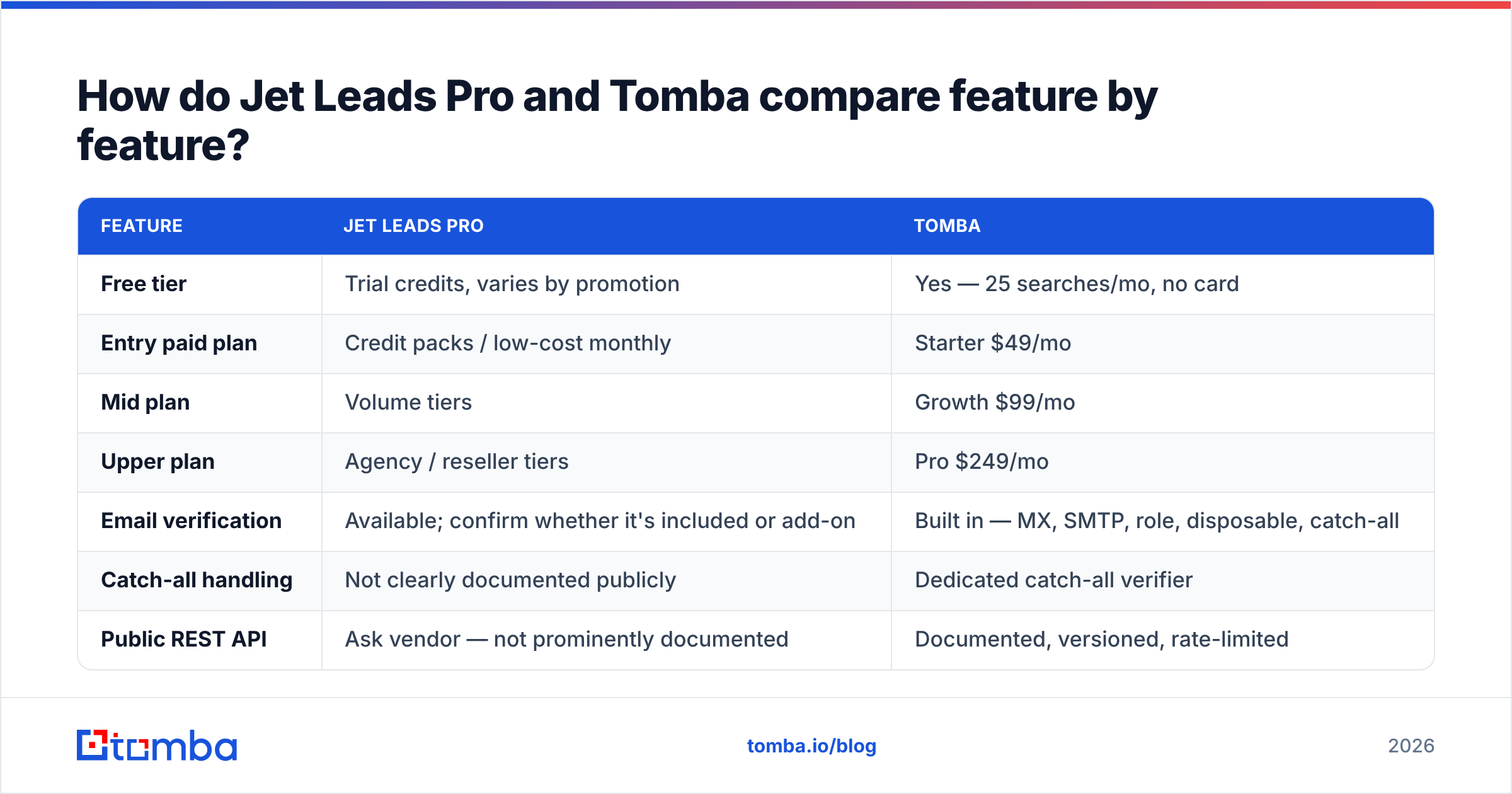
How do Jet Leads Pro and Tomba compare feature by feature?#

| Feature | Jet Leads Pro | Tomba |
|---|---|---|
| Free tier | Trial credits, varies by promotion | Yes — 25 searches/mo, no card |
| Entry paid plan | Credit packs / low-cost monthly | Starter $49/mo |
| Mid plan | Volume tiers | Growth $99/mo |
| Upper plan | Agency / reseller tiers | Pro $249/mo |
| Email verification | Available; confirm whether it's included or add-on | Built in — MX, SMTP, role, disposable, catch-all |
| Catch-all handling | Not clearly documented publicly | Dedicated catch-all verifier |
| Public REST API | Ask vendor — not prominently documented | Documented, versioned, rate-limited |
| Spreadsheet add-ins | Export to CSV | Native Google Sheets, Excel, Airtable |
| Bulk processing | Yes | Yes, with per-row status codes |
| Phone numbers | Yes on higher tiers | Yes, plus phone validation |
| Transparent public pricing | Partial — changes between promotions | Full pricing page, all tiers listed |
The column that matters most is the one people skim past: catch-all handling. Roughly a third of mid-market B2B domains accept every address at the MX layer, which means a naive SMTP check returns "valid" for asdkjh@company.com. A tool that doesn't isolate catch-alls is effectively selling you guesses labelled as verified contacts.
Which one is more accurate?#

Accuracy claims in this category are close to meaningless as published, because every vendor computes them differently. Three common tricks:
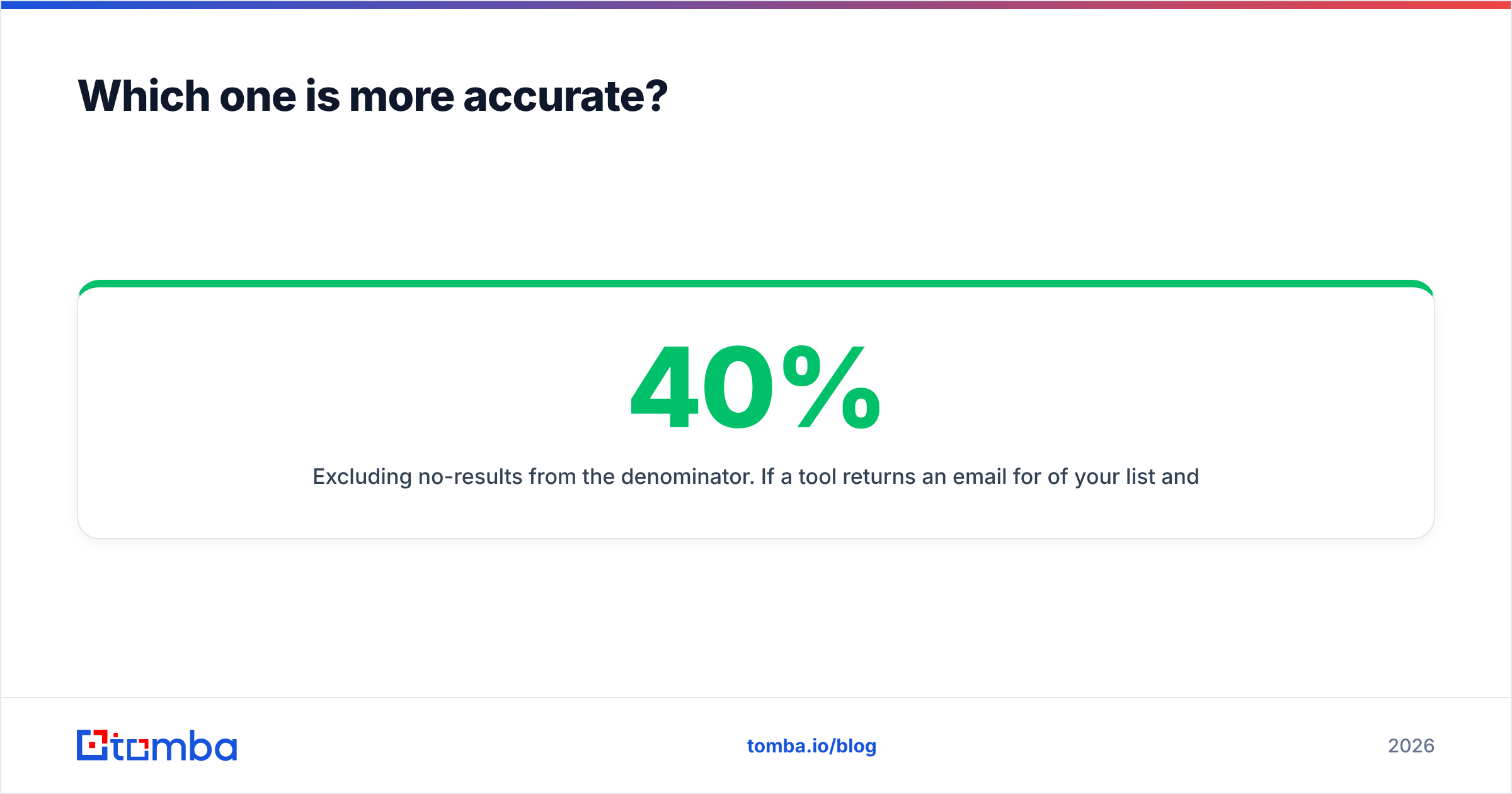
- Excluding no-results from the denominator. If a tool returns an email for 40% of your list and 95% of those are good, the marketing page says "95% accurate" while your actual coverage is 38%.
- Counting catch-all domains as verified. Instantly inflates accuracy by 10–20 points on a typical mid-market list.
- Benchmarking on Fortune 500 domains only. Every tool nails
@microsoft.com. Nobody's ICP is only Microsoft.
The metric to use instead is usable contacts per 100 input rows: rows where you got an email and it passed independent verification and it wasn't a role account like info@. Run that on a sample of your real target accounts, and measure both tools on the same 100 rows on the same day. That is the only apples-to-apples comparison available to you.
If you want a second opinion on any returned address, run it through a neutral email verifier or a free email checker rather than trusting the sourcing tool to grade its own homework. Self-graded verification is a conflict of interest in every vendor, Tomba included.
What does each one really cost per usable lead?#
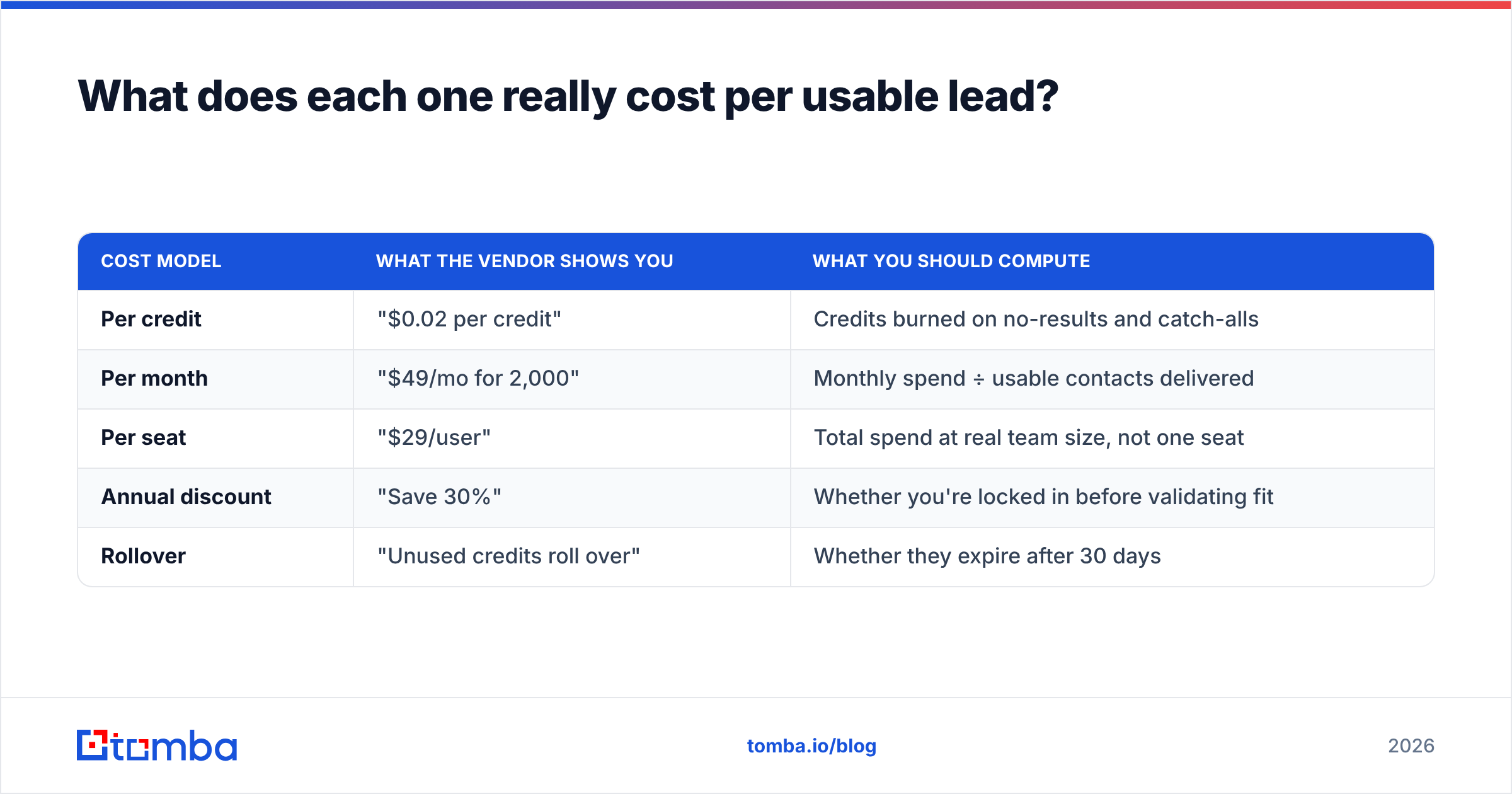
Credit pricing obscures the real number. Here's how to normalise it.
| Cost model | What the vendor shows you | What you should compute |
|---|---|---|
| Per credit | "$0.02 per credit" | Credits burned on no-results and catch-alls |
| Per month | "$49/mo for 2,000" | Monthly spend ÷ usable contacts delivered |
| Per seat | "$29/user" | Total spend at real team size, not one seat |
| Annual discount | "Save 30%" | Whether you're locked in before validating fit |
| Rollover | "Unused credits roll over" | Whether they expire after 30 days |
Worked example. Say a tool costs $99/month for 5,000 credits. You run 5,000 rows, get emails on 2,100, and 1,500 survive independent verification and role-account filtering. Your real cost is $0.066 per usable contact — more than triple the advertised $0.02 per credit. Run that same arithmetic for both vendors and the "cheaper" one frequently flips.
Tomba's plans are public and flat: Free at 25 searches/month, Starter $49/mo, Growth $99/mo, Pro $249/mo, Enterprise custom — all listed on the Tomba pricing page, so you can do the division before you talk to anyone. With Jet Leads Pro, pin down the credit consumption rules in writing first, particularly whether a search that returns nothing still costs a credit.

Where does Jet Leads Pro win?#
Three honest scenarios:
- Raw volume at low unit cost. If your motion is high-volume, low-intent outbound into a broad TAM and you have your own verification stack downstream, a cheaper sourcing layer is rational. You're buying candidates, not contacts, and you know it.
- Filtered discovery. If you don't yet have a target list and want to build one from firmographic filters rather than starting from known domains, a database-style product can be faster than a domain-first finder.
- Bundled phone data at the low end. Some volume tools include mobile numbers on cheaper tiers than the specialists do. Check the connect rate before celebrating.
Where does Tomba win?#
- Verification is in the pipeline, not an upsell. Catch-all detection, role-account flags, and SMTP checks run as part of the flow, which keeps your email deliverability from degrading three weeks into a campaign.
- It's programmable. A documented REST API, a CLI, an MCP server, and spreadsheet add-ins mean it drops into an existing RevOps stack instead of forcing a CSV round-trip. If your enrichment runs nightly from a cron job, this is decisive.
- Pricing you can plan against. Public tiers with no per-seat surprises make forecasting trivial.
- A free tier that's a real test, not a demo. 25 searches a month is enough to validate coverage on your ICP before you spend anything.
Neither wins universally. A 3-person agency doing broad outreach and a 40-person sales org with a Salesforce-backed pipeline should not buy the same tool.
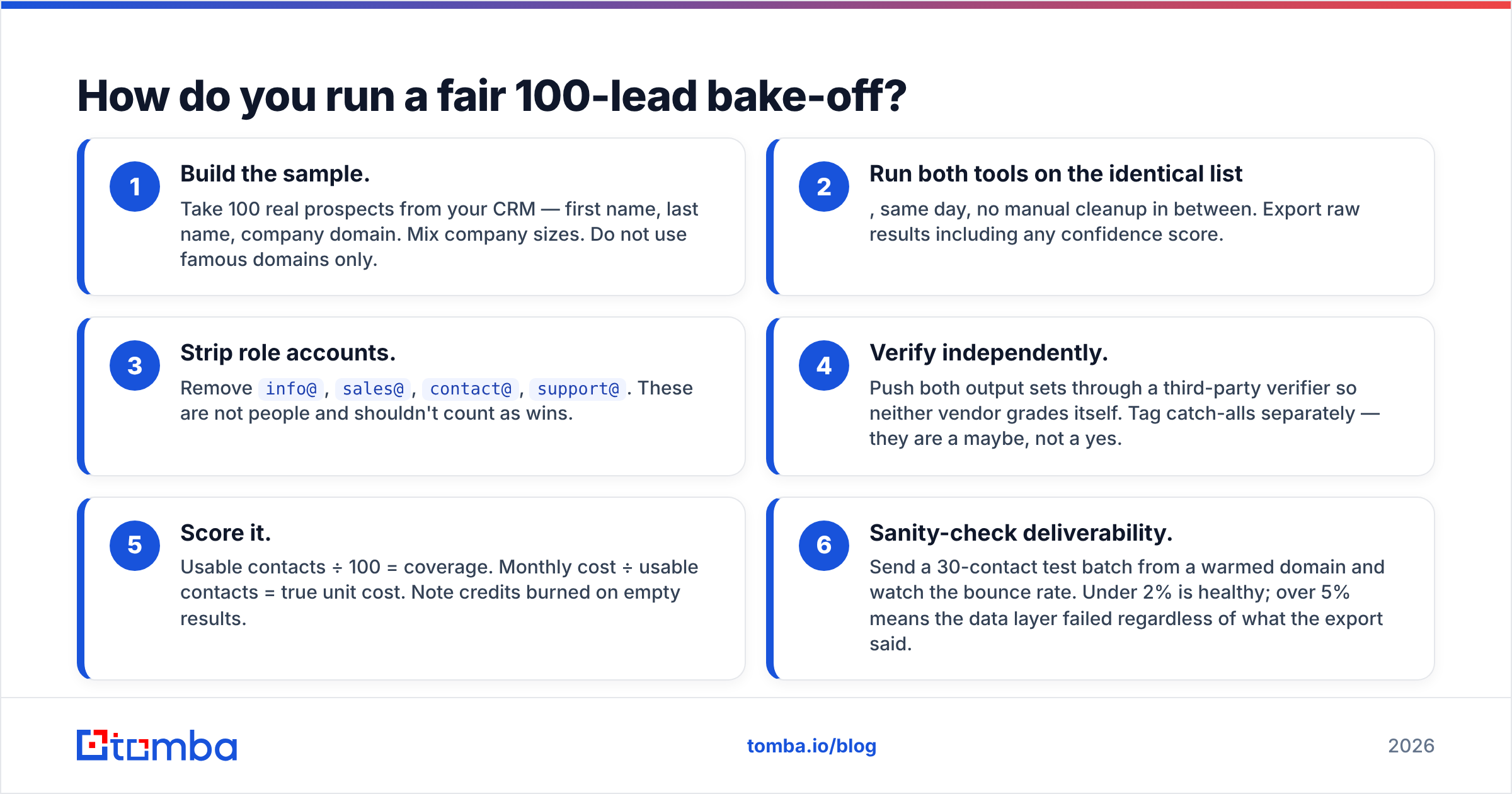
How do you run a fair 100-lead bake-off?#
Forty minutes, no bias, permanently settles it.
- Build the sample. Take 100 real prospects from your CRM — first name, last name, company domain. Mix company sizes. Do not use famous domains only.
- Run both tools on the identical list, same day, no manual cleanup in between. Export raw results including any confidence score.
- Strip role accounts. Remove
info@,sales@,contact@,support@. These are not people and shouldn't count as wins. - Verify independently. Push both output sets through a third-party verifier so neither vendor grades itself. Tag catch-alls separately — they are a maybe, not a yes.
- Score it. Usable contacts ÷ 100 = coverage. Monthly cost ÷ usable contacts = true unit cost. Note credits burned on empty results.
- Sanity-check deliverability. Send a 30-contact test batch from a warmed domain and watch the bounce rate. Under 2% is healthy; over 5% means the data layer failed regardless of what the export said.
Log the results in a shared sheet. Whichever tool wins on step 5 and step 6 is your answer — and if they split, take the one that won step 6, because bounce damage compounds and cheap credits don't.
Which should you choose?#
Choose Jet Leads Pro if your priority is maximum records at minimum unit cost, you already own a verification and deliverability stack, and you're comfortable working with a vendor whose documentation is lighter than the category leaders'.
Choose Tomba if you want sourcing and verification in one place, need an API or spreadsheet workflow rather than manual CSV handoffs, and want to test coverage on your real ICP for free before spending. If you're currently evaluating several tools at once, the Apollo alternative and RocketReach alternative breakdowns cover the adjacent options with the same methodology used here.
For further reading on outbound benchmarks that aren't vendor-published, HubSpot's sales research is a reasonable neutral baseline, and if you want to understand why SMTP verification is probabilistic rather than definitive, the SMTP protocol overview explains what the handshake can and cannot prove.
Start with the free test, not the sales call#
You don't need a demo to answer this question — you need 100 rows and 40 minutes. Start the Tomba Email Finder on the free tier, run your own ICP sample through it, verify the output independently, and compare the usable-contacts-per-dollar number against whatever Jet Leads Pro returns on the same list. If Tomba loses on your data, you've spent nothing and learned something. If it wins, Starter at $49/mo is the cheapest way to lock in that result.
Related guides#
// get started
Find, verify and enrich your first contacts today
Start on the free plan with 25 searches a month, then scale when your team is ready.
Free plan · No credit card required · GDPR & CCPA
// about the author