Journey Pricing Reviews: Pros and Cons for B2B Sales Teams
Journey's pricing looks simple until you add seats, analytics and admin controls. Here's what reviews actually say about the pros, the cons, and the costs that show up in month three.
TL;DR
- Journey (journey.io) sells a digital sales room: one link that holds your deck, pricing, mutual action plan and recorded demo, with view analytics on top. Pricing is free-to-start, then per seat, with enterprise deals quoted.
- The pros reviewers repeat: fast to build, genuinely pretty buyer-facing pages, and engagement tracking that tells you who actually opened the proposal.
- The cons reviewers repeat: per-seat math that punishes wide rollouts, analytics that measure attention rather than intent, and a ceiling on customization compared to a real web page.
- The cost that surprises teams is not the license. It is the seat sprawl, the CRM sync work, and the fact that a sales room does nothing if your contact list is stale.
- Budget order matters: accurate contact data first, sequencing second, buyer-facing collateral third. A $0 sales room beats a $10k one sent to bounced addresses.
What is Journey and who actually buys it?#
Journey is a buyer-enablement tool. Instead of emailing a 40-slide PDF and a separate pricing sheet, a rep builds a single branded page — video intro, deck, security docs, case study, mutual action plan — and sends one link. Everything a buying committee needs sits in one place, and the seller sees what got opened.
That category is usually labeled "digital sales room" or "deal room," and it now includes a crowded field you can browse on G2's digital sales room category. Journey's own positioning and current plan details live at journey.io.
The buyers who get real value from it look like this:
- Mid-market AE teams with 45–120 day cycles. Long enough that champions need something to forward internally, short enough that a full portal project is overkill.
- Sales engineers and solution consultants who keep re-sending the same technical annex to every deal and want one canonical link.
- Customer success teams running onboarding, reusing the same room structure as a 30/60/90 plan.
- Partner and channel teams who need co-branded collateral without asking marketing for a new landing page every week.
The teams who churn are usually transactional: SMB, one-call close, self-serve pricing. If your deal never involves a second stakeholder, a sales room has nobody to be shared with.
How does Journey pricing work in 2026?#
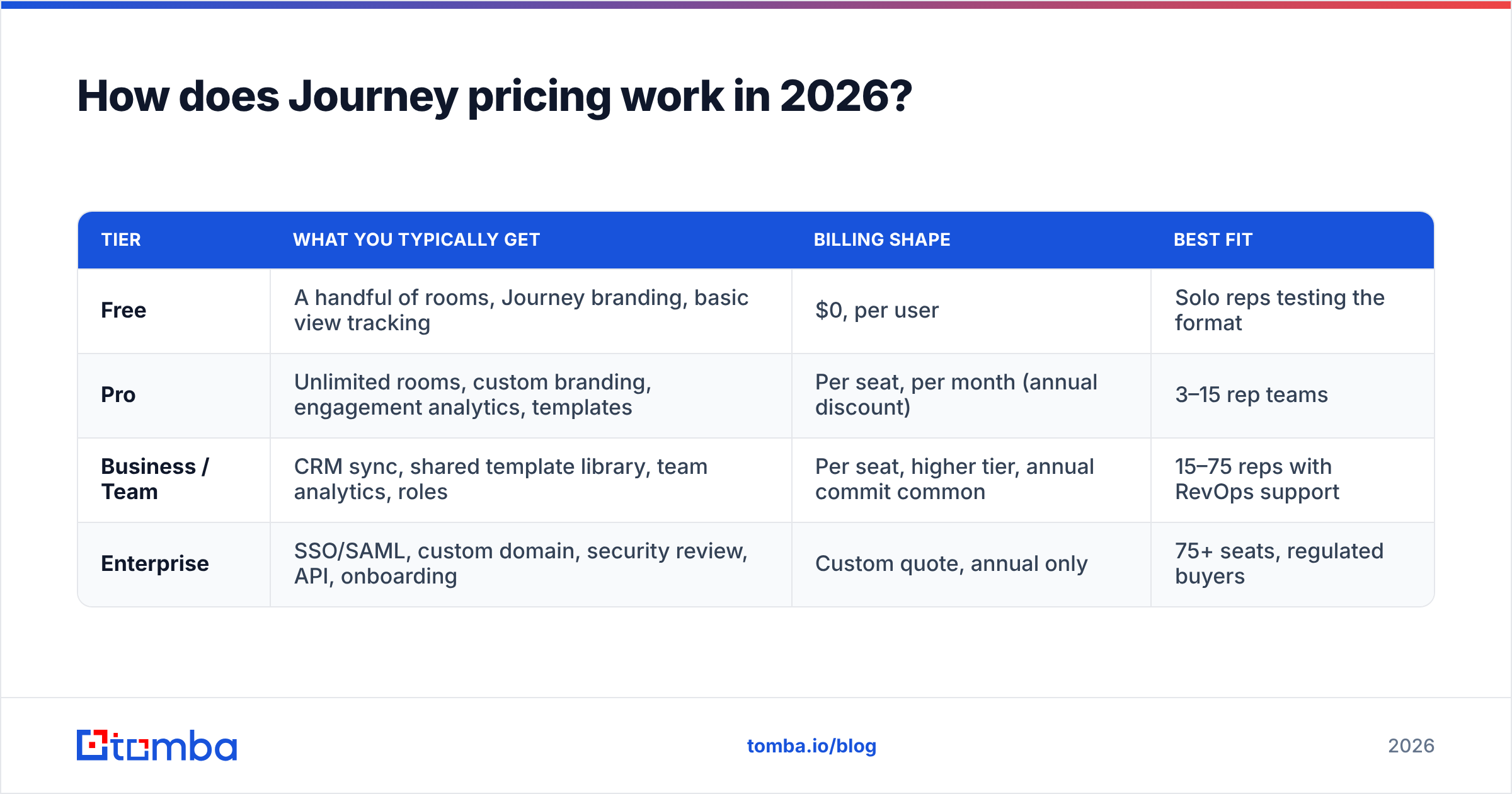
Journey uses the same shape as most tools in this category: a free tier to get reps hooked, a per-seat paid plan for real teams, and a quoted enterprise tier once you need SSO, security review and custom domains.
Published numbers in this category move often, and vendors run quarterly promotions, so treat any figure you read on a blog — including this one — as a starting point and confirm on the vendor's live pricing page before you build a business case.
| Tier | What you typically get | Billing shape | Best fit |
|---|---|---|---|
| Free | A handful of rooms, Journey branding, basic view tracking | $0, per user | Solo reps testing the format |
| Pro | Unlimited rooms, custom branding, engagement analytics, templates | Per seat, per month (annual discount) | 3–15 rep teams |
| Business / Team | CRM sync, shared template library, team analytics, roles | Per seat, higher tier, annual commit common | 15–75 reps with RevOps support |
| Enterprise | SSO/SAML, custom domain, security review, API, onboarding | Custom quote, annual only | 75+ seats, regulated buyers |
The structural point matters more than the exact dollar figure: this is seat-priced software with a usage-shaped value curve. Ten reps who each send four rooms a month pay the same as ten reps who each send forty. If adoption is uneven — and in most orgs it is — you are paying full freight for your bottom third.
Run the math the way procurement will:
- Seats × months, not seats. A 20-seat annual commit at $40/seat is $9,600, not "forty bucks."
- Assume 60% active usage in year one. That is generous for a new tool without enablement. Your effective cost per active rep is what matters.
- Count the implementation hours. Template building, brand setup and CRM field mapping is typically 10–25 hours of RevOps time.
- Add the content cost. Rooms are only as good as the assets inside them. Someone has to make the video.
What do Journey pricing reviews say are the pros?#
Across public review sites and practitioner threads, the positive signal clusters into four themes.
- Speed to first room. Most reviewers report building a usable room in under 30 minutes, without design or dev help. That is the single biggest reason the free tier converts.
- The buyer-side experience is good. Clean, mobile-legible, no login wall by default. Champions forward it because it does not embarrass them internally.
- Engagement analytics change forecast conversations. Knowing that the CFO opened the pricing tab twice on a Thursday is a better signal than "prospect says we're in good shape."
- Consolidation of scattered collateral. Teams replace a mess of Drive links, PDF attachments and Loom URLs with one artifact per deal, which also makes handoff to CS cleaner.
- Low switching risk at the bottom tier. Because the free plan is real, you can validate the workflow before committing budget, which is rare in this category.
That last point is underrated. Most sales tech demands a pilot contract before you know whether reps will use it. Journey's free tier lets you answer the adoption question for $0 — and adoption, not features, is what kills these purchases.
What are the cons reviewers keep raising?#
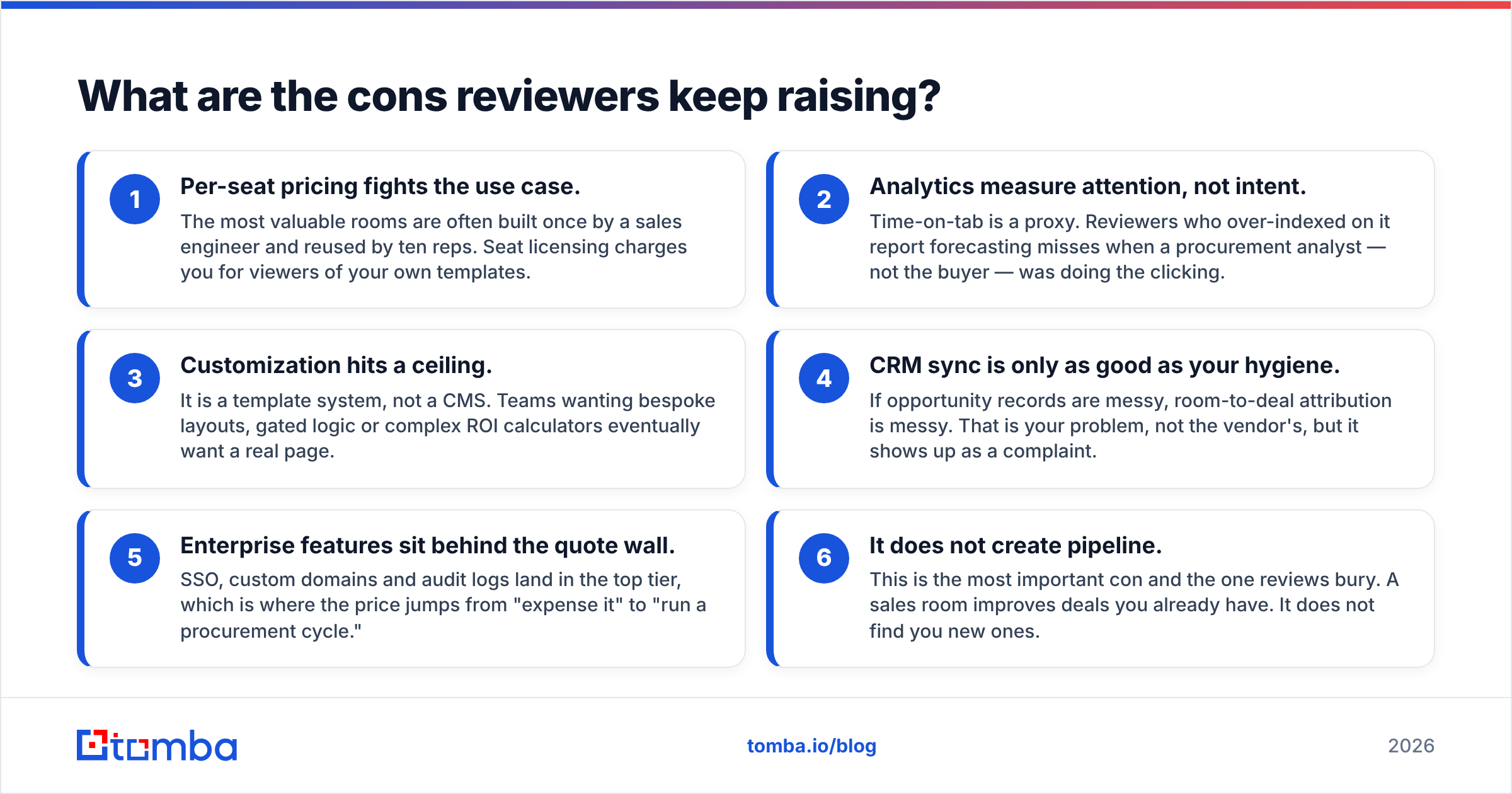
The critiques are consistent enough to plan around.
- Per-seat pricing fights the use case. The most valuable rooms are often built once by a sales engineer and reused by ten reps. Seat licensing charges you for viewers of your own templates.
- Analytics measure attention, not intent. Time-on-tab is a proxy. Reviewers who over-indexed on it report forecasting misses when a procurement analyst — not the buyer — was doing the clicking.
- Customization hits a ceiling. It is a template system, not a CMS. Teams wanting bespoke layouts, gated logic or complex ROI calculators eventually want a real page.
- CRM sync is only as good as your hygiene. If opportunity records are messy, room-to-deal attribution is messy. That is your problem, not the vendor's, but it shows up as a complaint.
- Enterprise features sit behind the quote wall. SSO, custom domains and audit logs land in the top tier, which is where the price jumps from "expense it" to "run a procurement cycle."
- It does not create pipeline. This is the most important con and the one reviews bury. A sales room improves deals you already have. It does not find you new ones.
That last item is why the honest verdict on Journey pricing depends entirely on where you are in the funnel. If you have 40 live opportunities and poor multithreading, the ROI case is straightforward. If you have eight opportunities and need eighty, you are solving the wrong problem with the wrong budget.
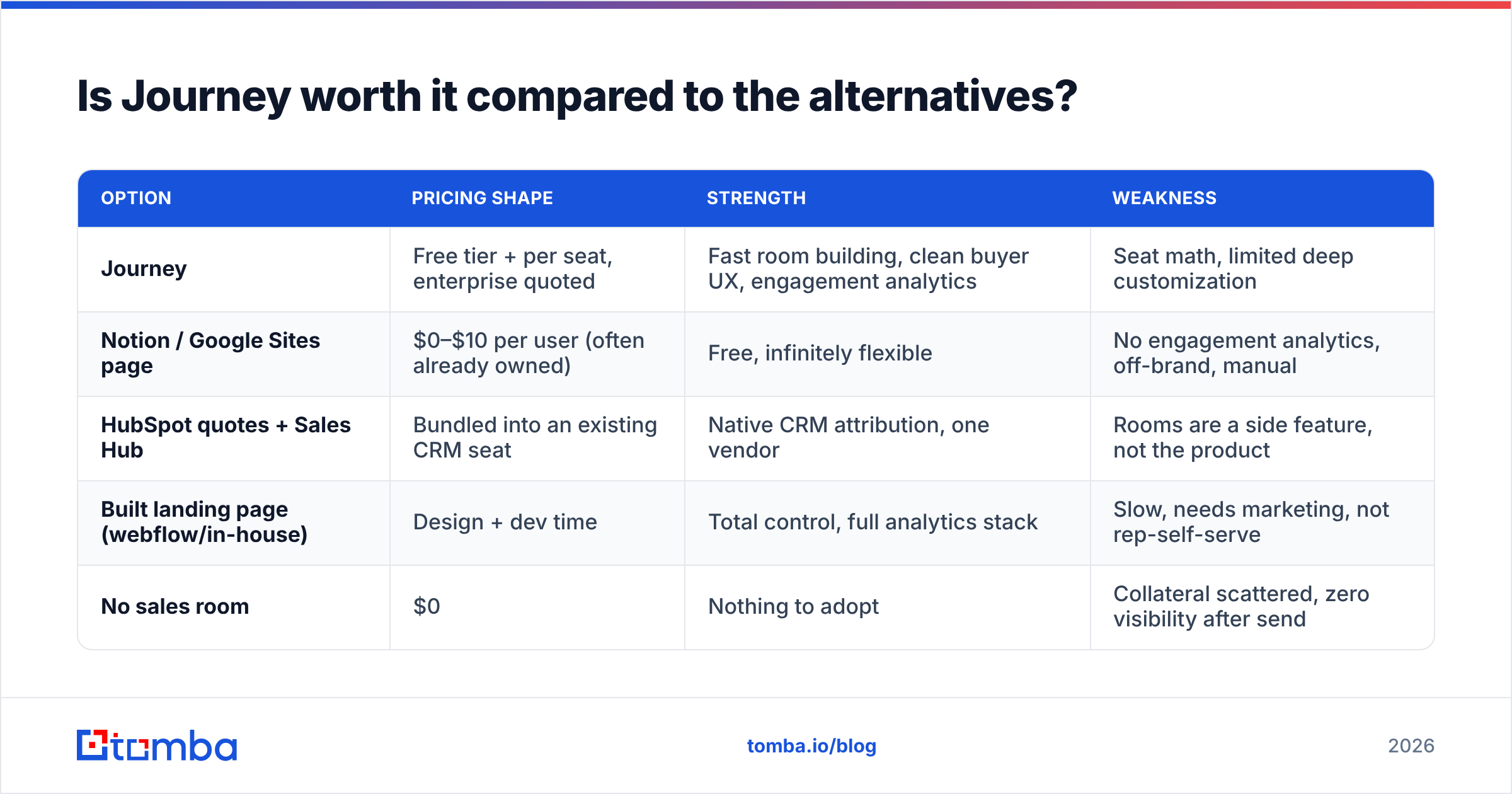
Is Journey worth it compared to the alternatives?#
Compare it against what teams actually use instead, including "nothing."
| Option | Pricing shape | Strength | Weakness |
|---|---|---|---|
| Journey | Free tier + per seat, enterprise quoted | Fast room building, clean buyer UX, engagement analytics | Seat math, limited deep customization |
| Notion / Google Sites page | $0–$10 per user (often already owned) | Free, infinitely flexible | No engagement analytics, off-brand, manual |
| HubSpot quotes + Sales Hub | Bundled into an existing CRM seat | Native CRM attribution, one vendor | Rooms are a side feature, not the product |
| Built landing page (webflow/in-house) | Design + dev time | Total control, full analytics stack | Slow, needs marketing, not rep-self-serve |
| No sales room | $0 | Nothing to adopt | Collateral scattered, zero visibility after send |
The honest framing: Journey competes less with other deal-room vendors and more with the free workaround your reps already invented. A shared Notion page costs nothing and does 60% of the job. What you are paying for is polish, speed and the analytics layer. Whether that is worth four figures a month is a function of average deal size. At $8k ACV it rarely is. At $80k ACV, one saved deal pays for the year.
What hidden costs should you budget for?#
Four line items that never appear on the pricing page.
- Seat creep. Sales ops adds managers, CS, marketing and a partner lead "just to view." At per-seat pricing, viewers cost the same as builders unless the tier separates them. Ask this question in the demo, in writing.
- Annual commit lock. The meaningful discount is annual. If your headcount plan is uncertain, you are pre-paying for reps you may not hire — or worse, paying for seats after a reduction.
- Content production. A room with a stale 2024 deck inside it performs worse than an email. Budget design and video time, or the tool becomes an expensive PDF host.
- The data layer underneath. Rooms get sent to contacts. If those contacts bounce, the entire spend produces zero views. This is the most common failure mode and the cheapest to fix.
That fourth point deserves a number. If 18% of your contact list is invalid — roughly the annual decay rate for B2B email data as people change roles — then 18% of your sales-room spend evaporates before a buyer ever loads a page. Running your list through an email verifier before a campaign costs a fraction of one Journey seat and protects the whole investment.
Who should buy Journey and who should skip it?#
Buy it if: your ACV is above roughly $25k, your deals involve three or more stakeholders, your reps already improvise shared folders, and you have someone who will own templates. In that profile, the engagement data alone usually justifies the line item within a quarter.
Start on the free tier if: you have fewer than five reps, or you are not yet sure the format fits your motion. There is no reason to pay before adoption is proven. Run ten deals through the free plan, measure whether champions actually forward the link, then decide.
Skip it if: your bottleneck is at the top of the funnel. A team with 15 opportunities and a 25% win rate does not need better collateral — it needs 60 opportunities. Spending on buyer enablement while prospecting is starved is the most common sequencing mistake in B2B sales tooling, and it is expensive because the tool works exactly as advertised on a problem you did not have.
How does a sales room fit into the rest of your stack?#
Think of a digital sales room as the dining room of a restaurant. Beautiful lighting, good plating, excellent service. None of it matters if nobody walks through the door, and nobody walks through the door if your address on the map is wrong.
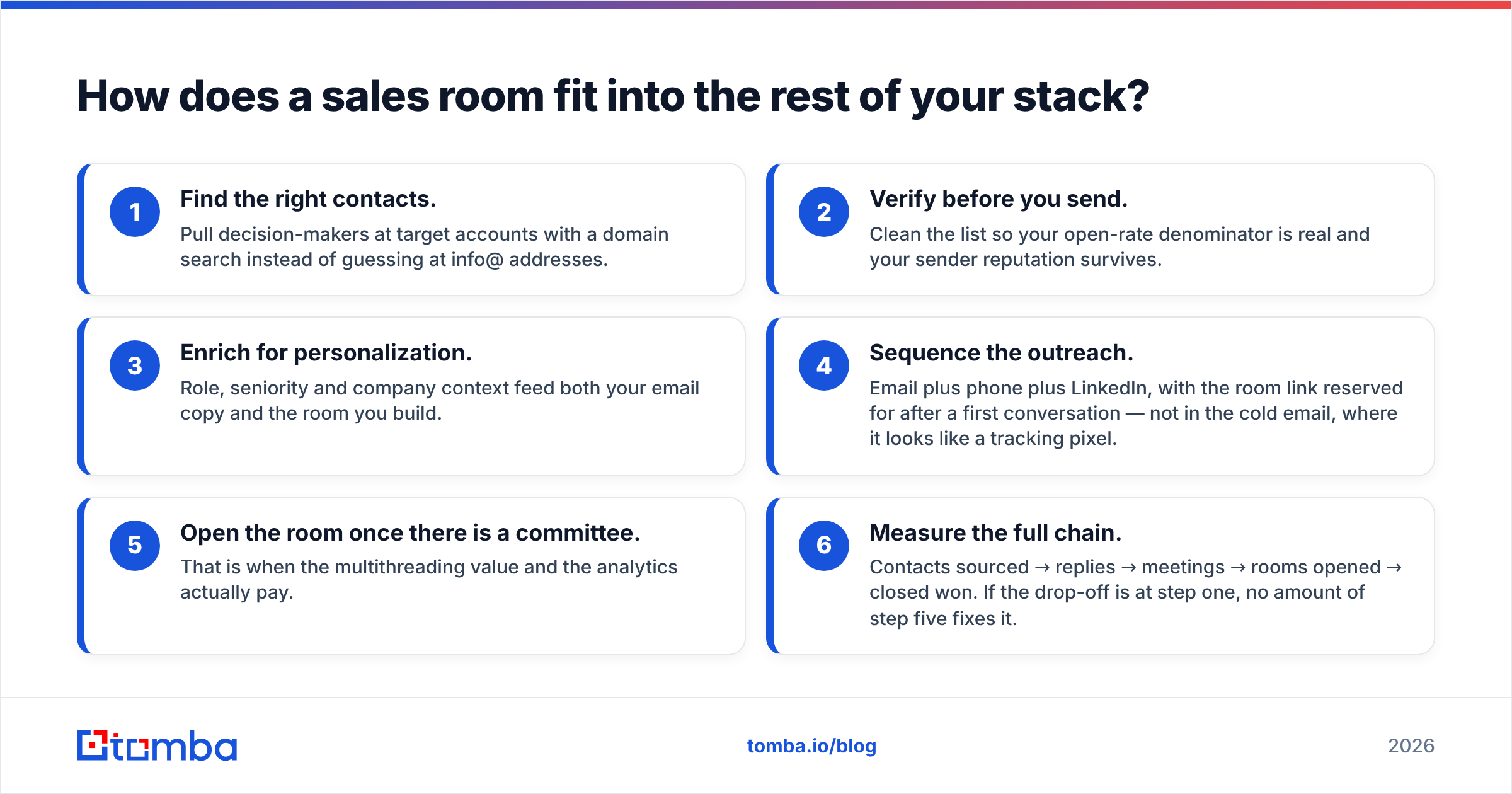
A working sequence looks like this:
- Find the right contacts. Pull decision-makers at target accounts with a domain search instead of guessing at info@ addresses.
- Verify before you send. Clean the list so your open-rate denominator is real and your sender reputation survives.
- Enrich for personalization. Role, seniority and company context feed both your email copy and the room you build.
- Sequence the outreach. Email plus phone plus LinkedIn, with the room link reserved for after a first conversation — not in the cold email, where it looks like a tracking pixel.
- Open the room once there is a committee. That is when the multithreading value and the analytics actually pay.
- Measure the full chain. Contacts sourced → replies → meetings → rooms opened → closed won. If the drop-off is at step one, no amount of step five fixes it.
Steps one through three are a data problem and cost far less than most teams assume. Tomba's own pricing starts free at 25 searches a month, with the Starter plan at $49/mo and Growth at $99/mo — roughly the cost of one or two sales-room seats, covering the input that everything downstream depends on. If your CRM is the system of record, the HubSpot integration keeps enriched contacts flowing in without manual CSV work.
What's the verdict on Journey pricing?#
Journey is fairly priced for what it is, and mispriced for what teams often hope it will be. As a buyer-enablement layer on top of an existing pipeline, the per-seat cost is defensible and reviewers largely agree it earns its place. As a pipeline-generation tool, it is the wrong purchase at any price, because that is not what it does.
Do the diagnostic before the demo. Pull your last two quarters: if you lost more deals to "no decision" and stalled committees than to empty pipeline, buy the sales room. If the reverse is true, fix the top of the funnel first, use the free tier in the meantime, and revisit the paid plan when you have enough deals in flight for the analytics to mean something.
Fix the input first. Before you spend on buyer-facing polish, make sure the contacts receiving your outreach are real. Tomba's Email Finder locates verified professional email addresses by name, domain or company, so the links you send — sales room or not — reach an actual human. Start free with 25 searches a month and see how much of your current list holds up.
Related guides#
// get started
Find, verify and enrich your first contacts today
Start on the free plan with 25 searches a month, then scale when your team is ready.
Free plan · No credit card required · GDPR & CCPA
// about the author