Kaspr vs SalesQL 2026: Which Contact Finder Actually Wins
Both Kaspr and SalesQL live inside LinkedIn and promise emails plus phone numbers. Here is how they really differ on coverage, mobile data, pricing, API access, and what happens when you need 50,000 contacts instead of 50.
Kaspr vs SalesQL comes down to one question. Do you need phone numbers or cheap emails? Kaspr wins on European mobiles. SalesQL wins on price. Here is the full Kaspr vs SalesQL breakdown.
TL;DR
- Kaspr is the phone-number tool. Cognism bought it in 2022. Its strength is European mobile coverage. Users opt in to share their own address books, and that pool feeds the data. Cold call EMEA prospects and Kaspr wins.
- SalesQL is the cheap LinkedIn scraper. It is a simple Chrome extension with a generous free tier. You get work and personal emails at a flat, low price per credit.
- Neither is built for scale. Both charge per seat. Both start in the browser. Ask for 20,000 verified contacts or an API and you hit a wall.
- Both accuracy claims are marketing numbers. Run your own 100-contact test before you sign for a year.
- Work from domains, not profiles? An API-first finder like Tomba costs less per verified contact. It also drops the per-seat bill.
Kaspr vs SalesQL: what are these tools?#
Both find contacts inside LinkedIn. You install a Chrome extension. You open a profile or a Sales Navigator list. You click a button. The tool hands back emails, and sometimes phone numbers.
That is where the overlap ends.
Kaspr is a French product. Cognism bought it in 2022. It inherited Cognism's data and its compliance rules. It leans hard into phone numbers, above all mobiles in Europe. Part of the data is shared by users. They opt in to pool their own address books. That is why Kaspr beats US-first vendors in France, the UK, Germany and the Benelux.
SalesQL is smaller and independent. Its promise is narrow. It pulls emails, both work and personal, plus some phone numbers from LinkedIn profiles. Then you export to CSV or push to a CRM. Solo founders and small agencies have liked it for years. It never tried to be a full sales-intelligence suite. It is a scraper with a decent hit rate and a low price.
So Kaspr vs SalesQL is not a like-for-like fight. It is European phone data with a big parent company against cheap, fast email extraction.
Kaspr vs SalesQL: where does the data come from?#
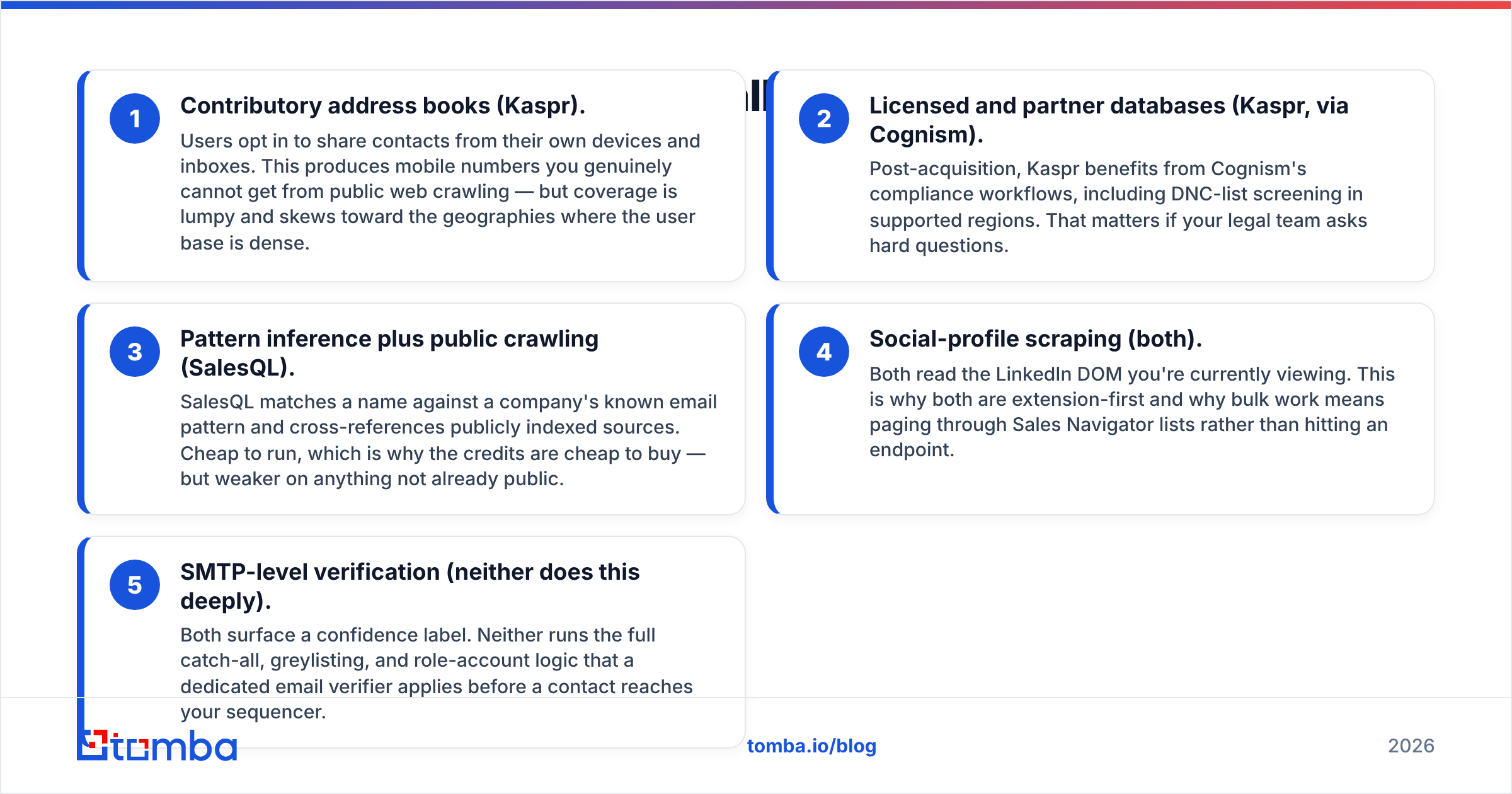
The sourcing explains every gap in price, coverage and legal risk:
- Shared address books (Kaspr). Users opt in to share contacts from their own devices and inboxes. This yields mobile numbers that no public crawl can reach. Coverage is lumpy, though. It follows the places where the user base is dense.
- Licensed and partner data (Kaspr, via Cognism). Kaspr now runs on Cognism's compliance workflow. That includes do-not-call screening in supported regions. It matters when your legal team asks hard questions.
- Pattern guessing plus public crawling (SalesQL). SalesQL matches a name to a company's known email pattern. Then it checks public sources. It is cheap to run, so the credits are cheap to buy. It is weak on anything not already public.
- Profile scraping (both). Both read the LinkedIn page you are viewing. That is why both start in the browser. Bulk work means paging through Sales Navigator, not calling an endpoint.
- Deep SMTP checks (neither). Both show a confidence label. Neither runs the full catch-all, greylisting and role-account logic of a dedicated email verifier.
Most teams miss that last point. A found email is not a deliverable email. A 12% bounce rate costs more in domain reputation than either subscription costs in cash.
Kaspr vs SalesQL accuracy: which one is right more often?#
Short answer. Kaspr is better on phone numbers. SalesQL holds its own on emails. Take both accuracy claims with salt.
Each vendor measures accuracy on its own sample. Kaspr sells mobile accuracy. SalesQL sells email hit rate. Both numbers are true and useless. Accuracy on Series-B SaaS VPs in Berlin says nothing about plant managers in Ohio.
Here is benchmark data for the wider email-finder market. It shows where profile scrapers land next to API-first finders.

Run this test before you buy either one. Pick 100 contacts whose emails you already trust. Past customers work well. So do your own team and closed-won accounts. Feed the names and companies into each free trial.
Then measure three things. Did the tool return anything? Was the address correct? How many bounce? Send the results through a free email checker and count the hard fails. Ninety minutes of work beats every G2 review combined.
One finding shows up again and again. Profile scrapers return personal Gmail and Hotmail addresses next to work emails. SalesQL does this by design.
That helps recruiters. It hurts B2B cold outreach. Personal inboxes have no corporate filter to please. They also carry no work context, weaker reply rates and far more GDPR risk if you email people in the EU.
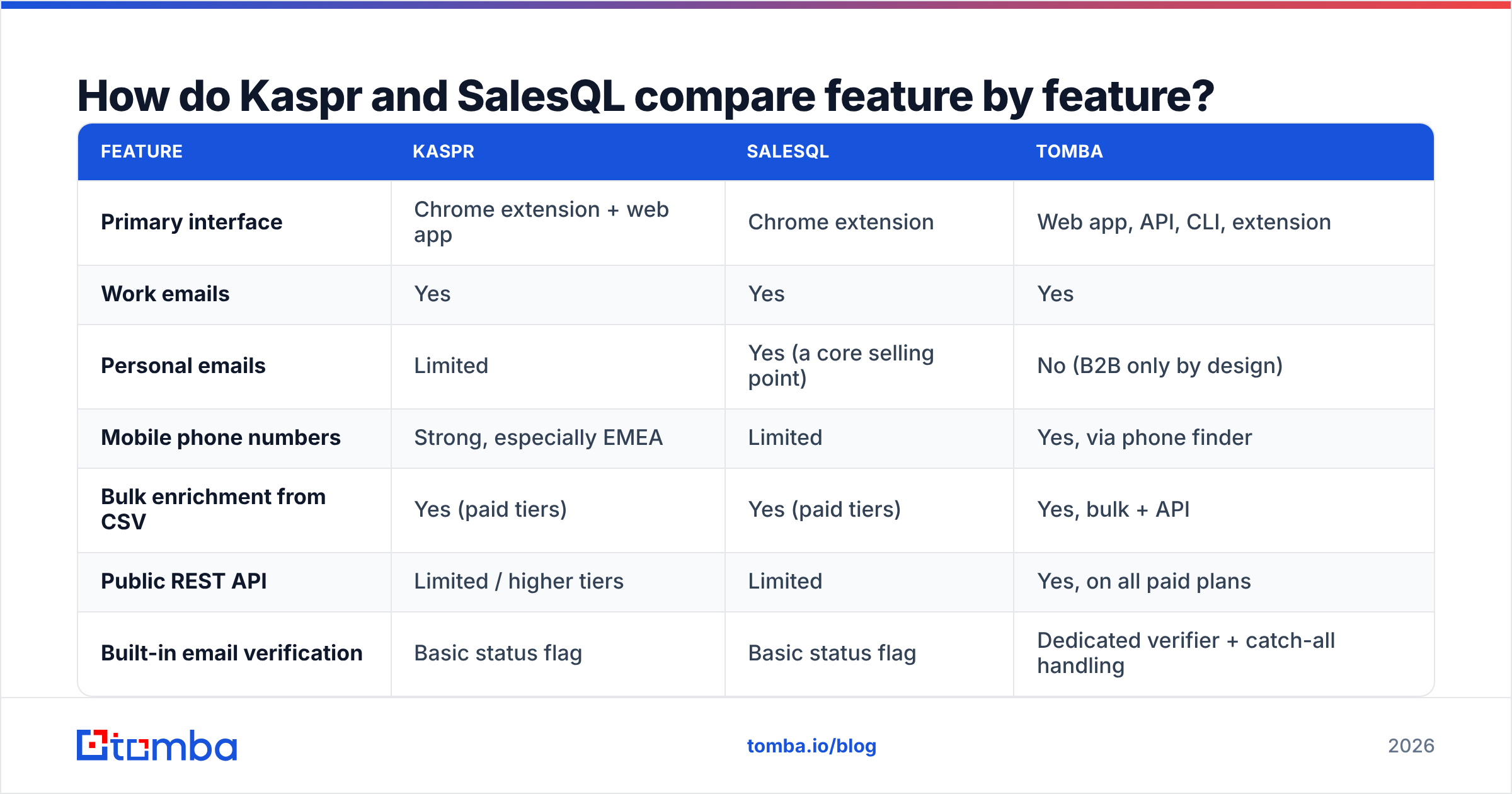
Kaspr vs SalesQL: feature by feature#
| Feature | Kaspr | SalesQL | Tomba |
|---|---|---|---|
| Primary interface | Chrome extension + web app | Chrome extension | Web app, API, CLI, extension |
| Work emails | Yes | Yes | Yes |
| Personal emails | Limited | Yes (a core selling point) | No (B2B only by design) |
| Mobile phone numbers | Strong, especially EMEA | Limited | Yes, via phone finder |
| Bulk enrichment from CSV | Yes (paid tiers) | Yes (paid tiers) | Yes, bulk + API |
| Public REST API | Limited / higher tiers | Limited | Yes, on all paid plans |
| Built-in email verification | Basic status flag | Basic status flag | Dedicated verifier + catch-all handling |
| Domain-wide search (no profile needed) | No | No | Yes |
| Seat-based pricing | Yes | Yes | No — credits are account-wide |
| Free tier | Yes, capped credits | Yes, ~100 email credits/mo | Yes, 25 searches/mo |
| DNC / compliance screening | Yes (Cognism infrastructure) | Minimal | GDPR-aligned, B2B-only sourcing |

The row that settles most deals is domain-wide search. Kaspr and SalesQL both need a LinkedIn profile to start. Say you want every contact at stripe.com. Neither tool can do it. You need a domain search that works from the company outward, not from the profile inward.
Kaspr vs SalesQL pricing: how do the plans compare?#
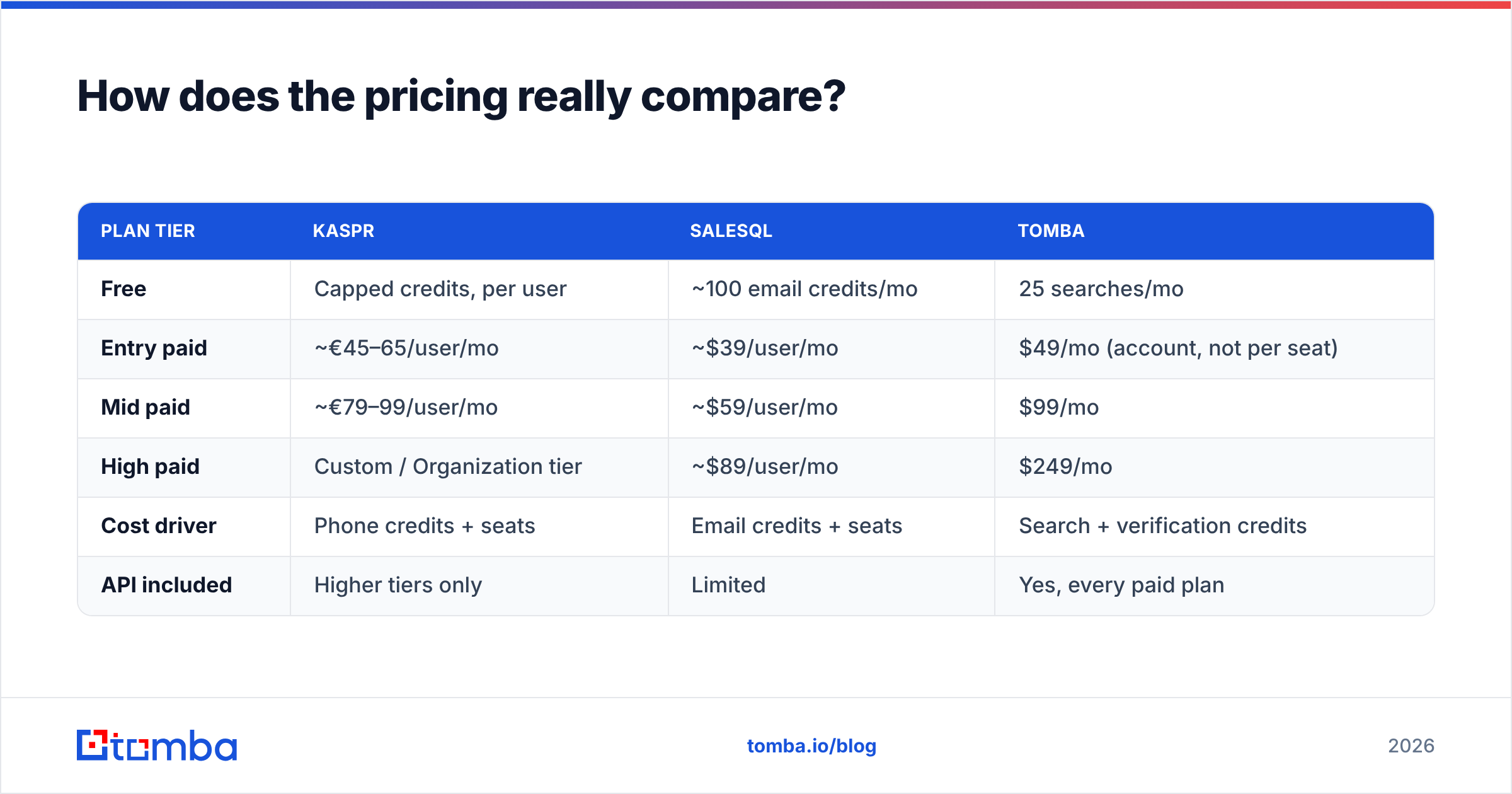
Check both pricing pages before you sign. The tiers move. The gap between monthly and annual is wide on both. As a rough guide today:
| Plan tier | Kaspr | SalesQL | Tomba |
|---|---|---|---|
| Free | Capped credits, per user | ~100 email credits/mo | 25 searches/mo |
| Entry paid | ~€45–65/user/mo | ~$39/user/mo | $49/mo (account, not per seat) |
| Mid paid | ~€79–99/user/mo | ~$59/user/mo | $99/mo |
| High paid | Custom / Organization tier | ~$89/user/mo | $249/mo |
| Cost driver | Phone credits + seats | Email credits + seats | Search + verification credits |
| API included | Higher tiers only | Limited | Yes, every paid plan |
The structure matters more than the headline price. On Kaspr vs SalesQL pricing, the two tie on one point: both charge per seat. Five SDRs on SalesQL's mid tier cost about $295 a month. That is before anyone enriches a single extra record. Five seats on Kaspr's business tier land well north of $400.
Per-seat pricing also fights the workflow you want. One RevOps process should own enrichment. Instead you get five reps scraping five copies of the same list. Look at Tomba pricing and the model flips. Credits sit in one account pool. A single Growth plan at $99 a month covers the team and the automation behind it.
Kaspr vs SalesQL: which is better for phone numbers?#
Kaspr, clearly. It is the strongest reason to pick it.
Is your motion call-first? Is your patch Europe? Then Kaspr's mobile coverage is hard to match. Cognism's compliance layer screens against do-not-call lists where they exist. That is not a nice-to-have when fines are charged per call.
SalesQL does return phone numbers. Coverage is thinner, though. Most numbers are main switchboards, not direct mobiles. For a caller, a switchboard is close to worthless. You are back to the gatekeeper.
You may want phone data without a per-seat platform. A standalone phone finder plus a phone validator pass covers the same ground on credits. Kaspr still leads on EMEA mobile depth.
Where do Kaspr and SalesQL both fall short?#
Both are tied to LinkedIn. Your pipeline inherits its rate limits. It inherits the risk of a restricted account. It inherits every UI change too. When LinkedIn ships a new page layout, extensions break. Sometimes for days. Anyone who ran outbound through the 2024 crackdowns remembers it.
Neither is API-first. You can export CSVs from both. Putting enrichment inside your own product, warehouse or GTM workflow is another story. A real email finder API with clear rate limits, webhooks and SDKs is a different class of tool. If you build agent workflows, MCP access changes what is possible.
Verification is an afterthought. A confidence score is not verification. Catch-all domains accept every address, then bounce it later. That is where naive finders quietly wreck your sender reputation. Run any list through catch-all verification first. Or budget for the cleanup.
Seat pricing fights your process. Both tools push rep-by-rep, ad-hoc prospecting. That is the opposite of the central, auditable data pipeline most RevOps leaders built in 2025.
What are the best Kaspr and SalesQL alternatives?#
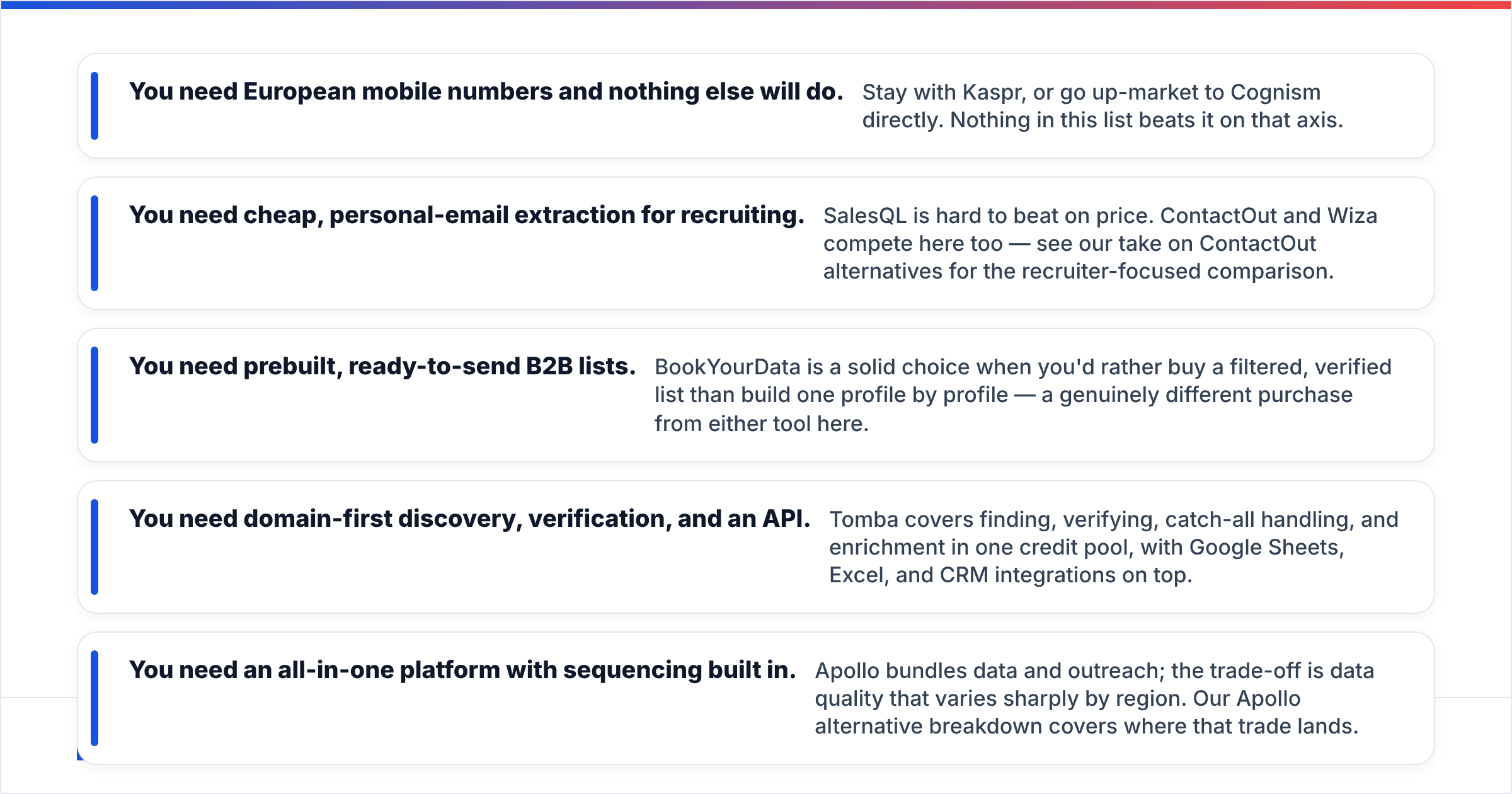
Pick by the shape of your problem, not by feature count:
- You need European mobiles above all else. Stay with Kaspr. Or move up to Cognism itself. Nothing here beats it on that axis.
- You need cheap personal emails for recruiting. SalesQL is hard to beat on price. ContactOut and Wiza compete here too. See our ContactOut alternatives piece for the recruiter view.
- You want lists that are ready to send. BookYourData suits buyers who would rather buy a filtered, verified list than build one profile at a time. It is a different purchase from either tool here.
- You need domain-first search, verification and an API. Tomba covers finding, verifying, catch-all handling and enrichment in one credit pool. Google Sheets, Excel and CRM integrations sit on top.
- You want one platform with sequencing built in. Apollo bundles data and outreach. The trade-off is data quality that swings sharply by region. Our Apollo alternative breakdown covers it.
Check any shortlist against real user reviews on G2, not vendor case studies. Read the reviews from firms your size and in your region. Coverage complaints cluster by geography.
Kaspr vs SalesQL: which should you choose in 2026?#
Choose Kaspr if you cold call, you sell into Europe, and procurement asks about compliance. The seat price buys the best mobile data in that region.
Choose SalesQL if you are a solo operator or a small team. It fits modest LinkedIn prospecting. You get personal emails and the cheapest reliable extension. Do not expect it to scale past a few thousand contacts a month without friction.
Choose neither if your real limit is volume, verification or automation. The honest read on Kaspr vs SalesQL is simple. Both are great at the last mile of manual prospecting. Both are a poor fit for a programmatic pipeline. If a rep clicks a button per contact, you pay a seat tax on an API call.
One last piece of advice, whichever you pick. Verify every address before you send. Both tools will hand you emails that look right and bounce. Your sender reputation takes weeks to rebuild and minutes to wreck. No amount of contact volume makes up for landing in spam.
Want LinkedIn-level coverage without the per-seat bill? Start on the Tomba Email Finder free tier. You get 25 searches a month and no card is needed. Find people by name, company or whole domain. Verify them in the same flow. Call the API from your own stack when you are done clicking. Then run your own 100-contact test against Kaspr and SalesQL, and buy the tool that wins on your list.
Related guides#
// get started
Find, verify and enrich your first contacts today
Start on the free plan with 25 searches a month, then scale when your team is ready.
Free plan · No credit card required · GDPR & CCPA
// about the author