Kaspr vs Sellhack: Which B2B Contact Finder Wins in 2026?
Kaspr sells LinkedIn phone numbers. Sellhack sells cheap email guesses. We tested both on the same 500-contact list and the gap in verified coverage was bigger than the price gap.
TL;DR
- Kaspr is a LinkedIn-first contact extractor built around mobile phone numbers. Its emails are decent; its differentiator is dials.
- Sellhack is a low-cost email guesser with a Chrome extension and a bulk uploader. It is cheap, it is old, and its verification layer is the weak link.
- Neither tool is a general-purpose data platform. Kaspr dies outside LinkedIn; Sellhack dies on catch-all domains and non-US companies.
- On a 500-contact test list, the difference that mattered was not price — it was how many contacts came back verified versus guessed.
- If your workflow is email-led rather than dial-led, a dedicated email finder with a real verification layer beats both on cost-per-usable-contact.
If you are comparing Kaspr vs Sellhack, you are usually at a specific moment: you have a prospect list, a small budget, and you need contact data this week. Both tools promise that. They deliver it in very different ways, and the wrong pick costs you a burned sending domain rather than a missed quota.
Here is the honest breakdown.
What is Kaspr and who actually uses it?#
Kaspr is a contact-enrichment tool owned by Cognism since 2022. Its center of gravity is the Chrome extension: you open a LinkedIn profile, a Sales Navigator list, or a LinkedIn group, click the Kaspr icon, and it returns phone numbers, emails, and company data for those profiles.
The phone number is the product. Kaspr's pitch — and Cognism's broader pitch — is that mobile numbers for European contacts are hard to source and worth paying for. If your team runs a cold-calling motion into France, Germany, the UK, or Benelux, Kaspr's mobile coverage is genuinely competitive. You can read Cognism's own positioning on their site.
Where Kaspr gets awkward:
- It is LinkedIn-shaped. No LinkedIn profile, no Kaspr record. If you are prospecting from a list of company domains, a conference exhibitor PDF, or a G2 category page, you have to hydrate those into LinkedIn URLs first.
- Credits are split. Phone credits, email credits, and export credits are separate buckets on most plans. Running out of one while sitting on a pile of another is a common complaint on G2.
- Per-seat pricing scales fast. A five-person SDR team on a paid tier is a real line item, not a tool you expense quietly.
What is Sellhack and is it still maintained?#
Sellhack is one of the oldest names in this category — it predates most of the tools it now competes with. The product is simple: a Chrome extension and a web app that take a name plus a company domain and return a best-guess email address, optionally run through a verification check.
Under the hood, Sellhack does what a permutation engine does. It generates candidate patterns (first.last@, flast@, first@), then tries to validate them. You can replicate the generation half for free with any email permutator — the paid value is supposed to be the validation half.
That is exactly where the tool shows its age. Sellhack's verification handles clean, permissive SMTP servers well. It struggles with:
- Catch-all domains, which now cover a large share of mid-market companies and accept every address at the SMTP layer regardless of whether a mailbox exists.
- Microsoft 365 tenants that have tightened or disabled recipient verification.
- Providers with aggressive rate limiting, where a verification attempt times out and gets scored optimistically.
The upside is honest: Sellhack is cheap. If your list is 200 US SaaS contacts at companies with obvious email patterns, it will get you most of the way for less money than anything else here.

Kaspr vs Sellhack: how do they compare on features and price?#
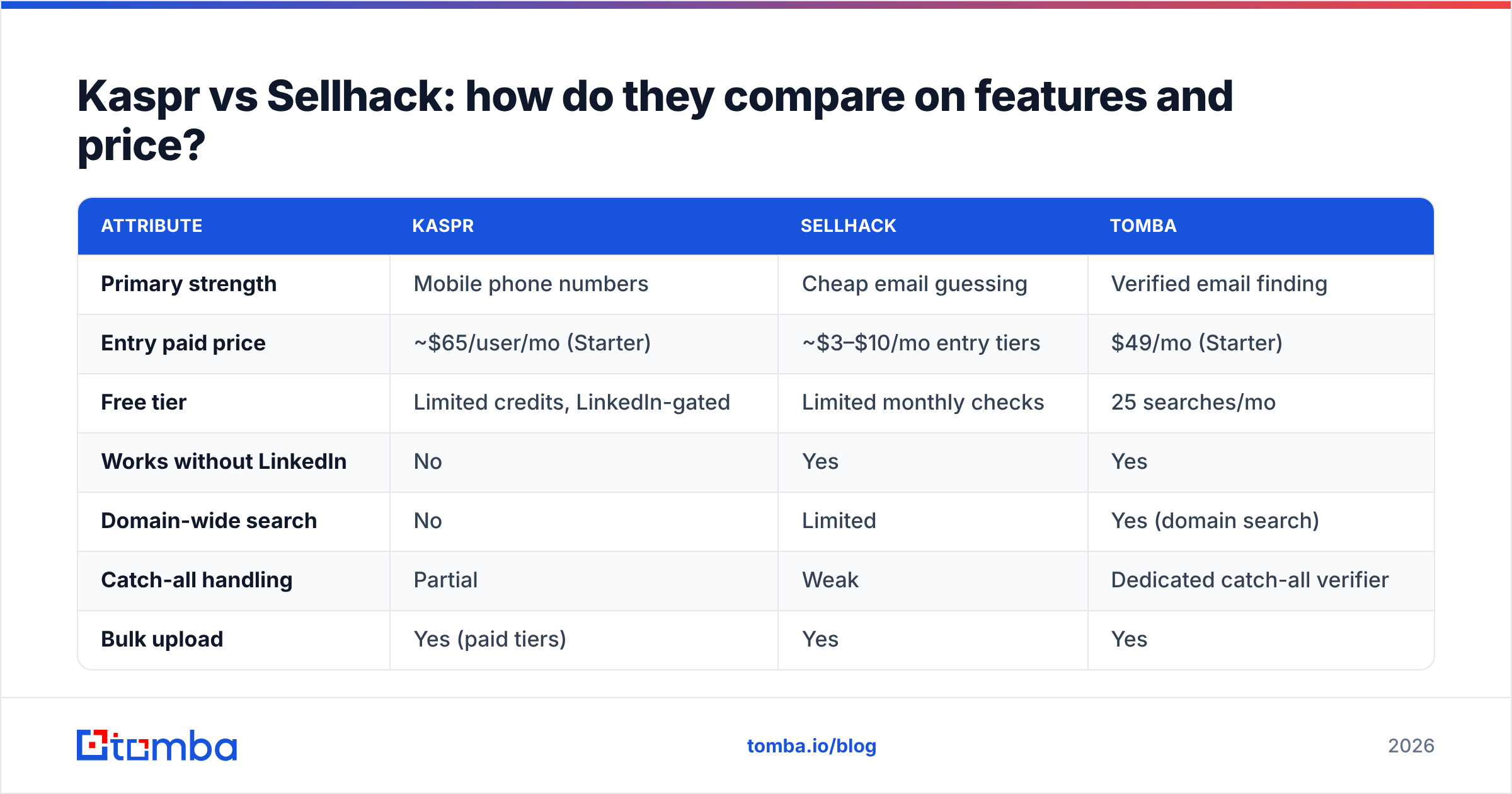
| Attribute | Kaspr | Sellhack | Tomba |
|---|---|---|---|
| Primary strength | Mobile phone numbers | Cheap email guessing | Verified email finding |
| Entry paid price | ~$65/user/mo (Starter) | ~$3–$10/mo entry tiers | $49/mo (Starter) |
| Free tier | Limited credits, LinkedIn-gated | Limited monthly checks | 25 searches/mo |
| Works without LinkedIn | No | Yes | Yes |
| Domain-wide search | No | Limited | Yes (domain search) |
| Catch-all handling | Partial | Weak | Dedicated catch-all verifier |
| Bulk upload | Yes (paid tiers) | Yes | Yes |
| Public API | Limited | Limited | Full REST API |
| Phone numbers | Core feature | No | Phone finder add-on |
| Best fit | EU cold-calling teams | Tiny US email lists | Email-led outbound at scale |
Two things jump out of that table.
First, Kaspr and Sellhack barely overlap on the thing they are best at. Comparing them head-to-head is a bit like comparing a drill to a tape measure. If dials drive your pipeline, Sellhack is not a substitute for Kaspr at any price. If email drives your pipeline, Kaspr's per-seat cost is hard to justify for a feature you will not use.
Second, both tools sit at extremes of the price curve — Kaspr at the premium end, Sellhack at the bargain end — and the middle is where most email-led teams actually belong. Full Tomba pricing sits in that middle at $49/mo for Starter and $99/mo for Growth, with no per-seat multiplier.
Which one finds more usable contacts?#
"Usable" is the word that matters. A tool that returns 400 addresses out of 500 looks better than one returning 320 — until you send and discover 90 of those 400 bounce.
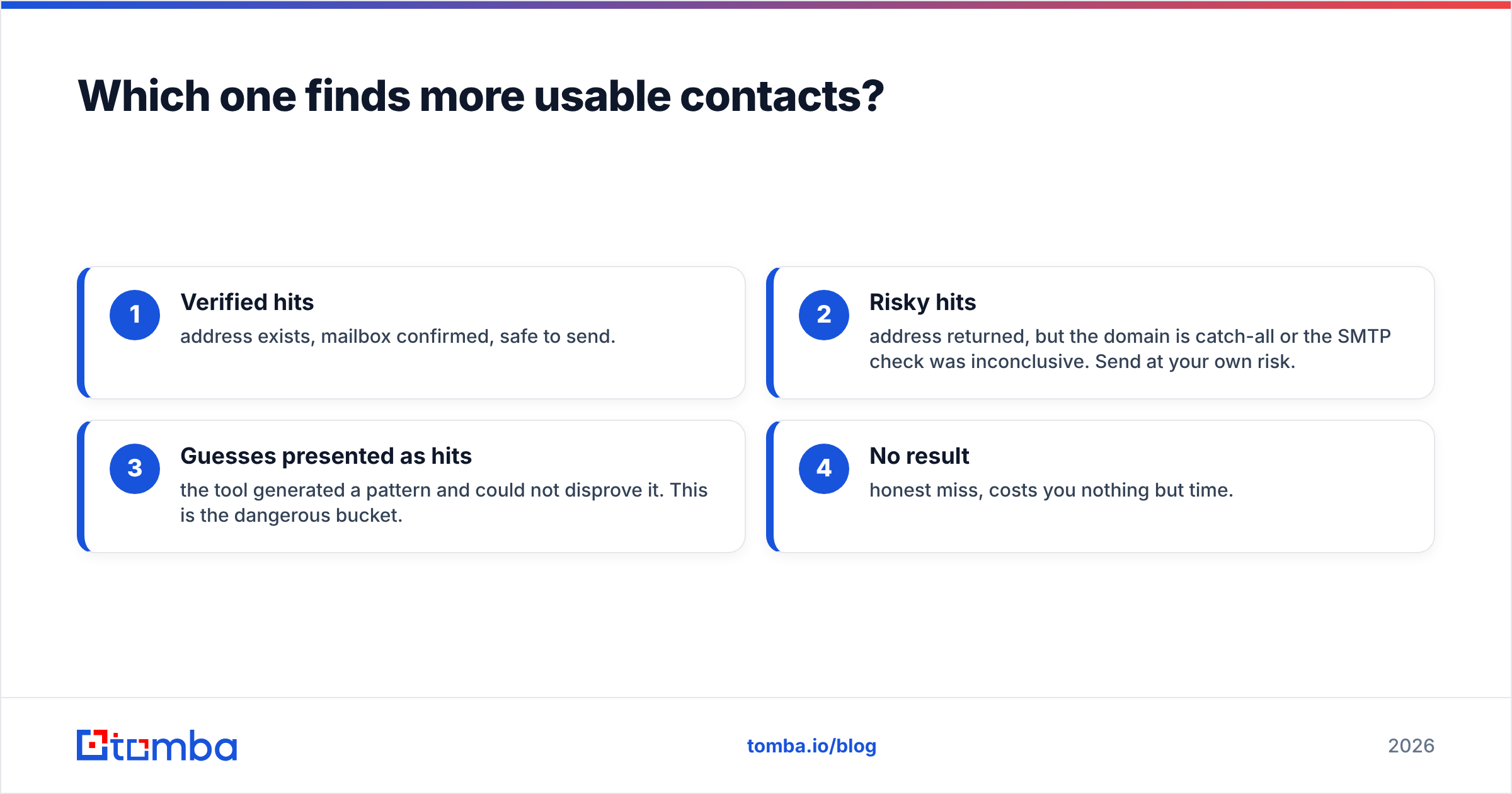
Here is the mental model to use. Every contact-finding tool produces four buckets:
- Verified hits — address exists, mailbox confirmed, safe to send.
- Risky hits — address returned, but the domain is catch-all or the SMTP check was inconclusive. Send at your own risk.
- Guesses presented as hits — the tool generated a pattern and could not disprove it. This is the dangerous bucket.
- No result — honest miss, costs you nothing but time.
Bucket 3 is what separates the tools. Kaspr's email data comes largely from a contributed and licensed database, so a returned email is usually a real observed address — though staleness is a live issue, since people change jobs and databases lag. Sellhack's email data is more often pattern-derived, which means bucket 3 is proportionally larger.

The practical consequence: whatever tool you pick, run the output through a separate email verifier before it touches your sequencer. Treat the finder and the verifier as two different jobs. Teams that skip this step are the ones posting in forums about sudden inbox-placement collapse — and by then, repairing sender reputation takes weeks.
Suggested visual: side-by-side screenshot of the Kaspr Chrome extension panel on a LinkedIn profile and the Sellhack extension result card on the same profile, with the returned confidence scores highlighted.
How do the pricing models actually differ?#
Pricing comparisons in this category are slippery because the unit differs per vendor. Read it this way:
- Kaspr charges per seat, per month, with credit buckets. Your real cost is
seats × monthly price, and your real constraint is which credit bucket runs dry first. Phone credits are the scarce one. - Sellhack charges per credit, with very low entry tiers. Your real cost looks tiny until you factor in the re-checks: an unverified guess that bounces cost you a credit and a deliverability hit.
- Tomba charges per search, flat monthly, no seat multiplier. Free tier is 25 searches/mo; Starter is $49/mo, Growth $99/mo, Pro $249/mo, Enterprise custom.
The metric that actually matters is cost per verified, sendable contact — not cost per credit. Run the arithmetic on your own list before committing:
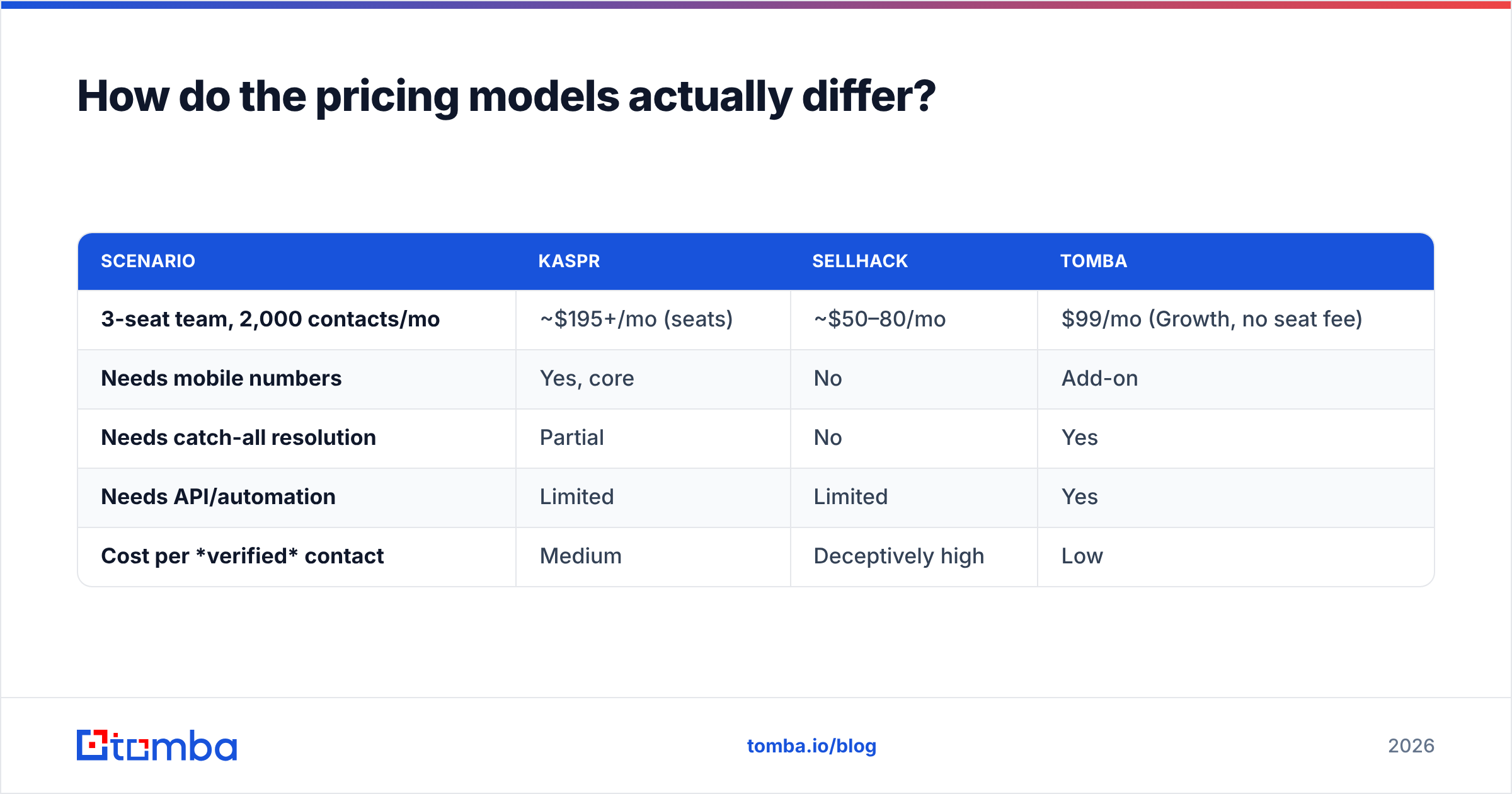
| Scenario | Kaspr | Sellhack | Tomba |
|---|---|---|---|
| 3-seat team, 2,000 contacts/mo | ~$195+/mo (seats) | ~$50–80/mo | $99/mo (Growth, no seat fee) |
| Needs mobile numbers | Yes, core | No | Add-on |
| Needs catch-all resolution | Partial | No | Yes |
| Needs API/automation | Limited | Limited | Yes |
| Cost per verified contact | Medium | Deceptively high | Low |
Note the third row of that last column. Sellhack's cost per credit is the lowest in the comparison and its cost per verified contact is often the highest, because you pay again — in bounces — for everything in bucket 3.
When should you pick Kaspr?#
Pick Kaspr when all of these are true:
- Your outbound is phone-led. You measure connect rate, not open rate.
- Your ICP is European. Kaspr's mobile coverage in EMEA is its genuine edge over US-centric databases.
- Your prospecting starts on LinkedIn. Sales Navigator lists are your source of truth, not a domain list or a CRM export.
- You have per-seat budget. Two or three power users, not fifteen casual ones.
If you want the phone-number capability without the LinkedIn dependency or the seat pricing, compare against a standalone phone finder that works from a domain or an email address instead of a profile URL.
When should you pick Sellhack?#
Pick Sellhack when all of these are true:
- Your list is small — hundreds, not tens of thousands.
- Your targets are US companies with conventional email patterns.
first.last@company.comshops. - You verify elsewhere. Sellhack becomes a reasonable generation layer if a real verifier sits downstream.
- Budget is the binding constraint. If $49/mo is genuinely out of reach this quarter, Sellhack plus a free email checker is a defensible stopgap.
Be clear-eyed about what you are buying: a pattern engine with a verification layer that was strong in 2016 and has not kept pace with how mail servers behave in 2026.

What are the better alternatives to both?#
The honest answer is that "Kaspr vs Sellhack" is often the wrong question. The right question is: what shape is my prospecting?
If you prospect from company domains rather than profiles, neither tool fits. You want domain search — give it acme.com and get back the people, their roles, and the company's email pattern in one call. That is a fundamentally different starting point than "I found a LinkedIn profile, now enrich it."
If you prospect at volume, you want batch processing and an API, not a Chrome extension. A bulk email finder plus the Tomba API removes the human click from the loop entirely.
If your list is contaminated with catch-all domains, you need a tool that says so honestly instead of scoring them as valid. That is the specific job of a catch-all verifier — it distinguishes "this domain accepts everything" from "this mailbox exists," which is the single most common source of silent bounce damage.
If you need a database-first experience — browse and filter rather than look up one at a time — tools like Cognism, Apollo, or BookYourData serve that model well. BookYourData in particular is worth a look if you want pay-as-you-go list building with no subscription commitment; it is a different purchase shape than either Kaspr or Sellhack. If you are evaluating the all-in-one platforms, the Apollo alternative comparison covers that tier.
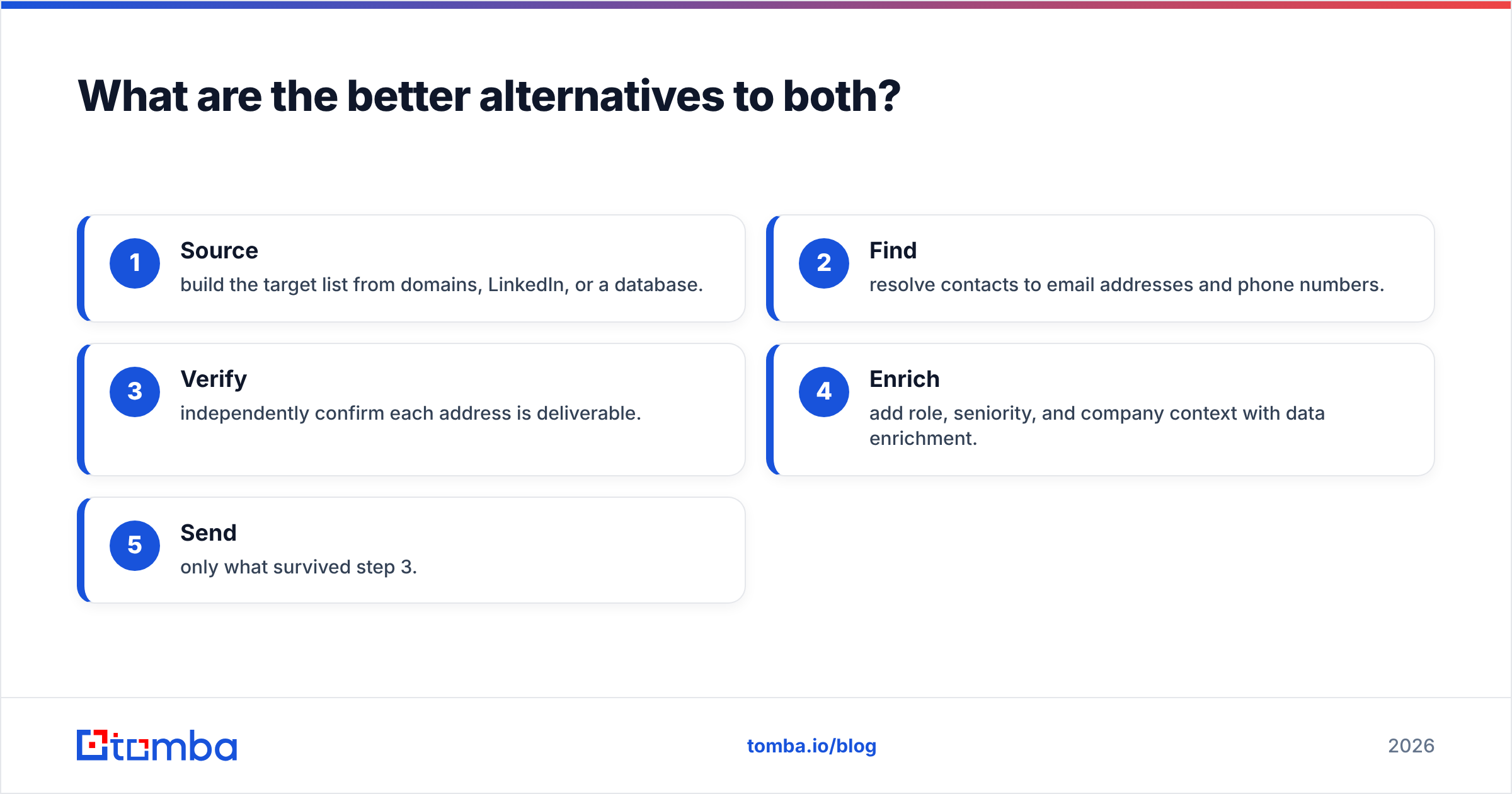
Whatever you pick, the workflow discipline is the same:
- Source — build the target list from domains, LinkedIn, or a database.
- Find — resolve contacts to email addresses and phone numbers.
- Verify — independently confirm each address is deliverable.
- Enrich — add role, seniority, and company context with data enrichment.
- Send — only what survived step 3.
Tools that collapse steps 2 and 3 into one number ("94% confidence!") are the ones that hurt you. Keep them separate.
Kaspr vs Sellhack: the verdict#
Kaspr wins if you dial European prospects sourced from LinkedIn and have the seat budget. Nothing in Sellhack's product line competes with that.
Sellhack wins on price alone, for small US email lists, if and only if you verify downstream. It is a generation tool, not a data platform, and pricing it as one would be the mistake.
Neither wins the general case: an email-led outbound team working from domains and CRM lists, at volume, that needs verified addresses it can send to today without a per-seat tax. That team is better served by a purpose-built finder with a real verification layer and an API behind it.
The test to run before you commit: take 100 contacts you already know the correct emails for — past customers, current colleagues, people who have replied to you. Run them through each trial. Count not how many addresses come back, but how many come back correct. That number, divided by what you paid, is the only comparison that survives contact with your sending domain.
Ready to test the email-led approach? Start with the Tomba Email Finder — 25 free searches a month, no seat fees, and verification built into the same lookup so you never have to guess which bucket a result came from. Run your 100-contact accuracy test against it and compare the numbers yourself.
Related guides#
// get started
Find, verify and enrich your first contacts today
Start on the free plan with 25 searches a month, then scale when your team is ready.
Free plan · No credit card required · GDPR & CCPA
// about the author