Kickbox Pricing, Reviews, Pros and Cons: A 2026 Breakdown
Kickbox charges per verification with no subscription lock-in, but the sticker price hides real trade-offs. Here's what the pay-as-you-go tiers actually cost, where reviewers push back, and when a cheaper stack wins.
TL;DR
- Kickbox sells email verification on a pay-as-you-go credit model — roughly $5 for 500 emails at the entry point, scaling down to well under a cent per email in the hundreds-of-thousands range. No monthly subscription is required.
- The headline strength is accuracy and deliverability posture: Kickbox is one of the few verifiers that publishes a Sendex quality score and has a long-standing anti-spam stance that keeps its IPs clean.
- The main limitation is scope. Kickbox verifies addresses. It does not find them, enrich them, or give you a B2B database — so most teams end up paying for a second tool anyway.
- Reviewers on G2 and Capterra consistently praise support and API reliability; the recurring complaints are credit expiry confusion, catch-all results marked "unknown," and cost creep at high volume.
- If your workflow is find → verify → send, a bundled platform like Tomba at $49/mo often costs less in total than Kickbox credits plus a separate email finder.
What is Kickbox and who actually uses it?#
Kickbox is an email verification service. You upload a list or call an API, and it tells you whether each address is deliverable, undeliverable, risky, or unknown — plus a quality score it calls Sendex.
The company has been around since 2015 and has built its reputation on two things: verification accuracy and a hard line against list-buyers. Kickbox will deactivate accounts that upload purchased lists, which sounds restrictive until you realize that's exactly why its infrastructure doesn't get blacklisted. If you're an ESP or a high-volume sender who needs a verifier that won't poison your own sender reputation, that policy is a feature.
The typical Kickbox customer falls into one of three buckets:
- ESPs and platforms embedding verification into signup forms via the real-time API.
- Email marketing teams cleaning a list before a big campaign or a migration between providers.
- Agencies verifying client lists they inherited and don't trust.
Notice who is not on that list: outbound sales teams who need to build a contact list from scratch. Kickbox has no discovery layer. That gap defines most of the pros and cons below.
How does Kickbox pricing actually work in 2026?#
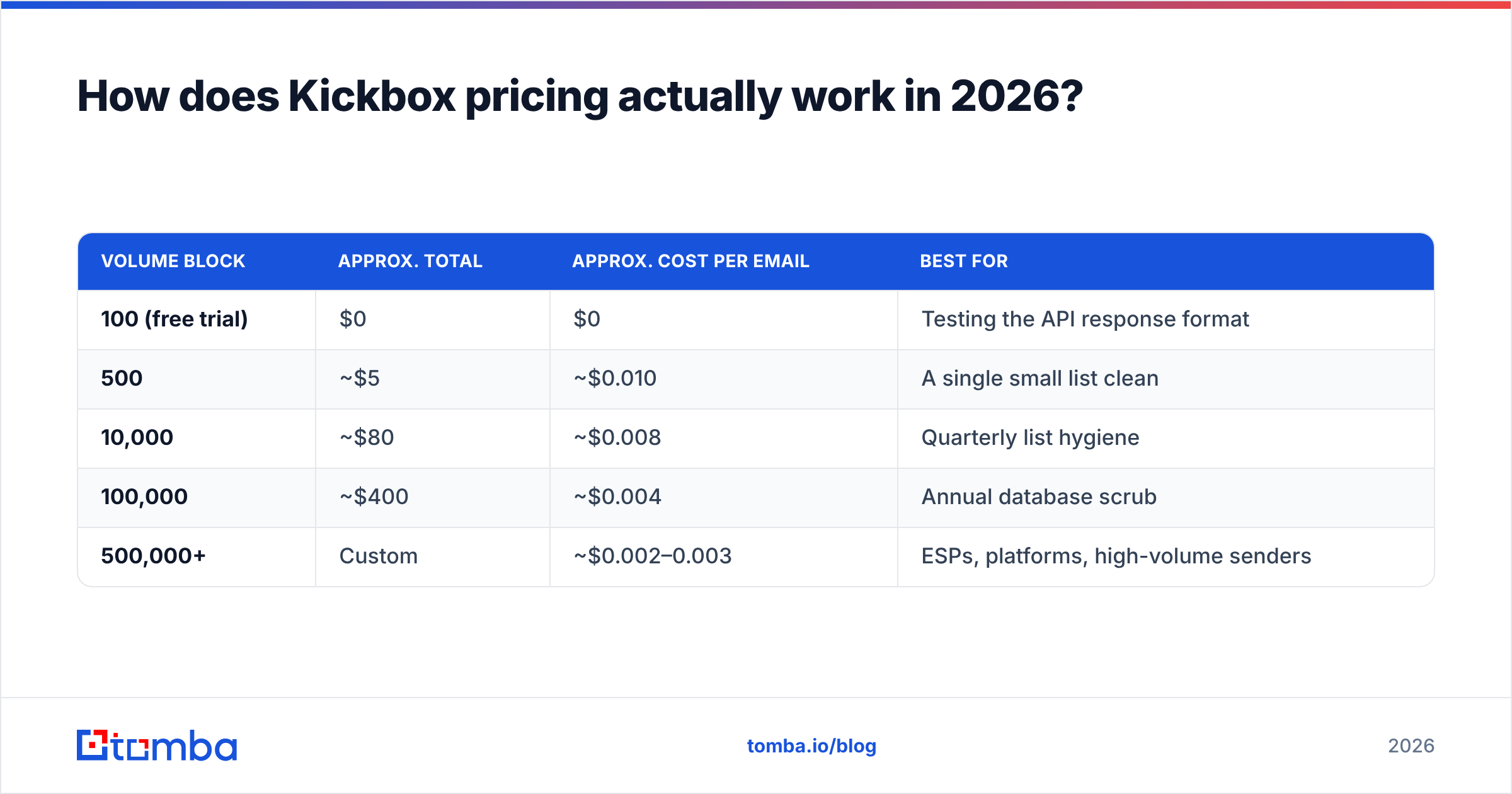
Kickbox uses pure pay-as-you-go credits. You buy a block, you spend it, you buy another. There is no seat fee and no forced monthly minimum, which is genuinely rare in this category — most competitors push you into a subscription.
Here's the shape of the pricing, based on Kickbox's published tiers (check kickbox.com for current numbers, since credit pricing moves):
| Volume block | Approx. total | Approx. cost per email | Best for |
|---|---|---|---|
| 100 (free trial) | $0 | $0 | Testing the API response format |
| 500 | ~$5 | ~$0.010 | A single small list clean |
| 10,000 | ~$80 | ~$0.008 | Quarterly list hygiene |
| 100,000 | ~$400 | ~$0.004 | Annual database scrub |
| 500,000+ | Custom | ~$0.002–0.003 | ESPs, platforms, high-volume senders |
Three things the pricing page does not shout about:
- Credits do not expire on standard accounts, which is a real advantage over subscription verifiers where unused monthly allowance evaporates. Confirm this against your contract — enterprise terms differ.
- "Unknown" results still consume a credit. If you're verifying a list heavy on catch-all domains, you pay for answers you can't act on. This is industry-standard, but it's the single biggest source of "the cost was higher than I expected" in reviews.
- Real-time API verification and bulk list verification draw from the same credit pool, so a leaky signup form can burn budget fast if you don't rate-limit it.
For a full picture of what an all-in-one alternative costs, compare against Tomba pricing — the structure is different enough that per-email math alone will mislead you.
Is Kickbox accurate enough to trust?#
Short answer: yes, on standard mailboxes. The nuance is in catch-all domains.
Kickbox returns one of five results — deliverable, undeliverable, risky, unknown, or a syntax error — plus the Sendex score (0 to 1) estimating the quality of a deliverable address, not just its existence. That second layer is genuinely useful: an address can be deliverable and still be a role account, a disposable inbox, or a long-dormant mailbox that will drag down engagement.
Where Kickbox struggles is the same place every verifier struggles. A catch-all domain accepts every address at SMTP time, so a simple handshake proves nothing. Kickbox is conservative here and marks many catch-all addresses as "risky" or "unknown" rather than guessing. That's honest, but it leaves you with a bucket of addresses and no decision.
If catch-alls make up a large share of your B2B list — and in B2B they often exceed 20% — you need a tool that attempts a real verdict. That's a specific use case for a dedicated catch-all verifier, which layers pattern evidence and historical signal on top of the SMTP check rather than stopping at "can't tell."
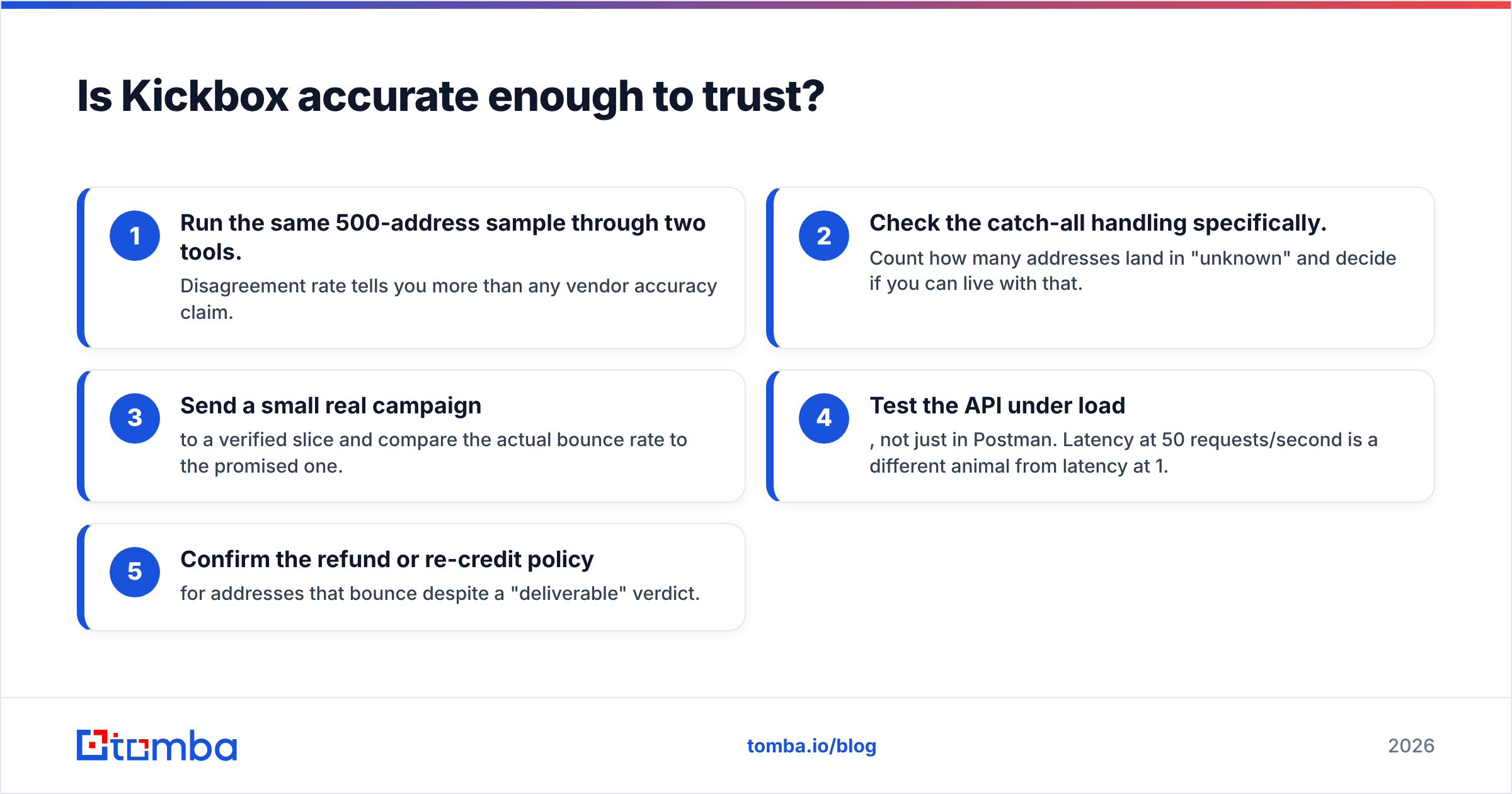
A practical accuracy checklist before you commit to any verifier:
- Run the same 500-address sample through two tools. Disagreement rate tells you more than any vendor accuracy claim.
- Check the catch-all handling specifically. Count how many addresses land in "unknown" and decide if you can live with that.
- Send a small real campaign to a verified slice and compare the actual bounce rate to the promised one.
- Test the API under load, not just in Postman. Latency at 50 requests/second is a different animal from latency at 1.
- Confirm the refund or re-credit policy for addresses that bounce despite a "deliverable" verdict.
What do Kickbox reviews say — the honest pros and cons?#
Aggregating the recurring themes from G2 and Capterra reviews, plus community threads, the pattern is consistent.
What reviewers praise:
- Support responsiveness. This comes up more than any feature. Real humans, fast replies, and engineers who actually answer API questions.
- API documentation and reliability. Developers report clean integration with minimal hand-holding, and the real-time endpoint holds up under production traffic.
- The Sendex score. Teams that use it to suppress low-quality-but-deliverable addresses report measurable engagement lifts.
- No subscription pressure. Buy credits when you need them, stop when you don't.
- Ethical posture. The anti-purchased-list policy earns trust from senders who've been burned by verifiers with dirty infrastructure.
What reviewers criticize:
- Cost at scale surprises people. At 500K+ verifications a year, a flat subscription from a competitor can come out cheaper despite a worse per-unit rate.
- The "unknown" bucket. Paying a credit for an inconclusive answer is the most common complaint in B2B contexts.
- UI feels dated relative to newer entrants. Functional, not delightful.
- No email discovery whatsoever. Reviewers who arrived expecting a prospecting tool leave disappointed — this is a scope mismatch, not a defect, but it shows up in ratings.
- Limited enrichment. You get a verdict, not a job title, company, or phone number.
That last pair matters more than it looks. If you're running outbound, verification is step three of a four-step process. Buying only step three means buying three other tools.
How does Kickbox compare to the alternatives?#
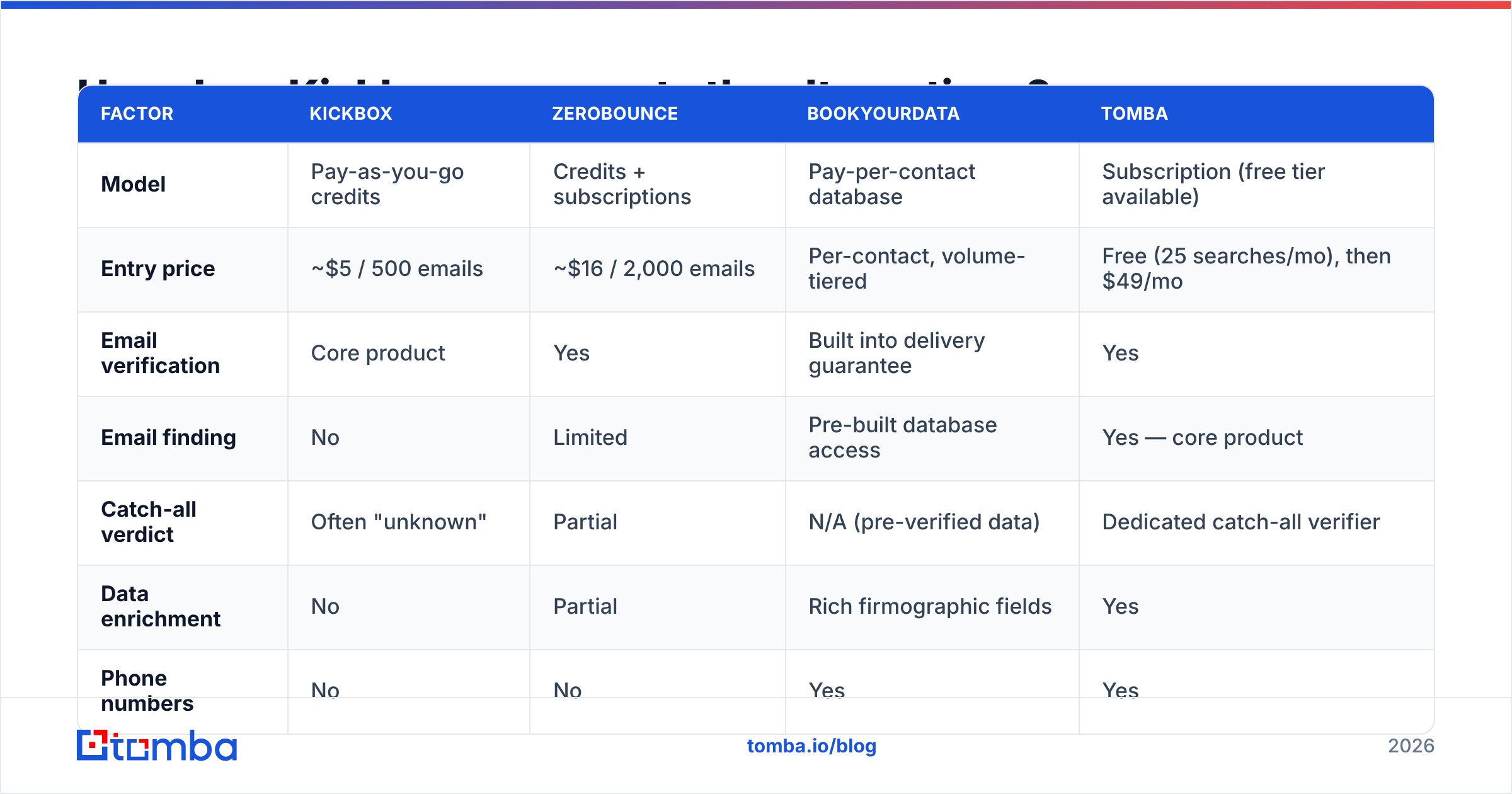
Here's where the pricing question gets interesting. Compare Kickbox not just to other verifiers but to platforms that bundle finding and verifying.
| Factor | Kickbox | ZeroBounce | BookYourData | Tomba |
|---|---|---|---|---|
| Model | Pay-as-you-go credits | Credits + subscriptions | Pay-per-contact database | Subscription (free tier available) |
| Entry price | ~$5 / 500 emails | ~$16 / 2,000 emails | Per-contact, volume-tiered | Free (25 searches/mo), then $49/mo |
| Email verification | Core product | Yes | Built into delivery guarantee | Yes |
| Email finding | No | Limited | Pre-built database access | Yes — core product |
| Catch-all verdict | Often "unknown" | Partial | N/A (pre-verified data) | Dedicated catch-all verifier |
| Data enrichment | No | Partial | Rich firmographic fields | Yes |
| Phone numbers | No | No | Yes | Yes |
| API | Strong | Strong | Yes | Strong |
| Best for | ESPs, list hygiene | Marketers wanting add-ons | Buying verified lists outright | Outbound teams doing find + verify |
Read that table by workflow, not by feature count.
If your job is cleaning an existing list, Kickbox is an excellent, fairly priced choice and you can stop reading. If you need verified contacts you don't yet have, BookYourData's pre-verified database is a strong path — you skip the finding step entirely and buy contacts that arrive validated. And if your job is building lists continuously from domains and names, you want a platform where email finder and email verifier share the same credit pool and the same data layer.
The economics tell the story. Verifying 100,000 emails on Kickbox runs roughly $400 — but that assumes you already have 100,000 addresses. If you don't, add a finder subscription on top. Tomba's Growth plan at $99/mo covers finding and verifying in one line item, and the Starter plan at $49/mo handles most single-rep workloads. Over a year, the bundled path frequently lands under the split-tool path.

When should you pick Kickbox anyway?#
There are four scenarios where Kickbox is the right call and no bundled platform beats it:
- You're an ESP or SaaS platform embedding real-time verification at signup. Kickbox's API latency and uptime are built for this, and the per-call economics at volume are hard to beat.
- You verify sporadically. Three list cleans a year means a subscription is dead weight. Non-expiring credits win.
- Your list came from opt-in forms, not prospecting. You already have the addresses; you just need hygiene before a send.
- Compliance matters to your legal team. Kickbox's refusal to process purchased lists is a documentable control.
Conversely, skip Kickbox if you're doing cold outbound from scratch, if your list is catch-all heavy, or if you'd need a second tool for discovery anyway. In those cases you're paying two vendors for one workflow, and the domain search plus verification combination in a single platform is both cheaper and less operationally annoying.
What does the total cost really look like over a year?#
Model it properly. Take a two-rep outbound team that needs 3,000 new verified contacts per month.
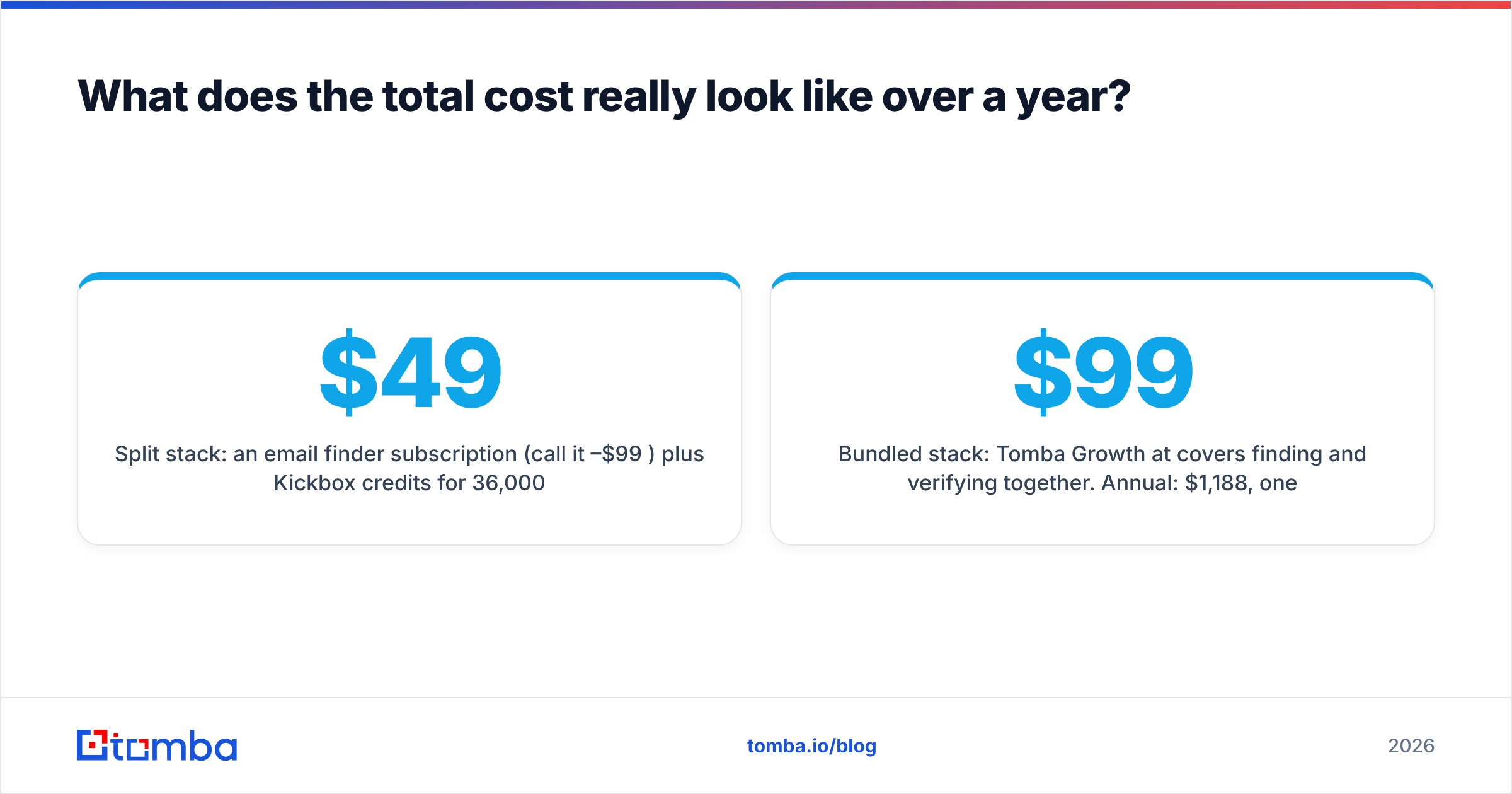
Split stack: an email finder subscription (call it $49–$99/mo) plus Kickbox credits for 36,000 verifications/year (~$290 at the 10K-block rate, less if you buy a 100K block). Annual: roughly $880–$1,480, across two vendors, two dashboards, two support queues.
Bundled stack: Tomba Growth at $99/mo covers finding and verifying together. Annual: $1,188, one vendor, one API key, one invoice.
The numbers land close — which is the point. Kickbox is not overpriced. It's precisely priced for what it does. The cost difference only appears when you count the second tool you need to make it useful for outbound, and the hours your team spends moving CSVs between them. For teams already sitting inside HubSpot or Salesforce, that CSV shuffle is the real tax; check whether your verifier writes back to the CRM directly, as HubSpot's own data quality documentation makes clear how quickly unverified records degrade a database.
What's the verdict on Kickbox pricing, reviews, pros and cons?#
Kickbox is a well-built, ethically run, fairly priced email verifier with a narrow and deliberate scope. The pay-as-you-go model is genuinely customer-friendly, the API is production-grade, and the support reputation is earned. Its weaknesses — catch-all ambiguity, an aging UI, and the total absence of discovery or enrichment — are all consequences of that narrow scope rather than execution failures.
Buy Kickbox if verification is a discrete, occasional job in your workflow. Look at a bundled platform if verification is one step in a repeating find-verify-send loop, because that's where paying two vendors stops making sense.
Ready to collapse the stack? If you're finding addresses and verifying them every week, run both through one tool. Start with the Tomba Email Finder — the free tier gives you 25 searches a month to test the data quality against whatever you're using now, and paid plans start at $49/mo with verification, domain search, and enrichment included rather than billed separately.
Related guides#
Ready to find emails that actually work?
Join 150,000+ professionals who stopped guessing and started sending. Free credits on signup — no credit card required.
Get the Tomba newsletter
Practical outbound tactics and product updates — once every two weeks.
About the author